One Dashboard. Every Platform.Zero Chaos.
Manage all your accounts, schedule weeks ahead, and post everywhere, without the tab juggling.
Why Use Instagram Feed Planner?
Plan your perfect Instagram grid layout before posting
Planned the grid? Schedule it from the same place.
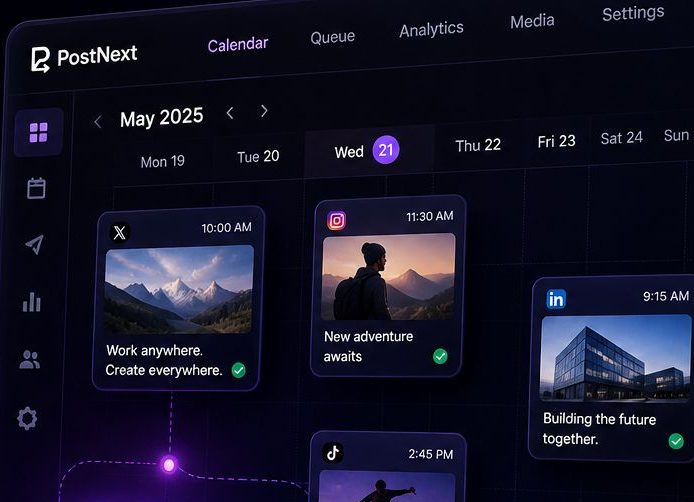
PostNext is the scheduler behind this planner. Take the nine posts you just arranged, write the captions with the AI assistant, and put them on an Instagram calendar next to X, LinkedIn, TikTok, Threads, YouTube and Bluesky.
- A calendar, not a guessDrag posts onto dates and times. The grid order you chose becomes the publishing order.
- Captions and hashtags in one passThe AI assistant drafts captions in your tone and suggests hashtags for each post.
- Free to startThe free plan schedules 10 posts a month with no card. Upgrade when the grid outgrows it.
What is an Instagram Feed Planner?
An Instagram Feed Planner is a visual tool that helps you preview and organize your Instagram grid before posting. By uploading images and arranging them in a 3×3 grid (or larger), you can see how your feed will look to visitors, ensuring a cohesive and aesthetically pleasing profile. Whether you're a content creator, brand, or influencer, planning your Instagram feed helps maintain visual consistency and tells a compelling story through your posts.
Why Plan Your Instagram Feed?
Your Instagram profile is often the first impression people get of your brand or personal account. A well-planned feed shows professionalism and attention to detail. Here's why feed planning matters:
- Visual Cohesion: Ensure colors, themes, and styles work together harmoniously
- Brand Consistency: Maintain a consistent aesthetic that represents your brand identity
- Strategic Posting: Plan content in advance and avoid posting decisions made on the fly
- Grid Aesthetics: Create patterns, checkerboards, or color schemes across multiple posts
- Storytelling: Arrange posts to tell a visual narrative when viewed as a grid
- Increased Engagement: Cohesive feeds are more likely to convert profile visitors into followers
Instagram Feed Aesthetics & Themes
Popular Instagram feed aesthetic styles include:
- Minimalist: Clean, white backgrounds with simple compositions and lots of negative space
- Monochromatic: Stick to one color palette or filter for all posts
- Bright & Colorful: Bold, vibrant colors that pop and grab attention
- Dark & Moody: Low-key lighting with rich, deep tones and dramatic shadows
- Checkerboard: Alternate between two types of content (photos/quotes, products/lifestyle)
- Row by Row: Each row of 3 posts follows a specific theme or tells a story
- Puzzle Feed: Images that connect together to form one large picture
How to Create a Cohesive Instagram Feed
Follow these best practices to create a visually stunning Instagram feed:
- Choose Your Color Palette: Select 3-5 main colors and stick to them across posts
- Use Consistent Filters: Apply the same editing style or preset to all images
- Plan Content Mix: Balance different content types (products, lifestyle, quotes, behind-the-scenes)
- Mind the Spacing: Consider how each post looks both individually and in the grid
- Test Different Layouts: Use our planner to try 2×2, 3×3, or 4×4 grid previews
- Preview Before Posting: Always check how new posts will fit into your existing grid
- Think in Threes: Instagram shows 3 posts per row, so plan in sets of three
Instagram Grid Strategies
Advanced strategies for Instagram feed planning:
- The Rule of Thirds: Use the first 3, 6, or 9 posts to make a strong first impression on new visitors
- Color Blocking: Group posts by color to create visual sections in your feed
- Diagonal Patterns: Create diagonal lines of similar content across your grid
- Border Strategy: Add consistent borders to all photos for a framed, gallery look
- White Space Strategy: Use blank or minimal posts strategically to break up content
- Content Pillars: Rotate through 3-5 content themes in a predictable pattern
Best Times to Plan Your Feed
Feed planning is especially useful when:
- Launching a new product or campaign that requires visual coordination
- Rebranding or changing your Instagram aesthetic
- Planning content for events, holidays, or special occasions
- Batch-creating content to maintain consistency during busy periods
- Growing your following and wanting to make a strong first impression
- Preparing for a scheduled content calendar
Like this tool? Schedule everywhere with PostNext
AI content, scheduling for X, Instagram, LinkedIn, TikTok, Threads, YouTube and Bluesky, plus a free link-in-bio site.
Start free, no card neededGet weekly tips on growing your social media
Free social media growth tips, straight to your inbox
Frequently Asked Questions
What is Instagram feed planning?
Instagram feed planning is the process of organizing and previewing your posts before publishing them to ensure a cohesive, aesthetic grid layout on your profile.
Is this tool free to use?
Yes, our Instagram Feed Planner is completely free with no registration required. All processing happens in your browser for maximum privacy.
How many images can I upload?
You can upload up to 9 images at once to preview your Instagram grid. This shows a 3x3 layout which is what visitors see first on your profile.
Are my images stored on your servers?
No, all images are processed locally in your browser. We never upload or store your images on our servers, ensuring complete privacy.
Can I rearrange the images after uploading?
Yes, simply drag and drop images to rearrange them. The grid updates in real-time so you can experiment with different layouts.
Does it work on mobile devices?
Yes, the feed planner works on all devices including smartphones and tablets, though desktop provides the best experience for drag-and-drop functionality.
What image formats are supported?
The tool supports all common image formats including JPG, PNG, GIF, and WebP. Instagram itself supports these formats as well.
Will the preview match my actual Instagram feed?
Yes, the preview shows a 3-column grid layout exactly as it appears on Instagram profiles. The aspect ratios and spacing match Instagram's display.
Can I save my planned layout?
Currently, the tool is session-based. You can take a screenshot of your planned grid for reference. We recommend noting your preferred order before posting to Instagram.
Why is feed planning important?
A well-planned feed creates a cohesive visual aesthetic that attracts followers and showcases your brand or personal style. It helps ensure colors, themes, and content flow together harmoniously.