To add a link to an Instagram story, create the story, tap the sticker tool at the top of the screen, choose the Link sticker, paste your URL and tap Done. Place the sticker where people will see it and share the story. Viewers tap the sticker to open the page. Instagram opened the Link sticker to all accounts in October 2021, apart from new accounts and accounts that repeatedly break its rules.
Key Takeaways
- The Link sticker is how you put a tappable link inside an Instagram story. Before October 2021, links in Stories were limited to verified accounts or accounts with a certain number of followers.
- Any account can use it except new accounts and accounts that repeatedly share things like hate speech and misinformation, according to Instagram’s announcement.
- No scheduling tool can add a Link sticker for you. Meta’s developer documentation says publishing stickers, including link stickers, is not supported through its API.
- A story expires, so a link in it expires too. A Highlight keeps the story on your profile, but whether the sticker stays tappable there is not documented, so test it. For a link that lasts, use your bio.
- For a link that stays put, use the link in your bio. A Link sticker is for one timely destination.
The Instagram story Link sticker at a glance
The table answers the questions people ask most about story links, with the source for each answer. Instagram’s own announcement covers who can use the sticker and how to add it. Meta’s developer documentation covers what third-party tools can and cannot do.
| Question | Answer | Source |
|---|---|---|
| How do I add a link? | Sticker tool, then the Link sticker, then paste the URL and tap Done | Instagram announcement, October 2021 |
| Who can use it? | All accounts, except new accounts and accounts that repeatedly share hate speech or misinformation | Instagram announcement, October 2021 |
| What do viewers do? | Tap the sticker and get redirected to the link | Instagram announcement, October 2021 |
| Can a scheduler add it? | No. Publishing stickers, including link stickers, is not supported through the API | Meta developer documentation |
| Does it last? | As long as the story. A Highlight keeps the story on your profile; test whether the sticker still opens | Story expiry: Meta developer documentation |
How do you add a link to your Instagram story?
Open the story camera and capture or upload the photo or video. Tap the sticker tool, which Instagram places in the top bar, then tap Link. Paste the full web address and tap Done. The sticker appears on the story: drag it into place, then share the story. The link opens for anyone who taps the sticker.
Step by step, on iPhone or Android:
- Start a story. Open the story camera, then take a photo or video or pick one from your gallery.
- Open the sticker tool. Instagram’s announcement describes it as the sticker tool “from the top navigation bar”.
- Choose Link. Tap the Link sticker. If you do not spot it, the sticker search in current versions of the app finds it when you type “link”.
- Paste the URL and tap Done. Copy the address from your browser first, so you paste it exactly. Check it before you tap Done: a typo sends every tap to an error page.
- Place it and share. Drag the sticker to a clear part of the frame, away from faces and text, then share to your story.
Many guides also describe changing the text the sticker shows, so it reads as a call to action instead of the bare address. Instagram’s announcement does not cover that option, so if you do not see it in your version of the app, the sticker shows the link itself. Open the story once from your own account and tap the sticker to confirm it lands on the right page.
Who can use the Instagram Link sticker?
Almost everyone. When Instagram announced on 27 October 2021 that it was “expanding the ability to add links in Stories to all accounts”, it noted that the feature had been “limited to verified accounts or those with a certain number of followers.” Two groups were left out: new accounts, and accounts that repeatedly share things like hate speech and misinformation.
That means follower count no longer matters. A business, a creator and a personal account with a few hundred followers all get the same sticker. Advice that names a follower threshold describes the period before October 2021 and is out of date.
Why can’t I add a link to my Instagram story?
Instagram names two groups without the sticker: new accounts, and accounts that repeatedly share things like hate speech and misinformation. Outside those, the usual fixes are practical ones: search the sticker tray for “link”, and update the app, since an outdated version can lack current stickers.
Work through it in this order:
- Search the sticker tray. Type “link” in the sticker search before assuming it is missing.
- Update the app. Update from the App Store or Google Play and open the story camera again. This is general troubleshooting, not an Instagram statement, but it rules out an outdated app.
- Check the account’s age. A brand-new account may not get the sticker straight away, under the exclusion Instagram described in 2021. It has not published how long the wait is.
- Check for restrictions. Instagram excludes accounts that repeatedly share things like hate speech and misinformation, so an account with a history of removed content may be in that group.
If you are trying to add the link through a scheduling tool, the problem is different. That is covered next.
Can you schedule an Instagram story with a link?
Not with the link in place. Meta’s developer documentation for publishing to Instagram says “Publishing stickers (i.e., link, poll, location) is not supported,” so no scheduler that uses Instagram’s official API can add a Link sticker. A scheduler can publish the image story itself. The Link sticker has to be added in the Instagram app when you create that story.
That gives you a simple split for planning:
- Stories without a link (announcements, behind-the-scenes images, teasers) can be scheduled ahead.
- Stories with a link are created in the Instagram app, where the Link sticker lives. Prepare the image in advance, keep the URL ready to paste, and post it at the time you planned.
Be wary of any tool that promises to schedule stories with working Link stickers through the official API. Meta’s documentation says the API does not support it.
Should you use a story link or the link in your bio?
Use both, for different jobs. A Link sticker suits one timely destination, such as a new post, a launch or a limited offer, because it sits right in front of people watching the story. The link in your bio is the one permanent link on your profile, so it should point somewhere that stays useful for weeks, often a page that holds several links.
| Story Link sticker | Link in bio | |
|---|---|---|
| Where it appears | On one story | On your profile, permanently |
| How long it lasts | As long as the story | Until you change it |
| Best for | One timely destination | A page of your current links |
| Can a scheduler set it? | No | You set it on your profile |
A story expires, and its link with it. Meta’s developer documentation puts story insights at 24 hours and notes that data can still arrive “after the story expires if the story is added to a highlight.” A Highlight keeps the story itself on your profile, but nothing Instagram or Meta publishes says whether the Link sticker stays tappable there. Open the Highlight from another account and tap the sticker to check, and keep any link that must last in your bio.
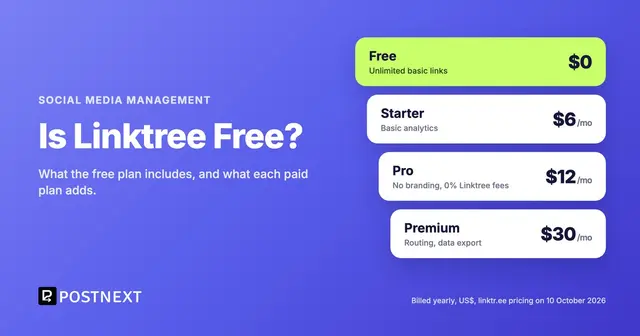
Many accounts point the bio at a link-in-bio page that holds all their current links. Our guide to whether Linktree is free compares what the free plans include, and the PostNext guide to adding a link to your Instagram bio walks through the profile settings.
How do you get more people to tap your story link?
Give one clear reason to tap and make the sticker easy to find. Say what is behind the link in the story itself, keep each story to a single link, and place the sticker where nothing covers it. Then measure the result, because Instagram’s story insights show how people responded and your own site analytics show who arrived.
Practical habits that help:
- Say why to tap. “New guide: the 5 settings we changed” tells people what they get. A bare link asks them to guess.
- One story, one link. Several stories each pointing somewhere different split attention. A short sequence that builds to one link works better than three links in a row.
- Keep the sticker clear of the edges. The top and bottom of a story are where the app shows your profile name and the reply field. Place the sticker in the middle area so nothing overlaps it.
- Tag the URL. Add UTM parameters to the address so your website analytics can tell story visitors apart from everyone else.
- Keep the destination reachable. If the page matters for longer than a day, add it to your link in bio too, so people who missed the story can still find it.
How does PostNext fit into story planning?
PostNext schedules image Stories to Instagram through the official API, so the stories that do not need a link can be planned on the calendar with the rest of your posts. Because the API does not publish stickers, captions or links on Stories, a story with a Link sticker is made in the Instagram app. PostNext does not schedule video Stories yet.
The PostNext Instagram scheduler shows how a Story will look on mobile, tablet and desktop before you schedule it, so you can leave room for a sticker you plan to add. For the permanent link, the free plan of PostNext link in bio includes one published page with click and view analytics, so you can see which links people tap after they find your profile.
For planning a week of stories, see our guide to scheduling Instagram Stories. If the story is promoting a Reel, our guide to Instagram Reel size covers the dimensions and safe zones to export at, and our list of Instagram Reel ideas has 30 formats to film.
Frequently Asked Questions
How do I add a link to my Instagram story?
Create the story, tap the sticker tool at the top, choose the Link sticker, paste the URL and tap Done. Drag the sticker into place and share the story. Viewers tap the sticker to open the link.
Do you need 10,000 followers to add a link to an Instagram story?
No. Before October 2021, links in Stories were limited to verified accounts or accounts with a certain number of followers. Since then the Link sticker has been available to all accounts, except new accounts and accounts that repeatedly break Instagram’s rules.
Why is the link sticker not showing on Instagram?
Search the sticker tray for “link” first. If it is still missing, update the app. A new account, or one restricted after repeated guideline violations, may not have access to the sticker.
Can you add more than one link to an Instagram story?
Instagram’s announcement describes adding a link with the Link sticker and does not set a number. Most people use one link per story, which also keeps the message clear. Post a second story for a second link.
Can you schedule an Instagram story with a link sticker?
No. Meta’s developer documentation says publishing stickers, including link stickers, is not supported through Instagram’s API. Schedule the image story ahead if it needs no link, or create the linked story in the Instagram app.
How long does a link in an Instagram story last?
As long as the story does. A Highlight keeps the story on your profile, but Instagram has not documented whether the sticker stays tappable there, so test it, and put lasting links in your bio.
Related reading
- How to Schedule Instagram Stories for Maximum Engagement
- Is Linktree Free? What the Free Plan Includes in 2026
- Instagram Reel Size: Dimensions and Safe Zones
- 30 Instagram Reel Ideas You Can Film This Week
- How to Post on Instagram From a Computer
Sources
- Instagram, Share Links in Instagram Stories to Everyone, Max Eulenstein, 27 October 2021 (read October 2026)
- Meta for Developers, Instagram API: IG User Media reference, on stickers in story publishing (October 2026)
- Meta for Developers, Instagram API: IG Media Insights, on story insights after a story expires (October 2026)
- PostNext, postnext.io/instagram-scheduler and postnext.io/features/link-in-bio (October 2026)