Key takeaways
- Posting Stories whenever you have a spare moment leaves reach on the table.
- Stories last 24 hours, so their top-of-feed position depends on hitting active hours.
- Audit your current workflow first — skipping that step is why scheduling tools underdeliver.
- Plan content in advance; last-minute Stories are where consistency breaks.
Scheduling Instagram Stories: The Practitioner’s Guide to Consistent Engagement
The Real Impact of Posting at the Right Time
If you post Instagram Stories whenever you have a free moment – sometimes at noon, other times late at night – you’ve likely noticed that your stories don’t always reach as many viewers as you’d expect. Stories published at random times often underperform because they miss the windows when your audience is most active. In a crowded feed, those missed hours mean missed opportunities, especially as competitors post with more precision.
Why Stories Command Attention
Stories aren’t just another content format – they’re featured at the top of the app, making them the first thing users see. Because each one disappears after 24 hours, scheduling your stories to go live when your own followers are most active helps you secure a spot in their daily routines and gives each story more of its short life in front of people.
Consistency: The Overlooked Advantage
Social media moves quickly. A story posted at midnight may never reach your core audience, while a well-timed update can spark conversations and shares. Consistency is equally important. Sporadic posting can cause followers to forget about your brand or question its relevance. Treating story timing as a strategic asset ensures your content appears when it matters most, building trust and reliability in a noisy feed.
Step 1: Audit Your Current Instagram Stories Workflow
If you want to schedule Instagram Stories for maximum engagement, start by reviewing your current process. Skipping this step means missing out on easy improvements and repeating mistakes that limit your reach. A thorough audit helps you identify bottlenecks, content gaps, and timing issues that could be holding you back.
How to Conduct an Instagram Stories Audit
Begin with Instagram’s own Insights, which is where Story-level numbers such as replies, sticker taps and exits live. Map out your recent Stories activity: when you’re posting, how often, and which stories drive engagement. Look for patterns in posting times: do your stories posted at certain hours consistently reach more people? Are there days you’re skipping stories, or stretches where your content feels repetitive?
Next, compare your engagement on stories versus regular posts. Note which formats – polls, quizzes, behind-the-scenes clips – spark replies or shares. These are the content types to prioritize.
Finally, set a baseline for improvement. Track how many stories you post weekly and your current average reach and completion rate. This snapshot will help you measure progress as you optimize and schedule Instagram Stories.
| Check Item | What to Look For | Why It Matters |
|---|---|---|
| Posting Times | Which hours your stories earn the most reach | Posting when your followers are active gives each story more of its 24 hours in front of them. |
| Frequency | Number of stories posted per week | Inconsistent posting disrupts audience expectations and weakens brand recall. |
| Engagement Metrics | Replies, shares, poll votes, and completion rates | Identifies which content types keep viewers watching and interacting. |
| Content Variety | Mix of behind-the-scenes, product, interactive stories | Monotonous content leads to drop-offs; variety boosts retention. |
| Missed Opportunities | Gaps in posting (days with no stories) | Every missed day is a missed touchpoint with your audience. |
| Use of Scheduling Tools | Manual vs. scheduled posting | Scheduling can increase consistency and free up creative time. |
Taking time to audit your workflow now sets you up for smarter, data-backed decisions. The real power of scheduling comes from knowing what’s working – and where you can improve.
Step 2: Understand Your Audience’s Active Hours
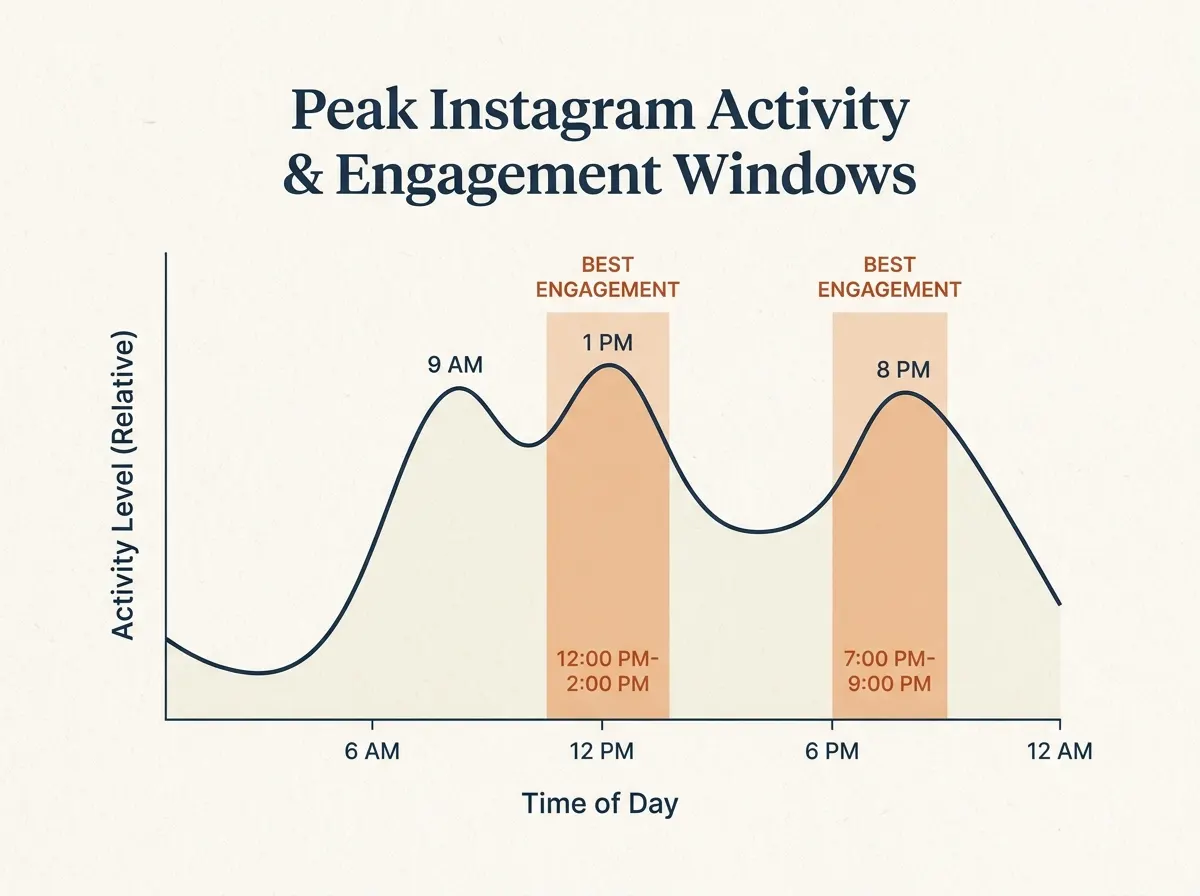
When it comes to maximizing your Instagram Stories, timing is everything. Stories only last 24 hours, and their top-of-feed placement means that posting when your followers are most active improves both visibility and engagement. To make the most of this, you need to know when your audience is actually scrolling.
Key Insight: Posting stories during your audience’s peak activity hours is the most effective way to increase reach and interactions.
There is no single set of hours that suits every account. A global brand will see different peak times than a local business, and a B2B audience keeps different hours from a student one. That’s why your own analytics matter most.
Using Instagram Insights for Audience Activity
Instagram Insights provides data about your followers’ habits. Open Insights from your business or creator profile and look at when your followers are most active by hour and day. Look for engagement spikes – do they occur before lunch, or after work? If story views consistently peak on Wednesday evenings, that’s a prime slot for scheduled stories.
Compare your story views and interactions against the times suggested by Insights. If your engagement lags, consider shifting your schedule and monitoring the results. On paid plans, PostNext also looks at how your own Instagram posts performed over the last 90 days and shows the three strongest weekday-and-hour slots in the date picker. It is built from your post history, so treat it as a second opinion next to Insights rather than a Story-specific measurement.
These patterns may shift with seasons, campaigns, or audience growth. Regularly reviewing your analytics ensures your schedule Instagram Stories strategy stays relevant. Consistently posting during active hours turns fleeting impressions into lasting engagement.
Step 3: Plan Your Stories Content in Advance
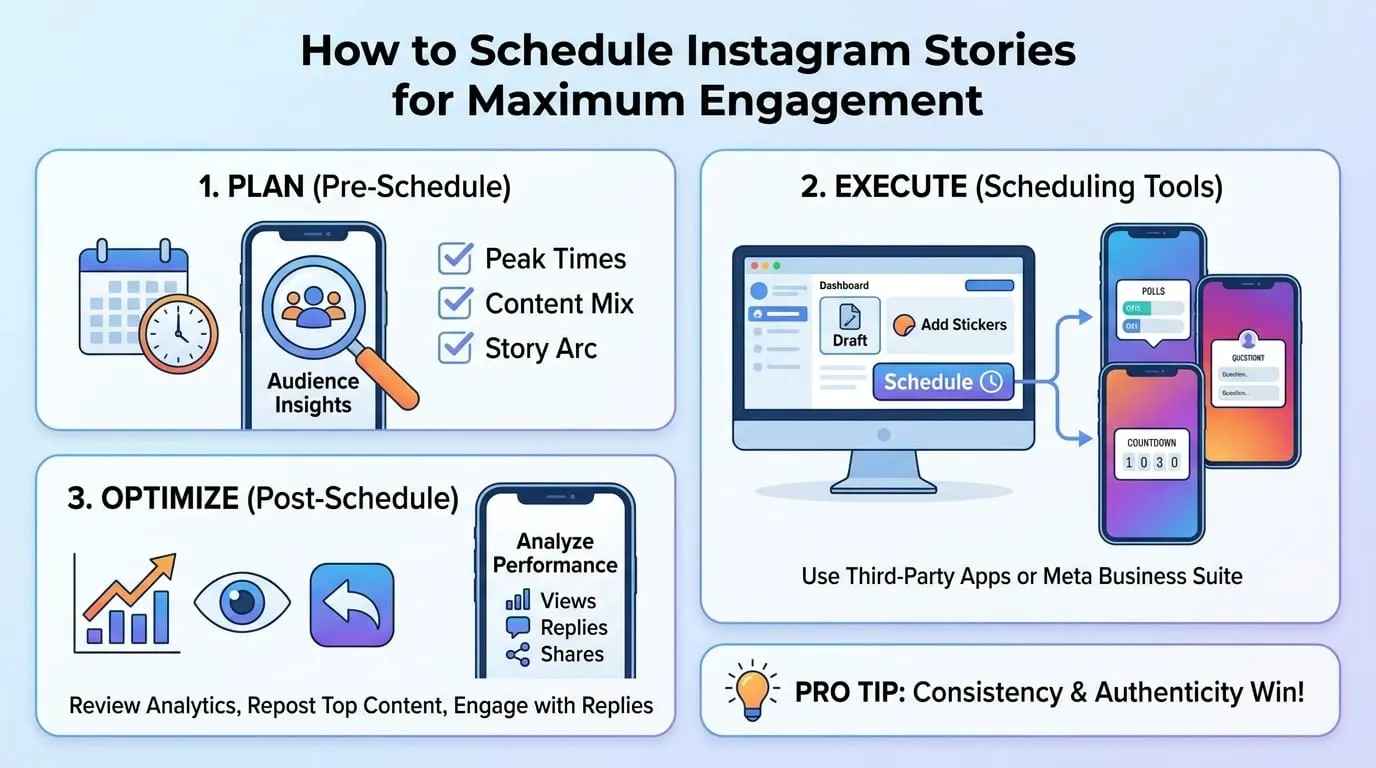
If you want to schedule Instagram Stories that consistently engage your audience, start with a solid content plan. Relying on last-minute ideas usually leads to lower quality, missed opportunities, and inconsistent messaging. Batch-producing story content, mapping out themes in advance and working from a calendar improves both consistency and quality of your Stories output.
Key Insight: Consistent planning and batching of Instagram Stories content leads to a more cohesive brand narrative.
By anticipating your audience’s expectations and building content in advance, you gain the creative space to deliver higher-impact stories.
Actionable Playbook: Building a 7-Day Story Calendar
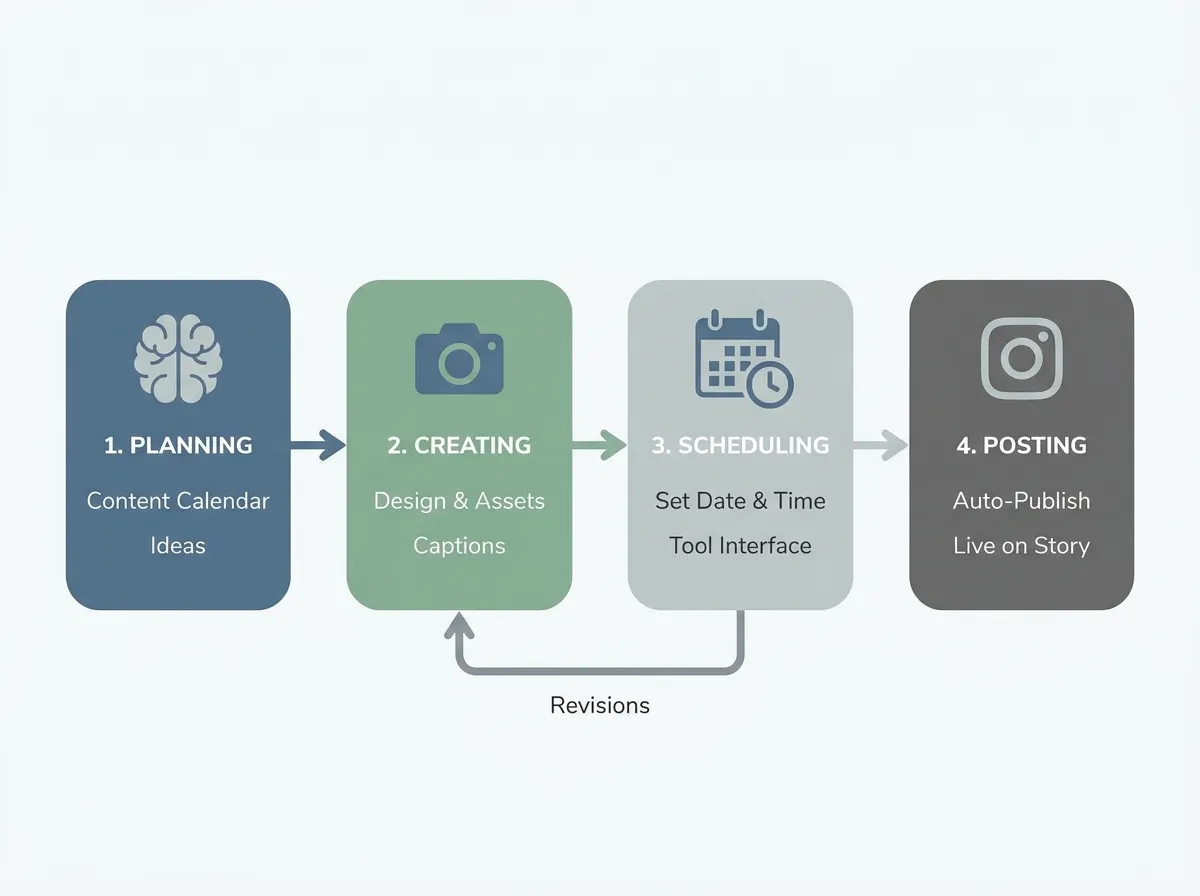
Building a week’s worth of Stories is manageable with a template-driven approach. One thing to plan around: schedulers publish Stories through Instagram’s API, and PostNext schedules image Stories only. Instagram’s API does not publish captions, stickers or links on Stories, and video Stories are not supported yet. So schedule the plain image slides ahead, and create any story that needs a poll, quiz, question box, emoji slider or link in the Instagram app, where you add the sticker before you share it. Video stories are posted there too. For the Link sticker step by step, and who can use it, see how to add a link to an Instagram story.
- Audit Your Content Pillars. Identify 3-4 key themes that matter to your brand and your audience. For example, behind-the-scenes moments, product tips, customer shoutouts, and day-in-the-life snippets.
- Brainstorm Story Ideas in Batches. Take 30-45 minutes to generate 2-3 story ideas for each pillar. Build a backlog you can pull from.
- Assign Content Types to Each Day. Use a simple table or Google Sheet. Here’s a sample mapping, with a column for how each story gets published:
| Day | Theme | Story Format | Interactive Element | How It Gets Published |
|---|---|---|---|---|
| Monday | Behind-the-Scenes | Photo Series | Poll | Schedule the plain photos; post the poll slide in the Instagram app |
| Tuesday | Product Tips | Quick Video | Quiz | Post in the Instagram app (video Story) |
| Wednesday | Customer Stories | User-Submitted Photo | Q&A Box | Post in the Instagram app (question box) |
| Thursday | Day-in-the-life | Short Clips | Emoji Slider | Post in the Instagram app (video Story) |
| Friday | Team Highlights | Photo | Poll | Post in the Instagram app (poll) |
- Batch Create Visuals. Set aside time to produce all your assets for the week. Since text on a scheduled Story has to be part of the image, design any overlay text into the graphic itself.
- Schedule the Image Stories. Upload the image slides and set posting times based on the active hours you found in Step 2.
- Leave Space for Real-Time Updates. Even with a full calendar, stay flexible. Leave at least one daily slot unfilled for spontaneous or trending content.
This approach streamlines production and allows you to monitor which days or formats spark the most engagement, so you can refine your strategy over time.
Content Types That Drive Engagement
Not all Instagram Stories are equal. To keep your audience coming back, mix up your formats and add interactive elements. Here are some reliable options:
- Polls and Quizzes: Quick feedback tools that drive taps and comments. Even simple questions, like “Which product should we launch next?” encourage participation.
- Q&A Sessions: Use the question sticker to invite direct feedback or crowdsource ideas. This lets your audience feel heard and valued.
- Behind-the-Scenes Looks: Authentic glimpses into your team or process build trust and spark conversation.
- User-Generated Content: Share your audience’s photos or stories to encourage community and showcase real-life use.
Prioritize content that invites viewers to interact. While scheduling tools simplify planning and publishing, the most engaging stories still feel personal and timely.
Step 4: Choose the Right Scheduling Tool
If you want to schedule Instagram Stories for consistent engagement, your choice of platform matters. Before comparing features, check what each tool can actually publish to Stories through Instagram’s API, since that decides how much of your plan can be scheduled at all.
What to Look For
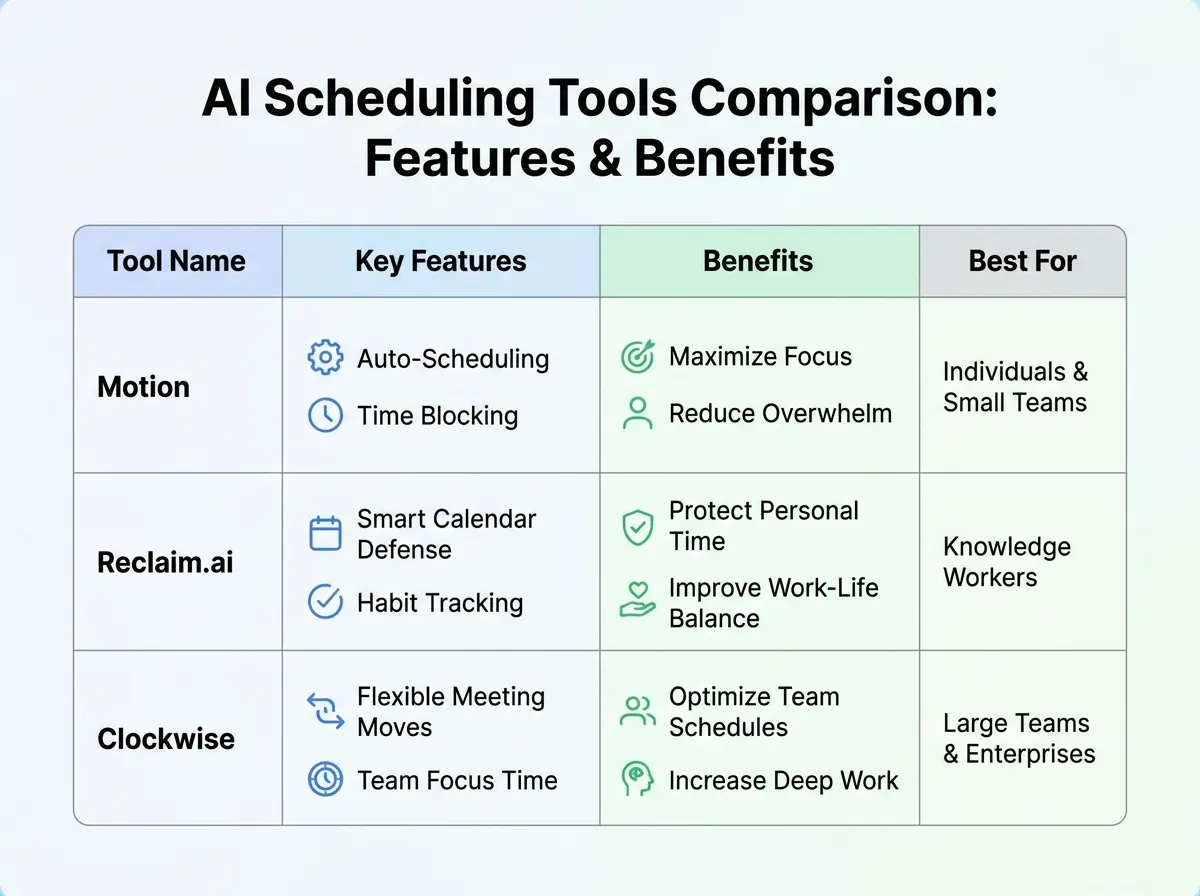
Basic automation – queuing stories and setting posting times – is the core of any scheduler. Beyond that, AI features can take on tasks you’d rather not do manually. PostNext, for instance, can draft captions for your feed posts and generate images from a text prompt, which helps when you need a week of Story graphics.
Analytics is another area to check. Some schedulers suggest posting times based on how your past posts performed. PostNext does this on paid plans, from your own Instagram history, rather than from a generic industry chart.
What PostNext Does for Instagram Stories
| Capability | PostNext |
|---|---|
| Image Stories | Yes, choose Story in the composer, add the image and schedule it |
| Video Stories | Not supported yet |
| Captions, stickers, links on Stories | Not published by Instagram’s API; create those stories in the Instagram app |
| Story preview | Yes, the composer shows Story previews before you schedule |
| Suggested posting times | On paid plans, the three strongest slots from your own last 90 days of Instagram posts |
Details are on the Instagram scheduler page. Other schedulers work through the same API, so check each vendor’s current documentation for what it can publish to Stories.
How Scheduling Improves Efficiency
Scheduling changes how you schedule Instagram Stories in practice. Instead of stopping what you’re doing at the right hour, you prepare the slides in one sitting and let them go out on time. Instead of writing every caption from scratch for your feed posts, AI can draft on-brand suggestions for you to edit.
Not every automated feature will fit every workflow. For highly visual or brand-sensitive campaigns, you may want more manual control, and interactive stories still need a person in the Instagram app.
Step 5: Create and Upload Story Content for Scheduling
Optimizing Visuals for Engagement
The difference between an average story and one that pulls viewers in often comes down to the quality of your visuals. Instagram Stories are inherently visual-first. To stand out, design assets that reflect your brand identity – consistent color palettes, recognizable fonts, and on-brand imagery.
Plan interactive elements like polls, quizzes, and Q&A stickers for the stories you’ll post from the app. Don’t overlook vertical ratios, crisp image resolution, and concise, easy-to-read text built into the image. Batch-create your story slides using a content calendar to map the narrative arc: tease a new product, share behind-the-scenes looks, and close with a call to action. This approach keeps your branding clear and streamlines the upload process.
Batch Uploading and Arranging Story Sequences
Once your assets are ready, upload and arrange your story sequence in your chosen scheduler. In PostNext each image Story is its own scheduled post, so a sequence is simply a few Stories scheduled a minute or two apart in the order you want them seen. Preview each one in the composer to check the crop before you schedule.
For example, you might start with a product teaser, follow with a customer photo, then end with a limited-time offer. If a slide needs a link or a poll, post that slide from the Instagram app at its planned time and schedule the plain slides around it.
Before/After Example: Random vs. Planned Story Flow
| Before: Random Sequence | After: Planned Sequence |
|---|---|
| • Slide 1: Behind-the-scenes photo (no context) • Slide 2: Product demo video • Slide 3: Poll (“Which color do you like best?”) • Slide 4: Quote from a team member | • Slide 1: Poll (“Which color do you like best?”) to spark engagement • Slide 2: Product demo video, referencing poll responses • Slide 3: Behind-the-scenes photo with a caption connecting to product features • Slide 4: Quote from a team member wrapping up the story with a call-to-action |
The “before” column shows a sequence with no narrative logic – viewers might be confused about the story’s focus, leading to taps away or missed engagement opportunities. The “after” version starts by engaging the audience with a poll, then uses those responses to create context for the demo, builds intrigue with behind-the-scenes content, and closes with a personal touch and clear call-to-action. Arranging stories with intent creates a natural progression that keeps viewers invested from start to finish. In a sequence like this, the poll and the demo video are the parts you’d post in the Instagram app; the photo and quote slides can be scheduled.
The real payoff comes when you review your analytics. By organizing your visuals, batching uploads, and planning your story sequence, you position yourself to schedule Instagram Stories that look professional and drive measurable results.
Even the best-laid plans need flexibility. Trends shift, and audience preferences can change quickly. Treat your story uploads as living campaigns: monitor performance, adjust as needed, and always leave room for authentic, real-time engagement alongside scheduled content.
Step 6: Schedule Instagram Stories at Peak Engagement Times
Why Timing Makes All the Difference
Posting Instagram Stories when your audience is most active gives each story the best chance of being seen in its 24 hours. But just posting more often isn’t enough – the when matters as much as the what. Use the active hours you found in your own Insights rather than a generic chart.
Key Insight: Scheduling Instagram Stories during analytics-backed peak times maximizes reach and helps your content land when your audience is paying attention.
How to Schedule Instagram Stories for Peak Performance
- Review your analytics. Check your Instagram Insights to confirm your followers’ peak activity periods. Look for consistent spikes across days.
- Queue your image stories in a scheduling tool. Upload the image, pick a time slot based on your analytics, and set it for automatic publishing. Keep video and sticker stories for the Instagram app.
- Prioritize consistency. Regular story posting keeps your brand top-of-mind. Build a habit – aim for at least a few Story slots per week in your audience’s preferred windows.
- Mix evergreen and timely content. Schedule general Stories (behind-the-scenes, product highlights, user-generated posts) ahead, but leave room for real-time updates and trends.
Pitfalls to Avoid with Story Scheduling
- Over-scheduling too far ahead can backfire. If you fill your calendar weeks in advance, it’s easy to miss out on trending moments or rapidly unfolding events. Followers may notice if your content feels too scripted or out-of-sync.
- Missing real-time engagement opportunities. While automation boosts efficiency, genuine interaction still matters. Respond to replies, share topical content, and join conversations as they happen.
- Ignoring analytics after scheduling. Don’t “set and forget.” Check how your Stories perform in Insights, then refine your approach as you learn what works.
The best strategy blends planning with flexibility. By using scheduling features to cover peak hours and leaving space for timely posts, you keep your content relevant and authentic. The payoff? A stronger, more responsive presence that stands out in your audience’s daily scroll.
Step 7: Balance Automation with Authentic Interaction
Key Insight: Automation can drive efficiency, but a genuine brand voice and real-time responses are what build lasting trust with your audience.
Why Automation Alone Isn’t Enough
Scheduling tools help marketers schedule Instagram Stories for better reach. The appeal is clear: set your content to go live during peak hours, when audiences are most active.
But there’s a catch. Relying solely on automation can make your content feel impersonal. Audiences quickly sense when stories are formulaic and lack a human touch. A scheduled story that launches at the perfect time can still fall flat if you’re not there to answer a question or acknowledge a DM in the moment.
How to Keep Authenticity Front and Center
- Respond to story interactions in real time. If a follower replies to a poll or asks a question, reply promptly. This shows you’re present, not just pushing out queued content.
- Mix scheduled content with spontaneous updates. Use scheduling tools for planned campaigns, but leave space for behind-the-scenes clips, quick check-ins, or celebrating trending moments as they happen.
- Maintain a consistent brand voice. Whether using AI-generated captions or writing manually, keep your language personal and on-brand. Avoid overly refined or generic phrasing – authenticity builds connection.
- Encourage conversation. Stories with interactive elements like quizzes or Q&As invite replies. Be ready to engage with those responses in real time, not just after the fact.
Stay Flexible and Human
Scheduling tools are invaluable for covering the basics and keeping your account active, especially when managing multiple platforms. Still, it’s the unscripted, human moments that set memorable brands apart. Analytics help you spot what resonates, but it’s the personal replies and timely reactions that encourage loyalty. Brands that blend automation with authentic interaction are the ones audiences remember – and trust.
Step 8: Monitor Analytics and Continuously Refine Your Strategy
Your efforts to schedule Instagram Stories are only as effective as your ability to measure what’s working – and what needs to change. For Story-level detail such as taps, exits and sticker responses, Instagram’s own Insights is the place to look. But simply tracking numbers isn’t enough. You need to interpret them and adapt your strategy accordingly.
Key Metrics for Instagram Stories Success
Three metrics consistently stand out: reach, completion rate, and interaction metrics. Reach tells you how many unique users see your content. Completion rate signals whether viewers find your stories engaging enough to watch from start to finish. Interaction metrics, such as replies, sticker taps, and shares, reveal how viewers participate with your content.
| Metric | What It Measures | Why It Matters |
|---|---|---|
| Reach | Unique accounts that viewed your story | Shows the size of your actual audience and the impact of your timing |
| Completion Rate | Percentage of viewers who watched all story slides | Indicates story quality and whether your narrative holds attention |
| Interactions | Replies, sticker taps, link clicks, shares | Reveals which stories spark conversations and drive deeper engagement |
| Forward/Exit Rate | How often users skip forward or exit your stories | Helps pinpoint where viewers lose interest or drop off |
| Engagement Rate | Total interactions divided by reach | Benchmarks overall story performance and compares campaigns |
How to Identify What’s Working (and What’s Not)
Patterns emerge quickly when you analyze these numbers over time. If stories posted at 9 AM consistently outperform those posted mid-afternoon, you’ve found a sweet spot in your audience’s daily rhythm. Conversely, if interactive stories see higher replies but lower completion rates, consider shortening the format or adding more visual interest early on.
Look for consistent trends. If a certain content type (like behind-the-scenes videos) regularly boosts completion rates, double down on it. Use analytics, but also factor in qualitative feedback from your audience. Even a handful of direct messages can give you clues about what’s resonating.
Adapting Your Posting Schedule and Content
Analytics are only valuable if you act on them. Adjust your schedule based on data: post when your own audience is most active. Experiment with interactive stickers, polls, or Q&As if engagement dips. If a style or topic underperforms, rotate it out in favor of what’s delivering higher completion or interaction rates.
Stay flexible. Audience behaviors change. A trend that works this quarter might fade by the next. The most successful brands use analytics dashboards as a compass, continually refining their Instagram Stories strategy to keep content relevant and effective.
Troubleshooting Common Scheduling Mistakes
Stories Not Publishing as Scheduled
Even the best scheduling process can hit a snag. If your Instagram Stories aren’t publishing as planned, start with the basics – check the app’s connection to your Instagram account and verify permissions. Many scheduling tools require periodic re-authentication. Missed posts can also result from media the platform rejects, such as a video file sent as a Story through a tool that only supports image Stories. In PostNext, a failed post is retried automatically, and if the failure persists you get an email and in-app alert from which you can retry, edit or reschedule it.
Engagement Falling Despite Regular Posting
Sticking to a posting schedule is only half the equation. If you notice a dip in engagement even when you schedule Instagram Stories consistently, look to your content strategy. Stories that repeat the same template or lack interactive elements quickly lose their impact. Try adding polls, quizzes, or Q&A stickers to spark conversation, and use Insights to pinpoint which formats your audience is skipping versus sharing.
Avoiding Over-Automation and Repetitive Content
Scheduling is about efficiency, not turning your channel into a content conveyor belt. Over-automation – where every story is pre-planned and none are reactive – often leads to a stale, impersonal brand voice. Real-time engagement builds trust. Set aside time daily or weekly for genuine replies to comments and DMs. Rotate story themes, showcase behind-the-scenes content, and invite user submissions to add unpredictability. If your story views are dropping, it’s often a signal to dial back automation and reintroduce real human touchpoints.
The most effective social media pros use automation to support – not replace – meaningful interaction. By regularly auditing your scheduled queue, tracking analytics, and staying responsive, you’ll avoid common traps and keep your Instagram Stories working for you, not against you.
Summary Checklist
Quick Reference: How to Schedule Instagram Stories Effectively
Use this concise checklist as your go-to guide for planning, executing, and optimizing your Instagram Stories scheduling strategy.
- Audit your current workflow – Identify bottlenecks and gaps in how you plan and publish Stories now.
- Pinpoint your audience’s active hours – Use Insights to find when your own followers are online.
- Plan your Stories content in advance – Map out visuals and decide which stories need interactive elements (polls, quizzes, Q&As), since those are created in the Instagram app.
- Select a scheduling tool – Check what it can publish to Stories; PostNext schedules image Stories.
- Create and upload Stories for scheduling – Prepare your images, with any text built in, then load them into your chosen scheduler.
- Schedule Instagram Stories at optimal times – Set posts for the slots your audience is most active, maximizing reach and interaction.
- Balance automation with authenticity – While scheduling saves time, remember to engage directly with your audience for a personal touch.
- Monitor analytics and refine your strategy – Regularly review engagement data and adjust your schedule, content style, or timing as needed.
Consistency is your best asset. Revisit this checklist and your performance data often to keep your Stories strategy fresh and effective throughout 2026.
Frequently Asked Questions
Can you schedule Instagram Stories in advance?
Yes, with a third-party scheduler that publishes through Instagram’s API. In PostNext you choose Story in the composer, add the image and schedule it. Instagram’s API does not publish captions, stickers or links on Stories, so create Stories that need them in the Instagram app, and video Stories are not supported yet. The advantage: image Stories go live when your audience is most active, even if you’re away from your device.
Why does timing matter so much for Instagram Stories?
Timing is critical because Instagram Stories have a short shelf life – just 24 hours. Posting when your own followers are most active means more of them see the story before it expires. Check Insights for your account’s active hours rather than relying on a generic window.
How do AI-powered tools help with scheduling?
They take on the admin work. In PostNext, AI drafts captions and hashtags for your feed posts and can generate images from a prompt, and on paid plans the date picker shows the three strongest posting slots from your own last 90 days of Instagram posts. That leaves you more time for the visual storytelling and for talking to followers.
What are the most effective engagement tactics for Stories?
- Consistency: Posting Stories daily or several times a week keeps your brand top-of-mind.
- Interactive features: Use polls, quizzes, and question stickers to prompt responses.
- Behind-the-scenes content: Give your audience a look at your creative process or daily operations.
- User-generated content: Repost customer testimonials or audience submissions for authenticity.
How do I balance automation with authentic engagement?
Automation streamlines your workflow – but don’t let it replace real-time interaction. Reply to DMs, respond to comments, and join conversations in your Stories. Use scheduling for consistency, while still carving out time to engage directly with your audience.
What should I do if a scheduled Story fails to post?
Check your tool’s connection to Instagram and confirm you’ve granted all required permissions. Double-check the file: a scheduler that supports image Stories only will not publish a video. In PostNext, failed posts are retried automatically, and a persistent failure triggers an email and in-app alert with options to retry, edit or reschedule. Stay alert for Instagram API changes, as these can occasionally disrupt scheduled publishing.
How often should I review analytics?
Regularly reviewing analytics is essential for optimizing your strategy. A weekly check-in to assess Story views, replies, and completion rates is a sensible rhythm. Use these insights to refine your content plan, test new approaches, and adapt to shifts in audience behavior.
Scheduling Instagram Stories can give you a measurable advantage, but sustained results come from mixing smart automation with true audience connection. Staying responsive to data and trends is what separates a busy feed from a truly engaged community.
Authored with PostNext