Analytics
Analytics
PostNext retrieves performance data for your published posts and surfaces account health information for your connected channels.
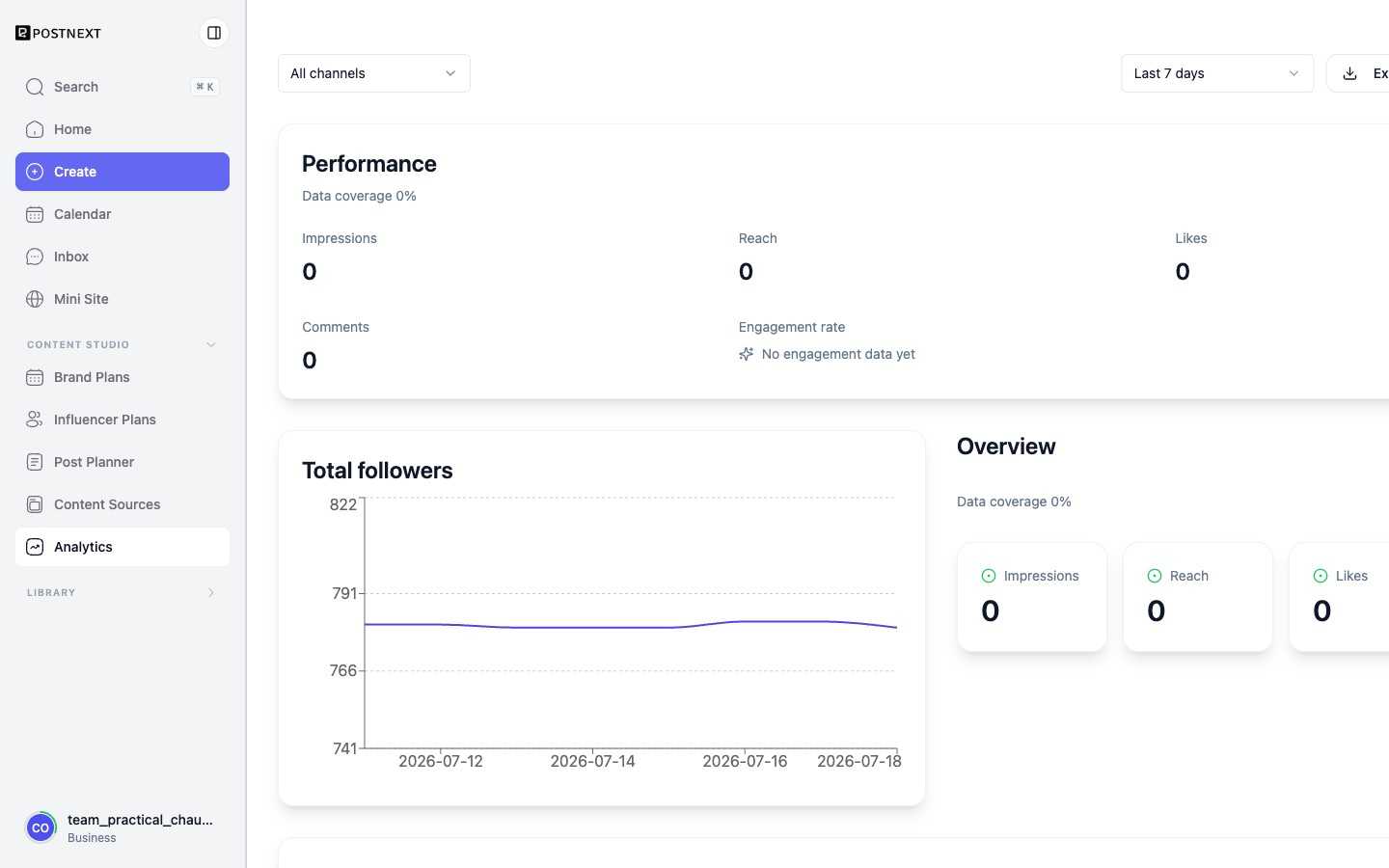
Analytics lives in two places. The Analytics page in the sidebar is the full view: it tracks total followers and follower growth over time, engagement over time, and performance metrics such as impressions, reach, likes, comments, and engagement rate, and you can filter everything to a single channel or view all channels together. The My Analytics tab on the Home screen is a quick summary: headline totals, such as the number of posts and stored assets, followed by a Historical Activity chart you can view over a rolling range like the last 7 days.
Post metrics
For each published post, PostNext shows the likes, comments, and shares it has received. Open a post to see its metrics. Data is fetched from the channel and may have a short delay from the time of publication.
Account health
Account health gives you a view of the status of your connected channels: whether tokens are valid, connections are active, and your publishing queue is in good shape. This helps you catch issues before they interrupt your posting schedule.
Account health is available on paid plans.
Informing your schedule
Engagement data from your published posts feeds into the best time to post calculation. The more posts you publish, the more accurate the timing suggestions become. See Best Time to Post for details.