AI Content
AI Content
The AI content creator generates draft posts for you based on your brand profile. Each generation request draws from your monthly AI credit allowance.
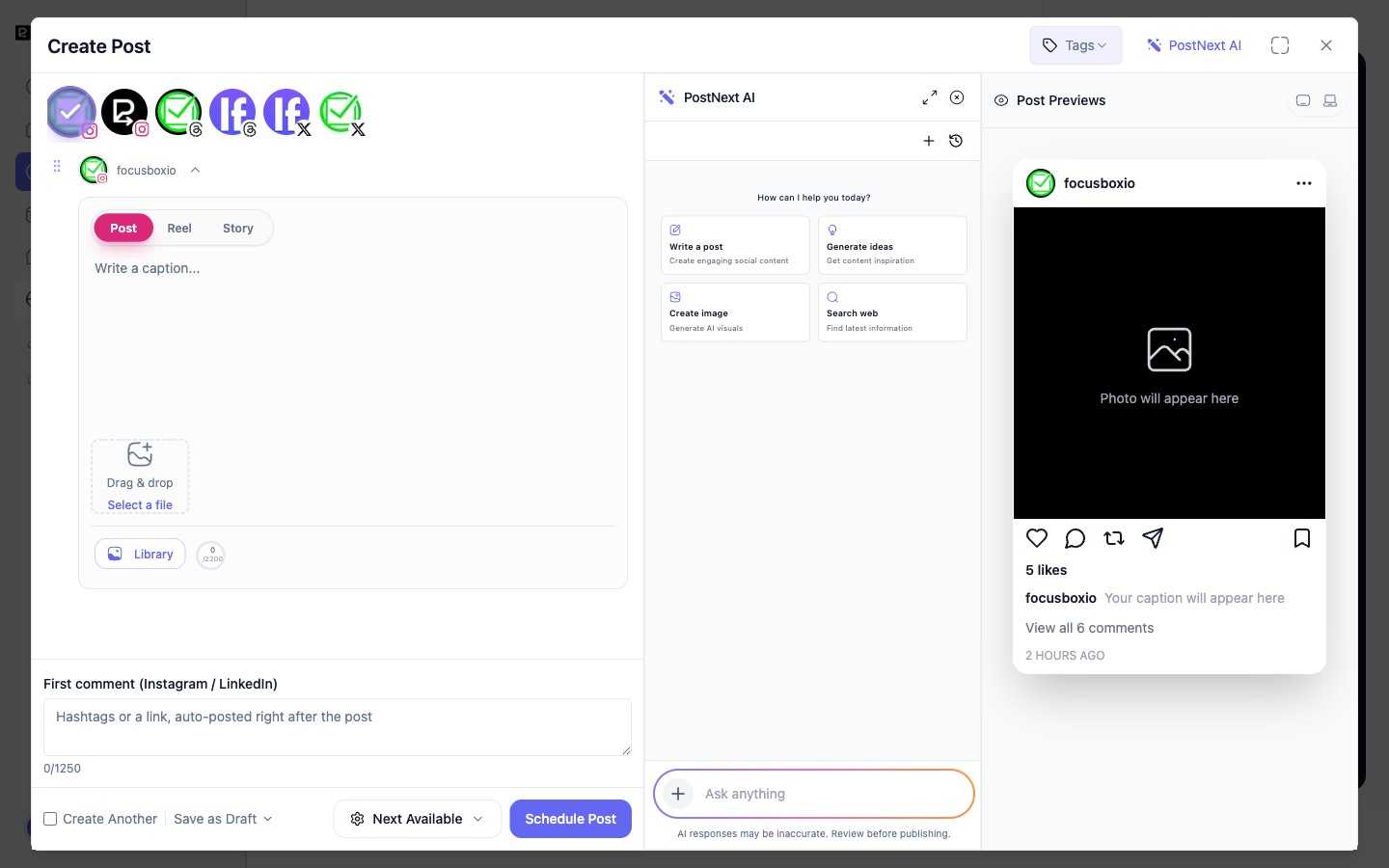
How generation works
Open PostNext AI from inside the composer to start. The assistant offers quick actions, Write a post, Generate ideas, Create image, and Search web, or you can type a request into the prompt box. If your team has one brand profile, PostNext uses it automatically, so the draft speaks for your brand, its products, and its audience. If you have several brands, pick one under Advanced options. The writers are told not to invent quotes, testimonials, or statistics. You review and edit every draft before scheduling or publishing, and a reminder notes that AI responses should be reviewed before publishing.
AI credits
AI credits are a monthly allowance included in your plan. Each generation request consumes credits. Paid plans also have a daily cap, so the allowance lasts through the month.
| Plan | AI credits per month | Daily cap |
|---|---|---|
| Free | 10 | None |
| Premium | 150 | 20 |
| Business | 500 | 50 |
| Teams | 50 per user | 30 per user |
During a free trial you get a flat trial allowance instead, with no daily cap: 25 credits on Premium and Business, 10 per user on Teams.
When you run out, the team owner on an active paid plan can select Buy AI Credits to add a credit pack. Purchased credits are valid for 12 months. Otherwise AI generation is available again when your allowance resets. See Managing Your Plan and Limits for the full plan comparison.
The AI Assistant workspace
Beyond the composer, PostNext AI has a full-page workspace for longer sessions. Open it from the AI Studio card in Apps. Describe what you want to create, or start from the Topics, Search web, Research, Generate image, Post formats, and Find inspiration tabs. Your conversations are saved, so you can pick up where you left off. Assistant requests draw from the same AI credit allowance.
AI Repurpose
AI Repurpose turns a blog post or any long text into platform-ready posts. Open Create in the sidebar and choose Repurpose (the Create menu appears once your account has scheduled its first post). Paste a URL or the text itself, pick the channels and how many posts you want per channel, optionally set a tone and language, and PostNext generates drafts tailored to each platform. Each post uses one AI credit. Instagram needs an image, so if neither the article nor your brand has one, an AI image adds a few more credits. Send the results to your drafts or select Add to queue.
Getting better results
The more complete your brand profile is, the more relevant the drafts will be. The writers use your brand name, tagline, description, products, voice, personality traits, main themes, audience, and languages. Fill those in, or run Retrieve Brand Info on the profile to pull details from your website.