Mini Site
Mini Site
The Mini Site is your link-in-bio page: a single, mobile-friendly page that holds your links, media, and content in one place. It lives at postnext.io/s/your-name, and publishing it is free.
Use it as the link in your social profiles to send followers to everything that matters: your other channels, your latest posts, a signup form, a video, or your own website.
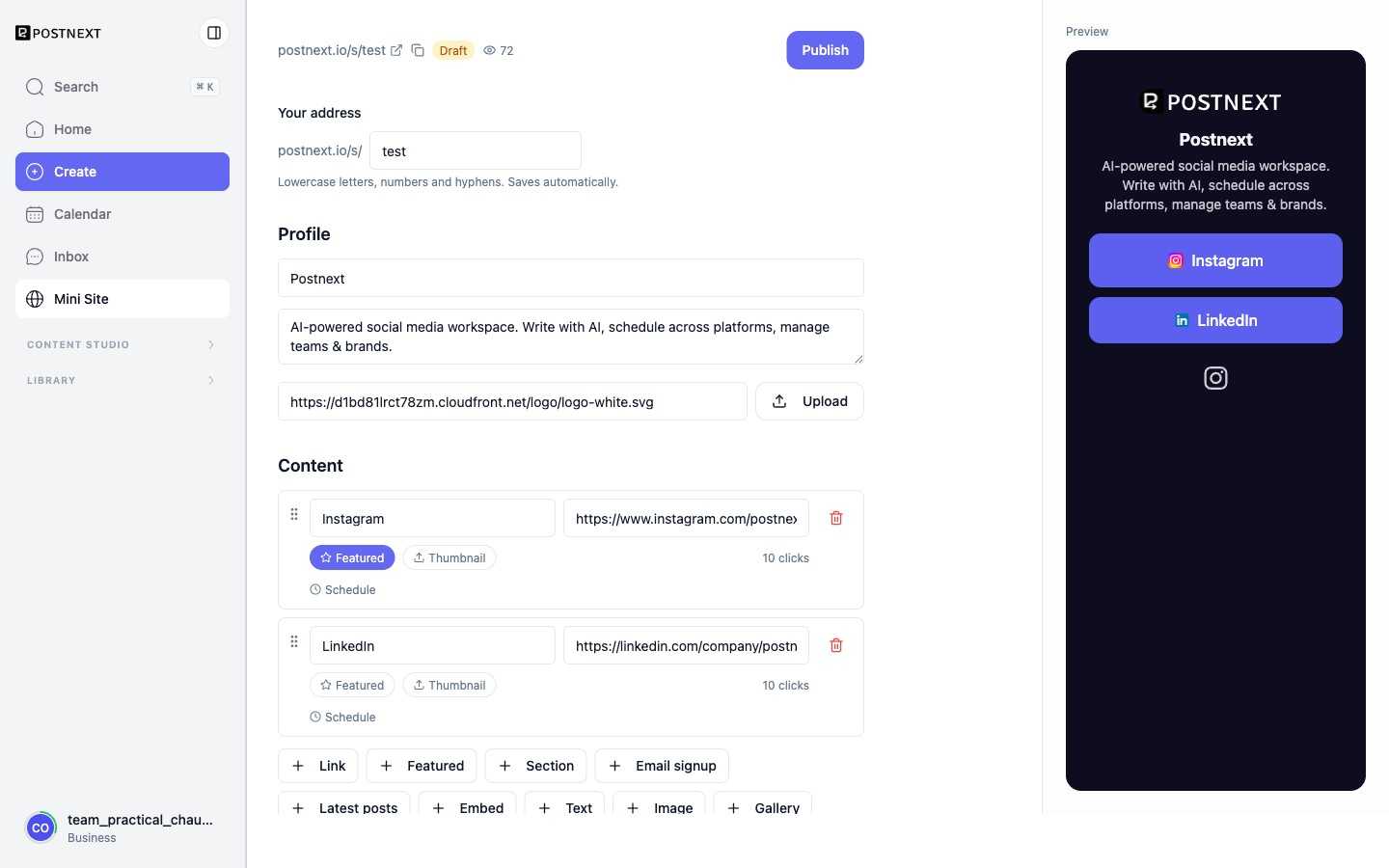
Create your page and pick your address
- Open Mini Site in the app.
- Under Your address, choose your handle. Your page will be at
postnext.io/s/your-handle(lowercase letters, numbers, and hyphens). - Fill in your profile, add some blocks, then click Publish to make the page live.
Once published you get a QR code and a copy-link button for sharing, and you can unpublish at any time.
Profile
Set the display name, a short bio, and an avatar or logo shown at the top of your page. You can upload an image or paste an image URL.
Content blocks
Your page is built from blocks. Drag to reorder them, and give any block a schedule so it only shows during a set window (show from, show until).
- Link and Featured link: a titled button to any URL. Featured links stand out with a larger style.
- Section: a heading to group the blocks below it.
- Text: a rich-text block. Supports a small set of Markdown:
**bold**,*italic*,[links](https://example.com), and lists. - Image: a single image with an optional caption and an optional click-through link.
- Gallery: a row of images that scrolls sideways.
- Embed: paste a link and the media plays inline. Supported providers are YouTube, Vimeo, Spotify, TikTok, SoundCloud, Apple Music, and Loom.
- FAQ: a list of questions and answers shown as expandable rows.
- Latest posts: automatically pulls your most recent published posts.
- Email signup: collects visitor email addresses (see Email capture below).
- Divider: a thin line to separate sections.
Themes
Pick a preset theme (minimal, dark, sunset, or ocean) or choose custom colors for the background, buttons, and text to match your brand.
Email capture
Add an Email signup block and visitors can subscribe right from your page. Collected addresses appear in the editor, and you can export them as a CSV file.
Analytics
Published pages track views and link clicks, with a breakdown by top link, traffic source, device, and country. You can also turn on UTM tagging so outbound clicks are attributed as coming from your mini site in your other analytics tools.
Sharing and social previews
Share your page with the built-in QR code or copy link. You can set a custom preview image, title, and description so the page looks right when shared on social platforms.
Custom domain
On a paid plan you can serve your page on your own subdomain, for example bio.yourbrand.com, instead of postnext.io/s/your-handle.
- In the Custom domain card, enter your subdomain and click Add.
- At your DNS provider, add the two records the card shows you:
- a CNAME record pointing your subdomain to
cname.postnext.io - a TXT record on
_postnext-verify.your-subdomainwith the value shown
- a CNAME record pointing your subdomain to
- Click Verify. Once the records resolve, your domain is verified, and an HTTPS certificate is issued automatically the first time someone visits.
Visitors reaching your domain over http are redirected to https on the same domain.
Retargeting pixels
On a paid plan you can add retargeting pixel IDs so you can build audiences from people who visit your page and reach them again through your own ad accounts.
In the Pixels card, add any of:
- Meta Pixel ID (digits only)
- Google GA4 or Ads ID (for example
G-XXXXXXXorAW-XXXXXXX) - TikTok Pixel ID
The pixels fire a page view on your published page. They are active for paid plans only.