
If you are deciding what to post on social media for business, post three things each week. Post one answer to a question customers ask before they buy. Add one piece of proof that you do the work well, and one invitation to act now. Post them where your customers already are. In Pew Research Center’s 2026 survey, 84% of U.S. adults use YouTube, 70% Facebook and 51% Instagram. PostNext schedules all three to seven channels from one calendar.
Key Takeaways
- Three posts a week, three jobs: Answer a buying question, Prove you do good work, Invite people to act. Each job has its own formats and its own number to watch.
- Your post ideas are already in your week. Quotes, emails, reviews and the questions staff hear at the counter give you more Answer posts than you can use.
- Pick the channel by your customers, not by trend. YouTube reaches 84% of U.S. adults, Facebook 70%, Instagram 51%, TikTok 37%, LinkedIn 31% and X 18% (Pew Research Center, survey run January to June 2026).
- Instagram ranks Reels by reshares, full watches and likes. It shows fewer Reels that carry a watermark, are mostly text, or were already posted on Instagram (Instagram, “Instagram Ranking Explained”).
- Measure the action you asked for. Comments and saves for an Answer post, profile taps and replies for a Prove post, tagged link visits for an Invite post.
- Content-mix rules such as 80/20 are blog habits, not platform rules. Use the three jobs as your mix and adjust after four weeks of your own numbers.
What should you post on social media for business?
A business should post content that moves a customer one step closer to a decision. Most buyers need three things: an answer to the question that stops them, proof that you can deliver, and a clear reason to act this week. So a weekly plan for a business has three posts: one Answer post, one Prove post and one Invite post. The table shows what each job does and how to tell if it worked.
| Job | What it does for the customer | Example post | Formats that fit | Number to watch |
|---|---|---|---|---|
| Answer | Removes the question that stops a purchase | A plumber explains what changes the price of a boiler repair | Carousel, short video, text post | Saves, shares, follow-up questions |
| Prove | Shows you do the work, and do it well | A salon posts a before and after from the same angle | Photo, before and after, short video | Profile taps, replies, direct messages |
| Invite | Gives a real reason to act now, with one next step | A bakery posts that Sunday pre-orders close Friday at 18:00 | Image with the date on it, Story, short text | Tagged link visits, bookings, orders |
Three posts is a starting rhythm, not a rule. Post more if you have the material, but keep all three jobs in every week. A week of only Invite posts reads like an advert, and a week of only Answer posts gives people no reason to buy from you.
Where do business post ideas come from?
Business post ideas come from the questions customers already ask you. Every question in an email, a quote, a review or a phone call is an Answer post with its first draft written. Every finished job is a Prove post. Every opening, deadline or restock is an Invite post. Keep one list, add to it the day you hear something, and choose next week’s posts from it.
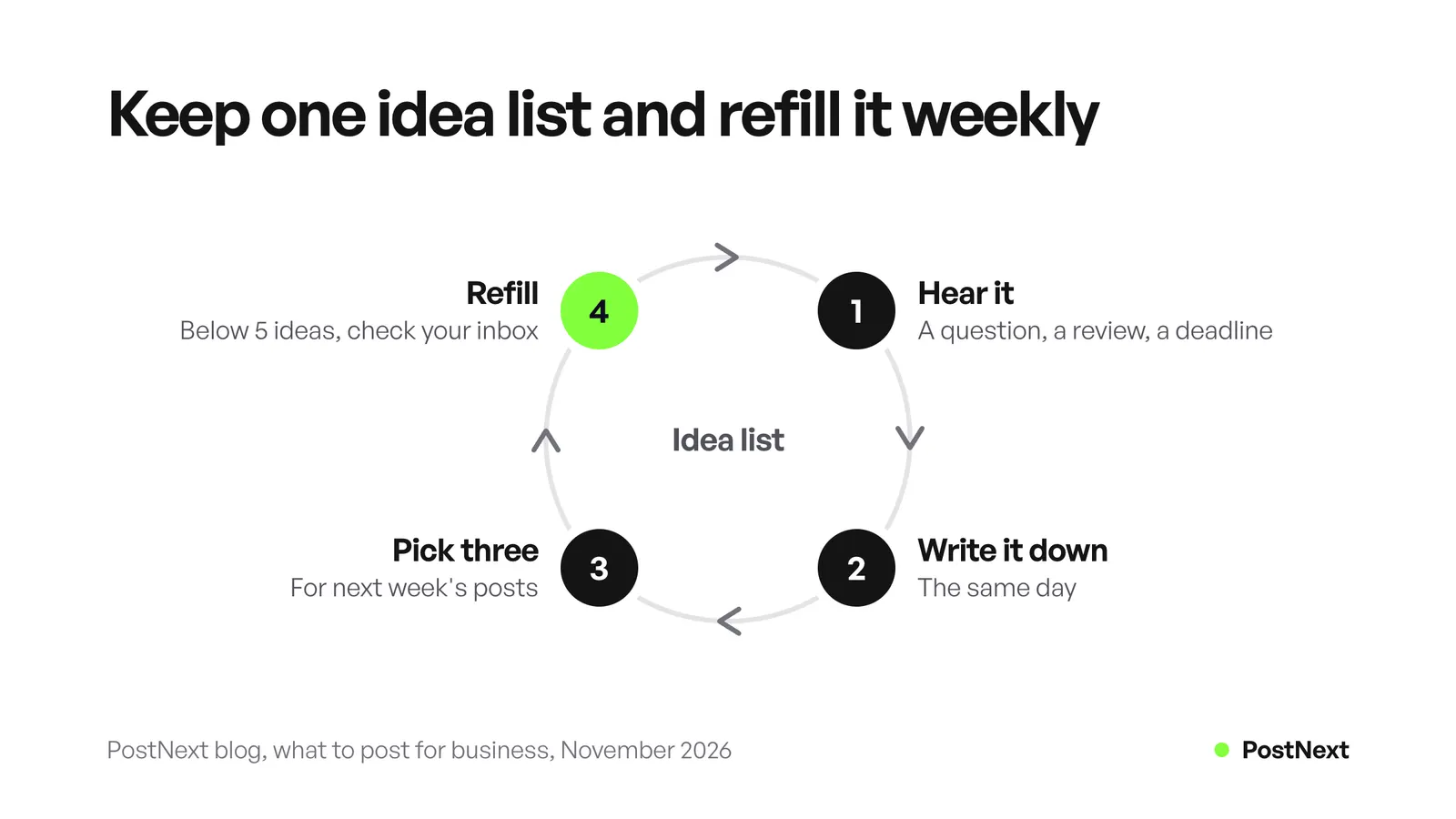
Five places to look, in the order most businesses find the best ideas:
- Quotes and estimates. The question a customer asks before they accept a price is the strongest Answer post you have.
- Your inbox and messages. Search for “how”, “can you” and “do you”. Each match is a post.
- Reviews. A review that names a specific detail tells you what to prove next time.
- The counter or the phone. Ask staff which question they answered most this week. Write it down the same day.
- Your own calendar. Openings, holidays, deadlines and new stock are your Invite posts for the month. For public holidays and awareness days, PostNext’s social media holiday calendar gives a post idea for each day.
Aim to keep ten ideas on the list. When it drops below five, spend ten minutes on your inbox and fill it again. For a full set of worked examples sorted by goal, with versions for a bakery, a clinic and a consultant, the PostNext course has a lesson with 36 social media post ideas by goal.

What are 12 post ideas for a business?
Twelve post ideas cover the three jobs a business needs each week: four Answer posts, four Prove posts and four Invite posts. Each idea below names the job, the format that fits and an example from a real kind of business. Replace the example with your own work. Never invent a result, a review or a number: if you do not have one, describe what happened in plain words.
Answer: 4 ideas
- The question before the price. Explain the two or three things that change what a customer pays. A roofer shows why a flat roof costs more to repair than a pitched one, and a car dealer shows what changes a monthly payment. Format: carousel or short video.
- Which one is right for me. Compare two of your products or services and say who each suits. A gym compares the morning class and the evening class. Format: carousel or a two-column image.
- What happens after you book. Walk through the first visit, the delivery or the first call, step by step. A dentist films the walk from reception to the chair, and a vet clinic shows the scale and the treat jar. Format: short video or Story.
- The mistake you fix most often. Show the problem and the simple fix, and say when to call a professional. A bike shop shows a chain that needs oil, and a boxing coach fixes a dropped guard. Format: short video.
Prove: 4 ideas
- A finished job and the one decision behind it. Name the problem and the choice that made the result work. A garden designer explains why the path curves. Format: photo or carousel.
- Before and after from the same angle. Use the same light and the same position, and remove names, faces and house numbers unless you have permission. Format: two photos or a short video.
- A customer’s own words. Post an approved review with a photo of the work it describes. Keep the customer’s words as written. Format: image or text post.
- The step nobody sees. Film the preparation or the quality check that customers never watch. A coffee roaster weighs and tests a batch, and a jeweler films a stone being set. Format: short video.
Invite: 4 ideas
- A real opening or deadline. Share open appointment slots, a restock date or an order cut-off, such as a florist’s last day to order for Mother’s Day. Say it only when it is true. Format: image with the date on it, or a Story.
- The seasonal reminder. Tie your service to a date in the customer’s year. A tax adviser posts the filing deadline and how to book a review before it. Format: text post or image.
- An event or open day. Give the date, the time, the place and what people get when they come. Format: image, then a reminder Story on the day.
- A small first step. Offer the easiest way to start: a free quote form, a sample, a 15-minute call. Point people to one link, such as the link in your bio on Instagram. Format: short video or text post.
Which social media channel fits which business post?
The right channel for a business post is the one your customers use, in the format that channel rewards. In Pew Research Center’s 2026 survey of 5,511 U.S. adults, YouTube and Facebook reach the most people, and Instagram reaches about half. LinkedIn suits posts aimed at buyers at work. The table matches each channel to the posts that fit it and notes what PostNext can publish there.
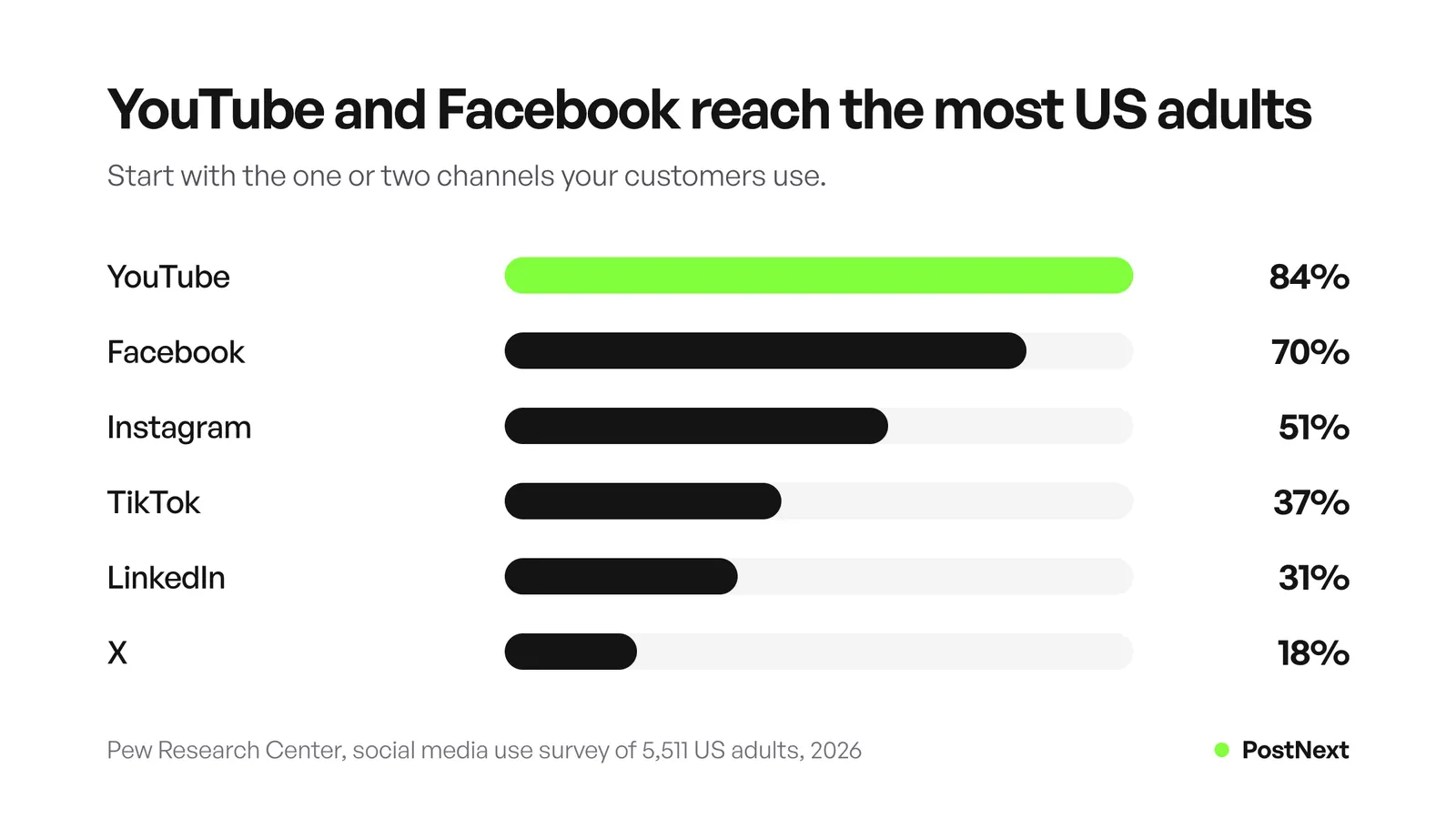
| Channel | U.S. adults who use it (Pew, 2026) | Posts that fit best | What PostNext publishes |
|---|---|---|---|
| YouTube | 84% | Answer posts as longer how-to videos; Prove posts as project walk-throughs | One video per post; open to a limited set of accounts while Google reviews the app |
| 70% | Invite posts with the address and booking link; event posts | Not available: post in Facebook directly | |
| 51% | Prove posts as photos and Reels; Answer posts as carousels; Invite posts as Stories | Feed posts, Reels, image Stories, carousels of 2 to 10 items | |
| TikTok | 37% | Answer and Prove posts as short vertical videos | Videos and photo posts |
| 31% | Answer posts that explain a decision; Prove posts about a project and its result | Text, image and GIF posts on personal profiles; no Company Pages | |
| X | 18% | Short answers, updates, service news | Posts, threads and polls |
| Threads | Not in Pew’s 2026 figures | Short Answer posts and questions to followers | Text, photos, videos and carousels |
| Bluesky | Not in Pew’s 2026 figures | Short Answer posts and service news | Text with up to 4 images |
Start with one or two channels and do them well. A shop that posts three good posts a week on Instagram learns more in a month than a shop that posts one weak post a week on five channels. Add a second channel once you can keep the first going for a month without missing a week. For a longer look at each network’s audience, see our guide to choosing the right social media platform for a business.
What does Instagram reward in a business post?
Instagram says its Feed ranks posts by how likely you are to spend a few seconds on a post, comment on it, like it, share it and tap the profile photo. For Reels, the main predictions are whether people reshare it, watch it to the end, like it and open the audio page. Explore weighs likes, saves and shares. These signals come from Instagram’s own explainer, “Instagram Ranking Explained”.
This tells you which job to give each format. An Answer post that people want to keep earns saves and shares, so make it a carousel they can come back to (these carousel ideas with slide outlines give you a start). A Prove post that makes people curious earns profile taps, so end it by naming what you do. A Reel works when people watch it to the end, so put the result in the first seconds and cut everything before it. Our list of Reel ideas you can film this week follows the same rule.
Instagram also lists what it shows less in Reels: low-resolution videos, videos with a watermark, muted videos, videos with borders, videos that are mostly text, and videos already posted on Instagram. If you film a video for TikTok, export the clean file and post that to Instagram, not a download with the TikTok logo on it. Before you post a product photo, check that it is sharp and well lit, because a Prove post depends on what people can see in it. If your shop has no time for photos, DesignerBox makes product photos from a picture you take on a phone.
How do you plan a month of business posts?
Plan a month of business posts by giving each week the same three slots and filling them from your idea list. Monday is an Answer post, Wednesday is a Prove post and Friday is an Invite post. Write all three in one sitting at the start of the week, schedule them, and spend the rest of the week on replies. Twelve posts a month is enough to learn what works for your customers.
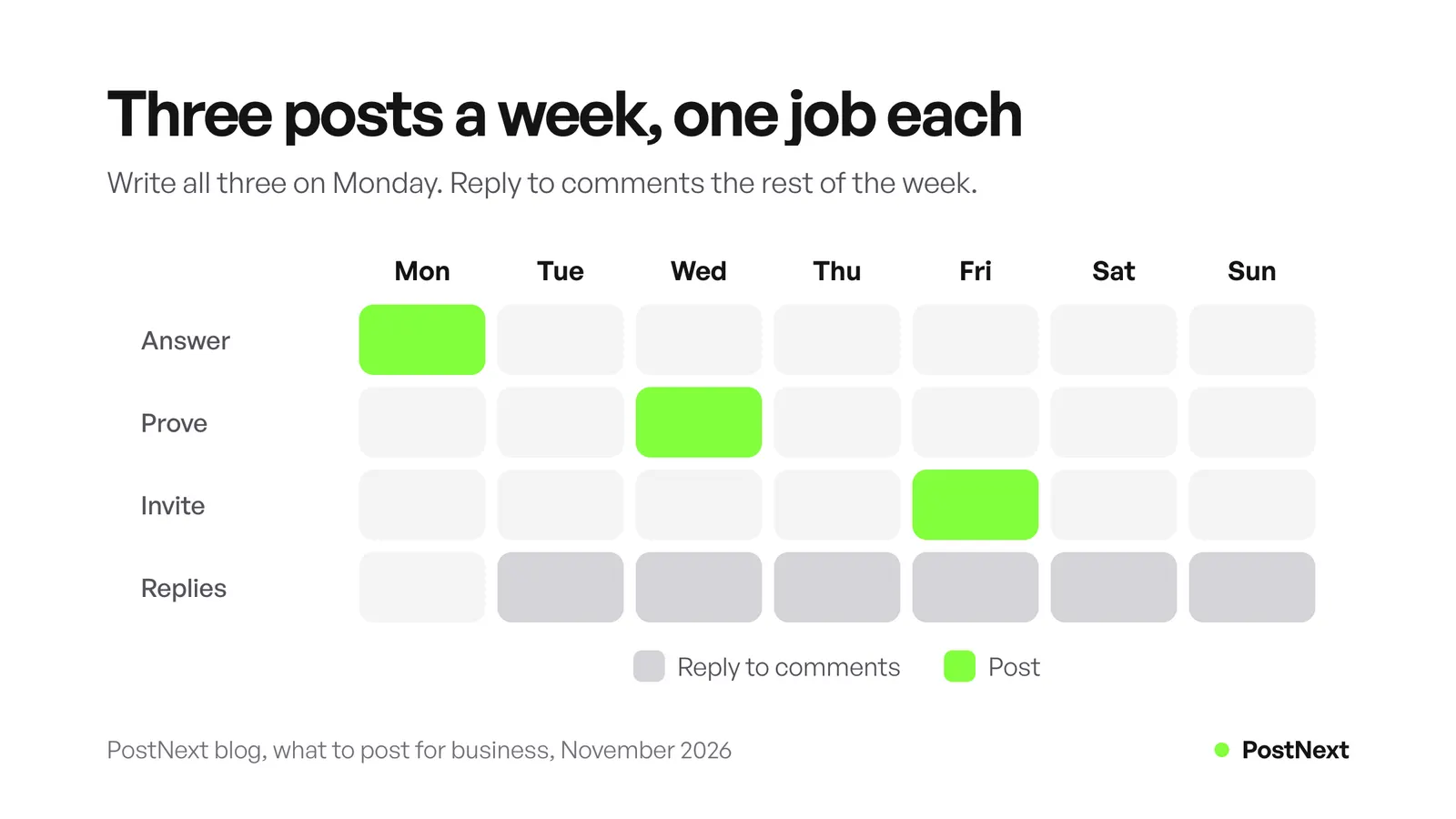
An example month for a florist, built only from the twelve ideas above:
| Week | Monday: Answer | Wednesday: Prove | Friday: Invite |
|---|---|---|---|
| 1 | Which flowers last longest in a warm room | A wedding table arrangement and the one choice behind it | Orders for Saturday close Thursday at 17:00 |
| 2 | What happens after you order online | Before and after of a shop window display | A free 15-minute call to plan an event |
| 3 | The mistake that makes cut flowers wilt in two days | A customer’s review with a photo of their bouquet | Open day at the shop, with the date and time |
| 4 | Short stems or long stems: which vase each one needs | The morning delivery check nobody sees | Order before the holiday cut-off date |
Every slot answers the same question: what does the customer need to know, see or do this week? When something happens that is worth a post, such as a big order or a local event, swap it into the slot that matches its job. A full plan on one page, with themes and dates, is in the guide on how to build a social media content calendar.
How do you know which business posts work?
You know a business post works when people take the action that post asked for. Judge each job by its own number. An Answer post works when people save it, share it or ask a follow-up question. A Prove post works when people tap your profile or message you. An Invite post works when people visit the link and book, order or come in.
Track Invite posts with tagged links, because likes do not show whether anyone booked. Google Analytics reads UTM tags on a link and shows the visits in its Traffic acquisition report. A florist could tag a link with utm_source=instagram, utm_medium=social and utm_campaign=holiday_orders, then compare visits from each post. For a shop or a salon, ask new customers how they heard about you and write the answer down. To set the tags up once for every network, see tracking social media ROI in GA4.
After four weeks, look at the twelve posts and keep two decisions. Choose one question to answer again in more detail, and choose one format to repeat. Drop the format that took the most time and led to the fewest actions. Your own four weeks of results tell you more than any general rule about how many posts to make or which day to post them.
How does PostNext help a business post every week?
PostNext lets a business write the week’s posts in one sitting and publish each one at its time. You write a post yourself, or describe the topic and the AI writer drafts a caption in the voice saved in your brand profile. A weekly offer can repeat every week with Repeat this post, which repeats every 1 to 365 days, weeks or months on every plan (postnext.io/for/small-businesses, November 2026).
If you are deciding whether to hire help instead, compare what a social media manager costs with the hours you spend now.
The content strategy planner fits the three-job plan. Save three to five content pillars in your brand profile, such as Answer, Prove and Invite, and the planners draft a month of posts from them. Tag each post with its pillar, then see the month on one calendar for all seven channels. On paid plans, the date picker suggests your best times on Instagram, LinkedIn and X from your own posts of the last 90 days. If you already write a blog or a newsletter, AI Repurpose turns one article into drafts for X, Instagram, LinkedIn and Threads. The drafts wait for you, and nothing publishes on its own.
Know the limits before you plan around them. PostNext publishes to X, Instagram, LinkedIn, TikTok, YouTube, Threads and Bluesky. It does not post to Facebook or Google Business Profile, and on LinkedIn it posts to personal profiles, not Company Pages. The Free plan covers 1 channel and 10 posts a month. Analytics shows likes and comments for each post, so track bookings from Invite posts with tagged links. PostNext’s page for small businesses has post ideas, a weekly plan of five posts and caption templates to copy.
Frequently Asked Questions
What should a small business post on social media every week?
Post one answer to a question customers ask before they buy, one piece of proof that you do good work, and one invitation with a real date or offer. Three posts a week is enough to keep a steady presence, and you can write all three in one sitting.
How many times a week should a business post on social media?
Start with three posts a week on one or two channels, and keep that up for a month before you add more. No platform publishes a number of posts that works best for every business. Choose a number you can keep, because a plan you stop after two weeks teaches you nothing.
What is the 80/20 rule for social media?
The 80/20 rule says about 80% of your posts should help or entertain and about 20% should promote. It is a habit from marketing blogs, and no platform states it. The three-job plan in this article gives a similar mix, with two helpful posts and one Invite post each week.
What should a business not post on social media?
Do not post invented reviews, results or numbers, photos that show customers’ names, faces or addresses without permission, or offers that are not true. On Instagram, avoid Reels with another app’s watermark, Reels that are mostly text and videos you already posted on Instagram, because Instagram shows them less.
What do I post when nothing new happened this week?
Answer an old question in more detail. Take a question you answered before and show a case where the answer changes. Post the step nobody sees, such as preparation or a quality check. Your idea list should hold ten ideas, so a quiet week takes ideas from it.
Should a business post the same content on every channel?
Post the same idea, but adapt it to each channel. A before and after works as a photo on Instagram, a short video on TikTok and a short text post with one image on LinkedIn. Export a clean video file for each channel instead of reposting a download with another app’s logo on it.
Do I need to disclose paid partnerships in business posts?
Yes, in the United States. If you pay someone to post about your business, or give them a free product, the FTC says the connection must be disclosed clearly in the post. The FTC’s “Disclosures 101 for Social Media Influencers” guide explains what counts and how to say it.
Sources
- Social Media Fact Sheet, Pew Research Center (19 October 2026): share of U.S. adults who use YouTube (84%), Facebook (70%), Instagram (51%), TikTok (37%), LinkedIn (31%) and X (18%); survey of 5,511 U.S. adults, 30 January to 18 June 2026.
- Instagram Ranking Explained, Instagram (31 May 2023, read November 2026): the interactions Instagram predicts for Feed, Explore and Reels, and the Reels it shows less.
- URL builders: Collect campaign data with custom URLs, Google Analytics Help (November 2026): UTM parameters and the Traffic acquisition report.
- Disclosures 101 for Social Media Influencers, Federal Trade Commission (November 2026): when and how to disclose a paid or gifted connection.
- PostNext small business page, postnext.io/for/small-businesses (November 2026): Repeat this post, the channels PostNext does and does not post to, the Free plan.
- PostNext content strategy planner page, postnext.io/features/content-strategy (November 2026): pillars, planners, tags and the calendar.
- PostNext LinkedIn channel page, postnext.io/channels/linkedin (November 2026): personal profiles only, no Company Pages.
- PostNext YouTube channel page, postnext.io/channels/youtube (November 2026): YouTube is open to a limited set of accounts while Google reviews the app.