
Social media for accountants works as a slow trust builder. Business owners read LinkedIn, which 51% of US college graduates use, and individual tax clients scroll Facebook, which 70% of US adults use (Pew, 2026). Post deadline reminders and plain answers, follow the AICPA and IRS advertising rules, and plan your posts around the tax year. This PostNext guide shows where to post and what.
Key Takeaways
- Pick by client: LinkedIn for business owners and professionals, Facebook for individual and family tax clients.
- The rules are short: no false or misleading claims (AICPA 1.600 and Circular 230 §10.30), and no client information without the client’s consent (AICPA 1.700).
- Tax return data carries a criminal penalty: a preparer who knowingly or recklessly discloses return information faces a fine of up to $1,000 and up to 1 year in prison under 26 USC 7216.
- The tax year writes your calendar: estimated tax dates, the filing season start, April 15 and October 15 give you six fixed dates to post about each year.
- The IRS names the problem: it put “misleading tax advice on social media” on its 2026 Dirty Dozen scam list. Correct, plain posts are the answer.
- Two posts a week is enough: one useful answer, one reminder or update, more in the weeks before a deadline.
Does social media work for accountants?
Social media works for accountants as a trust check and a reminder. When someone hears your name from a client or a friend, they look you up before they call. A profile with a year of clear, correct posts tells them you know your field and answer questions in plain words.
That shapes what the posts are for. An accountant’s post does not need to go viral. It needs to be correct, easy to read and still useful when a business owner finds it six months later. Fifty plain answers to real client questions make a stronger case than any advert.
| Client you want | Where they are | Data |
|---|---|---|
| Business owners, founders, finance managers | 51% of college graduates and 45% of adults in $100,000+ households use it | |
| Individuals and families with a tax return | 70% of adults, close to the same in every income and education group | |
| Clients who follow photos and short video | 51% of adults | |
| Clients who watch explainers | YouTube | 84% of adults |
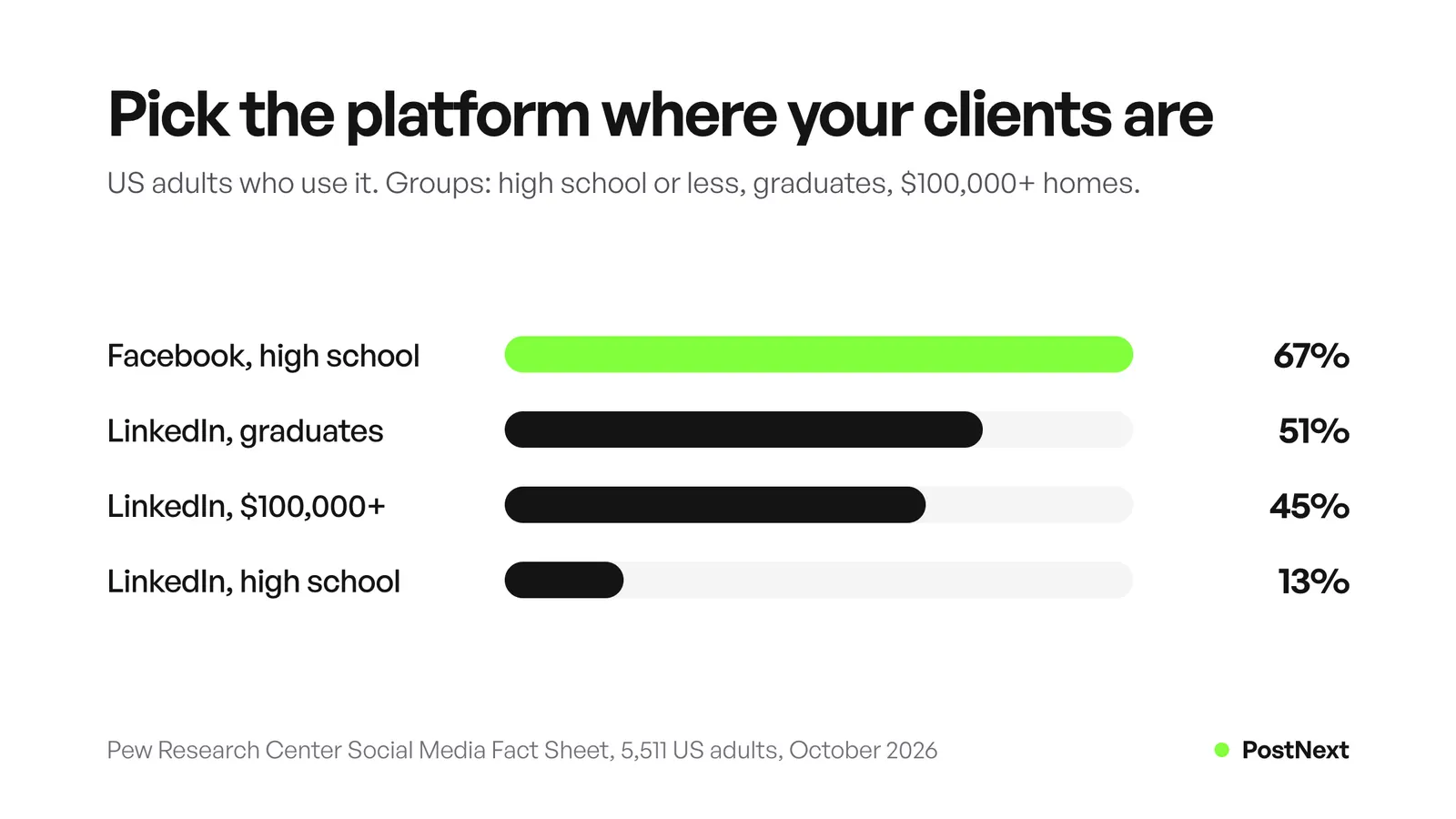
| Adults with a high school education or less | Facebook, not LinkedIn | 67% use Facebook, 13% use LinkedIn |
Pew Research Center Social Media Fact Sheet, published October 19, 2026 (5,511 US adults, surveyed January 30 to June 18, 2026), checked November 2026.
There is a fair case against spending much time on it. If your client list is full and referrals keep coming, social media adds little. It helps most when you want a different kind of client, such as a niche industry, or when you start a new practice and nobody has heard your name yet.
Which social media platforms should accountants use?
Accountants who serve businesses should start with LinkedIn, and accountants who prepare individual returns should start with Facebook. Pew’s 2026 survey shows the split clearly: LinkedIn reaches 51% of US college graduates but only 13% of adults with a high school education or less, while Facebook reaches 67% to 74% of every education group. Pick the one where your clients are and post there every week.
LinkedIn also offers a Service Page. LinkedIn describes Service Pages as dedicated landing pages that “showcase services and businesses to help you find potential clients”. People can send you a request for proposal from it. Some Service Page features need a Premium Business, Sales Navigator or Recruiter Lite subscription, so check which ones you need before you pay.
Run a personal profile and a firm page side by side if you have staff. The partner’s profile carries the opinions and answers. The firm page holds the address, the services and the hiring posts. Our guide to how the LinkedIn algorithm works explains how the feed picks which posts people see.
Instagram and YouTube are a second step. They suit a firm with one person who likes to explain things on camera, such as a 60-second video on what a 1099-NEC is. If nobody at the firm wants to do that, skip them. One active channel beats four quiet ones.
What can accountants post without breaking professional rules?
Accountants can post almost anything that is true and does not reveal client information. The AICPA Code bans advertising that is “false, misleading, or deceptive”, and IRS Circular 230 bans false or misleading claims in any public communication about IRS matters. The AICPA confidentiality rule bans disclosing confidential client information “without the specific consent of the client”. Tax return information carries a criminal penalty on top.
| Rule | What it says | What it means for a post |
|---|---|---|
| AICPA 1.600.001 | No advertising or solicitation that is false, misleading or deceptive; no coercion, over-reaching or harassing | Facts you can prove, no pressure tactics |
| AICPA 1.600.010 | Misleading includes creating “false or unjustified expectations of favorable results” or implying influence over a regulator | No “we always get you a bigger refund”, no hints of contacts at the IRS |
| AICPA 1.600.030 | A firm may use a designation such as PFS in marketing only if all its partners hold it | Check every partner before the designation goes on a firm post |
| AICPA 1.600.100 | Use of the CPA credential follows each state’s accountancy laws | Read your state board’s rules on the CPA title |
| AICPA 1.700.001 | No disclosure of confidential client information without specific consent | Written consent before any client story |
| Circular 230 §10.30(a)(1) | No false, fraudulent, coercive, misleading or deceptive claim; enrolled agents may not use “certified” | An enrolled agent can write “enrolled to practice before the Internal Revenue Service” |
| 26 USC 7216 | Knowing or reckless disclosure of return information is a misdemeanor | Never post a client’s numbers, forms or screenshots |
AICPA Code of Professional Conduct, updated for releases through July 2026; Treasury Department Circular No. 230 (Rev. 6-2014); 26 USC 7216. Checked November 2026.
The confidentiality rule reaches further than most people think. The AICPA’s own example: a client’s name alone can be confidential if your practice only does bankruptcy work, because the name suggests money trouble. A “welcome to our new client” post can break the rule if the kind of work says something private.
The 7216 penalty is a fine of up to $1,000 (up to $100,000 in some cases) and up to 1 year in prison. It covers anyone in the business of preparing returns, not only CPAs. A screenshot of a return with the name blurred is still a risk: the numbers, the city and the date can be enough to identify someone.
State boards add their own rules, and they differ. Before your first post, read your state board of accountancy’s advertising rules, and ask your professional liability insurer if they have a social media guide.
What should accountants post on social media?
Post plain answers to the questions clients ask you every week, and post reminders before each deadline. A three-sentence answer to “Do I need to pay estimated tax?” is useful, easy to share and shows you know the rules. Neither type needs a camera, a client story or a design team.
Rotate these six post types:
- The deadline reminder. One date, who it applies to, what to do. “June 15: second estimated tax payment for 2026.”
- The plain answer. A question from this week’s calls, answered in three sentences with no jargon.
- The rule change. What a new law or IRS notice means for one kind of client. Link to the IRS page, not a news story.
- The scam warning. The IRS publishes a Dirty Dozen list of tax scams. Turn one item into a short warning for your clients.
- The people. A photo of the team, a new hire, a training day. Clients want to know who sees their files.
- The client story, with written consent. What the problem was and what you did, without numbers that promise the same result to the next client.
The scam posts deserve extra attention. In its 2026 Dirty Dozen list (IR-2026-30, March 5, 2026), the IRS named “misleading tax advice on social media” as item 4 and warned that viral “tax hacks” can push people to file returns with false information. A short post that says “This tax hack is false, and here is the IRS page that says so” is useful to clients and shows the kind of adviser you are.
Watch the words in results posts. “We saved a client $40,000” creates the “unjustified expectations of favorable results” that AICPA 1.600.010 names as misleading. Describe the work instead: “We found three years of missed home office deductions.” For more formats, our list of LinkedIn post ideas has 30 you can adapt.
What is a tax-season content calendar for accountants?
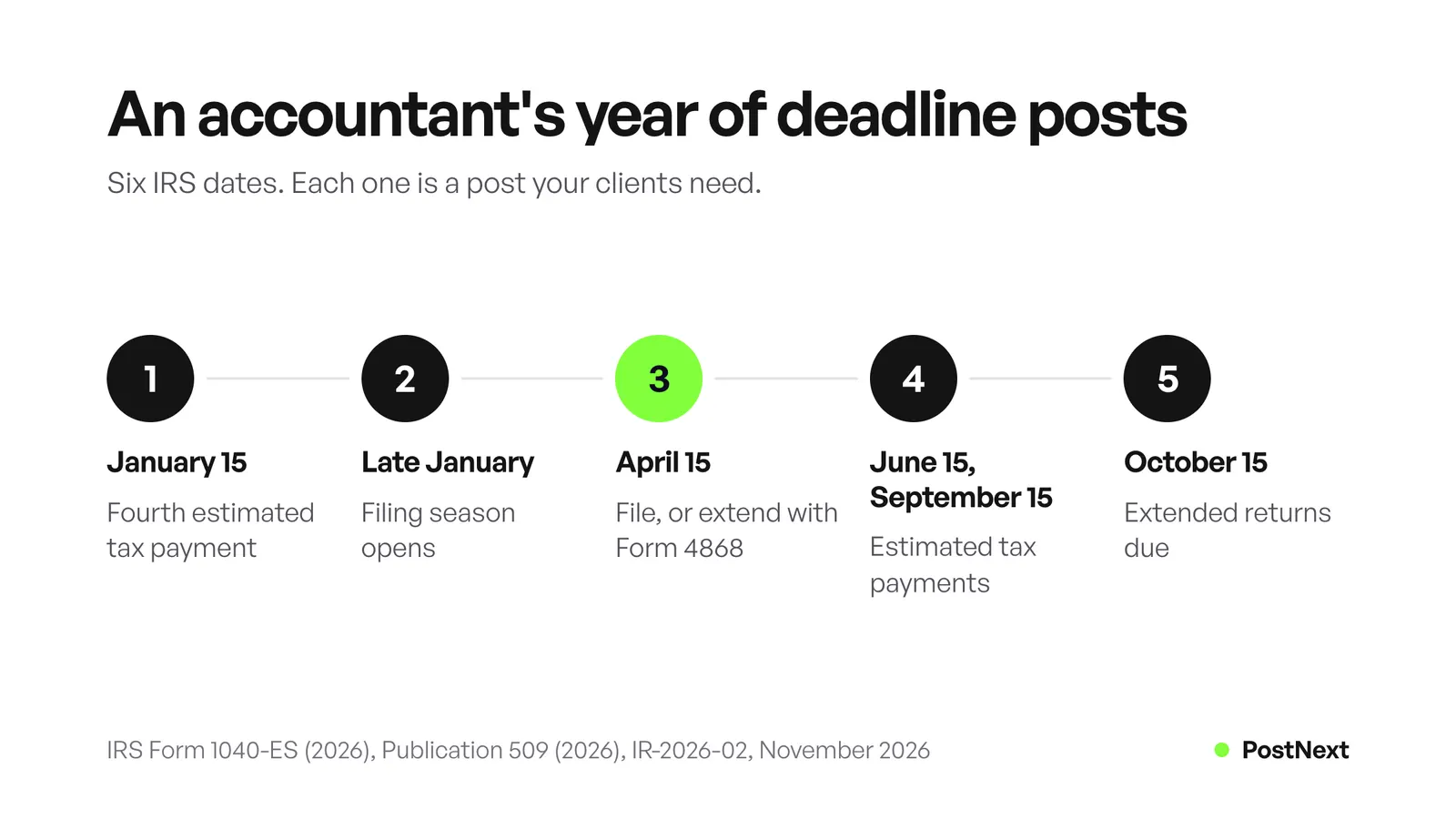
A tax-season calendar ties your posts to the dates clients already worry about. The IRS sets them: four estimated tax payments, the start of the filing season in late January, the April 15 deadline and October 15 for extensions. Write one reminder for each date before the year starts and schedule it, and the busiest months of the year already have posts.
| When | What happens | Post idea |
|---|---|---|
| January 15 | Fourth estimated tax payment for the year before (January 15, 2027 for 2026) | “Last payment for 2026 is due. Or file by February 1, 2027 and pay in full.” |
| End of January | W-2 copies due to employees and 1099-NEC copies to contractors (February 2 in 2026, because January 31 was a Saturday) | For business clients: “Your 1099-NEC forms are due this week.” |
| Late January | The IRS opens the filing season (January 26 in 2026) | “What to bring to your tax appointment” checklist |
| March | The IRS publishes its Dirty Dozen scam list (March 5 in 2026) | One scam per post, with the IRS link |
| April 15 | Filing deadline and first estimated payment | ”Can’t finish? File Form 4868 for six more months, and pay what you estimate you owe.” |
| June 15 | Second estimated tax payment | Reminder for self-employed clients |
| September 15 | Third estimated tax payment | Reminder for self-employed clients |
| October 15 | Deadline for returns on an extension | ”Extended returns are due today.” |
IRS Form 1040-ES (2026), Publication 509 (2026), IR-2026-02 and IR-2026-30, checked November 2026. When a due date falls on a Saturday, Sunday or legal holiday, it moves to the next business day.
Do not post a 2027 date the IRS has not published. In 2026 the IRS announced the filing season start on January 8. Until the 2027 dates are on IRS.gov, write “usually April 15” and link the IRS page. The January 15, 2027 estimated payment date is already on the 2026 Form 1040-ES, so that one is safe to schedule now.
UK accountants have a different calendar. For the 2025 to 2026 tax year, HMRC wants paper Self Assessment returns by 31 October 2026 and online returns and payment by 31 January 2027. People new to Self Assessment had to tell HMRC by 5 October 2026. Those three dates carry a UK firm’s autumn and January posts.
How often should accountants post on social media?
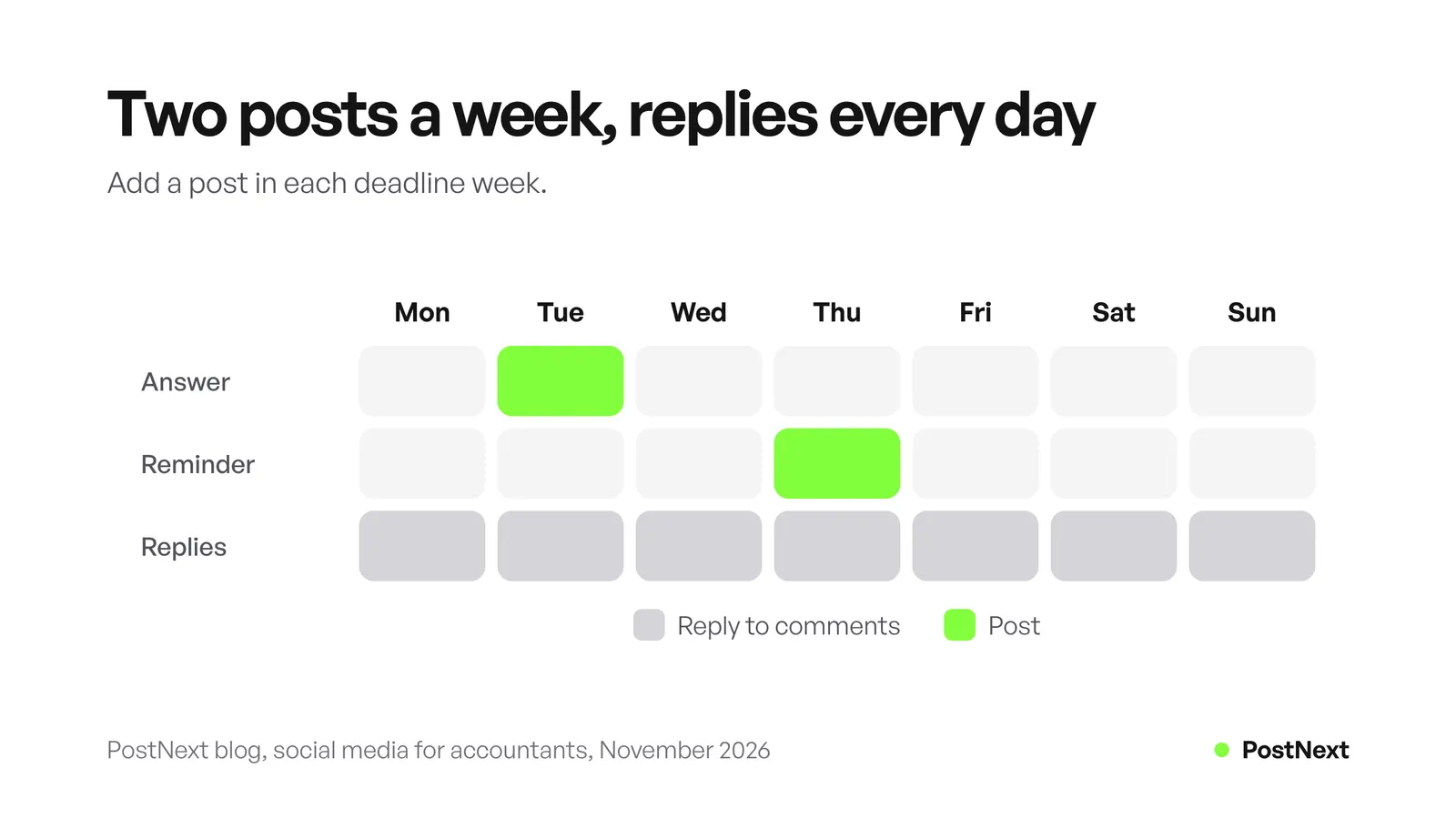
Two posts a week on one channel is enough for most accounting firms: one plain answer and one reminder or update. Add a post in each deadline week. Posting every week for a year matters more than posting every day in January.
Busy season is the hard part. From late January to April 15, the people who write the posts are the people preparing returns. Write the January to April posts in December and schedule them, so the channel stays active when you have no time to open it.
A simple week looks like this:
- Tuesday: a plain answer to a question from the last week.
- Thursday: a reminder, a rule change or a scam warning.
- Every day: reply to comments and messages. Move any question about a client’s own situation to a private call.
That last point matters. A public comment thread is the wrong place for tax advice about one person’s return. Thank them, and ask them to call or book a meeting.
How do accountants get clients from social media?
Make it easy to take the next step from every profile and post. Put your services, your location or service area and one booking link in each profile. End a post with one clear action, such as “Book a 20-minute call before April.” Then ask every new client how they heard about you, and write down the answer.
The booking link does most of the work. A business owner who reads your post on a phone wants one tap to a calendar, not a site menu. If your website has no booking page, a link in bio page for consultants can hold your fee list, a booking button and a short FAQ on one page.
Fee posts have their own rules. Circular 230 §10.30 lets a practitioner publish fixed fees for routine services, hourly rates, fee ranges and the fee for a first meeting. Once you publish a fee, you may charge no more than that rate for at least 30 calendar days. For direct mail and e-commerce communications, the rule says to keep a copy and a list of who received it for at least 36 months. Keeping a copy of every fee post is a cheap habit.
Do not keep messaging people who said no. Circular 230 says a practitioner “may not persist in attempting to contact a prospective client” who has said no, and any lawful uninvited solicitation must be identified as one. A cold LinkedIn message that offers tax help to a stranger is an uninvited written solicitation, so it must say that it is one. For the wider plan of winning business clients online, see our B2B social media strategy guide.
How does PostNext help an accounting firm?
PostNext lets a firm write three months of deadline reminders and plain answers in one sitting and publish each at its time. It posts to Instagram, TikTok, LinkedIn, X, YouTube, Threads and Bluesky from one calendar. Recurring posts repeat every 1 to 365 days, weeks or months, which suits a reminder that comes back every 12 months.
Check repeated tax dates each year. A recurring post copies the same text, and IRS dates move when they fall on a weekend. Set the repeat, then read each reminder against IRS.gov in December. The recurring posts page shows the end options. PostNext for accountants shows a deadline post that repeats each week and stops on the date, with caption templates you can copy.
Know the limits before you start. PostNext publishes to personal LinkedIn profiles only: text posts, image posts and GIFs, with an automatic first comment. It does not post to Company Pages or Showcase Pages, and it does not publish documents, video or polls. Page admins can schedule Page posts in LinkedIn itself, from 10 minutes to 3 months ahead. Facebook and Google Business Profile are on the PostNext roadmap, so post to those directly for now.
For firms where a partner reviews every post, the Teams plan adds approvals: a writer sends a post to approval, and a reviewer approves it or asks for changes with a comment. An approved post goes back to drafts and does not publish until someone schedules it. The free plan covers 1 channel, 10 posts and 10 AI credits a month, enough for two LinkedIn posts a week. To build the profile first, the free Grow on LinkedIn course covers your headline and posts people read.
Frequently Asked Questions
What should an accountant post on social media?
Post plain answers to client questions, deadline reminders, rule changes explained for one kind of client, IRS scam warnings, team photos, and client stories with written consent. Two posts a week is enough. Leave out client numbers and anything that promises a result.
Is LinkedIn or Facebook better for accountants?
LinkedIn fits firms that serve businesses: Pew’s 2026 survey found 51% of US college graduates use it. Facebook fits firms that prepare individual returns: 70% of US adults use it, at about the same rate in every income group.
Can CPAs advertise on social media?
Yes. The AICPA Code bans advertising that is false, misleading or deceptive, and solicitation by coercion, over-reaching or harassing conduct. It does not ban advertising. State boards of accountancy add their own rules, so read yours before your first post.
Can an accountant post client testimonials or stories?
Only with the client’s specific consent, because the AICPA confidentiality rule bans disclosing confidential client information without it. Get the consent in writing. Avoid dollar results, which can create unjustified expectations of favorable results under AICPA 1.600.010.
Can enrolled agents call themselves certified on social media?
No. Circular 230 §10.30 says enrolled agents may not use the term “certified” or imply they work for the IRS. Acceptable wording includes “enrolled to practice before the Internal Revenue Service”.
When should accountants post about tax deadlines?
Post a reminder a week before and on the day of each IRS date: January 15, the late January filing season start, April 15, June 15, September 15 and October 15. Check each year’s dates on IRS.gov, because a date on a weekend moves to the next business day.
Sources
- Pew Research Center, Social Media Fact Sheet, published October 19, 2026, checked November 2026.
- AICPA, Code of Professional Conduct, rules 1.600 and 1.700, updated for releases through July 2026, read in the copy published by the Minnesota Board of Accountancy, checked November 2026.
- US Treasury, Circular No. 230, §10.30 Solicitation, Rev. 6-2014, checked November 2026.
- 26 USC 7216, Disclosure or use of information by preparers of returns, checked November 2026. IRS Section 7216 information center, checked November 2026.
- IRS, Form 1040-ES (2026) and Publication 509 (2026), Tax Calendars, checked November 2026.
- IRS, IR-2026-02: first day of the 2026 filing season, January 8, 2026, checked November 2026.
- IRS, IR-2026-30: Dirty Dozen tax scams for 2026, March 5, 2026, checked November 2026.
- IRS, IR-2025-15: wage statements due January 31, January 15, 2025, checked November 2026.
- GOV.UK, Self Assessment tax return deadlines, checked November 2026.
- LinkedIn Help, Get started as a service provider on LinkedIn, checked November 2026.
- PostNext, LinkedIn channel page, automation page, pricing page and llms.txt, checked November 2026.