
Social media for carpenters is a portfolio that clients check before they call. In Houzz’s 2026 study of 10,176 renovating homeowners, 25% hired a carpenter directly, and BrightLocal found 97% of US consumers read local reviews. Photograph every job at four stages, post twice a week, and keep Google, Facebook and Houzz current. This PostNext guide shows where to post and what.
Key Takeaways
- Your photos are the proof: a finished built-in sits inside a private home, so your pictures are often the only record a new client can see.
- Two kinds of buyer look at you: homeowners, and the builders and designers who hire carpenters as part of a bigger job.
- Google, Facebook and Houzz come first: 70% of US adults use Facebook (Pew, 2026), and a free Houzz business account lists you in its directory of professionals.
- Shoot four stages on every job: before, a joinery detail, the install, and the finished room.
- Ask before you post a client’s home: get a yes in writing, crop out house numbers and family photos, and remove the location from the file.
- Two posts a week is enough: one finished job, one detail or tip.
- Reply within a day: 89% of consumers expect owners to respond to reviews (BrightLocal, 2026).
Does social media work for carpenters?
Social media works for carpenters as a portfolio and a trust check. Most clients still come from referrals, builders and searches, then look at your photos before they phone. Houzz’s 2026 study of renovating homeowners found 91% hired at least one professional, and 25% hired a carpenter directly. Those people want to see the quality of your joints, your finish and how you leave a room.
Tile installers sell the same way, with grout joints and flat edges; see social media for tilers.
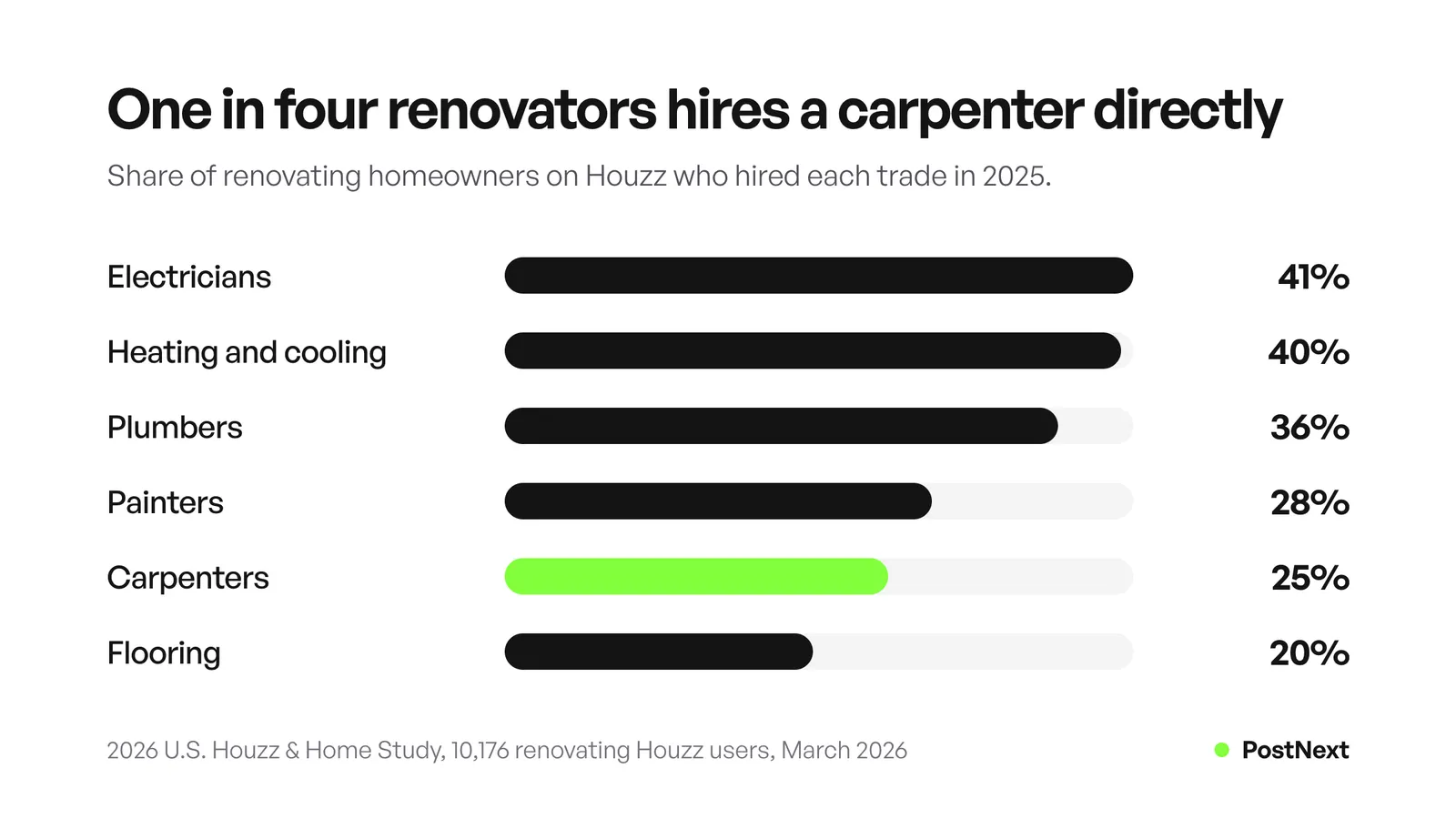
Carpentry has a problem that most trades do not. The best work ends up behind a client’s front door. Your built-in bookcase or kitchen is the thing people want to see, and nobody can see it unless you show it. Every job you do not photograph is a sales tool you threw away.
| Trade hired directly by renovating homeowners | Share in 2025 |
|---|---|
| Electricians | 41% |
| Air conditioning and heating specialists | 40% |
| Plumbers | 36% |
| Painters | 28% |
| Carpenters | 25% |
| Flooring specialists | 20% |
| Cabinetry specialists | 13% (down 3 points from 2024) |
2026 U.S. Houzz & Home Study, survey of registered Houzz users, 10,176 US homeowners who renovated in 2025, fielded January to March 2026. Excludes trades hired through a general contractor. Checked November 2026.
That last note matters. The 25% counts only carpenters hired by the homeowner. Much carpentry is subcontract work for general contractors, kitchen designers and builders, and that does not show in the number. So you have two audiences: the homeowner who hires you, and the pro who hires you again and again. Your posts should speak to both.
The market is not growing fast. Harvard’s Joint Center for Housing Studies expects US home improvement and repair spending to hover around $525 billion through the third quarter of 2027, with growth of 1.5%. In a flat market, the carpenter whose work is easy to find and easy to trust wins the jobs that exist.
There is a fair argument against spending much time here. Referrals and repeat work from builders bring most carpenters most of their jobs, and posting cannot replace that. For a one- or two-person shop, the order is: a Google profile with reviews, a few good project galleries, then two posts a week.
Which social media platforms should carpenters use?
Carpenters do best on a Google Business Profile, Facebook and Instagram, with Houzz and Pinterest for kitchens, built-ins and furniture. Pew’s 2026 survey of 5,511 US adults found 70% use Facebook, 51% use Instagram and 84% use YouTube. Pew last measured Pinterest in 2024, at 36%. Pick two or three and keep them current.
| Platform | Best job for a carpenter | Data |
|---|---|---|
| Google Business Profile | Reviews, photos of work, service area, posts | Google names service-area and hybrid businesses |
| Facebook Page | Finished jobs, local groups, reviews | 70% of US adults use Facebook (Pew, 2026) |
| Detail shots, process clips, reaching designers and builders | 51% of US adults (Pew, 2026) | |
| Houzz | Project galleries for kitchens, built-ins, renovations | Free business account adds you to the directory |
| Finished pieces that people save while they plan | 36% of US adults (Pew, 2024, last measured) | |
| Nextdoor | Neighbour recommendations | 18% of US adults (Pew, 2026); free Business Page |
| YouTube | Longer build videos for furniture and cabinet makers | 84% of US adults (Pew, 2026) |
Reach figures from Pew Research Center 2024 and 2026; Google, Houzz, Pinterest and Nextdoor details from their own help and business pages. Checked November 2026.
Match the platform to the work. A finish carpenter who does trim, stairs and doors for local homeowners needs Google, Facebook and Nextdoor most. A cabinet maker who sells kitchens needs Houzz and Instagram, because that is where designers and renovating homeowners collect ideas. A furniture maker can sell beyond the town, so Instagram, Pinterest and YouTube matter more than a service area.
How should a carpenter set up a Google Business Profile?
Set up your Google Business Profile by how clients reach you. If you only work at clients’ homes, set it up as a service-area business and remove your address. If you have a workshop or showroom that clients visit, Google calls that a hybrid business: show your address and your service area. You can list up to 20 service areas, within about 2 hours of driving.
Many cabinet makers and furniture makers are hybrid: clients visit the shop to choose wood and finishes, and you install at their home. Do not list a home workshop as a storefront if clients never come there. Then fill the profile with your work:
- Photos of finished jobs: a wide shot of the room and one close detail. Add new ones after every job.
- Posts: Google offers Update, Offer and Event posts with photos, and you can schedule a post and repeat it weekly or monthly.
- Reviews and replies: Google says more reviews and positive ratings can help your local ranking, and replying shows you value feedback.
For photo and post sizes, see our guide to Google Business Profile image sizes. PostNext’s Google Business Profile page lists Google’s own repeat settings. PostNext cannot post there yet.
Should carpenters use Houzz and Pinterest?
Use Houzz and Pinterest if you build kitchens, built-ins, stairs or furniture, the work people plan months ahead. Houzz says a free business account adds you to its Find Professionals directory, and you can post projects with photos and descriptions. Pinterest has a free business account with analytics, and every Pin can link to your website. Skip both if most of your work is repairs and small trim jobs.
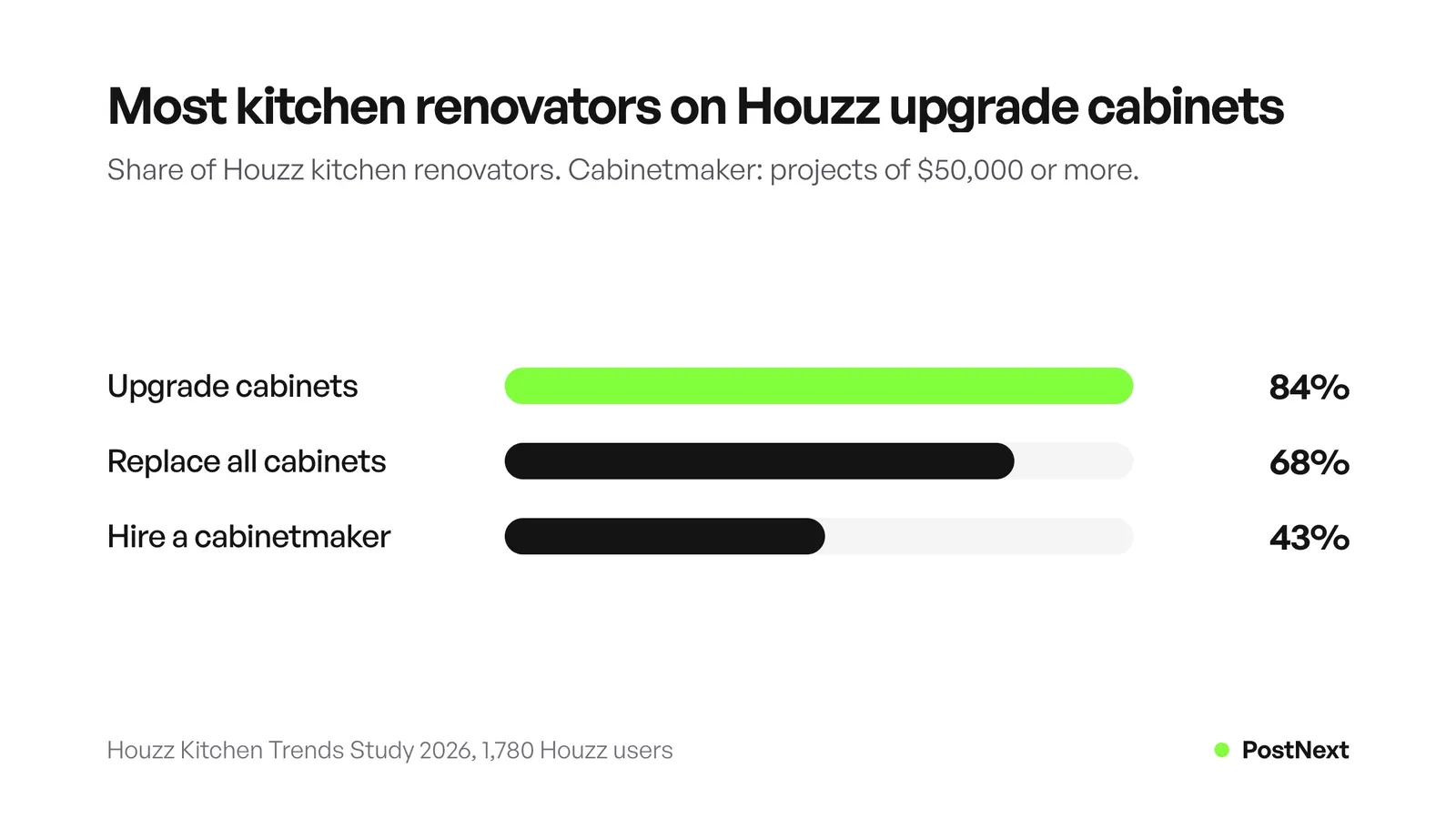
Houzz’s own numbers show why kitchens matter. Its 2026 Kitchen Trends Study of 1,780 Houzz users found 84% upgrade cabinets during a kitchen renovation, and 68% replace all of them. On kitchen projects of $50,000 or more, 43% hire a cabinetmaker. Wood is now the most popular cabinet colour at 29%, ahead of white at 28%. These are Houzz users, who renovate more than average, so read the numbers as a picture of the kitchen buyer, not of all homeowners.
On Houzz, a project is “a collection of photos and information” under your public profile. Give each photo a short description: the wood, the finish, the problem you solved. Houzz recommends describing the key decisions on the project, and those words are what a homeowner reads when they compare you with the next shop.
On Pinterest, each finished piece can become several Pins: the wide shot, the drawer detail, the hardware. Link each Pin to the matching project page on your website, not to the homepage. With a business account you can schedule a Pin up to 30 days ahead and keep up to 10 scheduled at a time. You create a new business account on a computer, or convert a personal account in the app. See our Pinterest Pin size guide for image sizes, and PostNext’s Pinterest page for Pinterest’s own scheduling steps. PostNext cannot post Pins yet.
What should carpenters post on social media?
Post the work at every stage, from rough timber to the finished room. A before photo, a close-up of a dovetail or a scribed edge, the install, and the finished space make four posts from one job. Detail shots prove skill in a way a wide photo cannot. Add short tips and real reviews, and you never start from a blank page.
Take four photos on every job. It costs a few minutes and gives you a month of posts:
| Stage | What to photograph | Where it works best |
|---|---|---|
| Before | The empty wall, the old kitchen, the damaged stair, from one fixed spot | Saved for the before-and-after |
| In the shop | Joints, glue-ups, raw timber, a jig you built for the job | Instagram, a short Reel |
| Install | Scribing to an uneven wall, levelling, fitting doors | Instagram, Facebook |
| Finished | The wide shot from the same spot as the before, plus one detail | Every channel, Houzz project, Pinterest |
Shot list based on the four stages of a typical built-in or kitchen job. The before and after must use the same angle to work as a pair.
Rotate these post types:
- Before and after. Same angle, same light, one line on what changed.
- The detail. A close-up of a joint, an edge profile or a hand-cut drawer. Say what it is and why it lasts.
- The process. A 15-second clip from the shop or the install. Film it upright, in good light, with your own phone.
- The material. A board of walnut or white oak before it is cut, and the piece it became.
- A real review. A quote from a client, with their first name and permission, next to a photo of their job.
- A common question. “Paint-grade or stain-grade?” or “Why does solid wood move?” answered in three sentences.
Post your own original clips. Instagram says it shows Reels less often when they are low resolution or watermarked, so a clip saved from another app with its logo on it reaches fewer people. Tag the designer or builder you worked with on a joint project, so their followers see who built it. For more ideas sorted by goal, see our list of what to post on social media for business.
Can a carpenter post photos of a client’s home?
Post photos of a client’s home only with their permission, and ask before the job starts. Put one line in your quote or contract that asks if you may photograph the finished work for your portfolio and social media. Then remove anything that shows who lives there or where: house numbers, family photos, mail, the view from the window and the location in the photo file.
Clients say yes more often when they know the rules. Tell them you show the work, not the house, and that you never name the street. Some will want to see the photos first, and that is a fair request. If a client says no, keep the photos for your own records and do not post them.
Check every photo for these before you post:
- Address clues: house numbers, street signs, cars with number plates, a view that locals would know.
- People and family life: children’s drawings, family photos on the wall, names on mail or school bags.
- Security: alarm panels, safes, key boxes, an open window showing how to get in.
- The location in the file: phones save the place a photo was taken inside the photo. On an iPhone, tap Share, then Options, and turn off Location before you send it. To remove it from the photo for good, open it and tap More, Adjust Info, Adjust Location, then No Location.
- Timing: do not post “the family is away, so we are working all week”. Post after the job, not during it.
Reviews have rules too. The FTC’s 2024 rule bans fake reviews, including AI-written ones, and buying them. Ask real clients for real reviews, and never write one for them. This is general guidance, not legal advice; if you work for celebrities or under a confidentiality agreement, follow the agreement.
How often should a carpenter post on social media?
Two posts a week on each channel is enough for a small carpentry business: one finished job and one detail, process clip or tip. Buffer’s study of more than 100,000 users found accounts that posted in 20 or more of 26 weeks got 450% more engagement per post than accounts that posted in 4 weeks or fewer. Regular beats frequent.
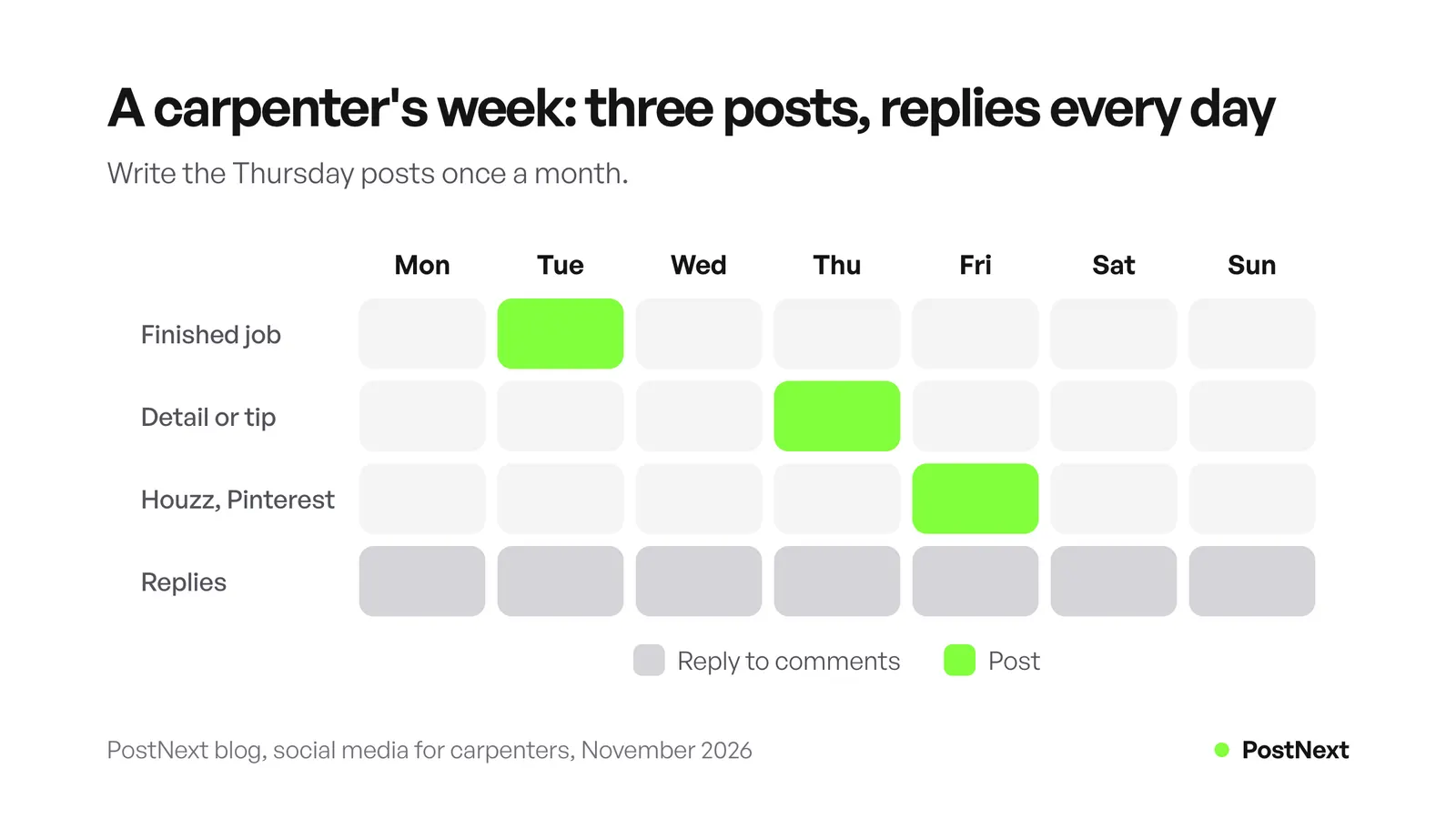
A job takes days or weeks, so plan posts from the photos you already have. One kitchen gives you a before-and-after, two detail shots, an install clip and a review. That covers three weeks.
| Day | Post | Channel | Material |
|---|---|---|---|
| Tuesday | Finished job: wide shot plus one detail | Facebook, Instagram, Google | Last week’s finished photos |
| Thursday | Detail, process clip, material or common question | Instagram, Facebook | Shop and install photos |
| Friday | One Houzz project or a few Pins, when a job is complete | Houzz, Pinterest | The full set from one job |
| Every day | Reply to comments, messages and new reviews | All | Ten minutes on your phone |
A sample week for a one- to five-person shop. Move the days to fit your schedule; keep the same rhythm every week.
Write the Thursday posts once a month. Tips and common questions do not depend on this week’s job, so you can write four in one sitting and schedule them. Then each week you only add the finished-job post on Tuesday.
How should carpenters handle reviews and messages?
Reply to every review and message within a day. BrightLocal’s 2026 survey found 89% of consumers expect owners to respond to reviews, and 80% are likely to use a business that responds to all of them. A vendor survey of 2,000 homeowners by Scorpion found 88% expect a response within 24 hours. A fast reply tells the next client you answer your phone.
Ask for reviews when the job is done and the client is pleased, with a direct link sent by text. BrightLocal found 78% of consumers were asked for a review in the past year, so asking is normal. Rating floors are rising: 68% will only use a business with 4 stars or more, up from 55% in 2025.
Write each reply by hand, because 50% of consumers are put off by templated replies. Name the piece you built and keep it short. For a bad review, apologise once, say what you will fix, and offer a call. The next client reads your reply more closely than the complaint.
Track where calls come from. Ask every new client “how did you hear about us?” and note Google, Houzz, Facebook or a builder next to the job. After three months, you will know which channel earns your time.
How does PostNext help a carpentry business?
PostNext lets a carpenter plan a month of job photos and tips in one sitting and publish each at its time. It posts to Instagram, TikTok, LinkedIn, X, YouTube, Threads and Bluesky from one calendar. Repeat this post sends a recurring post every 1 to 365 days, weeks or months, and the AI drafts captions in your brand’s voice.
The web app works in a phone browser, so you can add the finished photos from the van before you leave the client’s street. On Instagram, the comment inbox lets you read and reply to comments in one place. It does not cover direct messages.
PostNext does not post to Facebook, Pinterest or Google Business Profile today. Schedule those in Meta Business Suite, Pinterest and your Google profile, and use PostNext for Instagram, where designers and builders look at your detail shots. The free plan covers 1 channel, 10 posts and 10 AI credits a month, enough for two posts a week on one channel. The pricing page shows what the paid plans add. PostNext for carpenters shows a week of joinery posts on one calendar, with caption templates you can copy. For another trade’s version of this plan, see social media for plumbers.
Frequently Asked Questions
What should a carpenter post on social media?
Post before-and-after photos, close-ups of joints and finishes, short clips from the shop or the install, the timber before it is cut, real reviews with permission, and answers to common questions. Photograph four stages on every job: before, in the shop, install and finished.
Which social media is best for carpenters?
Facebook and a Google Business Profile matter most for local work; Pew’s 2026 survey found 70% of US adults use Facebook. Add Instagram to reach designers and builders, and Houzz and Pinterest if you build kitchens, built-ins or furniture that people plan months ahead.
Is Houzz worth it for carpenters?
A free Houzz business account lists you in the Houzz directory of professionals and lets you post project galleries. It suits kitchen, cabinet and built-in work. In Houzz’s 2026 Kitchen Trends Study, 43% of homeowners on kitchen projects of $50,000 or more hired a cabinetmaker.
Do I need a client’s permission to post photos of their home?
Ask every time, before the job starts, and get the answer in writing. Add one line to your quote. Then remove house numbers, family photos and the location data in the photo file. If a client says no, do not post the job.
How often should a carpentry business post?
Two posts a week on each channel: one finished job and one detail, process clip or tip. Buffer’s study of more than 100,000 users found accounts that posted in 20 or more of 26 weeks got 450% more engagement per post than those that posted in 4 weeks or fewer.
Should a cabinet maker set up Google Business Profile as a service-area business?
Only if clients never visit your shop. Google calls a business that serves customers at its address and also visits them a hybrid business: show the address and add your service areas. If you only work at clients’ homes, remove the address and list up to 20 service areas.
Do carpenters need video on social media?
No, but short clips help on Instagram. A 15-second clip of a drawer closing or a door being hung shows quality that a photo misses. Film upright, in good light, on your phone, and post your own clip, not a download with another app’s logo.
Sources
- Houzz, 2026 U.S. Houzz & Home Study: Renovation Trends, survey of registered Houzz users (10,176 who renovated in 2025), fielded January to March 2026, checked November 2026.
- Houzz, 2026 U.S. Houzz Kitchen Trends Study press release, 1,780 Houzz users, January 2026, checked November 2026.
- Houzz Pro Learn, How to create a free Houzz business account (July 2026) and How to upload project photos to your Houzz profile, checked November 2026.
- Harvard Joint Center for Housing Studies, Remodeling Spending Continues to Stagnate, October 22, 2026, checked November 2026.
- Pew Research Center, Social Media Fact Sheet, published October 2026, checked November 2026.
- BrightLocal, Local Consumer Review Survey 2026, 1,002 US adults, February 2026, checked November 2026.
- Scorpion, The state of home services marketing, survey of 2,000 homeowners, January 2026, checked November 2026. Scorpion sells marketing services.
- Google Business Profile Help, service-area and hybrid businesses, posts and reviews, checked November 2026.
- Pinterest Help, Get a business account and Schedule Pins, checked November 2026.
- Nextdoor, Nextdoor for small business, checked November 2026.
- Instagram, Instagram Ranking Explained, May 2023, checked November 2026.
- Apple Personal Safety User Guide, Manage location metadata in Photos, checked November 2026.
- US Federal Trade Commission, final rule banning fake reviews and testimonials, August 2024, checked November 2026.
- Buffer, Consistent Posting Study, January 2025 (buffer.com/resources, checked November 2026).
- PostNext, small business page, checked November 2026.