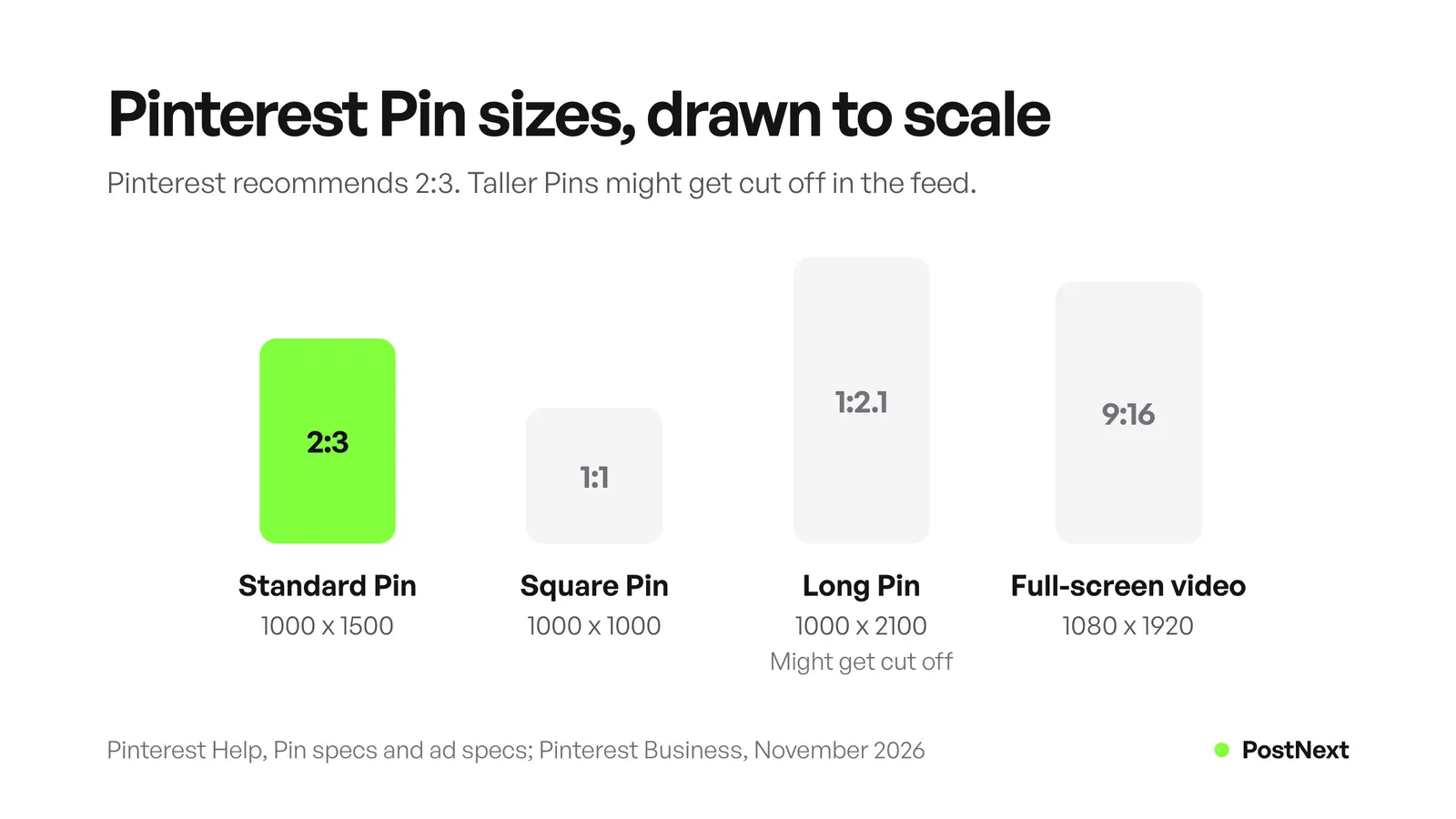
The standard Pinterest pin size is 1000 x 1500 pixels, a 2:3 vertical image. Pinterest recommends that ratio and warns that taller Pins might get cut off in the feed (checked November 2026). Upload a PNG or JPEG of up to 20 MB on the web. Video Pins run from 4 seconds to 5 minutes, and Pinterest suggests 9:16 at 1080 x 1920 for full-screen video.
Key Takeaways
- Image Pins: 2:3 at 1000 x 1500 pixels. Pins taller than 2:3 might get cut off in people’s feeds.
- Files: BMP, JPEG, PNG, TIFF or WEBP for Pins, up to 20 MB on the web. Pinterest converts every image to an 8-bit RGB JPEG.
- Video Pins: 4 seconds to 5 minutes, MP4 or M4V on the web. Pinterest recommends 9:16 (1080 x 1920) for full-screen video, with 1:2, 2:3, 3:4, 4:5 and 1:1 as other options.
- Text: a title of up to 100 characters, of which the first 40 may show in the feed. A description holds up to 800 characters and does not show in the feed.
- Ads: video ads run up to 15 minutes and 2 GB. Image ads take PNG or JPEG up to 20 MB on desktop and 32 MB in the app.
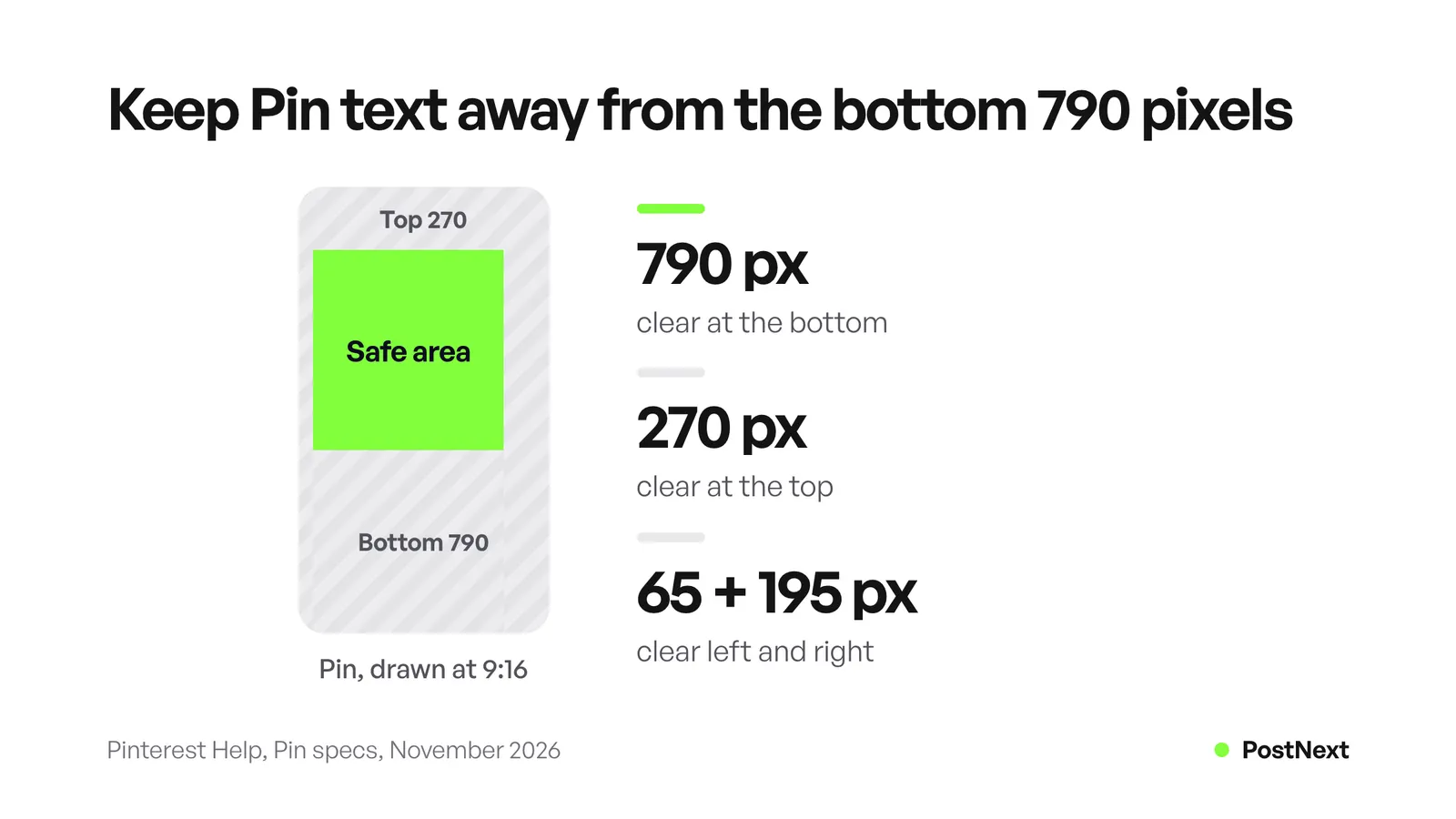
- Safe zone: Pinterest asks you to keep text 270 pixels from the top, 65 from the left, 195 from the right and 790 from the bottom.
Pinterest sizes at a glance
Every size below comes from Pinterest’s own pages, read on 21 November 2026: the Pin specs page, the ad specs page and the creative best practices page for businesses. Pinterest’s page for regular Pins lists file types and limits but no image ratio. The 2:3 advice appears on its ad and creative pages, so the table says which page each row comes from.
| Format | Size or ratio Pinterest gives | Length | File limit |
|---|---|---|---|
| Image Pin | 2:3, such as 1000 x 1500 (ad and creative pages) | Not applicable | 20 MB on web; BMP, JPEG, PNG, TIFF, WEBP |
| Video Pin | 9:16, 1080 x 1920 for full screen; also 1:2, 2:3, 3:4, 4:5, 1:1 | 4 seconds to 5 minutes | MP4, M4V on web; MOV too in the app |
| Standard image ad | 2:3, such as 1000 x 1500 | Not applicable | 20 MB desktop, 32 MB app; PNG or JPEG |
| Standard video ad | Between 1:2 and 1.91:1; 1:1 or vertical recommended | 4 seconds to 15 minutes | 2 GB; MP4, MOV, M4V |
| Carousel ad | 1:1 or 2:3, 2 to 5 images | Not applicable | 20 MB per image |
| Collections ad | Hero 1:1 or 2:3; up to 24 secondary images | Video hero 4 seconds to 15 minutes | 10 MB per image |
The title (100 characters) and description (800 characters) limits are the same for Pins and ads.
What is the best Pinterest pin size?
Use 1000 x 1500 pixels, a 2:3 vertical image. Pinterest’s ad specs page says: “We recommend using a 2:3 aspect ratio, or 1000 x 1500 pixels. Pins with an aspect ratio greater than 2:3 might get cut off in people’s feeds.” Its creative best practices page gives the same advice, because most people use Pinterest on phones.
Pinterest’s page for regular image Pins gives file types and limits but no ratio. The 2:3 advice for regular Pins comes from Pinterest’s page on Pin performance, which recommends “a 2:3 aspect ratio for images and videos”. So 2:3 is the shape Pinterest asks for on paid and unpaid Pins alike.
A larger file in the same shape also works. A 2000 x 3000 image is still 2:3 (worked out from the ratio, not a Pinterest number). Pinterest gives no maximum pixel size for a Pin, only the file limit, so a larger export is fine as long as it stays under 20 MB.
Can you use long or square Pins?
You can upload both. A long Pin is any image taller than 2:3, and Pinterest says those “might get cut off” in the feed. Pinterest gives no long Pin size. Many guides use 1000 x 2100, and PostNext’s resizer has that preset, with a note to put the key part near the top.
Square images (1:1) are accepted. Pinterest lists 1:1 as an option for carousel ads, collections ads and video Pins, but for a single image Pin it recommends only 2:3. A square Pin takes less height in the feed than a 2:3 Pin at the same width. Use it for products and simple graphics that are already square.
Horizontal images have no Pinterest ratio for image Pins. For video ads, Pinterest allows shapes up to 1.91:1 wide, and recommends square or vertical video instead.
What image size limits does Pinterest have?
Pinterest’s Pin specs page accepts BMP, JPEG, PNG, TIFF and WEBP images, up to 20 MB on the web. For the Android and iOS apps it says “1 GB recommended” and gives no maximum. Image ads accept only PNG or JPEG, up to 20 MB on desktop and 32 MB in the app. Pinterest converts every upload to an 8-bit RGB JPEG.
That conversion explains most color and sharpness problems. Pinterest’s ad specs page says all images become “standard 8-bit RGB JPEGs before being turned into Pins and ads”, and advises uploading PNG files in sRGB “to avoid any reduction in image quality”. It also says custom color profiles are not supported and may give slightly different colors on the published Pin.
One more change happens after upload. Pinterest adds a faint layer to image Pins with white or black backgrounds in the home feed:
- A white or near-white background gets a black layer at 4% opacity in light mode, and no change in dark mode.
- A black or near-black background gets a white layer at 10% opacity in dark mode, and no change in light mode.
Pinterest says this separates the Pin from the app background and applies to all image Pins and ads, but not to videos. If your brand color is pure white, expect it to look a little grey in light mode.
What is the Pinterest video size?
Pinterest’s Pin specs page recommends 9:16 at 1080 x 1920 pixels for full-screen video, with 1:2, 2:3, 3:4, 4:5 and 1:1 as other options. A video Pin runs from 4 seconds to 5 minutes, encoded in H.264 or H.265. On the web you can upload MP4 or M4V files, and the Android and iOS apps also accept MOV.
Pinterest’s pages point two ways on shape. The Pin specs page suggests 9:16 for full-screen video, while the Pin performance page recommends 2:3 for videos of 15 to 60 seconds. Both shapes are on the list of accepted ratios. Use 9:16 when the video is made for a full phone screen, and 2:3 when you want it to match the shape of your image Pins in the feed.
Video ads have wider limits than regular video Pins:
| Video format | Length | File limit | Shape |
|---|---|---|---|
| Video Pin | 4 seconds to 5 minutes | Not given | 9:16 recommended; 1:2, 2:3, 3:4, 4:5, 1:1 |
| Standard width video ad | 4 seconds to 15 minutes; 6 to 15 seconds recommended | 2 GB | Shorter than 1:2, taller than 1.91:1 |
| Max. width video ad | 4 seconds to 15 minutes | 2 GB | No taller than 1:1 |
A 9:16 video made for Instagram Reels or TikTok fits the Pinterest frame without a crop. Check the length first: our guide to TikTok video length covers TikTok’s own limits, and a Pinterest video Pin stops at 5 minutes.
Where should text go on a Pin?
Keep text and logos inside Pinterest’s safe zone: 270 pixels from the top, 65 from the left, 195 from the right and 790 from the bottom. Pinterest lists the same safe zone for image and video Pins on its Pin specs page. It does not say which frame size the pixels refer to, so treat them as a guide to how much the buttons and labels cover.
The words around the Pin have limits too:
- Title: up to 100 characters. Depending on the device, the first 40 may show in the feed. In Chinese, Japanese, Korean, Arabic and other double-byte languages, only the first 30 show.
- Textbox: up to 250 characters.
- Description: up to 800 characters. It does not appear in the home feed or search feed, but Pinterest uses it to decide who sees the Pin.
Put the main idea in the image itself and in the first 40 characters of the title. Those two are what people see before they tap.
How do Pinterest ad sizes differ from regular Pins?
Pinterest ads use the same 2:3 shape as regular Pins for single images, with a higher file limit in the app: 32 MB instead of 20 MB on desktop, and PNG or JPEG only. Video ads can run up to 15 minutes and 2 GB, against 5 minutes for a regular video Pin. Multi-image formats such as carousels and collections accept 1:1 or 2:3 images.
| Ad format | Images | Shape | File limit |
|---|---|---|---|
| Standard image ad | 1 | 2:3, such as 1000 x 1500 | 20 MB desktop, 32 MB app |
| Carousel ad | 2 to 5 | 1:1 or 2:3 | 20 MB per image |
| Collections ad | 1 hero, up to 24 secondary | 1:1 or 2:3; secondary images all one shape | 10 MB |
| Showcase ad | Title Pin and up to 4 cards | 2:3, 1000 x 1500 recommended | Up to 32 MB |
For collections ads, Pinterest recommends square secondary images and crops a non-square one at its center. Pinterest lists every format in the table as business accounts only, and several can also run as unpaid Pins to “generate organic impressions”, in Pinterest’s words.
How do you resize an image for Pinterest?
Crop the original to 2:3, then export it at 1000 x 1500 pixels or a larger size in the same shape. Save it as a PNG in sRGB, as Pinterest advises, and keep the file under 20 MB. Check the crop on a phone before you publish, because you cannot change the image of a scheduled Pin.
PostNext’s free Pinterest image resizer crops and resizes in your browser, so the photo is not uploaded to a server. It takes PNG, JPG or WebP files up to 10 MB. It has five presets. They are standard Pin (1000 x 1500), long Pin (1000 x 2100), square Pin (1000 x 1000), profile picture (165 x 165) and board cover (600 x 600). It saves PNG files without loss and JPG files at 92% quality.
Pinterest’s help pages read for this guide give no size for the profile picture or the board cover. The 165 x 165 and 600 x 600 presets are the sizes most guides use, so treat them as a starting point and check how the result looks on your profile.
If the Pin shows a product, the picture does most of the selling. Clean product photos on a plain background make a Pin easy to read at feed size, as long as the background is not pure white, for the reason above.
Can PostNext schedule Pins?
Not yet. Pinterest is coming soon to PostNext, and PostNext does not post to Pinterest today. Pinterest has its own scheduler: with a business account you can schedule a standard Pin up to 30 days ahead, one at a time, with up to 10 Pins waiting. After scheduling you can change the date, title, board, description and link, but not the image or video.
An older Pinterest page still says two weeks ahead, so the 30-day figure comes from the newer article on scheduling Pins (checked November 2026). Tailwind also schedules Pins, and PostNext’s Tailwind comparison shows that the two tools post to different networks.
PostNext posts today to X, Instagram, LinkedIn, TikTok, YouTube, Threads and Bluesky. Add the picture you pinned and tick the networks, and Instagram, Threads and Bluesky each get their own copy of the text and hashtags. The Pinterest page on PostNext shows the steps for Pinterest’s own scheduler and a form to hear when Pinterest is ready.
One size detail matters if you reuse Pins on Instagram. A 2:3 Pin is taller than 4:5, the tallest shape Meta’s Instagram publishing API accepts, so PostNext’s composer asks you to crop it before scheduling it to Instagram. Crop the Pin to 4:5, such as 1080 x 1350, for the Instagram copy. Our guide to Instagram post size explains that limit, and the Facebook post size guide shows the same 4:5 shape works in the Facebook feed. The image limits for X, LinkedIn, Threads and Bluesky are in PostNext’s social media image sizes table.
Frequently Asked Questions
What size is a Pinterest pin?
1000 x 1500 pixels, a 2:3 vertical image. Pinterest recommends that ratio and says Pins taller than 2:3 might get cut off in people’s feeds. A larger image in the same 2:3 shape also works.
What is the best Pinterest image size?
2:3 at 1000 x 1500 pixels, saved as a PNG in sRGB and under 20 MB on the web. Pinterest converts every image to an 8-bit RGB JPEG, and it says uploading PNG in sRGB avoids a drop in quality.
What size should a Pinterest video be?
9:16 at 1080 x 1920 pixels for full-screen video, according to Pinterest’s Pin specs page. It also accepts 1:2, 2:3, 3:4, 4:5 and 1:1. Use MP4 or M4V on the web, encoded in H.264 or H.265.
How long can a Pinterest video be?
A video Pin runs from 4 seconds to 5 minutes. Video ads can run from 4 seconds to 15 minutes, and Pinterest recommends 6 to 15 seconds for ads.
Can I post square images on Pinterest?
Yes. Pinterest accepts square images, and lists 1:1 as an option for carousel ads, collections ads and video Pins. For a single image Pin it recommends 2:3, which takes more height in the feed.
How long can a Pinterest title be?
Up to 100 characters. Depending on the device, only the first 40 may show in the feed, or 30 in double-byte languages such as Japanese. Descriptions hold up to 800 characters and do not show in the feed.
Can PostNext post to Pinterest?
Not yet. Pinterest is coming soon to PostNext. Today PostNext posts to X, Instagram, LinkedIn, TikTok, YouTube, Threads and Bluesky. For Pinterest, its own scheduler handles Pins up to 30 days ahead from a business account.
Sources
- Pinterest Help, Review Pin specs (checked November 2026)
- Pinterest Help, Review ad specs (checked November 2026)
- Pinterest Help, Pin performance and distribution (checked November 2026)
- Pinterest Help, Schedule Pins (checked November 2026)
- Pinterest Business, Creative best practices (checked November 2026)
- Meta for Developers, Instagram API: IG User Media reference, image ratio limits (checked October 2026)
- PostNext, postnext.io/channels/pinterest and postnext.io/tools/pinterest-image-resizer (checked November 2026)