
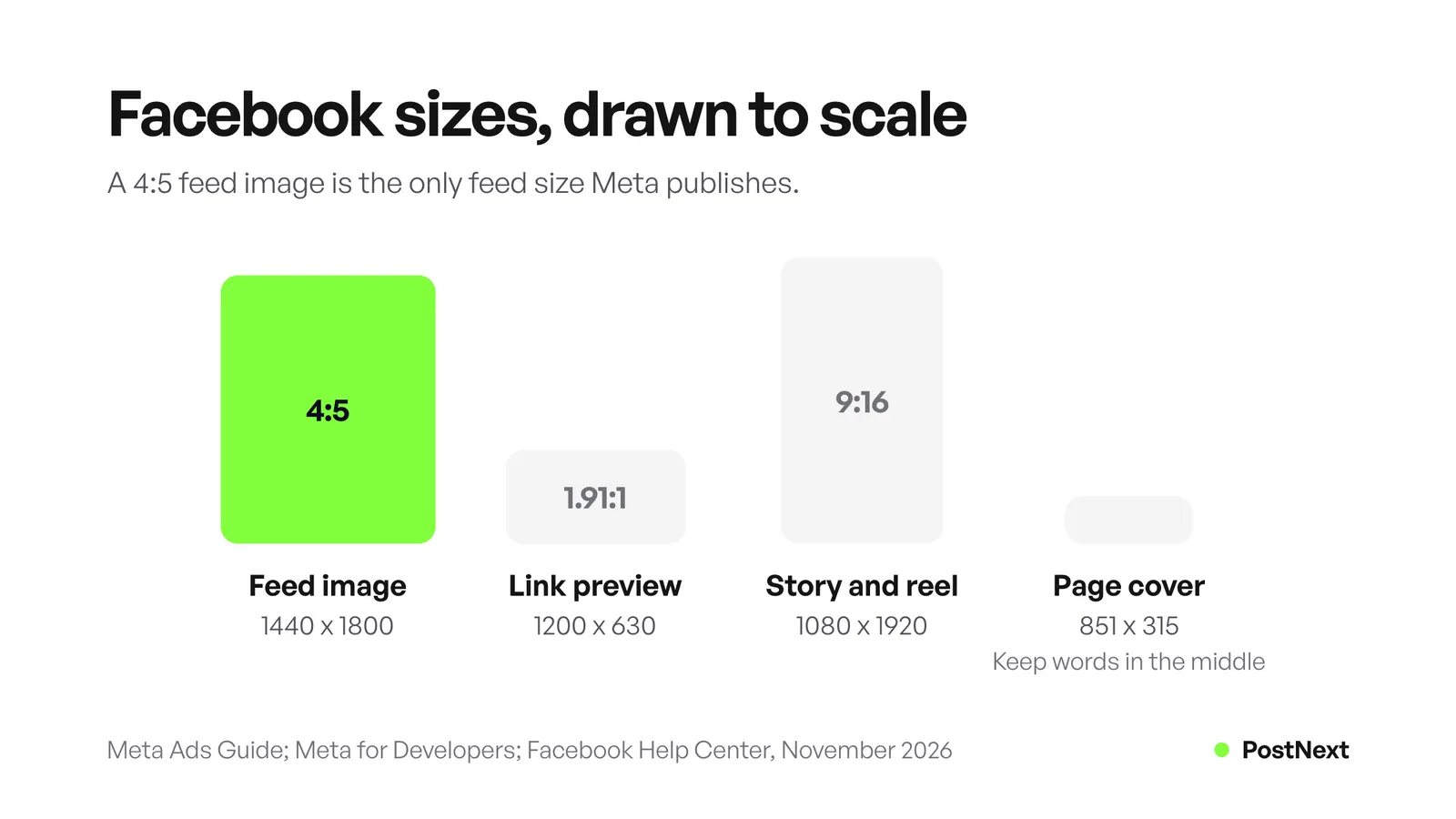
The best Facebook post size is a 4:5 image at 1440 x 1800 pixels, the feed size in Meta’s Ads Guide (checked November 2026). Meta publishes no separate size for unpaid photo posts, so the same shape works for both. Link previews use at least 1200 x 630, stories and reels use 1080 x 1920 (9:16), and a Page cover loads fastest at 851 x 315.
Key Takeaways
- Feed photos: 4:5 at 1440 x 1800 pixels is the only feed image size Meta publishes. The minimum is 600 pixels wide and 750 pixels tall.
- Link previews: at least 1200 x 630 pixels, close to 1.91:1, with a file of up to 8 MB. Below 600 x 315, the preview shrinks to a small image.
- Stories and reels: 9:16 at 1080 x 1920 pixels. The minimum is 540 x 960.
- Reel length: in the Facebook app a reel must be at least 3 seconds long and has no maximum. Apps that publish through Meta’s API are limited to 3 to 90 seconds.
- Page cover: 851 x 315 pixels as an sRGB JPG under 100 KB loads fastest. Phones show it at about 2.4:1, so keep words in the middle.
- File types: Meta’s help center recommends JPEG, BMP, PNG, GIF or TIFF files under 15 MB, and PNG files under 1 MB.
Facebook sizes at a glance
Every size below comes from Meta’s own pages, read on 21 November 2026: the Facebook Help Center, the Ads Guide, and Meta’s developer documentation for Pages, reels, stories and link sharing. Where a row says “no size given”, Meta’s page states no pixel size, and this guide does not invent one.
| Format | Size Meta gives | Ratio | File limit |
|---|---|---|---|
| Feed image (Ads Guide) | 1440 x 1800 recommended; at least 600 x 750 | 4:5 | 30 MB, JPG or PNG |
| Photo uploaded to a post | No size given; Facebook resizes it | Any | Under 15 MB recommended; PNG under 1 MB |
| Link preview (og:image) | At least 1200 x 630; 600 x 315 for a large preview; 200 x 200 minimum | About 1.91:1 | 8 MB |
| Story (Page Stories API) | 1080 x 1920 recommended; at least 540 x 960 | 9:16 | Photo 10 MB; video up to 60 seconds |
| Story ad | 1440 x 2560 | 9:16 | 30 MB image, 4 GB video |
| Reel | 1080 x 1920 recommended; at least 540 x 960 | 9:16 | MP4 recommended |
| Page cover photo | 851 x 315 loads fastest; at least 400 x 150 | 2.4:1 on phones | Under 100 KB for the fastest load |
| Profile cover photo | At least 720 pixels wide | Not given | Not given |
| Page profile picture | 320 x 320 for best quality | 1:1, shown as a circle | Not given |
The rows for ads come from the Ads Guide. They are the only Meta numbers for feed and story images, which is why many guides use them for unpaid posts too.
What size is a Facebook post?
The Facebook post size to use is a 4:5 image at 1440 x 1800 pixels. Meta’s Ads Guide gives that size for feed images, with a minimum of 600 pixels wide, 750 pixels tall, and a 3% tolerance on the ratio. For unpaid photo posts, Meta publishes no pixel size at all. Its developer page says Facebook resizes uploaded images to several sizes for display, so the shape matters more than the exact pixel count.
A 1080 x 1350 image has the same 4:5 shape at a smaller size. That number is worked out from the ratio, not taken from a Meta page. One 4:5 file works on both networks: 4:5 is also the tallest shape Meta’s Instagram publishing API accepts, as our guide to Instagram post size explains.
Do square and landscape photos work on Facebook?
Yes. Facebook accepts them and resizes them like any other upload, but Meta gives no pixel size or crop rule for them. At the same width, a 4:5 image takes more height in a phone feed. Use landscape when the subject is wide, such as a group photo.
Which file types does Facebook accept?
Meta’s help center recommends JPEG, BMP, PNG, GIF or TIFF files, and photos under 15 MB. It adds that PNG files larger than 1 MB may appear pixelated, so save photos as JPG and keep PNG for logos and graphics with text. It also says that editing a photo in another app before uploading can make the upload fail, and suggests trying the original file.
Apps that post to a Page through Meta’s Graph API have a lower cap: 4 MB per photo, in the same five formats, with the same advice to keep PNG files under 1 MB.
What size is a Facebook link preview image?
Facebook takes the preview image from the og:image tag of the page you link to. Meta’s developer page asks for at least 1200 x 630 pixels for the best display on high-resolution screens, and at least 600 x 315 for a large preview. The ratio should stay close to 1.91:1, the file must not exceed 8 MB, and the smallest image Meta allows is 200 x 200.
An image smaller than 600 x 315 still appears, but as a much smaller picture next to the link.
Two details from the same page save time when a preview looks wrong:
- Facebook caches the image by its URL. If you replace the image, give the new file a new URL, or Facebook keeps showing the old one.
- The first person to share a new link may see no image, because the crawler has not fetched it yet. Run the URL through Meta’s Sharing Debugger first, or add the og:image:width and og:image:height tags so Facebook can show the image at once.
What is the Facebook cover photo size?
Meta’s help page says a Page cover photo loads fastest as an sRGB JPG that is 851 pixels wide, 315 pixels tall and under 100 KB. The minimum is 400 x 150 pixels. On phones the cover shows at a 2.4:1 ratio, and the profile picture overlaps it by about 40 pixels. For a personal profile, Meta asks for a cover at least 720 pixels wide.
The same help page describes the computer view as left aligned, full bleed and 16:9. That shape does not match the 851 x 315 file, and Meta does not explain the difference. Keep words and faces in the middle: the 2.4:1 phone view trims the sides, and the profile picture covers part of the left side.
Many size guides still print 820 x 312 as the cover size. That figure is not on Meta’s help page today, so this guide uses 851 x 315.
If the cover has a logo or words, Meta suggests a PNG file for a better result. For a local service business, the cover is a good place for your service area and phone number; our guides to social media for plumbers, electricians and painters cover what else the Page needs.
What size is a Facebook profile picture?
For a Page, Meta recommends 320 x 320 pixels for best quality. The picture is cropped to a circle and displays at 176 x 176 pixels on computers, 196 x 196 on smartphones and 36 x 36 on most feature phones. Keep the logo or face in the center so the circle does not cut it.
What about group and event covers?
Meta’s help pages give no pixel size for group or event covers, and size guides disagree. Upload a large landscape image and move it in Facebook’s crop frame until nothing important sits at an edge.
What size is a Facebook story?
A Facebook story uses a 9:16 vertical frame. Meta’s Page Stories API documentation recommends 1080 x 1920 pixels for video, with a minimum of 540 x 960, at 24 to 60 frames per second. Photo stories can be JPEG, BMP, PNG, GIF or TIFF files up to 10 MB. A video story cannot be longer than 60 seconds.
In Meta Business Suite, one story can hold up to 10 photos or videos, and the editor lets you crop, trim, add text and add a link. Meta’s Ads Guide sets story ads at 1440 x 2560 pixels, the same 9:16 shape at a higher resolution, with images up to 30 MB and videos up to 4 GB and 3 minutes. Once a story or post is queued there, our guide to Facebook scheduled posts shows where to find, edit and reschedule it.
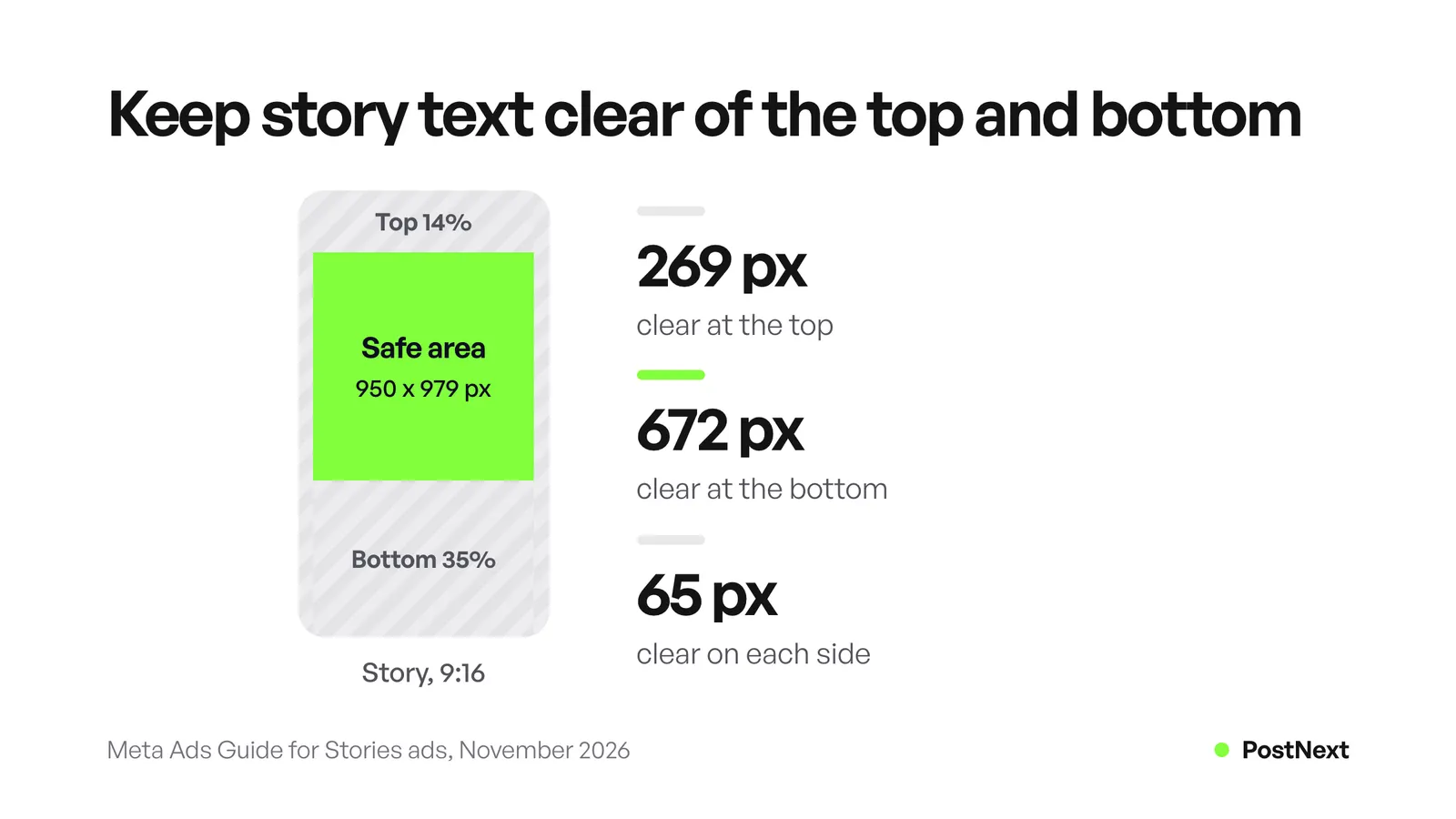
The Ads Guide also gives the safe zone: leave about 14% of the top, 35% of the bottom and 6% of each side free of text and logos, so the buttons and the profile name do not cover them. On a 1080 x 1920 story that is about 269 pixels at the top, 672 at the bottom and 65 on each side (worked out from Meta’s percentages). The rule is written for ads, and it is a good guide for unpaid stories too. Instagram stories use the same frame, covered in our guide to Instagram Story size.
What size is a Facebook reel?
Make reels 9:16 at 1080 x 1920 pixels. Meta’s reels publishing guide recommends that size, with a minimum of 540 x 960, 24 to 60 frames per second, and an MP4 file. Since 2025, Facebook treats every video as a reel, and Meta’s creator page says a reel can be vertical or horizontal. A vertical 9:16 reel fills the phone screen.
The developer guide lists the rest of the file settings for reels published through the API:
| Setting | What Meta asks for |
|---|---|
| File type | MP4 (recommended) |
| Frame rate | 24 to 60 frames per second, fixed |
| Video codec | H.264 or H.265 (VP9 and AV1 also supported) |
| Video settings | 4:2:0 chroma subsampling, closed GOP of 2 to 5 seconds, progressive scan |
| Audio | AAC Low Complexity, 48 kHz, stereo, 128 kbps or more |
An Instagram Reel uses the same 9:16 frame, so one export can serve both. Instagram’s safe zones and cover sizes are in our guide to Instagram Reel size.
How long can a Facebook reel be?
In the Facebook app, a reel must be at least 3 seconds long and has no maximum length, according to Meta’s creator page for reels (checked November 2026). Meta announced on 17 June 2025 that all videos posted to Facebook would become reels with no length or format limits, and rolled the change out over the following months.
The limit is lower for apps that publish through Meta’s API. The reels publishing guide still lists 3 to 90 seconds, and a reel published as a story on a Page cannot exceed 60 seconds. So the answer depends on how you post:
| How you post | Length |
|---|---|
| Facebook app or website | At least 3 seconds, no maximum |
| An app using Meta’s reels API | 3 to 90 seconds |
| A reel shared as a Page story through the API | Up to 60 seconds |
| Feed video ad (Ads Guide) | 1 second to 241 minutes |
| Story video ad (Ads Guide) | 1 second to 3 minutes |
Meta’s announcement also gave advice on length. It said shorter reels of 10 to 30 seconds drive reach, and longer reels, from 30 seconds to 3 minutes and beyond, drive engagement and help build community. Meta gave no numbers behind that advice, so test both lengths on your own Page.
Which Facebook size should you use for each kind of post?
Pick the shape by where the post appears. A photo post in the feed gets 4:5. A link post takes its image from the linked page, so fix the og:image there. Stories and reels get 9:16. The Page cover and profile picture have their own sizes and are cropped, so keep the subject in the middle.
If you run video ads as well as unpaid posts, the Ads Guide sizes in the first table are the specs Meta lists for them. When you publish matters as much as the size. The PostNext lesson on the best time to post on Facebook shows how to find your Page’s own busy hours.
How do you resize an image for Facebook?
Crop the original to the ratio you need, then export it at the pixel size in the table. Save photos as sRGB JPG files and keep logos and text graphics as PNG files under 1 MB. Stay under the file limits: 15 MB for a photo upload, 8 MB for a link image, 10 MB for a story photo posted through the API.
Start from a large original and size it down. Facebook resizes every upload, so a small file made larger in an editor looks soft after Facebook compresses it. For the Page cover, check the result on a phone after you save it, because the 2.4:1 phone view trims the sides.
PostNext has no Facebook resizer. Its free Instagram photo resizer crops to 1080 x 1350 (4:5) and 1080 x 1920 (9:16) in your browser, without uploading the photo to a server. Those are the shapes a Facebook feed photo and a Facebook story use, so the same files work on Facebook.
Can PostNext schedule Facebook posts?
Not yet. Facebook is coming soon to PostNext, and PostNext does not post to Facebook today. Meta Business Suite is Meta’s own tool for this: it schedules Page posts, reels and stories from 20 minutes to 29 days ahead, on the web and in its app. You need Facebook or Task access to the Page.
PostNext posts today to X, Instagram, LinkedIn, TikTok, YouTube, Threads and Bluesky. You write a post once, and each network gets its own copy of the text, media and hashtags, so a 4:5 photo made for Facebook can go out on Instagram and LinkedIn from the same calendar. The Facebook post itself still goes through Meta Business Suite. PostNext’s social media image sizes table lists the shapes the other 7 networks take.
For the words, PostNext’s free Facebook post formatter tidies a caption with line breaks, and you paste it into Meta Business Suite. The Facebook scheduling page lists Meta’s limits, the steps to schedule a Page post in Business Suite, and a form to hear when Facebook is ready in PostNext. If Pinterest is your other picture channel, our guide to Pinterest pin size covers its 2:3 format.
Frequently Asked Questions
What is the best size for a Facebook post?
A 4:5 image at 1440 x 1800 pixels, the feed size in Meta’s Ads Guide. Meta publishes no separate size for unpaid photo posts. A 1080 x 1350 image has the same shape and also works on Instagram. For a link post, the preview image should be at least 1200 x 630.
What is the Facebook cover photo size?
A Page cover loads fastest as an sRGB JPG that is 851 x 315 pixels and under 100 KB, according to Meta’s help page. The minimum is 400 x 150. Phones show it at about 2.4:1, so keep text in the middle. A personal profile cover must be at least 720 pixels wide.
What size is a Facebook story?
9:16 at 1080 x 1920 pixels, with a minimum of 540 x 960. Story ads use 1440 x 2560. Keep about 14% of the top, 35% of the bottom and 6% of each side free of text, so the buttons do not cover it.
What size is a Facebook reel?
9:16 at 1080 x 1920 pixels, as an MP4 at 24 to 60 frames per second. The minimum is 540 x 960. Facebook also accepts horizontal reels, but a vertical reel fills the phone screen.
How long can a Facebook reel be?
In the Facebook app, at least 3 seconds and with no maximum, since Meta removed the length limit in 2025. Apps that publish through Meta’s reels API are limited to 3 to 90 seconds, and a reel shared as a Page story through the API to 60 seconds.
What is the Facebook link preview image size?
At least 1200 x 630 pixels, close to a 1.91:1 ratio, with a file of up to 8 MB. Facebook reads it from the og:image tag of the linked page. Below 600 x 315, the preview appears as a small image beside the link.
Can PostNext post to Facebook?
Not yet. Facebook is coming soon to PostNext. Today PostNext posts to X, Instagram, LinkedIn, TikTok, YouTube, Threads and Bluesky. For Facebook, Meta Business Suite schedules Page posts, reels and stories up to 29 days ahead.
Sources
- Facebook Help Center, Facebook Page profile picture and cover photo dimensions (checked November 2026)
- Facebook Help Center, Add or change your cover photo on Facebook (checked November 2026)
- Facebook Help Center, Photos and videos, photo formats and upload size (checked November 2026)
- Meta Ads Guide, Image ads in Facebook Feed (checked November 2026)
- Meta Ads Guide, Image ads in Facebook Stories and video ads in Facebook Stories (checked November 2026)
- Meta Ads Guide, Video ads in Facebook Feed (checked November 2026)
- Meta for Developers, Images in link shares (updated 30 June 2026, checked November 2026)
- Meta for Developers, Reels publishing guide (checked November 2026)
- Meta for Developers, Page Stories API (checked November 2026)
- Meta for Developers, Graph API: Page photos (checked November 2026)
- Meta Newsroom, Making it easier to create videos on Facebook, 17 June 2025 (checked November 2026)
- Meta for Creators, Reels requirements and Making it easier to create videos on Facebook (checked November 2026)
- Meta Business Help Center, Create and manage stories in Meta Business Suite (checked November 2026)
- PostNext, postnext.io/channels/facebook and postnext.io/tools/instagram-photo-resizer (checked November 2026)