
The best Instagram Story ideas start with a goal: get replies, make a sale, show the work behind the business, or bring your customers in. Each goal has a sticker that does the job, such as a poll for replies or a link for sales. Below are 35 ideas grouped by goal, each with its sticker and a note on which ones you can plan ahead.
Key Takeaways
- Pick the goal first. Replies, sales, behind the scenes, community and plan-ahead Stories each need a different format.
- The sticker does the work. Polls, quizzes, questions and the emoji slider ask for a tap. Link and countdown stickers move people to a page or a date.
- A Story lasts 24 hours. Add the ones you want to keep to a Highlight on your profile.
- Stickers are made in the app. Instagram’s publishing API does not publish link, poll or location stickers, so no scheduler can add them.
- Plain image Stories can be planned. Tips, menus, opening hours and teasers work as images you schedule ahead.
- Read the replies and navigation. Taps forward, taps back and exits show which slide loses people.
What should I post on my Instagram Story?
Post Stories that serve one goal at a time. A poll or question gets replies, a link or countdown sticker supports a sale, a layout or short clip shows your work, and a reshare or Add Yours sticker brings customers in. Plain image Stories, such as a tip card or your opening hours, fill the gaps and can be planned a week ahead.
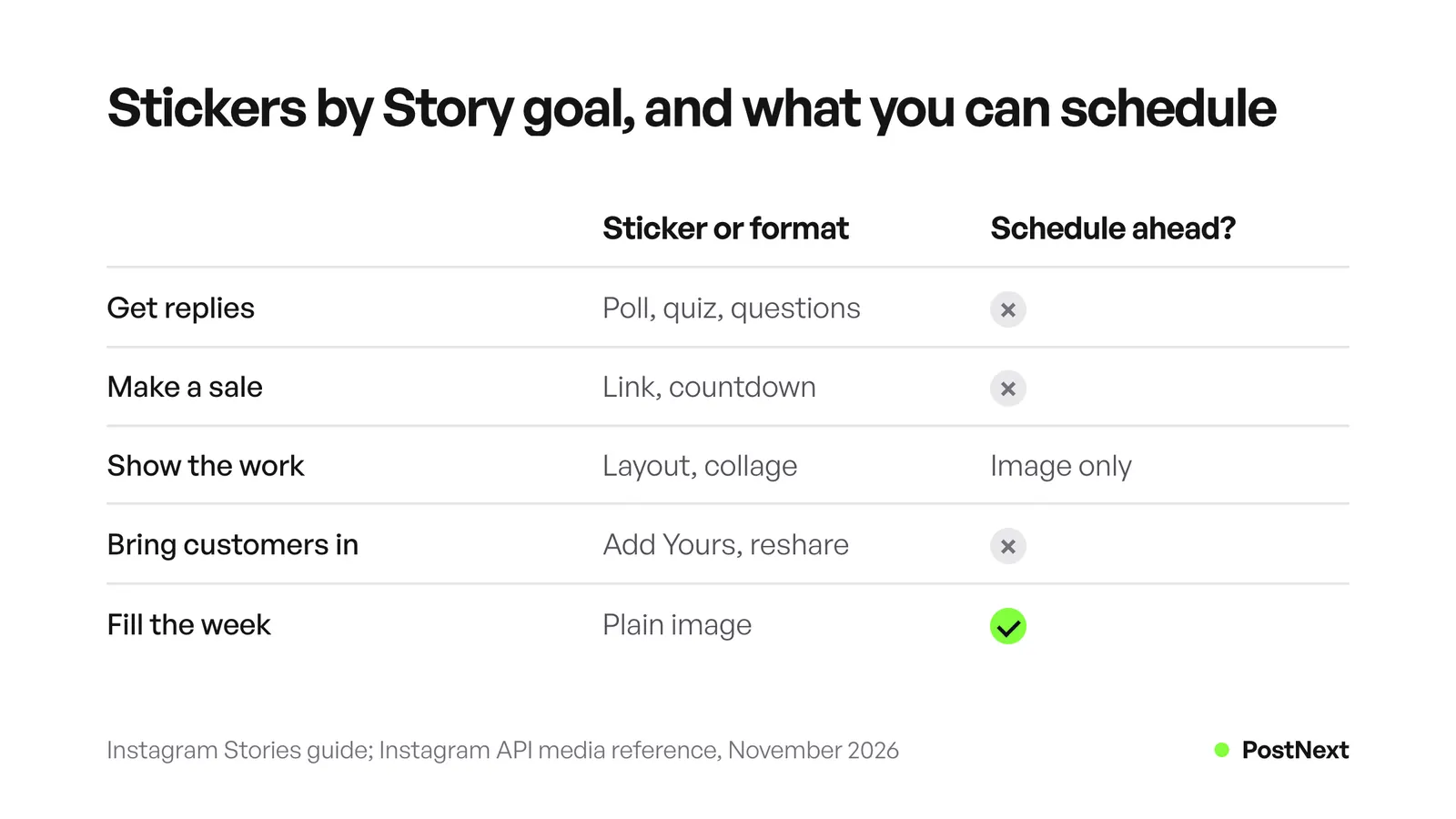
| Goal | Sticker or format to use | Plan ahead or post live? |
|---|---|---|
| Get replies | Poll, quiz, questions, emoji slider | Post from the Instagram app |
| Make a sale | Link, countdown | Post from the Instagram app |
| Show the work | Layout, collage, short video, music | Post from the app, or schedule the image version |
| Bring customers in | Add Yours, mentions, reshares | Post from the Instagram app |
| Fill the week | Plain image with text | Schedule ahead as an image Story |
The last column matters for planning. Instagram’s publishing API does not support link, poll or location stickers (developers.facebook.com, November 2026). Any Story with an interactive sticker has to be made in the Instagram app. That is why the ideas below say which sticker each one needs.
What are Instagram Story ideas that get replies?
Reply ideas use a sticker that asks for one tap or one short answer. A poll gives two answer options, a quiz gives four answer choices with one correct answer, and the questions sticker collects private answers you can share later without the sender’s name. These Stories also teach you what your followers want, so use the answers to plan your next posts.
- “This or that?” poll. Two products, two colours or two names. Use the poll sticker and share the result the next day.
- Guess the price quiz. Show a product and add a quiz with four prices. The quiz sticker marks one answer as correct.
- Ask me anything. Use the questions sticker. Answer the best questions in follow-up Stories, one per slide.
- Rate it with the emoji slider. “How much do you love this new colour?” Instagram describes the slider as a way to measure feeling.
- Which should we make next? A poll between two product ideas or two blog topics.
- Myth or fact quiz. One common belief about your field, with the fact as the correct answer.
- Fill in the blank. “My Monday is not complete without ___.” Use the questions sticker.
- Help me choose. A poll on a real decision, such as packaging or a shop window display. People like to see their vote used.
By default, anyone who can see your Story can reply to it with a direct message (about.instagram.com, November 2026). Those replies land in your inbox, and CreatorFlow has a guide on how to get more Story replies and answer them.
What are Instagram Story ideas for business sales?
Sales Stories point to one product and one action. The link sticker sends people to a web page, and the countdown sticker builds interest in a launch date. Followers can subscribe to a countdown and get a notification when time is up. Keep one product per Story and put the price or offer in the image, so the sticker only has to carry the tap.
- New product, one photo, one link. A clear photo, the price in large text and a link sticker to the product page.
- Launch countdown. A countdown sticker set to the launch date and time. Post it a few days before.
- Back in stock. A photo of the restocked item with a link sticker. Mention who asked for it.
- How to use it. A 3-slide demo: the problem, the product in use, the result. Add the link on the last slide.
- Last day of an offer. One slide, the end time in large text and a link to the offer.
- Customer question as a sale. Share a real question about the product, answer it, then add the link.
- Gift guide. One product per slide for a season or a budget, each with its own link.
Most accounts can use the link sticker. Instagram’s announcement says new accounts and accounts that repeatedly share things like hate speech and misinformation do not get access (about.instagram.com, November 2026). Our guide on how to add a link to an Instagram Story shows the steps and what to do if the sticker is missing.
What are behind-the-scenes Instagram Story ideas?
Behind-the-scenes Stories show the work customers do not see: making, packing, planning and fixing. They need no sticker, so they are the easiest to post every day. The layout tool puts up to 6 photos in one frame, and the collage tool turns 5 or more photos into a moving collage. A short clip with music adds mood, but the music sticker is not available to every account.
- Packing today’s orders. One clip per order, or a layout of four photos.
- From sketch to finished product. Three slides: the idea, the work in progress, the result.
- Desk or workshop tour. Point the camera at each tool and name it in text.
- Meet the team. One person per slide with one line about their job.
- A mistake we fixed. Show what went wrong and the fix. Honest Stories build trust.
- Before and after. Use a layout with two panels from the same angle.
- The week in photos. A collage of the week’s best photos on Friday.
If you put several photos in one Story, the PostNext guide on how to put multiple pictures on an Instagram Story covers layout, the photo sticker and collage step by step. For short behind-the-scenes clips that deserve a longer life, our Instagram Reel ideas use the same formats.
What are Instagram Story ideas for community?
Community Stories put your customers on screen. Reshare a post that mentions you, start an Add Yours prompt that others can join, or mention a partner business. Add Yours turns one prompt into a chain of Stories that anyone can add to. This works well for small businesses, because each customer Story shows your product to that customer’s own followers.
- Customer photo of the week. Reshare a post that tagged you and thank the person by name.
- Add Yours prompt. “Show us where you use our mug.” Each answer joins the chain.
- Shout out a local partner. Mention a nearby business you work with. Ask them to share it.
- Review screenshot. A real review from a customer, with their permission.
- Event recap. Photos from a market, workshop or meetup, with the people who came.
- Answer a comment. Take a comment from your last post and reply to it in a Story.
- Close Friends preview. Share an early look with your Close Friends list, such as your best customers. Instagram lets you choose who is on the list.
Keep the Stories you want new visitors to see. A Story disappears after 24 hours unless you add it to a Highlight on your profile (help.instagram.com, November 2026). Many businesses keep Highlights for reviews, FAQs and how-to Stories.
What are easy Instagram Story ideas you can plan ahead?
Plan-ahead Stories are plain images with the message written into the picture. They need no sticker, so you can design them in one sitting and schedule them for the week. Use them on busy days, so your profile always has a Story up. Design each one at 1080 x 1920 pixels and keep text away from the top and bottom edges.
- Tip of the day. One tip in large text on a brand colour background.
- This week’s menu, schedule or price list. One clear image, updated each week.
- Opening hours and holiday hours. Post on the day before a change.
- New post teaser. A crop of your new feed post with the words “New post on our profile”.
- Quote or customer line. One sentence from a review, with the customer’s first name if they agree.
- FAQ card. One common question and the short answer.
Our Instagram Story size guide gives the safe zone in pixels, so your text stays clear of the edges. If you also want to post a short video version, check how long an Instagram Story can be before you cut it.
Which Story ideas can you schedule?
You can schedule the plain image Stories. Ideas 30 to 35 work as scheduled image Stories, and so do the image versions of ideas 16 to 22. Ideas that need a poll, quiz, question, link, countdown or Add Yours sticker must be made in the Instagram app, because Instagram’s API documentation says publishing stickers is not supported.
PostNext schedules image Stories to Instagram through the official API, next to your feed posts, carousels and Reels on one calendar. Video Stories and Story stickers stay in the Instagram app (postnext.io, November 2026). You need an Instagram professional account, which means a Business or Creator account, and you can switch for free in the Instagram app. The PostNext Instagram scheduler page lists what it publishes and what stays in the app.
A practical week looks like this. Schedule two or three image Stories from ideas 30 to 35. Then post one sticker Story live each day, such as a poll on Monday and a countdown on Thursday. The PostNext lesson on whether you can schedule Instagram Stories compares Meta Business Suite and schedulers. Instagram’s own Stories guide now also describes a Schedule option in the three-dot menu of the Stories camera (about.instagram.com, November 2026). Our weekly Story plan shows a five-day example.
How do you know which Story ideas work?
Look at replies, link taps and navigation for each Story. Navigation counts taps forward, taps back, swipes to the next account’s Story and exits. A slide with many exits lost people. Instagram’s API keeps Story metrics for only 24 hours, so write the numbers down the same day.
- Replies show which questions and polls started a conversation. Instagram’s API does not count replies from users in Europe and Japan (developers.facebook.com, November 2026).
- Link taps show which sales Stories moved people to your page.
- Exits show the slide where people left. Move that idea later in the sequence, or cut it.
Compare one goal at a time. Run a poll Story each week for a month, then keep the question types that got the most replies. Instagram Insights covers any period within the past 90 days (help.instagram.com, November 2026).
Frequently Asked Questions
What are good Instagram Story ideas for business?
Start with polls and quizzes to get replies, product photos with a link sticker to make sales, and behind-the-scenes clips to show your work. Add customer reshares for trust and plain image Stories, such as tips or opening hours, for busy days.
What can I post on my Instagram Story every day?
Post one behind-the-scenes Story and one interactive Story each day. A packing clip or desk photo takes a minute. A poll or question sticker gives followers something to tap. Plain image Stories, such as a tip of the day, fill the gaps.
How many Instagram Stories should I post a day?
Instagram’s own Stories guide says there is no daily limit on Stories. Instagram gives no best number. Start with a few Stories on the days you post, then check exits in your insights and cut the slides people skip.
Can I schedule Instagram Stories with a poll or link?
Not with a scheduler. Instagram’s publishing API says publishing stickers, such as link, poll and location, is not supported, so those Stories must be made in the Instagram app. Schedulers can publish plain image Stories and add the interactive ones in the app on the day.
How long do Instagram Stories last?
A Story stays up for 24 hours, then it moves to your Stories Archive, which only you can see. Add a Story to a Highlight if you want it to stay on your profile after 24 hours.
What are Instagram Story ideas for small business owners with no time?
Plan a week of plain image Stories in one sitting: a tip, your hours, a new post teaser, a review and an FAQ card. Schedule them, then add one quick poll or behind-the-scenes clip from your phone each day.
Sources
- How to use Instagram Stories, about.instagram.com (November 2026): poll, quiz, questions, countdown, link, Add Yours and emoji slider stickers, layout up to 6 photos, collage from 5 or more photos, no daily limit, Archive and Highlights, the Schedule option in the Stories camera.
- Instagram Stories feature page, about.instagram.com (November 2026): replies by direct message, Close Friends, Highlights.
- Expanding sharing links in Stories to everyone, about.instagram.com (27 October 2021, read November 2026): who can use the link sticker.
- How long Instagram stories remain visible, help.instagram.com (November 2026): 24 hours, Highlights and Stories Archive.
- Tips for uploading, recording and editing your Instagram story, help.instagram.com (November 2026): the music sticker is not available to everyone.
- Instagram API, IG User Media, developers.facebook.com (November 2026): link, poll and location stickers cannot be published.
- Instagram API, IG Media Insights, developers.facebook.com (November 2026): Story metrics for 24 hours, navigation, replies and link taps.
- Instagram Insights, help.instagram.com (November 2026): insights for any period within the past 90 days.
- PostNext Instagram scheduler page, postnext.io/channels/instagram (November 2026): image Stories, video Stories and stickers stay in the app, professional account.