
Social media for hair salons works as a portfolio and a booking reminder. New clients look at your photos and reviews before they book: BrightLocal’s 2026 survey found 97% of US consumers read reviews for local businesses. Post finished work two or three times a week, ask every client for an honest review, and put a booking link everywhere. This PostNext guide shows what to post and where.
Key Takeaways
- Your work is the content: before-and-after photos, finished cuts and colour, and short care tips. Ask the client before you take the photo.
- Instagram and Facebook come first: 56% of US women use Instagram and 77% use Facebook (Pew, 2026). Keep a Google Business Profile with a booking link next to them.
- Make booking one tap: add a Book now button through your booking provider and up to 10 booking links on Google.
- Plan from your appointment book: gaps next week become posts this week.
- Reviews decide: 68% of consumers only use a business with 4 stars or more, and 47% skip a business with fewer than 20 reviews.
- Never pay for reviews: Google bans any incentive for a review. The FTC bans rewards for positive reviews only.
- Disclose free services: a creator who gets a free cut must say so in the post.
Does social media bring clients to a hair salon?
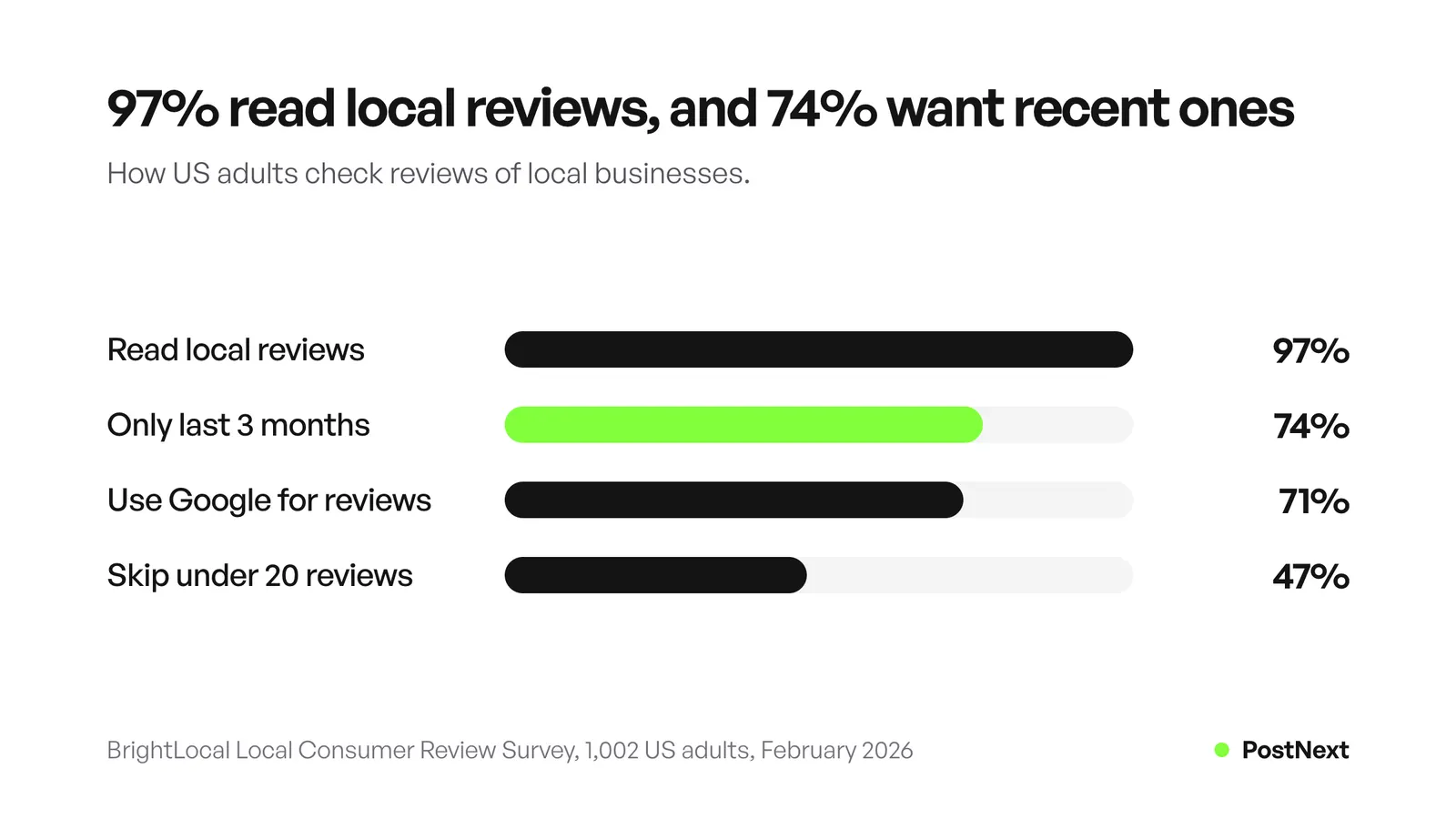
Social media brings clients to a salon as proof, more than as an advert. A new client hears your name or finds you on a map, then checks your photos, your reviews and how you answer people. BrightLocal’s 2026 survey of 1,002 US adults found 97% read reviews for local businesses, and the average person uses six review sites when choosing a business.
Hair is a trust purchase. A bad haircut lasts for weeks, so people look for proof that you can do the cut or colour they want, on hair like theirs. A feed of real clients answers that question better than any price list.
| Where clients check a salon | What they look for | Data |
|---|---|---|
| Reviews on Google and Facebook | Star rating, how recent, owner replies | 97% read local reviews; 71% use Google for reviews |
| Review count and age | Enough reviews, written lately | 47% skip a business with fewer than 20 reviews; 74% only care about reviews from the last three months |
| AI assistants | A short list of recommended salons | 45% used ChatGPT or other AI tools for local recommendations, up from 6% |
| Your Instagram or Facebook | Recent work, the salon, the team | 77% of US women use Facebook, 56% Instagram (Pew) |
| A photo with the review | Proof that the review is real | 36% name an appealing photo or video with a review as a factor they look for |
BrightLocal Local Consumer Review Survey 2026 (1,002 US adults, February 2026) and Pew Research Center, Americans’ Use of Social Media in 2026 (5,511 US adults), checked November 2026.
There is a fair argument against posting a lot. Some salon guides advise three or four posts a week. For a salon with two or three chairs, that is too many to keep up in a busy month, and an account that goes quiet looks worse than one that posts less. Two or three good posts a week, and a fast reply to every review, beat daily posting that stops in December.
Which social media platforms should a hair salon use?
Most hair salons should use Instagram and Facebook, plus a Google Business Profile with a booking link. Pew’s 2026 survey of 5,511 US adults found 70% use Facebook, 51% use Instagram and 37% use TikTok. Among women, the figures are 77%, 56% and 43%. Among adults aged 18 to 29, 79% use Instagram.
| Platform | Best job for a salon | Who is there (US adults, 2026) |
|---|---|---|
| Portfolio of cuts and colour, Reels of a transformation, booking button | 51% of adults; 56% of women; 79% of 18 to 29 | |
| Reviews, local groups, posts for older clients | 70% of adults; 77% of women | |
| Google Business Profile | Booking links, photos, reviews, weekly posts | Your booking links appear on Google Search and Maps |
| TikTok | Short videos of the process, for younger clients | 37% of adults; 43% of women; 65% of 18 to 29 |
| YouTube | How-to videos on styling at home | 84% of adults |
Pew Research Center, Americans’ Use of Social Media in 2026, survey January 30 to June 18, 2026; Google Business Profile Help. Checked November 2026.
Pick the two your clients use and keep them active. A salon whose clients are mostly over 40 should put Facebook first. A salon that does vivid colour for students should put Instagram and TikTok first. Your booking system already knows who your clients are: look at their ages before you choose.
How do clients book a salon from Instagram and Google?
Clients book from Instagram through a Book now action button, and from Google through booking links on your Business Profile. Both connect to the booking system you already use. On Google, you can add up to 10 links per category, including links to book an appointment, and set one as your preferred link.
On Instagram, the Book now button comes from your booking provider. The steps on several providers’ help pages are the same: switch to a business account, open Edit profile, choose Action buttons, pick Book now, then choose your booking provider and sign in. One provider notes that the button shows only in the Instagram app, not on the web. Another paused its Instagram button in January 2025. Check your provider’s help page, and keep a booking link in your bio as well.
A link in bio page for salons can hold that booking link next to your hours and the care products you sell. For the bio text itself, our list of Instagram bio ideas has examples written for salons.
On Google, open your Business Profile, choose Booking, select Add link and paste your booking page. Booking partners can also add their own links to your profile. You can hide those you do not use from the same screen, and the partner must remove a link within 5 business days of your request.
What should a hair salon post on social media?
Post your finished work, and post advice that helps clients look after their hair at home. A before-and-after of a colour correction shows skill in one look. A short tip, such as how to protect hair from pool water, gives people a reason to save and share. Neither needs a script or a studio.
Rotate these six post types:
- Before and after. Same angle, same light, one line on what you did. Ask the client first, and ask again before you show their face.
- The finished look. Front, side and back. This is the post a new client screenshots and brings to the appointment. Nail salons use the same post with close-ups of each set, as in social media for nail salons.
- The process. A short Reel of a balayage or a fade from start to finish. Speed it up and add the time it took.
- A care tip. One tip per post, from the seasonal plan below.
- The team. Each stylist, what they are best at, and when they work. New clients want to see who will cut their hair.
- A real review. A recent review as a post, with the client’s first name and their permission.
Make the photo a habit. Use one wall with good daylight, take the before photo while the client is in the gown, and the after photo before they stand up. Keep a short consent line on your booking form (“May we post photos of your hair?”) so you know who said yes before they sit down. For more formats, see our Instagram Reel ideas and the weekly plan of what to post for a business. A barbershop works the same way, and our guide to social media for barbers covers shop and barber accounts.
How do you plan salon posts around your chair time?
Plan posts from your appointment book. Your busy days give you the photos, and your empty slots tell you what to post. Each Monday, look at the next seven days: the gaps you want to fill become this week’s posts. A free Thursday afternoon becomes a post on Tuesday that shows a cut you could do in that slot.
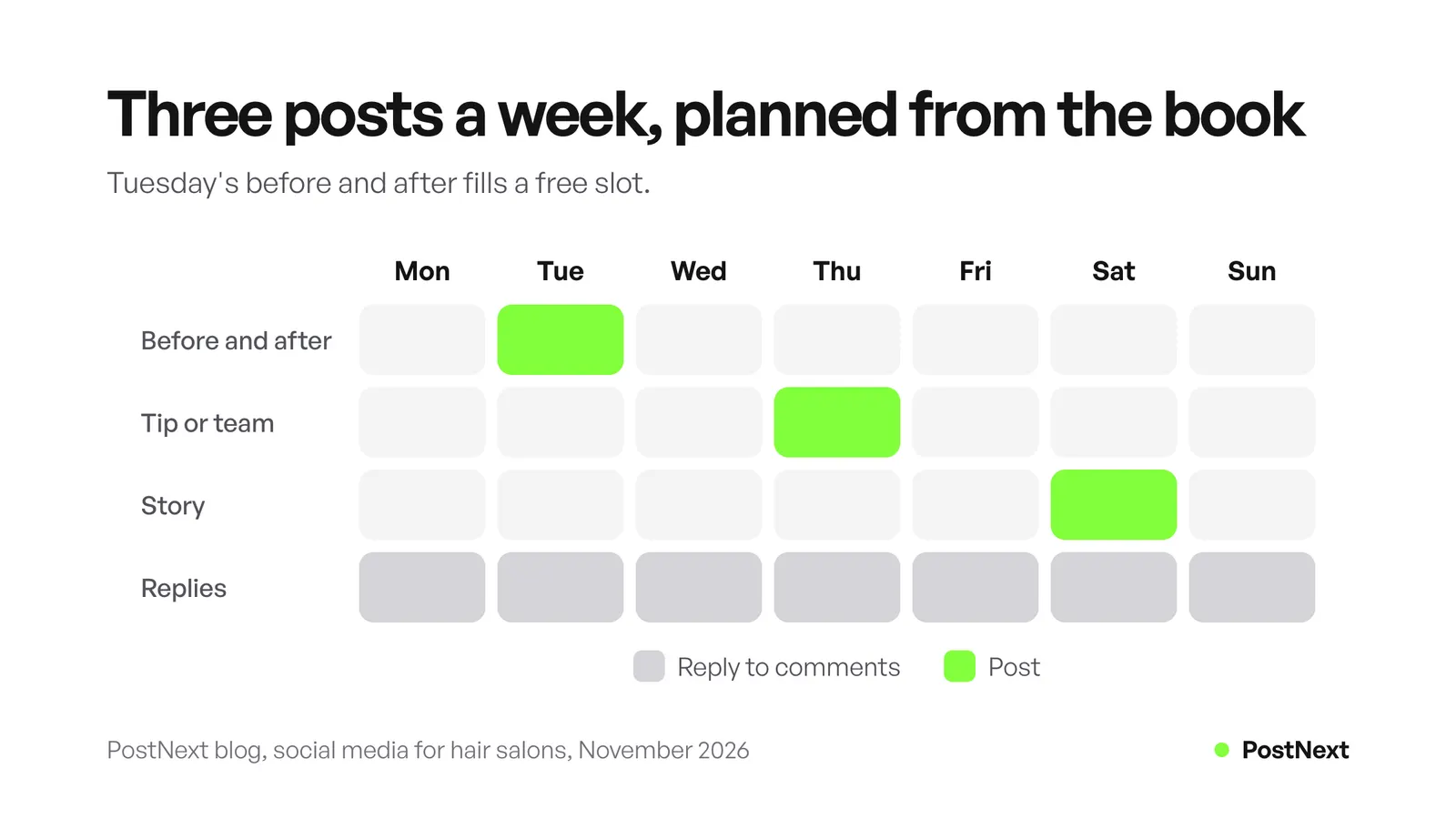
Here is one way a salon with three stylists could run a week. It is an example, not a measured result:
| Day | Task | Time |
|---|---|---|
| Monday | Check the book for next week’s gaps. Choose one photo from last week for each gap. | 15 minutes |
| Tuesday | Post a before and after of a service that has free slots. Name the service and the stylist. | 10 minutes |
| Wednesday to Saturday | Take before and after photos of clients who said yes on the booking form. | 1 minute per client |
| Thursday | Post a care tip or a team post, written ahead from the seasonal plan. | 5 minutes |
| Saturday | Post a Story of the day in the salon from the Instagram app. | 5 minutes |
| Every day | Reply to comments, messages and reviews within a day. | 10 minutes |
The tips and team posts can be written once a month. Only the before-and-after needs a fresh photo, and the book tells you which one to post. In a full week, skip the gap posts and post a review instead. In a quiet week, add a second before-and-after.
Messages need the same rhythm. If clients ask about prices and free times in direct messages, and the same three questions arrive every day, automatic replies to Instagram messages can send your price list and booking link to everyone who asks for it.
What is a seasonal social media plan for a hair salon?
A seasonal plan ties each tip to what is happening to your clients’ hair that month. Summer brings pool water and sun, winter brings dry air, and autumn brings weddings: In The Knot’s 2026 study, fall was the most popular wedding season, at 35% of weddings, and October its busiest month. The care tips below come from the American Academy of Dermatology.
| Season | Post idea | Source |
|---|---|---|
| Summer | Wear a swim cap, rinse hair right after swimming, then use a swimmers’ shampoo and a deep conditioner | American Academy of Dermatology |
| Summer | In the sun, use a leave-in conditioner with zinc oxide or wear a wide-brimmed hat | American Academy of Dermatology |
| Autumn | Wedding hair: trials, timelines and bridal party bookings, before the October peak | The Knot 2026 Real Weddings Study |
| Winter | Stretch colour and perm touch-ups to every 8 to 10 weeks or longer when the air is dry | American Academy of Dermatology |
| December | Holiday party styles and the last free slots before the holidays | Your own appointment book |
| Any month | Use the lowest heat setting, and use hot tools once a week or less | American Academy of Dermatology |
| Any month | Wear extensions for 2 or 3 months at most, from a salon that specialises in them | American Academy of Dermatology |
American Academy of Dermatology, “10 hair care habits that can damage your hair” and “Tips for healthy hair”; The Knot 2026 Real Weddings Study (10,474 US couples married in 2025). Checked November 2026.
A care tip with a source does two jobs. It helps the client, and it shows you know hair, not only styling. AAD also advises that if a client wants more than one chemical service, the perm or relaxer goes first and the colour 2 weeks later. That is a good post for a client who asks for both on the same day.
Write the season’s tips once, at the start of each quarter, and schedule them. Then each week you only add one fresh photo.
What can a salon offer for reviews and influencer posts?
A salon can ask every client for an honest review, and can give a creator a free service if the creator says so in the post. It cannot offer anything for a Google review, and it cannot reward only positive reviews. Google’s policy bans incentives such as discounts or free services for any review. The FTC’s rule bans incentives tied to a positive review.
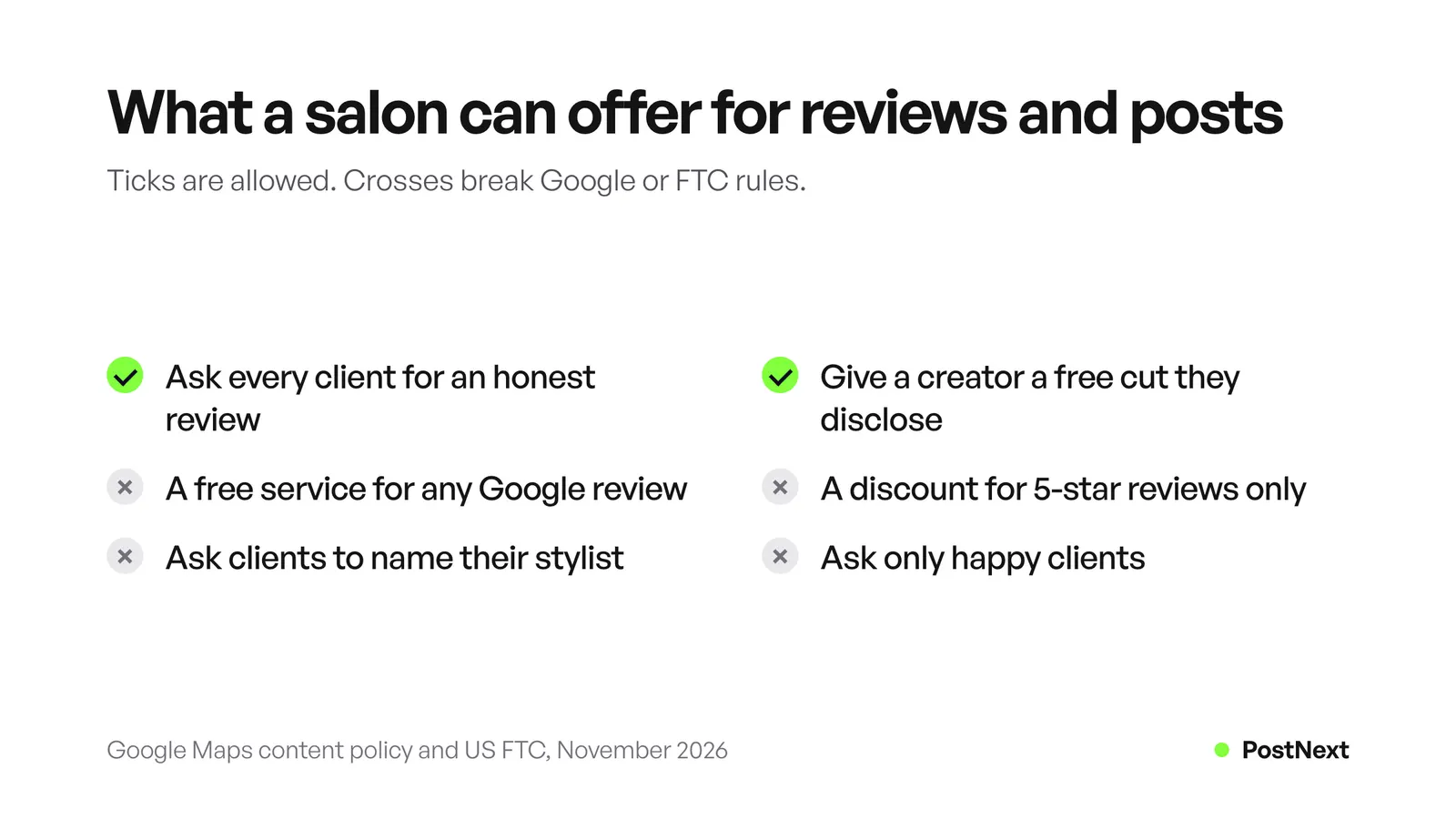
The rules in detail, from the sources:
- Google reviews: Google does not allow businesses to “offer incentives – such as payment, discounts, free goods and/or services - in exchange for posting any review”. A free blow-dry for a Google review breaks this, even if the review is honest.
- Only happy clients: Google also bans businesses that “selectively solicit positive reviews”. Ask everyone, not only the client who smiled.
- Naming the stylist: Google says staff should not ask for reviews “that include specific content, including content that identifies a staff member”, and should not pressure clients to review “while on the premises”. So do not ask clients to mention their stylist, and do not hand them a tablet at the desk. Send the link by text after the visit.
- The FTC rule: the Consumer Reviews and Testimonials Rule went into effect on October 21, 2024. It “does not prohibit giving incentives for reviews, as long as there isn’t an express or implied requirement that the reviews have to express a particular sentiment”. A discount for 5-star reviews breaks it, and courts can impose civil penalties for knowing violations.
- Creators and free services: the FTC’s guide for influencers says to disclose when you got “anything of value”, including free products. The disclosure goes in the post itself, not only in the profile. “Thanks to Acme brand for the free product” is the FTC’s own example, and words such as “sp”, “spon” or “collab” are too vague. In a video, the disclosure must be in the video.
This matters because many salons still do it. BrightLocal found 11% of consumers were offered an incentive to write a positive review in the past year.
How should a salon reply to reviews and messages?
Reply to every review by hand, within a day if you can. BrightLocal’s 2026 survey found 89% of consumers expect owners to respond to reviews, and 80% are likely to use a business that responds to all of them. Generic replies hurt: 50% are unlikely to choose a business that uses templated or generic responses.
Ask for reviews every day, because they age fast. BrightLocal found 74% of consumers only care about reviews from the last three months, and 78% were asked to leave feedback for a business in the past year. When asked, people say yes: 83% of those asked went on to leave a review. Send your Google review link by text after each visit, to every client.
For a bad review, apologise once, offer to fix the cut or colour, and give a phone number. Never argue about who is right in public. The next client reads your reply more closely than the complaint. Our guide to social media marketing for local business covers how to count which channel brings each new client.
How does PostNext help a hair salon?
PostNext lets a salon plan a month of tips, team posts and before-and-afters in one sitting and publish each at its time. It posts to Instagram, TikTok, LinkedIn, X, YouTube, Threads and Bluesky from one calendar.
On Instagram, it publishes feed posts, carousels, Reels and image Stories.
Repeat this post sends a recurring post every 1 to 365 days, weeks or months, which suits seasonal tips you post every year. The comment inbox lets you read, answer and delete Instagram comments in one place, on every plan. It does not cover direct messages.
Know the limits. PostNext does not post to Facebook or Google Business Profile today; both are listed as “Soon” on the pricing page. Post those in Meta Business Suite and in your Google profile for now. Instagram does not let apps add link stickers to Stories, so post an open-slots Story with a booking link from the Instagram app. The free plan covers 1 channel, 10 posts and 10 AI credits a month, enough for two Instagram posts a week. The pricing page also shows what the paid plans add. PostNext for hair salons has a weekly posting plan and caption templates you can copy.
Frequently Asked Questions
What should a hair salon post on social media?
Post before-and-after photos, finished looks from three angles, short videos of the process, care tips, posts about each stylist and real reviews with permission. Rotate them so you never start from a blank page. Ask every client before you take or post a photo.
Which social media is best for a hair salon?
Instagram and Facebook suit most salons, with a Google Business Profile next to them. Pew’s 2026 survey found 56% of US women use Instagram and 77% use Facebook. Add TikTok if many of your clients are under 30.
How often should a hair salon post?
Two or three times a week on each channel, every week. One before-and-after, one tip or team post, and one Story is enough. Posting every week matters more than posting every day.
Can a salon give a discount for a Google review?
No. Google’s policy bans incentives such as payment, discounts and free services in exchange for any review. The FTC’s rule also bans incentives that require a positive review. You can ask every client for an honest review with no reward.
Do I need permission to post a client’s photo?
Ask every client, every time, before you take or post the photo. Add a consent line to your booking form so the answer is ready before the appointment. If a client says no to their face, post the back or the side.
How do I add a Book now button to Instagram?
Switch to a business account, open Edit profile, choose Action buttons and pick Book now. Then choose your booking provider and sign in. The button needs a provider that works with Instagram, so check your provider’s help page first.
Sources
- BrightLocal, Local Consumer Review Survey 2026, 1,002 US adults, published February 2026, checked November 2026.
- Pew Research Center, Americans’ Use of Social Media in 2026, 5,511 US adults, published October 2026, checked November 2026.
- Google Business Profile Help, local business links and posts, checked November 2026.
- Google Maps, prohibited and restricted content (fake engagement and review solicitation), checked November 2026.
- US Federal Trade Commission, Consumer Reviews and Testimonials Rule: Questions and Answers, checked November 2026.
- US Federal Trade Commission, Disclosures 101 for Social Media Influencers, checked November 2026.
- American Academy of Dermatology, 10 hair care habits that can damage your hair and Tips for healthy hair, checked November 2026.
- The Knot, 2026 Real Weddings Study (released 18 February 2026), 10,474 US couples married in 2025, checked 26 November 2026.
- Booking provider help pages on the Instagram Book now button: MyTime (help.mytime.com), Schedulista (support.schedulista.com, January 2025) and Fresha (fresha.com help centre), checked November 2026.
- PostNext, Instagram channel page, comment inbox, automation page and pricing page, checked November 2026.