Social media for nail salons works because a finished set is a design people save and bring to their next appointment. Post close, sharp photos of each set, name the tech who made it, plan designs around the seasons, and put your booking link everywhere. This PostNext guide shows how to photograph nails, what to post each week, and the review and product rules that catch salons.
Key Takeaways
- Instagram reaches your clients: 56% of US women and 79% of adults under 30 use Instagram (Pew Research Center, 2026).
- Reviews decide the first visit: 97% of US consumers read reviews for local businesses, and 68% only use a business rated four stars or more (BrightLocal, 2026).
- Most techs work for a salon: 76% of the 201,800 US manicurists and pedicurists worked in personal care services in 2025, and 23% were self-employed (US Bureau of Labor Statistics).
- Credit the tech in every post: clients book a person, and named work builds each tech’s book.
- Plan designs by season: a design posted three weeks before a holiday gives clients time to book it.
- Never trade sets for reviews: Google bans discounts or free services in exchange for a review.
Does social media bring clients to a nail salon?
Social media brings clients to a nail salon because nail art sells on sight. A client sees a set on Instagram, saves it, and shows it to a tech at the next appointment. Your feed is the menu of what your techs can do. BrightLocal’s 2026 survey found 97% of US consumers read reviews for local businesses, so the reviews next to that feed decide whether a stranger books.
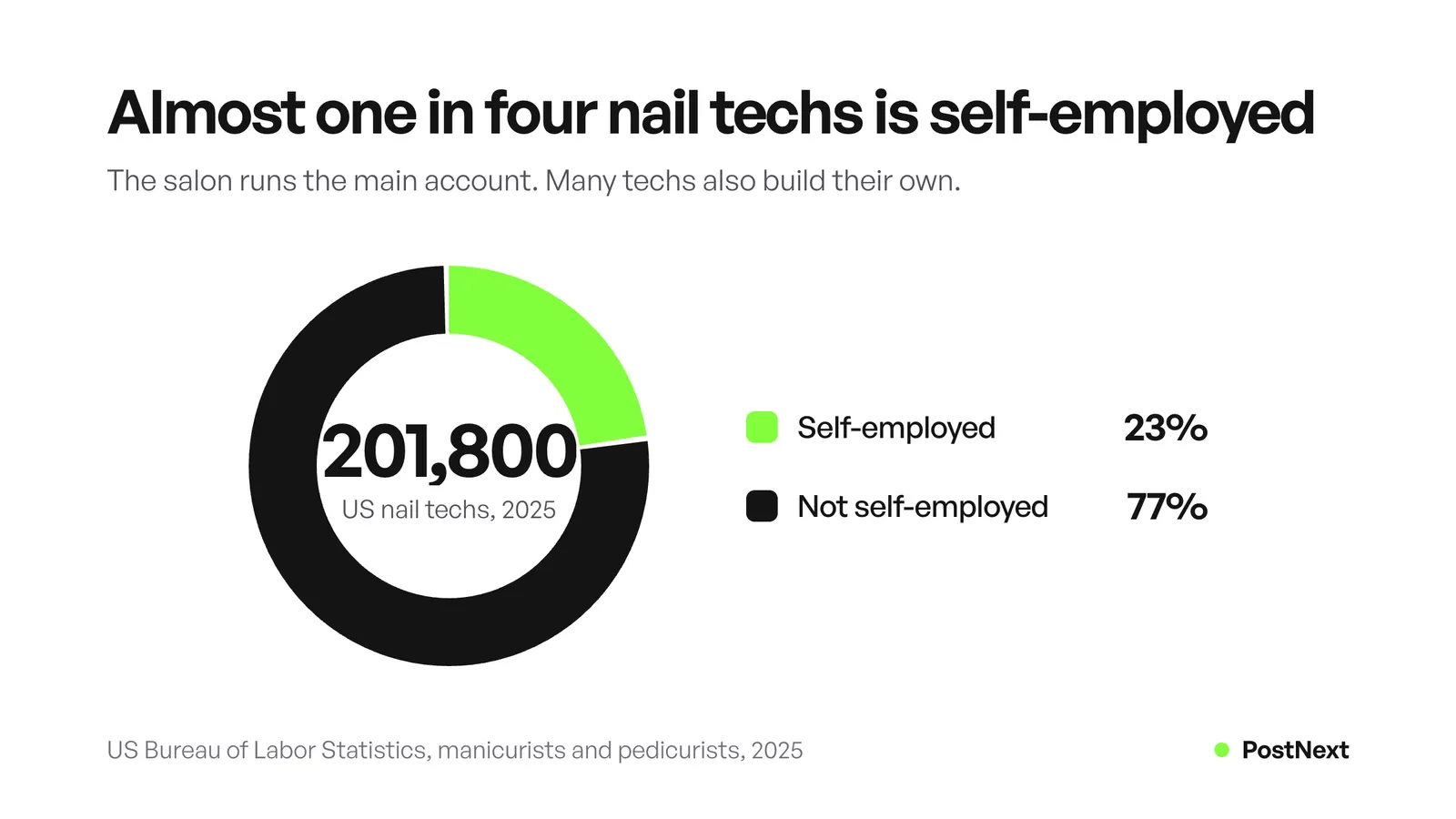
The US Bureau of Labor Statistics counted 201,800 manicurist and pedicurist jobs in 2025. Most, 76%, worked in personal care services such as salons, and 23% were self-employed. That mix shapes social media: the salon runs the main account, and many techs also build their own following.
Nail clients come back often. A set that grows out or a gel that lifts brings the client back within weeks. That means each new client found through a post can turn into many visits, and a feed that shows the same quality week after week keeps regulars from drifting to the salon down the street.
Which social media platforms should a nail salon use?
A nail salon should use Instagram first, TikTok for short process videos, and Google Business Profile for reviews and booking. Pew Research Center’s 2026 survey found 56% of US women use Instagram, 43% use TikTok and 77% use Facebook. Among adults under 30, Instagram reaches 79% and TikTok 65%. Pinterest also suits nail art, though Pew has not measured it since 2024.
| Platform | US adults who use it (2026) | Best use for a nail salon |
|---|---|---|
| 51% of adults, 56% of women, 79% of ages 18-29 | Close-up sets, carousels of seasonal designs, open-slot Stories, Book now button | |
| TikTok | 37% of adults, 43% of women, 65% of ages 18-29 | Process videos, design timelapses, removal and prep |
| 70% of adults, 77% of women | Gift cards, holiday hours, posts clients share with friends | |
| Google Business Profile | Not a social network | Reviews, photos, booking link, opening hours |
Source: Pew Research Center, Americans’ Use of Social Media in 2026, published October 2026.
Start with Instagram and Google, and add TikTok when you have a tech who enjoys filming. One process clip can go to Instagram Reels, TikTok and YouTube Shorts from the same file.
How do you photograph nails for Instagram?
Photograph nails in daylight, close, against a plain background, with the hand in a relaxed pose. Shoot the same set from two or three angles: fingertips forward, the side profile of the nail, and the full hand. Wipe the cuticle oil and dust first, because a macro shot shows everything. A sharp photo of an average set beats a blurry photo of a great one.
Pick one photo spot in the salon and use it every time: a window, a white or pale table, a plain wall or a fabric in your brand color. Clients scrolling your grid then see the nails, not a changing background. Keep a small box of props at the spot, such as a ring dish or a seasonal flower, and use them lightly.
A hand without a face is easier to post than a portrait, but still ask. Some clients do not want their hands, rings or tattoos online. A quick “Can I post your set?” before the photo, noted in the booking system, is enough for most salons.
What should a nail salon post each week?
A nail salon should post finished sets, short process videos, seasonal design ideas and the techs who make them. Finished sets are the core: two or three a week, each credited to the tech. Add one process video, a Story when a slot opens, and a post about a team member or the salon. Close-ups and named work make the feed a portfolio clients can book from.
| Post type | Format | How often |
|---|---|---|
| Finished set | Carousel of 2-3 close photos, tech named in the caption | 2-3 times a week |
| Process or timelapse | Reel of 15-30 seconds | Once a week |
| Seasonal design idea | Carousel of 4-6 designs | 3 weeks before each season or holiday |
| Open slot | Story with your booking link | When a slot opens |
| Tech spotlight | Photo and two lines about the tech’s style | Monthly |
| Review | Screenshot of a Google review, with consent | Twice a month |
An example plan built from the post types above. Change the pace to fit your appointment book.
Name the tech in every caption. Clients book a person, and a tech whose work is named builds a book of clients who ask for them. It also keeps the salon honest about whose work is shown. Our list of Instagram carousel ideas has more formats for design roundups.
How do you plan nail designs around the seasons?
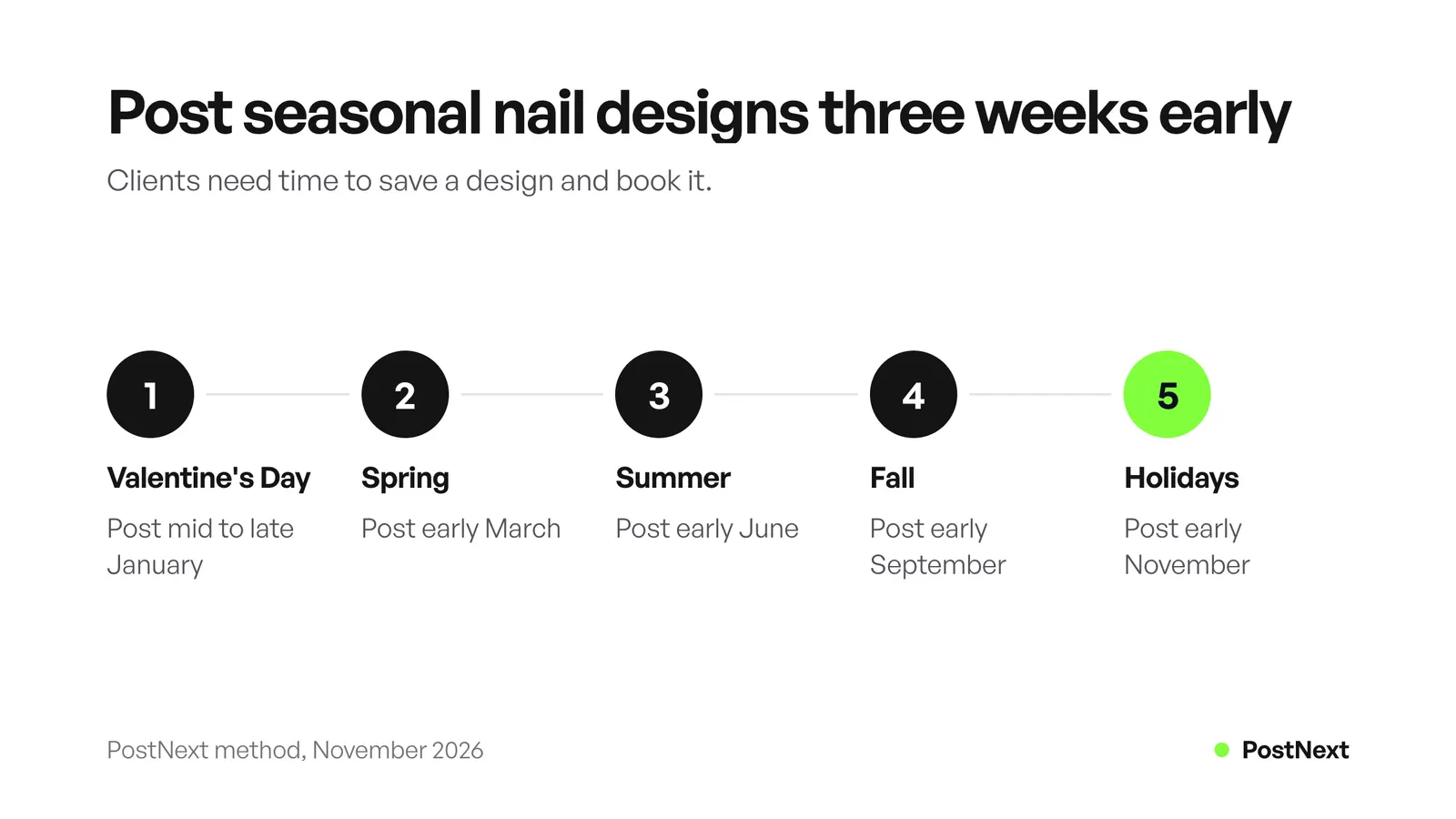
Plan seasonal designs about three weeks before each season or holiday, so clients can see the design, save it and book it. Make a simple calendar for the year: spring pastels, summer brights, fall tones, winter and holiday sets, plus wedding season and back-to-school. Then let each tech make one sample set for each date and photograph it.
| Season or date | Design idea | Post the samples |
|---|---|---|
| Valentine’s Day | Reds, pinks, small hearts | Mid to late January |
| Spring | Pastels, florals | Early March |
| Wedding season | Soft neutrals, French tips | April |
| Summer | Brights, neons | Early June |
| Fall | Deep tones, tortoiseshell | Early September |
| Holidays | Metallics, reds, glitter | Early November |
An example year built from the three-week rule above. Adjust the dates to your local season.
Write the seasonal posts once and reuse them each year with new photos. A recurring post with the same caption and new pictures saves time and keeps the calendar from slipping in a busy December.
How do clients book a nail appointment from Instagram and Google?
Clients book from Instagram through the Book now button or the link in your bio, and from Google through the booking link on your Business Profile. Instagram’s Book now button needs a business account and a supported booking partner, and booking providers’ help pages say it shows in the Instagram app. Google lets a business add up to 10 “book an appointment” links.
Use one booking link everywhere: your Instagram bio, every open-slot Story, Facebook and Google. A link in bio page for salons can hold booking, the price list, gift cards and your aftercare tips in one place.
Comments under a design often ask the same thing: “How much is this set?” or “Can I book this for Saturday?” You can invite people to comment a word such as “BOOK”. Then send them the booking link by DM. This answers them all. CreatorFlow’s comment-to-DM for salons sends the link to everyone who comments that word.
What rules apply to nail salon posts and reviews?
Two kinds of rules apply: review and creator rules, which cover every local business, and product claims, which matter when you name what you use. Google Maps policy bans offering “payment, discounts, free goods and/or services” for a review. The FTC’s guide for creators says a free set is a connection the creator must disclose in the post itself.
Reviews. “Free nail art for a 5-star review” breaks Google’s policy and the FTC’s Consumer Reviews and Testimonials Rule, which bans paying for positive reviews even with a disclosure. Ask every client for an honest review, for example with a QR code at the station, and give nothing for it.
Free sets for creators. Giving a local creator a free set is fine if the creator says so clearly in the post. The FTC says tags like “sp” or “collab” are too vague and that a disclosure in the bio alone is not enough.
Product posts. The FDA regulates nail products, while state and local authorities regulate salon operations and tech licensing. The FDA’s nail care page explains that some people become allergic to methacrylates in acrylic nails and that formaldehyde in some hardeners can irritate skin. If you post about the products you use, name them correctly and leave health claims to the label. Check your state board’s rules before you post about sanitation, so what you show matches what you do.
How does PostNext help a nail salon?
PostNext lets a nail salon plan a month of sets, seasonal designs and tech spotlights in one sitting and publish each at its time. It posts to Instagram, TikTok, YouTube, LinkedIn, X, Threads and Bluesky from one calendar.
On Instagram, it publishes feed posts, carousels of 2 to 10 images, Reels and image Stories.
A recurring post repeats every 1 to 365 days, weeks or months, which suits a yearly “book your holiday set” reminder. The comment inbox lets you read and answer Instagram comments in one place on every plan. It does not send direct messages.
Know the limits. PostNext does not post to Facebook or Google Business Profile today; both are marked “Soon” on the pricing page. Instagram does not let apps add link stickers to Stories, so post open-slot Stories with a booking link from the Instagram app. The free plan covers 1 channel, 10 posts and 10 AI credits a month. The PostNext for nail salons page shows what the paid plans add.
Frequently Asked Questions
What should a nail salon post on Instagram?
Post finished sets as close-up carousels with the tech named, short process videos, seasonal design ideas three weeks before each season, and Stories when a slot opens. Add a tech spotlight once a month and a review twice a month, with the client’s consent.
How do you take good nail photos for Instagram?
Use daylight, a plain background and the same photo spot every time. Shoot each set from two or three angles, fingertips forward, side profile and full hand, after wiping off cuticle oil and dust. Ask the client before you take the photo.
Is TikTok good for nail salons?
Yes, for salons with clients under 30 and a tech who likes filming. Pew Research Center’s 2026 survey found 65% of US adults aged 18 to 29 and 43% of women use TikTok. Post process videos and timelapses, and reuse the same clips as Instagram Reels.
Can a nail salon offer a discount for a Google review?
No. Google Maps policy bans any reward for a review, including discounts and free services. The FTC also bans buying positive reviews. Ask every client for an honest review and give nothing in return.
Should nail techs have their own Instagram accounts?
Many do, and it helps both sides if the rules are clear. The salon account shows every tech’s work with credit, and each tech’s account builds their own clients. Agree in writing who owns photos taken in the salon before a tech joins.
How often should a nail salon post?
Two or three finished sets a week, one process video, and Stories when slots open is a pace most salons keep. Plan the week in one sitting and schedule it, so a busy weekend does not leave the feed empty.
Sources
- US Bureau of Labor Statistics, Occupational Outlook Handbook: Manicurists and Pedicurists, 2025 data, checked November 2026.
- Pew Research Center, Americans’ Use of Social Media in 2026, 5,511 US adults, published October 2026, checked November 2026.
- BrightLocal, Local Consumer Review Survey 2026, 1,002 US adults, published February 2026, checked November 2026.
- US Food and Drug Administration, Nail Care Products, checked November 2026.
- Google, Maps prohibited and restricted content and local business links, checked November 2026.
- US Federal Trade Commission, Consumer Reviews and Testimonials Rule: Questions and Answers and Disclosures 101 for Social Media Influencers, checked November 2026.
- Booking provider help pages on the Instagram Book now button: MyTime (help.mytime.com) and Fresha (fresha.com help centre), checked November 2026.
- PostNext, Instagram channel page, comment inbox, automation page and pricing page, checked November 2026.