
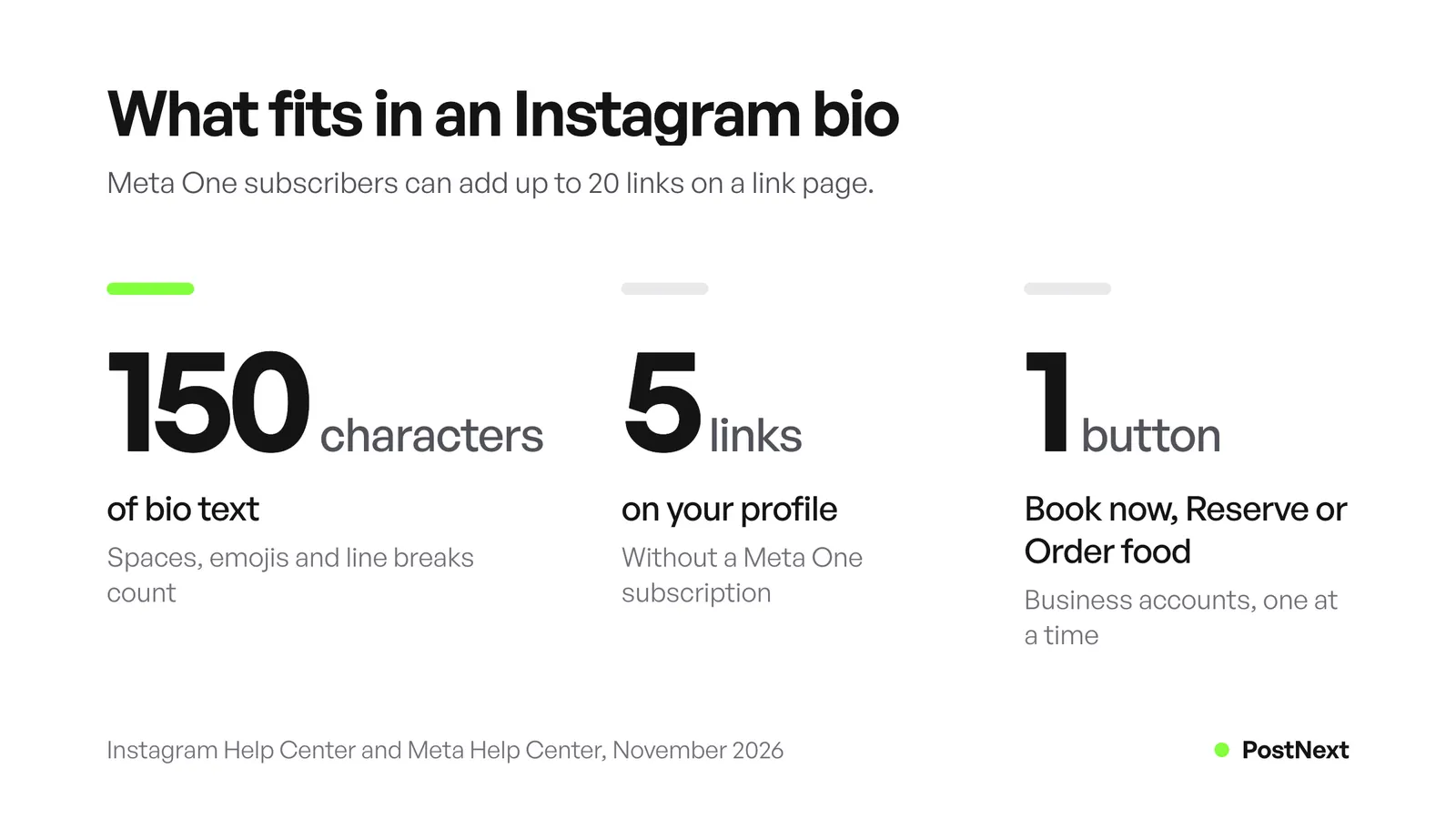
A good Instagram bio says who you are, what a visitor gets from you and what to do next, in three short lines. Below are 42 Instagram bio ideas sorted by account type: creators, online shops, local businesses, coaches, artists, freelancers and personal accounts. Each one shows its character count, because Instagram allows up to 150 characters in a bio (Instagram Help Center, November 2026).
Key Takeaways
- 150 characters. That is the most Instagram allows in a bio, and anyone can read it.
- Three lines, three jobs. Who you are, what you give the visitor, and where to tap next.
- The name field is searchable. Instagram matches search text with usernames, names and bios, so put the word people search for in your name.
- Five links without a subscription. Meta One subscribers can add up to 20 on a link page.
- Business tools live outside the bio. A category label, a Contact button and one action button (Book now, Reserve or Order food) do work your 150 characters do not have to.
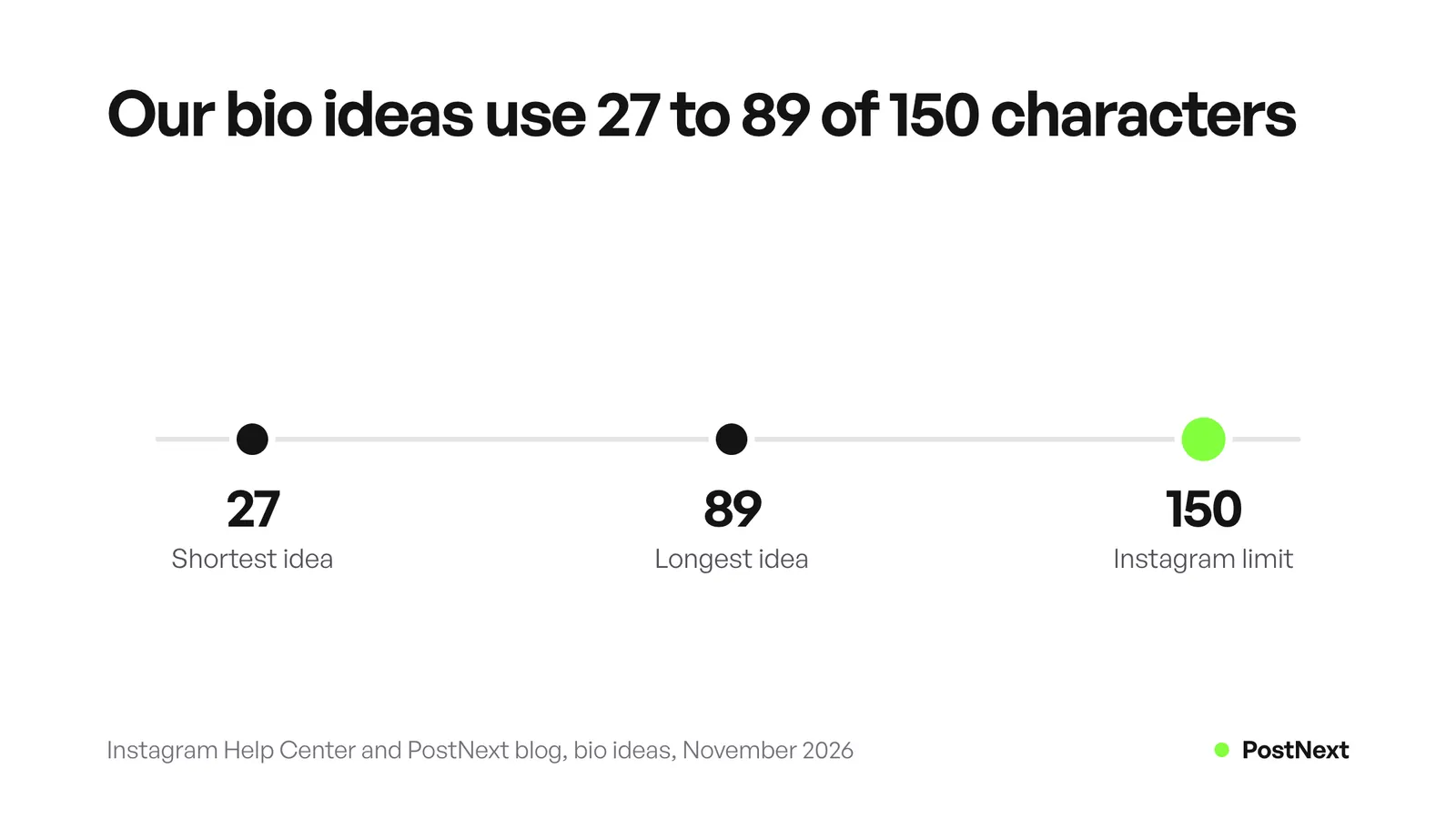
- Every idea below fits. The longest is 89 characters, so each leaves room for your own details.
What should you put in your Instagram bio?
Put three things in your Instagram bio: who you are or what you make, what a visitor gets if they follow, and one action that matches your link. Then use the fields around the bio. The name field carries your search word, the links carry the destination, and professional accounts add a category, contact details and an action button. Each field does one job, so the bio text stays short.
| Profile field | What to put there | Instagram’s rule |
|---|---|---|
| Name | Your name plus the word people search for | Matched by Instagram search |
| Username | Your handle, the same on every network | Separate from the name |
| Bio | Who you are, what you give, what to do next | Up to 150 characters, visible to anyone |
| Links | Shop, booking page, newsletter, WhatsApp | Up to 5, or up to 20 with Meta One |
| Category | Your type of business or work | Professional accounts, can be hidden |
| Contact button | Phone, email, directions | Professional accounts |
| Action button | Book now, Reserve or Order food | Business accounts, one at a time |
Our lesson on how to write a bio for Instagram goes through the three-line structure step by step. Write the bio last. Once the name, links and buttons are set, the bio only has to say what none of them say.
How long can an Instagram bio be?
An Instagram bio can be up to 150 characters, and anyone can see it, according to Instagram’s Help Center. Spaces, emojis and line breaks all use characters. Most good bios use far less: the 42 ideas below run from 27 to 89 characters. A shorter bio is quicker to read, and it leaves room for a city, an offer or a date that changes each season.
To change your bio, open your profile, tap Edit profile and type in the Bio box. If you write a few versions first, count the characters of each one before you paste it, because Instagram stops at 150.
The bio is one of several text limits on Instagram. Our guide to the Instagram caption character limit lists the caption, bio and alt text limits side by side.
Instagram bio ideas for creators
A creator bio should name the topic in plain words, say how often you post, and point to the one free thing you offer. Visitors decide in a few seconds whether your next post will be useful to them. A topic plus a schedule answers that question faster than an adjective like “passionate” or “creative”. Each idea below shows its character count in brackets.
- “Weeknight dinners in 20 minutes or less. New recipe every Tuesday. Shopping lists below ↓” (89)
- “Budget travel for people with 10 days off a year. Full costs for every trip in the link.” (88)
- “I test home workouts so you do not waste a month on the wrong one. Free 4-week plan ↓” (85)
- “Personal finance in plain English. No crypto tips. Weekly money email below.” (76)
- “Plant care for people who kill plants. Ask me anything in the comments. Guides ↓” (80)
- “Books under 300 pages, reviewed in 60 seconds. My reading list is in the link.” (78)
Name field idea: your first name plus the topic, such as “Mia · Weeknight Recipes”. Put each sentence on its own line in the app.
Instagram bio ideas for small businesses and online shops
A shop bio should say what you sell, one fact that makes buying easy, and where to buy. Shipping time, sizes, a repair promise or a drop day all answer a buyer’s first question. Use your own facts only. A bio that promises free shipping or a guarantee you do not offer loses the customer at checkout.
- “Handmade soy candles from Bath. Ships in 2 days. Shop the winter scents ↓” (73)
- “Leather wallets that fit a front pocket. Free repairs for 2 years. Shop ↓” (73)
- “Organic cotton kids’ clothes, sizes 0 to 6. New drop on the first Friday of the month.” (86)
- “Refill shop for soap and shampoo. Bring your bottle, or we post one. Order below.” (81)
- “Race posters for runners. Your race, your time, your poster. Make yours ↓” (73)
- “Small-batch hot sauce. Three heat levels. Free shipping on orders over $40 ↓” (76)
Name field idea: the brand plus the product, such as “Ember · Soy Candles”. Point the first link at the collection the bio names, not at your homepage.
Instagram bio ideas for local shops, cafes and salons
A local bio should give the street or area, your hours and the fastest way to book or order. Instagram’s own search advice says that if your account is location-specific, putting the location in your bio makes it easier for people nearby to find you. Leave the phone number and address to the Contact button, so the bio holds only what a passer-by needs.
For a restaurant, the posts below the bio matter as much; a 4-week posting plan for restaurants keeps them timed to the quiet nights. For what diners check on a restaurant’s profile before they book, see restaurant social media marketing.
- “Coffee and sourdough on Mill Street. Open 7 to 3, closed Mondays. Order ahead ↓” (79)
- “Hair salon in Leith. Color, cuts and curls. Tap Book now to pick a time.” (72)
- “Family pizza place since 1998. Dine in, takeaway or delivery. Tap Order food.” (77)
- “Dog groomer in Hove. Small dogs on weekdays, all sizes on Saturdays. Book below.” (80)
- “Yoga studio in Leeds. Beginner class every morning at 7. Your first class is free ↓” (83)
- “Bike repairs while you wait, Church Road. Tap Contact for a quote.” (66)
Name field idea: the business type plus the town, such as “Mill St Bakery · Bath”. Ideas 14, 15 and 18 name a button, which only works once you have added that button (see below).
Many local customers would rather send a message than call. A WhatsApp chat link works as one of your profile links: our guide to adding a WhatsApp link to your Instagram bio shows the format and Instagram’s own WhatsApp option.
Instagram bio ideas for coaches and consultants
A coach or consultant bio should name who you help and the change you help with, then offer one low-risk first step. “Life coach” says little. “Career coach for teachers who want a new job” tells the right visitor they are in the right place, and tells everyone else to keep scrolling. The first step is usually a free checklist, a short call or a review.
- “Career coach for teachers who want a new job. Free CV checklist in the link.” (76)
- “I help small cafes price their menus. Book a 30-minute menu check ↓” (67)
- “Nutrition coach for shift workers. Meals that fit a night schedule. Book a call ↓” (81)
- “Public speaking coach. For people whose hands shake before a talk. Free first call ↓” (84)
- “LinkedIn profiles for engineers who hate selling themselves. Free review on Fridays.” (84)
- “Fitness coach for new moms. 20-minute home workouts, no gym. Programs ↓” (71)
Name field idea: your name plus the person you help, such as “Sam Okafor · Career Coach”. The guide to social media marketing for coaches covers what to post once the bio is set. If you post on several networks, our lesson on how to write a social media bio shows how the same three lines change on LinkedIn, TikTok and X. Consultants who win most work on LinkedIn can read social media for consultants next.
Instagram bio ideas for artists, photographers and makers
An artist bio should say what you make, your style in two or three words, and how people buy or book. Your grid already shows the work, so the bio does not need to describe it at length. Name the medium and the subject, then say whether you take commissions, sell prints or open bookings on set dates. Dates help, because they give people a reason to come back.
- “Wedding photographer, Lake District. Calm, natural photos. 2027 dates open ↓” (76)
- “Watercolor birds, one painted every day. Prints and commissions in the link.” (76)
- “Tattoo artist in Glasgow. Fine line and botanical. Books open on the 1st of each month.” (87)
- “Ceramics made on a kick wheel in my garage. Shop update every second Sunday.” (76)
- “Illustrator for children’s books. Portfolio and contact details below.” (70)
- “Street photography in Lisbon, shot on film. Prints ↓” (52)
Name field idea: your name plus the craft, such as “Ana Reis · Film Photography”. Instagram suggests creator accounts for artists, and the category label can still say Photographer or Artist.
Instagram bio ideas for freelancers
A freelancer bio should name your service, the client you serve and where to see your work. Clients compare several freelancers in one sitting, so the bio has to sort you into the right group at once: what you do, for whom, and the proof one tap away. A portfolio or rate card link does more than a list of skills in the bio.
- “Freelance copywriter for software companies. Landing pages and emails. Portfolio ↓” (82)
- “Web designer for therapists and coaches. Your site live in 3 weeks. See my work ↓” (81)
- “Video editor for YouTubers. Long videos and Shorts. Rates and showreel in the link.” (83)
- “Virtual assistant for busy founders. Inbox, calendar, invoices. Book a chat ↓” (77)
- “Florist for weddings and events in Kent. Weekly flower subscriptions too ↓” (74)
- “Spanish to English translator. Legal and medical documents. Free quote in the link.” (83)
Name field idea: your name plus the service, such as “Leo Brandt · Video Editor”.
Short Instagram bio ideas for personal accounts
A personal bio has no sales job, so it can be short and say something about you in a few words. One line of personality works better than a long list of labels. Personal accounts have no category or action buttons, and the bio is still public on a public profile, so leave out your school, street or phone number.
- “Coffee first. Questions later.” (30)
- “Collecting sunsets and bad puns.” (32)
- “Mostly dogs. Sometimes food.” (28)
- “Running slow, reading fast.” (27)
- “Learning Italian one menu at a time.” (36)
- “Here for the plants and the playlists.” (38)
Should your Instagram name match your username?
No, they do different jobs. Your username is your handle, the address people tag. Your name is the line above your bio, and you can write it in words. Instagram’s head, Adam Mosseri, wrote that search matches the text people type with usernames, bios, captions, hashtags and places, and advised using a handle or profile name related to your content. So the name field is the place for your search word.
| Account type | Name field pattern | Example |
|---|---|---|
| Creator | First name + topic | Mia · Weeknight Recipes |
| Online shop | Brand + product | Ember · Soy Candles |
| Local business | Business + town | Mill St Bakery · Bath |
| Coach | Name + who you help | Sam Okafor · Career Coach |
| Artist | Name + craft | Ana Reis · Film Photography |
The same post advises adding relevant keywords and your location to your bio. Pick a username you can keep on every network. Our guide on how to check if an Instagram username is available covers the checks and the naming rules.
Be careful with changes once the account grows. Instagram’s Help Center says a username change on an account that reaches a lot of people may need a review, and your followers may be told about the change.
How many links can you add to your Instagram bio?
You can add up to 5 links to your Instagram profile without a subscription, according to Meta’s Help Center. With a Meta One subscription (Essential, Advanced, Expert or Max), an eligible account can add up to 20 links, with an image and a title on each, on a link page that has its own address. Teens cannot use the Meta One link page. Links are added under Edit profile, then Links.
Five links cover most accounts: a shop, a booking page, a newsletter, a WhatsApp chat and your latest video. The bio line should name the one you most want tapped, such as “Shop the winter scents ↓”, and that link should open the page the bio promised.
If you share more than five things, or want to know which link people tap, one profile link can lead to a link page that holds the rest. Our sister product More.You makes a link page like that, and its guide compares Instagram’s five native links with a page. To compare other tools, see our lists of Linktree alternatives and Beacons alternatives. If you are still deciding whether you need one, read is Linktree free first.
How do you add a category, contact button or action button?
Switch to a professional account first. Instagram offers business accounts for shops, local businesses, brands and service providers, and creator accounts for public figures, artists and influencers. Professional accounts show a category below the profile photo and can add a Contact button with directions, a phone number and an email. Business accounts can also add one action button. All three sit outside your 150 characters.
| Profile tool | What it does | Who can add it |
|---|---|---|
| Category label | Shows your type of work below the photo | Professional accounts, can be hidden |
| Contact button | Directions, phone number and email | Professional accounts |
| Book now | Visitors book an appointment | Business accounts with a partner account |
| Reserve | Visitors reserve a restaurant table | Business accounts with a partner account |
| Order food | Delivery or takeaway from your business | Business accounts with a partner account |
To show or hide the category and contact details, tap Edit profile and open Profile display under Public business information. Only one action button shows at a time, and you need an existing account with one of Instagram’s booking or ordering partners, which Instagram says are limited and differ by country. Two more facts from Instagram’s Help Center: the category you pick does not decide whether the account is a business or creator account, and professional accounts cannot be private.
A button changes what the bio should say. With Book now on the profile, “Tap Book now to pick a time” is a complete call to action, and your profile link can go to something else.
How do you add line breaks to an Instagram bio?
Write the bio in a notes app, one idea per line, then paste it into the Bio box under Edit profile. Instagram’s Help Center does not explain how the bio handles line breaks. The usual problem is an empty line between two lines of text, which can disappear when you save. Each line break also uses one of your 150 characters, so three lines cost two characters.
PostNext’s free Instagram line breaker puts an invisible character on each empty line, so the line is no longer empty. The character is ordinary text, and your text stays on your device. Check the result on your phone before you leave it.
Emojis can do the job of a line break. One arrow at the end of the last line, as in the ideas above, points to the link under the bio without a separate line.
What should you post after you change your bio?
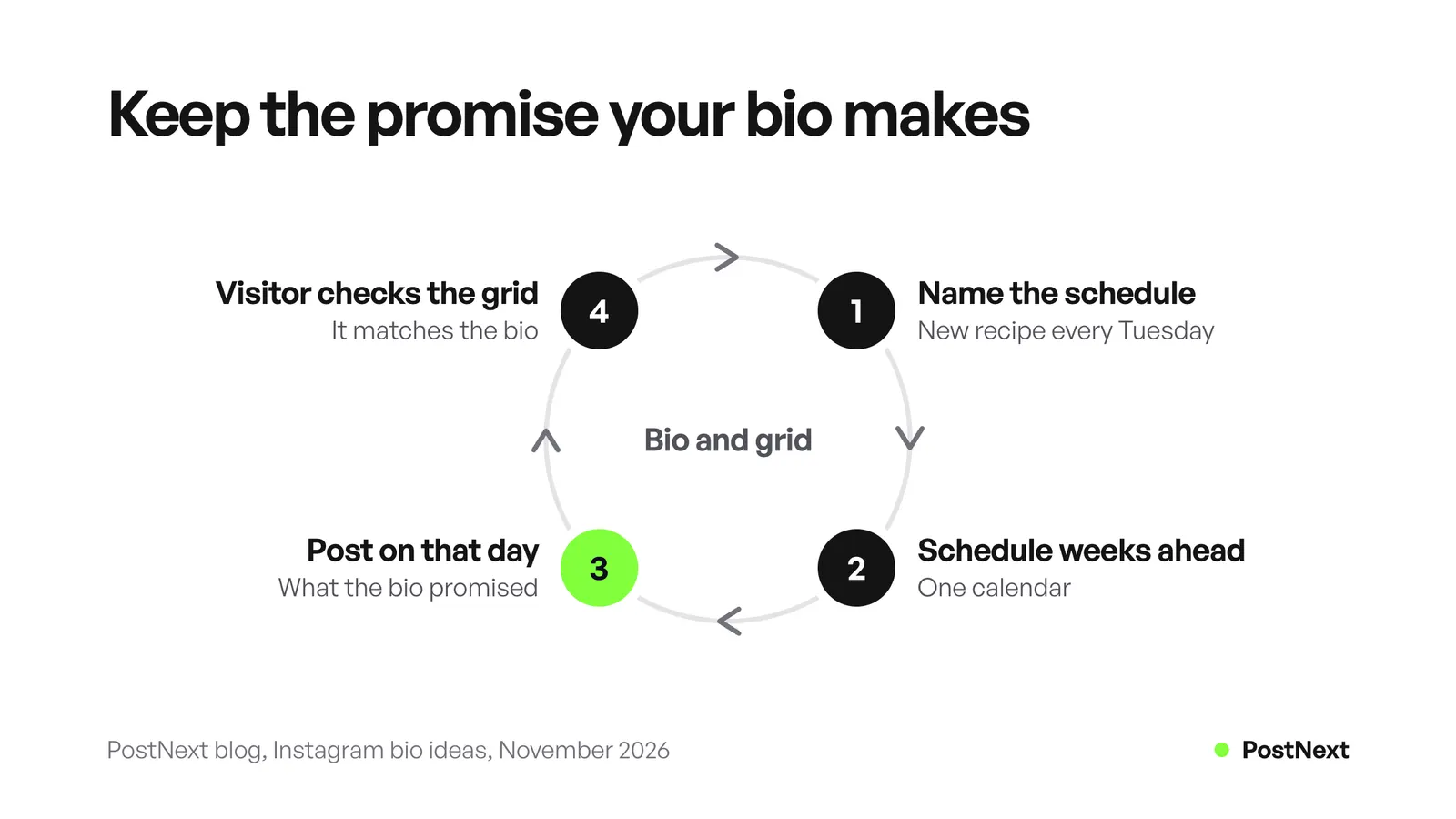
Post what the bio promises, on the schedule it names. A visitor who reads the bio usually looks at your latest posts next. If the bio says “New recipe every Tuesday” and the grid shows three recipes from last spring, the promise fails. A posting schedule kept a few weeks ahead keeps the bio true.
PostNext schedules Instagram feed posts, carousels, Reels and image Stories from one calendar, and its AI drafts captions and hashtags that you edit before you schedule (postnext.io/channels/instagram, November 2026). Instagram allows apps to publish only to professional accounts, so the business or creator account you set up for the buttons above also works for scheduling. The Instagram scheduler page explains the steps. The free plan covers 1 channel and 10 posts a month, and the 7-day trial of a paid plan asks for a card.
For what to post on the days your bio names, see our lists of Instagram Reel ideas and Instagram carousel ideas.
Frequently Asked Questions
What is a good bio for Instagram?
One that says who you are, what a visitor gets and what to do next, in three short lines. “Weeknight dinners in 20 minutes or less. New recipe every Tuesday. Shopping lists below” does all three in 89 characters. Specific facts beat adjectives such as “passionate” or “creative”.
What should a business put in its Instagram bio?
What you sell, one fact that makes buying easy, and where to buy. Add your town if you serve one area, because Instagram’s search advice suggests a location in the bio for local businesses. Leave the phone number and address to the Contact button and use an action button for bookings or orders.
How many characters can an Instagram bio have?
- Instagram’s Help Center says you can write a bio of up to 150 characters and that anyone can see it. Spaces, emojis and line breaks use characters too.
How many links can I put in my Instagram bio?
Up to 5 without a subscription. Meta One subscribers on eligible accounts can add up to 20 links on a link page with its own address. Teens cannot use the Meta One link page.
Does my Instagram bio help people find me in search?
It can. Adam Mosseri wrote that Instagram search matches the words people type with usernames, bios, captions, hashtags and places. He advised a handle or profile name related to your content, and keywords and a location in your bio.
Should I use emojis in my Instagram bio?
A few, where they carry meaning. An arrow pointing to the link or one emoji for your topic helps a visitor scan. A row of emojis uses characters and says less than words. Screen readers read emojis aloud, so do not replace key words with them.
How often should I change my Instagram bio?
When your offer changes: a new product, a new booking date, a new free download. Keep the username stable, because Instagram may review a username change on an account that reaches a lot of people and may tell your followers about it.
Sources
- Add a bio to your Instagram profile, Instagram Help Center (checked November 2026)
- How to add a link page to your Instagram bio with Meta One, Meta Help Center (checked November 2026)
- About professional accounts on Instagram, Instagram Help Center (checked November 2026)
- Set up a professional Instagram account, Instagram Help Center (checked November 2026)
- About action buttons for Instagram business profiles, Instagram Help Center (checked November 2026)
- How to edit your business information on Instagram, Instagram Help Center (checked November 2026)
- How to change your Instagram profile information, Instagram Help Center (checked November 2026)
- Breaking down how Instagram Search works, Adam Mosseri, Instagram (25 August 2021, checked November 2026)
- PostNext Instagram scheduler and line breaker pages, postnext.io/channels/instagram, /tools/instagram-line-breaker (November 2026)