
A good TikTok bio says what your videos are about and why someone should follow, in one or two short lines. Below are 36 TikTok bio ideas sorted by niche: creators, shops, local businesses, coaches, artists and personal accounts. Each shows its character count. TikTok says a website link on your profile needs at least 1,000 followers or a Verified Business Account (TikTok Support, November 2026).
Key Takeaways
- One line can be enough. Say the topic and the reason to follow. The ideas below run from 22 to 54 characters.
- TikTok publishes no bio length. Its Help Center gives limits for your name and username, but not for the bio, so keep it short and type it in the app.
- Name: up to 30 characters. You can change it once every 7 days.
- Username: 2 to 24 characters. Letters, numbers, underscores and periods, changed once every 30 days.
- Website link: 1,000 followers or a Verified Business Account. A web address typed into the bio text is not a link.
- One link, so make it count. Point it at the page your bio names, or at a link page that holds the rest.
What should a TikTok bio say?
A TikTok bio should say what your videos are about and what a viewer gets by following, then point to your link if you have one. When someone taps your name after a video they liked, the bio has to tell them the next videos will be like that one. A topic plus a promise does that: “Easy dinners in under 20 minutes. A new one every day.”
The bio is one of several profile fields, and TikTok sets different rules for each:
| Profile field | What it does | TikTok’s rule |
|---|---|---|
| Name | The name shown in For You, comments and messages | Up to 30 characters, changed once every 7 days |
| Username | Your @handle and your profile link | 2 to 24 characters, changed once every 30 days |
| Bio | What your videos are about | No length published in TikTok’s Help Center |
| Website link | One link people can tap | 1,000 followers or a Verified Business Account |
| Lemon8 | A link to your Lemon8 account | Optional |
| Business email, phone, address | Contact details on your profile | Verified Business Accounts |
A username may use letters, numbers, underscores and periods, but it cannot end with a period. Changing it also changes your profile link, so old links to your profile stop working.

How long can a TikTok bio be?
TikTok’s Help Center does not publish a bio length. Its profile pages give a limit of 30 characters for your name and 2 to 24 characters for your username, but none for the bio. Many guides print a number, and we could not find it on a TikTok page, so we do not repeat it. Write one or two short lines and type them in the app, which applies the real limit.
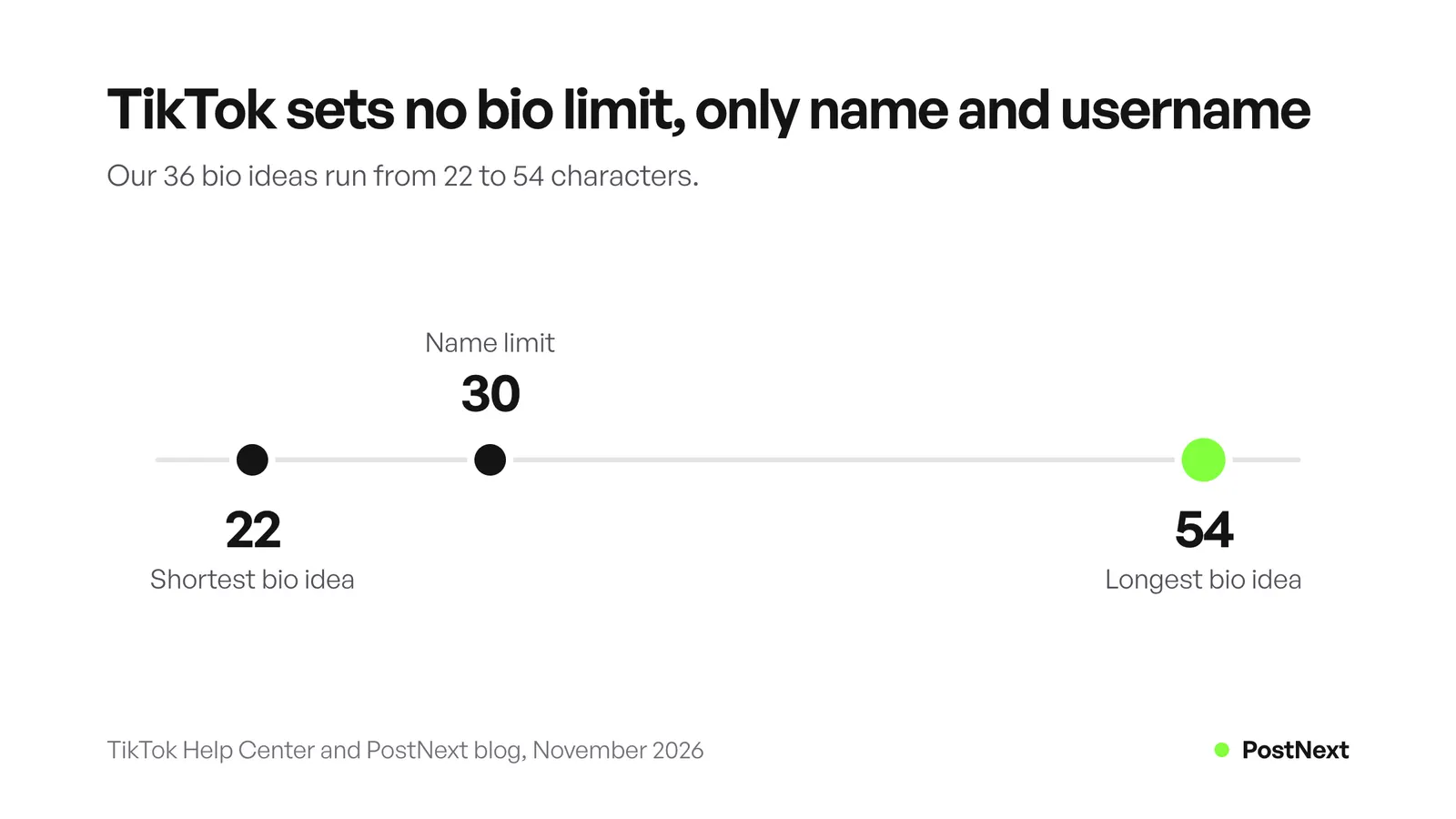
Short wins anyway, because a bio is read on a phone screen. The 36 ideas below are between 22 and 54 characters each, which leaves room for an arrow pointing at your link or a short offer.
If you want two lines with a gap between them, the gap can disappear when you save. PostNext’s free TikTok line breaker adds an invisible character to empty lines so they stay, and it works for bios as well as captions.
Who can add a website link to a TikTok bio?
General TikTok accounts with at least 1,000 followers can add a website link to their profile, and so can Verified Business Accounts, according to TikTok’s Help Center. A Verified Business Account is a business that completed TikTok’s business verification. It is not the same as the blue verified badge. Until you qualify, a web address typed into your bio is plain text that nobody can tap.
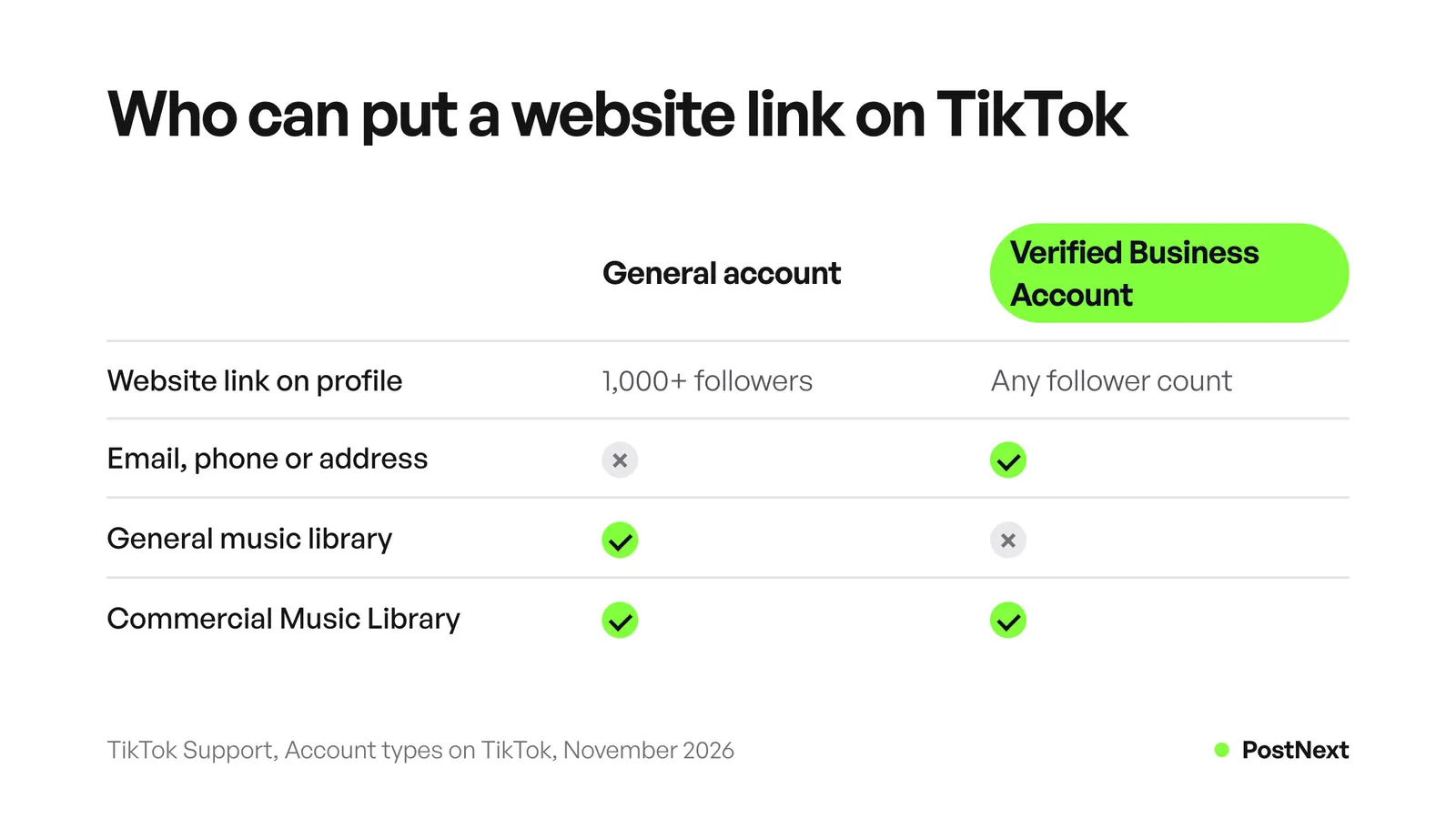
| General TikTok account | Verified Business Account | |
|---|---|---|
| Website link on profile | With at least 1,000 followers | Yes |
| Business email, phone or address on profile | No | Yes |
| Music | General library and Commercial Music Library | Commercial Music Library only |
| Best for | Creators and most public figures | Businesses that promote a product or service |
To switch, open Settings and privacy, then Account, then Business verification, and follow the steps. TikTok advises against switching back and forth: your verification is not saved, and a Verified Business Account loses the general music library. Our lesson on how to add a link to your TikTok bio covers the steps, why the link option may be missing and what to do until you reach 1,000 followers. Our guide to getting more followers on TikTok shows how to get there.
Two more rules shape where the link should go. TikTok opens profile links in its in-app browser and limits how far people can follow a chain of external links there, so a visitor may be asked to open the page in their phone’s browser. TikTok recommends direct links that reach the site in a few steps. It also no longer supports links that open or log you into other social media apps, although links to those platforms’ websites still work.
TikTok bio ideas for creators
A creator bio should name the topic and the posting rhythm, because a viewer follows for the next video, not the last one. “Home workouts, no equipment” tells them what is coming. “Start with day 1” gives them a first step. The arrow ↓ points to the website link under the bio, so use it only once you have that link.
- “Easy dinners in under 20 minutes. A new one every day.” (54)
- “Cheap flights and the trips I take with them.” (45)
- “Home workouts, no equipment. Start with day 1.” (46)
- “Money tips for your first job. No get-rich-quick.” (49)
- “Books under 300 pages. One review a day.” (40)
- “Thrift flips: old clothes, new outfits.” (39)
Your name field shows across TikTok, in For You, comments and messages. A name such as “Mia · Easy Dinners” says the topic every time it appears. Our list of TikTok content ideas has video formats that fit each of these niches.
TikTok bio ideas for businesses and shops
A shop bio should say what you sell and give one reason to tap the link now. Match the bio and the link to your videos: if the latest video shows a candle, the link should open the candle, not your homepage. A drop day or a new-stock day gives people a reason to come back.
- “Handmade candles. New scents every Friday. Shop ↓” (49)
- “Small-batch hot sauce. Pick your heat ↓” (39)
- “Phone cases you design yourself. Order ↓” (40)
- “Skincare for oily skin. Every ingredient on the label.” (54)
- “Plant shop. We pack, you water. Shop ↓” (38)
- “Kids’ books we read before we sell them.” (40)
A business that wants its email, phone or address on the profile needs a Verified Business Account, according to TikTok. That also gives you the website link at any follower count.
TikTok bio ideas for local businesses
A local bio should name the place and the one detail that brings someone in: your hours, walk-ins or a first visit offer. The town or street in your bio tells a viewer nearby that you are within reach. Keep the offer real and current, and change the bio when it ends.
- “Bakery on Mill Street. Fresh bread from 7am.” (44)
- “Barber in Leeds. Walk-ins Tuesday to Saturday.” (46)
- “Wood-fired pizza in Camden. Order ahead ↓” (41)
- “Dog groomer. Before and after every Friday.” (43)
- “Gym in Bristol. Your first week is free. Book ↓” (47)
- “Garden center tours and plant care tips.” (40)
TikTok bio ideas for coaches and educators
A coach or teacher bio should name the skill and the size of each lesson. “Spanish in 60 seconds a day” tells viewers what one lesson looks like before they follow. Say who it is for when the topic is broad: “Exam tips for ages 14 to 16” sorts the right viewers from everyone else.
- “Spanish in 60 seconds a day.” (28)
- “Excel tips you can use at work tomorrow.” (40)
- “Career coach. CV fixes, one video at a time.” (44)
- “Maths tutor. Exam tips for ages 14 to 16.” (41)
- “Nutritionist. Real food, no detox teas.” (39)
- “Public speaking tips for people who hate it.” (44)
The first spoken line of each video matters as much as the bio. Our list of hook ideas for social media videos has openings that match these bios.
TikTok bio ideas for artists and musicians
An artist bio should name the work and the way to buy it, book it or hear it. Your videos already show the art, so the bio only has to name the medium and the next step: prints, bookings, a new single. If you take requests, say so, because comments asking for a song or a subject turn into your next videos.
- “Watercolor birds, painted live. Prints ↓” (40)
- “Indie pop from Dublin. New single out now ↓” (43)
- “Tattoo artist. Fine line. Books open monthly.” (45)
- “Wedding photos and the stories behind them.” (43)
- “Pottery on a kick wheel. Shop sale every month.” (47)
- “Drummer. I play the songs you ask for in comments.” (50)
Short and funny TikTok bio ideas
A personal bio can be one joke or one fact about you. It has no sales job, so the only test is whether it sounds like you. Keep personal details out: your school, street, phone number and full birthday do not belong in a public profile. If the account is private, only the people you approve see your videos.
- “Professional snack reviewer.” (28)
- “Here for the comments.” (22)
- “My cat runs this account.” (25)
- “Overthinking in 60-second videos.” (33)
- “Bad at dancing. Posting anyway.” (31)
- “Plants: 12. Plants still alive: 9.” (34)
Where should your one TikTok link point?
Point your one TikTok link at the page your bio promises. If the bio says “Shop ↓”, link the shop or the product in your latest video. If you share several things, a link page that lists your shop, newsletter and other profiles works better. Because TikTok limits long chains of links in its in-app browser, keep that page short and put the most wanted link first.
A link in bio page can also count which links people tap, which a profile link alone does not. Our guide to whether Linktree is free lists what its free plan covers. More.You, our sister product, has a guide to setting up a link in bio page for TikTok with the in-app browser in mind.
If you want a one-page website instead of a list of links, Carrd builds one-page sites and Campsite makes link in bio pages. Our comparisons of Carrd alternatives and Campsite alternatives list other tools and what each one adds. A bio for Instagram follows different rules, with 150 characters and up to five links: see our Instagram bio ideas.
What should you post once your bio is set?
Post the videos your bio promises, as often as it says. “A new one every day” is a promise a viewer can check on your profile in seconds. Plan the videos in a batch and schedule them, so the bio stays true in the weeks when you cannot post by hand. A posting time based on your own audience beats a fixed rule.
PostNext schedules TikTok videos and photo posts from one calendar. Its AI drafts an opening line, a caption and hashtags from your topic, and you edit them before you schedule. Each post can publish directly at the time you pick, or go to your TikTok inbox to finish in the app (postnext.io/channels/tiktok, November 2026). TikTok allows about 15 direct posts per account in 24 hours, shared by all apps. The TikTok scheduler page has the details. The free plan covers 1 channel and 10 posts a month, and the 7-day trial of a paid plan asks for a card.
For timing, see our comparison of studies on the best time to post on TikTok.
Frequently Asked Questions
How long can a TikTok bio be?
TikTok’s Help Center does not publish a bio length. It gives 30 characters for your name and 2 to 24 for your username. Type your bio in the app, which applies the limit, and keep it to one or two short lines.
Why can’t I add a link to my TikTok bio?
Your account probably does not qualify yet. TikTok says a website link needs at least 1,000 followers on a general account, or a Verified Business Account at any follower count. TikTok names a Verified Business Account, not any business account.
How many followers do you need for a link in your TikTok bio?
1,000 on a general TikTok account, according to TikTok’s Help Center. A Verified Business Account can add a website link without reaching that number.
Can I put my Instagram or YouTube in my TikTok bio?
Yes, as the website address of that profile. TikTok no longer supports links that open or log you into other social media apps, but links to those platforms’ websites still work. You can also add a Lemon8 account to your profile.
How often can I change my TikTok name and username?
Your name once every 7 days, and your username once every 30 days. Changing the username also changes your profile link, and a username you give up cannot be used again for a short period.
What is a good TikTok bio for a business?
What you sell plus one reason to tap now, such as “Handmade candles. New scents every Friday. Shop”. Match the link to the product in your latest video. A Verified Business Account also lets you show your email, phone or address on the profile.
Can you use emojis in a TikTok bio?
Yes. One emoji that carries meaning, such as an arrow pointing at your link, helps people scan. Words carry the topic better than a row of emojis, and screen readers read each emoji aloud.
Sources
- Account types on TikTok, TikTok Support (website link, business contact details, music, business verification; checked November 2026)
- Link a website or social media account, TikTok Support (checked November 2026)
- Changing your nickname, TikTok Support (checked November 2026)
- Changing your username, TikTok Support (checked November 2026)
- Carrd, carrd.co, and Campsite, campsite.bio, homepage descriptions (November 2026)
- PostNext TikTok scheduler and TikTok line breaker pages, postnext.io/channels/tiktok, /tools/tiktok-line-breaker (November 2026)