
An influencer media kit is a one or two page document that shows a brand who you are, who watches you and what you can make for them. It holds eight sections: a short bio, audience size per platform, audience demographics, engagement, content examples, services, rates and contact details. Every number comes from Instagram, TikTok or YouTube analytics, with the date range you used.
Key Takeaways
- Eight sections cover what a brand checks. Bio, audience size, demographics, engagement, examples, services, rates and contact.
- Pull every number from the platform’s own analytics. Instagram Insights, TikTok Studio and YouTube Studio show the audience data brands ask for.
- Instagram demographics need reach. Instagram shows audience demographics only on preset timeframes and only when you reach or engage over 100 accounts.
- Say how you worked out engagement rate. Dividing by reach and dividing by followers give different numbers. Name the method and the period next to the figure.
- Rates are your choice to print. List deliverables in the kit and send prices on request, or add a separate rate card. Do not copy a “market rate” you cannot source.
- Plan how you disclose paid posts. The FTC asks for a clear disclosure on every sponsored post, and Instagram has a Paid partnership label for it.
What goes in an influencer media kit?
A media kit answers the questions a brand asks before it replies: who you are, who your audience is, how they react, what you have made and what you offer. Eight sections cover that. Keep each one short, put the strongest platform first and date every number, because brands compare kits side by side.
| Section | What to include | Where the data comes from |
|---|---|---|
| 1. Header and bio | Name, handles, niche in one line, one photo | You |
| 2. Audience size | Followers or subscribers per platform | Each profile, on the day you update the kit |
| 3. Audience demographics | Top countries, cities, age ranges, gender split | Instagram Insights, TikTok Studio, YouTube Studio |
| 4. Engagement and reach | Engagement rate with its method, average views or reach per post | Post insights in each app |
| 5. Content examples | 3 to 6 posts, with links and one result each | Your best organic or sponsored posts |
| 6. Past partnerships | Brand names, what you made, results the brand agreed to share | Your records |
| 7. Services and rates | Deliverables, usage rights, prices or “on request” | You |
| 8. Contact and disclosure | Email, response time, how you label paid posts | You |
PostNext’s lesson on what a media kit is covers the same core sections and why brands decide fast. If you are new to brand work, the definition of an influencer explains why audience trust matters more to brands than the follower count alone.
Media kit template you can copy
Copy this outline into Canva, Google Docs, Notion or a slide app and fill in the brackets. One page suits most creators with one or two platforms. Use two pages when you have several platforms or a long list of partnerships. Export a PDF and keep the file name plain, such as “Name-media-kit-November-2026.pdf”.
Page 1: who you are and who you reach
- Header. [Your name] · [@handle on each platform] · [one photo]
- Bio. “[What you make] for [who it is for]. Based in [city or country].” Two sentences at most.
- Audience size. [Platform]: [followers] · [Platform]: [followers]. “Numbers from [date].”
- Audience demographics. Top countries: [3]. Top age ranges: [2]. Gender split: [%]. “Instagram Insights, last 30 days.”
- Engagement. Engagement rate: [x%] “by reach, last 30 days”. Average views per Reel or video: [number].
Page 2: what you make and how to work with you
- Content examples. [3 to 6 thumbnails with links] and one line each: “[Format], [result], [month]”.
- Past partnerships. [Brand]: [what you made], [one result they agreed you can share].
- Services. [Deliverable 1], [Deliverable 2], [Deliverable 3]. Usage rights: [what the brand may reuse, and for how long].
- Rates. [Prices per deliverable] or “Rates on request”.
- Contact. [Email] · “I reply within [time]” · “Paid posts carry #ad and the Paid partnership label.”
The template has no sample numbers on purpose. A brand reads your figures next to other creators’ figures. A filled-in example with invented numbers teaches you nothing about your own account.
Which Instagram Insights numbers go in a media kit?
Instagram Insights gives you the audience and engagement numbers for the kit. Instagram’s help center says insights cover any period within the past 90 days, with five preset timeframes: last 7, 14 and 30 days, previous month and last 90 days. Audience demographics appear only on preset timeframes, and only once you reach or engage over 100 accounts.
Your account must be public to see insights. Instagram’s help center says personal and professional accounts both get them, and that you lose access if you switch to private. Open your profile, tap Professional dashboard (or Your dashboard on a personal account), then Insights.
| Metric in Instagram Insights | What it measures | Where it goes in the kit |
|---|---|---|
| Views | Times your content was played or displayed | Average views per post |
| Viewers | Unique accounts that saw your content, with top countries, cities, age ranges and gender | Audience demographics |
| Interactions | Likes, comments, saves and shares | Engagement rate |
| Accounts engaged | Unique accounts that interacted, split into followers and non-followers for posts, Stories and Live | Engagement and demographics |
| Total followers | Growth, top locations, age range, most active times (needs 100+ followers) | Audience size and demographics |
Source: Instagram Help Center, About Instagram insights (checked November 2026).
Two details matter for a kit. Instagram marks some of these metrics as estimated and in development, so round them and say where they came from. And Last 30 days is the safest range to quote: if demographics do not show for the last 7 days, Instagram suggests a longer preset. If you want a structured way to learn Insights, the free Instagram marketing course has a lesson path for small businesses.
Which TikTok analytics numbers go in a media kit?
TikTok’s analytics live in TikTok Studio: in the app go to Profile, then Menu, then TikTok Studio, then Analytics. TikTok’s Creator Academy lists date ranges of 7, 28, 60 and 365 days or a custom range. The Viewers tab shows unique and returning viewers and their gender, age and location. The Followers tab shows the same split for followers.
For the kit, take follower count, the Viewers or Followers demographics, and average views from your recent posts. TikTok’s Creator Academy says viewer gender, age and location are inferred “based on predictive models rather than confirmed user data”, so present them as estimates. TikTok’s help center also says you need at least one public post to see analytics, and that the feature is not available to everyone.
TikTok splits the tools by account type. Personal accounts see analytics in TikTok Studio, and Verified Business Accounts see them in Business Suite. Our guide to TikTok analytics walks through each tab and the data windows.
Which YouTube Analytics numbers go in a media kit?
YouTube’s Audience tab gives the strongest audience numbers of the three platforms. YouTube’s help center lists monthly audience (unique viewers in the last 28 days), new, casual and regular viewers, age and gender, top geographies, watch time from subscribers and device type. Open YouTube Studio, select Analytics, then Audience. On a computer YouTube now labels the page Insights.
Monthly audience suits a kit well, because YouTube calculates it every day over the previous 28 days. That gives a standard number a brand can compare. YouTube defines regular viewers as people who watched your channel at least once a month for more than 6 months in the past year, which shows a loyal audience better than a subscriber count.
Note what each report measures. YouTube’s age and gender report shows which age ranges add the most to your watch time, not a head count. Write “by watch time” next to those figures in the kit.
How do you calculate engagement rate for a media kit?
Add the interactions on a post (likes, comments, shares and saves), divide by the number of people who saw it (reach), and multiply by 100. Do this for recent posts and take the average. Dividing by followers instead gives a different number, because followers include people who never saw the post. Name your method next to the figure.
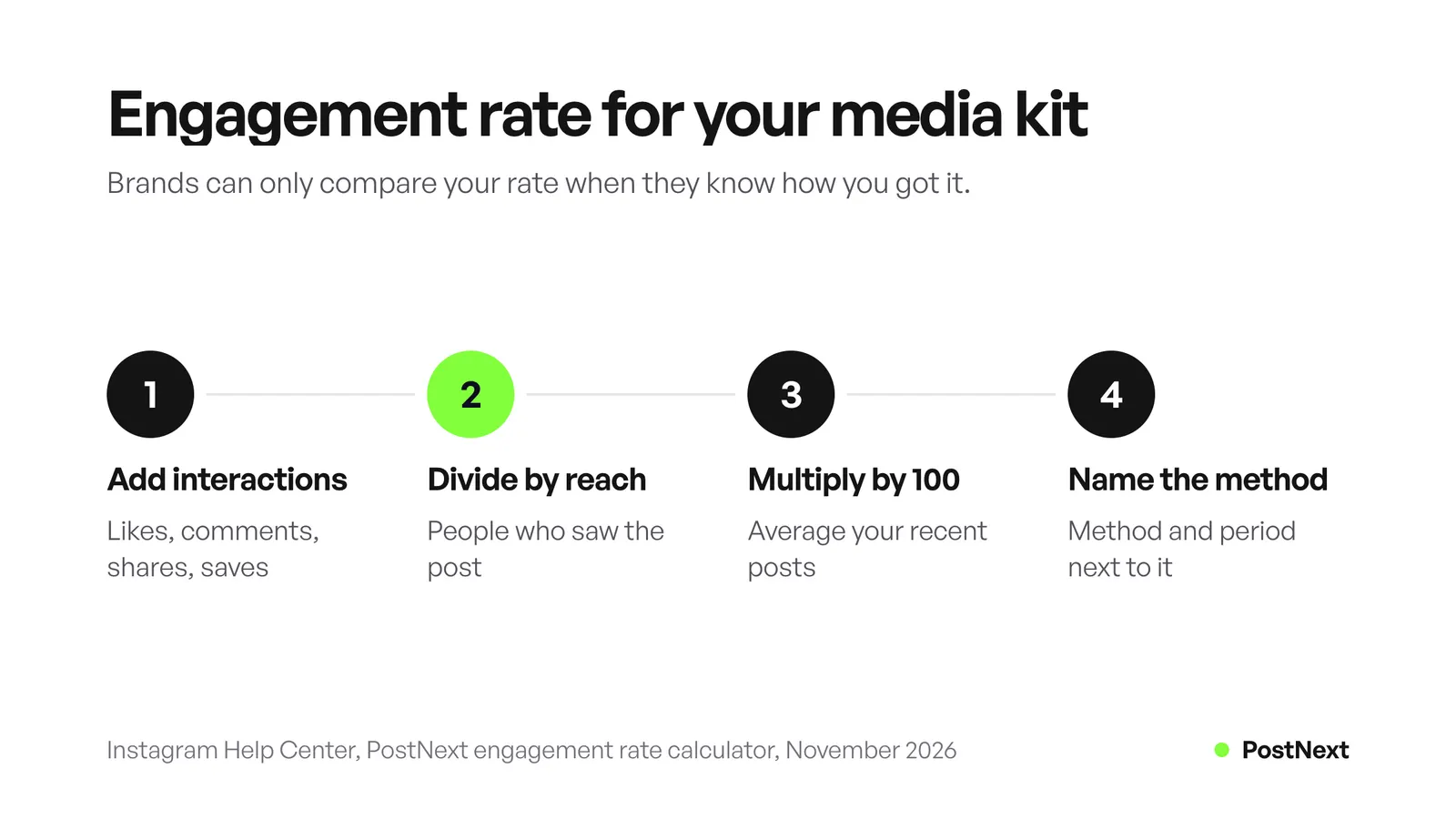
An illustrative example: a Reel with 240 likes, 30 comments, 20 shares and 10 saves has 300 interactions. If it reached 6,000 accounts, the engagement rate by reach is 300 / 6,000 x 100 = 5%. The same Reel on an account with 12,000 followers gives 2.5% by followers. Both are correct. A brand can only compare them when it knows which one you used.
The PostNext engagement rate calculator does the sum for Instagram, TikTok, LinkedIn, X, YouTube, Threads and Bluesky, and lets you choose what to divide by. Write the line in the kit like this: “Engagement rate 5% (interactions divided by reach, average of last 10 posts, October 2026).”
Should you put your rates in a media kit?
You can, but you do not have to. Some creators print a rate card in the kit, some send it as a separate file, and some write “rates on request” and quote per brief. Whichever you choose, list the deliverables clearly, because a brand prices a package of work, not a follower count.
There is no official price list for sponsored posts, and this guide does not print one. Rate surveys use different samples, platforms and years, so a number copied from one can be far from what a brand in your niche pays. Build your price from the work instead:
- Deliverables. How many posts, Reels, Stories or videos, and in which formats.
- Usage rights. Whether the brand may reuse your content in its own posts or ads, and for how long.
- Exclusivity. Whether you agree not to work with competing brands for a period.
- Revisions and timeline. How many rounds of changes, and the posting dates.
- Extras. Links in your bio, a discount code, or raw files.
Follower count still shapes what brands offer. PostNext’s guide on how many followers you need to get paid on Instagram says no single Instagram number turns on income, and that different paths open at different sizes. If you are still building the audience, our guide to your first 1,000 followers covers the early steps. If you also sell your own products, a short section with your shop link helps, and the guide on how to sell on Instagram covers that side.
How should a media kit handle sponsored post disclosure?
Add one line on how you label paid posts, such as “Every paid post carries #ad and the Paid partnership label.” It tells the brand you follow the rules. The FTC’s Disclosures 101 guide says to disclose any financial, employment, personal or family relationship with a brand, including free or discounted products, even if you were not asked to mention them.
The FTC guide, Disclosures 101 for Social Media Influencers, sets out where and how to disclose (checked November 2026):
- Make it hard to miss. Put it with the endorsement itself, not only on your profile, at the end of a caption, or behind a “more” link.
- Use plain words. “Ad”, “advertisement” and “sponsored” work. Avoid vague terms such as “sp”, “spon” or “collab”.
- Put it in the content. On a Story-style image, place it on the picture. In a video, say it in the video, not only in the description.
- Do not rely on the platform tool alone. The FTC suggests using a built-in disclosure tool in addition to your own clear disclosure.
- Talk only about real experience. You cannot claim experience with a product you have not tried.
The platforms have their own tools for this. Instagram’s help center says paid partnership posts use a “Paid partnership with” label naming the brand, and that content with an affiliate link should carry the label too. YouTube asks you to tick the paid promotion option in the video details, which adds a disclosure label at the start of the video. PostNext’s lesson on what a sponsored post is covers how to brief one.
How do you send a media kit to brands?
Send a short message with the kit attached as a PDF, or link to it. Three or four sentences are enough: who you are, why your audience fits this brand, one idea for them, and the kit. Update the numbers at least once a month and change the date on the file, so a brand never reads last year’s audience.
Some practical habits:
- One kit per main platform, if your audiences differ. A YouTube-led kit and a TikTok-led kit may need different examples.
- A link brands can find. Many creators keep the latest kit behind a link in their bio and a “work with me” page, so the newest version is always one tap away.
- Keep posting between deals. A brand checks your profile after it opens the kit. The PostNext influencer content planner drafts a 7, 14 or 30 day plan in your voice and schedules it, and you edit every post before it goes out.
If a deal becomes a joint post, Instagram’s Collab feature puts it on both profiles. Our guide on how to repost on Instagram compares Collabs, reposts and Story shares.
How does PostNext help keep media kit numbers current?
PostNext tracks per-post engagement and a daily follower count for the accounts you connect, so the numbers for the kit sit in one place. On Instagram it records likes and comments per post. On TikTok it records views, likes, comments and shares for videos you post directly. Follower growth is tracked for X, Instagram, Threads and TikTok.
The PostNext analytics dashboard lets you pick 7, 30 or 90 days or the time since tracking started, and exports the selected view as CSV or PDF on paid plans. The overview and follower trend are free. History starts on the day you connect an account, so connect early if you want months of data for your next kit. For audience demographics such as age, gender and location, use each platform’s own analytics, as described above.
Frequently Asked Questions
What should be in an influencer media kit?
A short bio, audience size per platform, audience demographics, engagement rate with its method, content examples, past partnerships, services and rates, and contact details. Add one line on how you disclose paid posts. Date every number and name the platform it came from.
Is there a free media kit template?
Yes. Copy the ten-line outline in this guide into Canva, Google Docs, Notion or any slide app and fill in your own numbers. Design tools also offer free media kit layouts. Whatever you use, replace every sample number with figures from your own analytics.
How many followers do you need for a media kit?
There is no minimum. A media kit is useful as soon as you pitch a brand. Smaller accounts can lead with engagement rate, audience fit and content examples. Note that Instagram only shows audience demographics once you reach or engage over 100 accounts.
How do you calculate engagement rate for a media kit?
Add likes, comments, shares and saves on a post, divide by reach and multiply by 100. Average it over recent posts. If you divide by followers instead, say so. Write the method and the period next to the number.
Should a media kit include rates?
It can. You can print a rate card, send rates as a separate file or write “rates on request”. In every case, list the deliverables, usage rights and exclusivity terms, because those decide the price.
How often should you update a media kit?
At least once a month, and before every pitch. Follower counts, demographics and engagement change, and Instagram Insights only covers the past 90 days. Change the date on the file each time.
Do you have to disclose sponsored posts?
Yes. The FTC says to disclose any financial, employment, personal or family relationship with a brand, including free products. Put the disclosure where people see it, in plain words such as “ad” or “sponsored”, and use the platform’s label as well.
Sources
- Instagram Help Center, About Instagram insights (checked November 2026)
- Instagram Help Center, View account and content insights on Instagram (checked November 2026)
- Instagram Help Center, About labels on paid partnership posts (checked November 2026)
- TikTok Creator Academy, TikTok Analytics (checked November 2026)
- TikTok Help Center, How to use TikTok Analytics and account types (checked November 2026)
- YouTube Help, Understand your YouTube audience and Get started with YouTube Insights (checked November 2026)
- YouTube Help, Add branded content restrictions and disclosure labels (checked November 2026)
- Federal Trade Commission, Disclosures 101 for Social Media Influencers, November 2019 (read November 2026)
- PostNext, postnext.io/features/analytics and postnext.io/tools/engagement-rate-calculator (November 2026)