
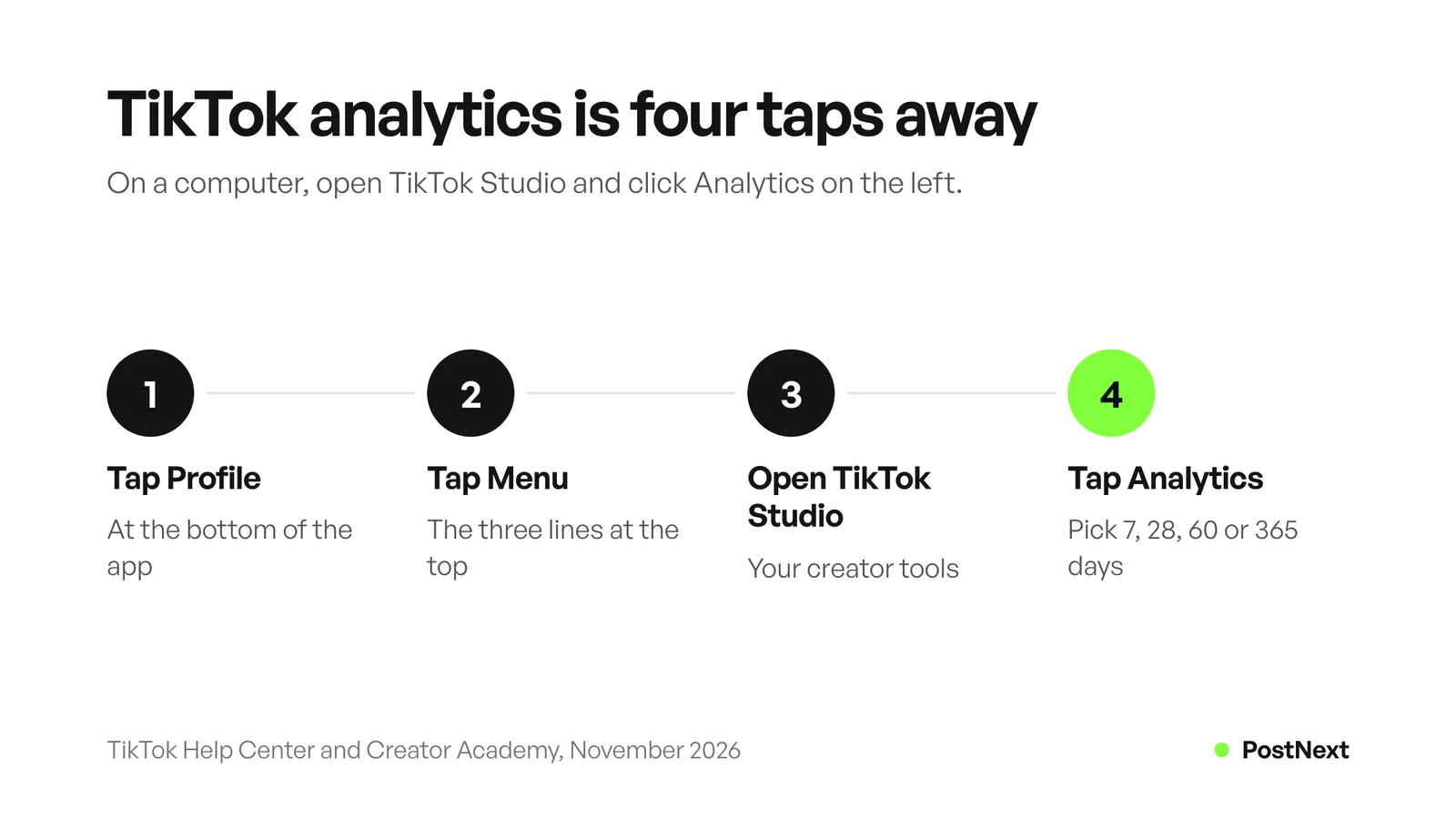
TikTok analytics is a free dashboard inside TikTok Studio. In the TikTok app, tap Profile, tap the Menu button, choose TikTok Studio, then tap Analytics. On a computer, open TikTok Studio in your browser and click Analytics on the left. You need at least one public post. You can view the last 7, 28, 60 or 365 days, or set your own dates.
Key Takeaways
- Where it is: TikTok Studio, in three places: the TikTok app, the TikTok Studio app and the web at tiktok.com/tiktokstudio.
- Who gets it: personal accounts see Analytics in TikTok Studio. Verified Business Accounts also get it in the Business Suite. Every account needs at least one public post.
- What it shows: views, profile views, likes, comments, shares, traffic sources, search queries, viewer details and follower details, plus retention and average watch time for each post.
- How far back: 7, 28, 60 or 365 days, or a custom range. On the web, custom dates go back to 17 July 2022, and a download covers up to 365 days at a time.
- Numbers can lag: TikTok says data can be delayed, so wait a few days before you judge a post.
- Read trends, not one post: TikTok’s own advice is to look at patterns over time instead of one metric on one video.
TikTok analytics at a glance
Every figure below comes from TikTok’s Help Center and Creator Academy, read in November 2026. TikTok changes menu names between app versions, so if a label differs on your phone, look for the same step in the same place.
| Question | Answer from TikTok |
|---|---|
| Where is it in the app? | Profile > Menu > TikTok Studio > Analytics |
| Where is it on a computer? | TikTok Studio on the web, Analytics tab on the left |
| Which accounts? | Personal accounts in TikTok Studio; Verified Business Accounts also in the Business Suite |
| What do you need first? | At least one public post |
| Date ranges | Last 7, 28, 60 or 365 days, or custom |
| Oldest custom date on the web | 17 July 2022 |
| Longest download | 365 days at a time |
| LIVE analytics | Last 7 to 28 days |
| Is it free? | Yes, TikTok calls it a free tool |
How do I see my analytics on TikTok?
Open the TikTok app and tap Profile at the bottom. Tap the Menu button at the top, then select TikTok Studio. Tap Analytics, which TikTok’s help page places within the Posts tab, to see how your posts perform. TikTok’s Creator Academy describes the same path, with a “View all” link next to Analytics. The page opens on an overview for the date range you pick.
For one video, there is a shorter path. Open the post from your profile and tap More insights at the bottom. TikTok Studio is also a separate app, and in it the Analytics tab sits in the bar at the bottom of the screen. It signs in with your TikTok account, and what you post or delete there also changes in TikTok.
If you cannot find Analytics, check two things. TikTok’s help page says the feature “is currently not available to everyone”. Its account page says you need at least one public post. A brand new account, or one with only private videos, sees nothing yet. Post one public video and come back in a day or two.
How do I check TikTok analytics on a computer?
Go to TikTok Studio in your web browser at tiktok.com/tiktokstudio and sign in. Click the Analytics tab on the left side of the screen. The web version holds the same overview, content, viewer and follower data as the app. It is the better place for long date ranges and downloads, because custom dates go back to 17 July 2022 on the web.
TikTok’s creator tools help page says content management and analytics are “best accessed from a web browser”. From the TikTok homepage, you can also click Upload, then pick Analytics in the sidebar. The same page warns that you may have to turn on analytics to see certain metrics. The Creator Academy says a download covers up to 365 days at a time.
Older guides tell you to hover over your profile photo and click “View Analytics”, or to switch to a Pro account first. Those steps come from an earlier version of TikTok. The current Help Center path goes through TikTok Studio.
Do you need a business account for TikTok analytics?
No. TikTok’s account help page lists “Analytics in TikTok Studio” as a feature of General TikTok Accounts, which TikTok also calls personal accounts. Verified Business Accounts get analytics too, inside the Business Suite, together with tools such as a leads manager. Both types need at least one public post before any numbers appear.
Pick the account type for what you post, not for the dashboard. TikTok recommends a Verified Business Account for anyone whose main goal is to promote a product or service. It also warns against switching back and forth, because the business verification is not saved. Business accounts use the Commercial Music Library instead of the general music library, which matters more for most creators than any analytics difference.
What do the TikTok Studio metrics mean?
TikTok groups its numbers into four tabs: Overview, Content, Viewers and Followers. A fifth tab, LIVE, appears for accounts that stream. Overview shows totals for your date range. Content ranks your posts. Viewers and Followers describe who watched. Tap any single post to see how long people watched it and where they came from. The table names each metric as TikTok does.
| Metric | Where | What it tells you |
|---|---|---|
| Post views | Overview | How many times your posts were viewed in the period |
| Profile views | Overview | How many times people opened your profile |
| Likes, comments, shares | Overview | Reactions to your posts in the period |
| Estimated rewards | Overview | Rewards for accounts in a TikTok monetization program |
| Traffic source | Overview and each post | How viewers found your posts |
| Search queries | Overview | The searches that led people to your content |
| Your top posts | Content | Your 10 best videos, ranked by views, likes, new viewers or new followers |
| Unique and returning viewers | Viewers | How many different people watched, and how many came back |
| Viewer insights | Viewers | Inferred gender, age and location of viewers |
| Most active times | Viewers | When your viewers were on TikTok in the last 7 days |
| Follower details | Followers | Gender, age, top locations and active hours of followers |
| Retention rate | Each post | The percentage of your video that people watched |
| Average watch time | Each post | The average time viewers spent on the video |
| Watched full video | Each post | The share of viewers who reached the last few seconds |
Two notes from TikTok. Viewer insights are “based on predictive models rather than confirmed user data”, so treat the age and location split as an estimate. And “watched full video” moves with length: a 15-second clip is easier to finish than a 3-minute one, so compare it only between videos of similar length.
What are traffic sources on TikTok?
Traffic source shows how viewers found your post. TikTok’s Creator Academy describes it as data on “how viewers discovered your posts”, and it sits in the Overview tab and on each post. Next to it, Search queries list the searches that brought people to your content. Together they tell you whether people found you, came looking for you or typed something you answer.
Each kind of source points to a different job. Views from the For You feed mean TikTok showed the video to people who do not follow you. Views from your profile mean people liked one video and came to see more. Views from search mean the video answers something people type. If search queries fill up, put those words in your spoken lines, your on-screen text and your caption. TikTok’s newsroom lists captions, sounds and hashtags as video information its recommendation system reads.
How long does TikTok keep analytics data?
You can pick the last 7, 28, 60 or 365 days, or a custom report. On the web, a custom range goes back as far as 17 July 2022. For earlier data, TikTok’s Creator Academy says to use the app. A download covers up to 365 days at a time. LIVE analytics show the last 7 to 28 days.
So keep your own copy. Download a year at a time and save it before the window moves past it. A spreadsheet with one row per post, its date, its views and its watch time lets you compare this spring with last spring, which the dashboard alone cannot do for older periods.
New numbers also need time. TikTok’s help page says data “might be delayed depending on the post” and suggests waiting a few days before you report a wrong number. Judge a video after three or four days, not after three hours.
How to use TikTok analytics to grow
Use the numbers to answer one question at a time. Retention shows where people leave, traffic sources show where views come from, and most active times show when your viewers scroll. Change one thing per video, such as the first line or the posting hour, and compare the next five posts with the last five. TikTok itself says no single metric matters more than the rest.
| What you see | What it suggests | What to change |
|---|---|---|
| Retention drops in the first seconds | The opening does not hold people | Start with the result or the question, not a greeting |
| High average watch time, few shares | People watch but do not pass it on | End with a reason to send it to a friend |
| Many profile views, few new followers | Your profile does not say what you post | Rewrite your bio and pin your best three videos |
| Search appears in traffic sources | People find you by typing | Say the search words out loud and in the caption |
| Viewers active at the same hours | Your audience has a routine | Post just before that window |
| One format fills your top posts | The format works for your viewers | Make a series of it |
Give each test a fair sample. One video can beat another because of the topic, the sound or the day. Five videos with the same change tell you more than one. For posting hours, our comparison of the best time to post on TikTok shows what three large studies found, and your own most active times beat all of them. For topic ideas, see our list of TikTok ideas with hooks. If a video stalls at zero, our guide on getting more views on TikTok covers the usual causes.
To turn likes, comments and shares into one number you can compare, use the free engagement rate calculator. PostNext’s free lesson on social media metrics and KPIs shows how to pick three numbers for a goal instead of watching all of them.
How does PostNext track TikTok views and shares?
PostNext collects views, likes, comments and shares for each TikTok video you post directly through it, plus a daily follower count for your TikTok account. Posts you finish from your TikTok inbox keep their numbers in TikTok. History starts on the day you connect the account, and PostNext does not import older data.
The PostNext analytics dashboard puts TikTok next to X, Instagram and LinkedIn. You can view 7, 30 or 90 days, or everything since tracking started. The follower trend and the overview are free. Engagement over time, the best-time panel and CSV or PDF exports need a paid plan. For TikTok, the best-time panel ranks time slots by how often you post there, not by engagement.
PostNext does not replace TikTok Studio. Its own analytics page says to use each network’s app for detail such as TikTok regions or watch time. A practical split: read retention and traffic sources in TikTok Studio, and use PostNext to see TikTok beside your other channels and to send one weekly report. Our guide to automating social media reporting shows how to set up that report.
Frequently Asked Questions
Why can’t I see analytics on TikTok?
TikTok’s help page says Analytics is “currently not available to everyone”. You also need at least one public post, so an account with only private videos shows nothing. Update the app, post one public video and check TikTok Studio again after a day or two.
Can you see TikTok analytics on a computer?
Yes. Open TikTok Studio in your web browser and click the Analytics tab on the left. The web version also lets you set custom dates back to 17 July 2022 and download up to 365 days of data at a time.
Do I need a Pro or business account to see TikTok analytics?
No. TikTok lists Analytics in TikTok Studio as a feature of personal accounts. The old instruction to switch to a Pro account comes from an earlier version of TikTok. Verified Business Accounts get analytics in the Business Suite as well.
How far back does TikTok Studio data go?
You can choose the last 7, 28, 60 or 365 days, or a custom range. On the web, custom ranges go back to 17 July 2022, and TikTok says to use the app for anything older. LIVE analytics cover 7 to 28 days.
Can you see who viewed your TikTok videos?
Not by name for videos. Analytics shows counts and estimates: unique and returning viewers, inferred gender, age and location, and when viewers are active. TikTok says the viewer split comes from predictive models, not confirmed user data.
Why are my TikTok analytics not updating?
TikTok says data can be delayed depending on the post. It suggests waiting a few days before treating a number as wrong. If the numbers still look wrong after that, send TikTok a support ticket from the app with screenshots.
What is a good average watch time on TikTok?
TikTok does not publish a target. Compare a video with your own videos of similar length, because a short clip is easier to watch to the end. If the average watch time rises across your last five posts, your openings and pacing are working.
Sources
- TikTok Help Center, How to use TikTok Analytics: the app path, “not available to everyone” and delayed data (read November 2026)
- TikTok Creator Academy, Understanding your analytics: the three ways in, date ranges, 17 July 2022, 365-day downloads, every tab and metric, retention, average watch time and watched full video (read November 2026)
- TikTok Help Center, Account types on TikTok: analytics for personal and Verified Business Accounts, the public post rule and switching account types (read November 2026)
- TikTok Help Center, TikTok Studio: the Studio app, the web address and the analytics tabs (read November 2026)
- TikTok Help Center, Creator tools on TikTok: web access, More insights on a post and analytics “best accessed from a web browser” (read November 2026)
- TikTok Newsroom, How TikTok recommends videos #ForYou: captions, sounds and hashtags as video information (read November 2026)
- TikTok Newsroom, TikTok Tutorial Series: TikTok Analytics: the older Pro account steps and TikTok’s advice to read trends over single metrics (read November 2026)
- PostNext, postnext.io/features/analytics and postnext.io/channels/tiktok: TikTok metrics, history, periods, free and paid features (read 21 November 2026)