
LinkedIn impressions are the number of times your post was shown on screen. If one person sees your post three times, that is three impressions. Members reached counts each person or Page once. You find both under any of your posts: click the impressions number to open post analytics. LinkedIn keeps impression counts for 1,000 days and calls every number an estimate.
Key Takeaways
- Impressions count showings: repeat views count, and LinkedIn says your own views count toward your post analytics too.
- Members reached counts people: distinct members and Pages that saw the post, without repeats. It is the closer number to “how many people”.
- In network vs out of network: LinkedIn splits impressions into people who follow or are connected to you and people who are not.
- Data has an end date: impressions and engagement 1,000 days, members reached 400 days, demographics 180 days.
- Every member gets analytics: post analytics, combined post analytics for 7 to 365 days and audience analytics are free. Premium adds the full list of profile viewers.
- No official normal range: LinkedIn publishes no benchmark, so compare each post with your own recent posts.
What are impressions on LinkedIn?
An impression is one time your post was displayed on screen on LinkedIn. LinkedIn’s help pages define impressions as the “number of times your post was shown on LinkedIn” and add that the number is an estimate and may not be precise. An impression does not mean someone read the post. It means the post appeared in front of them, in the feed or anywhere else LinkedIn shows it.
Three details from LinkedIn’s post analytics page change how you read the number (linkedin.com, November 2026):
- Your own views count. LinkedIn says your own views, engagements, saves and sends count toward your post analytics. Checking your post ten times adds to its numbers.
- The split shows where views came from. In network is the share of impressions from people who follow or are connected to you. Out of network is the share from everyone else.
- Only you see it. Your post analytics are private to you.
What is the difference between impressions and members reached on LinkedIn?
Impressions count how many times your post was shown. Members reached counts how many different members and Pages saw it at least once. If your post appeared to one person five times, that is five impressions and one member reached. Members reached is the better answer to “how many people saw my post”. Impressions show how often LinkedIn kept showing it.
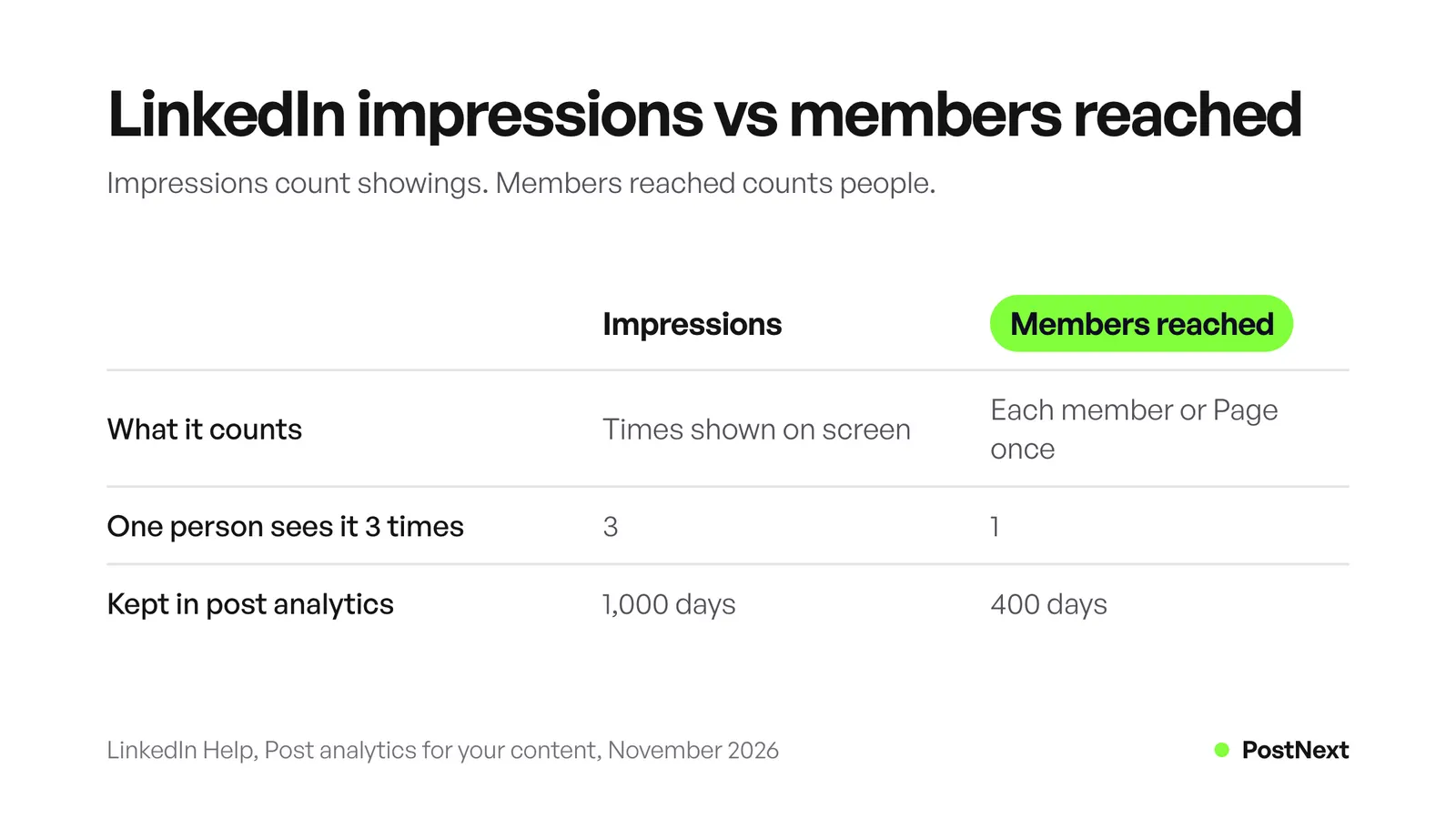
| Impressions | Members reached | |
|---|---|---|
| What it counts | Times your post was shown on screen | Distinct members and Pages who saw it |
| One person sees it 3 times | 3 | 1 |
| Kept in post analytics | 1,000 days | 400 days |
| Split by network | In network and out of network shares | Used for viewer demographics |
LinkedIn also uses members reached for viewer demographics. It adds a small amount of noise to the demographic numbers to protect viewers’ privacy and only shows a breakdown once enough members have seen the post (linkedin.com, November 2026). That is why the job titles and companies of your viewers can stay empty on a small post.
How do you see impressions on a LinkedIn post?
On a computer, click Me at the top of LinkedIn, then Posts & Activity under Manage. Pick the Posts, Videos, Images, Articles or Newsletter tab. Under a post, click the impressions number in the lower-left corner or View analytics in the lower-right corner. On the phone app, open your profile, scroll to Activity, tap Show all posts and tap the impressions number under a post.
The post analytics page then shows these groups, depending on the post type:
- Discovery: impressions, in network and out of network shares, and members reached.
- Profile activity: profile viewers from this post and followers gained from this post.
- Social engagement: reactions, comments, reposts, saves and sends on LinkedIn.
- Link engagement: visits to links in the post. LinkedIn shows no data for links flagged as spam or for links to LinkedIn content, such as your own posts.
- Video performance: video views, counted when someone watches for two or more continuous seconds, plus watch time.
- Post viewer demographics: job titles, locations, companies, company sizes, industries and seniority of viewers.
Profile viewers and followers gained are the two numbers closest to a result. A post with fewer impressions but more profile viewers often did more for you than one that was only scrolled past.
Where do you find LinkedIn analytics for all your posts?
Open your profile, scroll to the Analytics section and click Show all. The Analytics & tools page holds your combined post analytics, audience analytics and profile analytics in one place. Combined post analytics shows total impressions or engagements over any range from 7 to 365 days, your top posts and a table of recent posts, and you can export it as an .XLSX file.
What each part gives you (linkedin.com, November 2026):
| Analytics | What it shows | Range |
|---|---|---|
| Combined post analytics | Total impressions or engagements, members reached, up to three top posts, recent posts with lifetime totals | 7 to 365 days |
| Audience analytics | Total followers, new followers per day, top five follower demographics | 7 to 365 days |
| Who viewed your profile | Number of viewers, three most recent viewers on a free account | 90 days free, up to 365 days on Premium |
| Search appearances | How often you appeared in search, profile impressions, clicks and viewing time | Not stated |
LinkedIn’s creator analytics FAQ says the percentage change next to your impressions compares the selected date range with the range before it. The trend graph runs up to yesterday, so today’s numbers are not in it yet. Engagement can even show a negative day if people removed more reactions or comments than they added that day.
Do you need LinkedIn Premium to see analytics?
No. LinkedIn says all members have post analytics, combined post analytics and audience analytics. Premium matters for profile viewers. A free account sees the number of profile viewers and the three most recent viewers from the last 90 days. Premium Career and Premium Business show the full list for up to 365 days, with filters and trends.
Premium also adds a section to post analytics that lists people who viewed your profile in the first month after a post, up to 100 of them. It does not appear for posts older than 90 days. If you browse LinkedIn in private mode on a free account, you cannot see your own profile viewers either.
How long does LinkedIn keep post analytics?
LinkedIn keeps impressions and engagement counts for most posts for 1,000 days. Members reached data stays for 400 days and demographic breakdowns for 180 days. Article and newsletter analytics stay for two years. For video, LinkedIn’s two help pages disagree: one says 365 days, the other 180 days. Export the numbers you want to keep.
A monthly export is the simple fix. Combined post analytics and audience analytics both export to .XLSX. Save one file a month and you keep a record that outlives LinkedIn’s windows, including demographics you would otherwise lose after six months.
What is a good number of impressions on LinkedIn?
LinkedIn does not publish a normal range for impressions. The numbers depend on your followers, your topic and how often you post, so averages from other accounts tell you little. A better test is your own median. Take your last 10 to 20 posts, sort them by impressions and use the middle value as your baseline.
Then read every new post against it:
- Above the baseline: look at the format, the first lines and the topic. Make another post like it.
- Below the baseline: check the out of network share. A low share means the post stayed with people who already know you.
- High impressions, few reactions or comments: the post was shown, but people kept scrolling. The first lines did not hold them.
- Low impressions, many comments: a small audience cared a lot. Post on that topic again and reply to every comment.
Use the same date range when you compare, because combined post analytics compares each range with the one before it. Our guide to how the LinkedIn algorithm works explains which signals LinkedIn says it ranks.
How can you get more impressions on LinkedIn?
LinkedIn says its feed weighs how often a post is viewed or engaged with, what it is about and whether it gives knowledge or advice, how recent it is, and how constructive the conversation is. It also uses time spent viewing a post. Write posts that give advice in your field, hold attention past the first lines and start real discussions.
Five steps that follow from what LinkedIn says it measures:
- Give knowledge or advice. LinkedIn’s relevance page names “whether it provides knowledge or advice” as a content signal. A lesson from your own work beats a general opinion. Our list of LinkedIn post ideas has 30 starting points.
- Hold attention. LinkedIn’s engineering team measures dwell time on the feed from the moment at least half of a post is visible. Put the point in the first lines. The free LinkedIn post preview shows where “…more” cuts your post.
- Answer comments. LinkedIn ranks how constructive the conversation is. A reply to every comment in the first hours keeps the discussion going.
- Post on a steady schedule. LinkedIn weighs how recent a post is, and each post gets its own chance. Pick a number of posts a week you can keep for months. Our guide to scheduling LinkedIn posts shows three ways to plan them.
- Tag only people who belong in the post. LinkedIn lists tagged people and companies as a signal. Tag people you name or worked with, not a list of names to ask for attention.
The free course on growing on LinkedIn takes each step further, with exercises.
How PostNext helps with LinkedIn posting
PostNext schedules text, image and GIF posts to personal LinkedIn profiles through LinkedIn’s official API, and can post your first comment. It does not publish to Company Pages, documents, polls or video. For analytics, PostNext shows likes and comments for each LinkedIn post. Impressions and followers stay in LinkedIn’s own analytics.
That split is useful in practice. Use the LinkedIn scheduler to keep a steady rhythm, then read impressions, members reached and profile viewers in LinkedIn. On paid plans, PostNext also suggests three posting times from your own LinkedIn posts of the last 90 days, and analytics puts your LinkedIn likes and comments next to your X, Instagram and TikTok numbers.
Frequently Asked Questions
What counts as an impression on LinkedIn?
An impression is one time your post was shown on screen on LinkedIn. Repeat showings to the same person count again, and LinkedIn says your own views count toward your post analytics. LinkedIn calls the number an estimate that may not be precise.
Is members reached the same as reach?
Yes, in practice. Members reached is the number of distinct members and Pages that saw your post, without repeat views. Other networks call this reach. It is always the same as or lower than impressions.
Can other people see my LinkedIn impressions?
LinkedIn says your post analytics are private to you. Other members see the reactions, comments and reposts on your post, but not its impressions, members reached or viewer demographics.
Do my own views count as LinkedIn impressions?
Yes. LinkedIn’s post analytics page says your own views, social engagements, link engagements, saves and sends are counted toward the analytics of your content. Avoid opening your own post again and again if you want clean numbers.
Why did my LinkedIn impressions drop?
Compare the post with your own median first, because single posts vary a lot. Then check the out of network share, the topic and how many comments came in early. LinkedIn’s feed weighs engagement, recency and topic, so a post with little early engagement can get fewer showings later.
How far back can I see LinkedIn post analytics?
Impressions and engagement counts stay for 1,000 days for most posts. Members reached stays for 400 days and demographic breakdowns for 180 days. Articles and newsletters keep their analytics for two years. Combined post analytics shows ranges up to 365 days.
Sources
- LinkedIn Help, Post analytics for your content: definitions, own views, data availability, Premium profile viewers after a post (read November 2026)
- LinkedIn Help, View post analytics for your content: steps on desktop and mobile, data availability (read November 2026)
- LinkedIn Help, Combined post analytics: date ranges, metrics, export (read November 2026)
- LinkedIn Help, Recent changes to viewers demographics: impressions vs members reached, privacy noise (read November 2026)
- LinkedIn Help, Creator analytics FAQ and Audience analytics (read November 2026)
- LinkedIn Help, Analytics and tools on LinkedIn, Analytics for LinkedIn members and View your profile Search Appearances (read November 2026)
- LinkedIn Help, Who’s viewed your profile: Basic and Premium and Private mode viewers (read November 2026)
- LinkedIn Help, LinkedIn relevance: feed signals (read November 2026)
- LinkedIn Engineering, Understanding dwell time to improve LinkedIn feed ranking (read November 2026)
- PostNext, postnext.io/channels/linkedin, postnext.io/features/analytics and postnext.io/docs/features/analytics (read November 2026)