Social media for interior designers works when each platform matches how your clients hire. Instagram is the portfolio a referred client checks first. Pinterest and Houzz reach homeowners who are planning a project, and LinkedIn reaches commercial clients. Get the photographer’s licence and the homeowner’s written permission, post finished rooms at 4:5, and turn each project into two posts a week for six weeks. This PostNext guide shows how.
Key Takeaways
- Instagram is your portfolio: 51% of US adults use it, and referred clients look there first.
- Bigger projects hire designers: in Houzz’s 2026 survey, 13% of homeowners planned to hire an interior designer, and 20% of those with projects of $50,000 or more.
- Pinterest and Houzz reach planners: both have free business accounts, and Houzz lists you in its Find Professionals directory.
- Paying for a shoot does not make you the owner: the photographer licenses the photos to you. Get the homeowner’s permission in writing too.
- Export each shape: 4:5 for Instagram and LinkedIn, 2:3 (1000 x 1500 pixels) for Pinterest.
- One project gives 12 posts: two a week for six weeks, from the reveal to the credits.
- Steady beats busy: Buffer found accounts that posted in 20 of 26 weeks got 450% more engagement per post than accounts that posted in 4 or fewer.
Does social media work for interior designers?
Social media works for interior designers as a portfolio that clients check before a large decision. Interior design is often hired for bigger projects. In Houzz’s 2026 survey of 1,034 homeowners, 13% planned to hire an interior designer, and the share rose to 20% for projects of $50,000 or more. A client who spends that much looks at your past rooms first, and your feed is where they look.
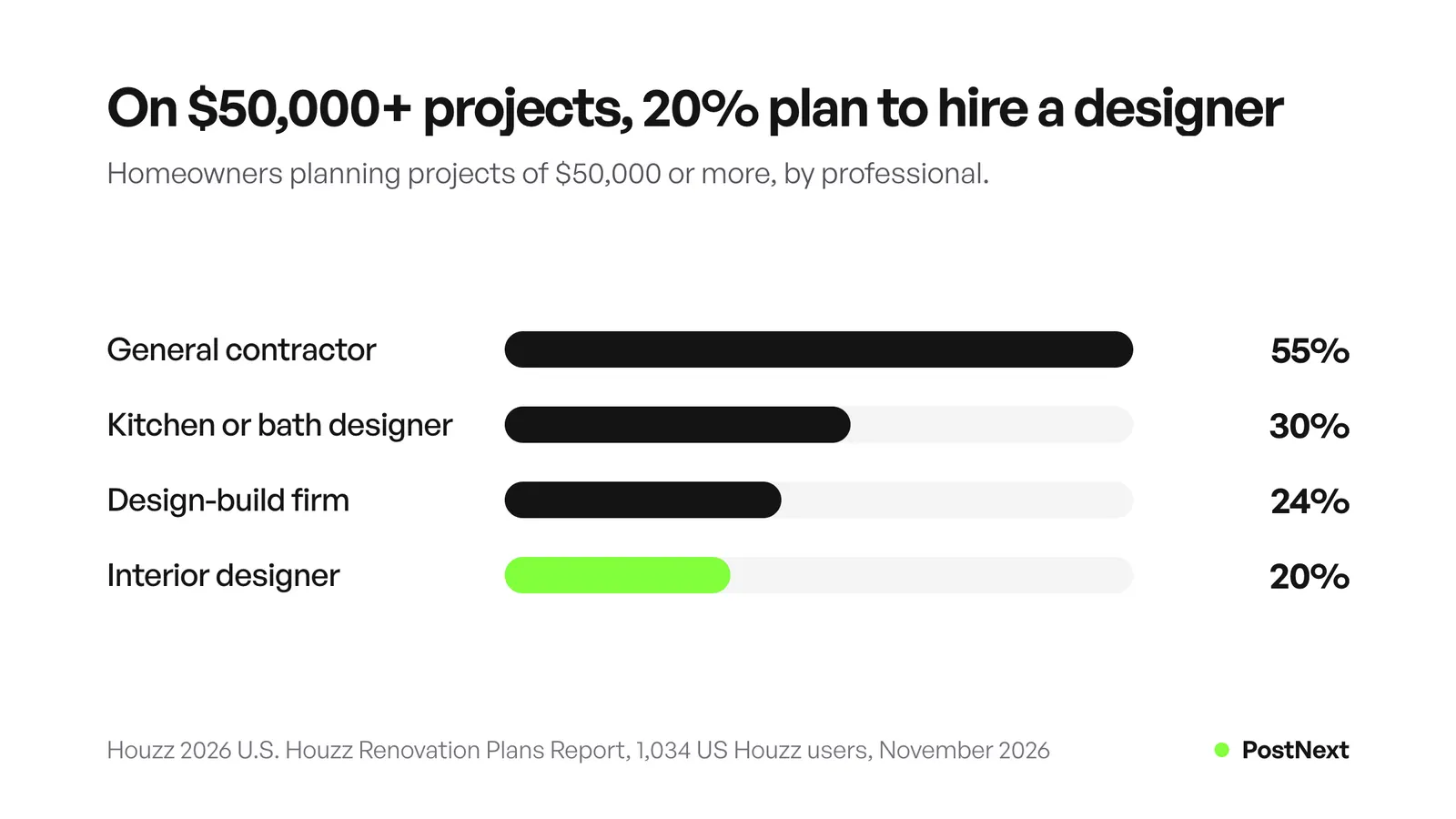
| Professional | All planned 2026 projects | Projects of $50,000 or more |
|---|---|---|
| General contractor | 37% | 55% |
| Kitchen or bath designer | 19% | 30% |
| Design-build firm | 13% | 24% |
| Interior designer | 13% | 20% |
| Architect | 10% | Not reported |
Houzz, 2026 U.S. Houzz Renovation Plans Report: online survey of 1,034 US Houzz users, October 2025. Checked November 2026.
The sample is Houzz users, so these are people already planning work. A client choosing a designer makes a large, slow decision and scrolls back through months of your posts. A feed that stopped in spring makes them ask whether you still take on work.
There is a fair case for spending less time here. Many studios get most of their work from referrals and past clients, and we found no survey that measures how many design clients come from a social post. If your diary is full from referrals, keep a current portfolio and skip daily posting.
Which social media platforms should interior designers use?
Use Instagram as your main portfolio. Add Houzz or Pinterest to reach homeowners who are planning a project, and add LinkedIn if you do commercial work. Pick two and keep them current. Pew’s 2026 survey found 51% of US adults use Instagram and 31% use LinkedIn. Pinterest was at 36% when Pew last asked about it, in 2024.
| Platform | Who you reach | Best post for a designer | US reach | Business account |
|---|---|---|---|---|
| Referred clients checking your work | Project reveal carousels, Reels of the finished room | 51% of adults (2026) | Free professional account | |
| Houzz | Homeowners looking for a pro in their area | Full project galleries and reviews | Houzz says 70 million homeowners and enthusiasts use it worldwide | Free, listed in the Find Professionals directory |
| People saving ideas for a future project | One room per Pin at 2:3, linked to your website | 36% of adults (2024) | Free, with Pinterest Analytics | |
| Office, hotel and retail clients, architects, developers | Commercial project case studies | 31% of adults (2026) | Personal profile is free | |
| TikTok | People who do not know you yet | Short before-and-after and process videos | 37% of adults (2026) | Free |
Reach from the Pew Research Center Social Media Fact Sheet (5,511 US adults, 2026; Pinterest from 2024). The Houzz number is Houzz’s own. Checked November 2026.
Match the mix to the work you want more of:
- Residential designer working alone: Instagram and Houzz. Add Pinterest once your website has a page for each project.
- Kitchen and bath studio: Instagram, Houzz and Pinterest, where homeowners save ideas for these rooms.
- Commercial or hospitality studio: LinkedIn and Instagram.
Facebook reaches the most people, 70% of US adults. Keep a Page with your contact details and reviews current, even if your portfolio lives on Instagram.
How should interior designers use Instagram?
Treat your Instagram profile as the first page of your portfolio. A referred client opens it, reads the bio and scrolls the top rows. Say your style, your area and the type of work in the bio, give one way to contact you, and fill the grid with finished rooms. Process posts go between the reveals.
A bio that does this job has four parts: the style in plain words (“warm, modern family homes”), the area you work in, the service (“full-service design and e-design”) and one contact button.
Use each format for one job:
- Carousels for project reveals and before-and-after pairs. They hold a whole room in one post.
- Reels for a slow walk through the finished room, filmed on a phone at eye height.
- Stories for site days, samples arriving and decisions in progress.
In captions, say what the client asked for, what was wrong with the room and what you changed. Name the paint, the stone or the maker. That answers the questions a new client asks in a first meeting.
How do you post a project reveal and a before-and-after?
Post the reveal as a carousel. Open with the strongest wide shot of the finished room, then the before-and-after pairs, then the details, then the plan or mood board. Instagram allows up to 20 photos or videos in one carousel. Keep every slide the same shape.
A reveal order that works for most rooms:
- Slide 1: the hero shot, the widest and best-lit view of the room.
- Slides 2 to 5: before-and-after pairs, each pair from the same corner.
- Slides 6 to 8: details, such as hardware, fabric or a joinery corner.
- Slide 9: the floor plan or the mood board that started it.
- Last slide: the credits: photographer, contractor and makers.
Take the before photos at the first site visit, from the corners where a photographer is likely to stand later, and note where you stood. Level, well-lit phone photos are fine. They show the client’s old home and belongings, so they need the same permission as the finished room. For more slide orders, see our carousel ideas with slide-by-slide outlines.
What size should interior design photos be for social media?
Post interior photos at 4:5 portrait on Instagram and LinkedIn, and at 2:3 (1000 x 1500 pixels) on Pinterest. Instagram accepts feed images from 4:5 to 1.91:1 through its publishing API, and LinkedIn shows photos at most 4:5. A tall frame suits rooms: it holds the ceiling height, a doorway or a styled shelf. Ask your photographer for vertical crops of the main shots.
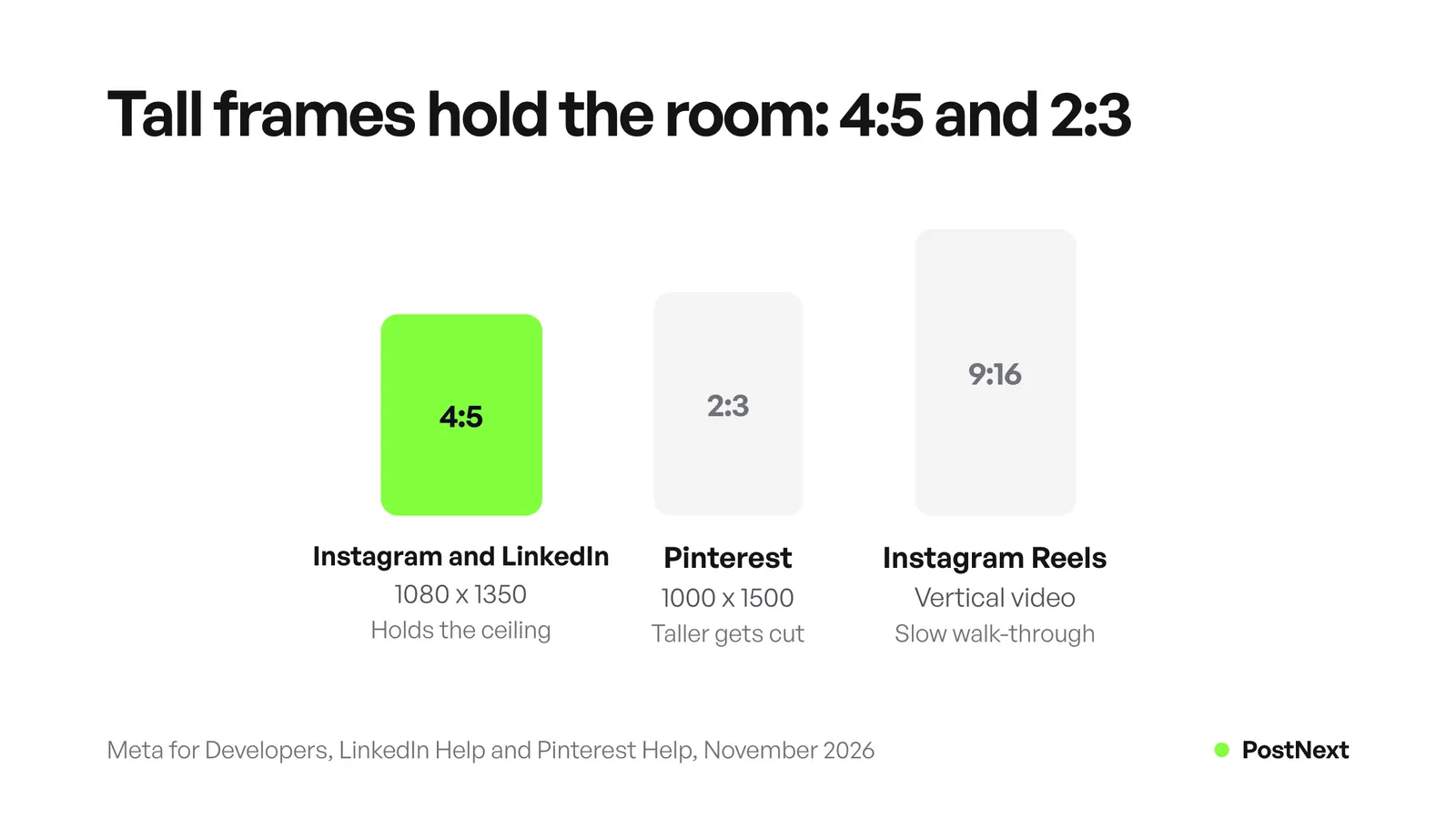
| Platform | Shape | Size to export | Source |
|---|---|---|---|
| Instagram feed and carousels | 4:5 tall to 1.91:1 wide | 1080 x 1350 (4:5), up to 1440 wide | Meta for Developers |
| Instagram Reels | 9:16 vertical | Phone video, vertical | PostNext Instagram page, from Meta |
| 3:1 to 4:5, shown at most 4:5 | 1080 pixels wide recommended | LinkedIn Help | |
| 2:3 | 1000 x 1500 | Pinterest Help |
From each platform’s own page, checked November 2026. 1080 x 1350 is 4:5 at 1080 pixels wide.
Plan the crops before the shoot. A wide photo of a living room cut down to 4:5 loses half the room. Ask for two versions of each hero shot: 4:5 for Instagram and LinkedIn, and 2:3 for Pinterest. Our guides list every Instagram feed size and the Pinterest Pin sizes for video and square Pins too.
Who owns the photos of your projects, and what permission do you need?
The photographer owns the photos, even when you paid for the shoot. You get a licence that says where, how and for how long you may use them. Before you post, check that the licence covers social media, and get the homeowner’s permission in writing. The British Institute of Interior Design tells designers to get client permission “in full and in writing from the offset.”
The American Institute of Architects puts it plainly: “Although you are paying the photographer to shoot the images for you, you don’t own them.” Under US law, a commissioned photo becomes a work made for hire only in narrow cases. Both sides must also sign a written agreement (US Copyright Office, Circular 30).
Settle these points in the contract before the shoot:
| Question | Why it matters |
|---|---|
| Does the licence name social media, your website and ads? | Only the copyright owner can allow a use. Name every use you plan. |
| For how long, and on which platforms? | A licence limits the purposes and the time period. |
| How must the photographer be credited? | Credit rules in the contract are conditions you must follow. |
| Will the architect or makers share the licence? | Shared licences can lower the cost for each party. |
| Can the photographer post the project too? | Agree it up front, so their posts and yours do not surprise the client. |
| Has the homeowner agreed in writing? | Some clients do not want their home shown at all. |
| Does anyone appear in the photos? | People in a shot need a photo release. |
From the AIA project photography guide (December 2025), the BIID and US Copyright Office Circular 30. Checked November 2026.
Credit the photographer in every post, in the words the contract asks for, and tag their account. If you share the post with them as a Collab, so it appears on both profiles, you send that invite from the Instagram app. PostNext’s guide on how to collab post on Instagram shows the steps. Your photographer markets on the same platforms; our guide to social media for photographers shows how they protect their images.
Protect the client’s privacy too: keep house numbers, the street and family photos out of the frame, and ask before you name the town.
How do you turn one finished project into weeks of posts?
Spread one finished project over six weeks, two posts a week. Open with the reveal, then the before-and-after pairs, the details, the decisions behind them, the client’s words and the credits. Twelve posts from one shoot keep your feed active in the weeks you are busy on the next job, and each post shows a different side of how you work.
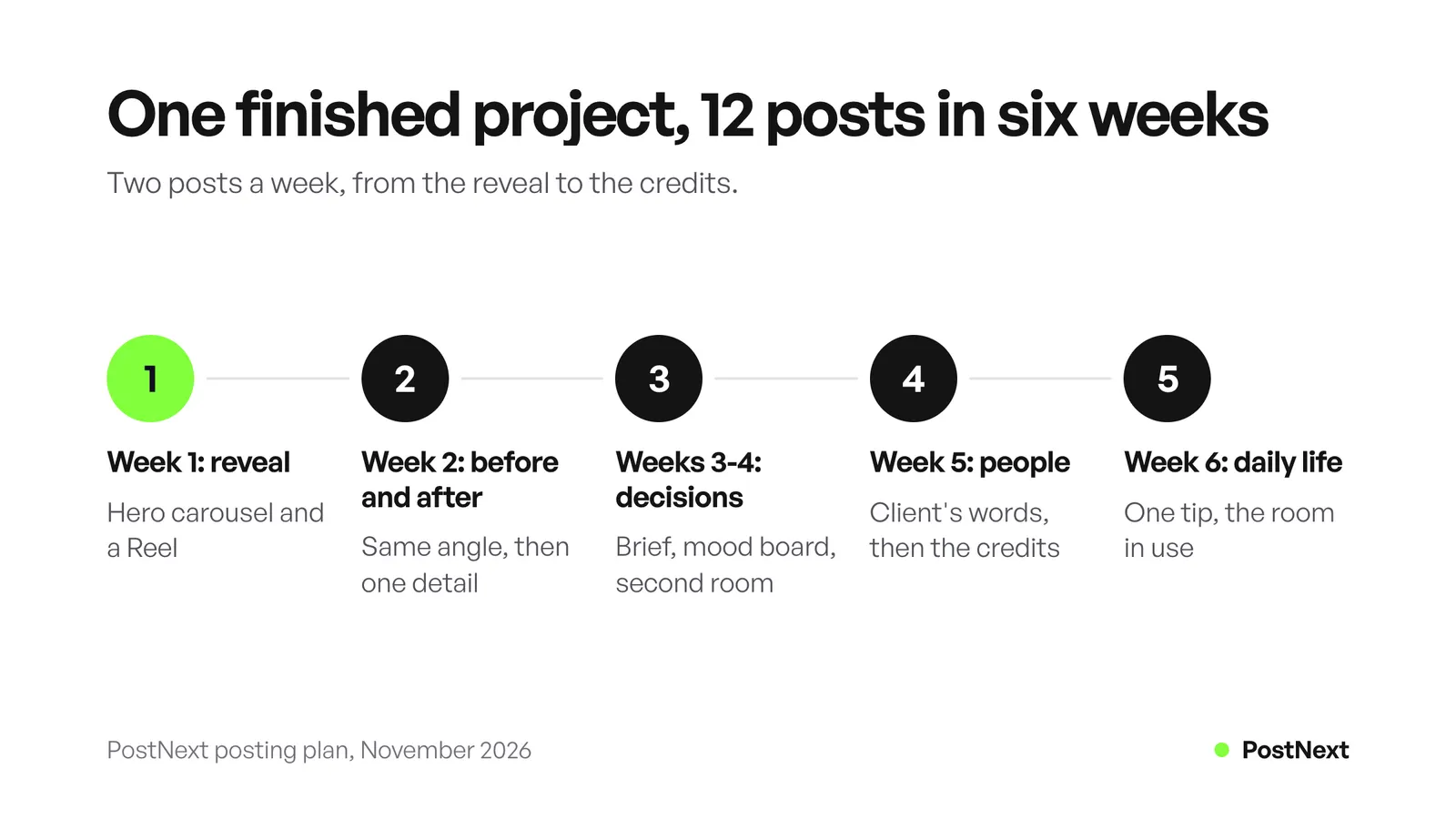
| Week | Post 1 | Post 2 |
|---|---|---|
| 1 | Reveal carousel, hero shot first | Reel: a slow walk through the finished room |
| 2 | Before-and-after pair of the main room | One detail and why you chose it |
| 3 | The brief: what the client asked for | Mood board or samples next to the finished room |
| 4 | Second room as a carousel | One decision explained: layout, colour or light |
| 5 | The client’s words, with permission | Credits: photographer, contractor, makers, tagged |
| 6 | A tip homeowners can use from this project | The room in daily use, if the client agrees |
A posting plan for one project. Two posts a week suits most independent designers.
In the reveal week, also upload the full gallery to Houzz, pin the 2:3 versions to Pinterest and, for commercial work, write the LinkedIn case study. Between finished projects, post from jobs in progress: a sample board, a site visit, a delivery.
How often should an interior designer post?
Two posts a week on your main platform is enough for most independent designers, if you keep it up every week. Buffer studied more than 100,000 of its users over 26 weeks. Those who posted in 20 or more weeks got 450% more engagement per post than those who posted in 4 weeks or fewer. Showing up every week matters more than posting every day.
Some advice for designers says three or four posts a week. That works only if you can hold it through an install month, and a gap of several weeks costs more than a lower count. Schedule a project’s six weeks in one sitting, on the day the photos arrive. Houzz needs less: add each project when it is photographed, and ask for a review at handover.
How should interior designers use Pinterest and Houzz?
Use Pinterest to send people from a saved idea to your website, and Houzz to be found and reviewed by homeowners who want a designer. Both business accounts are free. Pinterest business accounts get analytics on your Pins, and a free Houzz business account adds you to the Find Professionals directory, where homeowners search for a pro.
Pinterest. Pin one room per image at 2:3, 1000 x 1500 pixels, and link each Pin to the project page on your website. Pinterest says Pins taller than 2:3 might get cut off in people’s feeds. Give each Pin a title that names the room, the style and the town, such as “Oak kitchen with green cabinets, Bath”, and group boards by room type.
Houzz. Upload each finished project as a gallery, and ask every client for a review. Houzz says reviews are the first thing homeowners look for when they choose who to hire, and that professionals with at least three reviews are 15 times more likely to be contacted. That is Houzz’s own figure, with no published method. You can send a review request to up to 50 email addresses at once, and Houzz checks each review before it appears.
Should commercial interior designers use LinkedIn?
Use LinkedIn if your clients are businesses. It is the network where office, hotel and retail clients, and the architects and developers who bring you into projects, read about work. Post each finished project as a short case study: the brief, the constraint, the result and the team.
Lead with the problem the client had, such as an office that staff avoided or a lobby that felt cold, then show the result in four to six photos. LinkedIn shows photos at most 4:5 and allows up to 20 in one post. Tag the architect, the contractor and the client’s company, if they agree. Post from your personal profile as well as the studio’s Company Page: in a small studio, the client hires you.
How does PostNext help an interior designer?
PostNext lets you schedule a project’s six weeks of Instagram and LinkedIn posts in one sitting, then publishes each one at its time. It publishes Instagram feed posts, carousels of 2 to 10 photos or videos, Reels and image Stories. It also posts to LinkedIn personal profiles, TikTok, Threads, X, YouTube and Bluesky from one calendar.
Know its limits for this job:
- Carousels: Instagram allows 20 photos per carousel. PostNext takes 2 to 10, which fits a reveal. Post a longer carousel from the Instagram app.
- Collab posts, product tags and location tags: PostNext cannot add a Collab invite, so post a Collab with your photographer from the Instagram app. You can still tag them in the caption of a scheduled post.
- Pinterest and Facebook: PostNext does not post to them today. Both are listed as coming soon. Pin from Pinterest itself.
- Houzz and LinkedIn Company Pages: not supported. Post those on the platform.
- Messages: the Instagram comment inbox lets you read and reply to comments. It does not cover direct messages.
The free plan covers 1 channel, 10 posts and 10 AI credits a month. The six-week plan is about nine posts a month, so it fits on one channel. The Instagram scheduler page shows what PostNext publishes to Instagram and the limits Instagram sets for apps. PostNext for interior designers shows how one project becomes four posts, with caption templates you can copy.
Frequently Asked Questions
Is Instagram or Pinterest better for interior designers?
Start with Instagram. It is where a referred client checks your portfolio, and 51% of US adults use it. Add Pinterest once your website has a page for each project, so each 2:3 Pin can send planners there.
Do I own the photos I paid a photographer to take?
Usually not. The photographer owns the copyright and gives you a licence for named uses, places and time periods. Under US law, a commissioned photo is a work made for hire only in narrow cases and with a written agreement both sides sign. Read the licence before you post.
Can I post photos of a client’s home without asking?
No. Get the homeowner’s permission in writing before the shoot, and include the before photos. The British Institute of Interior Design tells designers to get it in full and in writing from the start. Keep house numbers, the street and family photos out of the frame.
How often should an interior designer post on Instagram?
Two posts a week, every week, is enough for most independent designers. Buffer found that accounts which posted in 20 or more of 26 weeks got 450% more engagement per post than accounts which posted in 4 weeks or fewer. One finished project gives about 12 posts.
Is Houzz free for interior designers?
Yes, a basic Houzz business account is free and lists you in the Houzz Find Professionals directory. Houzz says professionals with at least three reviews are 15 times more likely to be contacted, so ask every client for a review.
Should interior designers use TikTok?
TikTok reaches people who do not know you yet: 37% of US adults use it. It suits short before-and-after and process videos. It needs new video every week, so add it once your Instagram is steady, not before.
Sources
- Houzz, 2026 U.S. Houzz Renovation Plans Report and press release, survey of 1,034 US Houzz users, October 2025, published December 2025, checked November 2026.
- Pew Research Center, Social Media Fact Sheet, 5,511 US adults, published October 2026, checked November 2026.
- Houzz Pro, How to get reviews on your Houzz profile and How to create a free business account on Houzz, checked November 2026.
- Pinterest Help, Pinterest product specs and Get a business account, checked November 2026.
- Meta for Developers, IG User Media reference, checked November 2026.
- LinkedIn Help, Share photos or images in your post, checked November 2026.
- American Institute of Architects, Project photography: a reference guide, December 2025, checked November 2026.
- British Institute of Interior Design, Permission to use photography: what you need to know, checked November 2026.
- US Copyright Office, Circular 30: Works Made for Hire, checked November 2026.
- Buffer, Consistent Posting Study (buffer.com/resources/consistent-posting-study), more than 100,000 users over 26 weeks, January 2025, checked November 2026.
- PostNext, Instagram channel page and pricing, checked November 2026.