Key takeaways
- Traditional schedulers promise efficiency and deliver a queue you still have to think about.
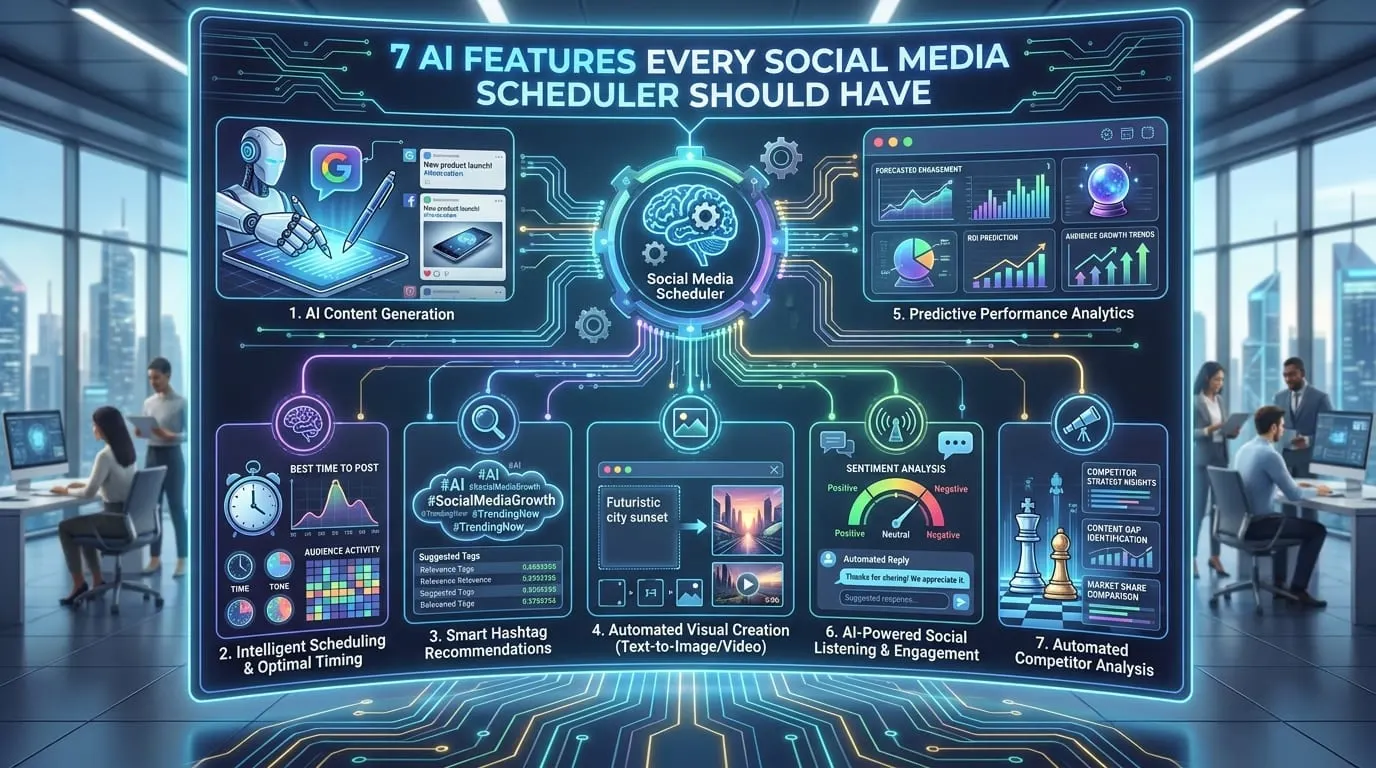
- Seven features now separate an AI scheduler from a calendar with a posting button.
- AI content creation plus smart scheduling is the new baseline, not a premium tier.
- Basic metrics no longer qualify as analytics; predictive tracking is the expectation.
Why Most Social Media Scheduling Fails (and How AI Changes the Game)
The Problem With Traditional Schedulers
Social media scheduling promises efficiency, but most traditional schedulers fall short. They require users to manually queue posts or set up rigid rules that don’t reflect real engagement patterns. You might spend hours planning content, only to see posts go live at the wrong moment, missing active conversations and trending topics. The result? Wasted time, missed engagement windows, and content that feels disconnected from your audience.
Manual and rule-based tools excel at publishing posts on a fixed schedule. But in 2026, that’s not enough. Social platforms update algorithms frequently, audience attention shifts rapidly, and trends can rise and fall within hours. Relying on outdated automation means you’re always a step behind.
Why Automation Alone Isn’t Enough in 2026
A basic scheduler can’t evaluate whether a trending meme fits your brand or if a competitor’s campaign is drawing away your audience. Automation alone ignores context. It won’t analyze which captions drive conversation or alert you to negative sentiment around your brand. If your tool just queues and posts, you’re missing critical opportunities to connect and adapt.
This is where AI social media scheduler features come in. Current tools generate AI-written content tailored to each channel, provide analytics that highlight what’s working, and some surface trends or competitor activity. Check each vendor’s own feature pages for what is included in which plan.
Key Insight: Outdated schedulers waste your time and limit your reach, but AI-driven features have become essential for maximizing both efficiency and engagement.
What Outdated Tools Miss – and Why It Matters
- No real-time trend adaptation: You can’t pivot content to ride a viral topic or adjust messaging quickly.
- Poor analytics: Basic post metrics don’t reveal which efforts actually drive results.
- Limited engagement tools: Manual responses and lack of a unified inbox slow down community building.
- No competitive or sentiment tracking: You’re unaware of shifts in public perception or industry activity until it’s too late.
Expectations are higher now. Businesses need smarter scheduling that learns, adapts, and optimizes in real time – something only AI can deliver. If your scheduler can’t suggest captions, surface actionable insights, or flag a brewing crisis, you risk falling behind.
As the landscape evolves, must-have AI features are no longer luxury add-ons. They’re requirements for anyone serious about staying relevant and efficient on social. The difference is clear: brands with AI-powered tools capture more engagement, protect their reputation, and make every post count.
Comparison Table: 7 Essential AI Social Media Scheduler Features (2026)
Choosing the right AI social media scheduler features for your team requires clarity. The table below compares seven core features that define the leading platforms in 2026, from AI-driven content creation to employee advocacy. Use it to pinpoint the capabilities that fit your actual needs – not just marketing claims.
| Feature Name | Key Strength | Key Limitation | Best For |
|---|---|---|---|
| AI-Driven Content Creation & Scheduling | Automates post drafting and image generation for each major channel | Limited nuance for niche industries; requires human review for brand voice consistency | Teams needing high-volume, cross-platform publishing |
| Comprehensive Analytics & Performance Tracking | Per-post, per-channel analytics | Historical data imports can be incomplete; benchmarking may favor larger brands | Agencies, marketing teams optimizing for ROI |
| Integration & Automation | Automated workflows via APIs or automation platforms | Complex setups may need technical support; API limits on entry plans | Businesses with complex content pipelines |
| Audience Engagement | Unified inbox for managing interactions | Doesn’t cover every social platform; AI auto-replies risk tone mismatches | Brands with high volume of comments/messages |
| Trend Tracking & Competitive Analysis | Trend discovery and competitor monitoring | Competitive features may lag for emerging networks | Strategists, agencies, content planners |
| Brand Protection & Crisis Management | Mention alerts and sentiment tracking | High volume can cause alert fatigue; sentiment algorithms imperfect | Brands at reputational risk, enterprise users |
| Employee Advocacy | Amplify reach with pre-approved employee content | Requires internal buy-in; results depend on staff participation | Large organizations, B2B brands |
Plan availability varies by vendor and changes often, so check each vendor’s pricing page before you compare.
No single platform excels at every feature. Some prioritize analytics and integrations, while others focus on engagement or advocacy. The right mix depends on your workflows, team size, and risk tolerance. Use this as a reference when planning your next move in the shifting world of social media automation.
AI-Driven Content Creation & Smart Scheduling
AI social media scheduler features have become common for brands aiming to stay relevant and efficient. In PostNext, for example, you describe a topic and the AI drafts post text, captions and hashtags for each platform in your brand voice, and on paid plans the date picker suggests best times from your own X, Instagram, TikTok and LinkedIn history.
Before/After: Manual Drafting vs. AI-Powered Scheduling
| Before: Manual Drafting | After: AI-Powered Scheduling | |
|---|---|---|
| Caption Creation | Teams spend hours each week brainstorming, writing, and revising captions for each channel. Consistency suffers, and posts often sound repetitive. | AI drafts tailored captions in seconds from your topic and brand voice. You edit them so posts feel fresh and on-brand. |
| Visual Content | Sourcing images and video clips is a manual process through stock libraries or old assets. Visuals are often reused, leading to lower engagement. | AI generates new images from a text prompt, alongside your own asset library. |
| Scheduling | Posts are queued at set times, often based on guesswork. Engagement windows are missed because timing isn’t data-driven. | Your own engagement history suggests the strongest posting slots, and you pick the time. |
| Overall Outcome | Teams spend significant time on manual scheduling, with inconsistent performance and frequent last-minute fixes. | Less time on first drafts and timing guesswork, more time on review and ideas. |
Compare these workflows. Manual drafting and guesswork timing take time that AI help can give back, as long as someone still reviews every post.
Best Practices for Human-AI Collaboration
Automation doesn’t mean abdication. AI excels at analyzing data, generating options, and handling repetitive tasks, but human review remains essential for maintaining brand authenticity. Here’s how to strike the right balance:
- Review AI-generated captions for tone and nuance. Subtle context or sensitive topics may require manual tweaks.
- Curate visual suggestions to ensure images and clips are original and on-brand. Reject anything that feels off-message.
- Customize scheduling recommendations for campaign launches or special events. While AI finds optimal windows, some moments demand manual overrides.
Teams that pair AI’s speed with thoughtful human oversight consistently outperform those relying on automation alone. The most effective content often comes from a quick human polish on top of an AI draft.
Critical Limitation: Don’t Let AI Flatten Your Brand Voice
Overreliance on automated workflows can dilute what makes your brand unique. Publishing every AI-generated post without review risks sounding formulaic or echoing competitors. Even the best AI tools can’t always capture subtle brand cues or industry-specific humor.
Use AI as a creative partner, not a replacement. Let it handle repetitive tasks, but always reserve final sign-off for a human. That’s how you keep your content sharp, timely, and unmistakably yours.
Advanced Analytics and Predictive Performance Tracking
Basic metrics are no longer enough. Marketers expect more from analytics tools – especially with AI in the mix. The leap from classic reporting to AI-powered insights is reshaping how brands approach social media. Instead of just seeing which post performed well, you now get answers to questions like: What’s the expected ROI of this post before it goes live? Should you pivot your content strategy based on next week’s sentiment forecast?
Classic social media metrics track what happened. Some AI analytics tools also try to predict what comes next. Treat those predictions as hypotheses to test. PostNext analytics, for comparison, is deliberately simpler: per-post engagement for X, Instagram, TikTok and LinkedIn, audience growth, a best-time panel ranked from your own history on paid plans, and CSV or PDF export. It does not collect link clicks or conversions.
Key Insight: AI-powered analytics transform social media from guesswork into a proactive, data-driven engine – marketers can now anticipate trends, benchmark against competitors, and pivot content in real time.
Key Metrics Unlocked by AI Analytics
Here are some of the advanced metrics that analytics-heavy tools advertise:
- Predicted Engagement: Before publishing, AI models estimate likes, comments, and shares based on historical data and current trends. This lets you prioritize content with the highest expected impact.
- Sentiment Analysis: AI engines break down the emotional tone of your posts and audience replies, providing nuanced scores that help spot early warning signs or capitalize on resonant content.
- Conversion Likelihood: AI tracks post-level conversion signals across platforms, allowing marketers to double down on formats and messages that drive results.
- Per-Post ROI: AI combines traffic, engagement, and conversion data into a single ROI estimate for every post – a major step up from platform-level analytics.
- Industry Benchmarking: Some tools compare your performance with other accounts in your sector.
- Predictive Trend Detection: AI spots emerging topics and recommends content pivots before your audience – or competitors – catch on.
Use Cases: Campaign Optimization, Forecasting, and Content Pivots
AI analytics aren’t just about dashboards – they’re about making better decisions, faster.
- Campaign Optimization: Marketers use predicted engagement scores to allocate resources, trimming underperforming campaigns before they impact ROI. Without a built-in test feature, schedule two versions yourself and compare their engagement.
- Forecasting: Planning next quarter’s content calendar? AI-powered forecasting helps you project engagement, reach, and conversion based on historical and industry-wide data.
- Content Pivots: If sentiment analysis reveals a dip in positivity or trend detection spots a new opportunity, you can pivot messaging or creative on the fly.
An Honest Limitation: Transparency Isn’t Guaranteed
There’s a tradeoff to all this intelligence. Black-box algorithms can make it tough to understand why a particular recommendation was surfaced. If the AI suggests dropping a post, you might not get a clear rationale. For data-driven teams, this can be frustrating.
Even as AI social media scheduler features deliver value, marketers should remember: automation is only as good as the data and logic behind it. Combining AI insights with human judgment is still the smartest way to keep your strategy sharp.
Seamless Integration, Automation, and Workflow Orchestration
AI social media scheduler features can connect content planning, publishing, analytics, and external workflows. Old-school schedulers forced marketers to manually upload post files, switch between apps, and rebuild workflows for every platform. Tools with a public API let your own stack create and schedule posts instead.
API integrations and workflow automation make this possible. Automation platforms such as n8n, Make.com or Zapier can call a scheduler’s API when a business event happens, so the event logic stays in your automation tool and the posting happens in the scheduler.
| Integration Type | Automation Level | Setup Complexity |
|---|---|---|
| Workflow automation platforms (n8n, Make.com, Zapier) | Advanced (custom triggers, multi-step flows) | Medium (some technical skill) |
| Public API | Advanced (custom integrations) | High (developer required) |
| CRM integration | Moderate (sync contacts, trigger posts) | Medium |
PostNext has a public API for posts, assets and analytics and an MCP server for AI assistants. It has no native n8n, Make.com or Zapier app and no outbound webhooks, so an automation tool calls the posts API instead.
Legacy tools often lacked even a basic API. Teams ended up juggling spreadsheets, exporting CSVs, or relying on browser extensions. Repurposing a campaign or creating an evergreen schedule meant rebuilding it for every platform.
With modern AI schedulers, you can set up systems where new blog posts in your CMS instantly generate draft social posts, route them for approval, and push them live on all channels – no manual copying or pasting. This flexibility is especially valuable as social campaigns grow more complex.
Workflow Automation Scenarios
The right automation workflows turn social media from a daily grind into a strategic lever. For example, every approved content calendar item can auto-publish across LinkedIn, Instagram, and TikTok, then pull engagement results into your reporting dashboard. Or, evergreen posts can repeat on a fixed cadence so the calendar never runs empty.
- Auto-publish from Content Calendar: Editorial calendars map directly to scheduled posts. When a draft gets final sign-off, the scheduler pushes it live across all assigned channels, saving hours each week.
- Feedback Loops from Analytics: If analytics show a post underperforming, an automation can pause the content, flag it for creative tweaks, and reschedule once adjustments are made.
- Evergreen Reposting: In PostNext you can set any post to repeat daily, weekly or monthly, which covers evergreen reposting on a schedule you control.
While basic integrations are plug-and-play, more complex automations may require technical support. For organizations without in-house expertise, initial setup may involve collaboration with IT or outside partners, but the long-term efficiency gains are substantial.
The bottom line: AI social media scheduler features now extend far beyond posting queues. Workflow orchestration, powered by robust integrations and automation, is rapidly becoming the standard for brands serious about scaling their social impact.
AI-Powered Audience Engagement Tools
Audience engagement is where social media wins or fails. Modern brands aren’t just broadcasting – they’re having real conversations across multiple platforms. That’s why AI social media scheduler features like unified inboxes, auto-reply, and AI-driven engagement suggestions are now central to any team’s toolkit.
Unified inboxes bring incoming messages and comments into a single interface so teams can review, triage, and respond from one dashboard. Coverage varies a lot between tools, so check which networks and which interaction types (comments, DMs, mentions) each one supports. PostNext’s Engagement Inbox, for example, covers Instagram comments today: read, reply and delete.
AI-powered prioritization and suggested replies are the real leap forward. Instead of sifting through a chaotic queue, the system flags urgent messages – such as angry customers or viral comments. At the same time, AI engines analyze the context of each interaction, offering suggested responses that match your brand’s voice. This isn’t just about speed – it’s about making every reply feel personal, even at scale.
- Unified inboxes bring every conversation into one place for faster, more consistent replies.
- Auto-moderation tools filter out spam or offensive language before a human sees them.
- AI-driven suggestions guide your team on what to say next, highlighting high-value opportunities and potential risks.
However, AI can’t read the room perfectly every time. Automated replies, if left unchecked, sometimes come off as tone-deaf or robotic – especially in sensitive situations. Human oversight remains critical. Teams should regularly review auto-moderated threads and flagged responses, tweaking templates and feedback loops to maintain trust and authenticity.
What Sets AI Engagement Apart from Rules-Based Tools
Classic social media tools rely on rules-based automation. You set up simple triggers – like an auto-reply to every message containing “refund” – and hope for the best. These systems can’t distinguish between a genuine complaint, a sarcastic meme, or a loyal fan’s joke. Every reply is one-size-fits-all, which quickly feels impersonal.
AI engagement, by contrast, is context-aware. Instead of matching keywords, AI looks at the full conversation. For example, if a user comments, “Your latest update is wild – did the team pull an all-nighter?” a rules-based tool might reply with a bland FAQ. An AI-assisted tool may recognize the humor and suggest a light-hearted response, which a person then checks. This subtlety is impossible with old-school rules alone.
AI social media scheduler features don’t just automate – they let you scale real, human-sounding interactions without sacrificing brand personality. That’s the difference between building a following and just broadcasting into the void.
AI Trend Tracking and Competitive Analysis
Spotting social trends before they peak isn’t luck – it’s process. Some AI social media scheduler features now include trend tracking, and some analytics suites add competitor monitoring. PostNext’s Viral Discovery, for example, searches recent high-engagement public posts on a topic across X, Instagram, LinkedIn, TikTok and YouTube. It is a research tool for ideas, not competitor tracking.
How AI Surfaces Trends and Competitor Moves
Trend tools pull from hashtags, shares, comments and engagement on public posts. Some flag a hashtag gaining rapid engagement, while competitive analysis tools map out how rivals are responding.
This level of insight turns trendspotting into a science. Rather than relying on gut instinct, marketers get a prioritized feed of what matters now – plus context on who’s leading the conversation and what’s resonating.
Turning Trends Into Actionable Content
Identifying a trend is only step one. The real advantage comes from pivoting quickly. With AI flagging a surge in interest – such as short-form video memes about a viral event – teams can shift content calendars on the fly. That could mean swapping out next week’s posts for a timely thread, or launching a real-time response campaign before the competition catches up.
Competitor analysis adds another dimension. If analytics show a rival’s campaign is gaining traction with a particular audience, AI can suggest counter-programming: new messaging, alternative formats, or boosted posts to reclaim attention. Marketers move from reactive to proactive, making every content decision more strategic.
Sample Trend Discovery Table
| Trending Topic | Engagement Growth | Competitor Activity | Recommended Action |
|---|---|---|---|
| #AIforMarketers | +320% in 48h | 2 major competitors posted threads | Publish expert commentary, boost with paid ads |
| Short-form video memes | +150% in 7d | Rivals using Reels, high engagement | Adapt scheduled posts to video format |
| Eco-friendly packaging debate | +400% in 24h | One competitor issued a brand statement | Respond with data-driven infographic post |
The Real-World Caveat: Data Without Judgment
Trend data can be noisy or misleading. AI can serve up insights in real time, but it can’t always separate a true emerging topic from a fleeting meme or bot-driven spike. Human judgment is still crucial. The most effective teams pair AI recommendations with their own expertise, sense-checking which trends align with brand values and long-term strategy.
Brand Protection and Proactive Crisis Management
Real-Time Monitoring: More Than Just Listening
Brand perception can change overnight. That’s why modern AI social media scheduler features include real-time monitoring for brand mentions, sentiment spikes, and emerging issues. Listening tools scan public posts across major networks and alert teams when negative sentiment or unusual activity is detected. AI models analyze context and emotion behind each mention, flagging potentially damaging conversations before they escalate.
For example, if your company is trending due to a customer complaint, the system can spot the pattern within minutes – long before it becomes a full-blown PR crisis. Alerts let you gauge the temperature and decide if intervention is needed. PostNext does not include mention or sentiment monitoring, so pair it with a dedicated listening tool if you need this.
Automated Escalation and Smart Response Suggestions
When a spike is detected, AI-driven escalation rules can route urgent alerts to social media managers, PR leads, or legal advisors. Some platforms suggest pre-approved responses or recommended actions based on the incident. For example, if negative feedback starts trending, your team might see a prompt with a draft apology or a request for further details.
These features help brands move quickly and consistently, avoiding the chaos of group chats or slow approvals. In practice, this can reduce response times from hours to minutes, making a real difference when public sentiment is volatile.
Honest Limitations: When AI Gets It Wrong
No system is perfect. AI alerts can generate false positives – flagging harmless banter as a crisis, for example. Human validation is essential before escalating every alert. AI should be the first line of defense, not the final judge. Over-relying on automation can create alert fatigue or lead to overreactions.
Still, the combination of real-time detection and smart escalation gives brands a fighting chance in today’s volatile social media climate. The best AI social media scheduler features work in tandem with human judgment, creating a buffer between your reputation and the next viral storm.
Employee Advocacy Powered by AI
AI Curates and Personalizes for Maximum Reach
AI isn’t just automating posts – it’s transforming employee advocacy into a real growth lever. With the right AI social media scheduler features, platforms can surface company news, product launches, or industry insights that are actually worth sharing. Employees get a curated feed of pre-approved, brand-safe content instead of a generic library.
Personalization goes further. Instead of sending the same message to everyone, AI can tweak posts to fit an employee’s role or audience. A sales rep might share a customer win, while an engineer could highlight a product innovation. This drives authenticity and engagement – two factors that boost reach far more than blanket messaging.
Tracking Advocacy Performance Is Simple
Modern tools let you see exactly who’s sharing, what’s resonating, and how much additional reach your employee network is delivering. Expect real-time analytics – not just on overall impressions, but broken down by department or region. This makes it easy to spot your top advocates and identify content that truly moves the needle.
Reality Check: Not Everyone Participates
Even with the best AI tools, some employees will participate, while others stay on the sidelines. Participation varies by company culture, motivation, and workload. Brands should set realistic expectations and focus incentives on those who consistently contribute. Employee advocacy powered by AI is a powerful lever, but it relies on both smart technology and genuine buy-in.
How to Choose the Right AI Social Media Scheduler for Your Business
Feature Prioritization: Start With Your Reality
There’s no single “best” AI social media scheduler – it’s about matching platform capabilities to your business needs. A small startup with one content creator doesn’t need the same features as a global brand with a distributed team. Before demoing tools, map the following:
- Business size and growth plans (solo, small team, large enterprise)
- Content output volume (posts per week, channels managed)
- Team workflow complexity (content approval, collaboration needs)
- Available technical resources (in-house automation, integration requirements)
Decision Framework: Business Need vs. Recommended AI Features
| Business Need | Critical AI Feature | Why It Matters | Recommended Platform Type |
|---|---|---|---|
| Solo Creator / Small Team | AI-Driven Content Generation & Scheduling | Drafts captions and suggests posting times from your own history, freeing up creative energy. | Lightweight SaaS with AI drafting and a posting queue (e.g., PostNext) |
| High Content Volume (25+ posts/week) | Bulk Scheduling & AI Visual Planning | Batch uploads and AI-powered previews prevent bottlenecks and missed deadlines. | Advanced scheduler with image/video support |
| Multi-Channel Brand / Global Teams | Workflow Automation & Team Collaboration | Enables approval flows, task assignments, and coordinated publishing across time zones. | Platform with approval and workflow tools |
| ROI & Trend-Focused Marketers | Predictive Analytics & Trend Tracking | Pinpoints what drives engagement and surfaces hot topics before competitors. | Analytics-heavy suite |
| Brand Reputation Protection | Real-Time Monitoring & Sentiment Analysis | Flags emerging crises and negative sentiment for immediate response. | Unified inbox and listening tool |
| Employee Advocacy Integration | AI-Powered Advocacy Tools | Turns employees into brand amplifiers with curated, on-brand content. | Advocacy-enabled platform |
| Custom Automation & Integrations | Open API & No-Code Workflow Support | Connects external tools for complex, automated publishing pipelines. | API-friendly platforms (e.g., PostNext) |
Key Insight: The best AI social media scheduler is the one that balances automation, collaboration, and analytics for your team’s unique scale and workflow – not the tool with the most features on paper.
Pilot Testing and Evaluation Tips
Don’t rely on marketing copy – test platforms in real workflows before committing. Run a short pilot with your actual team, content volume, and approval processes. Check if the AI-generated content aligns with your brand voice, and see how the analytics inform decisions. Pay attention to integration limits; not every “all-in-one” tool works seamlessly with your other systems. Involve at least one non-technical team member to surface usability friction early. If possible, export a report and review the data quality. The right scheduler will save you hours, not just minutes, and will adapt as your business grows.
Frequently Asked Questions about AI Social Media Scheduler Features
How does AI improve content creation and scheduling?
AI-powered schedulers automate much of the content process, from generating captions to suggesting optimal post times. Tools like PostNext can draft posts tailored to each platform and your brand voice, and suggest times based on your own past engagement on paid plans.
Are AI social media scheduler features safe for handling sensitive data?
Leading AI social media schedulers use industry-standard encryption and privacy protocols to protect user data. Always review each platform’s privacy policy and limit access permissions to necessary accounts, especially when connecting multiple social profiles.
Can these schedulers integrate with other business tools?
Many do. Look for features like public APIs, webhook support, or native integrations with the apps you use. PostNext offers a public API and an MCP server, but no webhooks or native app integrations.
How do AI schedulers measure ROI and social performance?
Modern AI social media scheduler features include advanced analytics dashboards, offering detailed per-post and per-channel metrics. Some platforms add predictive analytics and custom reporting. For revenue, you will usually still need your website or CRM analytics alongside the scheduler.
What level of automation can I expect from a scheduler like PostNext?
With PostNext you get AI post drafting, a post approval step on Teams, scheduling across channels, recurring posts on a daily, weekly or monthly cadence, and RSS or Atom feeds that create drafts. Best-time suggestions from your own history are on paid plans; nothing is rescheduled automatically.
Do these tools support trend tracking and competitor analysis?
Some do, usually the analytics-heavy suites, and features vary by plan. You can quickly spot emerging topics, adjust your content to join timely conversations, and benchmark performance against industry rivals – all within the same interface.
Can I manage brand reputation and crises with an AI scheduler?
Absolutely. Leading platforms provide real-time monitoring for brand mentions and sentiment spikes. These features help you catch potential reputation issues early and respond before problems escalate, offering a critical layer of brand protection.
What about employee advocacy – does AI help here?
Some schedulers include employee advocacy modules that supply pre-approved company content for staff to share. This amplifies reach and keeps messaging consistent, tapping into the collective networks of your team.
Choosing the right AI social media scheduler features comes down to balancing automation, analytics, privacy, and integration. As the technology advances, expect even more focus on personalization, smarter workflow automation, and unified analytics for every stage of social media management.