
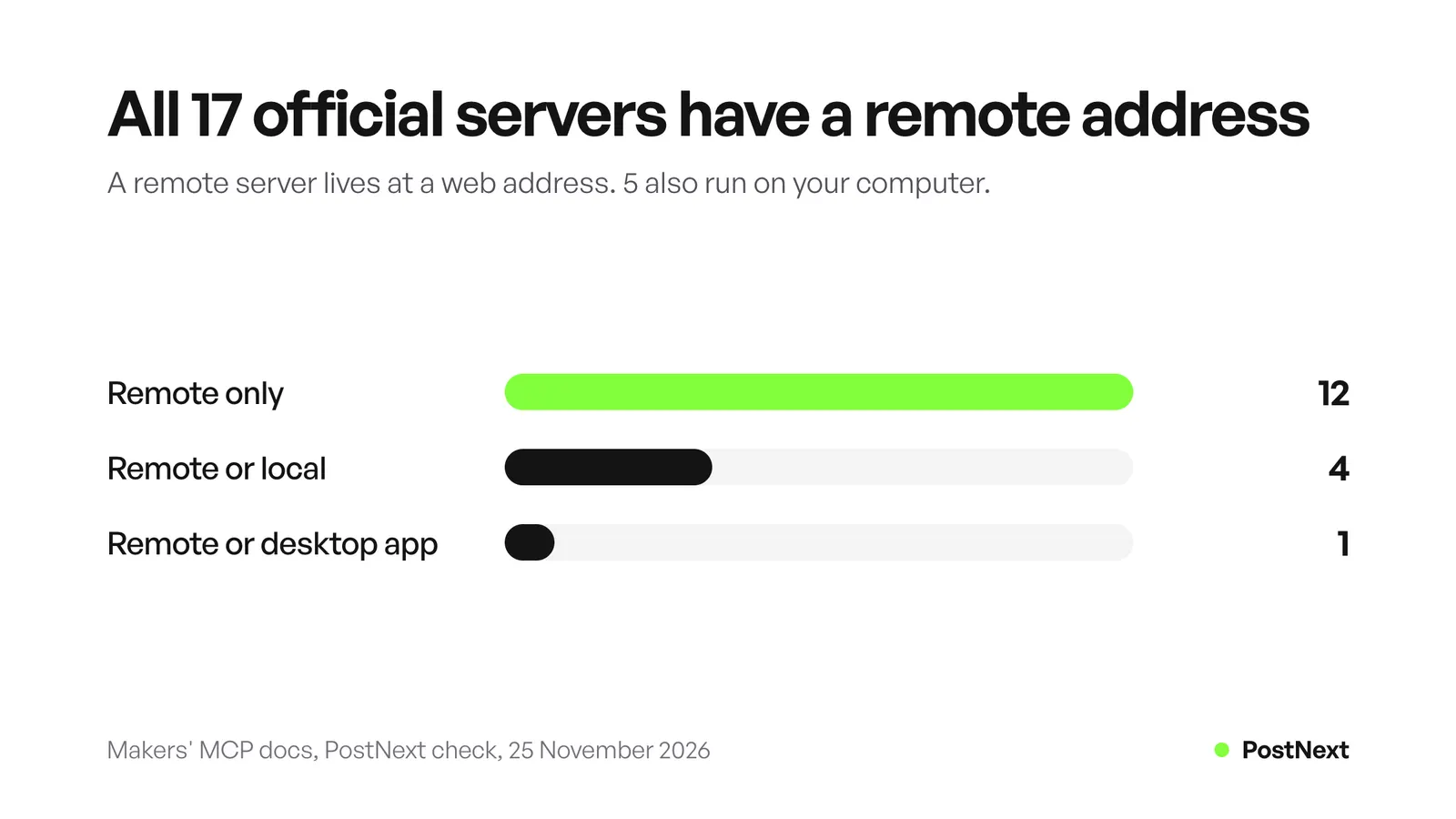
The best MCP servers for social media are official servers that each cover one job: planning, research, source material, visuals, scheduling or measuring. On 25 November 2026 we checked 17 of them on their makers’ own docs. All 17 are run by the company behind the app and connect by web address. Most of them also change data, so each one comes with the tool to watch.
Key Takeaways
- Pick one server per job. Plan in Notion or Airtable, research with Firecrawl or Semrush, design in Canva or Figma, schedule with PostNext, measure with HubSpot.
- All 17 are official. Each server here is built and hosted by the company that makes the app, checked on its own docs on 25 November 2026.
- The registry proves the publisher. A registry name such as
com.notion/mcpshows who published the entry. The registry does not scan code, and 7 of the 17 official servers here have no entry under their own name. - Every server supports OAuth sign-in. The assistant gets a token for that app and never sees your password.
- Watch the write tools. A delete, send, merge or schedule tool is where one wrong prompt costs you. Keep approval prompts on for those.
What is an MCP server?
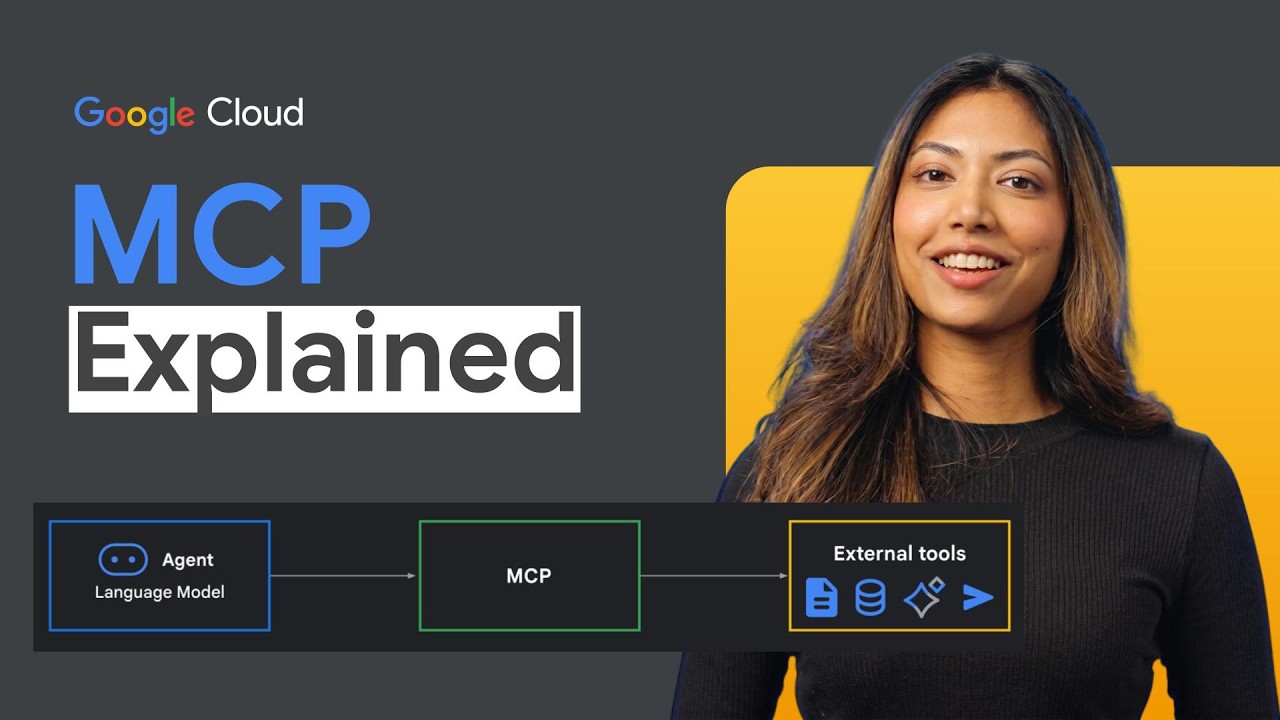
An MCP server is a program that lets an AI assistant, such as Claude, ChatGPT or Cursor, use another app. MCP, the Model Context Protocol, is an open standard. A server offers tools (actions such as “create a page”), resources (data the assistant reads) and prompts (ready-made instructions). A remote server lives at a web address. A local server runs on your own computer.
The current MCP specification is dated 28 July 2026. For how MCP works, see PostNext’s free lesson what an MCP server is. For how an assistant posts for you, read our guide to social media AI agents. To use Claude itself to write and plan posts, see Claude for social media.
Which MCP servers are best for social media?
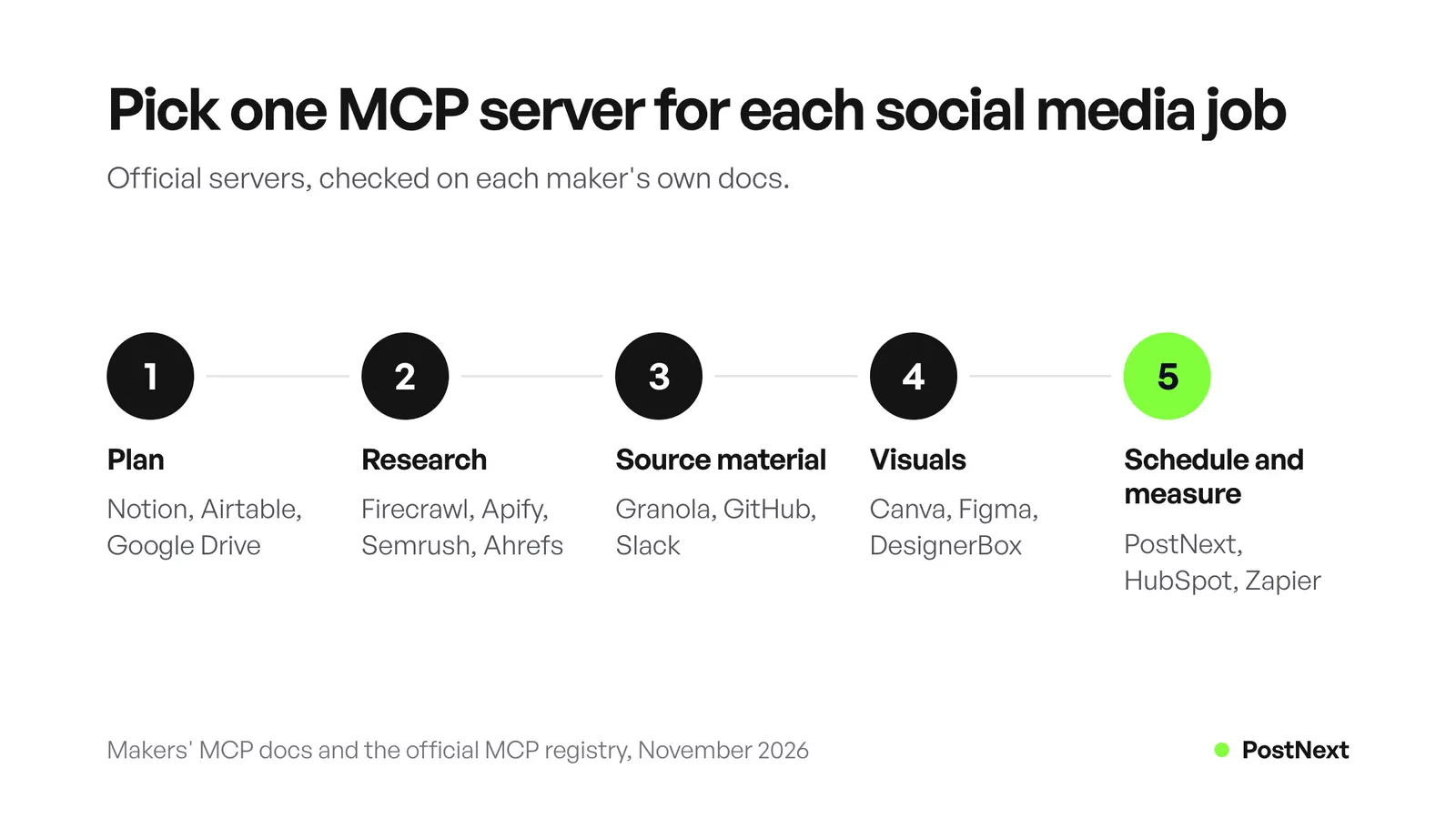
The best MCP servers for social media are the official servers of apps you already use, one for each job. For most teams that is a planning tool (Notion or Airtable), one research source (Firecrawl, Semrush or Ahrefs), a design tool (Canva or Figma) and a scheduler (PostNext). Add others when a task keeps sending you to another tab.
| Server | Job | Official (registry name) | Remote or local | Sign-in | Changes data? |
|---|---|---|---|---|---|
| PostNext | Schedule and publish | Yes (io.postnext/postnext) | Remote | OAuth or API key | Drafts, schedules, cancels |
| Notion | Plan | Yes (com.notion/mcp) | Remote | OAuth or MCP token | Yes, including deletes |
| Airtable | Plan | Yes (com.airtable/mcp) | Remote | OAuth or access token | Yes, including deletes |
| Google Drive | Plan, source files | Yes (not in registry) | Remote | OAuth | Creates and copies files |
| Firecrawl | Research | Yes (io.github.firecrawl/...) | Remote or local | OAuth, API key or none | Reads the web, uses credits |
| Apify | Research | Yes (com.apify/apify-mcp-server) | Remote or local | OAuth or token | Runs paid scraping jobs |
| DataForSEO | Research | Yes (not in registry) | Remote or local | OAuth or API login | Reads data, pay-as-you-go |
| Ahrefs | Research | Yes (com.ahrefs/mcp) | Remote | OAuth or MCP key | Mostly reads, uses API units |
| Semrush | Research | Yes (not in registry) | Remote | OAuth or API key | Read only, uses API units |
| Granola | Source material | Yes (not in registry) | Remote | OAuth only | Edits notes on paid plans |
| GitHub | Source material | Yes (io.github.github/...) | Remote or local | OAuth or token | Yes, read-only URL exists |
| Slack | Source material | Yes (not in registry) | Remote | OAuth | Sends and schedules messages |
| Canva | Visuals | Yes (com.canva.mcp/mcp) | Remote | OAuth | Creates and edits designs |
| Figma | Visuals | Yes (com.figma.mcp/mcp) | Remote or desktop app | OAuth | Writes to files (beta) |
| DesignerBox | Visuals | Yes (not in registry) | Remote | OAuth | Generates media, deletes assets |
| Zapier | Connect other apps | Yes (com.zapier/mcp) | Remote | OAuth or connection token | Runs actions in other apps |
| HubSpot | Measure | Yes (not in registry) | Remote | OAuth with PKCE | Yes, including social posts |
Each row was checked on the maker’s MCP docs and in the official MCP registry on 25 November 2026. “Not in registry” means the registry has no entry under the maker’s own name.
Which MCP servers help you plan social media content?
Notion, Airtable and Google Drive are the planning servers. They hold the content calendar, the briefs and the brand guide, so the assistant reads what is already planned before it suggests a post. Notion and Airtable also write pages and rows, so an assistant’s ideas land there for a person to review.
Notion
Notion’s server is https://mcp.notion.com/mcp, with OAuth sign-in, and Notion says it works on every plan. The tools search, read, create, update and delete pages and databases. Notion’s docs name Claude, ChatGPT, Claude Code, Cursor and VS Code. The older address, https://mcp.notion.com/sse, retires on 23 February 2027. A good first job: turn a campaign brief into a calendar database with one row per post.
Airtable
Airtable’s server at https://mcp.airtable.com/mcp is open to all users on all plans, with OAuth or a personal access token. It reads, creates, updates and deletes bases, tables and records, and revert_action undoes eligible changes. An automation created over MCP stays off until a person turns it on. Ask it to draft a caption for every row marked “Needs copy”.
Google Drive
Google runs one MCP server per Workspace app. Drive’s is https://drivemcp.googleapis.com/mcp/v1. It uses OAuth 2.0 with a client you create in a Google Cloud project, so setup takes longer than a one-click connector. The tools search, read, create and copy files; Google lists no delete or share tool. Its guide covers Claude (Enterprise, Pro, Max and Team plans) and Google Antigravity.
Which MCP servers help you research topics and competitors?
Firecrawl and Apify read public web pages and social profiles. DataForSEO, Ahrefs and Semrush return search data: keyword volumes, rankings and competitors’ top pages. All five mostly read, and all five charge for use in credits, API units or run costs.
Firecrawl
Firecrawl turns web pages into clean text. The hosted server is https://mcp.firecrawl.dev/v2/mcp (OAuth at /v2/mcp-oauth), or run it locally with npx -y firecrawl-mcp. Without an API key you get three tools (scrape, search and parse) with rate limits; the full set has 34. firecrawl_agent runs a multi-source job, capped at 2,500 credits when you leave out maxCredits. Use it to list the topics on a competitor’s blog.
Apify
Apify’s server at https://mcp.apify.com runs Actors, the ready-made scrapers in Apify Store, among them scrapers for Instagram, Facebook, YouTube and Reddit. Independent developers publish Actors too. call-actor bills at that Actor’s price; maxTotalChargeUsd or maxItems caps a run. Sign in with OAuth, or run npx @apify/actors-mcp-server locally with a token.
DataForSEO
DataForSEO’s v3 server is https://mcp.dataforseo.com/v3/mcp, with OAuth by default or your API login. Of its four tools, api_request calls any DataForSEO endpoint: search results, keyword volumes, backlinks. The service is pay-as-you-go, so ask for one keyword list before you ask for fifty. We used DataForSEO for the keyword numbers behind this article.
Ahrefs
Ahrefs hosts its server at https://api.ahrefs.com/mcp/mcp for paid plans from Lite up, and every call uses API units from your monthly allowance. Ahrefs calls custom scripts and bridges to the endpoint “unsupported and not permitted”, so sign in with OAuth from a client it supports, such as Claude or Claude Code.
Semrush
Semrush’s server at https://mcp.semrush.com/v2/mcp reads the SEO and Trends APIs, and only the read methods of the Projects API, so it never changes your projects. It signs in with OAuth or an API key and spends API units per request. Access comes with some plans (Semrush One Starter, One Pro+, SEO Classic Pro and Guru), an API units package or a Trends API plan.
Which MCP servers give the assistant material to write from?
Good posts start from real material: what customers said on a call, what shipped this week, what your team asked in chat. Granola holds call notes and transcripts, GitHub holds releases and merged pull requests, and Slack holds team threads. With these connected, the assistant quotes your own sources and does not have to guess a topic.
Granola
Granola’s server at https://mcp.granola.ai/mcp signs in with OAuth only and does not accept API keys. The free Basic plan reads personal and public notes from the last 30 days; transcript tools and edit tools need a paid plan. Ask it for the exact words customers used about a problem, then write hooks from them.
GitHub
GitHub’s remote server is https://api.githubcopilot.com/mcp/, with OAuth or a personal access token, or run the Docker image ghcr.io/github/github-mcp-server locally. A marketer needs read access only: add /readonly to the URL and the server offers only read tools. Ask for the last release and the pull requests merged since, then draft the launch posts. Our guide to Claude Code for marketing walks through that workflow.
Slack
Slack’s server at https://mcp.slack.com/mcp searches channels and threads, and it sends, schedules and drafts messages as you. It signs in with OAuth through an approved Slack app, so you connect it from a partner app such as Claude, ChatGPT, Cursor or Perplexity. Workspace admins approve every MCP client.
Which MCP servers make images and designs for posts?
Canva, Figma and DesignerBox make the visual half of a post. Canva builds and resizes designs from your templates, Figma reads and edits design files, and DesignerBox makes product photos, ads and short videos from a photo. All three sign in with OAuth and change files, and DesignerBox spends credits on each picture or video.
Canva
Canva’s AI Connector works on all Canva accounts, Free included. Brand Templates and some other actions need a paid plan, video needs Canva Pro or above, and AI actions use your Canva AI allowance. It searches, creates, resizes, exports and edits designs, and replies to comments. In Claude its tools are read_design and edit_design.
Figma
Figma’s remote server is https://mcp.figma.com/mcp, and a second server runs inside the Figma desktop app. Most tools read: design context, screenshots, variables and comments. Writing to the canvas is in beta, free during the beta, and needs a Full seat outside your drafts. Only clients in Figma’s MCP catalog connect, among them VS Code, Cursor and Claude Code.
DesignerBox
DesignerBox runs its server at https://mcp.designerbox.ai/api. From a chat it makes product photos, one ad in feed, square and story sizes, and short product videos. It signs in with OAuth and gives the client a 30-day access token. Generation tools spend credits, and video starts on the Premium plan. It works in Claude, ChatGPT and Cursor; Claude Code and VS Code connect from DesignerBox’s settings.
Which MCP server schedules and publishes social media posts?
A scheduler’s MCP server turns drafts into posts. PostNext’s server saves what the assistant writes as drafts, schedules a draft only when you ask, and publishes through each network’s official API at the set time. Zapier covers apps that have no MCP server of their own by running actions in them.
PostNext
PostNext’s social media MCP server is https://mcp.postnext.io/api, listed in the registry as io.postnext/postnext. It signs in with OAuth 2.1 and PKCE, or a personal API key that starts with apikey_, and OAuth clients get a 30-day access token. It posts to X, Instagram, LinkedIn, TikTok and Threads. create_post_draft never publishes; schedule_post moves a draft into the queue and counts against your monthly posts (10 on the free plan). MCP is included in every plan, and PostNext has setup guides for 24 AI agents. Every tool is in the MCP tool reference, and our PostNext MCP launch post shows what to ask it. The docs, recipes and setup helper are open on GitHub; our guide to the postnext-mcp repo walks through them.
Buffer and Hootsuite also publish MCP servers for their own schedulers (checked 25 November 2026).
Zapier
Zapier’s server at https://mcp.zapier.com/api/v1/connect gives the assistant actions in more than 9,000 apps, such as sending messages, creating tasks and updating records. In agentic mode the AI adds actions during the chat; in managed mode you pick a fixed list. Choose managed mode and leave out every action that publishes. Until 5 January 2027, successful calls use no tasks. After that date, each successful call uses tasks from your Zapier plan. Zapier has no app that posts to X, TikTok or Threads, as our Zapier posting guide shows.
Which MCP servers measure what your posts did?
An assistant reads numbers from several tools and compares them in one answer. PostNext returns results per post and per channel, and HubSpot adds social post analytics next to campaign and CRM data. Check which networks a server reports on before you trust a total.
HubSpot
HubSpot’s server at https://mcp.hubspot.com signs in with OAuth and PKCE, through an MCP connector you create in HubSpot. Read tools include get_social_post_analytics and get_campaign_attribution_reports. It also writes: manage_social_posts creates, updates or cancels posts on your connected social accounts, and pages ask for confirmation before they publish. Your HubSpot subscription and permissions decide which tools you see.
In PostNext, get_channel_analytics compares a channel’s results with the period before. get_post_metrics returns likes, reposts, replies and impressions on X, and likes and comments on Instagram; LinkedIn, Threads and TikTok return the publish status and link for now.
How do you find official MCP servers?
Start on the app maker’s own docs and copy the server address from there. Then check the official MCP registry at registry.modelcontextprotocol.io. A name such as com.notion/mcp can only be published by whoever controls notion.com. The registry proves who published an entry. It does not check the code, so a listing does not prove a server is safe.
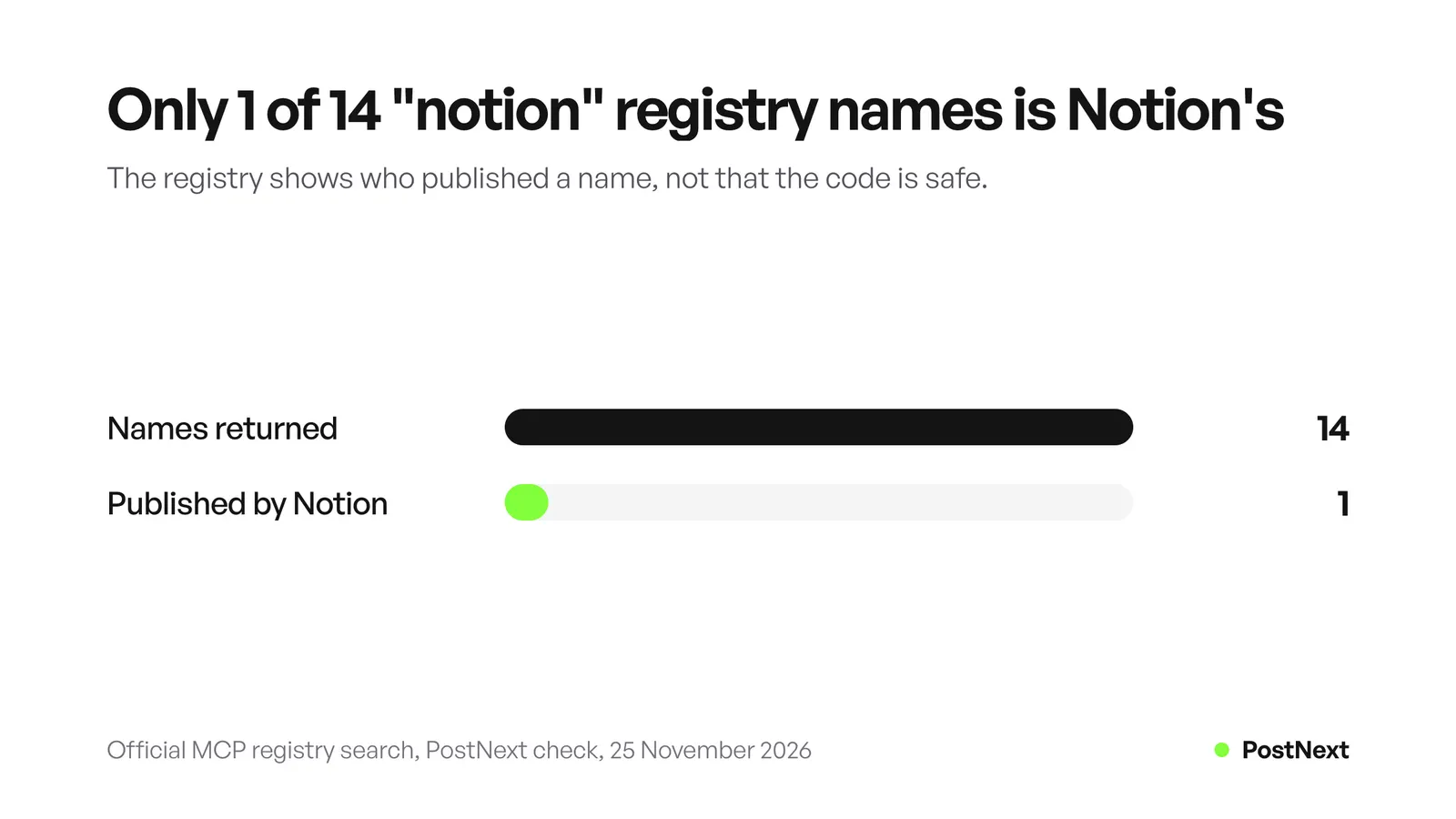
The registry is in preview and stores metadata only; the code lives on npm, PyPI or Docker Hub. Publishers prove a name through GitHub, DNS or HTTP checks, and the moderation policy tells users to “assume minimal-to-no moderation”.
Our check on 25 November 2026 showed why the name matters. A registry search for “notion” returned 14 server names on its first page, and only com.notion/mcp belongs to Notion. It also works the other way: 7 of the 17 official servers here (Google, Granola, HubSpot, Slack, DataForSEO, Semrush and DesignerBox) have no entry under their own name. A missing entry does not make a server fake. The maker’s docs are the proof.
How do you use MCP servers safely?
Treat each MCP server like a new person with access to your accounts. Connect only official servers, give each one the smallest access it offers, keep approval on for tools that send, publish or delete, and remove servers you stop using. The MCP specification says a person should always be able to deny a tool call.
| Server | Tool to watch | What it does | Safer setup |
|---|---|---|---|
| PostNext | schedule_post | Moves a draft into the publish queue | Ask for drafts, approve the time yourself |
| Notion | notion-delete-databases | Removes a database and its entries | Keep approval on for deletes |
| Airtable | delete_table | Deletes a table with its records and views | revert_action undoes eligible changes |
| GitHub | merge_pull_request | Merges code into a branch | Use the /readonly URL |
| Slack | Send messages | Posts as you in any conversation | Ask for drafts |
| Zapier | Write actions | Sends, creates and updates in other apps | Managed mode, short action list |
| Figma | use_figma | Creates, edits and deletes file content | Work in a copy of the file |
| HubSpot | manage_social_posts | Creates, updates or cancels social posts | Keep approval on |
| Firecrawl | firecrawl_agent | Runs a job of up to 2,500 credits | Set maxCredits |
| Apify | call-actor | Runs a paid scraper | Set maxTotalChargeUsd |
Approvals. Cursor asks you to approve each MCP connection and then each tool call, unless you put the tool on an allowlist. ChatGPT asks for confirmation on write actions, based on the app’s permissions and the action’s context. Claude’s Research mode is the exception: Anthropic says Claude “can invoke tools from your connectors automatically without further approval” there. Turn off connectors with write tools before a research chat.
Prompt injection. A page, file or message that a server fetches is outside text, and hidden lines in it may try to steer the assistant. Anthropic’s Claude Code docs warn that servers that fetch external content “can expose you to prompt injection risk”. OpenAI’s MCP docs add: “Trusting a MCP’s developer does not make this safe.” Read every draft built from scraped pages before you schedule it, as a fixed step in your content approval process.
Scopes and tokens. The specification asks for least-privilege scopes and forbids “token passthrough”: a server must not accept a token issued for another service. Use the smallest option each maker offers, such as GitHub’s /readonly URL or Zapier’s managed mode. PostNext and DesignerBox issue 30-day access tokens, and you revoke access by disconnecting the connector in your AI app or in the service’s settings.
Local servers. The specification warns that a local server means “arbitrary code execution” with your AI app’s rights. If you do not write code, use the remote URL that every maker in this list offers.
Frequently Asked Questions
What are the most popular MCP servers?
The official MCP registry stores names, addresses and versions but shows no install counts or ratings, so no neutral popularity list exists. The servers that matter most to a marketing team belong to apps it already uses.
Which MCP servers work best with Claude?
All 17 servers in this article work with Claude, and most also work with ChatGPT, Cursor and Claude Code. In Claude you add a remote server as a custom connector by pasting its URL, and the free plan allows one custom connector.
Are MCP servers free?
The connection costs nothing extra on most servers, but the app’s own plan still applies. Notion and Airtable work on every plan. Granola, Figma and Canva keep some tools for paid plans. Firecrawl, Apify, DataForSEO, Ahrefs and Semrush charge for use. PostNext includes MCP in every plan, the free plan too.
Is it safe to connect an MCP server to my social accounts?
It is safer when the server comes from the app’s maker, signs in with OAuth and saves drafts before anything publishes. Keep approval on for schedule, send and delete tools, read drafts built from web pages before you schedule them, and remove access you no longer use.
What is the difference between a remote and a local MCP server?
A remote server runs on the maker’s computers at a web address, and you sign in to it. A local server is a program your AI app starts on your own computer, with the same rights as that app. The MCP specification asks apps to show the exact command before a local server runs.
Can one AI assistant use several MCP servers at once?
Yes. The AI app opens one connection per server, so Claude or Cursor reads from Notion, designs in Canva and saves drafts in PostNext in the same chat. Each server keeps its own sign-in and its own tools. Turn off servers a chat does not need, so the assistant sees fewer tools.
Do I need to code to use MCP servers?
No, for the remote servers in this list. You paste a URL into your AI app’s connector settings, or pick the app from a directory, and sign in. Local servers and terminal tools such as Claude Code need one command, and the Google Workspace servers need a Google Cloud project.
Sources
- Model Context Protocol, Architecture overview (checked 25 November 2026): servers, tools, resources, prompts, one client per server.
- Model Context Protocol, Specification 2026-07-28: Tools and Authorization (checked 25 November 2026): human in the loop, OAuth 2.1, token audience.
- Model Context Protocol, Security best practices (checked 25 November 2026): token passthrough, scope minimization, local server compromise.
- MCP Registry, About, Authentication and Moderation policy (checked 25 November 2026); registry API searches at registry.modelcontextprotocol.io for every server in this article (25 November 2026).
- Notion, Get started with Notion MCP (November 2026).
- Airtable, MCP getting started and MCP tools (November 2026).
- Google, Configure the Google Workspace MCP servers and Drive MCP server (November 2026).
- Firecrawl, firecrawl-mcp-server README (November 2026): endpoints, keyless tier, 34 tools, credit limits.
- Apify, Apify MCP server docs and README (November 2026).
- DataForSEO, Model Context Protocol and mcp-server-typescript README (November 2026).
- Ahrefs, MCP introduction (November 2026).
- Semrush, Semrush MCP (November 2026).
- Granola, MCP help article (November 2026).
- GitHub, Remote GitHub MCP Server and README (November 2026).
- Slack, Slack MCP server and Guide to MCP in Slack (November 2026).
- Canva, Canva AI Connector setup and What you can do with the Canva AI Connector (November 2026).
- Figma, Figma MCP server and remote server installation (November 2026).
- Zapier, Zapier MCP (November 2026).
- HubSpot, Integrate with the remote HubSpot MCP server (November 2026).
- DesignerBox, MCP page and tool reference, designerbox.ai/mcp and designerbox.ai/mcp/docs (checked 25 November 2026).
- PostNext, MCP page and tool reference, postnext.io/mcp and postnext.io/mcp/docs (checked 25 November 2026).
- Anthropic, Get started with custom connectors using remote MCP and Claude Code MCP docs (November 2026).
- OpenAI, Connecting custom MCP servers in ChatGPT and MCP and connectors (November 2026).
- Cursor, Agent security (November 2026); Visual Studio Code, Manage MCP servers (November 2026).
- Buffer, developers.buffer.com integrations guide, and Hootsuite, blog.hootsuite.com/social-media-mcp (checked 25 November 2026): both publish MCP servers.