
PostNext MCP is live for every PostNext account, free plan included. Add one address, https://mcp.postnext.io/api, to Claude, ChatGPT, Claude Code, Cursor or another MCP client, and sign in once. The assistant can then read your calendar, write drafts in your brand voice and schedule posts to X, Instagram, LinkedIn, TikTok and Threads (checked November 2026).
Key Takeaways
- One address for every assistant. The server is
https://mcp.postnext.io/api. PostNext has setup guides for 24 AI agents, and any client that speaks MCP over Streamable HTTP can connect. - Five networks over MCP. X, Instagram, LinkedIn, TikTok and Threads. YouTube and Bluesky are scheduled from the PostNext calendar.
- Drafts first. Every post the assistant writes is saved as a draft. Scheduling is a second step, and you can cancel a scheduled post until it goes out.
- It reads your brand first. Your brand profile, connected channels and account summary load at the start of a conversation.
- Four ready-made workflows.
/weekly-plan,/draft-thread,/audit-queueand/channel-sweep. - Free plan included. 10 AI credits and 10 scheduled posts a month on one channel. Editing drafts, best-time suggestions and account health need a paid plan.
What is PostNext MCP?
PostNext MCP is a hosted server that lets an AI assistant work inside your PostNext account. MCP, the Model Context Protocol, is an open standard for connecting AI apps to other software. PostNext runs the server at one address. Your assistant connects, you sign in with PostNext, and from then on the assistant can create, schedule and check posts instead of only writing text.
Before MCP, asking an assistant for a post gave you a paragraph. You still had to open your scheduler, paste the text, find the image, pick the channel and pick a time. With the server connected, the assistant does those steps in PostNext, and you check the result.
The official MCP site describes the standard as “an open-source standard for connecting AI applications to external systems” and compares it to a USB-C port. For a longer explanation, PostNext has a free lesson on what an MCP server is.
There are three ways for software to reach PostNext. The MCP server is for AI assistants and signs in with OAuth. The REST API is for your own scripts and uses an API key, and our guide to the social media API shows how it compares with each network’s own API. A command-line helper covers terminal agents. All three are documented in public, as our tour of the PostNext MCP GitHub repo shows. This article is about the first one. For the other servers a social media team connects next to it, see our list of the best MCP servers for social media.

What can you ask PostNext MCP to do?
You ask in plain words and the assistant picks the PostNext tool. It can list scheduled posts and drafts, write new drafts, schedule or cancel posts, connect a channel, explain why a post failed and read results per post or per channel. Some tools work on every plan. Editing a draft and best-time suggestions need a paid plan.
| What you say | What happens in PostNext | Plan |
|---|---|---|
| ”What is going out next week?” | Lists your scheduled posts with channel, text and time | All plans |
| ”Plan next week from my brand profile” | Reads your profile and queue, then saves 5 to 10 drafts from Monday to Friday | All plans, 1 AI credit per draft |
| ”Turn this article into a thread for X” | Writes a thread of 5 to 10 posts and saves it as drafts | All plans |
| ”Schedule the candle post for Friday at 17:00” | Moves the draft into the publish queue for that time | All plans, counts as 1 monthly post |
| ”Make Wednesday’s draft shorter” | Rewrites the text of the existing draft | Paid plans |
| ”Why did my LinkedIn post fail?” | Shows the queue state and the error for each network | All plans |
| ”When should I post on Instagram?” | Ranks day and hour slots from your last 90 days | Paid plans |
| ”How did LinkedIn do this month?” | Shows likes and comments for the month against the month before | All plans |
| ”Connect my TikTok” | Sends you a one-time sign-in link for that network | All plans |
The tools behind each row are listed with their inputs and errors in the MCP tool reference (checked November 2026). A draft holds 1 to 2,200 characters and up to 10 images or videos.
How does PostNext MCP know your brand before it writes?
PostNext MCP gives the assistant your account context at the start of a conversation, before you ask for anything. That context is four read-only resources: an account summary, your connected channels, your active brand profile and your current team. So a request for “three posts about the new collection” is written in your voice, for channels you actually have, without repeating a topic already in the queue.
A general assistant does not know any of this. It does not know your tone, which networks you post to or what is already planned for Tuesday. The four resources fill that gap:
- Account summary: your plan, AI credits used, and how many drafts, scheduled posts and channels you have.
- Connected channels: each network and handle, so a post lands on the right account.
- Brand profile: bio, brand voice, personality traits, main themes, areas of expertise, preferred hashtags and audience size, from your brand profile.
- Current team: which team the assistant is working in. If you run several brands,
list_teamsandset_current_teamswitch between them.
On a paid plan the assistant can also update the brand profile for you. Tell it “add ‘no emoji’ to our brand voice” and the next drafts follow it.
Which workflows come with PostNext MCP?
PostNext MCP ships four named workflows that chain several tools for a common job. Pick one from your assistant’s slash menu and it walks through the steps, asking before it changes anything. They cover planning a week, writing a thread, checking the queue and checking your channels.
| Workflow | What it does | Changes anything? |
|---|---|---|
/weekly-plan | Reads your brand profile, channels and queue, then proposes 5 to 10 drafts from Monday to Friday | Creates drafts after you agree |
/draft-thread | Writes a 5 to 10 post thread for X or Threads from a topic or a link, in your brand voice | Creates drafts after you agree |
/audit-queue | Checks the next 7 days and flags repeated topics, days with too many posts and gaps of more than two days | No, read only |
/channel-sweep | Compares your connected channels with the supported ones and suggests what to connect or refresh | No, read only |
/audit-queue is the safest place to start. It changes nothing, and it shows how the assistant reads your calendar before you let it write.
How does a request become a scheduled post?
A request becomes a scheduled post in five steps. You ask. The assistant reads your brand profile and what is already queued. It saves drafts in PostNext. You check them, in the chat or in the PostNext calendar. Then you approve a time, and PostNext publishes the post through the network’s official API, even if the chat is closed.
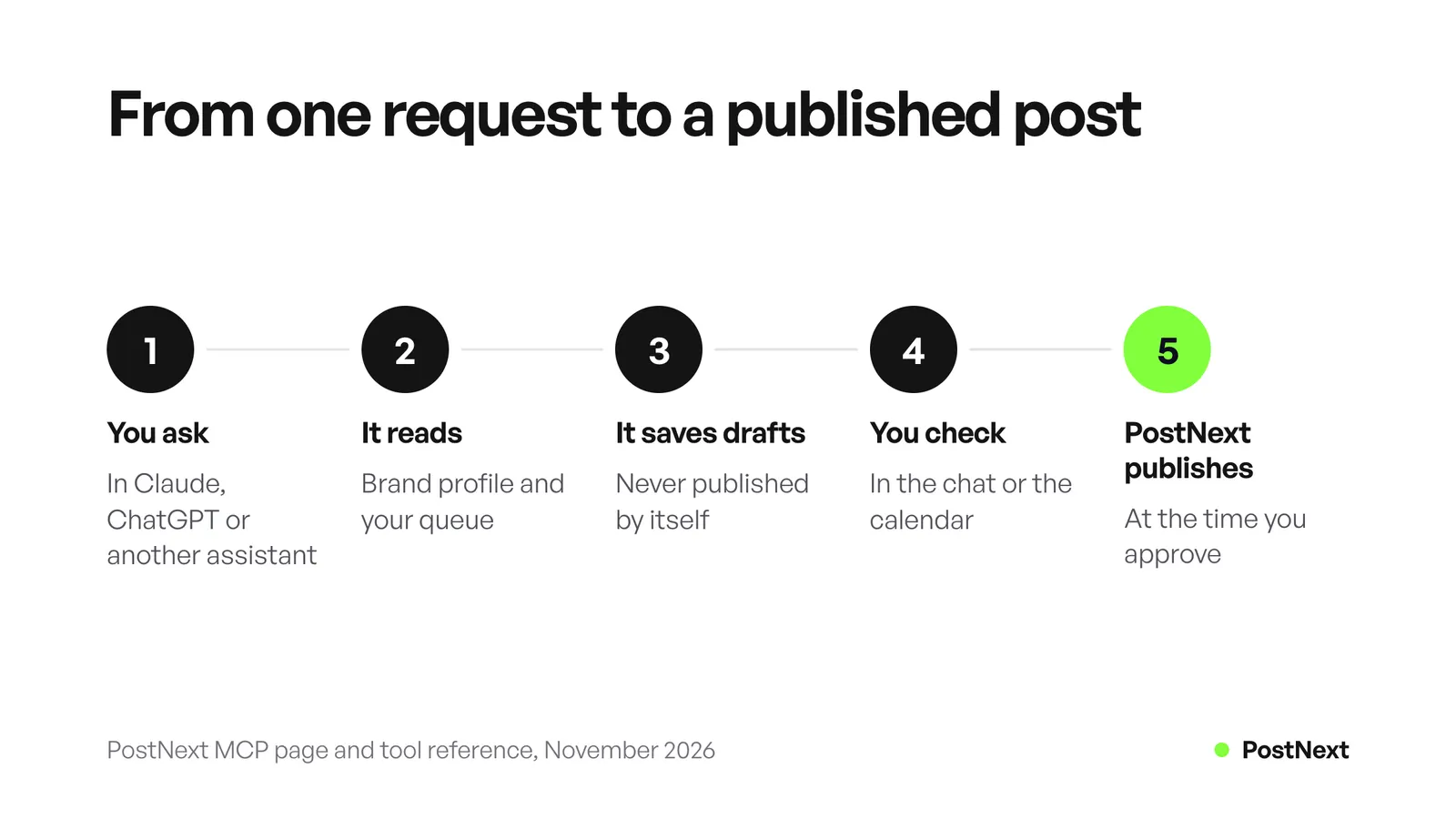
Two rules keep this safe. A draft created over MCP is never published by itself, because scheduling is a separate tool call. And schedule_post refuses a time more than 5 minutes in the past, so the assistant cannot backdate a post. Every scheduled post appears on your social media calendar, where you can edit it or cancel it until it goes out. Cancelling keeps the draft, so nothing you wrote is lost.
How do you connect PostNext MCP to Claude, ChatGPT or Claude Code?
You connect PostNext MCP by pasting https://mcp.postnext.io/api into your assistant’s connector or MCP settings and signing in to PostNext. There is no API key to create for chat apps, and in Claude the setup takes about two minutes. Terminal agents such as Claude Code, Codex and Gemini CLI add the same address with one command.
| Assistant | Where you add it | Plan notes from the vendor |
|---|---|---|
| Claude (web and desktop) | Customize, then Connectors, then Add custom connector. Name it PostNext and paste the address | Every Claude plan; the free plan allows one custom connector |
| Claude Team and Enterprise | An owner adds it under Organization settings, then Connectors; each member selects Connect | Each member signs in to their own PostNext account |
| ChatGPT (web) | Plugins, then Add custom MCP server | Write tools on Business, Enterprise and Edu; Pro gets read and fetch only |
| Claude Code | claude mcp add --transport http postnext https://mcp.postnext.io/api | Run /mcp to sign in |
| Cursor, Codex, Gemini CLI and others | One command or a settings file with the same address | Varies by tool |
Claude steps are from PostNext’s Claude setup guide, checked against Anthropic’s documentation on 18 November 2026. ChatGPT plan rules are from OpenAI’s help center (November 2026). Our longer guides cover each one: Claude connectors, ChatGPT for social media and Claude Code for marketing, which also explains which MCP scope a team should pick. For OpenAI’s coding agent, see our guide to Codex MCP setup.
For scripts and CI jobs, create a personal API key in PostNext under Account, then API Keys. It starts with apikey_ and works as a bearer token on the same server.
What can PostNext MCP not do yet?
PostNext MCP does not post to YouTube or Bluesky, does not read or answer comments and DMs, and does not publish without a scheduled time. Engagement numbers per post come back for X and Instagram only. LinkedIn, Threads and TikTok return the publish status and the live link. These are the limits listed in the tool reference in November 2026.
Each limit in practice:
- YouTube and Bluesky: PostNext schedules both from its own calendar. The MCP tools accept X, Instagram, LinkedIn, TikTok and Threads.
- Comments and DMs: no MCP tool reads or sends them.
- Per-post metrics: X returns likes, reposts, replies and impressions. Instagram returns likes and comments. The other three return status and URL until engagement collection is added.
- Best-time suggestions: on X and Instagram the slots are ranked by engagement. On LinkedIn, Threads and TikTok they are ranked by how often you posted, which is weaker evidence.
- Large files: the inline upload tool is reliable only up to about 8 KB. Images and videos of any size go through a pre-signed upload link. In ChatGPT, files you attach to the chat are saved for you, up to 10 per call and 50 MB each.
None of these limits applies to the PostNext app itself. They are what the assistant can reach today.
Is PostNext MCP safe to connect?
PostNext MCP signs you in with OAuth 2.1 and PKCE, so the assistant never sees your social media passwords. Access is limited to your team and ends after 30 days without use. You can remove it at any time from your assistant’s settings or from your PostNext account page. Most assistants also ask you to confirm each action before a tool runs.
The assistant gets a PostNext token, not your Instagram or LinkedIn login. PostNext keeps the network connections and publishes through each network’s official API. If you stop using the connection for 30 days, the token expires and the assistant has to sign in again.
The other layer is your assistant. Claude shows a permission prompt the first time it uses a tool, and you can set the scheduling tool to “Always ask”. ChatGPT asks you to confirm write actions. For more on approvals, read our guide to social media AI agents, which has four checks to run before any agent schedules for you.
What does PostNext MCP cost?
PostNext MCP costs nothing extra. It is included in every PostNext plan, and your plan’s limits apply over MCP the same way they apply in the app. On the free plan the assistant can read your queue, create drafts with 10 monthly AI credits and schedule up to 10 posts a month on one connected channel.
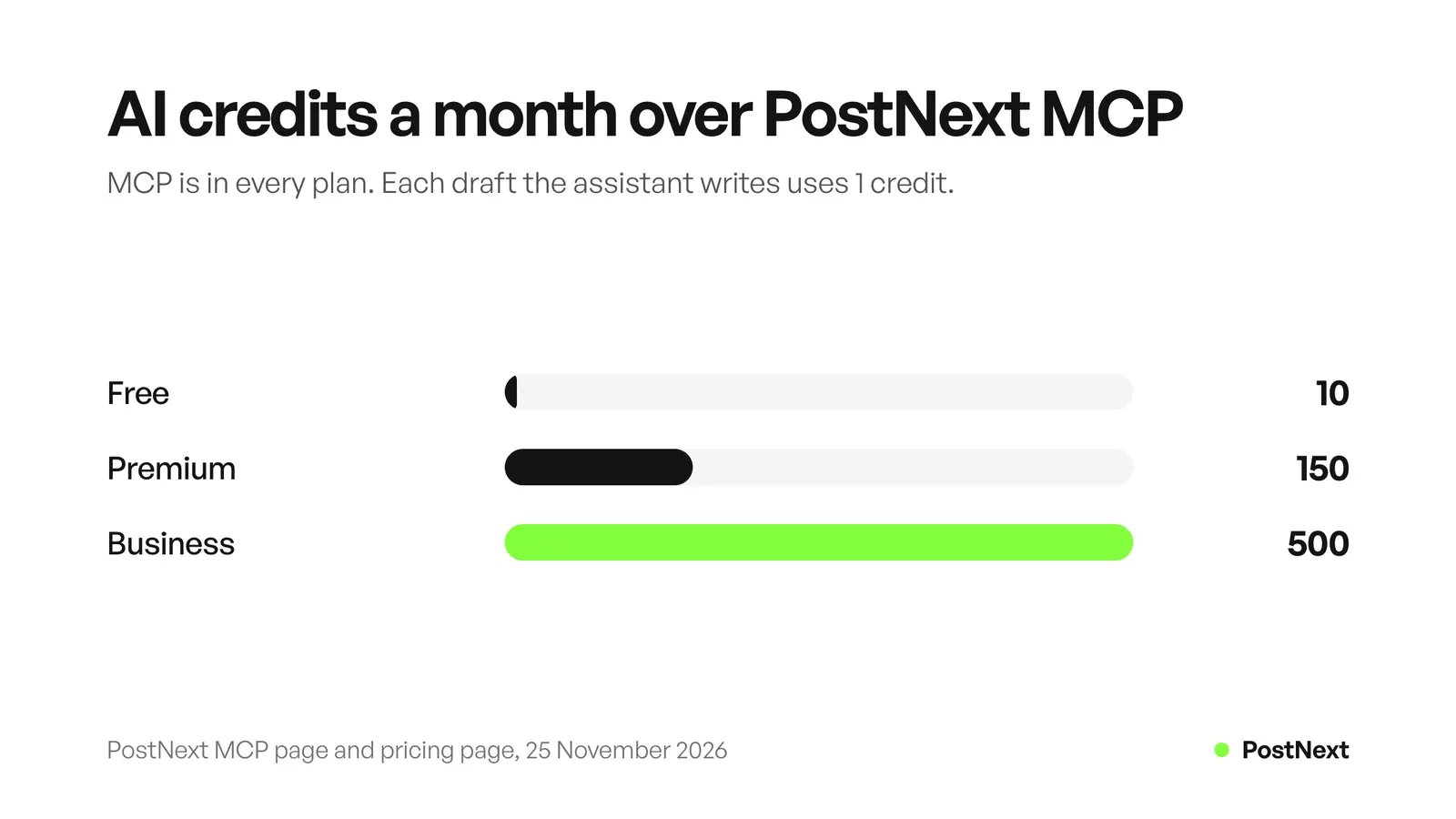
| Plan | Channels | AI credits a month | Assistant tools |
|---|---|---|---|
| Free | 1 | 10 | Read, create drafts, schedule up to 10 posts a month |
| Premium | 15 | 150 | Adds draft editing, best-time suggestions, account health and brand profile updates |
| Business | 20 | 500 | Everything in Premium, with 50 GB storage |
| Teams | 5 per seat | 50 per seat | Everything in Premium, for a team of 5 seats or more |
Plan limits are from the PostNext MCP page and the pricing page (checked 25 November 2026). Prices are on the pricing page and change on 1 December 2026, so they are not repeated here. Every paid plan starts with a 7-day free trial with lower limits until the first payment. Your assistant’s own subscription is a separate cost.
Frequently Asked Questions
What is the PostNext MCP server address?
The address is https://mcp.postnext.io/api. It is the same for Claude, ChatGPT, Claude Code, Codex, Cursor and every other MCP client. Chat apps sign in with OAuth. Scripts can use a PostNext API key that starts with apikey_.
Can the assistant publish a post right now?
It can schedule a post for a time you approve, including a few minutes from now, and PostNext then publishes it. It cannot publish a draft directly. Every scheduled post stays in your PostNext calendar, where you can cancel it until it goes out.
Do I need a paid PostNext plan?
No. MCP works on the free plan: the assistant reads your queue, creates drafts (1 AI credit each, 10 a month) and schedules up to 10 posts a month. Editing drafts, best-time suggestions, the 30-day account health summary and brand profile updates need a paid plan.
Which networks can the assistant post to?
X, Instagram, LinkedIn, TikTok and Threads (November 2026). PostNext also schedules YouTube and Bluesky, but from the PostNext calendar, not through the assistant.
Which ChatGPT plans can use PostNext MCP?
OpenAI decides which ChatGPT plans can use write tools on a custom MCP server. In November 2026 its help center lists full write access on Business, Enterprise and Edu, and read and fetch only on Pro. Check OpenAI’s page for your plan before you connect.
How do I remove PostNext from my assistant?
Disconnect it in your assistant’s connector settings, or open your account page in PostNext and remove the client. Both stop access. The token also expires by itself after 30 days without use.
Sources
- Model Context Protocol, What is the Model Context Protocol (MCP)? (checked 25 November 2026): definition of MCP.
- PostNext, MCP page and tool reference, postnext.io/mcp and postnext.io/mcp/docs (checked 25 November 2026): server address, tools, resources, workflows, plan limits, security.
- PostNext, Claude setup guide, postnext.io/ai-agents/claude (checked 25 November 2026): Claude steps, checked by PostNext against Anthropic’s documentation on 18 November 2026.
- Anthropic, Get started with custom connectors using remote MCP (November 2026): Claude plans and custom connectors.
- OpenAI Help Center, Connecting custom MCP servers in ChatGPT (November 2026): ChatGPT plans and write access.