
A social media API lets software publish, read and measure posts on a network without a person in the app. Each network runs its own: X, Instagram, LinkedIn, TikTok, YouTube, Threads and Bluesky each set their own access rules and daily limits, checked here on 26 November 2026. A scheduler API such as PostNext’s puts seven of them behind one key.
Key Takeaways
- Three ways in. Call each network’s own API, call one unified API that wraps several, or give an AI agent an MCP server that does it for you.
- Every network has its own gate. TikTok audits apps before posts can be public, LinkedIn splits personal and company posting, and Meta grants publishing permissions per app.
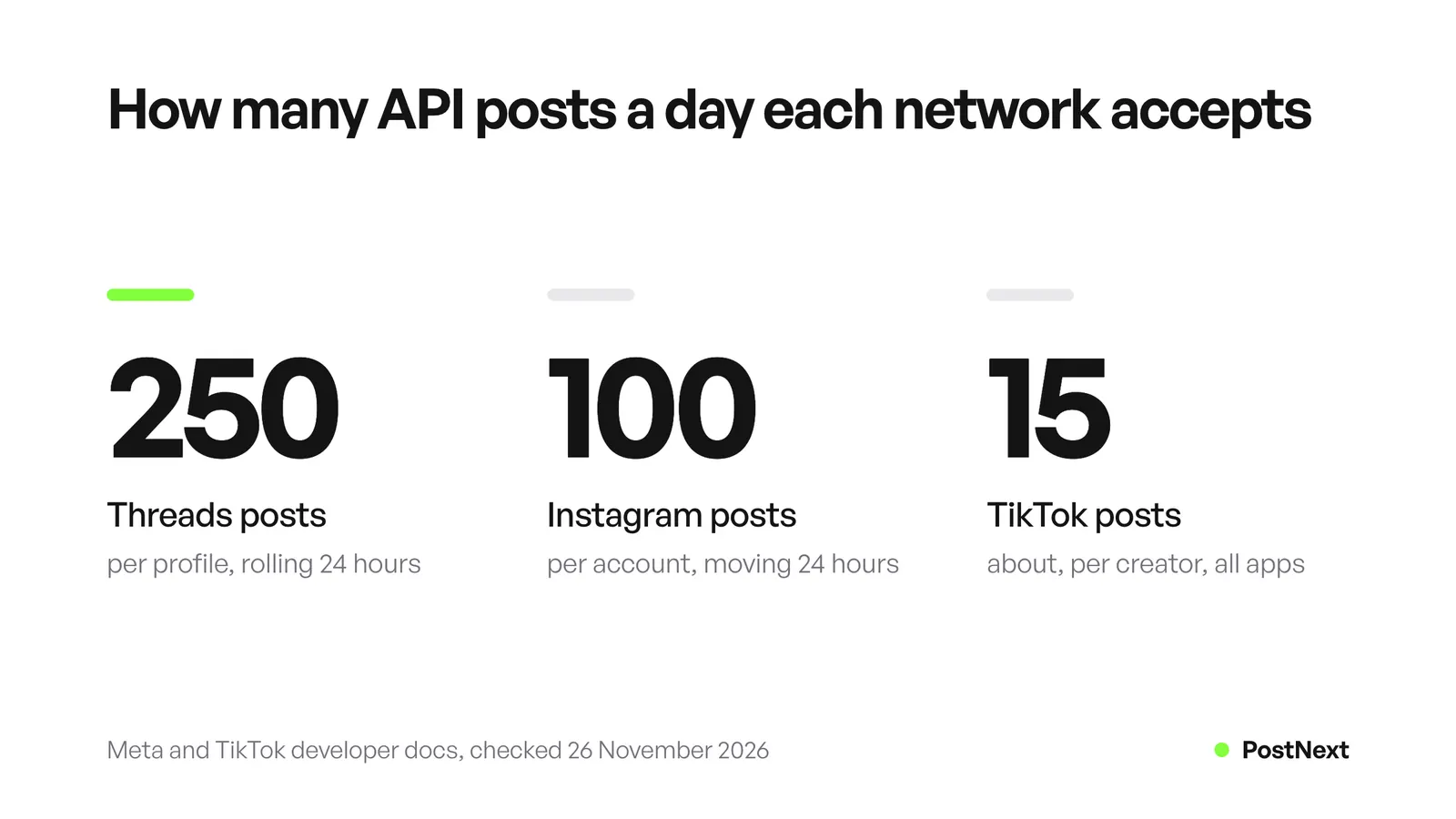
- Daily limits differ by a wide margin. Threads allows 250 API posts per profile in 24 hours, Instagram 100, and TikTok about 15 per creator account.
- Two old facts changed. YouTube now gives each project 100 uploads a day in its own quota bucket, and its docs say unverified projects are no longer held to private uploads.
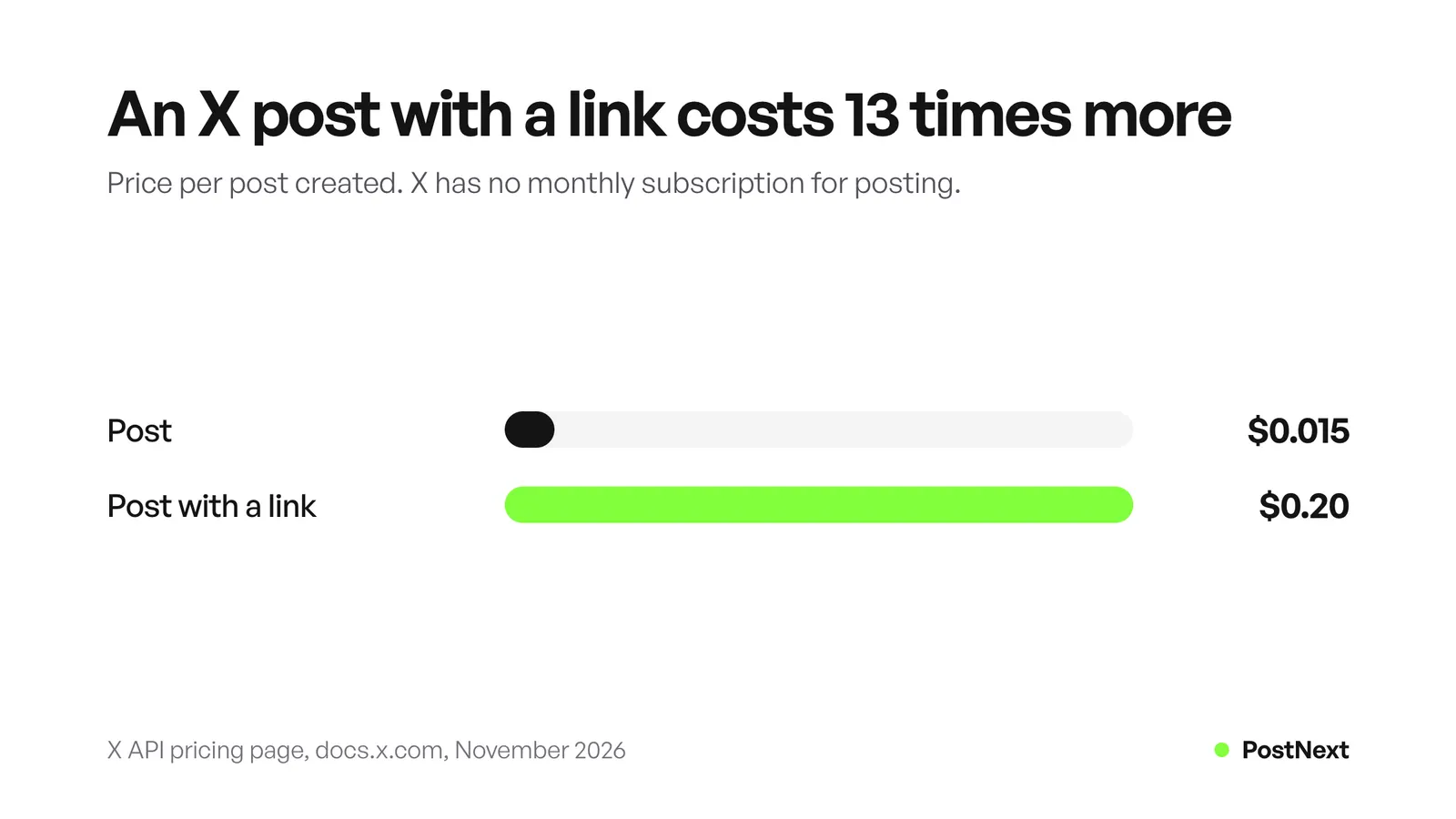
- X charges per post. The X API is pay-per-use: $0.015 per post created, and $0.20 for a post with a link (docs.x.com, checked November 2026).
- AI agents use the same APIs. An agent posts through an MCP server or a REST API, and the network’s own limits still apply.
What is a social media API?
A social media API is the set of commands a network offers so that other software can act on an account: create a post, upload a video, read comments or pull results. The account owner signs in once and grants permission, and the software then works through the API instead of the app. Schedulers, analytics tools, AI agents and release scripts all use these APIs.
There are three ways to reach them, and they differ in who does the integration work:
| Approach | What you call | Who handles sign-in, tokens and rules | Fits |
|---|---|---|---|
| Native API | Each network’s own API, one by one | You, per network | Products that need one network in depth |
| Unified or scheduler API | One API that publishes to several networks | The API provider | Teams that post the same content to several networks |
| MCP server for AI agents | Tools an assistant such as Claude or ChatGPT can call | The MCP provider, through its own API | People who plan and schedule posts from a chat |
The table compares scope, not quality. A native API gives full control of one network and full responsibility for it. A unified API trades some of that control for one sign-in flow and one set of errors. An MCP server is a layer on top of an API, built so an AI assistant can find and use it.
What does each platform’s API let you post?
Each network’s official API decides which accounts can post, what an app must do to get access and how many posts it accepts per day. The table below was read off each network’s developer documentation on 26 November 2026. Limits are per account or per project in a rolling 24 hours unless a row says otherwise.
| Network | Accounts that can post | Access step | Posting limit | Main catch |
|---|---|---|---|---|
| X | Any account that signs in | Developer account, pay-per-use credits | Paid per request: $0.015 per post, $0.20 with a link | 280 characters unless the account has X Premium |
| Professional accounts (Business or Creator) | Meta app with the content publishing permission | 100 API posts per 24 hours; a carousel counts as one | No shopping tags or filters; JPEG only for images | |
| Members (personal) and company pages | ”Share on LinkedIn” for members; page posting needs a page role | Not stated on the pages read | Personal and company posting use different permissions | |
| TikTok | Any account the creator connects | Audit before posts can be public | About 15 posts per creator per day, shared across apps | Unaudited apps: 5 users per day, private posts only |
| YouTube | Channels the user owns | Google Cloud project with the YouTube Data API | 100 uploads per project per day | Other calls share a 10,000-unit daily quota |
| Threads | Threads profiles | Meta app with Threads permissions | 250 API posts per 24 hours; a carousel counts as one | Text posts up to 500 characters |
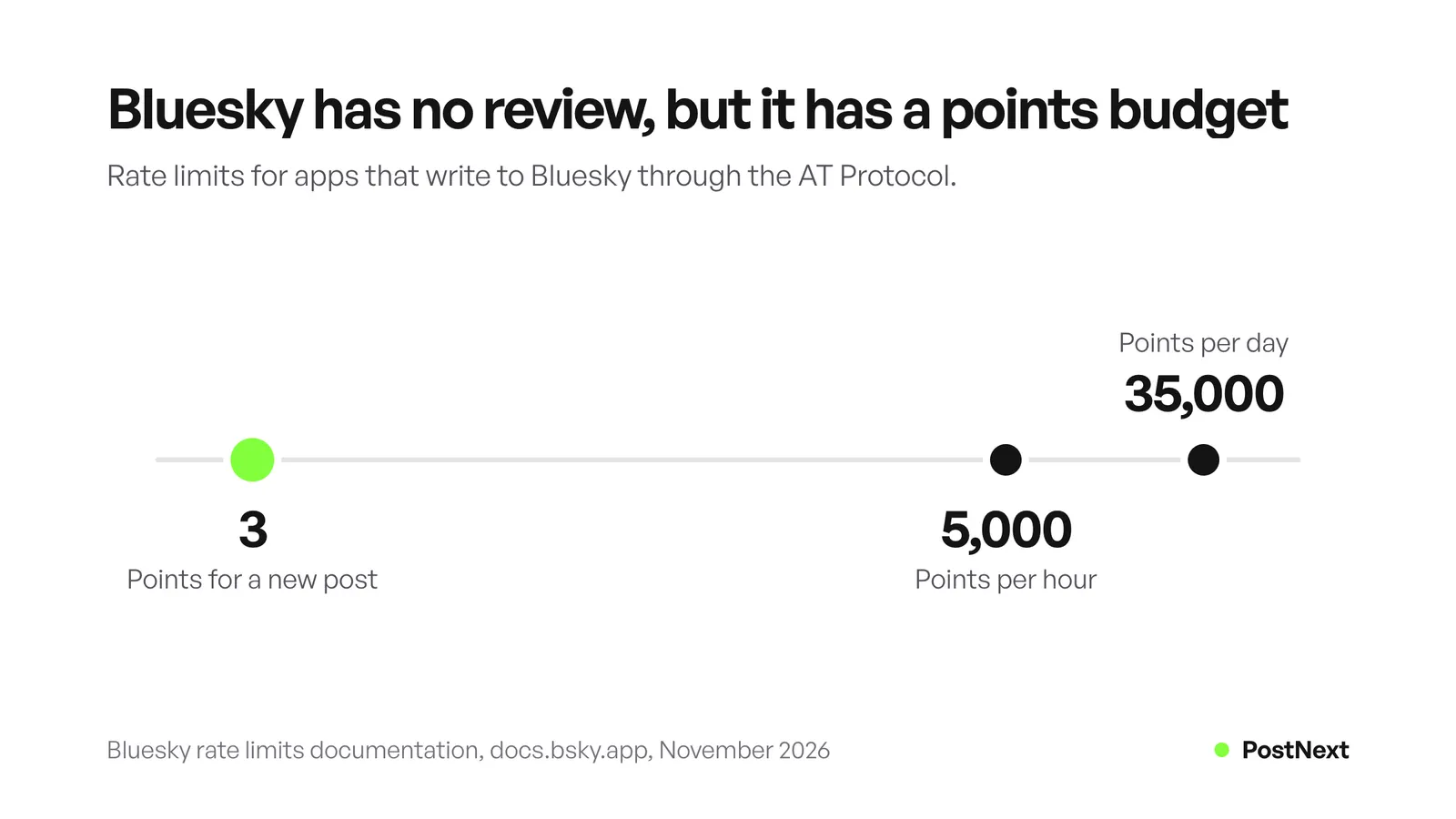
| Bluesky | Any account | None: the AT Protocol is open | 5,000 points per hour, 35,000 per day; a new post costs 3 | Apps with their own login should use OAuth |
Sources: docs.x.com, developers.facebook.com (Instagram and Threads), learn.microsoft.com (LinkedIn), developers.tiktok.com, developers.google.com (YouTube) and docs.bsky.app, all read 26 November 2026. Facebook Pages have their own Meta API; PostNext does not publish to Facebook yet, so it is left out of the table.
Platform by platform: access, limits and catches
The rules above look similar in a table and work very differently in code. The sections below give the one detail per network that most often stops an integration, with the exact words from each network’s documentation where they matter. Read them before you plan which networks to support first.
X API
X’s API uses “pay-per-usage pricing with no subscriptions”. Creating a post costs $0.015 per request, and a post that contains a link costs $0.200, according to X’s pricing page in November 2026. Posts are created with POST /2/tweets, and the text is “at most 280 characters unless the account has X Premium”. X does not list a free monthly posting allowance on that page; it offers a one-time credit when you add a payment card.
Instagram API
Meta’s content publishing API works on Instagram professional accounts. The documentation states that accounts “are limited to 100 API-published posts within a 24-hour moving period”, and one older section of the same page still shows 50, so check the live page before you plan close to the limit. Shopping tags and filters are not supported. PostNext’s Instagram API guide lists what a scheduler can and cannot post.
LinkedIn API
LinkedIn separates the two kinds of posting. Posting for a member needs the w_member_social permission, which an app gets by adding the “Share on LinkedIn” product. Posting for a company page needs w_organization_social, which LinkedIn restricts to members who hold an administrator, content admin or sponsored content poster role on that page. Many tools support only one of the two.
TikTok Content Posting API
TikTok’s rules for unaudited apps are strict: “Unaudited API Clients can allow up to 5 users to post in a 24 hour window”, and their posts can only be private (SELF_ONLY). An app must pass TikTok’s audit before posts can be public. Even then, TikTok caps posting at “typically around 15 posts per day” per creator account, shared across every app that account uses, and limits each access token to 6 requests per minute.
YouTube Data API
YouTube changed the numbers most guides still repeat. Its quota page now gives each project “100 videos.insert calls” per day in a separate bucket, plus 10,000 units a day for other calls. The upload reference says “videos uploaded from unverified API projects are not restricted to private viewing mode”. Older articles describe a 1,600-unit upload cost and forced private uploads; neither appears in Google’s documentation as of 26 November 2026.
Threads API
Meta’s Threads API limits each profile to “250 API-published posts within a rolling 24-hour period”, and a carousel counts as one. Text posts can be up to 500 characters. An app can check how much of the limit a profile has used with the threads_publishing_limit endpoint before it publishes, which avoids a failed post at the end of a busy day.
Bluesky and the AT Protocol
Bluesky runs on the open AT Protocol, so no app review is needed. The rate limit is “5,000 points per hour and 35,000 points per day”, and creating a record costs 3 points, so an app can create about 1,666 records an hour. Bluesky’s guide says apps “with their own end-user login flow should implement OAuth”, while single-purpose bots may use an app password.
How do you get access to a social media API?
You get access to a native social media API by registering an app with each network, asking for the publishing permission, and passing that network’s review or audit where it has one. Then each account owner signs in to your app and grants the permission. Plan for one review per network, because a permission approved by Meta says nothing to TikTok or LinkedIn.
The work, network by network, follows the same five steps:
- Register an app in the network’s developer portal (Meta for Developers, the LinkedIn Developer Portal, TikTok for Developers, Google Cloud, the X developer console).
- Request the publishing permission, for example the Instagram content publishing permission or LinkedIn’s
w_member_social. - Pass review or audit where the network requires it. TikTok’s audit is the one that decides whether posts can be public.
- Build the sign-in flow (OAuth) so each user grants access to their own account, and store the tokens safely.
- Handle token expiry and errors. Tokens expire, users revoke access, and each network returns its own error codes for limits and rejected media.
Bluesky is the exception: an open protocol with no app review. X needs a developer account and paid usage instead of a review. Token lifetimes, TikTok’s posting screen rules and upload patterns are in our social media API integration guide.
Native API or unified API: which should you use?
Use a native API when your product needs one network in depth, such as every analytics field or a feature only that network has. Use a unified or scheduler API when you need to post the same content to several networks and would rather not run seven sign-in flows, seven reviews and seven sets of error codes. Many teams start unified and add one native integration later.
| Question | Native APIs | Unified or scheduler API |
|---|---|---|
| How many integrations do you build? | One per network | One |
| Who passes app review and audits? | You, for each network | The provider |
| Who updates code when a network changes its API? | You | The provider |
| How deep can you go on one network? | Every endpoint the network offers | What the provider exposes |
| Who owns the relationship with the network? | You | The provider |
| What does it cost? | Each network’s own terms; X charges per post | The provider’s plan |
Two questions decide most cases. Does your own customer connect their accounts inside your product? Then you need a provider built for that, or native APIs, because a personal scheduler key posts only to your own channels. Is posting the whole job? Then a scheduler API is usually enough, and your team also gets a calendar to check what the code queued.
How do AI agents use social media APIs?
AI agents use social media APIs through a layer built for them, most often an MCP server. The agent, such as Claude or ChatGPT, reads the list of tools the server offers, picks one such as “schedule a post”, and the server calls the scheduler’s API, which calls the network’s API. The network’s limits and rules still apply at the end of that chain.
An agent can also call a REST API directly when it runs code, for example Claude Code or Codex in a terminal. MCP is easier for chat assistants because the tools describe themselves and sign-in happens once in a browser. Our guide to the social media AI agent explains the chain and the four checks to make before an agent schedules anything.
Three rules keep agent posting safe:
- Drafts before posts. The agent should save drafts that a person schedules, or schedule posts a person can cancel.
- Scoped access. The agent should reach only the channels you connected, through a key or sign-in you can revoke.
- Visible queue. Every post the agent creates should appear in a calendar you can open without the agent.
Our list of the best MCP servers for social media shows which official servers schedule posts and which only read data.
What does the PostNext API do?
The PostNext REST API schedules and publishes posts to X, Instagram, LinkedIn, TikTok, YouTube, Threads and Bluesky with one API key sent in the x-api-key header. It also uploads media, lists connected channels, checks whether a connection has expired and reads post results. Posts created through the API appear on the team’s calendar, where a person can edit or cancel them.
What the PostNext API reference lists, checked 26 November 2026:
- One base URL and one header. Requests go to
https://api-app.postnext.iowith thex-api-keyheader; responses are JSON. Version 1.0.0 has 31 endpoints and an OpenAPI file. - Posts.
POST /api/posts/scheduleschedules,POST /api/posts/publishpublishes now, and a partial success (one channel fails, others publish) returns 200 with a flag. - Connections. A check endpoint returns 200 for an active channel and 401 for an expired one, so a script can warn before a post fails.
- Media. Upload a file directly, from a URL or through an upload link.
- An MCP server for agents. Claude, ChatGPT, Codex and Cursor connect to the same account over MCP and post to X, Instagram, LinkedIn, TikTok and Threads.
The limits are stated on PostNext’s social media API for developers page. There are no webhooks, SDK or CLI today. One key acts as one PostNext account, so your own customers cannot connect their accounts through it. LinkedIn posts go to personal profiles, not company pages. YouTube is open to a limited set of PostNext accounts while Google reviews the app, and videos upload as private. Posting counts toward your plan’s monthly post limit.
A checklist before you build on a social media API
Before you write code against any social media API, check seven things on the network’s or provider’s own documentation. They are which accounts can post, what review is needed, and the daily posting limit. The rest are the media rules, how tokens expire, what errors look like and what it costs. A one-page answer to each saves weeks of rework once the first user connects an account.
- Accounts. Personal, business, creator or company page: which can post through this API?
- Review. Which permission do you need, and does the network audit or review apps first?
- Limits. How many posts per account per day, and how many requests per minute?
- Media. Which file types, sizes and aspect ratios does the API accept, and does it differ from the app?
- Tokens. How long does access last, and what does your code do when a user revokes it?
- Errors. What does the API return when a post is rejected, and will a person hear about it?
- Cost. Is the API free, paid per request, or part of a plan?
For a release script or an internal tool, the answers usually point to a scheduler API. For a product where thousands of customers connect their own accounts, they point to native APIs or a provider built for that.
Frequently Asked Questions
Is there one API for all social media platforms?
No network offers one, because each runs its own API. Unified and scheduler APIs wrap several networks behind one set of commands. PostNext’s API covers X, Instagram, LinkedIn, TikTok, YouTube, Threads and Bluesky with one key.
Are social media APIs free?
Some are. Bluesky’s protocol is open, and Meta, LinkedIn, TikTok and YouTube charge nothing per post but require an approved app. X charges per request: $0.015 per post and $0.20 for a post with a link, on its pricing page in November 2026.
Can an AI agent post to social media through an API?
Yes. An AI agent posts through an MCP server or by calling a REST API from code. The network’s limits still apply, and a safe setup saves drafts or schedules posts that a person can cancel.
What is the difference between a native and a unified social media API?
A native API is one network’s own API, such as the Instagram API or the YouTube Data API. A unified API is one API from a third party that publishes to several networks. Native gives more depth on one network; unified saves building and maintaining many integrations.
Why does my TikTok API post only show as private?
TikTok limits unaudited apps to private posts and 5 posting users per 24 hours. The app has to pass TikTok’s audit before its posts can be public. Accounts also need to be set to private while posting through an unaudited app.
Can I post to a LinkedIn company page through the API?
Yes, with LinkedIn’s w_organization_social permission, and only for members who hold an admin, content admin or sponsored content poster role on the page. Personal posting uses a separate permission. PostNext posts to personal profiles only.
Sources
- X, Pricing for the X API: pay-per-usage, Post create costs (docs.x.com), checked 26 November 2026
- X, Create a post: POST /2/tweets and the 280-character limit (docs.x.com), checked 26 November 2026
- Meta for Developers, Instagram content publishing: account type, 24-hour limit, unsupported features (developers.facebook.com), checked 26 November 2026
- Microsoft Learn, Share on LinkedIn: w_member_social (learn.microsoft.com), checked 26 November 2026
- Microsoft Learn, LinkedIn Posts API: w_organization_social and page roles (learn.microsoft.com), checked 26 November 2026
- TikTok for Developers, Content sharing guidelines: unaudited clients and daily caps (developers.tiktok.com), checked 26 November 2026
- TikTok for Developers, Content Posting API direct post reference: audit and rate limit (developers.tiktok.com), checked 26 November 2026
- Google for Developers, YouTube Data API quota costs (developers.google.com), checked 26 November 2026
- Google for Developers, YouTube Data API videos.insert (developers.google.com), checked 26 November 2026
- Meta for Developers, Threads API overview: 250 posts per 24 hours (developers.facebook.com), checked 26 November 2026
- Bluesky, Rate limits: points per hour and per day (docs.bsky.app), checked 26 November 2026
- Bluesky, OAuth client guide (docs.bsky.app), checked 26 November 2026
- PostNext, API reference (postnext.io/docs/api-reference), checked 26 November 2026
- PostNext, Social media API for developers (postnext.io/for/developers), checked 26 November 2026