
To automate social media marketing, automate the repeat work in five stages, planning, creating, publishing, replying and reporting, and keep a person on approvals and conversations. Each network’s rules set the limit: X bans automated likes, LinkedIn bans bots that comment or like, and Instagram allows automated DMs only after a person writes first (all checked 26 November 2026). PostNext covers the planning, publishing and reporting stages.
Key Takeaways
- Five stages: plan, create, publish, reply and report. Publishing and reporting are the safest to automate; replies need the most care.
- X: allows scheduled posts, RSS posts and auto-replies to people who engage with you, with opt-in and one reply per action. It bans automated likes and replies “based on keyword searches alone”, and AI reply bots need X’s written approval.
- LinkedIn: its User Agreement bans bots that “create, comment on, like, share, or re-share posts”. Scheduling through LinkedIn’s API is allowed.
- Instagram: an app can send a DM only after the person messages first, inside a 24-hour window, or one private reply to a comment within 7 days.
- TikTok: its developer rules ask that a person has “full awareness and control of what is being posted”, with a preview and consent before upload.
- What stays human: approving posts, answering complaints and anything said in a crisis.
What does it mean to automate social media marketing?
Automating social media marketing means letting software do the repeated steps of the work: filling a calendar, drafting posts from existing content, publishing at set times, sorting replies and building reports. It does not mean letting software talk for the brand unchecked. The useful split is simple: software does the steps that are the same every week, and people do the steps that need judgment.
Most guides stop at scheduling. Scheduling is one stage of five, and often not the one that takes the most time. The table below shows each stage, what can be automated in it, what should stay with a person, and the PostNext feature that covers it where one exists.
| Stage | What to automate | What a person keeps | In PostNext |
|---|---|---|---|
| Plan | Monthly drafts from content pillars; recurring posts | Choosing the topics and the offer | Content strategy planner, recurring posts |
| Create | First drafts from a blog post or feed; caption variants; resizing | Final wording, facts, images | AI Repurpose, RSS drafts |
| Publish | Posting at set times, per network format | Approving each post | Scheduling calendar, posting slots |
| Reply | Sorting comments, keyword DMs where the network allows | Answering questions and complaints | Instagram comment inbox |
| Report | Weekly or monthly reports by email | Deciding what to change | Analytics, PDF reports on paid plans |
What do social networks allow you to automate?
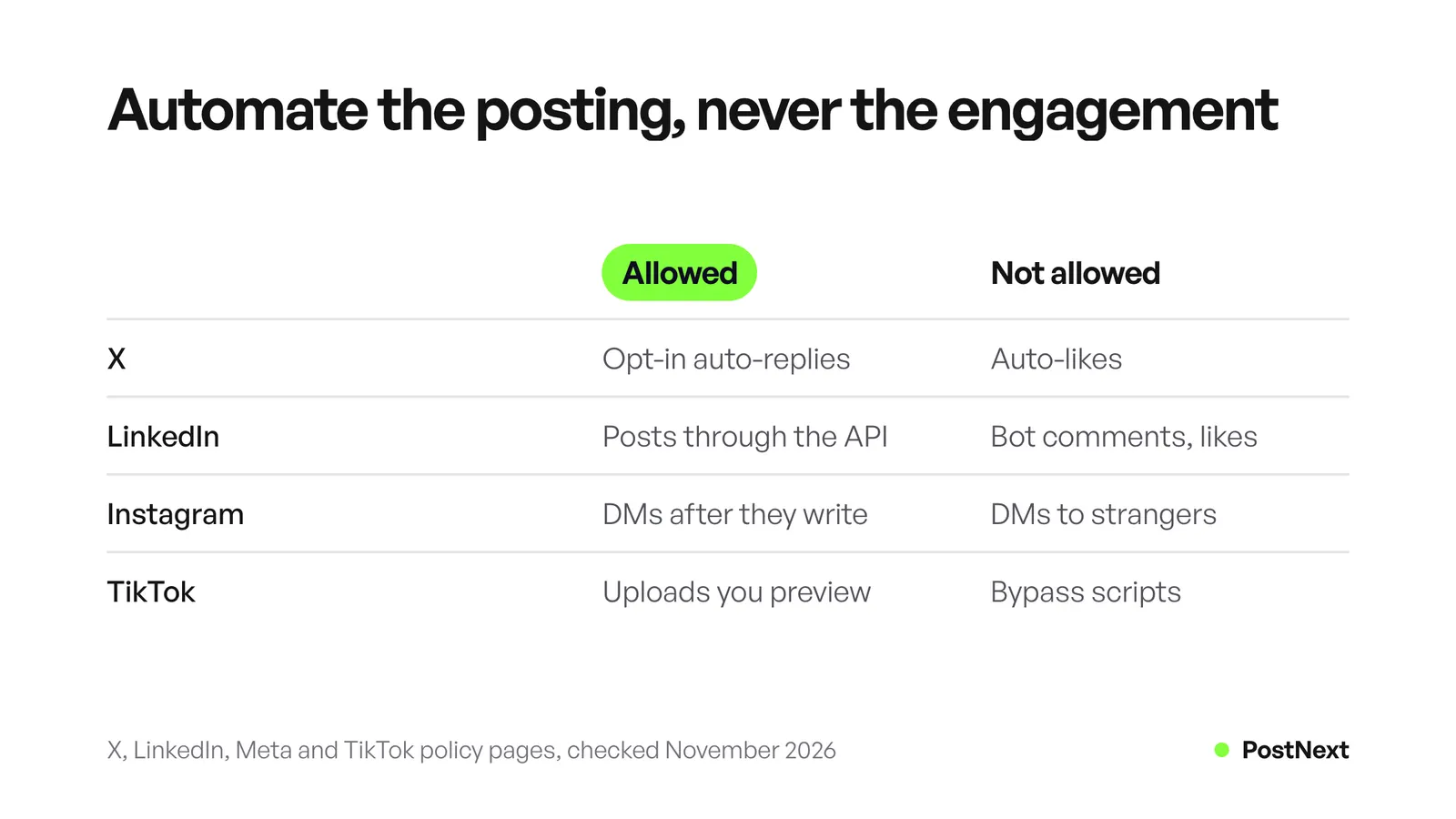
Every major network allows scheduled posts through its official API and bans automated likes, follows and fake engagement. The differences are in replies and messages. X allows auto-replies to people who engaged with you, with conditions. Instagram allows DMs only after a person writes first. LinkedIn bans automated comments and likes outright. These rules come from each network’s own policy pages, read on 26 November 2026.
| Network | Scheduled posts | Automated replies | Automated DMs | Automated likes and follows |
|---|---|---|---|---|
| X | Allowed, including from an RSS feed you are authorized to use | Allowed to people who engage with you, with opt-in, opt-out and one reply per action; not from keyword searches alone | Allowed as replies to people who message you | Not allowed |
| Allowed through the official API | Not allowed (“comment on” is in the ban) | Not allowed (“send or redirect messages”) | Not allowed | |
| Allowed through Meta’s API, 100 posts per 24 hours | Allowed through the API for comments on your posts | Only after the person writes first, within 24 hours; one private reply to a comment within 7 days | Not allowed | |
| TikTok | Allowed, with a preview and the user’s consent before upload | Not offered in TikTok’s posting API | Not offered in TikTok’s posting API | ”Automation tools, scripts, or other tricks” to bypass systems are banned |
| Facebook Page | Allowed, 20 minutes to 29 days ahead in Business Suite | Through Meta’s API for Page comments | Only after the person writes first | Not allowed |
X’s rules in detail
X’s automation rules, updated April 2026, allow you to “automatically broadcast helpful information” and to post from an RSS feed “as long as you are sufficiently authorized”. Auto-replies are allowed to “users who engage with your content”, with three conditions: the person opted in, they can opt out, and you send “one automated reply … per user interaction”. The same page says “any AI reply bot requires prior written and explicit approval from X”, and that “scripting the X website” can lead to permanent suspension.
LinkedIn’s rules in detail
LinkedIn’s User Agreement, section 8.2, says you will not “use bots or other unauthorized automated methods to access the Services, add or download contacts, send or redirect messages, create, comment on, like, share, or re-share posts, or otherwise drive inauthentic engagement”. The same section bans browser plugins that scrape LinkedIn and “copying cookies”. Tools that post through LinkedIn’s official API are the authorized route; browser extensions that click for you are not.
Instagram’s rules in detail
Meta’s messaging documentation says an app can message a person only after that person messages the account, and that the window “for most user actions” lasts 24 hours, or up to 7 days after a click-to-Direct ad. A comment allows one private reply: “Only one message can be sent to the commenter,” within 7 days. Where the law requires it, Meta asks that a bot says it is a bot, naming California and Germany. Our guide to Instagram DM automation covers the setup.
How do you automate the planning stage?
To automate social media planning, set content pillars once, let a planner draft a month of posts from them, and turn repeating posts into recurring posts. A person still picks the topics and the offers for the month. The software saves the hours spent filling empty slots, not the thinking about what to say.
In PostNext, three to five content pillars live in the brand profile, and the planners draft a month of posts from them into the calendar. Recurring posts repeat “every 1 to 365 days, weeks or months” with an end date or a number of repeats. Weekly tips, monthly offers and “we are open on the holiday” posts fit there. The automation features page lists what repeats and what does not.
Posting slots save the last decision: give each channel its times, such as Tuesday and Thursday at 9:00, and queued posts fill the next free slot in order. You stop choosing a time for each post.
How do you automate content creation?
To automate content creation, start from content you already have. A blog post, a newsletter or a product page can become several social posts per network, drafted by AI in each network’s format. An RSS feed can turn every new article into a draft. Treat every output as a first draft: AI copies the source’s facts, and it copies its mistakes too.
PostNext’s AI Repurpose takes a URL or pasted text and writes up to five posts per channel for X, Instagram, LinkedIn and Threads, at one AI credit per post. The results go to drafts; nothing publishes on its own. RSS feeds are checked every 30 minutes, with up to ten drafts per check. The RSS curation page says it plainly: “Auto-drafted does not mean auto-published.”
Two rules keep automated drafts from reading like automated drafts:
- Give the AI your voice once. A brand profile with your audience, tone and words you never use does more than rewriting every draft.
- Read every draft before it is scheduled. Check names, prices and dates against the source. A post with a wrong price costs more than the time it saved.
How do you automate publishing?
To automate publishing, schedule posts through a tool that uses each network’s official API, set posting times per channel, and keep an approval step for anything that speaks for the company. Publishing is the safest stage to automate, because every network allows API scheduling. The work that remains is checking that each post fits the network’s format before it goes out.
Our guide to automated social media posting covers each network’s API limits, video rules and what happens when a post fails. Two points matter for marketing teams:
- Approvals. On a team, a post should not publish because someone forgot to check it. PostNext’s Teams plan has a send-to-approval step; approving returns the post to drafts marked Approved and does not publish it until it is scheduled.
- Failures. An automated post can fail because a token expired or a file broke a rule. PostNext emails the account when a post fails; check that inbox, or the failure stays unseen.
Publishing can now start from an AI assistant too. With PostNext added as a connector in Claude, ChatGPT or another assistant, the assistant drafts posts and schedules them, and PostNext publishes at the set time. Drafts never publish by themselves. Our article on the social media AI agent explains how that works.
How do you automate replies and engagement?
To automate replies, automate the sorting and the replies that are the same for everyone, and keep a person on the rest. A keyword that sends a price list or a link is a good candidate for automation, inside the network’s rules. A complaint, a question about an order or a comment during bad news is not. No network allows automated likes or follows, so engagement growth itself cannot be automated safely.
Instagram comment-to-DM is the clearest case where automation helps: people comment a word, and they get the link in a DM within seconds. Meta’s private reply rule allows exactly one message per comment, so the first message has to carry everything. A tool built for comment-to-DM on Instagram handles that rule for you.
PostNext’s comment inbox brings comments on recent Instagram posts into one place to read, answer and delete. It does not send automated replies, hide comments or handle DMs. That is on purpose: the inbox is for a person answering faster, not for a bot answering instead.
Three replies should never be automated:
- Complaints. An automated “thanks for your feedback” under a complaint reads as not listening.
- Anything during a crisis. Pause scheduled posts and automated replies when your company or your field is in the news for the wrong reason.
- Replies on LinkedIn. The User Agreement bans automated comments, so every LinkedIn comment is typed by a person.
How do you automate social media reporting?
To automate social media reporting, schedule a report that arrives by email each week or month, with the same metrics every time, and spend the saved hour on what to change. The report should answer three questions: what published, what worked, and what to do next week. Software can collect the numbers; deciding what to change stays with a person.
PostNext sends a weekly or monthly PDF report on paid plans, with per-post engagement for X, Instagram, TikTok and LinkedIn, and follower trends for X, Instagram, Threads and TikTok. Sales and signups live in your website analytics, store or CRM, not in a scheduler, so a full report joins the two. Our guide to automated social media reporting with AI tools shows how to combine them.
What does a weekly automated routine look like?
A weekly automated routine takes about one hour of a person’s time once it is set up. On Monday, a person reads the report and picks the week’s topics. The planner or AI drafts the posts. On Tuesday, a person edits and approves them. The tool publishes through the week. Each day, a person spends ten minutes on comments. On Friday, the report arrives for next Monday.
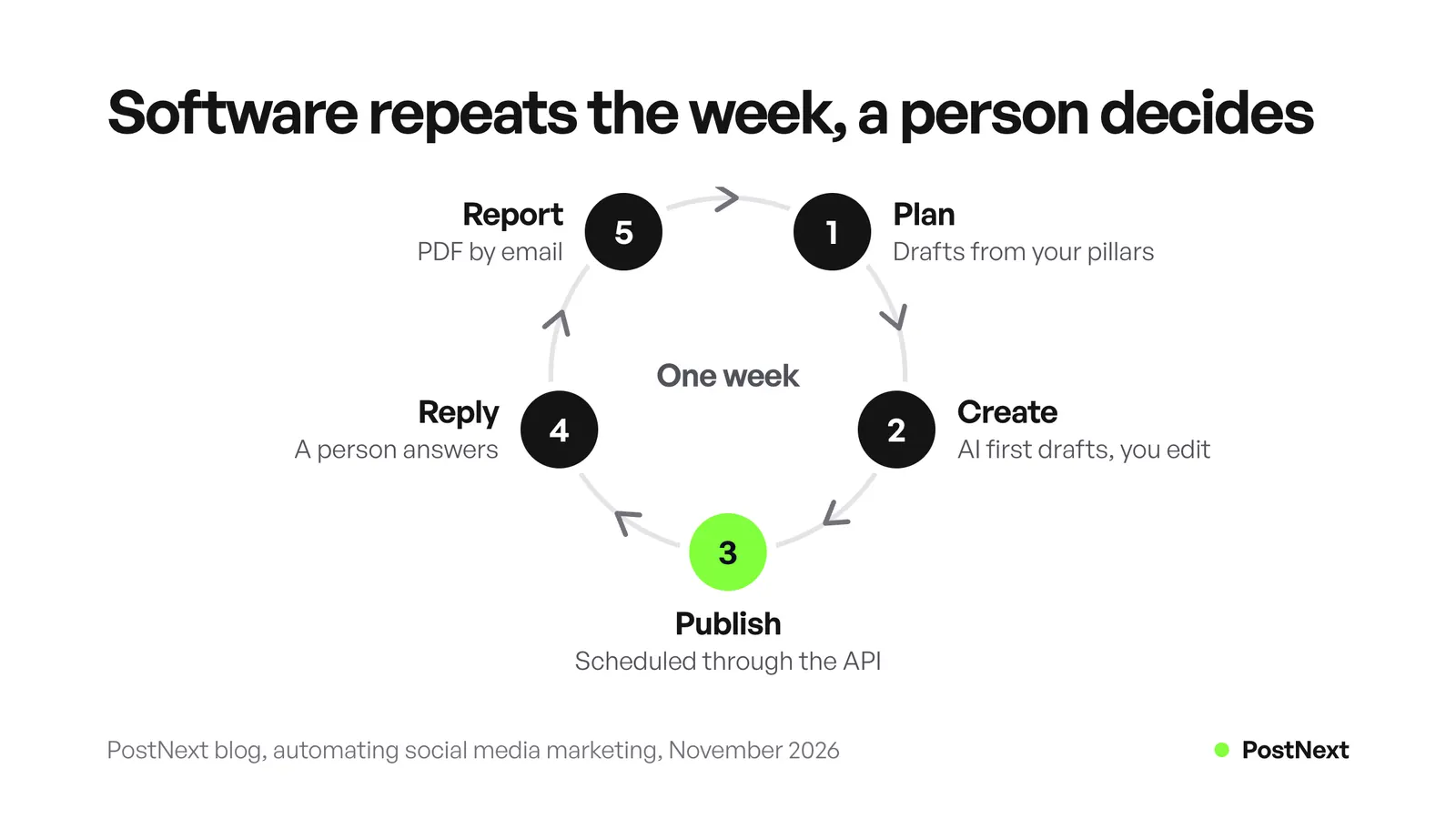
The part that grows over time is the library: every good post becomes a template, every repeated post a recurring one, every blog post a source for repurposing. The twentieth week takes less work than the second, because more of the week is already made.
The part that should not grow is what runs without a check. If a new step publishes, sends or deletes something, put an approval in front of it. The mistakes in social media automation are almost all steps that ran without one: a post scheduled into a bad news day, a reply bot answering a complaint, a recurring offer that ended last month.
Frequently Asked Questions
Can you fully automate social media marketing?
No, and the networks’ rules prevent it. You can automate planning drafts, publishing, report delivery and some replies, but X, LinkedIn and Instagram ban automated likes and follows, and LinkedIn bans automated comments. Approvals, answers to real questions and crisis decisions need a person.
Is it against the rules to automate social media?
Scheduling through a network’s official API is allowed on every major network. What breaks the rules is automated engagement: likes, follows, comments on LinkedIn, keyword-search replies on X, and DMs on Instagram to people who did not write first.
What is the best way to start automating social media?
Start with publishing. Move the next two weeks of posts into a scheduler with posting slots, then add recurring posts for anything you post more than once a month. Add AI drafting and automated reports after that, one stage at a time.
Can AI run my social media accounts?
AI can draft posts, suggest times and schedule through a connector, but it should not publish or reply unchecked. X requires written approval for AI reply bots. Keep drafts-first tools and a person on approval.
How much time does social media automation save?
It depends on how much of your week repeats. The repeated steps, such as resizing, copying captions into each network and building reports, are the ones software removes. Topic choice, editing and conversations stay, so plan for those hours.
Does automation hurt reach?
No network says scheduled posts reach fewer people. What hurts reach is what automation can produce at scale: the same caption on every network, posts at bad times, or content that copies others. Instagram no longer recommends accounts that mainly re-upload other people’s photos.
Sources
- X, Automation rules (updated April 2026; read from the 1 November 2026 Wayback Machine copy on 26 November 2026)
- LinkedIn, User Agreement, section 8.2 (effective 3 November 2025; checked 26 November 2026)
- Meta for Developers, Instagram Messaging API and Private replies (checked 26 November 2026)
- Meta for Developers, Instagram content publishing (100 API posts per 24 hours; checked 26 November 2026)
- TikTok, Community Guidelines: integrity and authenticity and Content Sharing Guidelines (checked 26 November 2026)
- Meta Help Center, Schedule and manage posts on your Facebook Page (20 minutes to 29 days; checked 26 November 2026)
- PostNext, Automation, RSS curation, AI Repurpose, Analytics and Comment inbox (checked 26 November 2026)