
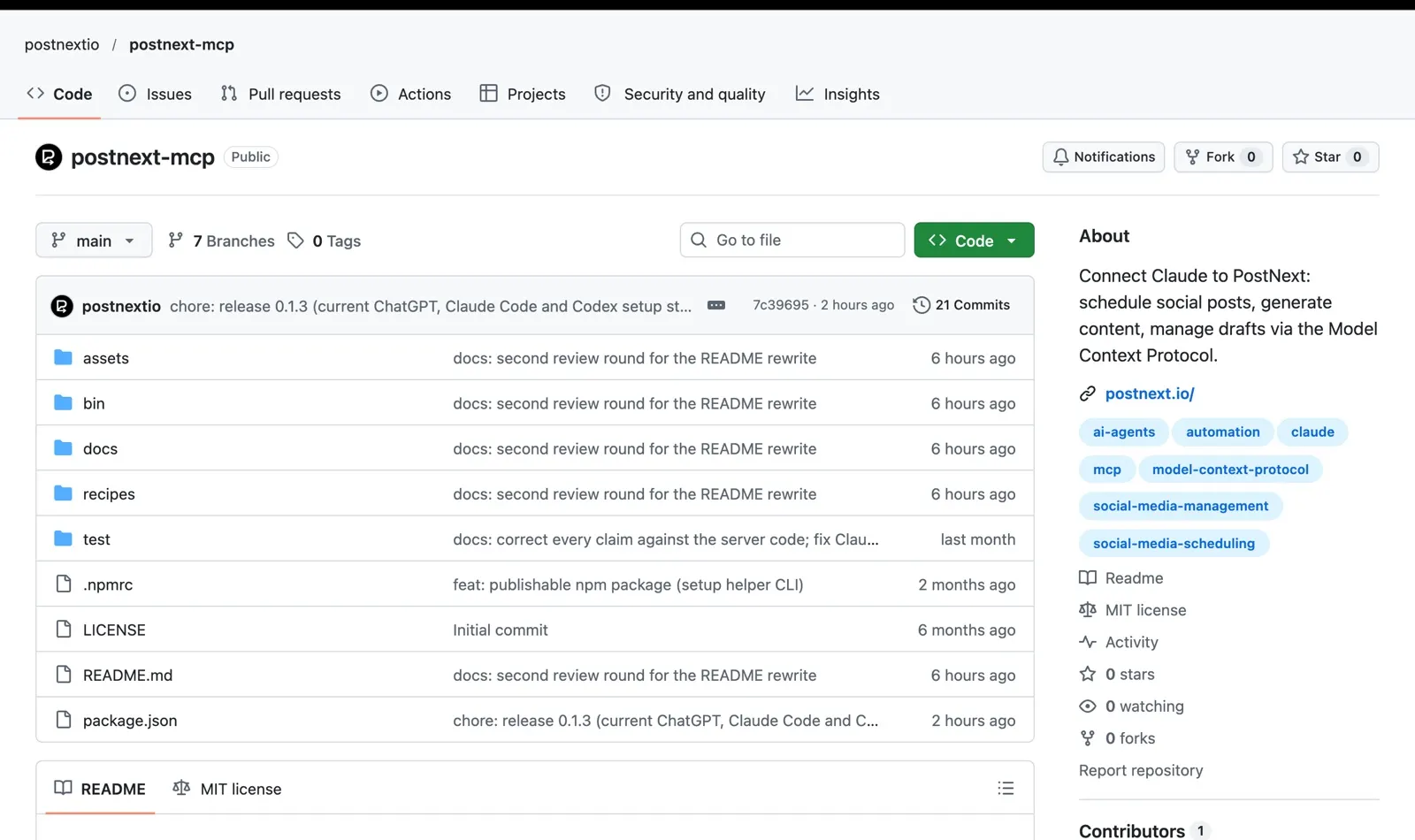
PostNext publishes everything a developer or an AI agent needs to use its social media MCP server in one open repository: github.com/postnextio/postnext-mcp. It holds the reference for all 25 tools, 4 resources and 4 prompts, setup steps for Claude, ChatGPT, Claude Code, Cursor and Codex, four paste-ready recipes and an npm setup helper, under the MIT license (checked 26 November 2026).
Key Takeaways
- One repo, one hosted server. The repository documents the server at
https://mcp.postnext.io/api. The server runs on PostNext, so there is nothing to install or host. - Open under MIT. Copy, fork or adapt the docs and recipes. Pull requests on the docs are welcome.
- 25 tools, 4 resources, 4 prompts. Each one is documented in
docs/tools.md, with its inputs, what it returns and its errors. - Five networks over MCP. X, Instagram, LinkedIn, Threads and TikTok.
- A test keeps the docs honest.
npm testfails when the documented tool count or list drifts from the reference. - A second repo for agents with a shell.
postnext-social-manageris an Agent Skill that uses the PostNext REST API and adds YouTube and Bluesky.
What is in the postnext-mcp repository?
The postnext-mcp repository is the public home of PostNext’s MCP server. MCP, the Model Context Protocol, is the open standard AI assistants use to call tools in other apps. The repo holds the docs, the recipes, a setup helper for the terminal and the images from the README. It does not hold the server code: the server is hosted by PostNext at one address.
| Folder or file | What it holds | Who it is for |
|---|---|---|
README.md | What the server is, setup for each assistant, networks, tools, FAQ | Everyone, first stop |
docs/quickstart.md | Step-by-step setup for Claude Desktop, claude.ai, Claude Code, Cursor, Codex, ChatGPT and API keys | People connecting an assistant |
docs/tools.md | All 25 tools: inputs, return shape, plan gating, error envelopes | Developers and agents |
docs/resources.md, docs/prompts.md | The 4 resources and the 4 named prompts, with example payloads | Developers building on top |
recipes/ | 4 paste-ready workflows with what the assistant does behind the scenes | Marketers and founders |
bin/cli.js | npx postnext-mcp <client>, which prints the config for a client | Terminal users |
test/ | A check that every tool count and list matches docs/tools.md | Contributors |
Source: github.com/postnextio/postnext-mcp, file tree and README, 26 November 2026.
The same reference is published on the site as the MCP tool reference. The repo copy is there for offline use, for forks and for agents that read GitHub before they read a website.
Why did PostNext put its MCP docs on GitHub?
PostNext opened the repo on 19 May 2026 to give the server one public, versioned home where developers and AI agents look for MCP servers: GitHub, npm and the official MCP registry. The commit history also shows a second reason: documentation for a live server goes stale, and a public repo with a test makes that visible and fixable.
Three decisions in the history, each with the reason given in the commit:
- A real npm package. The official MCP registry needs the package name on npm. Instead of a placeholder, the package became a setup helper:
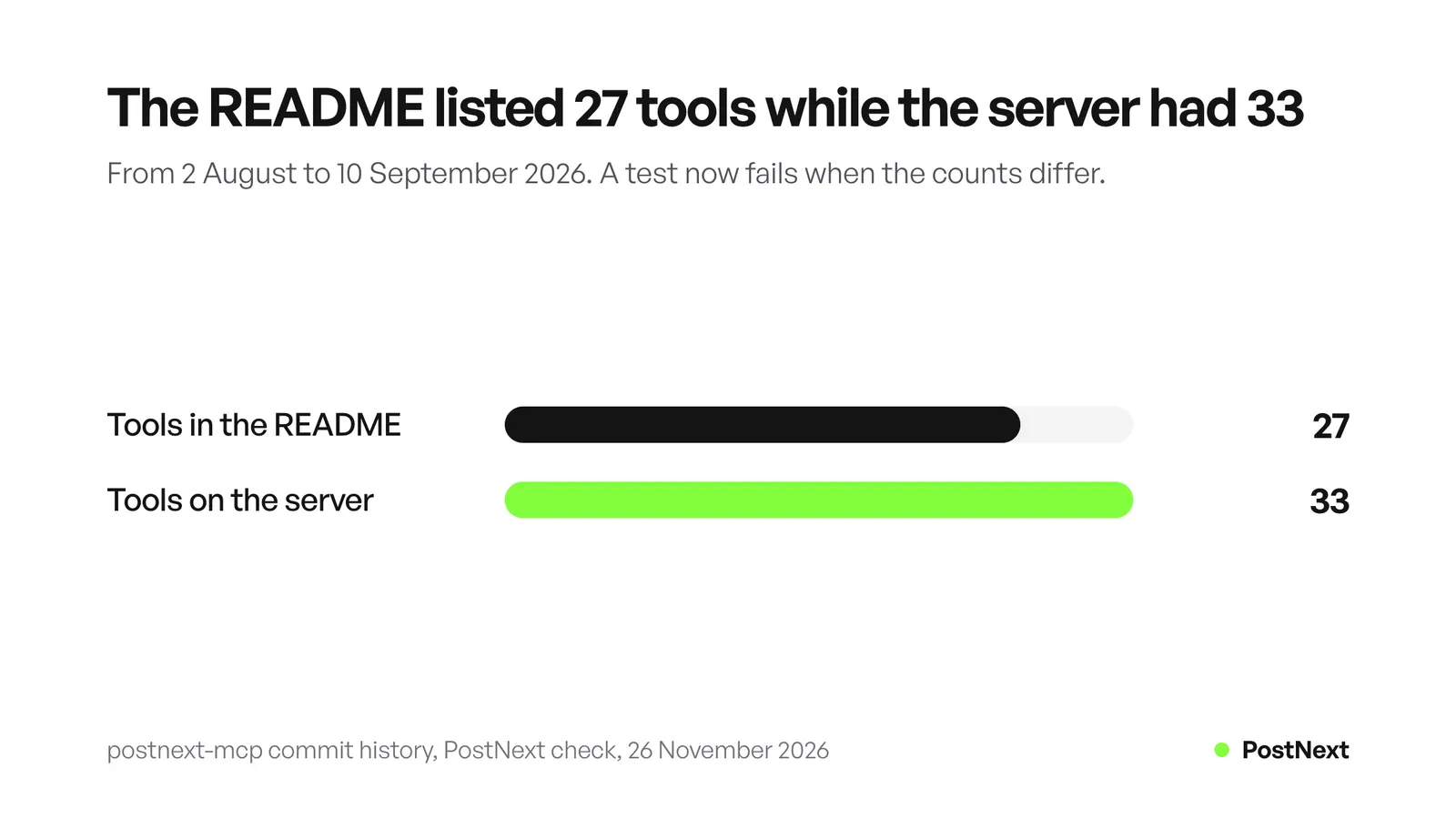
npx postnext-mcp claude-codeprints the exact config for that client. The commit notes that the package runs nothing locally and says so in its own help output, “so nobody installs it expecting a local server”. - A test against drift. From 2 August to 10 September 2026 the README said 27 tools while the server had 33, and the marketing site made the same mistake on its own. Both were found by accident. The fix was a test that reads
docs/tools.mdand fails when any other count or list in the repo disagrees. - Every claim checked against the server code. In October 2026 every claim in the docs was checked against the server code. It found that the Claude Desktop snippet in the old README could never connect, because Claude Desktop’s config file only starts local servers. Claude now adds PostNext as a custom connector instead.
That is the case for an open repo in short. When the docs are wrong, anyone can see it, and anyone can open an issue or a pull request.
How does the PostNext MCP server work?
You connect the server once to your AI assistant and sign in to PostNext with OAuth. Then you ask in plain words, and the assistant calls PostNext tools to read your channels and brand voice, write drafts and schedule them. PostNext publishes each post at the set time through the network’s official API, even after you close the chat.
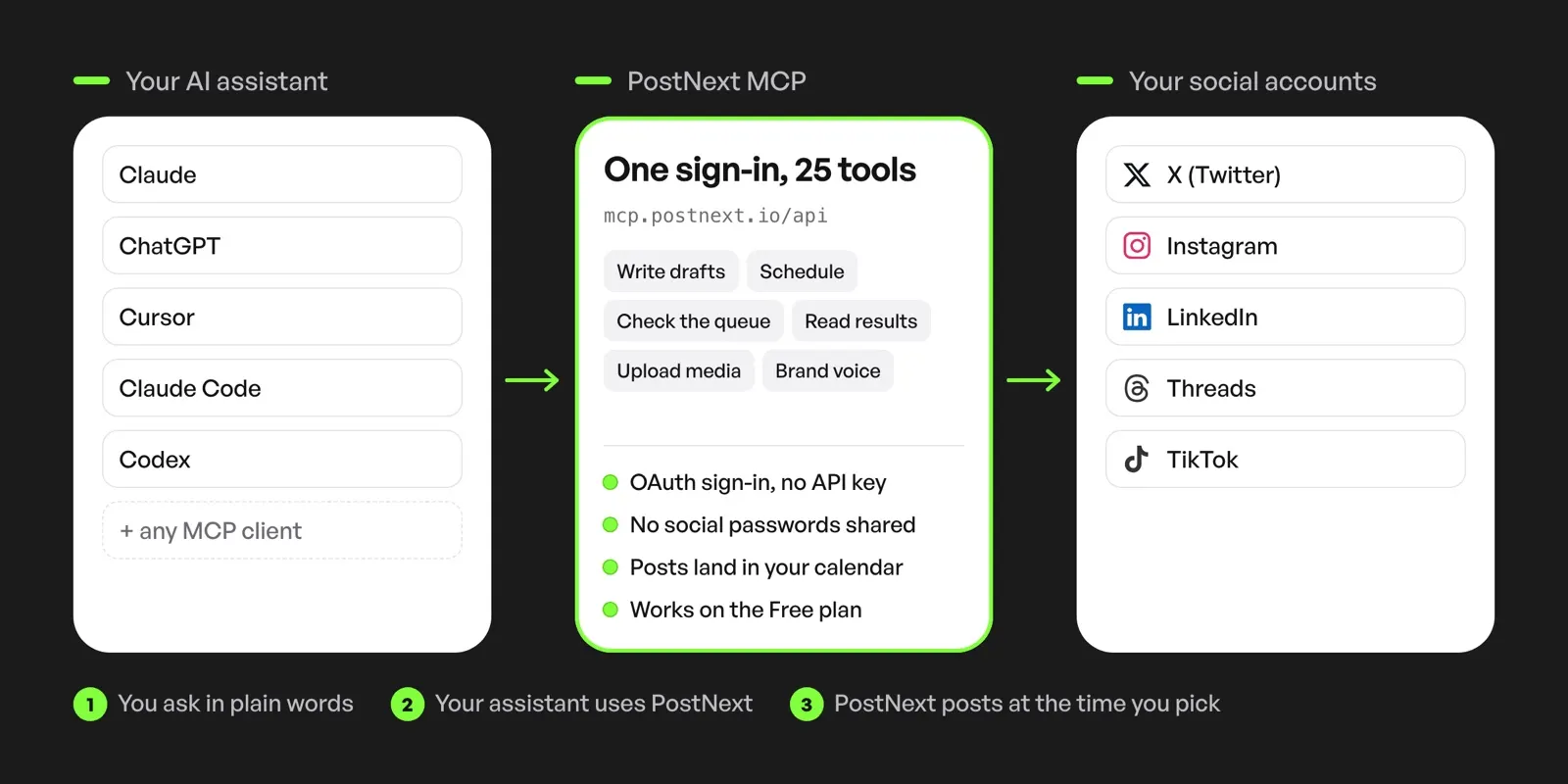
What each network supports over MCP (README, 26 November 2026):
| Network | What the assistant can do |
|---|---|
| X | Write and schedule posts and threads; read likes, replies, reposts and impressions |
| Schedule posts with at least one image or video; needs a Business or Creator account | |
| Write and schedule posts, confirm they went out | |
| Threads | Write and schedule posts and threads, confirm they went out |
| TikTok | Schedule your videos with captions, confirm they went out |
The PostNext app supports more channels than these five; the rest are scheduled from the PostNext calendar. Each network has its own page, for example the X MCP server guide.
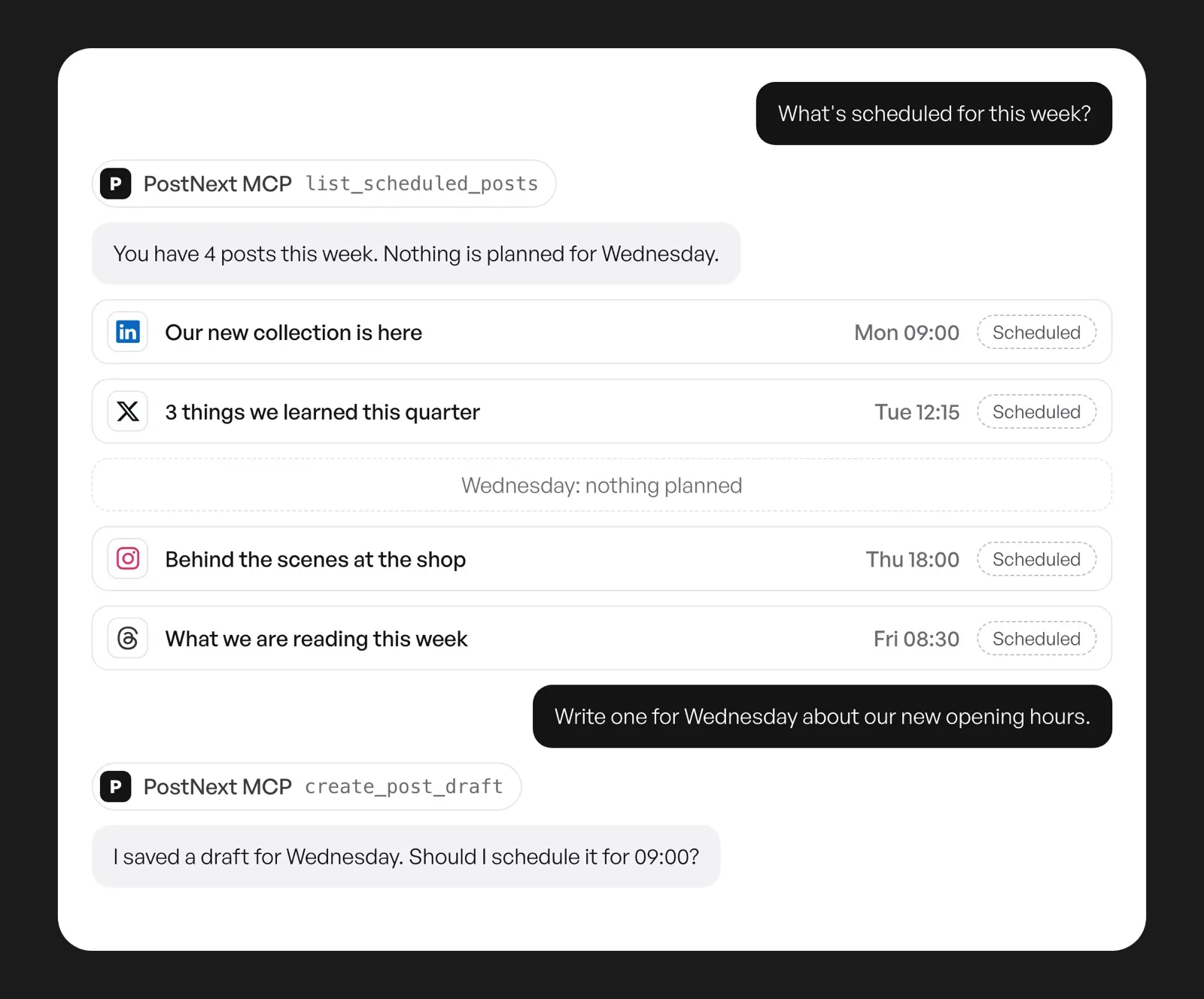
A typical chat looks like the example in the README: the assistant lists the week, spots the empty day and offers a draft before it schedules anything.
What can the 25 MCP tools do?
The 25 tools cover the account and plan, teams, channels, drafts, scheduling, past posts, analytics, media, the brand profile and a tool search. Most of them read. The ones that change something are writing and editing drafts, scheduling and cancelling, uploading media, connecting a channel and updating the brand profile. Each tool declares MCP annotations, so an assistant can tell a reader from a writer.
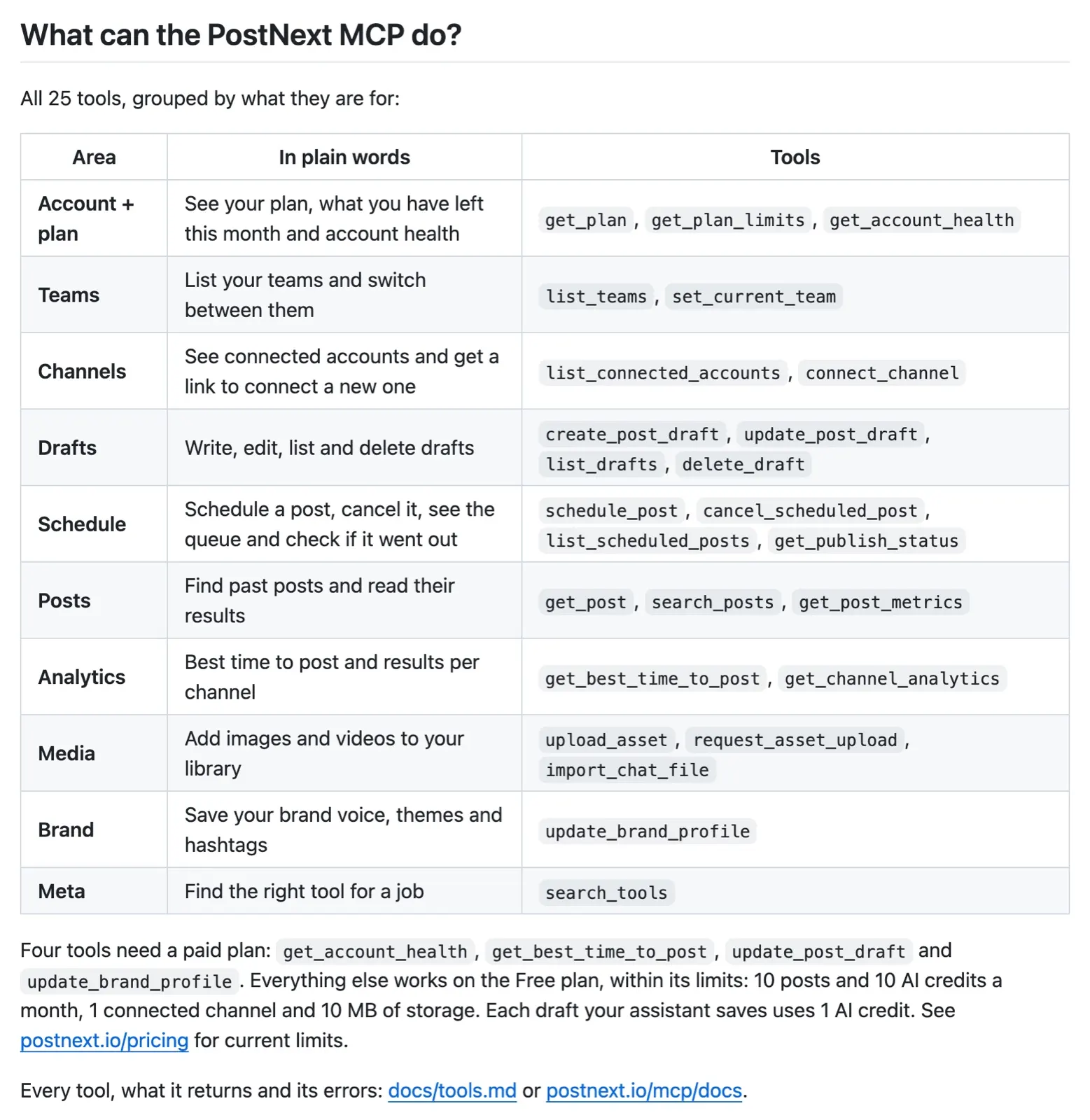
Four tools need a paid plan: get_account_health, get_best_time_to_post, update_post_draft and update_brand_profile. Everything else works on the Free plan, within its limits: 10 posts and 10 AI credits a month, 1 connected channel and 10 MB of storage. Each draft the assistant saves uses 1 AI credit.
The server also exposes 4 resources the assistant can read without asking you again: the account summary, the current team, the connected channels and the active brand profile.
How do you connect PostNext MCP from the repo?
Pick your assistant in the README and follow its steps. All of them use the same address, https://mcp.postnext.io/api, and sign in with OAuth. If you work in a terminal, npx postnext-mcp <client> prints the config for claude-code, claude-desktop, cursor, codex or chatgpt. Before you connect, finish the plan step in the PostNext web app: the Free plan or a 7-day trial, which asks for a card.
| Assistant | How you add it |
|---|---|
| Claude (desktop and web) | Customize, then Connectors, then Add custom connector; paste the URL |
| ChatGPT | Plugins, then +, then Add custom MCP server; choose OAuth |
| Claude Code | claude mcp add --transport http --scope user postnext https://mcp.postnext.io/api |
| Cursor | A postnext entry with the URL in ~/.cursor/mcp.json |
| Codex | codex mcp add postnext --url https://mcp.postnext.io/api, then codex mcp login postnext |
| Your own scripts | An API key sent as Authorization: Bearer apikey_<uuid> |
Source: postnext-mcp README, steps matched to the postnext.io guides on 26 November 2026.
OpenAI says write tools in ChatGPT need Business, Enterprise or Edu, and Pro connects with read access. Menus in AI apps move, so the guides in the AI agents directory are the ones kept current. Longer walkthroughs: Claude connectors, ChatGPT for social media and our Codex MCP setup guide.
What are the recipes and prompts in the repo?
The repo ships 4 named prompts on the server and 4 recipes in the recipes folder that use them. A prompt is a ready-made workflow your assistant can call by name. A recipe is a page you paste from, with notes on each tool the assistant calls behind the scenes, so you know what will happen before you run it.
| Prompt | What it does | Changes anything? |
|---|---|---|
weekly-plan | Proposes 5 to 10 drafts for next Monday to Friday in your brand voice | Creates drafts only after you confirm |
draft-thread | Drafts a 5 to 10 post thread for X or Threads from a topic or URL | Saves drafts only after you confirm |
audit-queue | Walks the next 1 to 30 days of scheduled posts, flags duplicates, overload and gaps | No, read-only |
channel-sweep | Lists connected, missing and stale channels | Asks before creating a sign-in link |
Source: postnext-mcp docs/prompts.md and recipes/, 26 November 2026.
The weekly plan recipe, for example, checks your plan limits first, reads your brand profile and connected channels, looks at what is already queued for the next 14 days, then proposes the week in one message. It writes nothing until you say “create them”, and schedules only if you also say “and schedule them”. The README says plainly that these prompts guide the assistant and are not enforced by the server.
What is the postnext-social-manager skill?
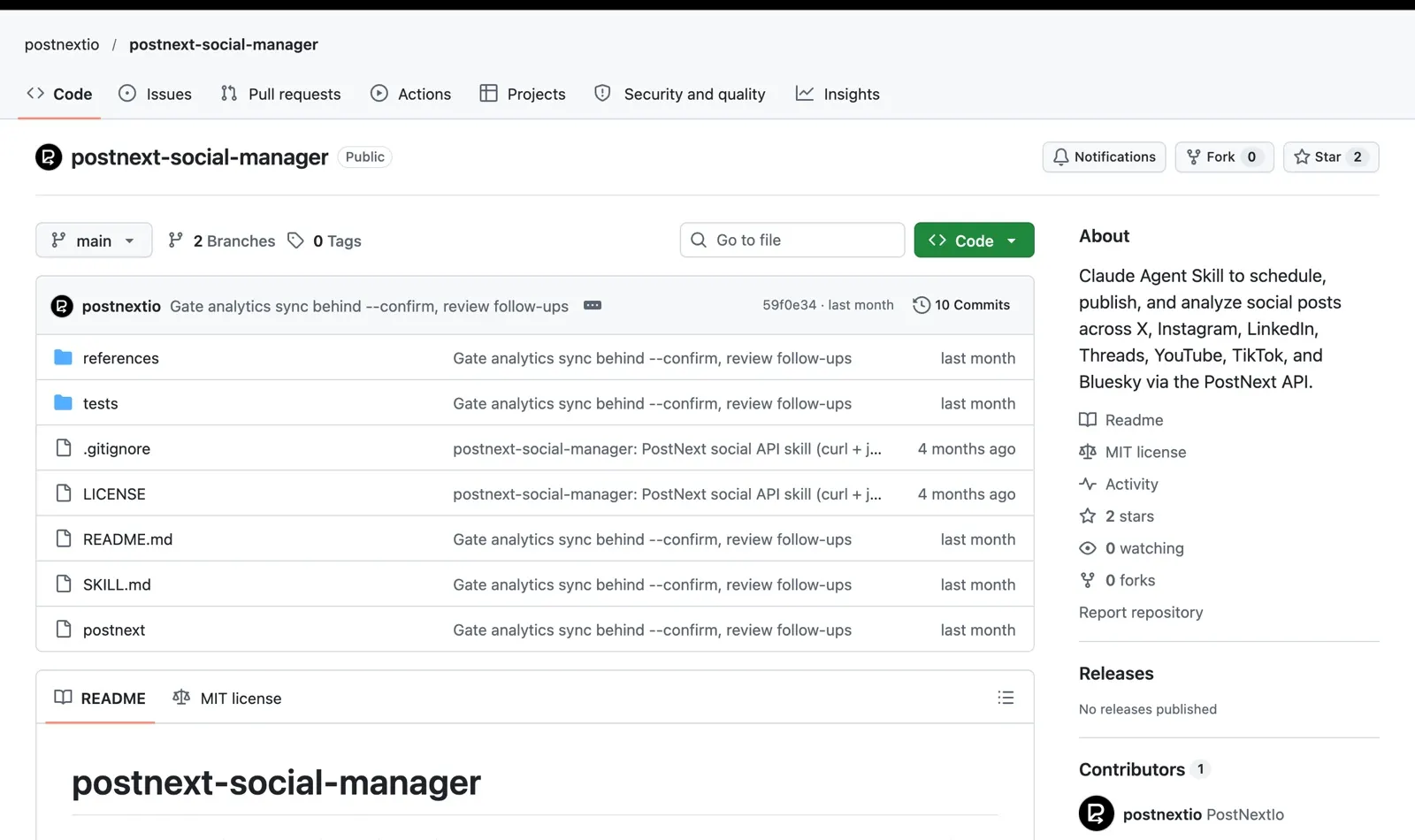
postnext-social-manager is a second PostNext repository: a Claude Agent Skill that manages social media through the PostNext REST API with one API key. It covers X, Instagram, LinkedIn, Threads, YouTube, TikTok and Bluesky, uploads media from a folder and reads analytics. A bundled postnext helper needs curl and jq, and every command that changes your account prints a preview and needs a --confirm code first.
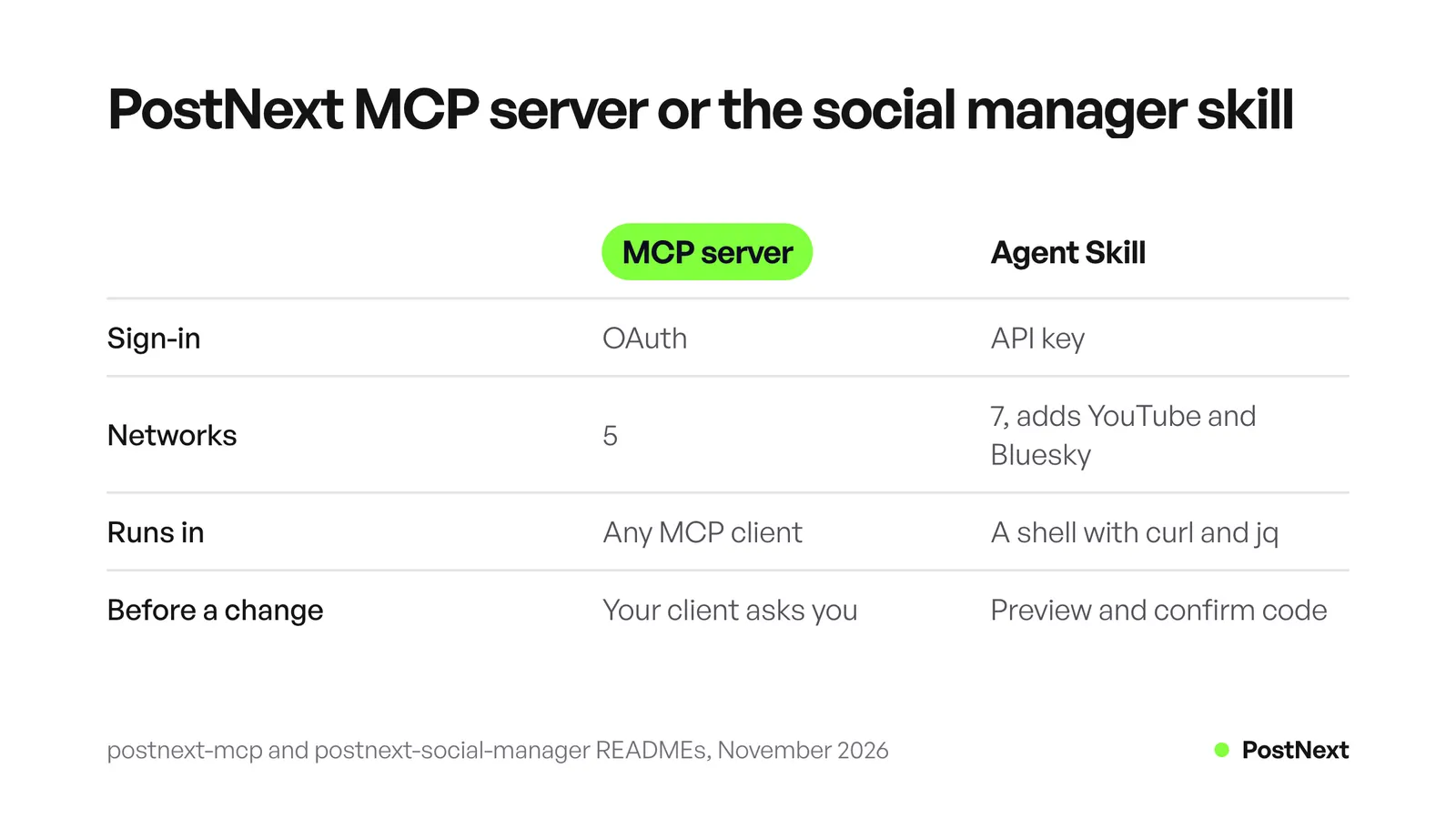
Which one to use, from the two READMEs (26 November 2026):
| You want to | Use |
|---|---|
| Ask Claude, ChatGPT or another assistant to handle your posts | The MCP server, https://mcp.postnext.io/api |
| Post to YouTube or Bluesky from an agent, or upload media from a folder | The postnext-social-manager skill |
| Post from your own app, script or backend | The PostNext REST API, see PostNext for developers |
The skill leaves some jobs to the MCP server or the web app: connecting channels, editing the brand profile and managing teams. Its tests/confirm.sh checks offline that the six account-changing commands send nothing without a matching confirm code. Our guide to Claude Code for marketing shows both in a terminal workflow.
How can developers use or contribute to the repo?
Fork it, star it, or open an issue or pull request on the docs. The license is MIT, so you can copy the recipes into your own agent setup or adapt the tool reference for an internal wiki. Run npm test after any docs change: it checks that the README, the tools table and the quickstart agree with docs/tools.md.
Three ways to use it:
- As a reference for agents. Point an agent at
docs/tools.mdso it knows each tool’s inputs and errors before it calls them. - As a starting point for workflows. Copy a recipe, change the brand and the timing, and keep it with your team’s prompts.
- As a setup check. Run
npx postnext-mcp codex(or another client) to print a config you can compare with your own.
The server is listed in the official MCP registry as io.postnext/postnext; on 26 November 2026 the registry’s active version was 1.5.2. Our article on the best MCP servers for social media covers the servers a marketing team connects next to PostNext.
Frequently Asked Questions
Is the PostNext MCP server open source?
The docs, recipes, setup helper and tests are open source under the MIT license in the postnext-mcp repository. The server itself is hosted by PostNext at https://mcp.postnext.io/api, and its code is not in the repo. You connect to it instead of running it.
Do I need to install anything from the GitHub repo?
No. The server is hosted, so most people only paste the address into their assistant and sign in. The npm package postnext-mcp is optional: it prints setup config and runs no server.
Is PostNext MCP free?
Yes. MCP access is included in every PostNext plan, Free included. The Free plan allows 10 posts and 10 AI credits a month on 1 channel, each saved draft uses 1 AI credit, and four tools need a paid plan.
Which social networks can I post to through the PostNext MCP?
X, Instagram, LinkedIn, Threads and TikTok. The postnext-social-manager skill, which uses the REST API, adds YouTube and Bluesky.
Will my AI assistant post without asking me?
It can, if you let it. PostNext adds no confirmation step of its own, but most AI clients ask before a tool that changes something runs, and the built-in prompts tell the assistant to wait for your OK. Every scheduled post stays in your PostNext calendar, where you can cancel it until it goes out.
How do I report a mistake in the docs?
Open an issue or a pull request on github.com/postnextio/postnext-mcp. For security issues, PostNext publishes a disclosure page at postnext.io/security and a security.txt file.
Sources
- PostNext, postnext-mcp repository (26 November 2026): README, file tree,
docs/tools.md,docs/prompts.md,recipes/,test/tool-consistency.test.js,package.json, commit history from 19 May 2026. - PostNext, postnext-social-manager repository (26 November 2026): README, scope, confirm step.
- npm, package
postnext-mcpversion 0.1.3 (26 November 2026). - MCP Registry, registry.modelcontextprotocol.io, entry
io.postnext/postnext(26 November 2026): active version 1.5.2. - PostNext, social media MCP and the MCP tool reference (November 2026).