
Claude connectors let Claude read and act in other apps, such as your calendar, your files or a social media scheduler. A custom connector is a remote MCP server that you add by URL. In November 2026 custom connectors work on every Claude plan, Free included, but Free accounts can add only one. You add one in Customize, then Connectors, and it then works in Claude on the web, Claude Desktop, Cowork and Claude Code.
Key Takeaways
- A connector is a remote MCP server. Anthropic’s help center says custom connectors use remote MCP, the open standard Anthropic created for connecting AI apps to tools and data.
- Every plan can add one. Free, Pro, Max, Ultra, Team and Enterprise. Free users are limited to one custom connector.
- Team and Enterprise work in two steps. An owner adds the connector for the organization, then each member connects their own account.
- Claude calls the server from Anthropic’s cloud. The server must be public and on HTTPS port 443, even when you use Claude Desktop.
- You turn it on per chat. The ”+” button, then Connectors, shows a toggle for each connector.
- Editing means re-adding. To change a connector’s URL or settings, remove it and add it again.
What are Claude connectors?
Claude connectors are links between Claude and other apps. With a connector turned on, Claude can call that app’s tools during a chat: read your calendar, search your documents or save a draft post. Anthropic offers reviewed connectors in its directory, and you can add any other service as a custom connector if it runs a remote MCP server.
Anthropic describes MCP as “an open standard, created by Anthropic, for AI applications to connect to tools and data”. MCP servers used to run only on your own computer. A remote MCP server runs on the internet, which is why a connector works the same on the web, in the desktop app and on your phone. The two kinds of connector differ in who checked them:
| Directory connectors | Custom connectors | |
|---|---|---|
| Who reviews it | Listed in Anthropic’s directory of reviewed connectors | Not verified by Anthropic |
| How you add it | Pick it from the list | Paste the server URL |
| Sign-in | Usually OAuth | OAuth, a request header with an API key, or none |
| Plan limit | No custom-connector limit | Free: one custom connector |
| Where it works | Claude web, desktop, mobile, Cowork, Claude Code | The same |
Source: Anthropic, “Get started with custom connectors using remote MCP” and the Claude Code MCP documentation, read November 2026.
Which Claude plans support custom connectors?
Anthropic’s help center lists Free, Pro, Max, Ultra, Team and Enterprise (November 2026). Free users can add one custom connector. On Team plans only Owners and Primary Owners can add a connector for the organization. On Enterprise plans, people with a custom role that includes Manage access to Libraries can add them too. Members then connect to the connector one by one.
The member step matters for a shared tool. Each member signs in with their own account, so Claude only reaches the data that member can reach. The exception is a connector that uses one shared API key: then everyone who uses it acts with that key’s access. Anthropic advises using a key limited to what members should see.
How do you add a custom connector to Claude?
On Free, Pro, Max and Ultra plans, open Customize, then Connectors. Select ”+ Add”, then “Add custom connector”. Enter a name and the server URL exactly as the provider documents it, including the path. Select Continue, check the sign-in settings Claude detected, then select Add. Connect and approve the sign-in in the window that opens.
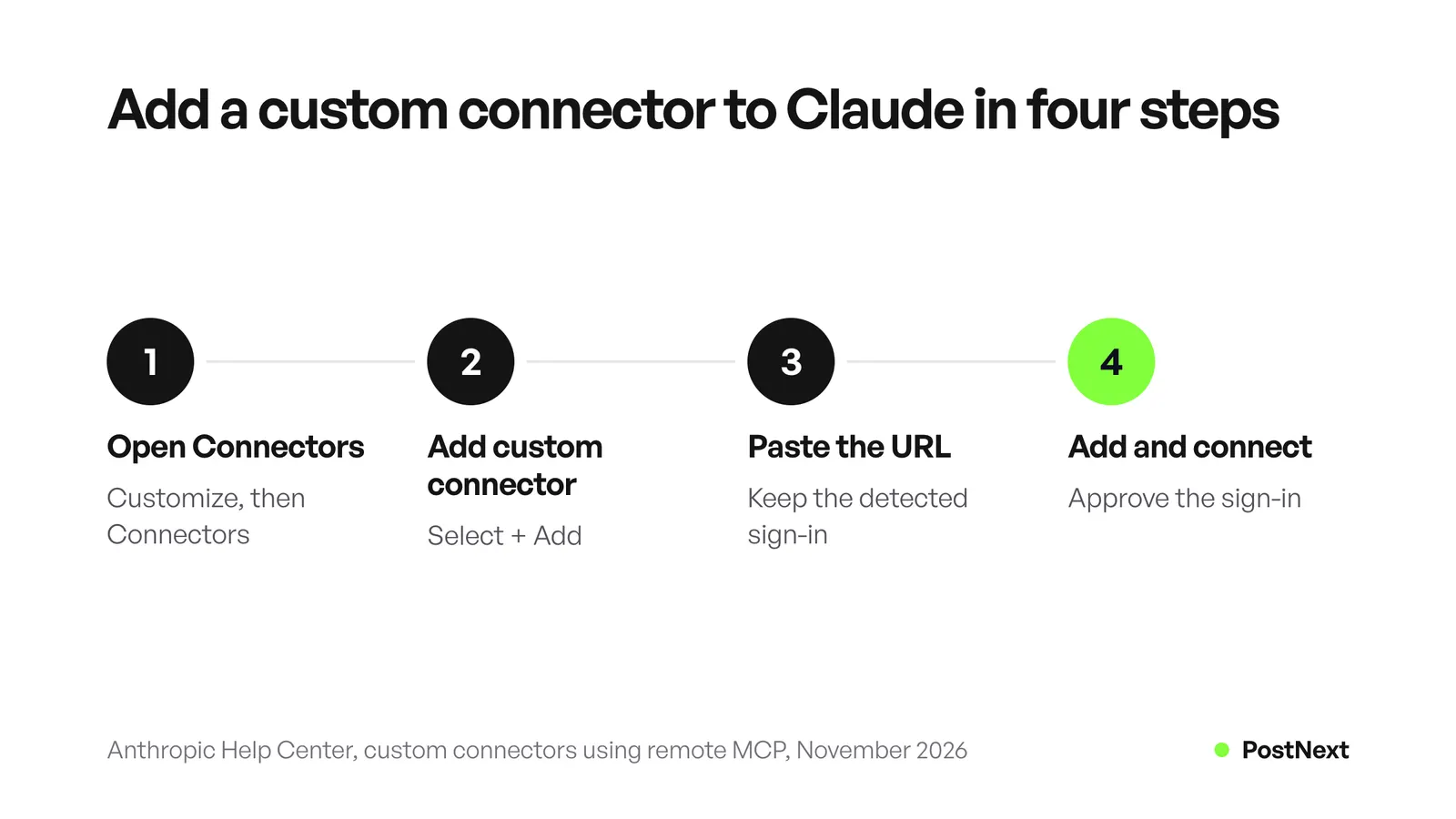
Step by step, following Anthropic’s article (November 2026):
- Open Connectors. In Claude, go to Customize, then Connectors.
- Add a custom connector. Select ”+ Add”, then “Add custom connector”.
- Name it and paste the URL. Use the URL from the provider’s documentation, for example
https://mcp.postnext.io/apifor PostNext. Select Continue. - Check the sign-in. Claude detects the server’s settings. Keep them unless the provider tells you otherwise. The options are “Sign in now”, “Sign in when needed” or “No sign in”.
- Add and connect. Select Add, then sign in to the service and approve the access it asks for.
On Team and Enterprise, an owner does the same in Organization settings, then Connectors, choosing Add, then Custom, then Web. Members then find the connector in their list and select Connect.
Why does my custom connector not connect?
The most common cause is a server Claude cannot reach. Claude connects to a remote MCP server from Anthropic’s cloud, not from your computer, and that is true in Claude Desktop and Cowork too. A server behind a VPN, on a private network or on a port other than 443 fails, even if it opens in your own browser.
Other causes Anthropic’s article points to:
- The URL is missing its path. Paste the full address, for example
https://example.com/mcp, not only the domain. - The server wants a key, not a sign-in. Some servers use an API key in a request header instead of OAuth. Add it under Request headers when you set up the connector.
- The connector is off in this chat. Select ”+” at the lower left of the chat, then Connectors, and turn it on.
- You changed something on the server. Remove the connector and add it again; Claude does not edit an existing one.
In Claude Code, a connector you added on claude.ai appears only when you are signed in with your Claude account. If it does not show up in /mcp, Anthropic’s Claude Code documentation says to run /status and check which sign-in method is active.
Can Claude post to social media with a connector?
Yes. With a scheduler added as a custom connector, Claude can draft posts, schedule them and read their results. PostNext is one example: you add https://mcp.postnext.io/api as a custom connector, sign in with OAuth, and Claude can then work with your X, Instagram, LinkedIn, TikTok and Threads accounts. PostNext publishes each post at the time you set, after you close Claude.
What a Claude chat can do with the PostNext connector (PostNext tool reference, November 2026):
| You ask Claude | What happens in PostNext |
|---|---|
| ”Plan next week: one post a day from Monday to Friday” | Reads your brand profile and queue, saves five drafts |
| ”Turn this article into a six-post thread for X” | Saves the thread as drafts for you to check |
| ”Schedule the LinkedIn draft for Thursday at 10:00” | Moves the draft into the publish queue |
| ”Check my next 7 days for repeated topics” | Reads the queue and changes nothing |
| ”How did last week’s posts do?” | Reads likes, comments and views per post where the network shares them |
The setup takes about two minutes and is shown step by step on PostNext’s guide to posting to social media from Claude. For Claude Desktop there is an “Open in Claude Desktop” button that fills in the URL. The free PostNext plan works over the connector: one channel, 10 scheduled posts and 10 AI credits a month. If Claude writes threads for you, our guide to scheduling X threads covers how they post on X.
Are Claude connectors safe?
Custom connectors are as safe as the server you connect. Anthropic says custom connectors connect Claude to services it has not verified, and that Claude may access and change data in them based on your permissions. Most connectors sign in with OAuth, so Claude never sees your password. You can disconnect a connector at any time in Claude’s settings or in the other service.
Three habits keep a connector under control:
- Keep write tools on “Always ask”. Claude shows a permission prompt when it first uses a tool. For a tool that schedules or sends something, choose to be asked each time.
- Watch Research mode. Anthropic says that during Research, Claude “can invoke tools from your connectors automatically without further approval”. Turn off connectors that can write before you start a research task.
- Prefer drafts. A connector that saves drafts gives you a second look. PostNext saves every new post as a draft, and you can cancel a scheduled post until it publishes.
Our guide to social media AI agents covers the same checks for ChatGPT, Muse and other assistants.
Do Claude connectors work in Cowork and Claude Code?
Yes. Connectors you add in Claude are available in Cowork, and in Claude Code when you sign in to Claude Code with your Claude account. Anthropic’s Claude Code documentation says connectors added on claude.ai are “automatically available in Claude Code”. They do not load when Claude Code uses an API key from the Anthropic Console instead.
Claude Code can also add a server directly with claude mcp add, without claude.ai. A server added that way stays on your computer and does not appear in Claude on the web. If you use both, add the connector on claude.ai once and let Claude Code pick it up. Our article on Claude Code for marketing shows the terminal side, from a changelog to scheduled posts.
Frequently Asked Questions
What is the difference between a Claude connector and an MCP server?
A connector is how Claude uses an MCP server. The MCP server is the program the other company runs. The connector is the entry in your Claude settings that points to it, with your sign-in. One MCP server can be a connector in Claude and a plugin in ChatGPT at the same time.
How many custom connectors can I add on the free Claude plan?
One. Anthropic’s help center says custom connectors are available on Free, Pro, Max, Ultra, Team and Enterprise plans, and that Free users are limited to one custom connector (November 2026).
Can I use Claude connectors on my phone?
Yes. Connectors are set up through your Claude account and Claude reaches them from Anthropic’s cloud, so they work in the mobile apps as well as on the web and in Claude Desktop. Anthropic names the mobile apps among the clients that connect this way.
How do I edit a custom connector in Claude?
You cannot edit it in place. Remove it in Customize, then Connectors, and add it again with the new details. On Team and Enterprise, owners do this in Organization settings, then Connectors.
Does Claude ask before it uses a connector?
Claude shows a permission prompt the first time it uses a tool, and you can allow it always or be asked each time. In Research mode, Anthropic says Claude can call connector tools without further approval, so turn off write tools before you start research.
Can a Claude connector post to Instagram?
Through a scheduler, yes. Claude does not post to Instagram by itself. With PostNext added as a custom connector, Claude saves Instagram posts as drafts or schedules them, and PostNext publishes them through Instagram’s official API.
Sources
- Anthropic, Get started with custom connectors using remote MCP (November 2026): plans, steps for each plan, network requirements, security, Research mode.
- Anthropic, Claude Code MCP documentation (November 2026): claude.ai connectors in Claude Code,
/status, the reviewed directory. - PostNext, Post to social media from Claude and the MCP tool reference, postnext.io/mcp/docs (November 2026).
- PostNext pricing, postnext.io/pricing (November 2026): free plan limits.