
AI tools for social media content creation fall into five jobs: writing, design, video and audio, scheduling, and automation. Most small teams need three to five tools, one for each job that slows them down. This PostNext list covers 12 tools, what each free plan allows as of November 2026, the free AI already inside Instagram, TikTok and YouTube, and when an AI-made post needs a label.
Key Takeaways
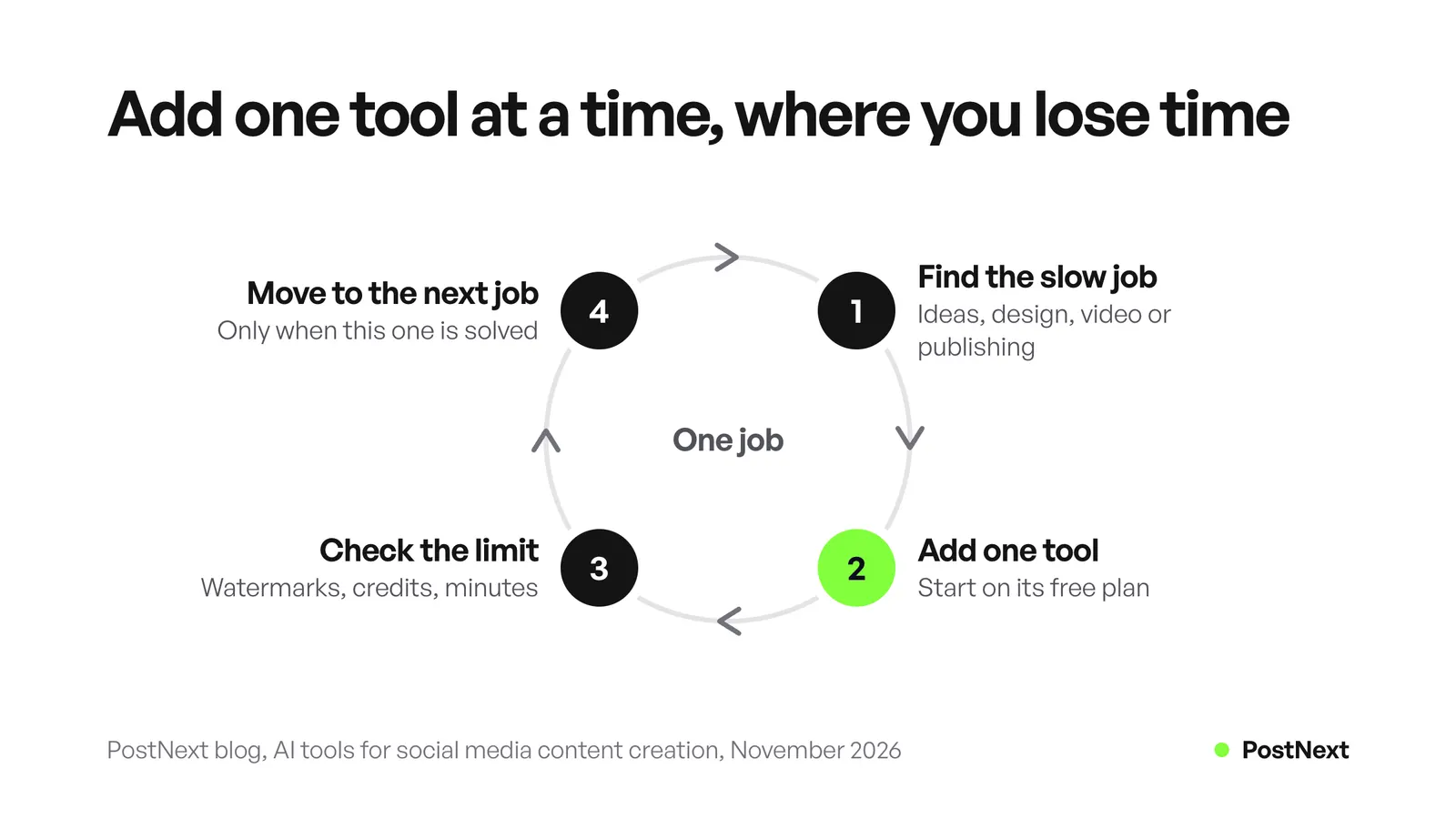
- Pick by job. Find the step where you lose the most time: ideas, design, video or publishing. Add one tool there first.
- A chat assistant plus a design tool plus a scheduler is a full setup. For most small businesses that means three tools.
- Free plans have catches. OpusClip’s free exports carry a watermark. ElevenLabs’ free plan is for non-commercial use. Notion AI is a trial on the free plan.
- The apps have free AI too. TikTok writes hooks and outlines, YouTube makes short clips for Shorts, and Instagram restyles photos and video.
- Text needs no label, realistic media does. YouTube, TikTok and Meta ask for a label on realistic AI video and audio.
- AI is weakest on images and video. In HubSpot’s 2026 survey, image generation was the job where marketers most often said AI fell short.
Which AI tools for social media content creation do you need?
You need one tool for each job that slows you down, not one for every job. For most small teams that is a chat assistant for ideas and text, a design tool for images, and a scheduler that publishes. Add a video tool if you post Reels, TikToks or Shorts each week. Add automation only when the same manual step repeats every week.
| Job | Tool | What its AI does | Free plan, in the vendor’s words or limits |
|---|---|---|---|
| Ideas and text | ChatGPT | Drafts, rewrites, images with text | Free plan with limited uploads and image creation |
| Ideas and text | Claude | Drafts, brand voice, connects to your tools | Free plan with limited usage; one custom connector |
| Ideas, text, images | Gemini | Drafts and images with clear text | Free with a Google Account |
| Proofreading | Grammarly | Corrects mistakes, shows tone | Free plan with 100 AI prompts a month |
| Design | Canva | Designs from a description, resizes one post into many | Free plan with limited AI use |
| Design | Adobe Express | Images, text effects and templates with Firefly | Free plan with free daily generations |
| Video editing | CapCut | Auto captions, templates | Free plan with basic editing tools |
| Video and audio editing | Descript | Edits video as text, cuts filler words | Free plan with 60 media minutes a month |
| Clips from long video | OpusClip | Finds clips and reframes them | Free plan, exports with a watermark |
| Voiceover | ElevenLabs | Text to speech in over 70 languages | Free plan for personal, non-commercial use |
| Scheduling | PostNext | Drafts captions and hashtags for each network, then publishes | Free plan with 10 posts and 10 AI credits a month |
| Automation | Zapier | Connects apps and AI assistants | Free plan with a monthly task limit |
Sources: each vendor’s own plan or product page, checked 25 November 2026. Prices change often, so this article gives none. Check each vendor’s pricing page.
Three starter sets:
- A local business that posts photos: Gemini or ChatGPT, Canva, a scheduler.
- A creator who posts short video: a chat assistant, CapCut, OpusClip, a scheduler.
- A small marketing team: Claude with a connector, Canva or Adobe Express, Descript, a scheduler, and Zapier later. Our guide to Claude connectors for marketing lists the ones worth adding.
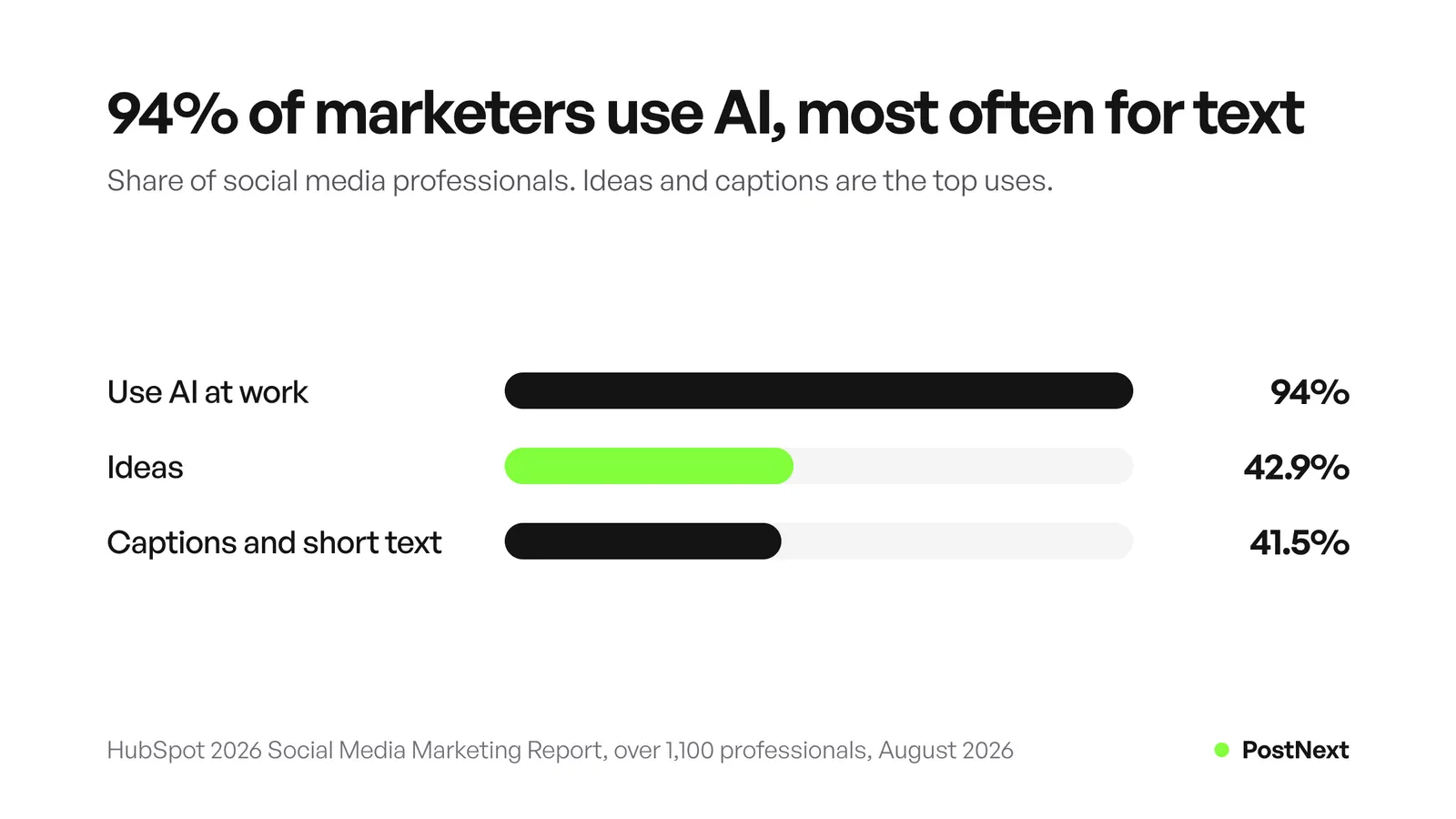
The surveys support starting small. In HubSpot’s 2026 report, based on over 1,100 social media professionals, 94% said they use AI in their work. The top uses were ideas (42.9%) and captions or other short text (41.5%) (blog.hubspot.com, August 2026). Text is where AI saves time first. If you want the steps before the tools, our AI content creation workflow covers them.
Which AI tool writes and plans social media posts?
ChatGPT, Claude and Gemini all write usable first drafts of captions, threads and weekly plans, and all three have a free plan. They differ in what surrounds the writing: ChatGPT and Gemini also make images, and Claude connects to other tools on every plan. Grammarly does a different job. It checks the final text for mistakes and tone.
Grok, xAI’s assistant, is the other name people weigh here, because it searches X posts live and makes short videos. Our Grok vs Claude vs ChatGPT comparison puts the three side by side for social media work.
1. ChatGPT
OpenAI’s free plan covers “everyday conversations, writing help, and learning at no cost”. ChatGPT also creates and edits images on every tier, and OpenAI says its image tool “can follow instructions to add text”, which helps for a quote card or a simple poster. The free plan lists limited uploads and limited image creation. Our guide to ChatGPT for social media has prompts and the plans that can connect a scheduler.
2. Claude
Claude’s free plan includes Projects, memory across conversations and connecting your apps and tools, with limited usage. Its strength for social media is context: a Project holds your past posts and product facts, and a connector lets Claude save drafts in your scheduler. Claude Design builds a first version of a visual from a description. Anthropic’s pages do not describe photo generation. See Claude for social media for what each plan can do.
3. Gemini
Gemini is free with a Google Account and includes image generation and editing. Google names the free image model Nano Banana 2 and lists text in images as a strength: “Create logos, invites, posters, comics, and whatever else you need with clear text.” Images carry a visible watermark and an invisible SynthID watermark. That makes Gemini a fair first choice for a poster or an event graphic with words on it.
4. Grammarly
Grammarly’s free plan lists “Write without mistakes”, “See your writing tone” and 100 AI prompts a month. Use it as the last check before a post goes out, not as the writer. Rewriting whole sentences and adjusting tone are on the paid plan.
Notion AI is on many lists. On Notion’s free plan it is a limited trial, so it suits teams that already pay for Notion.
Which AI tool makes images and designs?
Canva and Adobe Express are the two design tools that cover most social graphics: posts, carousels, Stories and channel art. Both have a free plan with some AI use, both start from templates or a description, and both resize one design for several networks. For an image with words in it, Gemini and ChatGPT are quick alternatives.
5. Canva
Canva now puts its AI features under the name Canva AI. You describe what you want, such as a “pitch deck, birthday invitation, flyer, or social post”, and it builds a design you then edit. It can turn “one post into multiple creations” such as a Story, a post and a carousel. Magic Write drafts captions and bios in 20 languages. Canva says its AI “is available to everyone” on the Free plan, with more use on paid plans. The Free plan has one Brand Kit with up to three colours. Scheduling to social networks is listed on paid plans.
6. Adobe Express
Adobe Express includes Adobe’s Firefly models. Its Free plan lists “Free daily generations” for images, text effects and templates, and for 5-second videos. It also schedules posts to one account per social network. Adobe describes the generative credits on its Premium plan as “designed to be commercially safe”, which matters to brands that worry about how an image model was trained. It fits best if you already use Adobe tools.
If you need product photos or ad images and not layouts, that is a different job. DesignerBox makes product pictures and short videos from your own product shots.
For tools that only make pictures, see our comparison of AI image generators for social media.
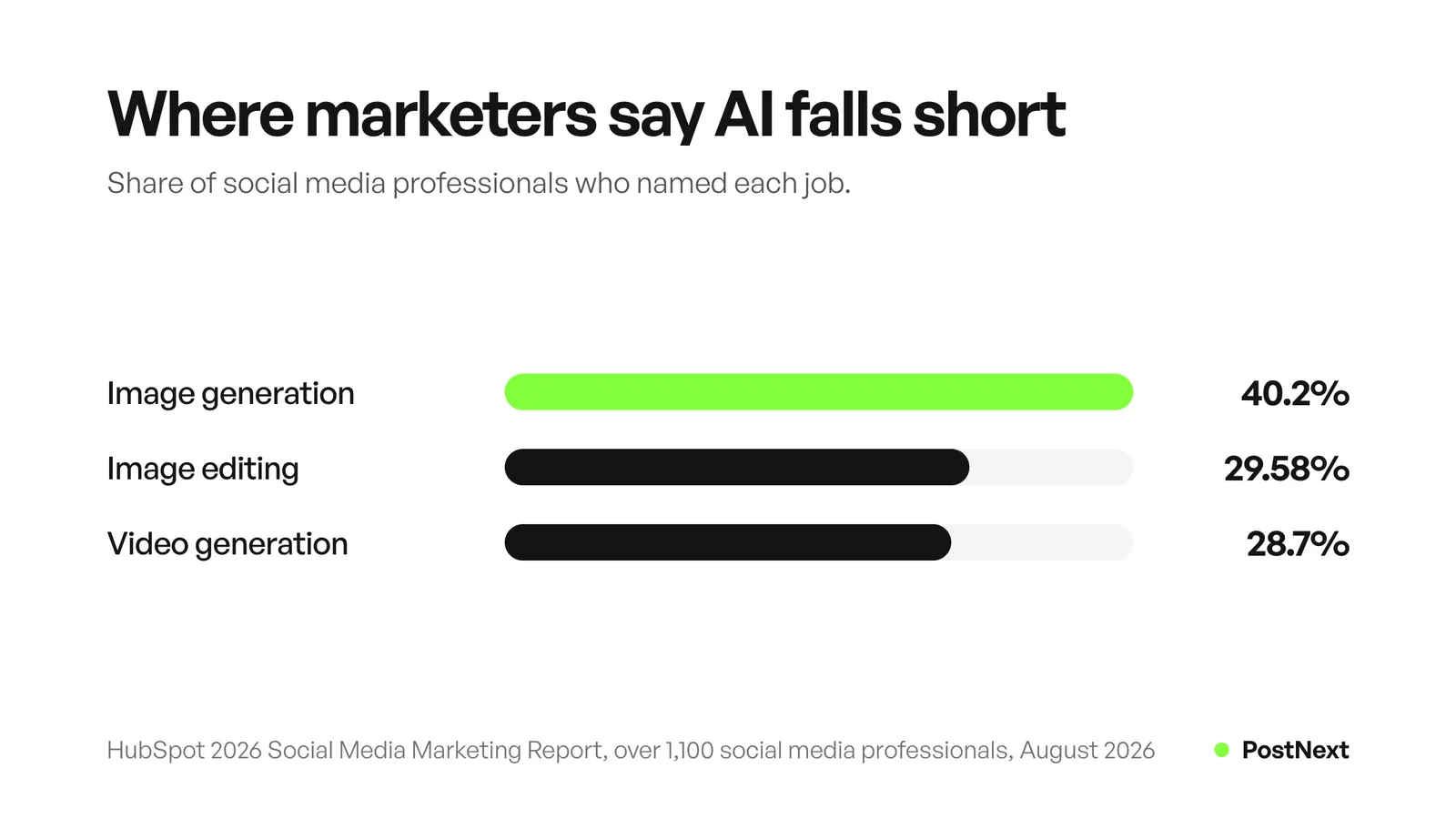
Whichever tool you use, check hands, logos and any text in the image before you post. In HubSpot’s survey, image generation was the job where the most marketers (40.2%) said AI fell short.
Which AI tool edits video and audio?
CapCut, Descript and OpusClip cover the three video jobs most accounts have. CapCut edits a short video and adds captions. Descript edits a longer recording by editing its text. OpusClip cuts one long video into short clips. ElevenLabs adds a voiceover from text. Each has a free plan, and each free plan has one limit to know before you depend on it.
To make new clips from a prompt instead of editing footage, see our AI video generator comparison.
7. CapCut
CapCut’s auto captions turn speech into subtitles and translate them. Its caption page says videos “may be automatically converted to text free of charge”. The pricing page lists “Access to AI features” and monthly AI credits on paid plans, and basic editing tools and free templates on the free plan. So test the feature you need in the app before you plan around it.
8. Descript
Descript shows your recording as a transcript, and deleting a sentence deletes it from the video. Descript describes its assistant, Underlord, this way: “Adjust your gaze, fix your sound, cut retakes, and remove filler words automatically.” The free plan lists 60 media minutes a month, 100 one-time AI credits and 720p export. It fits talking-head videos, podcasts and webinars better than fast TikTok edits.
9. OpusClip
OpusClip takes one long video and returns short vertical clips, with a model that “keeps moving subjects centered”. The free plan exports with a watermark, in 9:16 only, and stored media expires after 3 days. That is enough to test whether your long videos make good clips. Regular posting needs a paid plan.
10. ElevenLabs
ElevenLabs turns text into speech in over 70 languages. Its free plan includes 10,000 credits a month, which the company says is roughly 10 minutes of audio. One line matters for a business: “The free plan is intended for personal, non-commercial use and requires attribution to ElevenLabs.” A voiceover for your shop’s Reel needs a paid plan.
Videos with no footage at all can also be made in code: Claude writes a script that draws each frame and renders the MP4 on your computer. Our guide to Claude animation covers the tools and the checks.
For formats, lengths and a posting routine, see our guide to short-form content.
Which AI tool schedules and automates posts?
A scheduler publishes your posts at set times, and most now include an AI writer for captions. Automation tools connect apps so a repeated step runs by itself. In 2026 both also connect to chat assistants through MCP, an open standard, so Claude or ChatGPT can save drafts in your calendar. Keep a person in the approval step for both.
11. PostNext
PostNext schedules posts to X, Instagram, LinkedIn, TikTok, YouTube, Threads and Bluesky from one calendar. Its AI content creator drafts post text, captions and hashtags for each network and sets the caption length and hashtag count for you. AI Repurpose turns one article link into up to five posts per channel for X, Instagram, LinkedIn and Threads. The AI carousel generator writes each slide and renders the images in your brand colours.
Every plan includes AI credits: 10 a month on Free, with 10 scheduled posts and 1 channel (PostNext feature pages, checked 25 November 2026). Text drafts and AI images use credits. PostNext does not edit video and has no social listening. Claude, ChatGPT and other assistants connect through the PostNext MCP server, where every draft waits for you before it is scheduled.
Other schedulers include AI writers as well. Buffer, for example, lists its AI Assistant as included with all its plans (buffer.com, November 2026). If you already use a scheduler, try its AI before you add a separate writing tool. PostNext’s guide to social media AI tools compares nine schedulers on what their AI does and what each lacks.
12. Zapier
Zapier connects apps so that one event starts another: a new blog post creates a draft, or a form entry adds a row to a sheet. Its MCP server is “a secure way to connect AI clients such as Claude, ChatGPT, and Cursor to the apps you use through Zapier”. Zapier says it “is included in every Zapier plan”. Tool calls count against your plan’s tasks. Add it when you can name the step you repeat every week. Zapier’s own social apps reach six networks, and our Zapier social media guide shows which.
Replies are a separate job. No tool on this list answers comments or DMs for you. For Instagram, CreatorFlow sends your link by DM to people who comment a keyword you choose. For how assistants act on your accounts, and four checks to run first, read our guide to the social media AI agent.
Which free AI tools are already inside the social apps?
Instagram, TikTok and YouTube each include free AI tools for the people who post there. TikTok writes hooks and outlines and splits long videos into short ones. YouTube makes short AI clips and backgrounds for Shorts and dubs videos into other languages. Instagram restyles photos and video with Meta AI. Availability depends on your country and age.
| App | AI tool | What it does | Who gets it |
|---|---|---|---|
| TikTok | AI Outline | Writes “video titles, hashtags, hooks and outlines” from a prompt or a searched topic | Creators aged 18 or older in the US, Canada and select markets |
| TikTok | Smart Split | Automatically “clips, reframes, captions, and transcribes longer content into multiple short videos” | TikTok Studio on the web, globally |
| TikTok | Symphony Creative Studio | Makes videos for organic and paid posts | Free, in TikTok for Business |
| YouTube | AI clips and backgrounds in Shorts | Standalone clips “up to 10 seconds long” and green screen backgrounds from a prompt | Most countries, with the device language set to English. Not in the European Economic Area |
| YouTube | Auto dubbing | Translated audio tracks | Everyone, in 27 languages (YouTube, February 2026) |
| YouTube | Ask Studio | Ideas, titles, thumbnails and answers about your channel’s numbers | Most creators globally |
| Restyle in Stories and in Edits | Restyles a photo or a clip of up to 10 seconds with Meta AI | Free in the app |
Sources: TikTok Newsroom, TikTok Creator Academy, TikTok Business Help Center, YouTube Help, the YouTube blog, Instagram and Meta help pages, checked 25 November 2026.
None of the ten most visible lists of AI tools we read covers these. They cost nothing and need no export, so they are a good first test.
One correction to older lists: LinkedIn’s AI writing tool for posts is gone. LinkedIn’s help page says the tool “is not available at this time” and that new tooling will come later (LinkedIn Help, November 2026).
There is a catch. Content made with a platform’s own AI tools is often labelled automatically, which leads to the next question.
Do AI-made posts need a label?
A post needs an AI label when it shows realistic AI video, audio or, on TikTok, images. Text that AI wrote does not. YouTube requires disclosure for realistic altered or synthetic content. TikTok requires a label on realistic AI images, audio and video. Meta requires one for photorealistic video and realistic audio, not for images.
| Platform | When you must label | What needs no label | How it is applied |
|---|---|---|---|
| YouTube | Realistic content: a real person saying or doing something they did not, altered footage of a real event or place, a realistic scene that did not occur | Outlines, scripts, titles, thumbnails, captions and ideas made with AI | You answer the “AI use” question at upload. YouTube may also label automatically |
| TikTok | AI content with “realistic images, audio, and video” | Text | You turn on the label. TikTok may add one automatically, and you cannot remove an automatic label |
| Instagram, Threads, Facebook | Content with “photorealistic video or realistic-sounding audio” made or changed digitally | Images, though Meta may still label them when it detects AI | You add the label. Meta’s own AI tools may label automatically |
| No label you add yourself | Text | Images and video with C2PA Content Credentials show an icon | |
| X | No label you add yourself | Text | X prohibits misleading manipulated media that may cause serious harm |
Sources: YouTube Help, TikTok Support, Meta Help, LinkedIn Help and X’s Authenticity policy, checked 25 November 2026.
YouTube says a disclosure “alone won’t limit a video’s audience or impact its eligibility to earn money”. On TikTok, unlabelled AI content can be removed. Some tools mark their output. Gemini, for example, adds a visible watermark and an invisible one. YouTube, TikTok and LinkedIn read C2PA Content Credentials when a file carries them. So AI media is often labelled whether you set the label or not.
Where does AI fall short for social media?
AI falls short on images and video more than on text. In HubSpot’s 2026 survey of over 1,100 social media professionals, the jobs where marketers most often said AI fell short were image generation (40.2%), image editing (29.58%) and video generation (28.7%). It also cannot know your prices, your customers or what happened in your shop today.
That gives a simple rule for where to keep people:
- Facts. Check every price, date, name and number in a draft. An assistant states a wrong fact in the same confident voice as a right one.
- Real photos and video. Customers come to see your work, your place and your team. Use AI to plan and edit real footage before you generate fake footage.
- Replies. Answer comments and messages yourself, or with a tool where you wrote the answers.
- The decision to post. Keep one person who approves, even when everything else is automatic.
The same HubSpot report says 77% of marketers put authenticity above production value. A second survey, by the scheduler Metricool with more than 700 respondents, found that only 12% have a clearly defined AI policy (metricool.com, August 2026). Both are vendor surveys with self-reported answers, so read them as signals. A short written rule is worth having: which tools you use, what a person always checks and when you add a label.
AI also helps after you post. Export your results, hand the sheet to an assistant and ask what worked; our guide to a social media audit with AI has the template. For a wider set of writing and notes tools beyond social media, see our comparison of AI content creation tools.
Frequently Asked Questions
What is the best AI to use for social media content?
There is no single best tool, because the jobs differ. For text and ideas, ChatGPT, Claude and Gemini all work and all have a free plan. For designs, Canva and Adobe Express. For short video, CapCut and OpusClip. Start with the job that takes you the most time each week.
Are there free AI tools for social media?
Yes. Every tool in this list has a free plan in November 2026, with limits. The free AI inside TikTok, YouTube and Instagram costs nothing either. Read the limits first: OpusClip’s free exports carry a watermark, and ElevenLabs’ free plan is for non-commercial use only.
What is the best free AI poster generator?
For a poster with words on it, Gemini is a fair first choice: it is free with a Google Account, and Google lists clear text in images as a strength. Canva and Adobe Express are better when you want to edit the layout afterwards, because they start from templates you can change.
How many AI tools does a small business need?
Three is enough to start: a chat assistant for text, a design tool for images and a scheduler to publish. Add a video tool if you post video each week. More tools mean more subscriptions and more places where your brand rules must be kept the same.
Can AI tools post to social media for me?
A scheduler posts at the times you set. Chat assistants such as Claude and ChatGPT can save drafts and schedule posts when a scheduler is connected to them through MCP. No assistant posts by itself, and you should approve each post before it goes out.
Will people notice that AI wrote my posts?
They notice generic posts. A draft sounds generic when the only input was a short prompt. Give the assistant your own past posts, your facts and the words you never use, then edit the result. The label rules cover realistic AI video, audio and images, not text.
Do I have to tell followers that I used AI?
For text, no platform in this article requires it. For realistic AI video and audio, YouTube, TikTok and Meta require a label, and TikTok also requires one for realistic AI images. Advertising and consumer law in your country may add rules that this article does not cover.
Sources
- OpenAI, ChatGPT free plan, pricing and ChatGPT image generation (checked 25 November 2026).
- Anthropic, Claude pricing and Claude Design (checked 25 November 2026).
- Google, Gemini image generation and Gemini plans (checked 25 November 2026).
- Grammarly, plans; Notion, pricing (checked 25 November 2026).
- Canva, Canva AI, Magic Write and pricing; Adobe, Adobe Express plans (checked 25 November 2026).
- CapCut, auto caption generator and pricing; Descript, Underlord and pricing; OpusClip, pricing; ElevenLabs, text to speech and pricing (checked 25 November 2026).
- Zapier, Zapier MCP (checked 25 November 2026).
- TikTok Newsroom, new AI tools for creators; TikTok Creator Academy, AI Outline; TikTok Business Help Center, Symphony Creative Studio (checked 25 November 2026).
- YouTube Help, AI tools for Shorts, Ask Studio and disclosing altered or synthetic content; YouTube blog, auto dubbing (checked 25 November 2026).
- Instagram, Restyle in Stories and restyle a clip in Edits; Meta Help, AI content labels (checked 25 November 2026).
- TikTok Support, AI-generated content; LinkedIn Help, AI-powered writing tool, no longer available and Content Credentials; X Help Center, Authenticity policy (checked 25 November 2026).
- HubSpot, 2026 Social Media Marketing Report, blog.hubspot.com/marketing/hubspot-blog-social-media-marketing-report (published August 2026, over 1,100 respondents); Metricool, 2026 State of AI in Social Media Study, metricool.com (August 2026, more than 700 respondents).
- PostNext, AI content creator, AI Repurpose and AI agents pages, postnext.io/features/ai-content-creator, postnext.io/features/ai-repurpose, postnext.io/ai-agents (checked 25 November 2026). Buffer’s AI Assistant: buffer.com/resources/ai-social-media-content-creation (read 25 November 2026).