
Claude for marketing works best as a set of connectors around one brand brief. Anthropic’s own Marketing plugin, checked on 26 November 2026, links 12 tools: Slack, Canva, Figma, HubSpot, Amplitude, Notion, Ahrefs, Similarweb, Klaviyo, Supermetrics, Google Calendar and Gmail. Add the ones you already pay for, put your brand rules in a Project or a skill, and add a scheduler such as PostNext so drafts reach your social calendar.
Key Takeaways
- Anthropic’s own shortlist: the Marketing plugin’s connector file names Slack, Canva, Figma, HubSpot, Amplitude, Notion, Ahrefs, Similarweb, Klaviyo, Supermetrics, Google Calendar and Gmail.
- Free plan: connectors, Skills, artifacts, web search and up to 5 Projects. One custom connector.
- Paid plans only: Research, Cowork with scheduled tasks, and plugins such as Marketing and Brand Voice.
- Gaps: Claude’s directory has no connector made by Google for Google Ads, GA4 or Search Console, and none made by Meta. Those reach Claude through reporting tools such as Supermetrics.
- Anthropic’s example: its growth team says a Google Ads workflow cut “30 minutes per ad” to “30 seconds”, with a person reviewing every ad before upload.
- The rule that saves the most time: “Turn repeated corrections into skills,” Anthropic’s marketing operations team advises.
What can Claude do for marketing?
Claude can write, research and report for a marketing team, and with connectors it can also read and change the tools that team uses. Without connectors, it drafts copy, briefs and plans from what you paste in. With them, it reads HubSpot campaigns, Ahrefs keywords or Notion briefs, edits a Canva design, and saves a social post as a draft in a scheduler. A person still approves what goes out.
The jobs split into four groups. The table shows which Claude feature or connector each one uses, as listed on Anthropic’s pages on 26 November 2026.
| Marketing job | What Claude uses | Plan |
|---|---|---|
| Brand voice and campaign briefs | A Project with your brand guide, or a skill | Free (5 Projects) and paid |
| Blog, email and social drafts | Chat, plus a connector to save the draft where it is used | Free and paid |
| SEO and competitor research | Ahrefs, Semrush or Similarweb connectors; Research mode | Connectors on Free; Research paid |
| Designs and decks | Canva, Figma, Adobe or Gamma connectors | Free and paid |
| Weekly reports | Supermetrics, HubSpot or Amplitude connectors; Cowork scheduled tasks | Scheduled tasks paid |
| Social scheduling | A scheduler connector, such as PostNext | Free (one custom connector) and paid |
Two limits apply to every row. Most connectors need an account with the vendor, often a paid one. And Claude acts with your permissions in each tool, so a connector that can send an email campaign lets Claude send one.
Which Claude connectors should marketers add?
Start with Anthropic’s own list. The Marketing plugin, published in Anthropic’s public knowledge-work-plugins repository, connects 12 tools: Slack, Canva, Figma, HubSpot, Amplitude, Notion, Ahrefs, Similarweb, Klaviyo, Supermetrics, Google Calendar and Gmail. That list covers chat, design, CRM, analytics, notes, SEO, email and reporting. Add the tools from it that your team already uses, then fill the gaps below.
Every connector here was confirmed on its page in Claude’s directory on 26 November 2026, with the vendor’s own description. The number of tools is what each page lists.
Design and brand
- Canva (17 tools): “Browse, summarize, autofill, and even generate new Canva designs.” The quickest way to turn a draft into a social image in your brand template.
- Adobe (109 tools): Acrobat, Photoshop, Firefly and Express, including resizing images for social platforms.
- Figma (9 tools): design context for developers and designers. Useful when Claude needs to read a landing page design.
- Brandfetch and Frontify: pull logos, colours, fonts and brand guidelines, so Claude writes and designs to them.
SEO and research
- Ahrefs (61 tools): keywords, backlinks, rankings and, in Ahrefs’ words, “share of voice in LLM responses”.
- Semrush (14 tools) and Similarweb (22 tools): keyword data, competitor traffic and audiences.
CRM, email and website
- HubSpot (44 tools): contacts, deals and campaign results across emails, landing pages and blog posts.
- Klaviyo (27 tools) and Mailchimp (12 tools): campaign reports, copy and audience details.
- Webflow (34 tools) and WordPress.com (181 tools): edit pages and publish posts. WordPress.com lets you choose whether Claude asks before each change.
Analytics and reporting
- Supermetrics (23 tools): reads Google Ads, GA4, Search Console, Meta Ads and other sources into Claude, with no separate Supermetrics account needed, its page says.
- Amplitude, Mixpanel and PostHog: product analytics for teams that measure signups and activation.
Social media
Claude’s directory lists schedulers such as Buffer and Metricool, and analytics tools such as Windsor.ai and Supermetrics that read Instagram, Facebook and LinkedIn data. PostNext is not in the directory: you add it as a custom connector with one URL, https://mcp.postnext.io/api. It drafts and schedules posts to X, Instagram, LinkedIn, TikTok and Threads. Our list of MCP servers for social media compares the options by what each can post.
What is missing
Claude’s directory has no connector made by Google for Google Ads, GA4 or Search Console, and none made by Meta. Meta’s own MCP servers cover Ads, developer tools and WhatsApp. To get Google Ads or GA4 numbers into Claude, you go through a reporting tool such as Supermetrics, Windsor.ai or Funnel, each with its own fees.
How do you add connectors to Claude?
To add a connector from Claude’s directory, open Plugins (called Customize before November 2026 on Free, Pro, Max and Ultra, and still Customize on Team until 30 November), then Connectors, find the tool and select Connect. A tool that is not in the directory, such as PostNext, is added as a custom connector with its URL. On Team and Enterprise, an owner adds the connector first.
Anthropic’s help center lists custom connectors on Free, Pro, Max, Ultra, Team and Enterprise, with one limit: “Free users are limited to one custom connector.” Directory connectors have no such cap on Free. The full steps, and the fixes when a connector will not connect, are in our guide to Claude connectors.
Add connectors one at a time and test each with a small, read-only question, such as “list my last five HubSpot campaigns”. Claude picks tools by their descriptions, and a dozen tools with similar names make it pick the wrong one more often. Remove a connector you have not used in a month.
What do Claude plans include for marketers?
Claude’s Free plan covers most single-person marketing work: connectors, Skills, artifacts, web search, memory and up to 5 Projects, with one custom connector. Paid plans (Pro, Max, Ultra, Team and Enterprise) add Research, Cowork with scheduled tasks, plugins such as Marketing and Brand Voice, unlimited Projects, Claude Code and Claude in Chrome. Anthropic lists prices by plan and billing period on its pricing page.
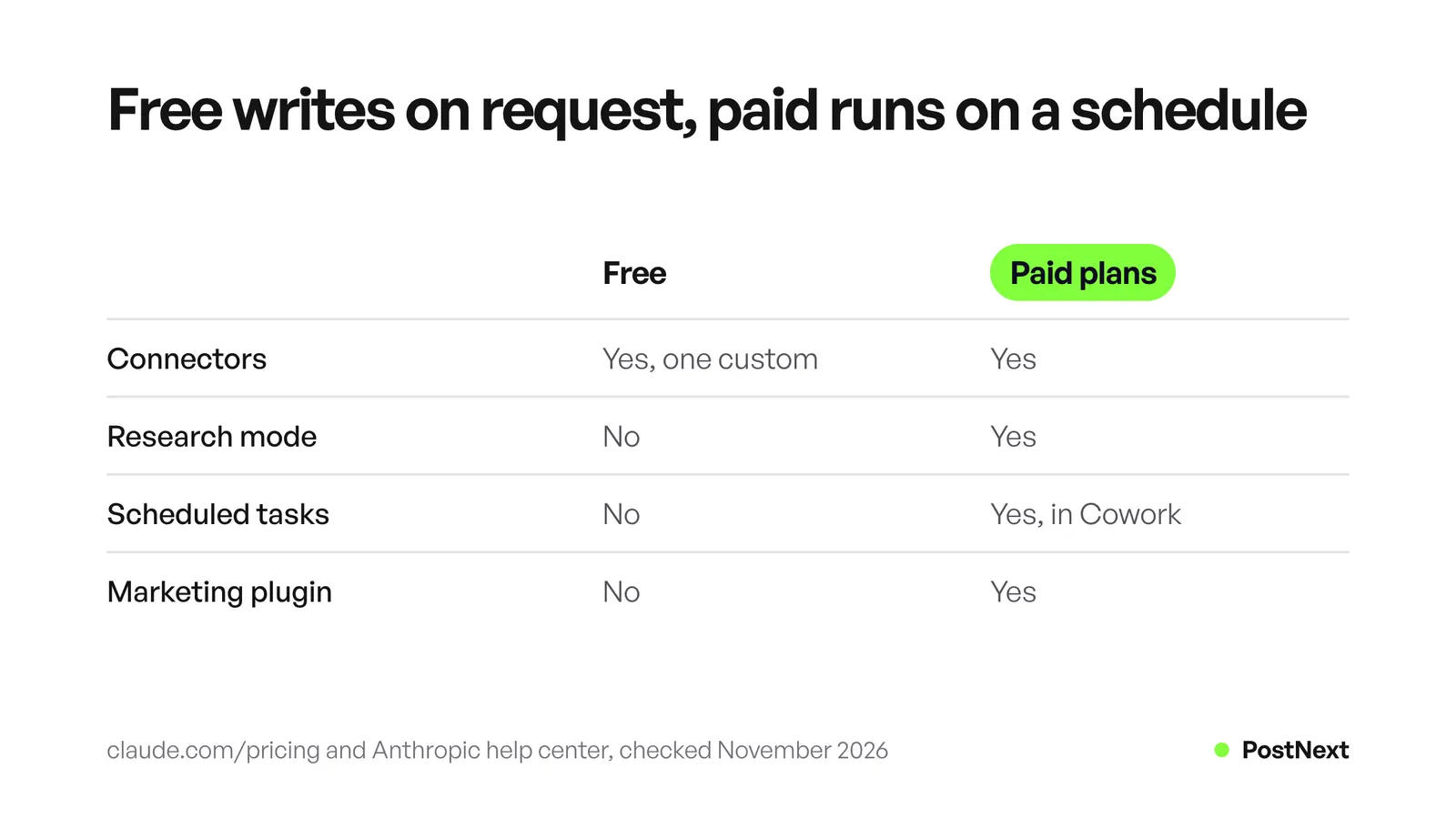
| Feature | What it does for marketing | Free | Paid |
|---|---|---|---|
| Projects | Keeps a brand guide, past campaigns and rules loaded for every chat | Up to 5 | Unlimited |
| Skills | Saves a procedure, such as “write a LinkedIn post in our voice”, that Claude loads when the job comes up | Yes (needs code execution on) | Yes |
| Connectors | Reads and changes your marketing tools | Yes; one custom connector | Yes |
| Research | Searches the web and your connected tools for a long report | No | Yes |
| Cowork and scheduled tasks | Runs a job on a schedule in the cloud, with no device on | No | Yes |
| Plugins (Marketing, Brand Voice) | Bundles commands, skills and connectors for one kind of work | No | Yes |
The difference that matters most is scheduled tasks. On Free, Claude works when you open a chat. On a paid plan, Cowork can run a job every Monday at 8:00 by itself, such as drafting next week’s posts or building last week’s report.
What is the Claude Marketing plugin?
The Marketing plugin is a ready-made bundle from Anthropic for paid plans. It adds seven commands, /draft-content, /campaign-plan, /brand-review, /competitive-brief, /performance-report, /seo-audit and /email-sequence, and connects the 12 tools listed above. You install it in Cowork from Claude’s plugin directory. Each command is a skill: a written procedure that Claude follows the same way each time.
A second plugin, Brand Voice, builds brand guidelines by searching Notion, Google Drive, Confluence, Gong, Slack and meeting transcripts, then checks AI-written content against them. Teams without a written voice guide get one out of it, and teams with one get a check on every draft.
Plugins save setup time. They do not replace your own rules: the /brand-review command checks content against the brand guide you give it. If the guide is two adjectives and a logo, the review is as thin as the guide.
How does Anthropic’s marketing team use Claude?
Anthropic’s growth marketing team built a Google Ads workflow with a /rsa command and skills for brand voice, product accuracy and ad rules. It exports “15 headlines, and 4 descriptions per ad” into a CSV file for Google Ads, “after undergoing manual review”. Anthropic says the work “used to take 30 minutes per ad now takes 30 seconds”. These are Anthropic’s own numbers about its own team, published January 2026.
Its marketing operations team, in a July 2026 article, runs a scheduled task every Sunday evening that builds the weekly metrics report. It reads the last review, the meeting transcript, Slack and the data warehouse, then uses three skills: one prepares the report, one checks every number against a verified source, and one sends action items to Asana. Anthropic says the report took “up to two days of work” and now “takes up to two hours”.
Three lessons from that article travel to any team:
- “Turn repeated corrections into skills.” The third time you fix the same thing in a draft, write the fix down as a skill.
- “Build a proofreading skill first.” A skill that checks numbers and names against a source catches the errors readers notice.
- “Lean on scheduled tasks.” Recurring work, such as reports and weekly post plans, is where Claude saves the most time.

How do you set up a weekly marketing routine in Claude?
A weekly marketing routine in Claude needs four parts: a Project or skill with your brand rules, connectors to the tools that hold your data, a scheduler connector for social posts, and a weekly prompt. On a paid plan, Cowork runs the prompt as a scheduled task. On Free, you paste it each Monday. Either way, Claude drafts and a person approves before anything publishes.
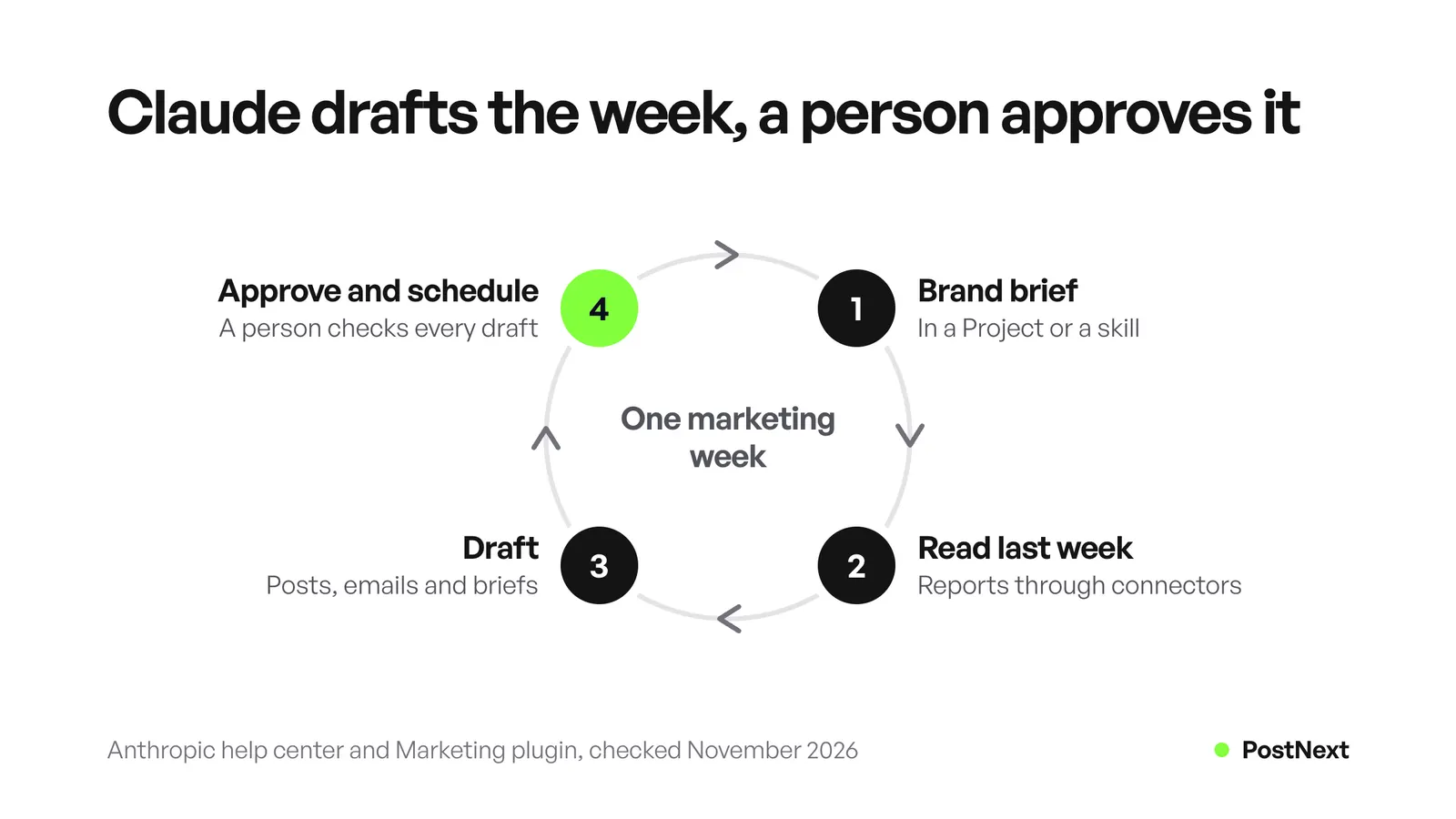
- Write the brand brief once. Product, audience, voice, words you never use, three content pillars. Save it in a Project or as a skill.
- Connect the data. HubSpot or Klaviyo for email, Supermetrics or GA4 through a reporting tool for traffic, Ahrefs or Semrush for search.
- Connect the calendar. Add PostNext as a custom connector so social drafts land in your calendar, not in a chat window.
- Write the Monday prompt. For example: “Read last week’s numbers, check what is already scheduled, then draft five LinkedIn posts and three Instagram captions for the pillar with the best results. Save them as drafts.”
- Approve on Monday afternoon. Read the drafts on the calendar, change what is off, and schedule them.
The approval step is not optional. In Research mode, Anthropic’s help center says Claude “can invoke tools from your connectors automatically without further approval”, and in Cowork you can set each tool to Always ask. Set every tool that publishes, sends or deletes to ask first. A scheduler that saves drafts, like PostNext, keeps posts from going out without a person.
For the social half in detail, read our guide to Claude for social media. To run the same routine from a terminal, see Claude Code for marketing.
How does PostNext work with Claude?
PostNext is the social media part of a Claude marketing setup. Added as a custom connector, it lets Claude read your brand profile and posting queue, draft posts, and schedule them to X, Instagram, LinkedIn, TikTok and Threads. PostNext then publishes each post at its time through the network’s official API. Drafts never publish by themselves, and the connector is included on every PostNext plan, Free too.
In Cowork, the same connector runs a weekly posting plan as a scheduled task. PostNext’s Claude Cowork page has the four steps. What PostNext does not do through Claude: it does not create images or videos, and it does not publish to YouTube or Bluesky through the assistant. Claude does not make product photos either; for visuals, a tool built for on-brand pictures and video fits better than a chat window.
Is Claude good for marketing?
Claude is good for marketing work that follows rules: writing in a set voice, turning one asset into many, checking drafts against a guide, and building the same report each week. It is weaker where the work needs live numbers it cannot reach, such as Google Ads or GA4 data without a reporting tool. Results depend on the brief and the connectors you give it.
The case against is worth hearing. More connectors give Claude more tools it can call by itself, which raises the chance of a wrong action, so keep approvals on. Many connectors need the vendor’s paid plan, so the real cost of a Claude marketing stack is the sum of the tools behind it. And Anthropic’s time savings are measured on Anthropic’s own team, with its own skills; a team with no brand guide will not see them in week one.
Frequently Asked Questions
Can I use Claude for marketing on the Free plan?
Yes. The Free plan includes connectors, Skills, artifacts, web search and up to 5 Projects, which is enough to write in your brand voice and draft campaigns. It allows one custom connector. Research, Cowork scheduled tasks and plugins such as Marketing need a paid plan.
What is the best Claude connector for marketing?
The one for the tool that holds your most-used data. Anthropic’s Marketing plugin picks 12: Slack, Canva, Figma, HubSpot, Amplitude, Notion, Ahrefs, Similarweb, Klaviyo, Supermetrics, Google Calendar and Gmail. A team that lives in HubSpot gets more from HubSpot than from five tools it rarely opens.
Can Claude connect to Google Ads and Google Analytics?
Not with a connector made by Google. Claude’s directory has Google-made connectors for Gmail, Drive and Calendar, but not for Google Ads, GA4 or Search Console. Supermetrics, Windsor.ai and Funnel read those sources into Claude.
Can Claude post to social media?
Yes, through a scheduler connector. With PostNext added as a custom connector, Claude drafts and schedules posts to X, Instagram, LinkedIn, TikTok and Threads, and PostNext publishes them at the set time through each network’s official API.
Can Claude send marketing emails?
Some email connectors let it, so check each one. HubSpot and Klaviyo connectors read campaigns and reports. Brevo’s page in Claude’s directory states that Claude “will never send or schedule email campaigns”. Turn on approval for any tool that can send.
Is Claude better than ChatGPT for marketing?
Neither wins every job. Claude’s directory of connectors, Skills and the Marketing plugin suit teams that want the same procedure run each week. Our comparison of Grok, Claude and ChatGPT covers writing quality and limits for social media work.
Sources
- Anthropic, Marketing plugin and its connector file on GitHub (12 connectors, 7 commands; checked 26 November 2026)
- Anthropic, Brand Voice plugin (checked 26 November 2026)
- Anthropic, Claude connector directory, claude.com/connectors (Canva, Adobe, Ahrefs, HubSpot, Supermetrics and other listings; checked 26 November 2026)
- Anthropic, Get started with custom connectors using remote MCP (plans, one custom connector on Free, Research mode approvals; checked 26 November 2026)
- Anthropic, Manage plugins, skills and connectors from one Plugins page (Customize renamed Plugins; checked 26 November 2026)
- Anthropic, What are Skills?, Using Research, Get started with Cowork and Use plugins in Cowork (checked 26 November 2026)
- Anthropic, Claude pricing page, claude.com/pricing (feature grid by plan; checked 26 November 2026)
- Anthropic, How Anthropic uses Claude in marketing (26 January 2026)
- Anthropic, How Anthropic’s marketing operations team uses Claude Cowork (8 July 2026)
- Meta, MCP servers for developers (checked 26 November 2026)