
Grok vs Claude vs ChatGPT for social media, as of November 2026. Grok reads what people post on X right now and makes short videos. ChatGPT makes images. Claude connects to a scheduler on every plan, the Free plan included. None of the three posts to Instagram, LinkedIn or TikTok by itself. Each one schedules posts through a connected tool such as PostNext.
Key Takeaways
- All three cost $0 to start. Paid plans begin at $8 a month for Grok Plus and ChatGPT Go, and $20 a month for Claude Pro billed monthly (makers’ pricing pages, 26 November 2026).
- Grok is the one that reads X live. xAI says Grok “searches the web and X live”. Claude and ChatGPT search the web on every plan.
- Images and video split the field. Grok Imagine makes images and videos up to 15 seconds. ChatGPT makes images. Claude makes no images or video.
- Scheduling needs a connector. Claude allows custom connectors on every plan (one on Free). ChatGPT gives full custom MCP access on Business, Enterprise and Edu. Grok Bot takes custom connectors on Premium, Super and Ultra.
- Sora is gone. OpenAI closed the Sora web and app on 26 April 2026, so ChatGPT is no longer a video tool.
- Your posts may train the model. ChatGPT and Grok on X use your chats for training unless you turn it off. Claude’s pricing page lists training as opt-out on every consumer plan.
Which is best for social media: Grok, Claude or ChatGPT?
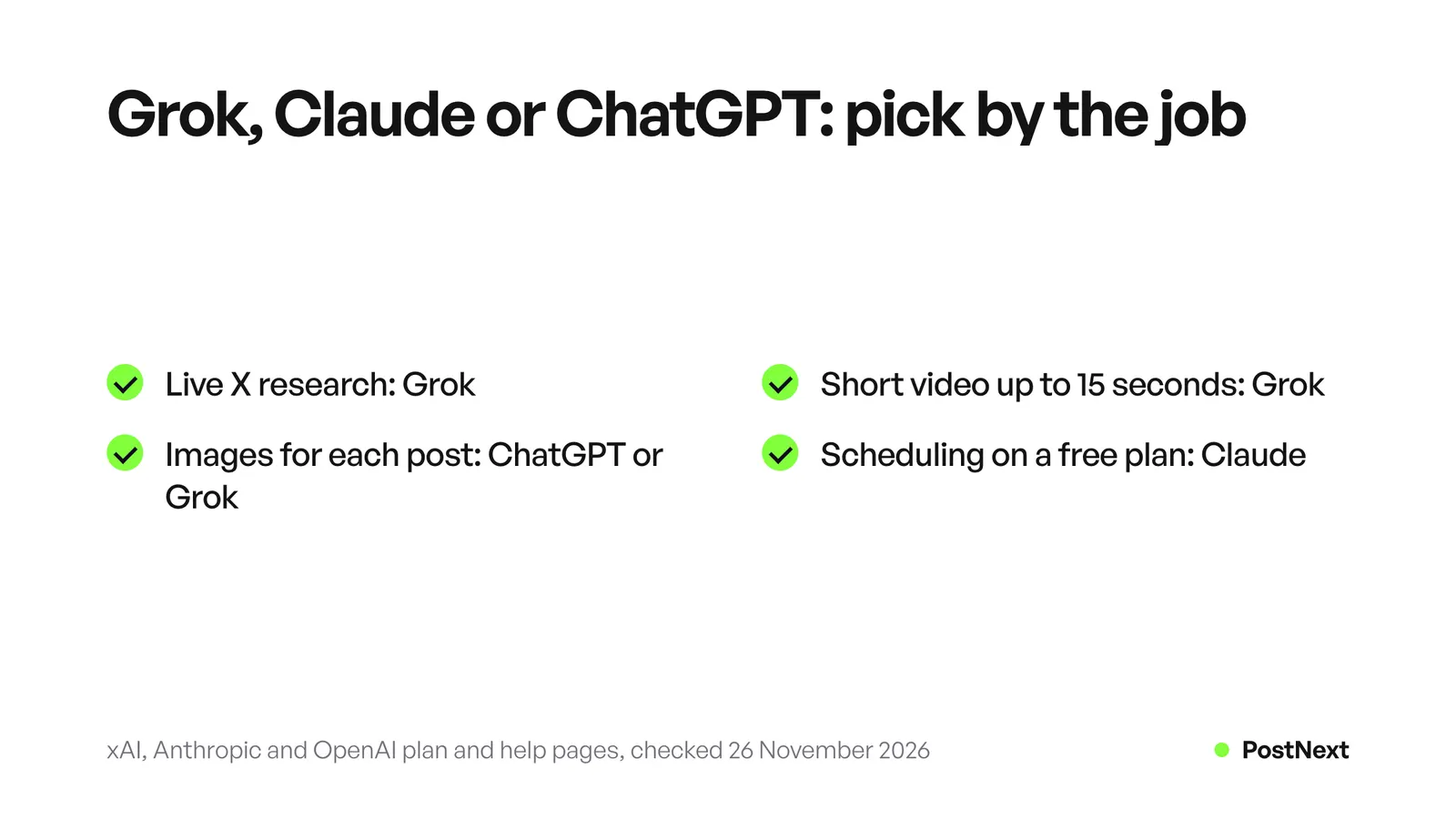
For social media, Grok is best when your work starts on X and needs short video. ChatGPT is best when each post needs an image. Claude is best when you want an assistant to schedule posts on a free plan. The table compares the jobs a social media manager does each week, checked on each maker’s own pages on 26 November 2026.
| Job | Grok | Claude | ChatGPT |
|---|---|---|---|
| Write posts and threads | Yes, all plans | Yes, all plans | Yes, all plans |
| See what is said on X today | Yes, live X and web search | Web search only | Web search only |
| Make images | Yes, Grok Imagine (limited on Free) | No, charts and diagrams only | Yes (limited on Free) |
| Make short video | Yes, up to 15 seconds | No | No, Sora closed in 2026 |
| Keep your brand voice | Skills | Projects, Skills, Memory | Projects, Memory, custom GPTs |
| Run a task on a schedule | Automations, all plans | Paid plans | Go, Plus and Pro |
| Schedule posts through a connected scheduler | Grok Bot on Premium and up | Every plan, one connector on Free | Full access on Business, Enterprise, Edu |
| Post to Instagram, LinkedIn or TikTok by itself | No | No | No |
Sources: x.ai/pricing, x.ai/grok, claude.com/pricing, chatgpt.com/pricing and the help pages listed under Sources, checked 26 November 2026.
A one-prompt test tells you little, because the same assistant writes a different caption every time you ask. The rows above are the differences that stay the same from one chat to the next, because the makers state them on their plan pages.
How much do Grok, Claude and ChatGPT cost?
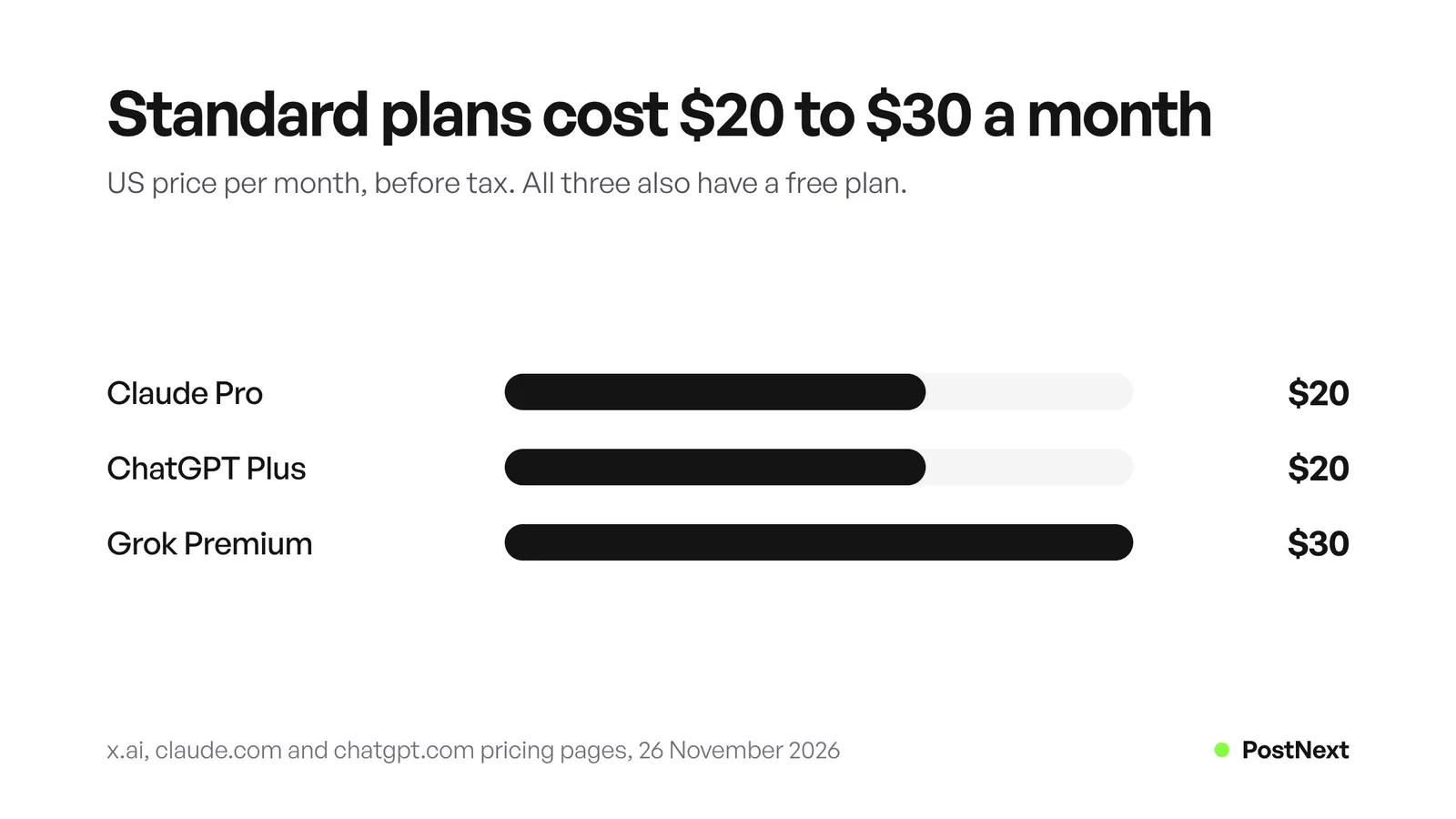
Grok, Claude and ChatGPT all have a free plan. The cheapest paid plans in November 2026 are Grok Plus and ChatGPT Go at $8 a month. Claude Pro is $20 a month billed monthly, or $17 a month on an annual plan paid up front. The top consumer plans are $200 a month for Grok Ultra and Claude Ultra, and $100 a month for ChatGPT Pro.
| Plan level | Grok (The X Subscription) | Claude | ChatGPT |
|---|---|---|---|
| Free | $0 | $0 | $0 |
| Entry | Plus, $8 a month | Go, $8 a month | |
| Standard | Premium, $30 a month | Pro, $20 a month ($17 a month billed annually) | Plus, $20 a month |
| High | Super, $100 a month | Max, $100 a month | Pro, $100 a month |
| Top | Ultra, $200 a month | Ultra, $200 a month | |
| Teams | From $30 per user a month | Team from $20 per seat a month billed annually | Business from $20 per user a month billed annually |
US prices before tax from x.ai/pricing, claude.com/pricing, chatgpt.com/pricing and OpenAI’s ChatGPT Business help page, checked 26 November 2026.
Two changes this year make older comparisons wrong. On 12 October 2026 xAI moved Grok into “The X Subscription”, whose Premium plan replaces SuperGrok, Cursor Pro and X Premium+ in one plan. Existing SuperGrok and X Premium subscribers can keep their old plan. ChatGPT Pro is now $100 a month.
No maker prints a daily message count for its free plan. xAI calls its free use “limited” with an allowance that “refreshes weekly”. Anthropic says “limited” every 5 hours and every week. OpenAI lists “unlimited text chats subject to abuse guardrails” on Free.

Which one writes the best social media posts?
All three write usable social media posts on their free plans, and no maker publishes a test of social media writing. The difference that lasts is how each one keeps your voice: Claude has Projects, Skills and Memory, ChatGPT has Projects, Memory and custom GPTs, and Grok has Skills. A post sounds like you when the assistant has your past posts, your rules and your facts.
The common complaint about AI posts is that they all sound the same. That happens when the only input is “write a LinkedIn post about our launch”. Give any of the three these four things and the drafts improve more than a switch of assistant would:
- Ten of your own posts that did well. Assistants copy rhythm and length from examples better than from words such as “friendly”.
- Words and shapes you never use. For example, no hashtags in the first line and no question as the opening sentence.
- Facts that must stay exact. Prices, dates, product names and opening hours, with an instruction to ask when one is missing.
- A length for each network. One sentence each for X, LinkedIn, Instagram and Threads.
Where you store them differs. In Claude, a Project holds files and instructions for one brand, and Free allows up to 5 Projects. In ChatGPT, Projects appear on every plan in the comparison table on chatgpt.com/pricing, and memory is “limited” on Free and “expanded” on Plus and Pro. Grok’s Skills let you “teach Grok something once and it remembers across every conversation”, in xAI’s words.
Benchmarks do not settle this. xAI’s Grok 4.7 launch post compares Grok with Claude and GPT models on seven tests, and those are xAI’s own numbers on coding and reasoning, not social media writing. Our guides to Claude for social media and ChatGPT for social media cover the voice setup step by step.
Which one knows what is trending on X?
Grok is the only one of the three built to read X. xAI says Grok “searches the web and X live”, and X’s help page says Grok can “decide whether or not to search public posts” in real time. Claude and ChatGPT search the web on every plan, Free included, but neither is described by its maker as reading X posts.
That matters for three social media jobs:
- Replies and timing. Ask Grok what people said about a topic in the last day before you write a post about it.
- Topic research for X. Grok can pull the posts that started a conversation, so your post can answer a real question.
- Checking a claim before you repeat it. Grok can find the original post. Open the link and read it yourself before you quote it.
Grok Bot, xAI’s always-on agent, has an X plugin. xAI describes it as able to “search posts, read your timeline, check mentions” and “manage bookmarks”. Since 13 November 2026 the Grok Bot changelog says Bots show X posts as draft cards and “publish only after you confirm”. That covers X only, so plan on a scheduler for the other networks. Our guide on how to use Grok Bot for social media walks through the setup and routines.
For research on Instagram, TikTok or LinkedIn, none of the three has a live feed. All three see only what web search returns, which is mostly public pages and news.
Which one makes images and video for posts?
ChatGPT and Grok make images; only Grok makes video. Grok Imagine creates images up to 2K and text-to-video clips up to 15 seconds, with 1080p video on the Super and Ultra plans. ChatGPT creates images on every plan, limited on Free. Claude makes no photos or illustrations, only charts and diagrams. OpenAI closed the Sora web and app on 26 April 2026.
| Grok | Claude | ChatGPT | |
|---|---|---|---|
| Images | Yes, up to 2K; limited on Free | No | Yes; limited on Free, unlimited on Pro |
| Video | Up to 15 seconds; 720p on Grok chat, 1080p on Super and Ultra | No | No video listed on the plan page |
| Charts and simple graphics | Yes | Yes, as code or diagrams | Yes |
Sources: x.ai/grok, x.ai/pricing, support.claude.com “Can Claude produce images?”, chatgpt.com/pricing and OpenAI’s Sora help page, checked 26 November 2026.
Claude’s answer is plain: “Claude doesn’t generate photos or illustrations the way image-generation tools do.” It can still build a chart from your numbers or a simple text graphic as HTML.
Two checks before an AI image goes out. Read every word in the picture, because image models still misspell text. Then check the network’s label rule: TikTok asks for a label on realistic AI-made images and video. Meta (Instagram and Threads) asks for one on realistic AI video and audio, not on images. No network asks for a label on a caption an assistant wrote. For product photos and ad visuals made in your brand style, a tool built for social media creatives saves the clean-up.
Can Grok, Claude or ChatGPT post to social media?
None of the three posts to Instagram, LinkedIn, TikTok or Threads by itself. Each one schedules posts through a connected tool, using MCP, an open standard that links an AI assistant to another app. Claude allows custom connectors on every plan, with one on Free. ChatGPT gives full custom MCP access on Business, Enterprise and Edu. Grok Bot takes custom connectors on Premium, Super and Ultra.
| Where you add a scheduler | Plans that can save and schedule posts | |
|---|---|---|
| Claude | Customize, then Connectors, then Add custom connector | Free (one custom connector), Pro, Max, Ultra, Team, Enterprise |
| ChatGPT | Plugins, then the plus button, then Add custom MCP server (web) | Business, Enterprise and Edu; Pro connects with read access only |
| Grok Bot | Connect apps, then Add a custom connector, then Remote HTTPS | Premium, Super and Ultra; not Plus or Free |
| Grok chat | Connectors, with “Bring Your Own MCP” for all Grok users | xAI does not say whether custom tools can write |
Sources: Anthropic, OpenAI and xAI help pages and docs.x.ai, checked 26 November 2026; the Grok Bot steps are from PostNext’s setup guide, checked against xAI’s docs on 18 November 2026.
The ChatGPT row is the one to read twice. OpenAI’s help center says “custom MCP server connections and full MCP support are available for ChatGPT Business and Enterprise/Edu customers”, and Pro users connect “with read/fetch permissions”. It does not say that Plus can write through a custom server, so do not count on it.
Use the official route. A scheduler that posts through each network’s API keeps your account within the rules. Browser tools that log in as you, or copied session cookies, break LinkedIn’s and X’s terms. Our guide to a social media AI agent covers the four checks before you let an assistant schedule anything.
Which one can run social media tasks on a schedule?
Grok, Claude and ChatGPT can all run a task on a schedule, on different plans. Grok’s Automations run on every plan and repeat once, daily, on weekdays, weekly, monthly or yearly. Claude’s scheduled tasks are on Pro, Max, Ultra, Team and Enterprise. ChatGPT’s scheduled tasks are on Go, Plus and Pro, and not on Free, according to chatgpt.com/pricing.
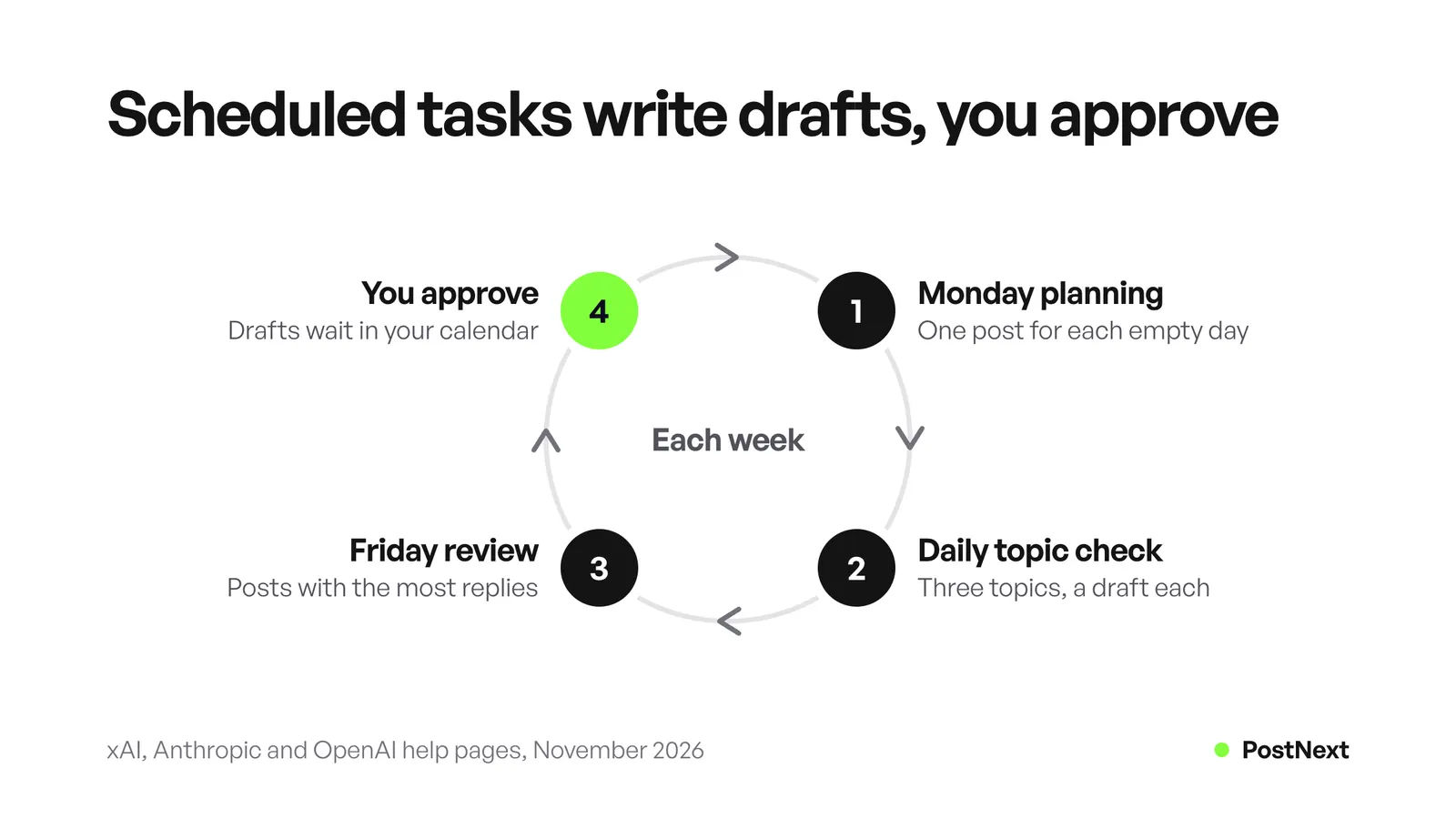
A scheduled task is useful for the parts of social media that repeat:
- Monday planning. “Read what is scheduled for this week and suggest one post for each empty day.”
- Daily topic check. “Find three things people said about our industry today and draft a post for each.” Grok is the fit when the topics come from X.
- Friday review. “List this week’s posts and the ones that got the most replies.”
A scheduled task writes drafts. It does not publish. With a scheduler connected, the drafts land in your calendar and wait for you. Grok Bot adds approval controls: xAI’s Auto Review is on by default, and each action can be set to Allow once, Always allow or Deny.
What do Grok, Claude and ChatGPT do with your posts?
Grok on X and ChatGPT can use your chats to train their models unless you turn it off. In ChatGPT the switch is “Improve the model for everyone” under Settings, then Data controls. On X the setting is under “Grok & Third-party Collaborators”. Claude’s pricing page lists model training as “Opt-out” on Free, Pro, Max and Ultra.
For social media work this matters when you paste in things that are not public yet: a launch date, a client’s results or a price change. Three habits keep it safe on any of the three:
- Turn the training setting off before you paste client material.
- Use a private or temporary chat for one-off drafts. ChatGPT says temporary chats are not used to improve its models, and Grok’s private chat “will not be used to train models”.
- Keep passwords and session cookies out of every chat. A scheduler with OAuth or an API key needs neither.
Team plans differ. Anthropic lists “no model training on your content by default” for Claude Team, and OpenAI says it does not train on ChatGPT Business data by default. Check your workspace settings rather than trusting the consumer defaults above.
Which should you pick for your social media?
Pick by where your posts go and what each post needs. If X is your main channel, Grok earns its place for live research and short video. If every post needs a picture, ChatGPT covers the images. If you want an assistant to schedule your posts without a business plan, Claude is the only one of the three that allows it on Free.
Four common set-ups, using only the facts above:
| You are | Start with | Why |
|---|---|---|
| A creator who posts mainly on X | Grok Premium, $30 a month | Live X search, video, and Grok Bot can use a scheduler |
| A small business on Instagram | ChatGPT Go or Plus | Images in the same chat; schedule them in your scheduler’s own calendar |
| A solo marketer on LinkedIn and Threads | Claude Free or Pro | Text posts need no images, and a scheduler connects from Free |
| A team that shares one workspace | Claude Team or ChatGPT Business | Both connect a scheduler for each member and keep chats out of training by default |
Many people end up with two: one assistant for words and one for pictures. That works as long as one calendar holds the result, so posts are not planned twice.
How does PostNext work with Grok, Claude and ChatGPT?
PostNext is a social media scheduler that each of the three can connect to through one MCP server, https://mcp.postnext.io/api. Once connected, the assistant reads your calendar, saves drafts and schedules posts to X, Instagram, LinkedIn, TikTok and Threads. A draft never publishes by itself. MCP access is included in every PostNext plan, the free plan too.
Setup takes about two to three minutes in each:
- Claude. Add PostNext as a custom connector and sign in. Steps: post to social media from Claude.
- ChatGPT. On the web, add PostNext as a custom MCP server under Plugins. Steps: social media scheduling from ChatGPT.
- Grok Bot. Add PostNext as a custom connector with an API key, then give your Bot a posting routine. Steps: schedule posts with Grok Bot.
The PostNext free plan schedules up to 10 posts a month on one channel and includes 10 AI credits. A few assistant tools, such as best time to post, need a paid plan. The full tool list is on the PostNext MCP page. Your Grok, Claude or ChatGPT subscription is a separate cost.
Frequently Asked Questions
Is Grok better than ChatGPT for social media?
Grok is better for X: it searches X posts live and makes short videos up to 15 seconds. ChatGPT is better when each post needs an image, as on Instagram. For text alone, both write usable drafts on their free plans.
Is Claude better than ChatGPT for writing social media posts?
Neither maker publishes a test of social media writing. Claude keeps your voice with Projects, Skills and Memory; ChatGPT uses Projects, Memory and custom GPTs. The bigger difference is posting: Claude connects a scheduler on every plan, while ChatGPT gives full custom MCP access only on Business, Enterprise and Edu.
Can Grok post to X for me?
Grok Bot can, with a review step. Its X plugin shows each post as a draft card and publishes only after you confirm (xAI changelog, 13 November 2026). The Grok chat app does not post for you. To schedule posts to X and other networks from Grok Bot, connect a scheduler as a custom connector.
Which AI is best for Instagram posts?
ChatGPT or Grok, because both make images and Claude does not. Grok also makes short videos for Reels. Whichever you use, read the text in each image before you post it, and add Instagram’s AI label to realistic AI-made images if you want one (Meta does not require it for images).
Is there a free AI that can schedule social media posts?
Yes. Claude’s Free plan allows one custom connector, so a scheduler such as PostNext can save drafts and schedule posts from a Claude chat. PostNext’s free plan covers 10 posts a month on one channel.
Do Grok, Claude and ChatGPT use my posts for training?
ChatGPT and Grok on X can, unless you turn it off in settings. Claude’s pricing page lists training as opt-out on its consumer plans. Claude Team and ChatGPT Business do not train on your content by default.
Sources
- xAI, pricing, Grok, Introducing The X Subscription, Grok connectors, Automations in Grok, Skills, Grok Bot now works with X, Grok 4.7 and Grok Bot FAQ (checked 26 November 2026).
- X Help Center, About Grok (archived copy, read 26 November 2026): live search of public posts and the training setting.
- Anthropic, pricing (plans, web search, connectors, Projects, scheduled tasks, model training) and Help Center: Can Claude produce images?, custom connectors using remote MCP, scheduled tasks in Cowork (checked 26 November 2026).
- OpenAI, ChatGPT pricing and Help Center: custom MCP servers in ChatGPT, ChatGPT Business billing, the Sora discontinuation and how your data is used, and business data privacy (checked 26 November 2026).
- Instagram Help Center, Label AI content on Instagram, and TikTok Support, AI-generated content (checked 25 November 2026).
- PostNext, setup guides for Claude, ChatGPT and Grok Bot, the MCP page and pricing: postnext.io/ai-agents, postnext.io/mcp, postnext.io/pricing (checked 26 November 2026).