
Claude for social media does three jobs. It writes posts, it keeps your brand voice between chats, and, with a scheduler connected, it saves drafts and schedules them. Claude has no posting button of its own for X, Instagram, LinkedIn, TikTok or Threads. In November 2026 a connector to a scheduler such as PostNext works on every Claude plan, and the Free plan allows one custom connector. For one network in detail, with Meta’s limits, read how to connect Instagram to Claude.
Key Takeaways
- Writing works on the Free plan. So do Projects (up to 5), Skills, Memory and reading a CSV of your results.
- Posting needs a connected tool. Claude acts in other apps through connectors. Free accounts can add one custom connector.
- Voice comes from what you give it. A Project holds your facts, a Skill holds your rules, and Memory keeps your preferences.
- The route decides the risk. A scheduler that posts through the network’s official API is the safe route. Browser tools and copied cookies break LinkedIn’s and X’s rules.
- Running by itself is a paid feature. Scheduled tasks need Cowork, which is on Pro, Max, Ultra, Team and Enterprise.
- No label for AI-written text. Instagram, Threads, TikTok, LinkedIn and X ask for labels on realistic AI media, not on a caption.
How can you use Claude for social media?
You can use Claude for social media to write posts, adapt one idea to each network, plan a week of topics, keep a brand voice and find patterns in your past results. All of that works in a plain chat on the Free plan. Reading your queue, saving drafts and scheduling posts need a connector to a scheduler. Weekly runs without you need a paid Claude plan.
| Job | What Claude needs | On the Free plan |
|---|---|---|
| Write a post, a thread or a week of topics | Nothing extra | Yes |
| Keep your brand voice between chats | A Project, a Skill or Memory | Yes, up to 5 projects |
| Find patterns in your past posts | A CSV or XLSX file you upload | Yes |
| Read your queue, save drafts, schedule posts | A connector to a scheduler | Yes, one custom connector |
| Run a weekly plan without you | A scheduled task in Cowork | No, paid plans only |
| Click through a website for you | Claude in Chrome | No, paid plans only |
Source: Anthropic’s help center and pricing page, checked 25 November 2026.
The first three rows are where most people start. Row three deserves more use than it gets: export your post results, upload the file and ask which topics and formats did best. Our guide to a social media audit with AI has the prompts.
How do you make Claude write in your voice?
Claude writes in your voice when you give it three things: examples of your own posts, the rules you follow and the facts it must not invent. Claude has three places to keep them. A Project holds documents and instructions for one brand. A Skill holds a procedure that works in every chat. Memory keeps your preferences without any setup.
The usual complaint about AI posts is that they all sound the same. That happens when the only input is “write a LinkedIn post about our launch”. The fix is input, not a cleverer prompt.
| Where | What it keeps | Good for | Plans |
|---|---|---|---|
| Project | Uploaded files and written instructions for the chats inside it | One brand or one client: past posts, product facts, tone | All plans; Free has up to 5 |
| Skill | A folder with a skill.md file of instructions that Claude loads when the task fits | Rules for every chat: post lengths, words you never use, your checklist | All plans, with code execution turned on |
| Memory | Your role, projects and how you like to work | Small preferences you would otherwise repeat | On by default on Free, Pro, Max and Ultra |
Anthropic describes the difference this way: “Projects provide static background knowledge that’s always loaded when you start chats within them. Skills provide specialized procedures that activate dynamically when needed and work everywhere across Claude.” A simple skill is plain Markdown, so you do not need to write code. The name can be up to 64 characters. In Claude Code, skills work next to subagents, which our guide to AI marketing agents covers.
What to put in, in order of effect:
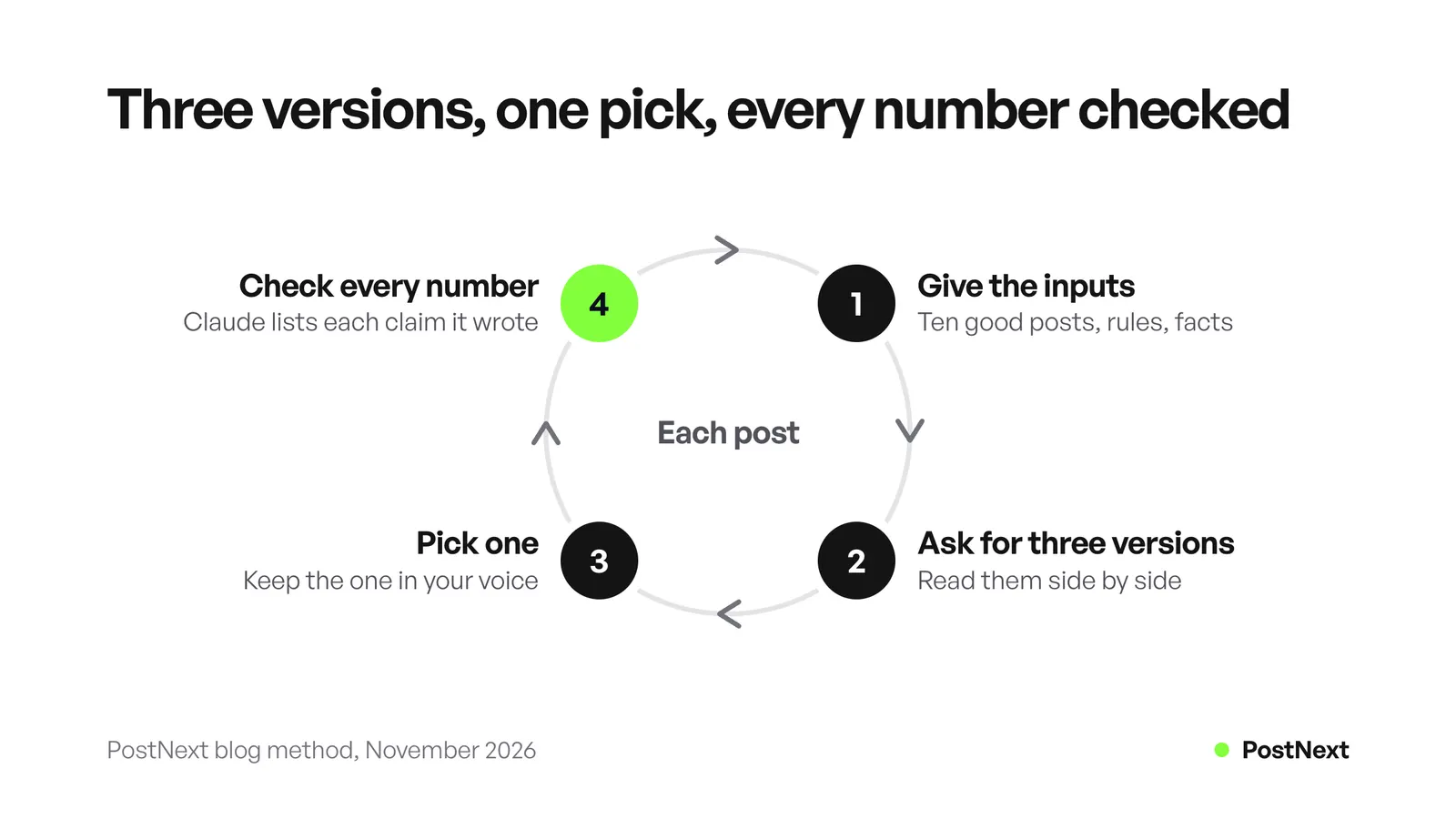
- Ten of your own posts that did well. Paste them as examples. Claude copies rhythm and length from examples better than from adjectives such as “friendly”.
- A short list of words and shapes you never use. For example: no hashtags in the first line, no questions as the opening sentence, no emoji.
- The facts that must stay exact. Prices, dates, product names and opening hours. Tell Claude to ask you when one is missing.
- A length for each network. One sentence each for X, LinkedIn, Instagram and Threads.
Then ask for three versions of each post and pick one. Ask Claude to list every number and claim it wrote, so you can check them before anything goes out. PostNext’s guide on how to write social media posts with AI has a brand profile to complete and prompts to copy. For opening lines, our hook ideas give Claude tested shapes to start from.
Can Claude post to social media?
Claude cannot post to social media by itself. It has no built-in publishing for X, Instagram, LinkedIn, TikTok or Threads. Claude acts in other apps through connectors, and a connector to a scheduler lets it read your queue, save drafts and schedule posts. The scheduler then publishes each post at its time, also after you close the chat.
Anthropic’s help center says connectors “let Claude access your apps and services, retrieve your data, and take actions within connected services”. There are two kinds. The Connectors Directory lists ready-made ones, and several social media schedulers are in it, among them Buffer, Metricool and Typefully (claude.com/connectors, November 2026). A custom connector is any remote MCP server you add by its URL. Our list of the best MCP servers for social media covers the official ones by job.
PostNext is added the second way. Its server is https://mcp.postnext.io/api, and over it Claude can post to X, Instagram, LinkedIn, TikTok and Threads (PostNext MCP tool reference, November 2026). YouTube and Bluesky are scheduled from the PostNext calendar, not through Claude. If you are choosing a wider set of tools, our list of AI tools for social media sorts them by job.
How do you connect Claude to a scheduler?
In Claude, open Customize, then Connectors, select ”+ Add” and choose “Add custom connector”. Type a name, paste the scheduler’s server URL, select Continue and then Add. Select Connect and sign in to the scheduler. The same connector then works in Claude on the web, Claude Desktop and Cowork, and you turn it on for a chat from the ”+” button.
With PostNext, following Anthropic’s article and PostNext’s setup guide (November 2026):
- Open Connectors. In Claude, go to Customize, then Connectors. Select ”+ Add”, then “Add custom connector”.
- Paste the URL. Name it PostNext and paste
https://mcp.postnext.io/api. Select Continue, keep the detected sign-in option and select Add. - Sign in. Select Connect and approve the PostNext sign-in. There is no API key to create.
- Ask for something that changes nothing. “What is scheduled for the next 7 days?” shows that Claude reads the right account.
- Then ask for drafts. “Plan next week: read my brand profile, check what is already scheduled and suggest one post a day from Monday to Friday.”
On Team and Enterprise plans an owner adds the connector under Organization settings, then Connectors, and each member selects Connect. Anthropic says installing connectors in the mobile apps is in beta, so do the setup on the web or the desktop app. The full walk-through, with a one-click button for Claude Desktop, is PostNext’s guide to posting to social media from Claude. Plan differences and connection errors are in our article on Claude connectors.
Will Claude get your social accounts banned?
Claude does not get an account banned. The route the post takes can. A post sent by a connected scheduler goes through the network’s official API, which the networks allow. A tool that logs in as you, copies your browser cookies or clicks through the website breaks the rules of LinkedIn and X, and both name account restriction or suspension as the result.
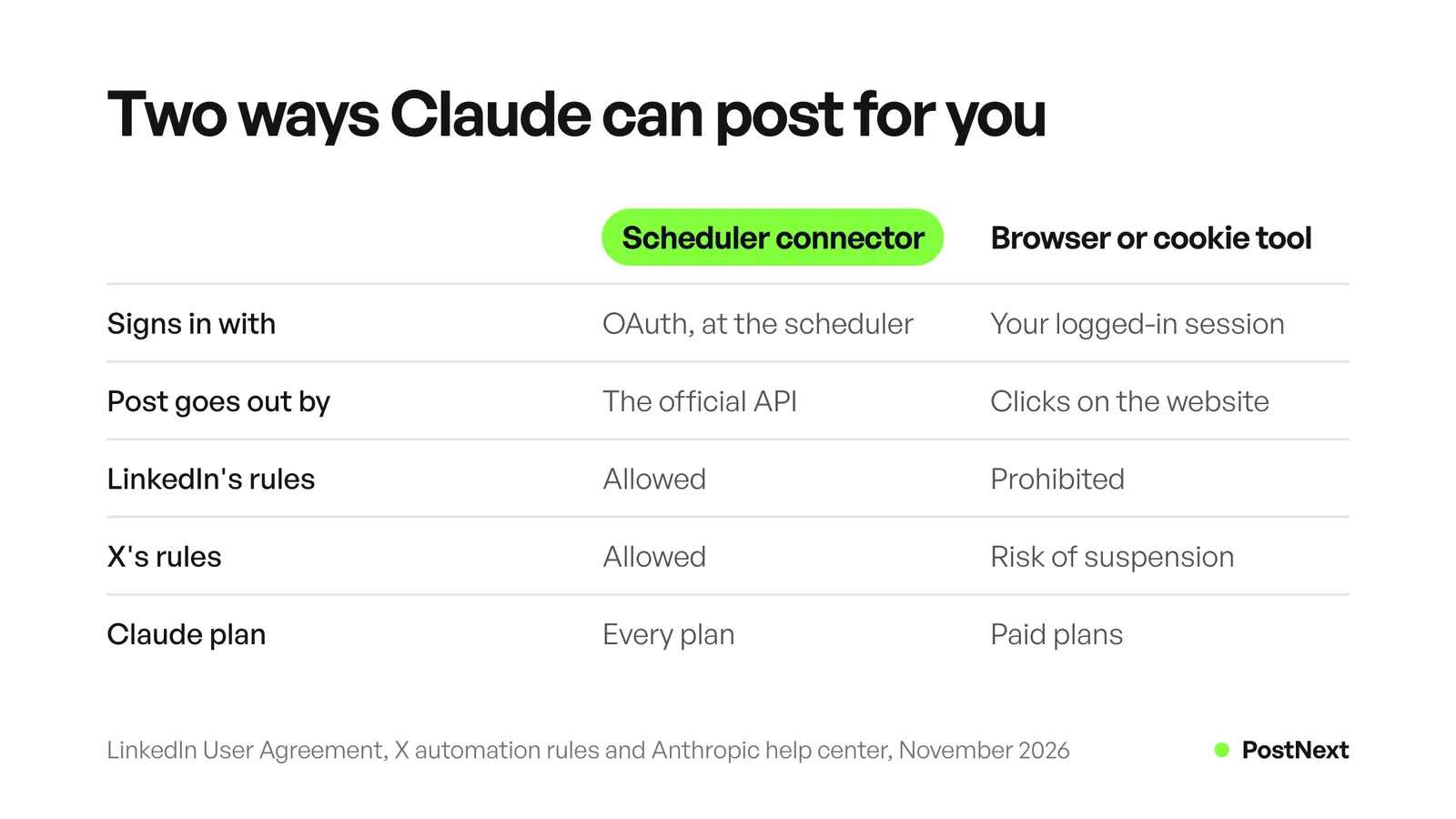
This is the question the popular Claude guides skip, and the one people ask most on Reddit. The rules, in each platform’s own words (checked 25 November 2026):
| Platform | What its rules say | What it means for Claude |
|---|---|---|
| No “bots or other unauthorized automated methods” to “create, comment on, like, share, or re-share posts”, and no “copying cookies” | Post through a scheduler that uses LinkedIn’s official API. Do not let any tool reuse your logged-in session | |
| X | ”Use non-API-based forms of automation, such as scripting the X website” is not allowed and “may result in the permanent suspension of your account” | Scheduled posts through the API are fine. A browser agent posting on x.com is not |
| X, replies | ”The deployment or operation of any AI reply bot requires prior written and explicit approval from X” | Do not let Claude answer other people’s posts for you |
| No “accessing or collecting information in an automated way without our express permission” | Publishing through Instagram’s API needs a professional account | |
| TikTok | Users “must have full awareness and control of what is being posted to their TikTok accounts” | See and confirm each TikTok post before it goes out |
Is a LinkedIn MCP server for Claude safe?
Check how the server signs in. Some open-source LinkedIn MCP servers work by reusing the session of a browser where you are logged in to LinkedIn. One widely used project says in its own README that “LinkedIn’s User Agreement prohibits automated access, and accounts using automated tools can be restricted or banned”. LinkedIn’s help page on prohibited software says the same about bots, browser plug-ins and extensions that automate activity on its website.
A scheduler connector is a different thing. You sign in on LinkedIn’s own page, the scheduler receives a token and it posts through LinkedIn’s official API. PostNext publishes to personal LinkedIn profiles this way, as described on its LinkedIn scheduler page.
The same split applies to Claude in Chrome and other browser agents. Anthropic’s safety page says: “You remain responsible for all browser actions taken by Claude performed on your behalf”, and the list that follows includes “Respecting third-party website terms of service, including any restrictions on automated access”. Use a browser agent to read and research. Post through the scheduler.
Can Claude run your social media by itself?
On a paid plan Claude can run the planning and drafting part by itself, and it should stop there. A scheduled task in Cowork runs hourly, daily, weekly or on weekdays, also when your computer is asleep, and it can use your connectors. Photos, video, replies to customers and the final check before a post goes out stay with you.
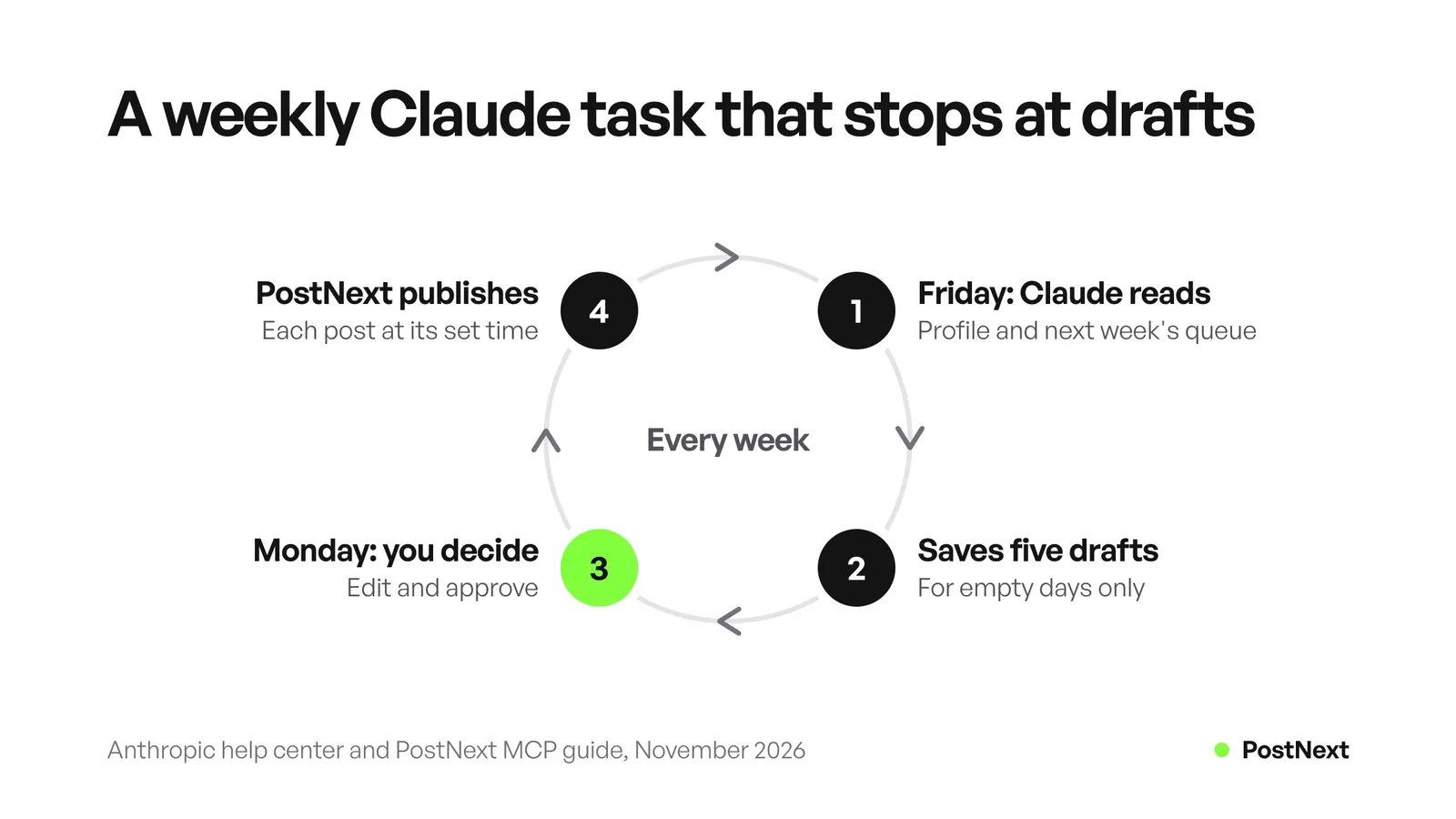
Scheduled tasks are on Pro, Max, Ultra, Team and Enterprise, not on Free (Anthropic help center, November 2026). A weekly task that works well: “Every Friday, read my brand profile and next week’s queue in PostNext, then save five drafts for the empty days. Do not schedule anything.” You open the calendar on Monday, edit and approve.
Three limits to plan for:
- Approval prompts. If you set a connector tool to “Always ask”, Anthropic says a scheduled task that uses it “may wait for your answer or finish without the tool”. PostNext’s guide to scheduling with Claude Cowork recommends asking for drafts only.
- TikTok. TikTok’s rules for apps require that you see and control each post. In PostNext, a TikTok post with Post directly turned off goes to your TikTok inbox, and you publish it in the app.
- Comments and DMs. PostNext’s connector has no tool that reads or sends them. For Instagram DMs, a tool built for the inbox does that job: CreatorFlow sends your link by DM to people who comment a keyword you choose.
X’s automation rules add one line that applies to every setup: “You are ultimately responsible for the actions taken with your account, or by applications associated with your account.” Our guide to a social media AI agent lists four checks. Run them before any assistant schedules for you.
Do you have to label posts that Claude wrote?
No. In November 2026 none of Instagram, Threads, TikTok, LinkedIn or X requires a label on a caption or text post that AI wrote. Their label rules cover realistic AI media. Meta requires a label for photorealistic video and realistic audio. TikTok requires one for realistic AI images, audio and video. LinkedIn and X have rules for synthetic media.
Meta’s help page is the clearest on scope. It “requires you to label content you share that has photorealistic video or realistic-sounding audio that has been digitally generated or altered, including with AI”. It “does not require you to label images that have been created or altered with AI”. TikTok defines AI-generated content as “images, video and/or audio”, so text is outside the definition.
Other rules still apply to the words. A post must be true, a paid endorsement must be disclosed, and Anthropic’s Usage Policy forbids fake personas, naming “sockpuppets, astroturfing, fake reviews, or bots that claim to be human”. This section covers platform rules only, not the law in your country.
How does PostNext work with Claude?
PostNext gives Claude your account context first, then a set of tools. At the start of a chat Claude can read your brand profile, connected channels and account summary. It can then list scheduled posts and drafts, write new drafts, schedule or cancel posts and read results. Every post is saved as a draft first, and scheduling is a separate step.
What that means in daily use (PostNext MCP page and tool reference, checked 25 November 2026):
- Voice from two places. The brand profile in PostNext holds your bio, brand voice, main themes and preferred hashtags, and Claude reads it before it writes. Your Claude Project or Skill adds the rest.
- Four ready-made workflows.
/weekly-plan,/draft-thread,/audit-queueand/channel-sweep. Start with/audit-queue: it checks the next 7 days and changes nothing. - Drafts you can see. Each draft and scheduled post appears on your social media calendar, where you edit or cancel it until it goes out.
- Free plan included. 1 channel, 10 AI credits a month and 10 scheduled posts a month. Editing an existing draft, best-time suggestions and brand profile updates through Claude need a paid plan.
- Limits per network. LinkedIn posts go to personal profiles, as text or images. Instagram needs a professional account. Results per post come back for X and Instagram.
Claude shows a permission prompt the first time it uses a tool. Keep the scheduling tool on “Always ask” until you trust the drafts. The launch article for PostNext MCP lists every request and the plan it needs. If your team uses OpenAI, the same server works there with different plan rules, covered in ChatGPT for social media.
Frequently Asked Questions
Can I use Claude to run my social media?
You can use Claude to plan, write and schedule posts, with a scheduler connected for the scheduling. It cannot film or photograph, and it should not answer comments or DMs for you. On a paid Claude plan a scheduled task can prepare next week’s drafts every Friday. Read and approve them before they go out.
Is Claude free to use for social media?
Yes, for writing and for one connected tool. In November 2026 the Free plan includes Projects (up to 5), Skills, Memory, file uploads and one custom connector. Scheduled tasks, Cowork, Claude in Chrome and Claude Code need a paid plan. A scheduler has its own plan; PostNext’s free plan allows 10 scheduled posts a month.
Can Claude post to LinkedIn?
Not by itself. With a scheduler connected, Claude saves a LinkedIn post as a draft and schedules it, and the scheduler publishes it through LinkedIn’s official API. Avoid tools that log in with your LinkedIn password or browser cookies. LinkedIn’s User Agreement prohibits copying cookies and using bots to create posts.
Can Claude see my Instagram account?
Only what a connected tool gives it. Through PostNext, Claude sees your queue, your drafts and the likes and comments on posts that PostNext published. It does not browse your feed. A browser agent could open instagram.com, but Instagram’s terms do not allow automated access without permission.
What is a Claude skill for social media?
A skill is a folder with a skill.md file of instructions that Claude loads when a task fits. A social media skill usually holds your post lengths for each network, words to avoid and a checklist to run before a draft is saved. Skills work on every Claude plan when code execution is turned on.
Is Claude or ChatGPT better for social media?
Both write usable first drafts, so the difference is in connecting tools. In November 2026 Anthropic allows custom connectors on every Claude plan, with one on Free. OpenAI’s help center lists write access for custom MCP servers on ChatGPT Business, Enterprise and Edu. Pick the assistant your team already pays for.
Does PostNext charge extra for Claude access?
No. Access through Claude is included in every PostNext plan, and your plan’s limits apply the same way as in the app. Your Claude subscription is a separate cost.
Sources
- Anthropic Help Center, Get started with custom connectors using remote MCP and Use connectors to extend Claude’s capabilities (checked 25 November 2026): plans, the one-connector limit on Free, steps, where connectors work, mobile beta.
- Anthropic Help Center, What are Projects?, What are Skills?, How to create custom Skills and chat search and memory (checked 25 November 2026).
- Anthropic Help Center, Schedule recurring tasks in Claude Cowork, Create and edit files with Claude and Use Claude in Chrome safely (checked 25 November 2026).
- Anthropic, pricing (plan names and what Free includes) and Usage Policy (checked 25 November 2026).
- LinkedIn, User Agreement, section 8.2, and Prohibited software and extensions (checked 25 November 2026).
- X Help Center, Automation rules (archived copy of 1 November 2026, read 25 November 2026).
- Instagram Help Center, Terms of Use and Label AI content on Instagram (checked 25 November 2026).
- TikTok for Developers, Content sharing guidelines, and TikTok Support, AI-generated content (checked 25 November 2026).
- GitHub, linkedin-mcp-server README (checked 25 November 2026): the project’s own warning about LinkedIn’s User Agreement.
- OpenAI Help Center, Connecting custom MCP servers in ChatGPT (November 2026).
- PostNext, Claude setup guide, MCP page and tool reference, and the LinkedIn, Instagram and TikTok channel pages: postnext.io/ai-agents/claude, postnext.io/mcp, postnext.io/mcp/docs (checked 25 November 2026).