
Zapier social media automation works on six networks: LinkedIn, Instagram, Facebook Pages, YouTube, Pinterest and Bluesky, checked on Zapier’s own app pages on 26 November 2026. X has been missing since August 2023, and Zapier has no app that posts to TikTok or Threads. This PostNext guide shows what each app can post, what the free plan allows and where a scheduler fits.
Key Takeaways
- Six networks have a Zapier posting app. LinkedIn, Instagram for Business, Facebook Pages and YouTube are standard apps. Pinterest and Bluesky are premium apps, which need a paid plan.
- X, TikTok and Threads are not covered. Zapier’s X integration stopped working on 31 August 2023. The only TikTok apps handle lead ads and conversions.
- The free plan runs two-step Zaps. You get 100 tasks a month and a check for new data every 15 minutes. One trigger and one action fits a blog-to-LinkedIn Zap.
- Each post counts as one task. Triggers, Filter, Formatter, Paths and Delay steps do not count. A post to three networks uses three tasks.
- Instagram posts are photos, carousels and Reels. Zapier’s Instagram app has no Story action, and Instagram’s API accepts JPEG images only.
- Webhooks reach any API. Webhooks by Zapier, on paid plans, can send a post to a scheduler’s API, which covers networks Zapier cannot reach.
Which social networks can Zapier post to?
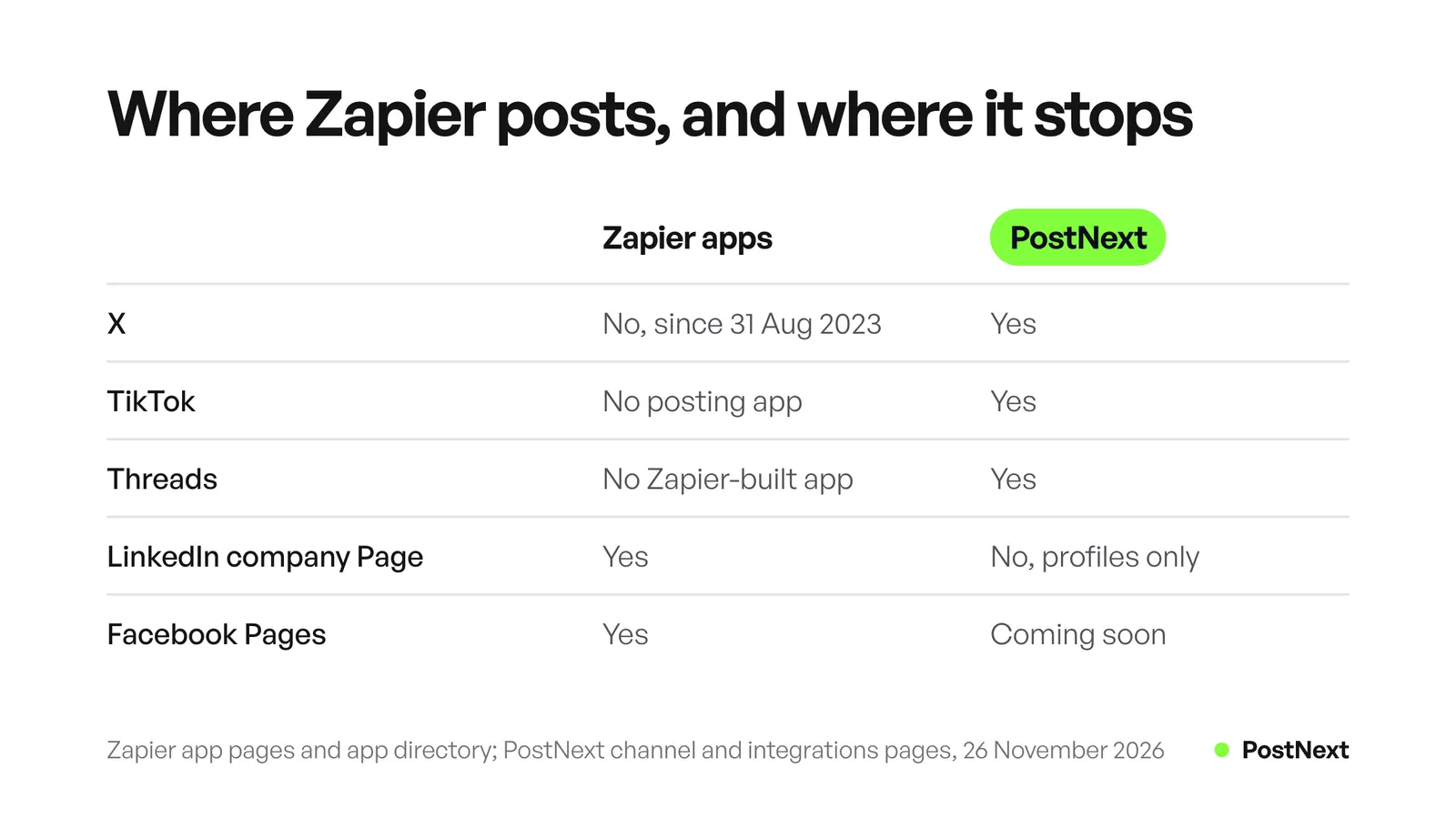
Zapier can post to LinkedIn, Instagram for Business, Facebook Pages, YouTube, Pinterest and Bluesky through its own apps, as listed in its app directory on 26 November 2026. It cannot post to X, TikTok or Threads with an app Zapier built. Pinterest and Bluesky are premium apps, so they need the Professional plan or higher.
| Network | Zapier app | What it can post (action names) | Plan needed |
|---|---|---|---|
| Create Company Update, Create Share Update (personal profile) | Any plan | ||
| Instagram for Business | Publish Photo(s) as one post or a carousel, Publish Video as a Reel | Any plan | |
| Facebook Pages | Create Page Post, Create Page Photo, Create Page Video, Create Page Post as Draft | Any plan | |
| YouTube | YouTube | Upload Video with privacy status and publish time, Add Video to Playlist, Update Video Thumbnail | Any plan |
| Create Pin on a board you choose | Premium app: Professional or higher | ||
| Bluesky | Bluesky | Create Post, Like Post, Repost Post | Premium app: Professional or higher |
| X | None since 31 August 2023 | Nothing | Not available |
| TikTok | TikTok Lead Generation and TikTok Conversions only | Nothing to your profile | Not available |
| Threads | No Zapier-built app; a third-party app is listed | Not tested here | Check the app’s own page |
Read on each Zapier app page and in Zapier’s public app directory (10,611 apps) on 26 November 2026. “Any plan” means the app is not premium. The free plan still limits each Zap to two steps.
Zapier also gives some apps an “API Request” action, which sends a raw request with the app’s sign-in attached. LinkedIn’s and Pinterest’s are marked beta. Use it when the action you need has no ready-made step.
Why can’t Zapier post to X, TikTok or Threads?
Zapier stopped its X integration because of X’s API changes. Zapier’s own page says it “stopped working (effective August 31, 2023)” after X changed its API policy and pricing. TikTok and Threads have no Zapier-built posting app at all. Both networks require each app to pass their own review, and on 26 November 2026 Zapier listed none.
The X decision still holds. Today X sells API access by usage: creating a post costs $0.015 per request, and a post that contains a link costs $0.20, on X’s pay-per-usage pricing page in November 2026. Any tool that posts to X pays those rates or passes them on.
TikTok’s rules explain the gap there. An app that posts for creators must pass TikTok’s audit, and until then every post is private and only 5 users can post through it in 24 hours, according to TikTok’s content sharing guidelines. Even audited apps share a cap of about 15 posts a day per creator account.
For Threads, Zapier’s directory lists a third-party app, “Threads by Unshape”, next to “Bluesky by Unshape”. Third-party apps are built by other companies on Zapier’s platform. We did not test it, so read its own page for what it posts and who keeps your sign-in.
What does Zapier’s free plan allow for social media?
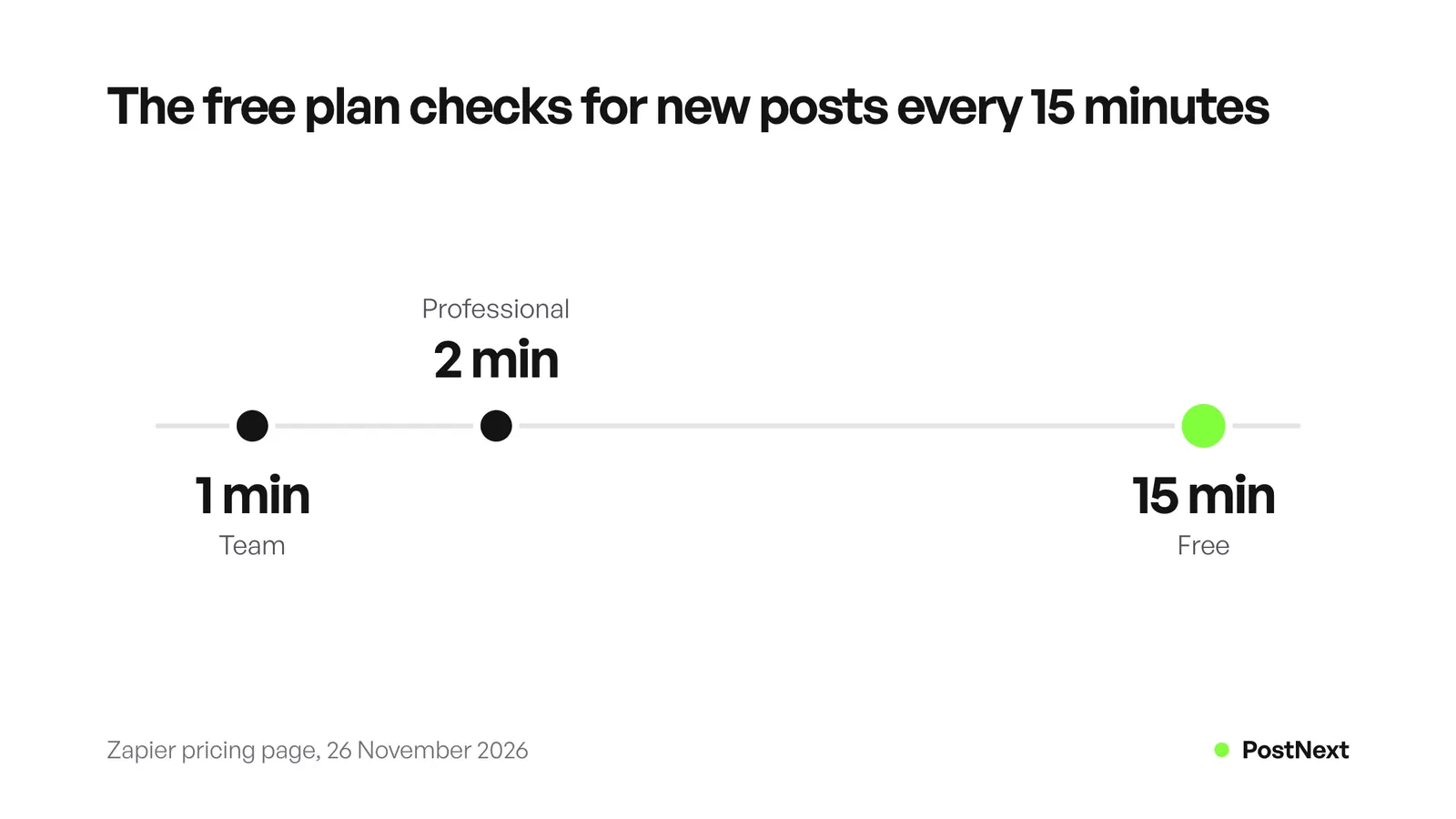
The free plan allows unlimited two-step Zaps, 100 tasks a month and a check for new data every 15 minutes, on Zapier’s pricing page on 26 November 2026. Premium apps and Webhooks by Zapier need the Professional plan, which also allows multi-step Zaps and checks every 2 minutes. Team and Enterprise check every minute.
| Feature | Free | Professional | Team |
|---|---|---|---|
| Steps per Zap | Two (one trigger, one action) | Multi-step | Multi-step |
| Tasks a month | 100 | By tier | By tier |
| Check for new data | Every 15 minutes | Every 2 minutes | Every minute |
| Premium apps (Pinterest, Bluesky) | No | Yes | Yes |
| Webhooks by Zapier | No | Yes | Yes |
| Users | 1 | 1 | 25 |
Zapier’s pricing page, read on 26 November 2026. Zapier sells each paid plan in task tiers. Check the current price on zapier.com/pricing.
For social media, the two-step limit matters more than the task count. “New blog post, then a LinkedIn company update” is two steps and runs free. “New blog post, then LinkedIn, then Facebook” is three steps and needs a paid plan, unless you build two separate Zaps from the same trigger.
How does Zapier count tasks for social posts?
Zapier counts one task each time an action succeeds, such as one LinkedIn update or one Instagram photo. Checking for new items is free: “Zapier never charges you a task to check for new data”, its pricing page says. Filter, Formatter, Paths and Delay steps do not use tasks. A blog post sent to three networks uses three tasks.
When you reach your task limit, Zapier emails you. If pay-per-task billing is on, your Zaps keep running at a higher rate per task. If it is off, they pause until the next usage period starts. Zapier states both outcomes on its pricing page.
A worked example, from the numbers above:
- The plan. You publish 4 blog posts a week and want each one on LinkedIn, Facebook and Bluesky.
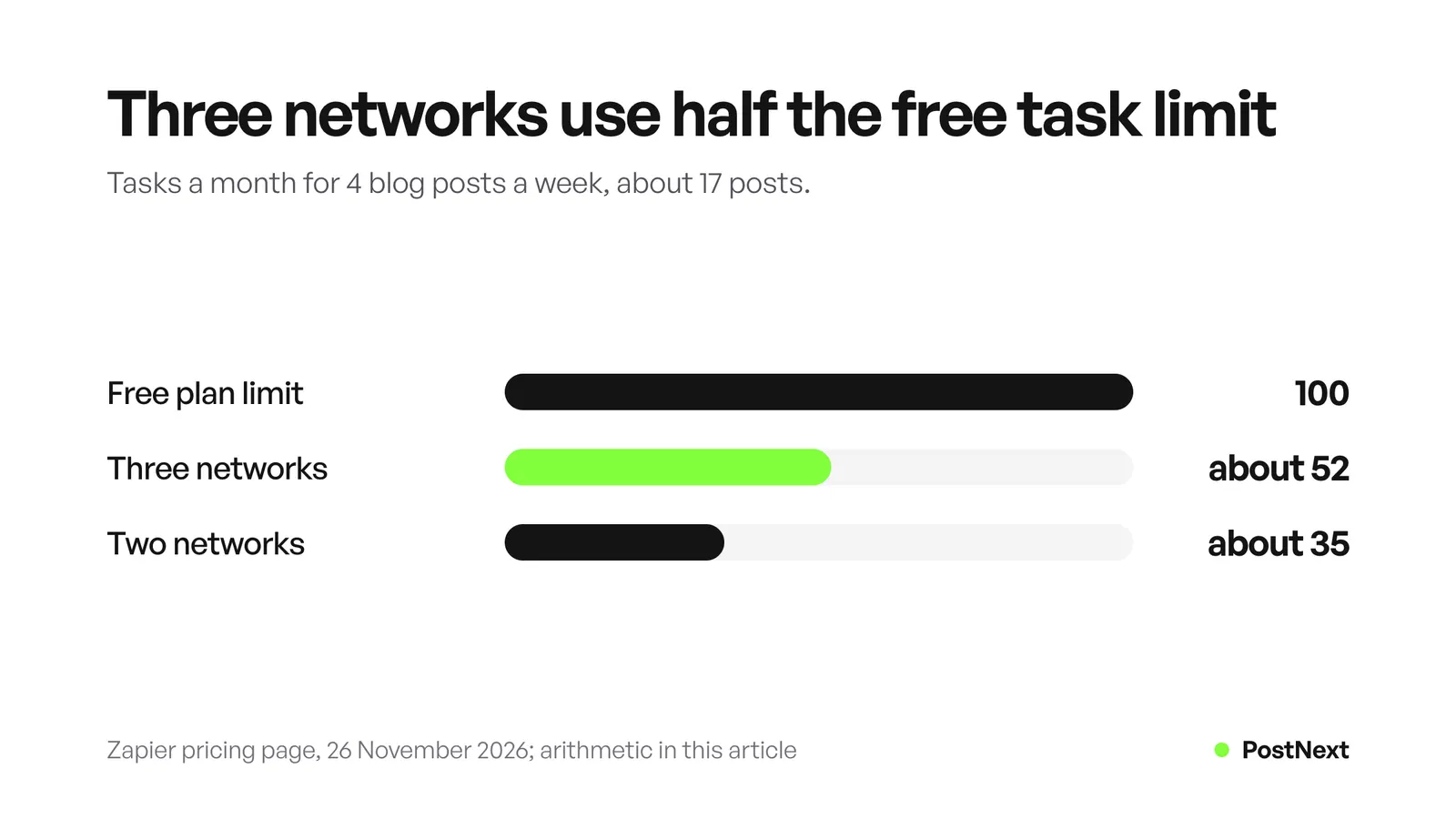
- The tasks. 4 posts a week is about 17 posts a month (4 x 52 / 12). Three networks per post makes about 52 tasks a month.
- The fit. 52 tasks fits the free plan’s 100. Bluesky is a premium app, though, and one Zap with three actions needs multi-step Zaps. Both mean the Professional plan.
- The free version. Drop Bluesky and build two separate two-step Zaps, RSS to LinkedIn and RSS to Facebook. That is about 35 tasks a month on the free plan.
This is arithmetic from Zapier’s published limits, not a measured account.
How do you set up a Zapier social media automation?
Set up a Zap in five steps: pick a trigger such as a new RSS item, connect the social account, choose the post action, map each field and run a test before you turn it on. A test sends a real post, so test on an account or Page your audience does not follow. Zapier then checks the trigger every 15 minutes on the free plan.
- Pick the trigger. RSS by Zapier, WordPress, Google Sheets, Google Drive and Dropbox are common starts for social posts. All five are standard apps.
- Connect the account. You sign in on the network’s own page. For LinkedIn, choose whether the Zap posts as a company Page or as your profile.
- Choose the action. For example “Create Company Update” on LinkedIn or “Publish Photo(s)” on Instagram for Business.
- Map the fields. Put the post title and link into the text. Add a Formatter step to shorten text, which costs no task.
- Test, then turn it on. Check the test post on the network. Delete it if it went to a live account.
Name each Zap after its trigger and network, such as “Blog RSS to LinkedIn Page”. Once you run ten of them, the name is how you find the one that failed.
What breaks in a Zapier social media workflow?
Most failures come from the network, not from Zapier: an expired sign-in, a file the network rejects or a daily posting limit. Instagram accepts JPEG images only and allows 100 API posts per account in 24 hours. Zapier’s Instagram app has no Story action. Long-lived Instagram and Threads sign-ins last 60 days unless the app refreshes them.
| Failure | Where it comes from | What to do |
|---|---|---|
| Image refused on Instagram | Instagram’s API accepts JPEG only and a 4:5 to 1.91:1 shape | Convert PNG to JPEG and crop to 4:5 before the Zap runs |
| Post missing on Instagram | 100 API-published posts per account in 24 hours | Check content_publishing_limit before a busy day |
| Stories not posted | No Story action in Zapier’s Instagram app | Post Stories from a scheduler or the Instagram app |
| Zap stops after weeks | The network sign-in expired or was revoked | Reconnect the account in Zapier |
| Posts arrive late | Free plan checks every 15 minutes | Move to a paid plan, or post at fixed times from a scheduler |
| Posts stop at month end | Task limit reached with pay-per-task off | Turn pay-per-task on or move up a tier |
Instagram limits from Meta’s content publishing guide (updated 20 October 2026). That guide states 100 posts in one place and 50 in its carousel section, so plan below 50 on carousel days.
The second problem is that Zapier posts the same moment everywhere. A Zap fires when the trigger fires, so a blog post published at 23:00 goes to LinkedIn at 23:00. Add a Delay step to hold it, or let a scheduler post at the best time for each network. Our common mistakes in social media automation covers the rest of the list.
Should you use Zapier or a social media scheduler?
Use Zapier when a post should follow an event in another app: a new blog post, a new product, a new row in a sheet. Use a scheduler when you plan posts ahead, need X, TikTok or Threads, or want to see every post on one calendar before it goes out. Many teams use both, with Zapier for events and the scheduler for posting.
| Job | Zapier | Social media scheduler |
|---|---|---|
| Post when something happens in another app | Yes, this is what a trigger is for | Only with feeds or an API |
| Plan a month of posts on a calendar | No calendar view | Yes |
| Post to X, TikTok and Threads | No Zapier-built app | Depends on the scheduler; PostNext covers all three |
| Instagram Stories | No Story action | Depends; PostNext schedules image Stories |
| A different caption per network | Yes, with one action per network | Yes, in one post |
| A person checks a post first | Only with a draft action, such as Facebook’s | Drafts and approvals in the calendar |
Zapier facts from its app pages on 26 November 2026. PostNext facts from its Instagram scheduler and channel pages, read the same day.
Zapier’s own help page for the missing X app points people to scheduler apps in its directory for the same reason. The trigger stays in Zapier, and the posting moves to a tool that holds the network’s sign-in.
How do you send Zapier posts to PostNext?
PostNext has no Zapier app yet: its integrations page lists Zapier as “Soon” on 26 November 2026. Until then, a Zap can reach PostNext through Webhooks by Zapier and PostNext’s REST API. The Zap creates a draft or a scheduled post, and the post appears on your PostNext calendar for X, Instagram, LinkedIn, TikTok, YouTube, Threads or Bluesky.
Webhooks by Zapier is a premium app, so this route needs Zapier’s Professional plan. The Zap has three parts:
- Trigger. For example a new item in RSS by Zapier, or a new row in Google Sheets with the caption and a posting time.
- Webhooks by Zapier, POST. Send JSON to
https://api-app.postnext.io/api/poststo create a draft, or to/api/posts/schedulewith a futurescheduledAttime to schedule it. - Headers. Add
x-api-keywith your key from Account settings, then API keys, andContent-Type: application/json.
The body names each network under providers, with the channel name and the text. The API reference shows the full shape, and GET /api/connections lists your connected channels and their names. Each PostNext account has one API key, and a new key stops the old one at once.
Send drafts, not live posts, while you test. A draft waits on the calendar, where you or a teammate reads it before it is scheduled. PostNext has no outbound webhooks, so a PostNext post cannot start a Zap. It also posts to personal LinkedIn profiles only, so keep company Page updates in Zapier’s LinkedIn app. To let your own customers post from your product, read our social media API integration guide.
Two jobs need no Zapier at all. PostNext checks your RSS and Atom feeds every 30 minutes and turns new items into drafts, and recurring posts repeat every 1 to 365 days, weeks or months. Both run on every plan, Free included, as listed on its automation features page. The free plan includes 1 channel and 10 posts a month.
Which Zapier automations work best for social media?
The Zaps that work best start from content you already publish elsewhere, and they post it once. A new blog post becomes a LinkedIn company update. A new YouTube video becomes a Facebook Page post. A new Instagram post is logged to a sheet for reporting. Zaps that copy one post to every network unchanged work least well.
Five Zaps that fit the free plan’s two steps:
- RSS by Zapier to LinkedIn, Create Company Update. Your blog’s newest article on your company Page.
- YouTube, New Video in Channel, to Facebook Pages, Create Page Post. Each new video shared to your Page with its link.
- Instagram for Business, New Media Posted, to Google Sheets. A row per post with its link, for a monthly report.
- Facebook Pages, New Recommendation, to Slack. A message to the team when someone reviews your Page.
- Google Drive, new video file, to YouTube, Upload Video. Set the privacy status to private, so each upload waits for you in YouTube Studio.
Each runs on two steps and uses one task per post. The YouTube upload action also takes a publish time, so you can check the video before it goes public. For the wider picture of what to automate and what to keep by hand, read our guide to automating social media posting.
Frequently Asked Questions
Can Zapier post to Instagram?
Yes, to Instagram Business and Creator accounts through the Instagram for Business app. It publishes photos as a single post or a carousel, and videos as Reels. It has no action for Stories. Instagram’s API accepts JPEG images only and allows 100 API-published posts per account in 24 hours.
Can Zapier post to X (Twitter)?
No. Zapier’s X integration stopped working on 31 August 2023, after X changed its API policy and pricing. To post to X from a Zap, send the post to a scheduler that holds your X connection, through that scheduler’s app or its API.
Can Zapier post to TikTok?
No. Zapier’s TikTok apps, TikTok Lead Generation and TikTok Conversions, work with lead ads and conversion data. None posts videos to a TikTok profile. TikTok requires each posting app to pass its own audit before posts can be public.
Is Zapier free for social media automation?
Yes, with limits. The free plan runs two-step Zaps, 100 tasks a month, and checks for new data every 15 minutes. Pinterest, Bluesky and Webhooks by Zapier are premium, so they need the Professional plan. One post to one network is one task.
Can Zapier post to a LinkedIn company page?
Yes. Zapier’s LinkedIn app has a “Create Company Update” action for company Pages and a “Create Share Update” action for your personal profile. You choose the Page when you set up the action.
Does PostNext work with Zapier?
Not with its own app yet: PostNext lists Zapier as coming soon. Today a Zap can create PostNext drafts or scheduled posts through Webhooks by Zapier and the PostNext REST API with an API key. That route needs a paid Zapier plan.
What is the difference between Zapier and a social media scheduler?
Zapier starts an action when something happens in another app. A scheduler plans posts on a calendar and publishes them at set times. Zapier reaches six networks; a scheduler such as PostNext reaches seven, including X, TikTok and Threads.
Sources
- Zapier, LinkedIn integrations, Instagram for Business integrations, Facebook Pages integrations, YouTube integrations, Pinterest integrations and Bluesky integrations (triggers, actions, premium status, checked 26 November 2026)
- Zapier, Twitter integration FAQ (integration stopped 31 August 2023, checked 26 November 2026)
- Zapier, app directory API (10,611 apps, premium flags, TikTok and Threads listings, checked 26 November 2026)
- Zapier, Plans and pricing (two-step Zaps, 100 tasks, polling times, premium apps, webhooks, task counting, checked 26 November 2026)
- X Developer Platform, X API pay-per-usage pricing (post create costs, checked 26 November 2026)
- TikTok for Developers, Content sharing guidelines (audit, private posts, 5 users, about 15 posts a day, checked 26 November 2026)
- Meta for Developers, Instagram content publishing (100 posts in 24 hours, JPEG only, updated 20 October 2026)
- Meta for Developers, Refresh access token and Threads long-lived tokens (60-day tokens, checked 26 November 2026)
- PostNext, Integrations, API reference, Social media API for developers and Automation (checked 26 November 2026)