Short-form content is vertical video made to be watched in a feed on a phone: TikTok videos, Instagram Reels and YouTube Shorts. The limits differ by app, but the overlap is clear. A 9:16 video of 3 minutes or less, at 720p or higher, fits all three. Below are the specs side by side, how to make one video work everywhere, and a weekly workflow.
Key Takeaways
- Short-form means vertical feed video: TikTok, Instagram Reels and YouTube Shorts are the three main places for it.
- 3 minutes is the shared line: YouTube treats square or vertical videos up to 3 minutes as Shorts, and Instagram does not recommend Reels over 3 minutes to new audiences.
- Export once at 9:16: Instagram asks for at least 720 pixels and 30 frames per second, and TikTok’s ad guide asks for at least 720p.
- Upload the clean file everywhere: Instagram says it tries not to recommend Reels with logos from other apps, so never post a file saved with another app’s watermark.
- Plan a week in one sitting: pick three ideas, film them together, export once and schedule all three apps.
- PostNext posts one video to TikTok, Reels and Shorts from one post in one calendar. YouTube is open to a limited set of accounts for now.
What is short-form content?
Short-form content is a video short enough to watch in one go while scrolling, filmed vertically for a phone screen. In practice, it means TikTok videos, Instagram Reels and YouTube Shorts. Each app sets its own maximum length, but the format is the same everywhere: a full-screen vertical video, one idea, and a reason to keep watching in the first seconds.
What are the specs for TikTok, Reels and Shorts?
Each app sets its own length and size rules, but they overlap. All three take vertical 9:16 video. TikTok and Instagram ask for at least 720p. YouTube counts a square or vertical video of up to 3 minutes as a Short. The table shows each app’s rules as its own help pages state them in November 2026.
| TikTok | Instagram Reels | YouTube Shorts | |
|---|---|---|---|
| Longest video in the app | 10 min recorded, 60 min uploaded | 20 min | 3 min |
| Length that works everywhere | 3 min (every account, also through other apps) | 3 min (longer Reels are not recommended to new audiences) | 3 min |
| Shape | 9:16 vertical (TikTok’s ad guide) | 1.91:1 to 9:16 | Square or vertical |
| Minimum quality | 720p (TikTok’s ad guide) | 720 pixels, 30 frames per second | No minimum stated; camera uploads up to 1080p |
On TikTok, a video you record in the app can be up to 10 minutes, and one you upload can be up to 60 minutes (TikTok Help Center, November 2026). Apps that post for you have a tighter rule: every account can receive 3 minutes, and only some can receive 5 or 10 (TikTok for Developers, November 2026). Our guide to TikTok video length covers each route.
On Instagram, Reels can run to 20 minutes, but Reels longer than 3 minutes are not recommended to new audiences (help.instagram.com, November 2026). Our Instagram Reel size guide shows where the buttons and caption cover the frame.
On YouTube, a square or vertical video of up to 3 minutes is a Short. A 16:9 video stays a regular video. YouTube’s steps for the Shorts camera say Shorts upload at a maximum of 1080p (YouTube Help, checked November 2026). How long YouTube Shorts can be covers the copyright and music rules that change at the one-minute mark.
How do you make one short video fit TikTok, Reels and Shorts?
Export one master file that meets the strictest rule in each column of the table. Film and edit at 9:16, keep the video at 3 minutes or less, export at 1080 x 1920 or at least 720p, and keep text away from the top, bottom and right edges where each app puts its buttons. Then upload that same clean file to all three apps.
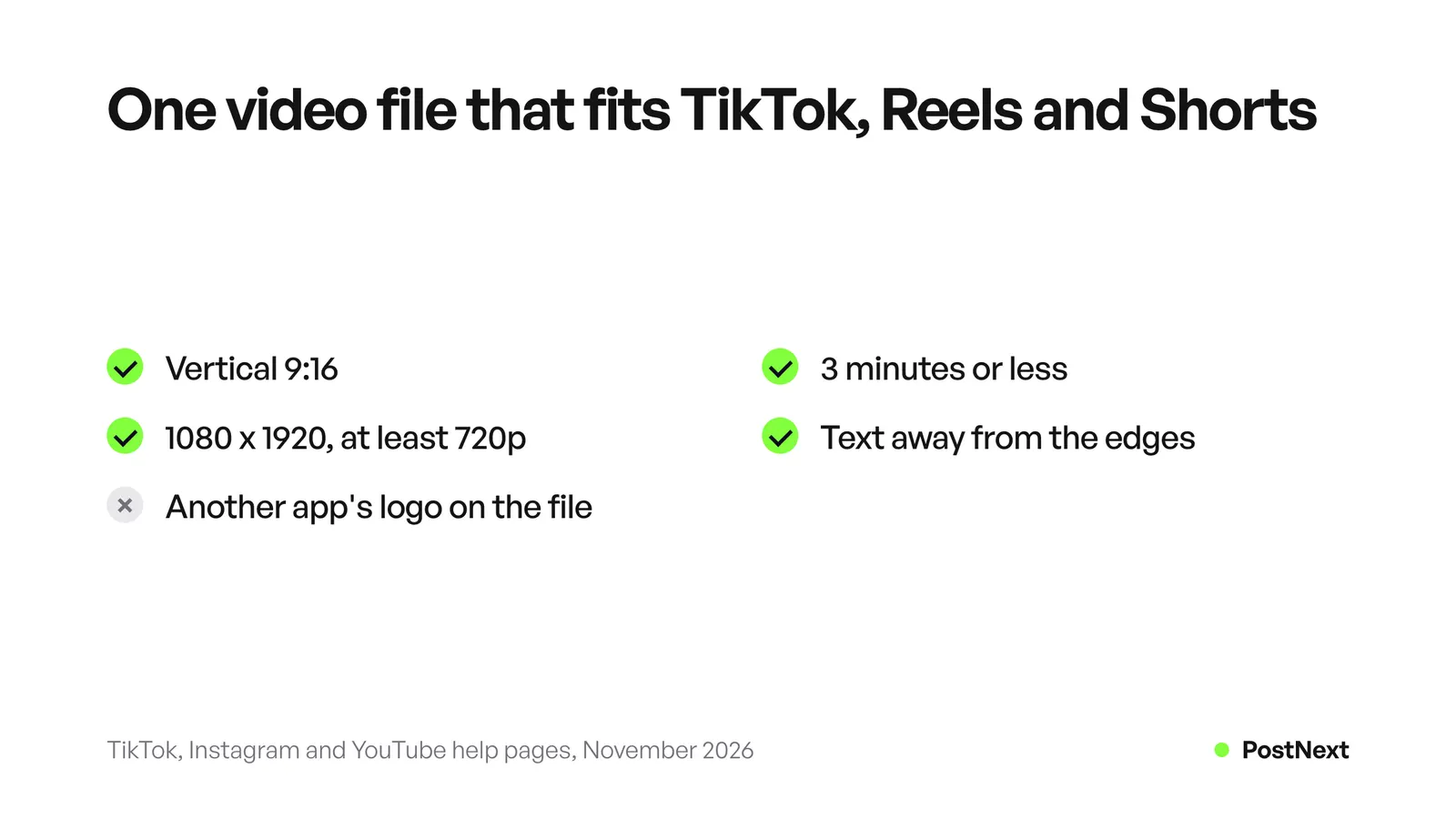
- Film vertically. 9:16 fills the screen on all three apps. On YouTube, a 16:9 video becomes a regular video instead of a Short.
- Cut to 3 minutes or less. At that length, the video can be a Short, a Reel that reaches new people and a TikTok any app can post.
- Export at 1080 x 1920. That size meets Instagram’s 720-pixel minimum and TikTok’s 720p advice, and it is the maximum YouTube names for Shorts from its camera.
- Keep text inside the middle of the frame. Each app covers the bottom with the caption and the right side with buttons.
- Never post a file with another app’s logo on it. Instagram has said it tries not to recommend Reels with logos from other apps, and said in 2024 that your own logo is fine (Social Media Today, October 2024). Save your edit from your editor, not from TikTok. Our guide on how to remove a TikTok watermark explains the clean ways to get your own file back.
Sound is the one part you cannot copy across. Trending sounds belong to each app. Add them in the app, or use your own voice and music you have the rights to.
Which short-form video length works best?
The best length is the shortest one that delivers the idea. TikTok’s ad guide says to introduce what the video is about in the first 3 seconds and to place the hook within the first 6 seconds. It also says that a viewer who finishes a longer video is a strong sign of interest to its recommendation system. So the length matters less than whether people stay to the end.
A single tip may need 20 seconds, and a tutorial needs the time each step takes. Stay at 3 minutes or less if the same file must work as a Short and as a Reel for new audiences.
How do you plan a week of short-form videos?
Plan three videos a week and make them in one sitting. On day one, pick three ideas and write the first line of each. On day two, film all three. On day three, edit and export one 9:16 file per video. Then schedule each file to TikTok, Reels and Shorts. At the end of the week, check which openings kept people watching.
- Pick three ideas. One that teaches, one that shows your work and one that answers a question from your comments.
- Write the opening line first. If you cannot say the point in one sentence, the idea is not ready.
- Film in one session. Same spot, same light, two or three takes of each.
- Edit one master file per video. 9:16, 3 minutes or less, captions on screen for people with the sound off.
- Schedule all three apps at once. Write a caption per app, then set the times.
- Review after seven days. TikTok shows retention rate, YouTube Studio shows “Stayed to watch” for Shorts, and Instagram reports a Reels skip rate for the first 3 seconds. Keep the formats that hold people and drop the rest.
How can PostNext post one video to TikTok, Reels and Shorts?
PostNext publishes one video to TikTok, Instagram Reels and YouTube from a single post in one calendar. You write the post once, pick the networks and choose a time. Each network gets its own version in the composer, so you can change the caption for each app before it goes out. PostNext does not edit or resize video, so upload the finished vertical file.
The channels page lists what each network accepts. For each app:
- TikTok: with Post directly on, the video publishes at its time with the privacy, comment, Duet and Stitch settings you chose. With it off, the video waits in your TikTok inbox, and it arrives there without its caption, so you type it again. PostNext has no sound library, so add a TikTok sound from the inbox. The TikTok scheduler page lists the daily limits.
- Instagram Reels: PostNext publishes through Instagram’s official API, waits for Instagram to process the video, and tells you if Instagram rejects it for length, format or aspect ratio. You can set the cover image, and you need a Business or Creator account. Trending audio cannot be added by any scheduler, as the Reels planner page explains.
- YouTube Shorts: upload a vertical video and YouTube decides whether it is a Short. YouTube in PostNext is open to a limited set of accounts while Google reviews the app, and videos upload as private for now, so you make them public in YouTube Studio. Our guide to scheduling YouTube Shorts covers YouTube’s own scheduler too.
Frequently Asked Questions
Can you schedule short-form videos for all three apps at once?
Yes. PostNext puts TikTok, Instagram Reels and YouTube on one calendar. You upload the finished vertical file, pick the apps, write a caption for each and set a time. It does not edit or resize video. TikTok videos wait in your inbox unless you turn Post directly on, and YouTube is open to a limited set of accounts.
Which apps have short-form content?
TikTok, Instagram with Reels and YouTube with Shorts are the three main ones, and each has its own feed of vertical videos. Each app sets its own length and quality rules, so check the table in this guide before you export your video for all three.
What are the different types of short-form content?
Most short videos do one of five jobs. They teach one thing, show work in progress, tell a short story, react to something or answer a question. Pick the job first, then the topic. The same five jobs work on TikTok, Reels and Shorts, so one idea can become one video for all three apps.
Can you post the same video on TikTok, Reels and Shorts?
Yes. Upload the same clean 9:16 file to each app. Do not upload a copy saved from TikTok with its logo, because Instagram says it tries not to recommend Reels with logos from other apps. Write a separate caption for each app.
What resolution should a short-form video be?
Export at 1080 x 1920 pixels. Instagram asks for at least 720 pixels and 30 frames per second, TikTok’s ad guide asks for at least 720p, and YouTube’s Shorts camera uploads at up to 1080p, so that size covers all three.
Is long-form or short-form content better?
Neither is better on its own, because they do different jobs. Short videos reach new viewers in the feeds. Long videos hold the detail for people who want it. Many creators post the long version as a regular video, then cut short clips from it that point back to the full video.
Sources
- TikTok Help Center, camera tools (checked November 2026): 10 minutes recorded, 60 minutes uploaded.
- TikTok for Developers, Content Posting API media transfer guide (checked November 2026): 3 minutes for every account, 5 or 10 for some; 360 to 4,096 pixels; 4 GB.
- TikTok for Business, creative best practices for performance ads (page updated June 2025, checked November 2026): 9:16, at least 720p, hook in the first 6 seconds, proposition in the first 3.
- TikTok newsroom, how TikTok recommends videos for you (June 2020, checked November 2026)
- Instagram Help, record a reel (checked November 2026): up to 20 minutes; over 3 minutes not recommended to new audiences.
- Instagram Help, reel size and aspect ratios (checked November 2026): 1.91:1 to 9:16, 30 frames per second, 720 pixels.
- YouTube Help, upload YouTube Shorts and Shorts up to 3 minutes (checked November 2026)
- YouTube Help, create YouTube Shorts (checked November 2026): Shorts camera uploads at a maximum of 1080p.
- YouTube Help, understand your content performance (checked November 2026): “Stayed to watch” for Shorts.
- TikTok Creator Academy, understanding TikTok analytics (checked November 2026)
- Meta for Developers, Instagram media insights reference (checked November 2026): Reels skip rate.
- Social Media Today, “Instagram Says Including Your Own Logo on a Reel Is Fine” (23 October 2024), quoting Adam Mosseri.
- PostNext channels, TikTok scheduler, Reels planner and YouTube scheduler pages, postnext.io (checked November 2026)