To promote a podcast, turn every episode into 3 to 5 short vertical clips with captions on screen. Post them across TikTok, Instagram Reels, YouTube Shorts, X and Threads in the 7 days after the episode comes out. Add a text post from the show notes, give each guest their clip, and put the full episode on YouTube as well as the audio apps.
Key Takeaways
- Clips do the finding: short video clips put the show in front of people who have never heard of it, where they already scroll.
- One episode, one week: cut 3 to 5 clips per episode and post one a day in the week after release, so each episode feeds a full week.
- Fit every platform with one file: a 9:16 clip under 140 seconds fits TikTok, Reels, Shorts, Threads and X, even for an X account without a subscription.
- Captions on screen: burn the words into the video, so a clip still works when someone scrolls with the sound off.
- YouTube counts twice: Shorts reach new viewers, and YouTube can turn an audio podcast’s RSS feed into full episodes on your channel.
- Guests are a second channel: send every guest their own clip and a ready caption on release day.
- Scheduling: PostNext schedules one clip to several networks from one calendar and drafts text posts from a transcript. It does not cut or edit video.
How do you promote a podcast on social media?
You promote a podcast on social media by posting short pieces of each episode where people already scroll, then pointing them to the full episode. Video clips go to TikTok, Instagram Reels, YouTube Shorts, X and Threads. Text posts built from the show notes go to LinkedIn, X and Threads. Each piece should make sense alone and end with the show name.
Each platform takes a slightly different piece from the same episode. The table shows what to post and the one limit that matters for a podcast clip, read from each platform’s own help or developer pages in November 2026.
| Platform | What to post from each episode | Limit to know for clips |
|---|---|---|
| TikTok | 1 or 2 vertical clips | Every account can post 3-minute videos through apps; some accounts get 5 or 10 minutes |
| YouTube Shorts | The same clips | A square or vertical video up to 3 minutes is a Short |
| Instagram Reels | The same clips | Aspect ratio from 1.91:1 to 9:16, at least 720 pixels and 30 frames per second |
| X | The best clip, plus a text thread | 140 seconds and 512 MB without an X subscription |
| Threads | A clip or a text post | One video per post, up to 5 minutes |
| A text post with the main lesson | Up to 3,000 characters per post |
What are podcast clips, and how long should they be?
A podcast clip is a short cut from an episode, usually one complete thought, posted as a vertical video with captions. Keep most clips under 140 seconds. That length fits every platform in the table above with one file, including X for accounts without a subscription. A clip that runs longer than its idea loses viewers before the point lands.
Two limits shape the upper end. TikTok’s developer documentation says every creator can post 3-minute videos, and only some can post 5 or 10 minutes. YouTube treats a square or vertical upload of up to 3 minutes as a Short. Our guide to how long YouTube Shorts can be covers what happens to a Short over one minute. X is the tightest: without a subscription, X’s help page allows videos up to 140 seconds. Our article on X video length has the limits for each X plan.
How do you pick the best moments for podcast clips?
Pick moments that make sense to a stranger who has never heard your show. The best clip has one idea, starts on a strong line, and ends when the idea ends. Look for a clear opinion, a short story with an outcome, a number or a surprising answer to a common question. Skip inside jokes and anything that needs the first half of the episode.
Use this test on every candidate: play the first 3 seconds to someone with no context. If they cannot tell what the clip is about, move the start to a later line. Three habits make picking faster:
- Mark moments while you record. Note the minute when a guest says something you want to clip. It saves an hour of searching later.
- Search the transcript. Many editing tools can make a transcript. Search it for “the mistake”, “the reason” and “what I learned”, which often sit right before a good answer.
- Pick different kinds of moments. From one episode, take one opinion, one story and one practical tip. Three clips that sound the same do the job of one.
A trailer clip for release day can be the strongest 30 seconds of the episode with one line of text: the episode title and where to listen.
How do you make podcast clips with captions?
Make each clip a 9:16 vertical video at 1080 x 1920, with the speaker’s face filling the frame and the words burned into the video as captions. Put the captions in the middle third of the screen, away from the app buttons at the bottom. Export one file and use it on every platform, so you edit once.
Video podcasts are the easy case. Crop the speaker from the wide shot, or cut between two speakers as they talk. Instagram’s help page says Reels need a frame rate of at least 30 frames per second and a resolution of at least 720 pixels, so export at 1080 x 1920 and 30 frames per second. Our Instagram Reel size guide shows where the app covers the frame with buttons.
Audio-only podcasts use an audiogram. An audiogram is a short video made from an audio clip: the show art or a still photo, a moving waveform and captions on top. It gives the clip something to look at, and the captions carry the meaning. A photo of the host at the microphone gives the viewer a person to listen to, which a plain logo does not.
Captions should be large, high contrast and short: three to six words on screen at a time. Check every caption against the audio before you export. Automatic captions get names and numbers wrong, and a wrong name in a guest’s clip is the one mistake they will notice.
What is a weekly podcast promotion routine?
A weekly podcast promotion routine is a fixed set of steps you repeat for every episode: pick the moments, cut the clips, add captions, schedule the week and answer comments. Doing it the same way every week takes less time than planning each episode from zero, and it keeps the show visible on the days between releases.
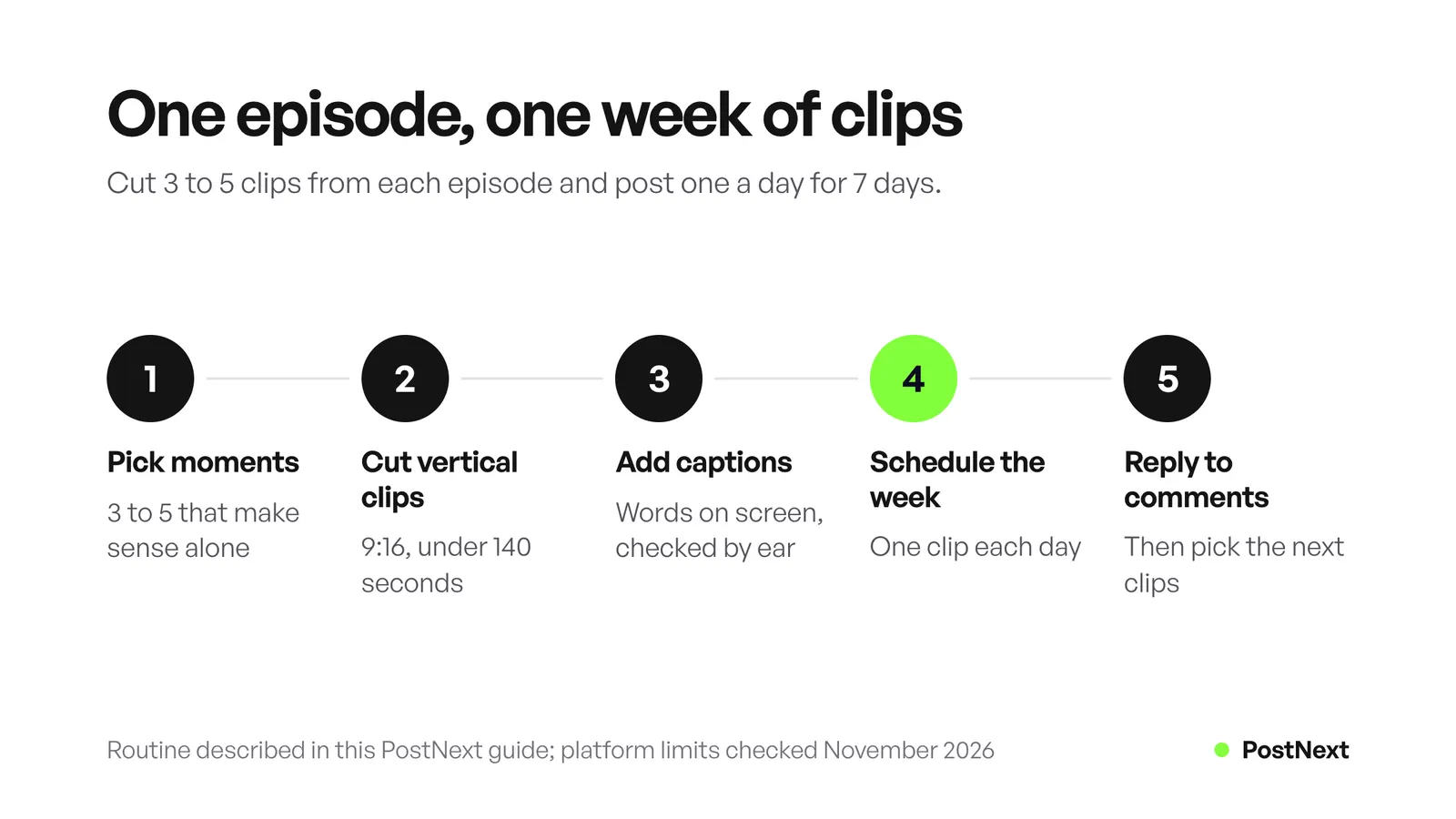
Here is one week for a show that releases on Monday. Move the days to match your own release day.
| Day | Post | Where |
|---|---|---|
| Release day | Trailer clip and a “new episode” post with the link | All video platforms, plus X, Threads and LinkedIn |
| Day 2 | Clip 1: the strongest opinion | TikTok, Reels, Shorts |
| Day 3 | Text thread: 5 lessons from the show notes | X and Threads |
| Day 4 | Clip 2: the best story | TikTok, Reels, Shorts, X |
| Day 5 | Text post: the main lesson, written for work | |
| Day 6 | Clip 3: the most practical tip | TikTok, Reels, Shorts, Threads |
| Day 7 | Reply to comments and pick the next episode’s clips | Every platform |
Batch the work. Cut all clips for an episode in one sitting, write the captions in one sitting and schedule the whole week at once. For a wider plan of what goes where, see our content distribution strategy.
Put one link in your bio that lists every listening app and the newest episode, so a viewer who likes a clip can find the show in the app they already use.
How do you promote a podcast on YouTube?
Promote a podcast on YouTube in two ways: post clips as Shorts, and put the full episodes on your channel. If your show is audio only, YouTube can take your RSS feed and make a video for each episode from your show art. Full episodes let people who find a Short keep listening without leaving YouTube.
YouTube’s help page on RSS delivery says it creates a static-image video from the podcast’s show art for each episode you choose, and uploads new episodes from the feed to your channel. Three details from the same page are worth knowing before you connect a feed:
- Availability: RSS delivery works in selected countries and regions only.
- First upload: the episodes you pick are uploaded as private videos first. YouTube suggests waiting until all of them are uploaded before you make the podcast public.
- Ads and sponsors: podcast content uploaded this way cannot contain advertisements, and host-read promotions or sponsorships must be declared as branded content.
You manage it in YouTube Studio, under Content and then Podcasts.
How do you turn show notes and transcripts into posts?
Turn show notes and transcripts into text posts by pulling out the 3 to 5 main points and writing each one as a post in plain words. One point becomes a LinkedIn post. Five points become a thread on X or Threads. A strong quote becomes an image post. The transcript already holds the words, so you edit instead of writing new.
- X thread: the episode’s main question as the first post, one lesson per post after it, the link in the last post.
- Threads: the same lessons. A Threads post holds 500 characters, so keep each lesson short.
- LinkedIn: one lesson told as a short story, up to 3,000 characters, written for people at work.
- Quote image: one sentence from the guest on a plain background with their name, posted as an image on Instagram, LinkedIn or Bluesky.
How do guests and other podcasts help promote a show?
Guests and other podcasters bring an audience that already listens to shows like yours. Send every guest their clip as a file, a quote image, a ready caption and the episode link on release day. Pick their clearest answer for the clip, so sharing it makes them look good. With other podcasters, trade a short mention or a trailer on each other’s shows. Both cost nothing but time.
How PostNext fits a podcast promotion week
PostNext is a social media scheduler. You upload a finished clip once, choose Instagram, TikTok and YouTube for it, and see the whole week on one calendar by day, week or month. PostNext does not resize or reformat video, so export each clip at 9:16 before you upload it. It does not cut clips or add captions either.
The scheduling calendar also takes text posts for X, Threads, LinkedIn and Bluesky, so the clips and the show-notes posts for one episode sit in the same week.
What each network does with a clip, from PostNext’s own pages (checked November 2026):
- TikTok: with Post directly on, the clip publishes at its time. With it off, the clip waits in your TikTok inbox, where you finish it in the app. A video arrives in the inbox without its caption, so you type it again there. The TikTok scheduler page lists every setting.
- Instagram Reels: published through Instagram’s official API with the audio already in your file. Add music before you export, because no scheduling tool can attach Instagram audio.
- YouTube: open to a limited set of accounts while Google reviews the app. For now, videos upload as private, and you make them public in YouTube Studio.
- X and Threads: clips and text posts, including multi-post threads.
- LinkedIn: text and image posts to personal profiles. PostNext does not post video to LinkedIn, so upload LinkedIn clips in LinkedIn.
For the text side, AI Repurpose takes a link or pasted text of at least 250 characters, such as your show notes or part of a transcript, and drafts posts for X, Instagram, LinkedIn and Threads. Each post lands in drafts for you to edit, and nothing publishes on its own. It cannot read audio or video files, so paste the transcript text. To script a trailer before you record it, the video script generator drafts a hook, the beats and a call to action.
Frequently Asked Questions
Where can I promote my podcast for free?
Post clips on TikTok, Instagram Reels, YouTube Shorts, X and Threads, and text posts on LinkedIn. All of them are free to use. Add the full episodes to YouTube, give guests their clips to share, and trade mentions with other podcasts. The only cost is your time for each episode.
How many clips should I make from one podcast episode?
Three to five clips is a good number for one episode. That gives you one new clip on most days of the week after release without repeating yourself. A long interview with several strong answers can give more. A short solo episode may give two. Pick by quality and stop when the good moments run out.
Should podcast clips be vertical or square?
Make them vertical, at 9:16 and 1080 x 1920. TikTok, Reels and Shorts are built around vertical video, and X and Threads show it too. YouTube also treats a square video of up to 3 minutes as a Short, but square leaves part of a phone screen empty in the vertical feeds.
Can I post the same podcast clip on TikTok, Reels and Shorts?
Yes. Export one 9:16 file without another app’s watermark and upload that file to each platform. Change the caption for each one if you like, because each audience reads a little differently. Posting the same clip on the same day across platforms is fine, because most people do not follow you everywhere.
Is an audiogram as good as a video clip?
A video clip shows a person talking, which gives the viewer more to watch. An audiogram is the right choice when the show has no video at all. Make it stronger with a photo of the host, large captions and a first line that states the topic, so the viewer knows why to listen.
How long does it take to promote one podcast episode?
Most of the time goes into picking moments and checking captions. Once the routine is fixed, the same steps repeat every week, and scheduling a whole week of clips takes one sitting. Track your own time for three episodes and cut the step that takes longest for the least result.
Sources
- TikTok for Developers, Content Posting API media transfer guide, duration restrictions (developers.tiktok.com, November 2026)
- YouTube Help, Shorts up to three minutes (support.google.com, November 2026)
- YouTube Help, Deliver podcasts using an RSS feed (support.google.com, November 2026)
- Instagram Help Center, Reel size and aspect ratios (help.instagram.com, November 2026)
- X Help Center, How to share and watch videos on X, archived copy of 11 November 2026 (help.x.com, November 2026)
- Meta for Developers, Threads API overview, video and text limits (developers.facebook.com, November 2026)
- LinkedIn Help, Share a post on LinkedIn (linkedin.com, November 2026)
- PostNext pages read on 21 November 2026: /creators, /channels/tiktok, /planners/reels, /channels/youtube, /channels/linkedin, /features/ai-repurpose