
OpenAI dots are always-on agents inside ChatGPT, launched on 29 September 2026. Each dot has its own cloud computer and browser, uses the plugins on your ChatGPT account and keeps working between conversations. For social media, a dot is best at research, drafts and weekly checks. Publishing works best through a connected scheduler such as PostNext, with you approving each post.
Key Takeaways
- A dot is a background worker. OpenAI says dots have “their own cloud computer, their own browser, and the apps you’ve connected” and keep “making progress between conversations”.
- One dot per person for now. Dots are on ChatGPT Pro, selected Plus users, and Business Standard and Premium seats, aged 18 and over, outside the EEA, Switzerland and the UK (OpenAI Help Center, November 2026).
- Plugins carry over. “Plugin permissions are shared across dots, ChatGPT, ChatGPT Work, and Codex”, so a scheduler you add to ChatGPT can be used by your dot.
- You can watch and take over. Open the dot’s computer at any time, press Take over to sign in yourself, then Return control.
- Writes are checked first. A separate system, Auto-review, checks planned actions against your instructions and Custom Rules before they run.
- TikTok bans tricks that bypass its systems. Its rules prohibit “automation tools, scripts, or other tricks designed to bypass our systems”, so post through an approved route, not a scripted browser.
What are OpenAI dots?
OpenAI dots are agents in ChatGPT that run all the time instead of only when you send a message. OpenAI introduced them on 29 September 2026 and calls them “always-on agents built to handle everything”. A dot has a cloud computer, a browser and your connected apps, takes recurring tasks and learns your preferences from feedback.
Three things separate a dot from a normal ChatGPT chat:
- It keeps going. A chat stops when the answer is written. A dot can keep working “even when you are not actively engaged”, in OpenAI’s words.
- It has a computer. The dot browses, opens files and uses apps on its own machine. You can open that machine to see what it is doing.
- It acts first. A dot looks for ways to help using your connected apps, but in that mode its tools are “restricted to be read-only” and “can’t send messages, change app content, or control your browser or computer”.
OpenAI launched dots on GPT-6 Astra and added GPT-6.1 Terra on 3 November 2026, saying “Your dot can draw on different models for different parts of its work.” You reach a dot in ChatGPT on desktop, web and mobile apps, and in Slack and Teams. The Help Center notes that dots are not supported on mobile web.
Who can use OpenAI dots, and what do they cost?
OpenAI dots are available to ChatGPT Pro users and selected Plus users aged 18 and over, in markets outside the European Economic Area, Switzerland and the UK, and on ChatGPT Business Standard and Premium seats (OpenAI Help Center, checked 26 November 2026). Each person gets one dot. OpenAI lists no separate monthly price for a dot.
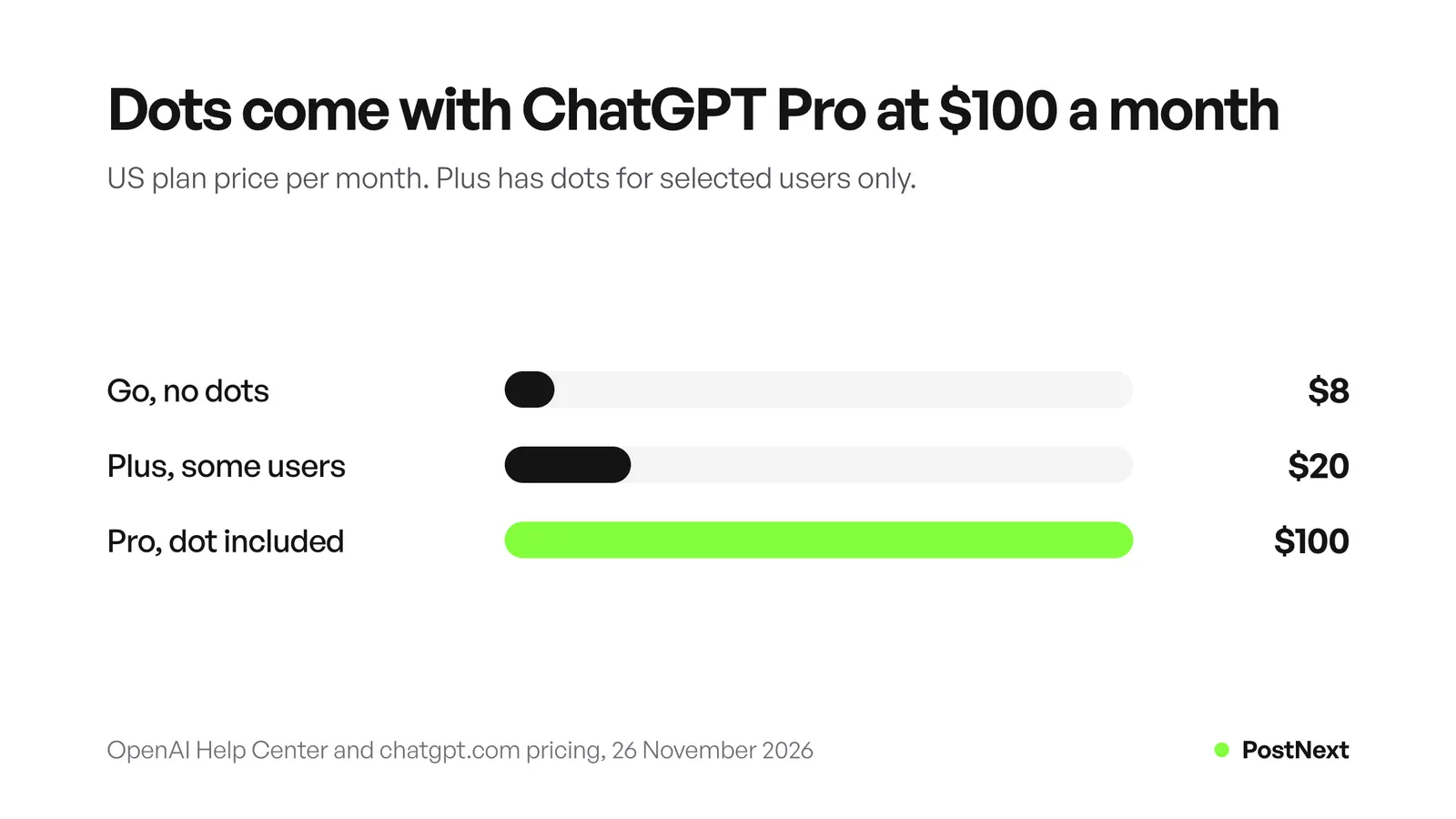
| Plan | Dots | Plan price (US, monthly) |
|---|---|---|
| ChatGPT Free, Go | No | $0, $8 |
| ChatGPT Plus | Selected users, rolling out | $20 |
| ChatGPT Pro | Yes, first dot included | $100 |
| Business Standard | One personal dot | Business from $25 per user |
| Business Premium | Yes, first dot included | See chatgpt.com/pricing |
| Enterprise, Edu | When the admin turns it on; billing from 14 January 2027 | Contact sales |
Sources: help.openai.com/en/articles/20001530, openai.com/index/introducing-dots, chatgpt.com/pricing, checked 26 November 2026.
Usage is counted in two parts. OpenAI says “Conversations with your dot don’t count toward your ChatGPT usage limits”, but tasks the dot starts in Codex or ChatGPT Work “count toward your usage limits as usual”. The Plus rollout is gradual, and OpenAI Support “is unable to enable it for you”. If dots do not appear on your account, you wait.
What can an OpenAI dot do for social media?
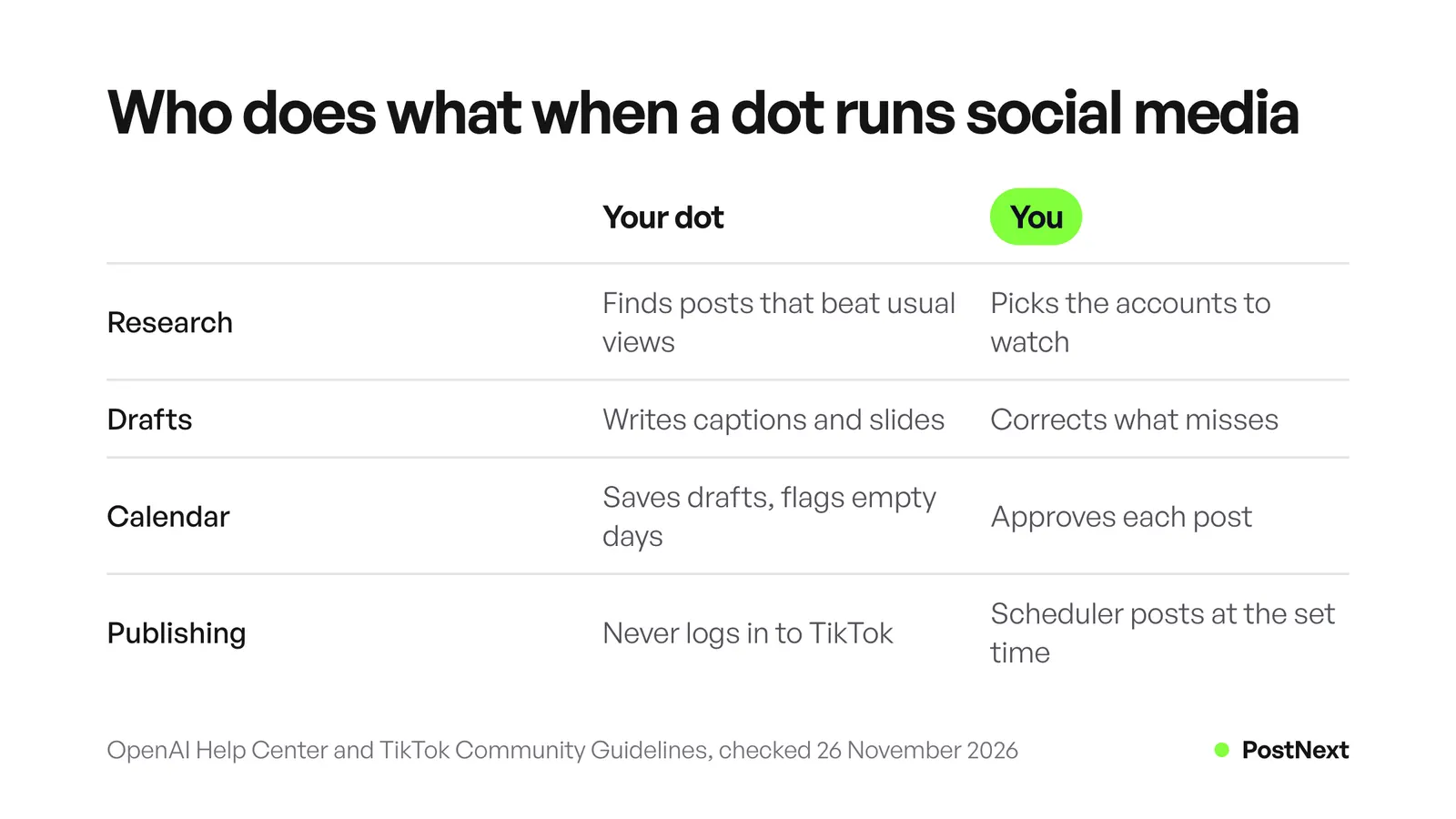
An OpenAI dot can research what is posted in your niche, keep a library of references, draft posts and slides from your brief, check your calendar for gaps and report results each week. It does this on a schedule, without you starting each task. Posting is the part to set up with care, because a dot’s own browser has no special access to TikTok or Instagram.
| Job | Give it to the dot? | How |
|---|---|---|
| Research top posts in your niche | Yes | Its own browser, a recurring task each morning |
| Keep a reference library | Yes | A doc or sheet the dot updates, with links and why each post worked |
| Draft captions and slide text | Yes | From your brief and the reference library |
| Make images | Test first | OpenAI’s dots pages name no image model |
| Check next week’s calendar for gaps | Yes | Through a scheduler plugin, read-only |
| Schedule approved posts | Yes, with rules | Through a scheduler plugin, Ask before taking action |
| Log in to TikTok or Instagram and post | No | Sites can block cloud browsers, and TikTok bans tricks that bypass its systems |
| Reply to comments as you | No | Keep replies human, or use a tool built for it |
Sources: help.openai.com/en/articles/20001529 and 20001530, tiktok.com/community-guidelines (integrity and authenticity), checked 26 November 2026.
The split follows one idea: a dot should do the reading and the first drafts, and a person should sign anything that goes out under the brand’s name. OpenAI’s own line is “Dots can still make mistakes, so always review consequential work.”
How do you set up a dot for social media?
Set up a dot for social media by giving it one job, a written brief, a place to store its research, and rules about what it may do without asking. Write the first message like a job description, not a chat. The dot learns the rest from your corrections, which OpenAI says build up over time.
- Write the job. “You run research and drafts for our TikTok and Instagram. You find posts that perform in our niche, explain why, and turn the patterns into drafts for our product. You never post. You send drafts to me.”
- Attach the brief. Who the customer is, what the product does, the words you use, real numbers you may quote, and posts you liked. Put it in a document the dot reads before each task.
- Give it a library. A Google Sheet or doc with one row per reference: link, format, hook, why it worked, idea for us.
- Set Custom Rules. OpenAI offers four behaviors: “Take action without asking”, “Take action if pre-approved”, “Ask before taking action” and “Hand off to you”. Set posting and scheduling to Ask before taking action.
- Correct, do not restart. When a draft misses, say what was wrong and why. OpenAI says “The more you work together, the more your dot learns your preferences.”
A limit to know: you “currently cannot view, delete, or directly modify individual dot memories”, per OpenAI’s Help Center. If the dot learns a wrong rule, correct it in chat and put the right rule in the brief, where you can see it.
How do you use an OpenAI dot for TikTok research?
Use a dot for TikTok research by giving it a recurring task: each morning, open TikTok in its browser, find posts in your niche from the last few days that beat the account’s usual views, and add each one to your library with the reason it worked. Ask for patterns, not ideas. A dot that copies a hook word for word gives you a post someone else already made.
A research task that returns useful rows:
- Scope. Five accounts or three search terms, not “TikTok”.
- Bar. Only posts with clearly more views than that account’s other recent posts.
- Fields. Link, format (video, photo post, talking head), the first line on screen, the structure slide by slide, the comment that shows why people cared.
- Output. Three rows a day, then stop. A library of 300 rows nobody reads is worse than 30 you use.
Expect friction. A dot’s cloud browser has its own sign-in sessions, and the Help Center says to “Complete the sign-in request, including any website verification, or use takeover to sign in yourself.” For sign-ins, OpenAI pauses the model while you type, so your password goes “directly to the browser environment… without exposing them to the model’s context”. A password pasted into a chat message is different: OpenAI warns it “may still be visible to the model”.
How do you turn one winning post into several drafts?
Turn one winning post into several drafts by keeping its structure and changing its content: the same number of slides or beats, the same kind of hook, but your product, your customer’s problem and your proof. Ask the dot for five variations that each change one thing, such as the hook, the scenario or the customer, and keep the rest.
This is where a dot’s memory pays off. After a few rounds of corrections (“too salesy”, “slide 3 needs a real number”, “never say the app name on slide 1”), the dot’s drafts start closer to what you approve. Write each correction into the brief as well, so it survives if you ever reset the dot.
For TikTok photo posts and Instagram carousels, the dot writes the text and order of the slides. Making the slides themselves is a separate step: OpenAI’s dots pages name no image model, so test the dot’s images against what you need, or build the slides in a design tool or an AI carousel maker. Our guide on how to make a TikTok slideshow covers the photo post format: up to 35 photos, swiped through one by one.
How does a dot schedule and post social media?
A dot schedules social media through a plugin on your ChatGPT account. You add a scheduler as a plugin in ChatGPT, check that it is turned on in the dot’s plugin list, and the dot can then save drafts and schedule approved posts. OpenAI says “permission to read information may not include permission to change it”, so check what the plugin may write.
The safe pattern has three parts:
- Drafts first. Ask the dot to save every post as a draft and send you the plan, never to publish.
- Ask before taking action. Set that Custom Rule for scheduling. OpenAI says Auto-review checks planned actions “against your instructions, Custom Rules, and safety requirements” before they run.
- A calendar you can read. Approve posts where you see the whole week, so two posts on the same topic on one day stand out.
Why not let the dot log in to TikTok and post? TikTok’s community guidelines say “We strictly prohibit automation tools, scripts, or other tricks designed to bypass our systems”, with “content removal, account bans, or other enforcement”. They also require creators to “label AI-generated or significantly edited content that shows realistic-looking scenes or people”. A scheduler that posts through TikTok’s official API stays on the approved route, and you still set the AI label when the content needs one.
How does PostNext work with OpenAI dots?
PostNext works with OpenAI dots as a plugin: you add PostNext as a custom MCP server in ChatGPT, sign in, and check that PostNext is turned on in your dot’s plugins. Your dot can then plan posts, save drafts and schedule approved posts to X, Instagram, LinkedIn, TikTok and Threads. Setup takes about four minutes. Steps from the OpenAI dots setup guide, checked against OpenAI’s docs on 18 November 2026.
- In ChatGPT on the web, open Plugins, select the plus button and choose Add custom MCP server. Paste
https://mcp.postnext.io/apiand choose OAuth. - Create and install the plugin, then approve the PostNext sign-in.
- Open your dot’s profile, then Customize and Plugins, and check that PostNext is on.
- Give the dot its job: “Every Monday at 9:00, plan five posts for TikTok and Instagram from our library. Save them as drafts and send me the plan.”
Two limits come from OpenAI’s help pages. Full custom MCP access, including write tools, is on Business, Enterprise and Edu, while Pro can connect custom servers with read access, so on Pro your dot can read your PostNext calendar and results but may not be able to save drafts. And OpenAI says dots can use the plugins on your account but that the apps available may differ, so test with one small request first. Every post the dot makes waits on your PostNext calendar until you approve it, and PostNext’s MCP never publishes a draft on its own. For the bigger picture of agents that post, read what a social media AI agent is. Meta’s agent runs the same weekly loop from WhatsApp: see how to use Meta Muse for social media marketing.
Frequently Asked Questions
What are OpenAI dots?
OpenAI dots are always-on agents in ChatGPT, introduced on 29 September 2026. Each dot has its own cloud computer and browser, uses the apps you connect to ChatGPT, runs recurring tasks and learns your preferences from feedback. It keeps working between conversations.
How much do OpenAI dots cost?
OpenAI lists no separate price for a dot. Your first dot is included with ChatGPT Pro ($100 a month in the US) and Business Premium, Business Standard seats get one personal dot, and selected Plus users ($20 a month) are getting access gradually, as of 26 November 2026.
Can an OpenAI dot post to TikTok?
A dot has no TikTok plugin of its own. It can post through a scheduler plugin that publishes with TikTok’s official API, such as PostNext. Logging the dot’s browser in to TikTok is risky, because TikTok prohibits automation tools and tricks designed to bypass its systems.
Does an OpenAI dot need my computer to stay on?
No. A dot works on its own cloud computer, so it keeps going when your laptop is closed. The Help Center says a dot can use your local browser when its cloud browser is blocked, which needs your computer, so check where it is working before you close it.
How do you train an OpenAI dot?
Give it a job description and a written brief in the first message, then correct its work as you go. OpenAI says the dot learns your preferences over time. You cannot view or edit its memories directly, so keep important rules in the brief document as well.
Are OpenAI dots available in the UK and EU?
Not yet for personal plans. OpenAI’s Help Center lists dots for Pro and selected Plus users aged 18 and over in markets excluding the European Economic Area, Switzerland and the UK, as of 26 November 2026.
Sources
- OpenAI, Introducing dots and How we build safety, security and privacy into dots (checked 26 November 2026).
- OpenAI Help Center, Dots in ChatGPT, Dots privacy and safety FAQ and ChatGPT release notes (checked 26 November 2026).
- OpenAI, ChatGPT pricing and usage policies (checked 26 November 2026).
- TikTok, Community Guidelines: integrity and authenticity (checked 26 November 2026).
- PostNext, OpenAI dots setup guide, MCP server and TikTok scheduler (checked 26 November 2026).