
A unified social media inbox puts comments, direct messages, mentions and reviews from several networks into one list your team can answer. We checked 14 social media inbox tools on their own pages in November 2026. Comments are covered almost everywhere; DMs and reviews are where tools differ most. This PostNext guide shows what each inbox collects, per message type.
Key Takeaways
- Check message types, not logos: a tool can connect a network and still not show its DMs. NapoleonCat states private messages for Facebook and Instagram only.
- Instagram DMs follow Meta’s rules in every tool: the person writes first, and most replies must go out within 24 hours.
- Three kinds of tool sell an inbox: social media suites (Agorapulse, Hootsuite, Sprout Social), support desks (Chatwoot, Trengo) and APIs for developers (Zernio).
- Reviews are rarer than DMs: of the 14 pages, Agorapulse, NapoleonCat, ContentStudio, Statusbrew, Zoho Social, Sprout Social and Zernio name reviews.
- Most tools offer a free trial: 10 of the 14 pages state one; Zernio states a free tier for 2 accounts.
- PostNext’s inbox is narrow on purpose: Instagram comments only, on every plan including Free.
What is a unified social media inbox?
A unified social media inbox is one screen that collects the comments, direct messages, mentions and reviews from your connected social accounts, so a team can read, assign and answer them without opening each app. Most tools add saved replies, a way to assign a message to a teammate, and filters for spam. Some add rules or AI that sort, tag or answer messages.
The word “unified” hides a lot of variation. One tool unifies comments from eight networks and DMs from two. Another unifies DMs from twelve messaging apps and no comments at all. Before comparing features, list the networks you use and the message types you get on each. That list decides the tool more than any feature page does.
Teams usually start looking when one of three things happens: a message waits a day because nobody saw it, two people answer the same customer, or a manager cannot tell how fast the team replies. A shared inbox with assignment fixes the first two.
Which social media inbox tools cover DMs, comments and reviews?
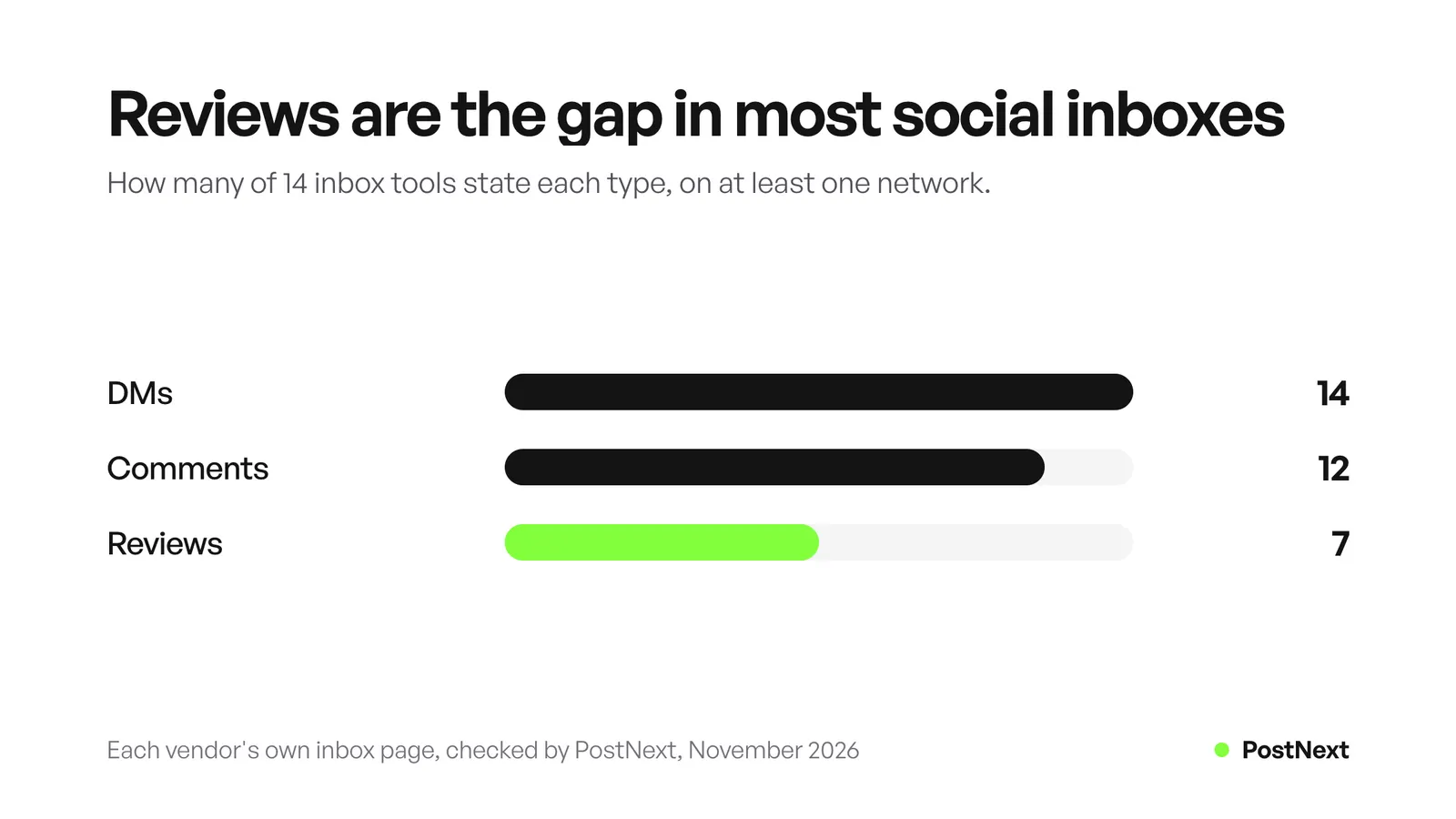
Of the 14 social media inbox tools we checked, 12 state comments, all 14 state DMs on at least one network, and 7 name reviews. The table lists what each tool’s own page says it collects, in November 2026. “Not stated” means the page does not say it, which is different from saying the tool lacks it. Ask the vendor before you rely on a blank.
| Tool | Networks the inbox names | Comments | DMs | Reviews | Assign to a teammate |
|---|---|---|---|---|---|
| Agorapulse | Facebook, Instagram, Threads, LinkedIn, X, YouTube, Google, TikTok | Yes | Yes, split per network not stated | Yes | Yes |
| Hootsuite | Facebook, Instagram, WhatsApp, LinkedIn, X, TikTok, Threads | Yes | Yes on Facebook, Instagram, LinkedIn, X | Not stated | Yes |
| Sprout Social | Connected profiles, list not on the inbox page | Yes | Yes | Through Review Management | Case assignment |
| NapoleonCat | Facebook, Instagram, TikTok, LinkedIn, YouTube, Google, app stores | Yes | Facebook and Instagram only | Facebook, Google, app stores | Yes |
| Sendible | Not stated on the feature page | Yes | Yes | Not stated | Yes |
| ContentStudio | Facebook, Instagram, X, LinkedIn, Google Business Profile | Yes, including ads | Yes | Yes | Yes |
| Statusbrew | 10+ social, messaging and review channels | Yes | Yes | Yes | Rule-based routing |
| Vista Social | Not stated on the help page | Yes | Yes | Not stated | Yes, as tasks |
| Zoho Social | Facebook, Instagram, LinkedIn, X, Google, YouTube, TikTok, WhatsApp, Telegram, Threads, Bluesky | Yes | Yes | Yes | Assignee views |
| Planable | Facebook, Instagram, LinkedIn, TikTok | Yes | Instagram and Facebook only | Not stated | Not stated |
| Loomly | Instagram and Facebook on its DM page | Yes | Yes | Not stated | Yes |
| Chatwoot | Instagram, Facebook, WhatsApp, TikTok, X, Telegram, email, chat | Not stated | Yes | Not stated | Not stated |
| Trengo | WhatsApp, Instagram, Messenger, TikTok, Telegram, email, chat | Not stated | Yes | Not stated | Tagging colleagues |
| Zernio | 15 platforms in its logo list, API product | Yes | Yes | Facebook and Google | Not stated |
Each vendor’s own inbox feature or help page, checked November 2026. No prices: plans change often, so check each pricing page.
Two patterns stand out. Social media suites start from comments and add DMs network by network. Support desks such as Chatwoot and Trengo start from messaging apps and email, and their pages do not mention public comments. If your customers ask questions under your posts, a support desk alone will miss them.
Why do inbox tools miss some Instagram and TikTok DMs?
Inbox tools miss some DMs because each network decides what its API shares. Instagram shares DMs only for professional accounts, through Meta’s Messaging API, and a business can reply only after the person writes first, usually within 24 hours. Personal accounts, group chats and some message types never reach a third-party inbox, whatever the tool promises.
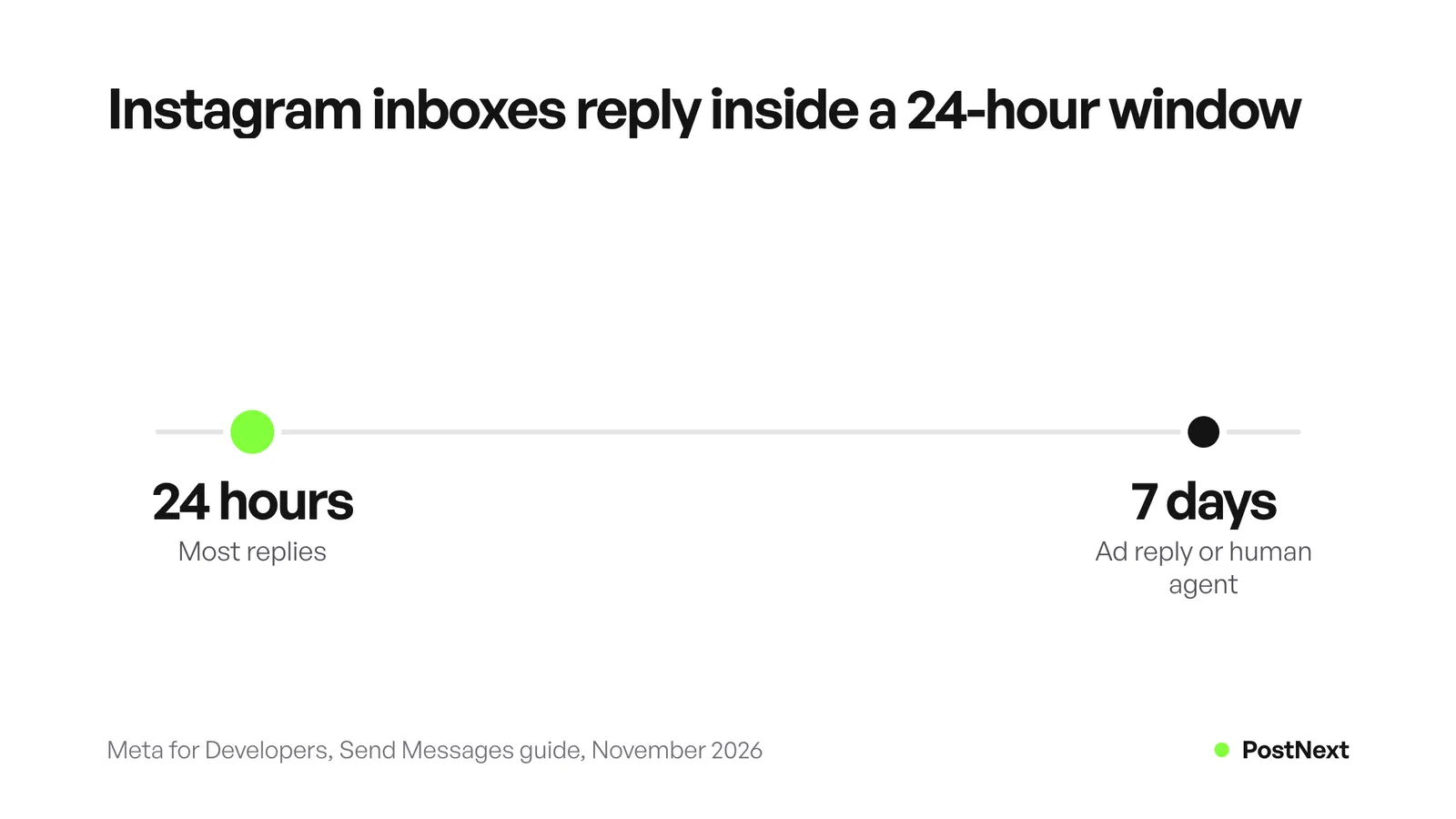
Meta’s Send Messages guide sets the rules every Instagram inbox follows. Your app can send a message “only after” the person has messaged your professional account. The reply window lasts 24 hours for most actions, up to 7 days after a Click-to-Direct ad, and a separate 7-day window applies when a human agent answers with Meta’s human agent tag. Group messaging is not supported.
Vendors list the gaps when they are honest about them. Planable states that it does not support personal profile messages, Instagram voice messages, reactions or group chats. NapoleonCat’s FAQ limits private messages to Facebook and Instagram. Trengo counts a message after 7 days as a new conversation. Read the “what is not supported” part of the help page before the feature page.
Social inbox, support desk or API: which type do you need?
The type of inbox tool you need depends on where your conversations start. Choose a social media suite when most questions arrive as comments under posts. Choose a support desk when most arrive as private messages and email. Choose an API when you want to build the inbox into your own product. Mixing up the three is the most common buying mistake.
| Type | Starts from | Good at | Watch for | Examples |
|---|---|---|---|---|
| Social media suite | Posts and their comments | Comments, mentions, ad comments, publishing in the same tool | DM coverage varies per network | Agorapulse, Hootsuite, Sprout Social, NapoleonCat, Sendible, ContentStudio, Statusbrew, Vista Social, Zoho Social, Planable, Loomly |
| Support desk | Private messages and email | Tickets, routing, chat, WhatsApp, help-centre answers | Public comments not stated | Chatwoot, Trengo |
| API for developers | Your own app | Webhooks for new messages, custom screens | You build and host the inbox | Zernio |
Vendor pages, checked November 2026.
An API product is not a ready inbox for a team. Zernio’s page describes webhooks for new comments, messages and reviews, and an MCP server for AI agents. That suits a software company building its own product. A team that wants to log in and answer today needs one of the first two types.
The 14 social media inbox tools, one by one
Each of the 14 social media inbox tools below is described from its own pages in November 2026: the networks and message types it names, how it assigns work, and what it automates. Prices are left out on purpose, because they change often and vary by seat and account count. A free trial is mentioned only where the page states one.
1. Agorapulse
Agorapulse’s inbox covers post comments, mentions, private messages and reviews across Facebook, Instagram, Threads, LinkedIn, X, YouTube, Google and TikTok. Its Inbox Assistant can review, hide, delete, assign or bookmark items by keyword, and AI suggests replies to private messages. Saved replies are on the Advanced and Custom plans, and collision detection needs Professional or higher. Ad comments sync for Facebook, Instagram, LinkedIn and TikTok.
2. Hootsuite
Hootsuite’s inbox names Facebook, Instagram, WhatsApp, LinkedIn, X, TikTok and Threads. It lists private messages and comments on Facebook, DMs, comments and mentions on Instagram, and DMs and mentions on X. Teams can assign messages, see who else is replying and use saved replies. The page also lists auto-responders, Instagram DMs sent on a keyword comment and AI that routes messages. YouTube comments sit in Streams, not the inbox. A free trial is stated.
3. Sprout Social
Sprout Social’s Smart Inbox shows comments, DMs and mentions from connected profiles in one stream, with custom views, message tags, bulk actions and collision detection. Its engagement page adds case assignment, AI reply suggestions and Review Management for the Apple App Store, Google, Yelp and Tripadvisor. The inbox page does not list networks. A free trial is stated.
4. NapoleonCat
NapoleonCat connects Facebook, Instagram, TikTok, LinkedIn, YouTube, Google Business Profile and both app stores, including ad accounts. Its FAQ limits private messages to Facebook and Instagram, while comments and mentions cover the rest. It offers reply templates, task assignment, rule-based and AI spam removal, and AI reply suggestions that wait for your approval. A 14-day free trial is stated.
5. Sendible
Sendible’s Priority Inbox page promises “every comment, mention and message” in one place and lets you assign messages to a teammate. The feature page does not name the networks or say whether saved replies or automation exist, so check Sendible’s help centre for the per-network list before you buy. A free trial is stated.
6. ContentStudio
ContentStudio’s inbox FAQ names Facebook, Instagram, X, LinkedIn and Google Business Profile, with direct messages, post and ad comments, mentions and reviews. Teams can route a conversation to a teammate, add private notes and use a library of saved replies. The page does not mention inbox automation or AI. A 7-day free trial with no card is stated.
7. Statusbrew
Statusbrew covers 10+ social, messaging and review channels, including Facebook and Instagram comments and TikTok DMs. A rule engine moderates, routes and labels messages, and the inbox offers saved, suggested and automatic replies. AI adds sentiment, summaries and translation in 10 languages, and replies drafted through MCP wait for your confirmation. A 14-day free trial is stated.
8. Vista Social
Vista Social’s help centre describes an inbox where you view and answer comments and messages, assign any conversation as a task, and leave internal notes for teammates. Facebook, Instagram and TikTok update in real time; other networks refresh on a schedule of several hours. Macros run several actions in one click, and sentiment analysis is on the Enterprise plan.
9. Zoho Social
Zoho Social’s inbox names eleven networks, from Facebook and Instagram to WhatsApp, Telegram, Threads and Bluesky. It sorts items into comments, messages, reviews, mentions, dark comments and questions. Saved replies are capped at 280 characters, and Zia, Zoho’s AI, drafts replies and marks sentiment. The help page notes that TikTok is not available in the inbox in India.
10. Planable
Planable’s Social Inbox is an add-on with a 30-day trial. It collects comments from Facebook, Instagram, LinkedIn and TikTok, including Facebook and Instagram ad comments, and DMs from Instagram and Facebook professional accounts. AI drafts replies and sorts comments into negative, questions and positive. Planable lists what it does not support: personal profile messages, Instagram voice messages, reactions and group chats.
11. Loomly
Loomly’s automated DMs page covers comments and DMs on Instagram and Facebook. It assigns conversations to teammates, routes them in real time, and offers saved responses for common questions. Auto-replies run on rules, keywords or AI-detected intent. A 15-day free trial with no card is stated.
12. Chatwoot
Chatwoot is an open-source support desk you can host yourself. It connects website chat, email, WhatsApp, Facebook Messenger, Instagram DMs, TikTok, X, Telegram, LINE and SMS. Its channel page does not mention post comments, mentions or reviews, so it fits teams whose customers write privately. A 15-day free trial with no card is stated.
13. Trengo
Trengo’s omnichannel inbox joins WhatsApp, Instagram DMs, Messenger, TikTok, Telegram, email, live chat, SMS and calls. Workflows, auto-close and AI that answers common questions run on top. A conversation lasts 7 days, and later contact opens a new one. Its page does not mention comments or reviews. A free trial is stated.
14. Zernio
Zernio sells an inbox API for developers. Its page shows 15 platforms, comments, DMs, Facebook and Google reviews, three email providers, webhooks for new items and an MCP server for AI agents. You build the screens your team uses. Counts differ across Zernio’s own pages, so confirm the platform list in its documentation. The page states a free tier for the first 2 social accounts.
How do you choose a social media inbox tool?
To choose a social media inbox tool, write down the networks you use and the message types each one brings you, then keep only the tools whose own pages state those types. Test the shortlist for a week with your real accounts. The test shows gaps no feature page admits: missing DMs, slow sync and answers that do not post back.
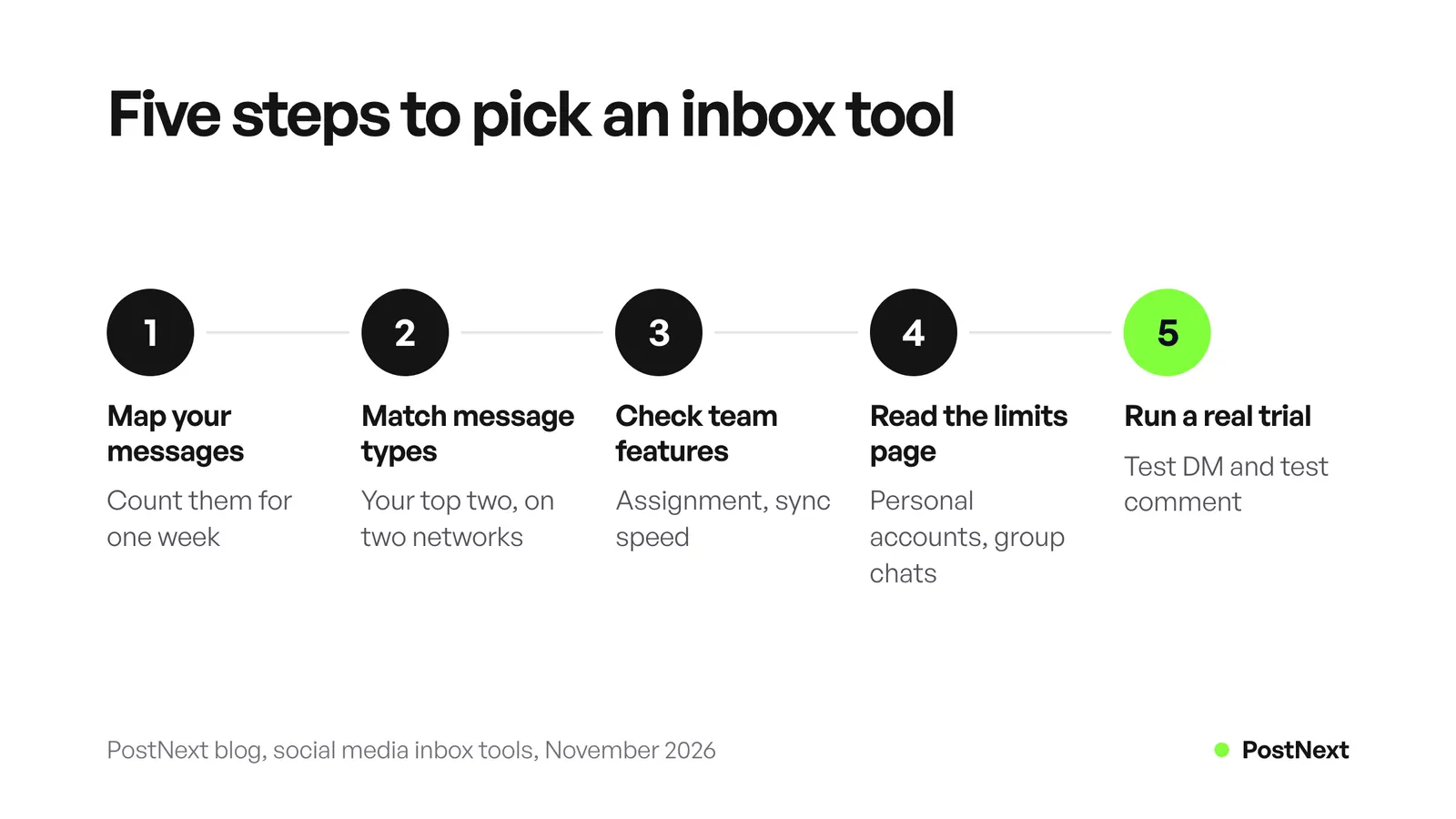
- Map your messages. For one week, count where questions arrive: comments, DMs, mentions or reviews, on which network.
- Match types, not networks. Keep tools that state your top two types on your top two networks.
- Check the team features. Assignment, collision detection, saved replies and internal notes matter once two people answer.
- Check sync speed. Some tools update a few networks in real time and others every few hours.
- Read the limits page. Look for personal accounts, group chats, voice messages and old conversations.
- Run a real trial. Send a test DM and a test comment from a second account on each network and answer them from the tool.
If public replies matter most, our guide to managing social media comments and messages has reply targets per message type. Agencies comparing inboxes alongside approvals and reports can use the agency tools comparison.
Where does PostNext fit?
PostNext is a scheduler with a small inbox: you can read, answer and delete comments on your recent Instagram posts, on every plan including Free. It does not collect DMs, mentions or reviews, and it does not cover other networks. A team that needs one inbox for every network should pick one of the tools above and keep PostNext for planning and publishing.
The PostNext comment inbox fits creators and small teams whose conversations happen under Instagram posts. You schedule a Reel in PostNext, and you answer its comments in the same app. For the wider list of inbox tools PostNext’s own site tracks, see the community management and inbox alternatives.
If your Instagram posts ask people to comment a word for a link, a DM tool does that job. CreatorFlow’s comment-to-DM automation sends the link by DM to each person who commented, within Meta’s rules. The Instagram DM automation guide explains those rules.
Frequently Asked Questions
What is a social inbox?
A social inbox is a screen in a social media tool that collects comments, direct messages, mentions and reviews from connected accounts. A team reads and answers them in one place instead of opening each app. Most social inboxes add saved replies and a way to assign messages to teammates.
Which social media inbox tool covers the most networks?
On their own pages in November 2026, Zoho Social named eleven networks and Zernio showed 15 platforms, though Zernio is an API for developers. Agorapulse named eight networks. Coverage per message type matters more than the count, so check DMs and reviews network by network.
Can a social media inbox show Instagram DMs?
Yes, for Instagram professional accounts, through Meta’s Messaging API. The tool can reply only after the person writes first, usually within 24 hours. Personal accounts, group chats and some message types do not reach third-party inboxes.
Is there a free unified social media inbox?
Most tools offer a free trial rather than a free plan: 10 of the 14 pages we checked state a trial. Zernio states a free tier for 2 accounts, and PostNext’s Instagram comment inbox works on its Free plan. Chatwoot is open source and can be hosted yourself.
What is the difference between a social inbox and a help desk?
A social inbox starts from your posts and collects comments, mentions and messages from social networks. A help desk starts from private conversations such as email, chat and WhatsApp, and turns them into tickets. Some help desks connect Instagram DMs but do not show public comments.
Do I need a unified inbox for a small business?
Not always. If one person answers and most questions arrive on one network, the network’s own app may be enough. A unified inbox pays off when two or more people answer, or when messages arrive on three or more networks.
Sources
- Meta for Developers, Send Messages, Instagram API with Instagram Login, updated September 28, 2026, checked November 2026.
- Agorapulse, social media inbox feature page (agorapulse.com/features/social-media-inbox), checked November 2026.
- Hootsuite, social media inbox page (hootsuite.com/platform/social-media-inbox), checked November 2026.
- Sprout Social, Smart Inbox and engagement feature pages (sproutsocial.com/features/smart-inbox), checked November 2026.
- NapoleonCat, Social Inbox feature page and FAQ (napoleoncat.com/features/social-inbox), checked November 2026.
- Sendible, Priority Inbox feature page (sendible.com/features/priority-inbox), checked November 2026.
- ContentStudio, social inbox page (contentstudio.io/social-inbox), checked November 2026.
- Statusbrew, engagement page (statusbrew.com/social-media-engagement), checked November 2026.
- Vista Social, help article “Getting started with the Social Inbox” (support.vistasocial.com), checked November 2026.
- Zoho Social, help article “Interact using Inbox” (help.zoho.com), checked November 2026.
- Planable, Social Inbox guide (planable.io/guides/planable-social-inbox), checked November 2026.
- Loomly, automated DMs page (loomly.com/automated-dms), checked November 2026.
- Chatwoot, channels page (chatwoot.com/features/channels), checked November 2026.
- Trengo, omnichannel inbox page (trengo.com/products/omnichannel-inbox), checked November 2026.
- Zernio, social media inbox page (zernio.com/social-media-inbox), checked November 2026.
- PostNext: comment inbox feature page, inbox alternatives page and llms.txt, checked November 2026.