
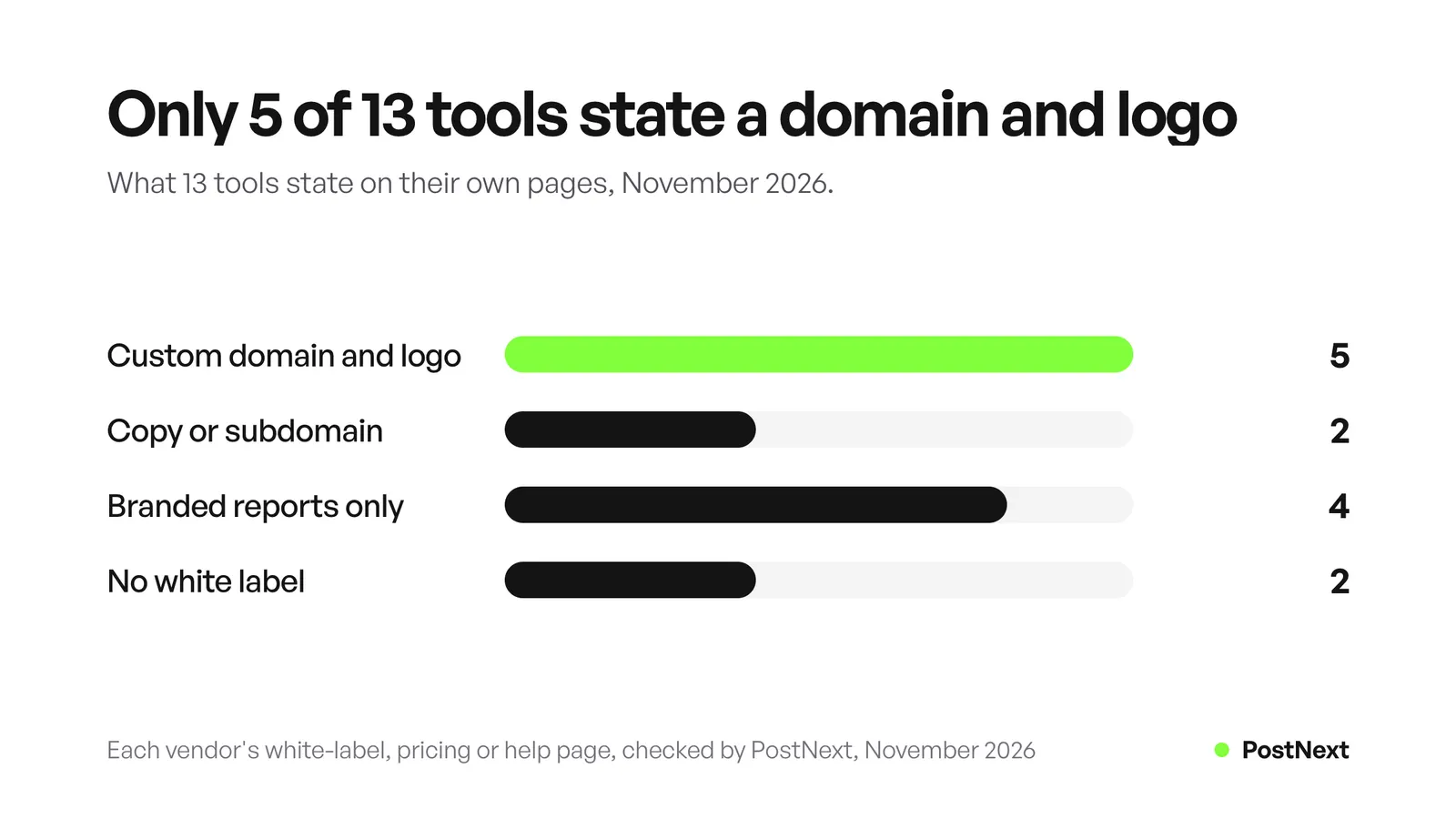
White label social media management means selling social media software or services under your own brand. For software, Sendible, SocialPilot, ContentStudio, Vista Social and Cloud Campaign state a custom domain and your logo in the app, in November 2026. On the pages we read, Agorapulse, Hootsuite and Sprout Social state report branding only. This PostNext guide checks 13 tools layer by layer.
Key Takeaways
- Two meanings share one phrase: white-label software you rebrand, and done-for-you social media services an agency resells under its name.
- White label has six layers: domain, logo in the app, login page, reports, emails and the screens clients use. Few tools state all six.
- Report branding is the common layer: Agorapulse lists white-label reporting on all four of its plans; Sprout Social puts your logo on PDF reports on Professional and Advanced.
- Some tools say no: SocialBee’s help centre says it does not offer a white-label version, and Planable’s says it no longer does.
- The vendor’s name can still appear: Vista Social keeps X off the white-labeled dashboard, and Zernio’s docs say the network’s own sign-in screen still names Zernio.
- Building is the third route: Zernio and Ayrshare sell APIs with branded connect screens for agencies that build their own scheduler.
What does white label social media management mean?
White label social media management has two meanings. For software, it is a scheduling and reporting tool you rebrand, so clients see your domain, logo and reports, never the vendor’s name. For services, it is social media work done by another company and sold to your clients under your agency’s name. Search results mix the two, so check which one a page sells.
Most pages that rank for the phrase sell software. Sendible, ContentStudio and SocialPilot each run a white-label page, and several roundups compare such tools. Agency directories list service providers that write and post content for you. SocialBee’s ConciergeBee is an example from a software company that also sells white-label content services.
A third route appears when people search for a “white label social media scheduler”: building your own product on a social media API. Zernio and Ayrshare sell APIs for this, with connect screens that show your brand. That route needs developers, and it gives you the most control over what clients see.
What can a white-label tool rebrand?
A white-label tool can rebrand six layers. They are the web address clients open, the logo and colours inside the app, and the login page. The other three are the PDF reports, the emails the app sends, and the screens clients use to approve posts or connect accounts. A tool that brands only the reports is a reporting feature, not a white-label platform. Ask the vendor which layers your plan includes.
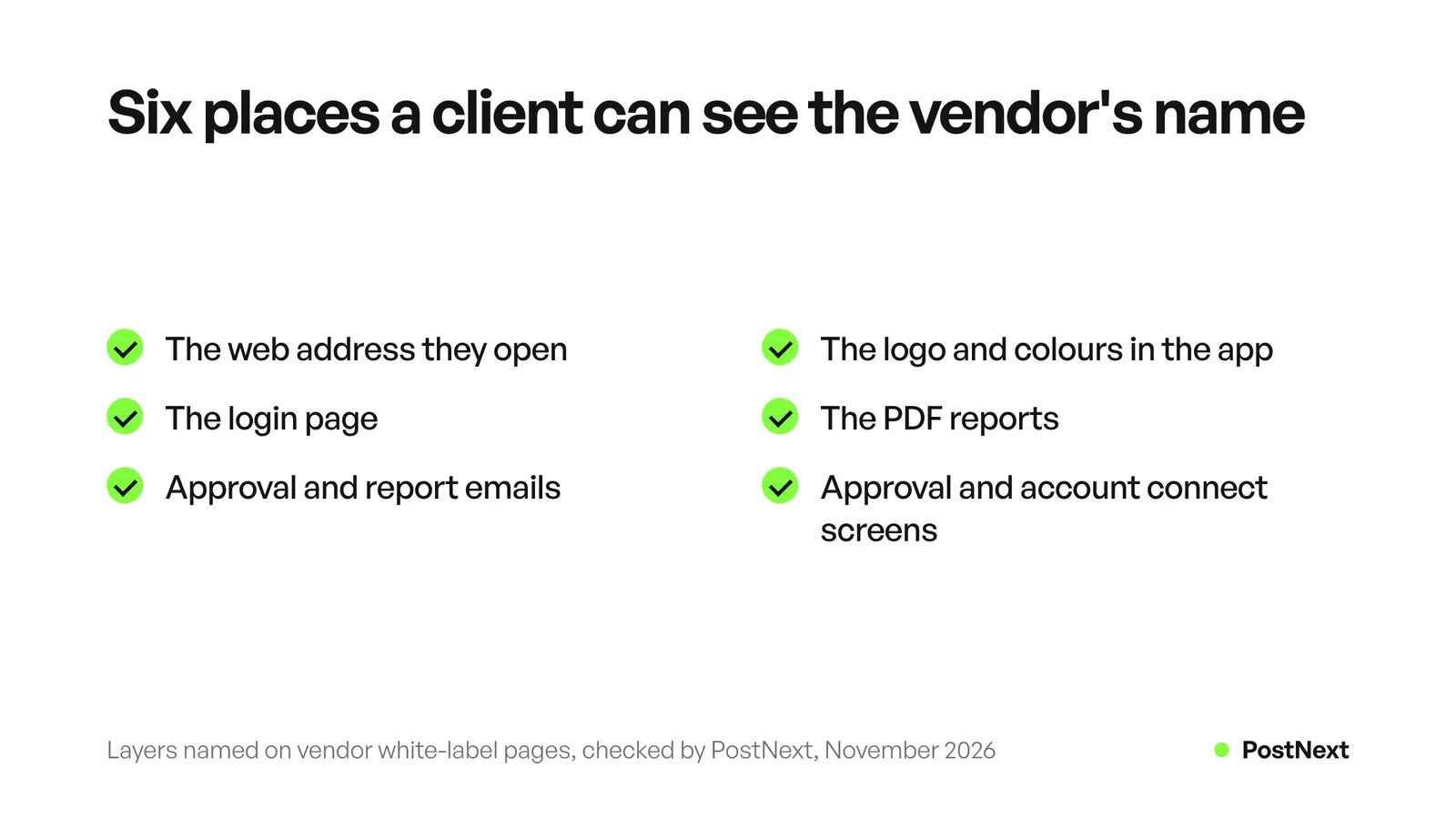
| Layer | What the client sees with white label | Why it matters |
|---|---|---|
| Domain | social.youragency.com instead of the vendor’s address | Clients bookmark your address, not the vendor’s |
| Logo and colours | Your logo in the dashboard and browser tab | The app looks like your product |
| Login page | Your sign-in screen | The first screen a client sees |
| Reports | Your logo and cover on PDF reports | The document clients forward to their boss |
| Emails | Approval and report emails from your domain | Clients answer emails they recognise |
| Client screens | Approval pages and account connect screens in your brand | The moments when a client acts |
PostNext summary of the layers named on vendor white-label pages, November 2026.
The sixth layer has a limit no vendor fully controls. When a client connects Instagram or LinkedIn, the network shows its own consent screen with the name of the app asking for access. Zernio’s documentation says that screen “still names the Zernio app” when its branded welcome screen is used. Planly’s white-label table says some network connections, such as Instagram and Pinterest, may stay under its name.
Which tools offer white label social media management?
Of the 13 tools we checked on their own pages in November 2026, five state a custom domain and your logo in the app: Sendible, SocialPilot, ContentStudio, Vista Social and Cloud Campaign. Planly installs a branded copy on your domain. Loomly offers a branded subdomain. Agorapulse, Hootsuite, Sprout Social and Statusbrew state branded reports only. SocialBee and Planable say they do not offer white label.
| Tool | Custom domain | Your logo in the app | Branded login | Branded reports | Branded emails | Plan named |
|---|---|---|---|---|---|---|
| Sendible | Yes | Yes | Not stated | Not stated | Yes | A separate White Label plan |
| SocialPilot | Yes | Yes | Yes | Yes | Yes | Reports on Premium and Ultimate; full white label on Ultimate |
| ContentStudio | Yes | Yes | Yes | Yes | Yes | A white-label reseller option |
| Vista Social | Yes | Yes | Not stated | Yes | Yes | Not stated |
| Cloud Campaign | Yes | Yes | Not stated | Not stated | Not stated | Not stated |
| Planly | Yes, a copy on your domain | Yes | Not stated | Not stated | Not stated | A white label plan |
| Loomly | A subdomain on myloomly.com | Yes | Not stated | Logo on PDF exports | Not stated | Beyond and higher |
| Agorapulse | Not stated | Not stated | Not stated | Yes | Not stated | All four plans |
| Hootsuite | Not stated | Not stated | Not stated | Yes | Not stated | Not stated |
| Sprout Social | Not stated | Not stated | Not stated | Your logo on PDF reports | Not stated | Professional and Advanced |
| Statusbrew | Not stated | Not stated | Not stated | Logo on reports, per its blog | Not stated | Not stated |
| SocialBee | No white label | No | No | No | No | Not offered |
| Planable | No white label | No | No | Your logo on reports, no white label | No | Not offered |
Each vendor’s own white-label, pricing or help page, checked November 2026. “Not stated” means the page does not say it. No prices: they change often.
Read the limits as closely as the yes cells. Vista Social’s white-label page says X is not supported on a white-labeled dashboard and stays on Vista’s own domain. Sendible’s page says its White Label plan may carry an onboarding fee. Loomly’s custom branding page dates from 2019, so confirm the details with Loomly.
Full white label or branded reports: which do you need?
You need full white label only when clients log in to the tool themselves. If clients only receive reports and approval requests, branded PDF reports and emails from your domain cover what they see. Full white label usually sits on a higher plan or a separate plan, and it needs setup such as a domain, DNS records and email settings. Match it to how often clients open the app.
Three agency setups, and what each needs:
- Clients never log in. You plan, post and send a monthly report. Branded reports are enough, and most suites offer them.
- Clients approve posts. They open an approval link or email every week. Check that approval screens and emails carry your brand, or that the approval page shows no vendor name.
- Clients use the tool daily. They schedule their own posts or read their own analytics. You need the domain, login and in-app logo, and ideally the mobile app too.
The third setup is where reselling starts. ContentStudio’s page says its white-label reseller lets you set your own price. Planly says the same for its branded copy. Before you resell, check who answers your clients’ support questions and what happens to their data if you move tools.
Should you buy white-label software or build on an API?
Buy white-label software when you want a branded tool for clients this month and you have no developers. Build on a social media API when the scheduler is your product, or when you need screens no vendor offers. Building gives you full control of the brand. It also makes you responsible for hosting, support and every change the networks make to their APIs.
| Buy white-label software | Build on a social media API | |
|---|---|---|
| First step | Set your domain, logo and emails | Build your own app |
| Who builds the screens | The vendor | Your developers |
| Network changes | The vendor updates | Your team updates |
| Vendor name visible | Where the vendor cannot hide it | On the network’s consent screen |
| Examples | Sendible, SocialPilot, ContentStudio, Vista Social | Zernio, Ayrshare |
Vendor pages and API documentation, checked November 2026.
Ayrshare’s documentation says you build your own front end, and clients connect accounts through a white-labeled page with your logo, headers, chosen networks, language and help links. Its Max Pack add-on adds custom CSS, a favicon, a page title and a footer. Its docs list 14 networks. Zernio’s documentation describes a connect screen with your name and logo, which can open on a subdomain you own, such as connect.yourbrand.com.
How do you choose a white label social media tool?
To choose a white label social media tool, list every screen and message your clients will see, then check each one on the vendor’s own pages and in a trial. Domain and logo are easy to promise. Emails, approval pages, mobile apps and network connect screens are where a vendor’s name shows up after you sign.
- List the client moments. Login, approval, report, connecting an account, a password reset email.
- Check each layer on the vendor’s page. Use the table above as a start, and ask for anything marked “not stated”.
- Check the plan. White label often sits on the top plan or a separate plan. SocialPilot splits report branding and full white label across two tiers.
- Check the networks. Make sure the networks your clients use work on the white-labeled dashboard.
- Run a test client. Set up a fake client, connect a test Instagram account, send an approval and a report, and read every email.
If you also need approvals, client workspaces and an inbox, our comparison of social media management tools for agencies checks 17 tools on five client jobs.
Where does PostNext fit?
PostNext is not a white-label tool. It has no custom domain, no in-app rebranding and no white-label reports. What it gives agencies is a separate Teams workspace per client, a read-only preview link a client opens without an account, and weekly or monthly PDF reports emailed to people outside your workspace on paid plans.
That fits agencies whose clients never log in. You plan and publish for each client in its own workspace, send a preview link for any post that needs approval, and let PostNext email the report. The client sees your emails, your notes and a report about their accounts. See PostNext for agencies for what is included, and PostNext analytics for what the PDF report covers.
Agencies that need clients to log in to a branded app should pick a tool from the table above. Agencies that send most client updates as reports can start with the guide to social media reporting automation.
Frequently Asked Questions
What is a white label social media scheduler?
A white label social media scheduler is a scheduling tool you rebrand as your own. Clients open it on your domain, see your logo and login page, and get reports and emails in your brand. You pay the vendor and charge clients under your name.
Does Hootsuite offer white label?
Hootsuite’s agencies page states white-labeled reports that you can schedule. The page does not mention a custom domain, a branded login or your logo inside the app, in November 2026. Ask Hootsuite if clients will log in.
Can I resell a social media tool under my own brand?
Yes, with tools built for it. ContentStudio’s white-label page says you set your own price, and Planly installs a branded copy on your domain with your own pricing. Check the contract for support duties and what happens to client data if you leave.
Does white label remove the vendor’s name everywhere?
Not always. Networks such as Instagram show their own consent screen with the name of the app that asks for access. Zernio’s docs say that screen still names Zernio, and Vista Social keeps X off its white-labeled dashboard.
Which white label tools give clients their own login?
SocialPilot states a branded login page, and ContentStudio states a branded sign-in for clients and teams. Sendible, Vista Social and Cloud Campaign state a custom domain and your logo, but their white-label pages do not mention the login page.
Is white label social media management a service or software?
It is both. Software is a tool you rebrand and use yourself. A service is content and posting work another company does for your clients under your agency’s name. Read the page before you compare prices, because the two sell different things.
Sources
- Sendible, white label social media management page (sendible.com/white-label-social-media-management), checked November 2026.
- SocialPilot, white label page and pricing page (socialpilot.co/white-label), checked November 2026.
- ContentStudio, white label page (contentstudio.io/white-label), checked November 2026.
- Vista Social, white label platform page (vistasocial.com/white-label-social-media-management-platform), checked November 2026.
- Cloud Campaign, white label scheduler page (cloudcampaign.com/tools/white-label-social-media-scheduler), checked November 2026.
- Planly, white label page (planly.com/white-label-social-media-management), checked November 2026.
- Loomly, custom branding post (2019) and pricing page (loomly.com/pricing), checked November 2026.
- Agorapulse, pricing page and Report Studio changelog (agorapulse.com/pricing), checked November 2026.
- Hootsuite, agencies page (hootsuite.com/industries/agencies), checked November 2026.
- Sprout Social, help article on report branding (support.sproutsocial.com), checked November 2026.
- Statusbrew, white label social media marketing post (statusbrew.com/learn), checked November 2026.
- SocialBee, help article on white label (help.socialbee.com), and Planable, help article “Do you offer a white label?” (help.planable.io), checked November 2026.
- Zernio, connecting accounts guide (docs.zernio.com/guides/connecting-accounts), and Ayrshare, business plan and connect widget docs (ayrshare.com/docs), checked November 2026.
- PostNext: agencies page, analytics page, collaboration page and llms.txt, checked November 2026.