
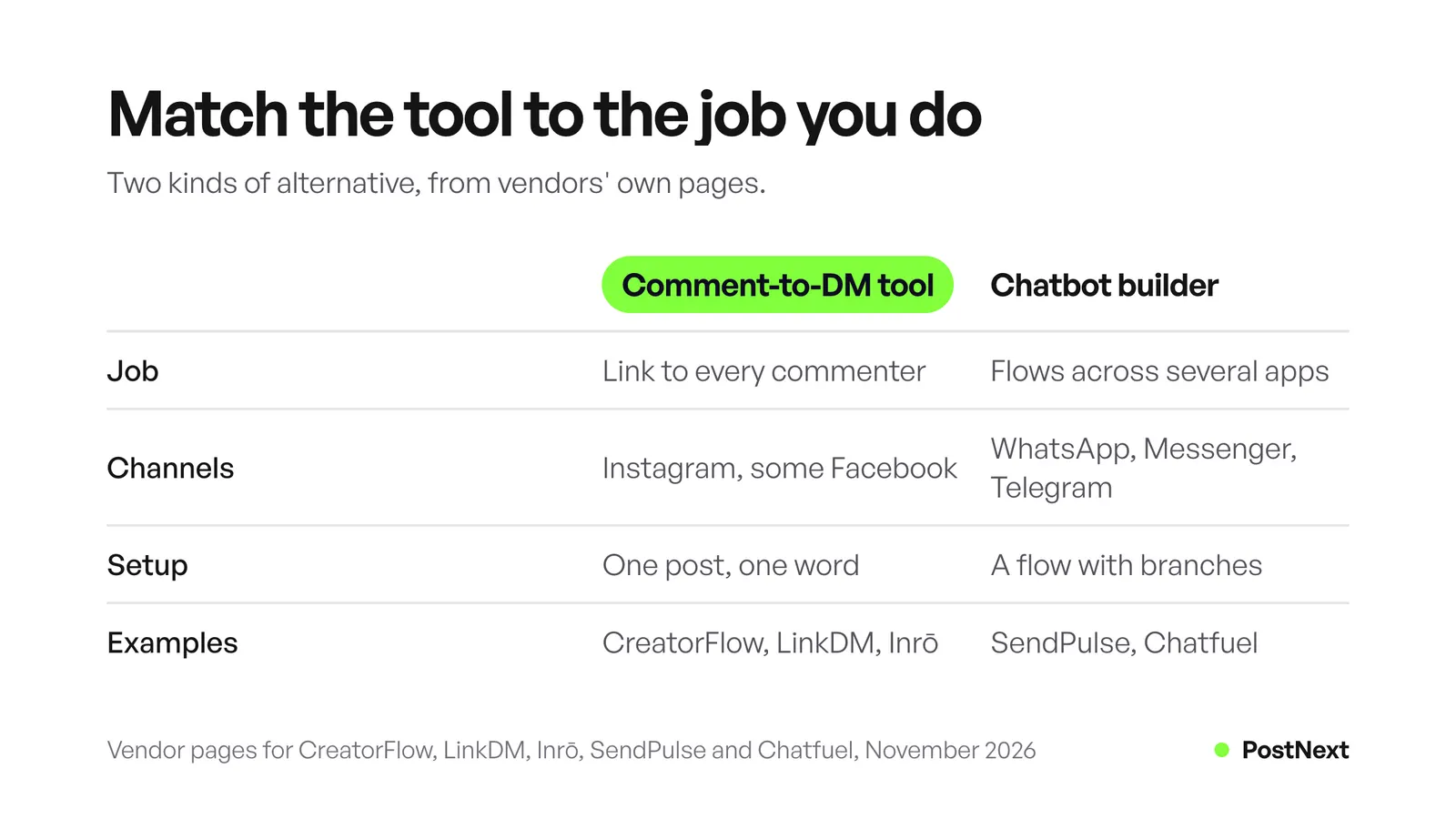
The best ManyChat alternative depends on the job ManyChat does for you. For Instagram comment-to-DM only, a focused tool such as CreatorFlow, LinkDM or Inrō is simpler. For long flows across WhatsApp, Messenger and Telegram, look at SendPulse, Chatfuel or Respond.io. We checked 10 tools on their own pages in November 2026. This PostNext guide sorts them by job.
Key Takeaways
- Name the job first: most people use ManyChat for one of three jobs: Instagram comment-to-DM, multi-channel chatbots, or a WhatsApp and support inbox.
- ManyChat’s plans grow with contacts: the Free plan covers 25 active contacts and 2 channels; Pro covers 2,500 contacts and 3 channels (manychat.com/pricing, November 2026).
- Every tool follows the same Meta rules: one private reply per comment within 7 days, and a 24-hour window after each message from the person.
- Instagram-only tools are narrower: CreatorFlow states it does not build multi-step sequences, split tests or messages to new followers.
- “Meta partner” means different things: in Meta’s own table, a Tech Provider is not a Meta Business Partner.
- Switch one post at a time: a comment gets one private reply, so two tools watching the same post compete for it.
Why do people look for a ManyChat alternative?
People look for a ManyChat alternative when the plan they need grows faster than the job they use it for. ManyChat sizes its plans by active contacts and channels: Free covers 25 contacts and 2 channels, Essential 250 contacts, and Pro 2,500 contacts and 3 channels. A creator who only sends a link to commenters may not need the flow builder, broadcasts or AI that come with larger plans.
ManyChat does a lot. Its pricing page names Instagram, TikTok, Facebook Messenger, WhatsApp, Telegram, SMS and email. It offers a Flow Builder, more than 60 templates and AI that learns your business and tone of voice, which starts on the Pro plan. Its Instagram page lists comment-to-DM (“Respond to Comments”) and a “Follow to DM” trigger for new followers. Multi-user inbox seats start on the plans above Pro.
So the question to ask is narrower than “what is cheaper”. Write down which ManyChat features you used in the last month. If the list is “reply to comments with a link”, you need a comment-to-DM tool. If it includes flows across three apps, broadcasts and an AI agent, you need another chatbot builder.
Which ManyChat alternative fits your job?
The ManyChat alternative that fits is the one built for your main job. Instagram comment-to-DM tools send a link to everyone who comments a word, with little setup. Chatbot builders run long flows across several messaging apps. Support inboxes put WhatsApp, Instagram and email in front of a team. Developer APIs let you build DM automation into your own product.
| Your main job | Type of tool | Tools in this guide |
|---|---|---|
| Send a link to everyone who comments a word on Instagram | Comment-to-DM tool | CreatorFlow, LinkDM, ReplyRush, Inrō |
| Run flows on Instagram, WhatsApp, Messenger and Telegram | Chatbot builder | SendPulse, Chatfuel |
| Answer customers as a team, mostly on WhatsApp | Conversation inbox with automation | Respond.io, Spur, Wati |
| Add DM automation to your own app | API | Zernio |
Tool scope from each vendor’s own pages, checked November 2026.
The table also shows what you give up. Comment-to-DM tools keep the setup short and leave out multi-step logic. Chatbot builders and inboxes do more, so they take longer to set up and usually price by contacts, seats or conversations. Check each pricing page for the unit you pay by before you compare totals.
The 10 ManyChat alternatives compared
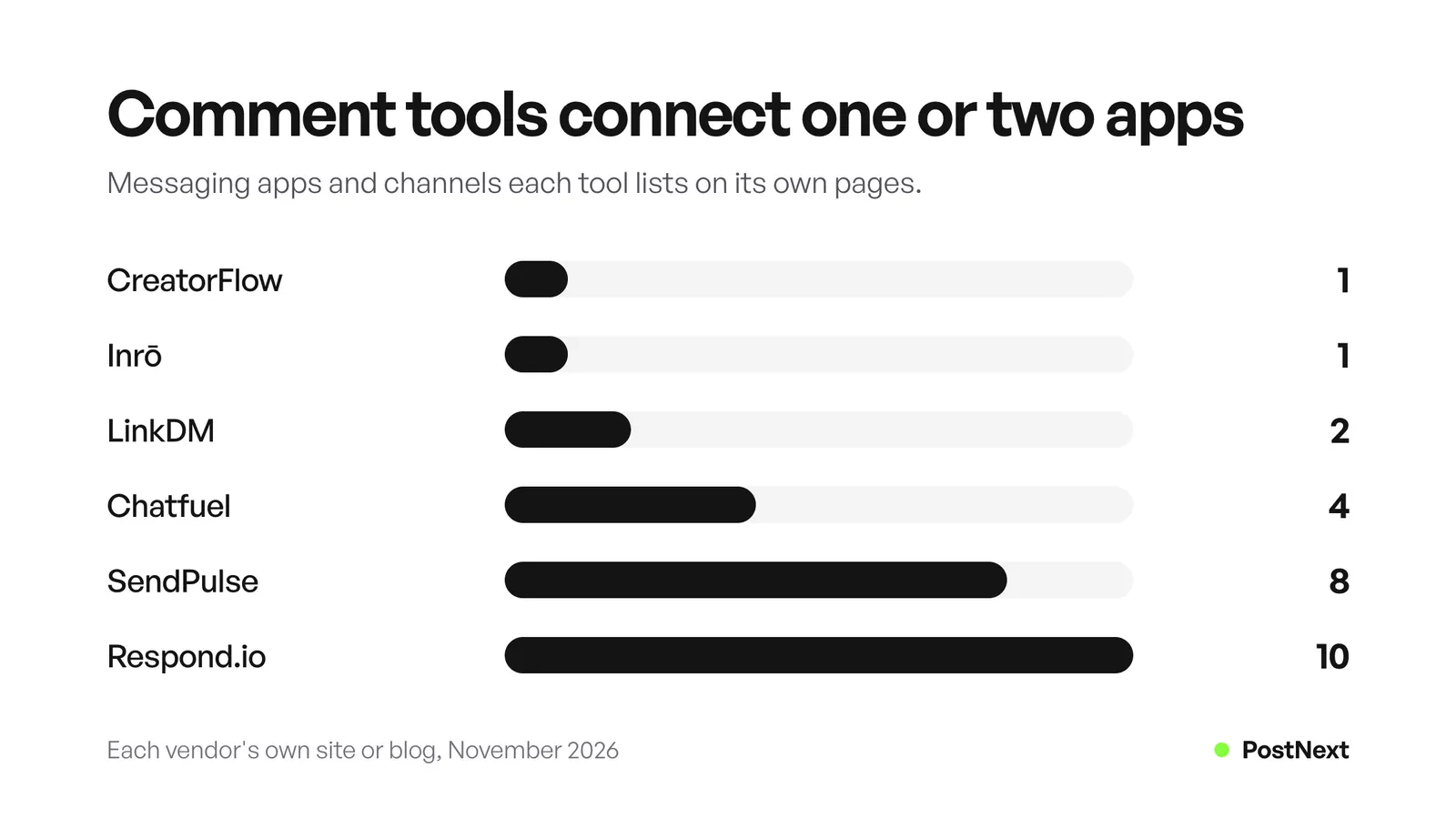
The 10 ManyChat alternatives below differ most in three places: which messaging apps they connect, which Instagram actions start an automation, and whether they include a team inbox. The table lists what each tool’s own page states in November 2026. “Not stated” means the page did not say it, so ask the vendor before you count on it.
| Tool | Channels | Instagram triggers stated | Flow builder | Team inbox | Free plan |
|---|---|---|---|---|---|
| CreatorFlow | Comment, Story reply, DM keyword | Single-step, with gates | No | Yes | |
| LinkDM | Instagram, Facebook | Comment, Story reply, Story mention | Flows on Pro | Not stated | Yes |
| ReplyRush | Instagram, Facebook | Comment keyword, Story reply, Story mention | Not clear | Not stated | Yes |
| Inrō | Comment, Story reply, mention, DM, ad, Live | Visual builder | Yes | Yes | |
| SendPulse | Instagram, WhatsApp, TikTok, Messenger, Telegram, Viber, SMS, email | Comments, reactions, mentions | Visual builder | Yes | Yes |
| Chatfuel | Instagram, Facebook, WhatsApp, website | Not stated | Yes | Yes | Free trial |
| Respond.io | WhatsApp, Instagram, Messenger, TikTok, Telegram, WeChat, LINE, Viber, SMS, email | Not stated | Yes | Yes | Free trial |
| Spur | WhatsApp, Instagram, Messenger, email, website | Comment-to-DM | Canvas builder | Yes | 14-day trial |
| Wati | Instagram inside its team inbox | Comment keyword, Story reply | Not stated | Yes | Not stated |
| Zernio | 16 channels, by API | Comment, DM keyword | By API | Yes | Yes, 2 accounts |
Each vendor’s own site or blog, checked November 2026. No prices: plans change often.
1. CreatorFlow
CreatorFlow is an Instagram DM automation tool for creators, brands and agencies, built on Meta’s official API. It has three automations: Comment-to-DM, Story Reply and Keyword DM Reply. Paid plans add a Follow Gate, an Email Gate, link tracking, public comment replies and Rewind, which messages people who commented before you set up the automation. Every plan, Free included, has a contact list and unlimited automations.
CreatorFlow states plainly what it does not build: split tests, message variations, multi-step sequences, follow-ups, conditional flows and messages to new followers. It has no public API, Zapier connection or team seats. It fits people whose ManyChat setup was “comment a word, get the link”. It is the wrong pick if your flows branch or run on WhatsApp.
2. LinkDM
LinkDM automates DMs on Instagram and Facebook. Its triggers include comments, Story replies and Story mentions, and its Free plan covers one Instagram account. Flow automation, reminder DMs, public comment replies, inbox automation and ads automation are on the Pro plan. Its pages do not mention a team inbox or an API.
3. ReplyRush
ReplyRush covers Instagram and Facebook with comment keyword triggers, Story reply and Story mention DMs, and a DM that waits for a follow. It has a free plan and an iOS app, and one dashboard can hold up to 3 Instagram accounts. Its homepage both lists step-by-step DM flows and says it avoids complex flow builders, so ask how deep its flows go before you switch a branching ManyChat flow.
4. Inrō
Inrō describes itself as built only for Instagram. It starts automations from comments, Story replies, mentions, DMs, ads and Lives. A visual flow builder joins message bubbles, and follow-up campaigns run after the first reply. It adds an inbox and contact list, an API and an MCP server, and connections to Shopify, Calendly, Stripe and Make. The free plan covers one user.
5. SendPulse
SendPulse is a chatbot builder that connects Instagram, WhatsApp, TikTok, Messenger, Telegram, Viber, SMS, email and website chat. Its Instagram page lists replies to comments, reactions and mentions, a visual no-code builder, templates and AI that builds a flow from a text prompt. It includes a shared inbox, a CRM and an API, and has a free plan with no time limit.
6. Chatfuel
Chatfuel builds chatbots for Instagram, Facebook, WhatsApp and websites. Every plan includes AI chatbots, a shared team inbox, a CRM, Google Sheets and Zapier connections, and official WhatsApp API access. Chatfuel offers a free trial and no free plan. Its pages do not list Instagram trigger types, so test your comment and Story flows during the trial.
7. Respond.io
Respond.io is a customer conversation platform for teams. It joins WhatsApp, TikTok, Messenger, Instagram, WeChat, LINE, Viber, Telegram, SMS, web chat and email in one inbox, with AI agents and connections to HubSpot and Salesforce. The pages we checked do not describe Instagram comment-to-DM. It suits a sales or support team more than a creator.
8. Spur
Spur connects WhatsApp, Instagram, Messenger, email and website chat. It has a canvas flow builder with triggers, waits and conditions, Instagram comment-to-DM, a shared inbox with assignment and an AI agent. It offers a 14-day trial with no card and states that it is a Meta Business Partner.
9. Wati
Wati has moved its Instagram automation into its team inbox. It sends a public reply and a DM when someone comments a keyword, answers Story replies, and adds an AI agent. Its pages do not state a free plan. It fits a team that already answers customers in Wati and wants Instagram in the same place.
10. Zernio
Zernio is an API product for developers. Its blog lists comment-to-DM and keyword triggers, targeting by follower status, timed DMs within 24 hours, message variations, automation logs, a unified inbox and an MCP server for AI agents. You build the screens. Its blog states a free plan for 2 social accounts. Teams without a developer need one of the tools above.
What does Meta allow any ManyChat alternative to do?
Every ManyChat alternative that uses Meta’s official API follows the same Instagram rules. A tool can send one private reply to a comment, within 7 days of it. After that, it can message the person only if they answer, and within 24 hours of their message. A first message after a Click-to-Direct ad opens a window of up to 7 days.
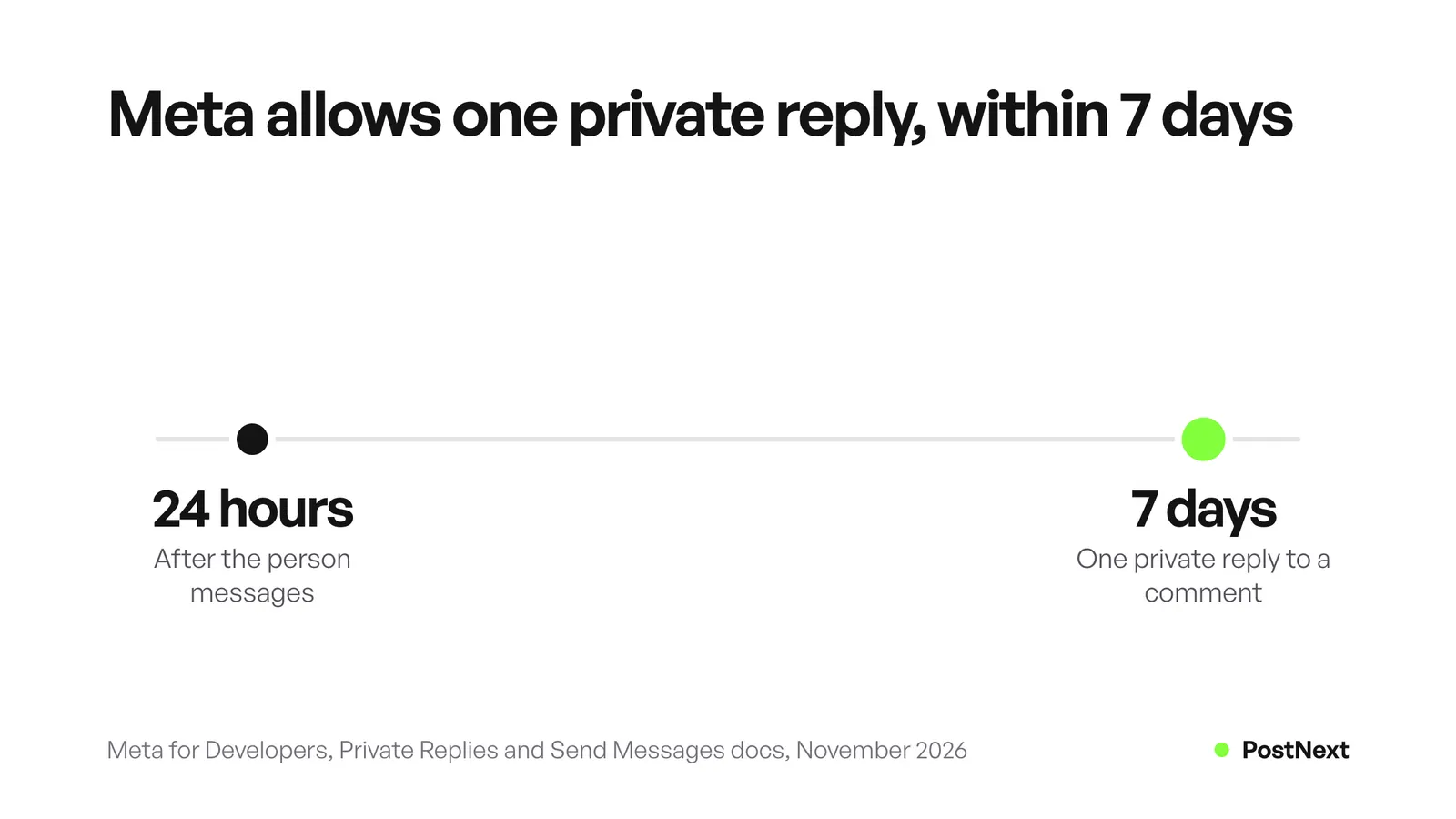
These rules come from Meta’s Private Replies and Send Messages documentation. They explain the features you see on pricing pages. A “follow-up” or “reminder DM” works only inside the 24-hour window. A button in the first message matters, because a tap is the answer that opens the window. “Rewind” style features that message past commenters still work inside the 7-day limit.
The rules also make a switch tricky. A comment can receive only one private reply, so if ManyChat and the new tool both watch the same post, they compete for that single reply. Our Instagram DM automation guide covers each trigger and its window in detail.
What do “Meta partner” badges mean?
“Meta partner” badges on DM tools mean different things. In Meta’s own documentation for the WhatsApp Business Platform, Solution Partners and Tech Partners are Meta Business Partners, while a Tech Provider is not. A Tech Provider offers other businesses access to Meta’s messaging APIs without joining the Business Partner program. Both use the official API.
| Label a tool may show | Meta Business Partner in Meta’s table | Who states it in this guide |
|---|---|---|
| Solution Partner | Yes | Not claimed by the tools here |
| Tech Partner | Yes | Not claimed by the tools here |
| Tech Provider | No | CreatorFlow, Inrō |
| ”Meta Business Partner” or “Meta-approved partner” | Depends on the tier | ManyChat, Spur, ReplyRush |
Meta for Developers, Solution Providers overview, and each vendor’s own site, checked November 2026.
What matters for your account is simpler: the tool connects through Meta’s login screen and never asks for your Instagram password. The badge tells you about the company’s paperwork with Meta. It does not tell you that one tool’s DMs are safer than another’s.
How do you move from ManyChat to another tool?
To move from ManyChat, list the automations that ran in the last 30 days, rebuild each one in the new tool, and switch them one post at a time. Turn off the ManyChat automation on a post before you turn on the new one, because a comment can receive only one private reply. Test each post from a second account before you move on.
- List what runs. Note each live trigger: the post, the keyword, the message and the link.
- Export your contacts. Check your ManyChat plan’s export options, and the new tool’s import options, before you cancel.
- Rebuild the top three. Start with the automations on the posts that still get comments.
- Switch one post. Turn off ManyChat on that post, turn on the new tool, and comment the word from a second account.
- Watch for a week. Compare how many people commented with how many got the DM in the new tool’s log.
- Cancel last. Keep ManyChat until every live post has moved.
Keep the words the same. People who saw an old Reel will keep commenting the old word, and old posts can collect comments for months.
Where does PostNext fit?
PostNext does not send DMs, so it does not replace ManyChat. It schedules the Instagram posts and Reels that ask for the comment, and its comment inbox lets you read, answer and delete Instagram comments on every plan, including Free. The DM tool sends the link; PostNext plans and publishes the post that earns the comment.
A planning loop that works with any tool above: draft the week’s Reels in the PostNext Instagram scheduler, add the comment word to each caption, and create the matching automation in your DM tool before the post goes live. Answer the comments that need a person from the PostNext comment inbox. Teams that also want DMs, mentions and reviews from several networks in one place can compare the social media inbox tools we checked.
Frequently Asked Questions
What is the best free ManyChat alternative?
For Instagram comment-to-DM, CreatorFlow, LinkDM, ReplyRush and Inrō all state a free plan, in November 2026. For a multi-channel chatbot, SendPulse states a free plan with no time limit. Compare the free plan’s monthly limit with how many comments your posts get.
Is there a ManyChat alternative for Instagram only?
Yes. CreatorFlow and Inrō describe themselves as Instagram tools, and LinkDM and ReplyRush cover Instagram and Facebook. They focus on comment-to-DM, Story replies and DM keywords, with less setup than a multi-channel chatbot builder.
Which ManyChat alternative works with WhatsApp?
SendPulse, Chatfuel, Respond.io and Spur state WhatsApp on their own pages. ManyChat also connects WhatsApp. Instagram comment-to-DM tools such as CreatorFlow, LinkDM and Inrō do not list WhatsApp.
Can I use ManyChat and another tool on the same Instagram account?
You can connect both, but do not run both on the same post. Meta allows one private reply per comment, so two tools watching one post compete for it. Split them by post, or move everything at once.
Are ManyChat alternatives safe for my Instagram account?
Tools that use Meta’s official API and connect through Instagram’s own login screen follow Meta’s rules. Avoid any tool that asks for your Instagram password or promises mass DMs to people who never wrote to you.
Can a ManyChat alternative send a DM to new followers?
Meta’s Messaging API lets a business message someone only after they message, comment or tap an ad. ManyChat lists a “Follow to DM” trigger on its Instagram page. CreatorFlow states it does not send DMs to new followers. Check each tool’s own page if this matters to you.
Sources
- Meta for Developers, Private Replies and Send Messages, checked November 2026.
- Meta for Developers, Solution Providers overview, the partner comparison table, checked November 2026.
- ManyChat, pricing page (manychat.com/pricing) and Instagram page (manychat.com/instagram), checked November 2026.
- CreatorFlow, product facts from creatorflow.so/llms.txt, checked November 2026.
- LinkDM, pricing page (linkdm.com/pricing), checked November 2026.
- ReplyRush, homepage and pricing page (replyrush.com), checked November 2026.
- Inrō, homepage and pricing page (inro.social), checked November 2026.
- SendPulse, Instagram chatbot page (sendpulse.com/features/chatbot/instagram) and chatbot page, checked November 2026.
- Chatfuel, pricing page (chatfuel.com/pricing), checked November 2026.
- Respond.io, homepage and its ManyChat comparison post (respond.io), checked November 2026.
- Spur, homepage (spurnow.com), checked November 2026.
- Wati, Instagram automation page (wati.io/en/instagram-automation), checked November 2026.
- Zernio, ManyChat alternative post (zernio.com/blog/manychat-alternative), self-reported product facts, checked November 2026.
- PostNext: comment inbox, Instagram channel page and llms.txt, checked November 2026.