
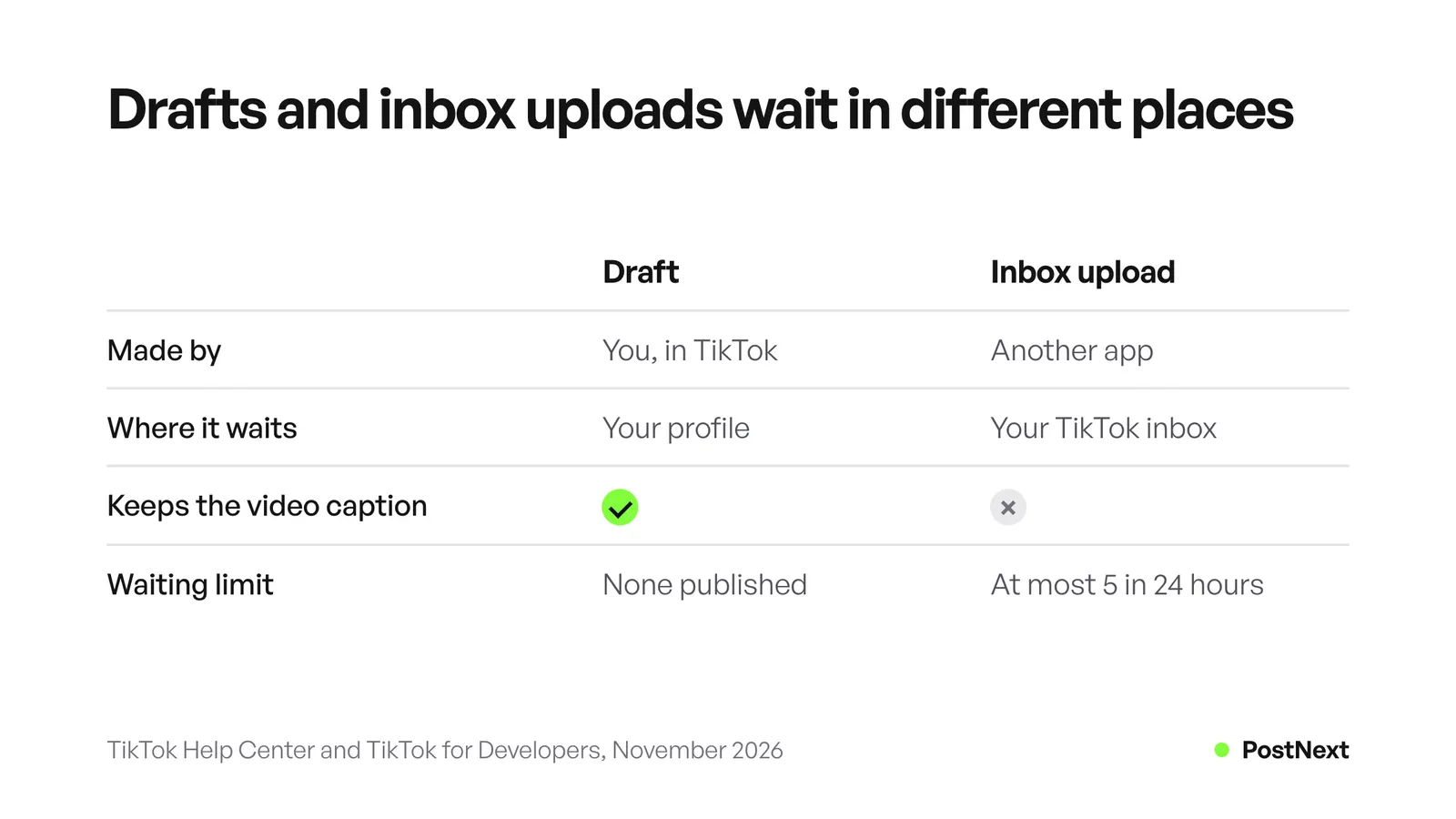
TikTok drafts are on your profile, and only you can see them. Open the TikTok app, tap Profile at the bottom, and look for Drafts among your posts. You save a draft by tapping Drafts instead of Post on the last screen before publishing. Videos that other apps send to TikTok wait in your TikTok inbox instead, and they need your tap before they go live.
Key Takeaways
- Where they are: on your profile in the TikTok app. TikTok’s help page says “your drafts are visible only to you on your profile”.
- How to make one: on the last screen of a new video, photo post or text post, tap Drafts instead of Post.
- What TikTok does not say: its help pages do not explain where drafts are stored or whether they survive deleting the app. Treat a draft as fragile.
- Back up what matters: keep the original clip in your camera roll, or post the video with the privacy set to Only you.
- Inbox uploads are different: a video sent by another app waits in your TikTok inbox. TikTok allows at most 5 of them waiting in any 24 hours.
- Captions: a video sent to the inbox through TikTok’s API arrives without its caption, so you type it again.
TikTok drafts, inbox uploads and scheduled posts
Three things can hold a TikTok post before it goes live. They sit in different places and behave differently. The table uses TikTok’s Help Center, Creator Academy and developer documentation, read in November 2026.
| Draft | Inbox upload from another app | Scheduled post | |
|---|---|---|---|
| Who makes it | You, in the TikTok app | A scheduling or editing app, through TikTok’s API | You, in TikTok on a computer, or an app with Direct Post |
| Where you find it | Your profile, visible only to you | A notification in your TikTok inbox | TikTok on the web and in the app, or the app that scheduled it |
| Goes live on its own | No | No, you finish it in TikTok’s editor | Yes, at the set time |
| Caption | What you typed | Photo posts keep it; videos arrive without it | What you typed |
| Limit | TikTok publishes none | At most 5 waiting in any 24 hours | Direct Post: typically around 15 posts a day per account |
Where are drafts on TikTok?
Your drafts are on your own profile in the TikTok app. Tap Profile at the bottom of the screen and look among your posts for Drafts. TikTok’s help page says your drafts “are visible only to you on your profile”, so nobody else sees them, including followers. TikTok’s Creator Academy lists drafts with your content and bio as parts of your profile page.
TikTok changes labels between app versions. If you do not see a Drafts label, check that you are on your own profile and that you have saved at least one draft. A profile with no drafts has nothing to show.
How do you save a video as a draft on TikTok?
Record or upload your video, tap Next to reach the screen where you add a description, then tap Drafts instead of Post. TikTok’s help page gives the same last step for videos and for photo posts of up to 35 photos. For a text post, the Drafts button sits next to Post to feed and Your Story. The draft then waits on your profile.
Step by step, following TikTok’s help page:
- Start a post. Tap Add post + at the bottom of the app.
- Add your content. Record a video, or tap Upload to pick one from your phone.
- Edit. Tap Next and add a description, hashtags, a location or a link.
- Save. Tap Drafts instead of Post.
Before you save, check the privacy setting. TikTok’s help page says a new post keeps the privacy setting of your previous post. A draft you later publish keeps whatever setting the post screen shows.
How do you find drafts on TikTok on a computer?
TikTok’s help pages describe drafts only in the TikTok app. Its steps for a web browser cover uploading a video, not opening drafts. So plan to finish a phone draft on the same phone. On a computer, TikTok Studio at tiktok.com/tiktokstudio is where you upload, schedule and manage posts.
Scheduling on the web works differently from a draft. TikTok’s Creator Academy says its Post Scheduler schedules organic posts from 15 minutes up to 10 days ahead, from the upload page on a computer. A scheduled post goes live on its own. A draft waits until you open it. For the full set of desktop options, see our guide to scheduling TikTok posts from your desktop.
Do TikTok drafts get deleted?
TikTok does not say. Its Help Center explains how to save a draft and who can see it, but not where the draft is stored or what happens when you log out, delete the app or change phones. With no promise from TikTok, the safe rule is to treat a draft as something that lives on one phone. Back up any draft you cannot remake.
Moments when a draft is at risk:
- Deleting or reinstalling the app. Post or back up your drafts first.
- Changing phones. Finish or back up drafts on the old phone before you reset it.
- Saving over a draft. Editing a draft changes it. Keep the original clip if you want to start again.
TikTok also offers a separate TikTok Studio app. Its help page says a post you upload or delete in TikTok Studio is also uploaded or deleted in TikTok. It does not say the same about drafts, so do not count on Studio as a backup.
How do you back up TikTok drafts?
Keep the raw clip outside TikTok. Record with your phone’s camera app, or export from your editing app, so the original file sits in your camera roll. If the draft disappears, you upload the clip again and redo only the TikTok edits. For a finished edit, post it with privacy set to Only you, which keeps it on your account without showing it.
Private posts are easy to find later. TikTok’s help page says only public videos appear in the posts tab, and you open private ones with the Lock icon on your profile. When you are ready, change the privacy and the video goes public. A private post keeps the edit, the sound and the text. A clip in your camera roll keeps only the footage.
If you post the same video to Instagram or YouTube too, keep that original file. A clean copy is also the answer to removing the TikTok watermark before you post elsewhere.
What is the difference between TikTok drafts and the TikTok inbox?
A draft is a post you saved in the TikTok app. An inbox upload is a post another app sent to TikTok for you to finish. TikTok’s developer documentation calls this step “Upload draft to TikTok”: the app uploads a video or photos, and you get an inbox notification. You tap it to open the post in TikTok’s editor and publish it.
TikTok sets three rules for these uploads:
- At most 5 waiting. TikTok allows at most 5 pending uploads in any 24 hours. TikTok refuses a sixth upload in that window.
- Videos arrive without a caption. TikTok’s video upload request takes only the file, so you type the caption in TikTok. Photo posts can carry a title and a description.
- Photo uploads need a recent app. For photo posts sent to the inbox, TikTok requires app version 31.8 or later.
The inbox route has one advantage: you add a trending sound and check the post in TikTok’s own editor before it goes live. The other route, Direct Post, publishes at the set time without opening TikTok. TikTok’s guidelines say Direct Post is typically capped at around 15 posts a day per account, shared by all apps. For photo posts, our guide to TikTok slideshows and carousels compares the two routes in detail.
How does PostNext send TikTok posts?
PostNext schedules TikTok videos and photo posts through TikTok’s official API. By default, a post goes to your TikTok inbox at its time, and you finish it in the app. Turn on Post directly and PostNext publishes it at the scheduled time, with the privacy, comment, Duet and Stitch settings you chose. If TikTok refuses a post, PostNext marks it as failed and emails you.
Choose by the post. Send a video to the inbox when you want a sound from TikTok’s library, because PostNext has no sound library. The video arrives without its caption, so copy it before you schedule. Use Post directly when the post is final. The PostNext TikTok scheduler page lists both modes and TikTok’s limits. To compare TikTok’s own scheduler with a tool, read PostNext’s lesson on how to schedule a post on TikTok.
PostNext also keeps its own drafts. Save as Draft in the composer keeps a post in your PostNext workspace instead of on your phone. To pick a time for the posts you finish, see our guide to the best time to post on TikTok.
Frequently Asked Questions
Can other people see my TikTok drafts?
No. TikTok’s help page says your drafts are visible only to you on your profile. Followers and visitors do not see them. A draft becomes visible only when you post it, and then the privacy setting on the post screen decides who sees it.
Why can’t I find my drafts on TikTok?
Check that you are signed in to the same account on the same phone where you saved them. TikTok’s help pages describe drafts only in the app, not on the web. If you deleted the app or changed phones, the drafts may not come back, because TikTok does not say they move with your account.
Do TikTok drafts transfer to a new phone?
TikTok does not say they do. Its help pages do not describe moving drafts between phones. Before you switch, post important drafts with privacy set to Only you, or save the original clips to your camera roll or cloud storage.
Does deleting the TikTok app delete drafts?
TikTok’s Help Center does not answer this, so do not risk it. Post or back up every draft you need before you delete the app. Your posted videos stay on your account.
How many drafts can you have on TikTok?
TikTok does not publish a limit for drafts in the app. The only published cap is for posts that other apps send to your TikTok inbox: at most 5 waiting in any 24 hours.
Why did my video arrive in my TikTok inbox without a caption?
The app that sent it used TikTok’s upload route, which takes only the video file. TikTok’s documentation sends a title and description only with photo posts. Type the caption in TikTok’s editor before you post, or use Direct Post if the app supports it.
Sources
- TikTok Help Center, Making a post: saving to Drafts, drafts visible only to you, 35 photos, privacy carried over, private videos under the Lock icon (read November 2026)
- TikTok Creator Academy, How to personalize your profile: drafts on the profile page (read November 2026)
- TikTok Creator Academy, Advanced desktop tools: Post Scheduler, 15 minutes to 10 days, desktop only (read November 2026)
- TikTok Help Center, TikTok Studio: uploads and deletes in Studio apply to TikTok (read November 2026)
- TikTok for Developers, Content Posting API: Get started with upload and Upload video reference: inbox notification, 5 pending uploads in 24 hours, video request fields (read November 2026)
- TikTok for Developers, Content Posting API: Photo: title and description with photo uploads, app version 31.8 (last updated 27 October 2026, read November 2026)
- TikTok for Developers, Get post status: “complete the draft post using TikTok’s editing flow” (read November 2026)
- TikTok for Developers, Content Sharing Guidelines: Direct Post cap of around 15 posts a day (read November 2026)
- PostNext, postnext.io/channels/tiktok: inbox and Post directly, captions in the inbox, failed post emails (read 21 November 2026)