
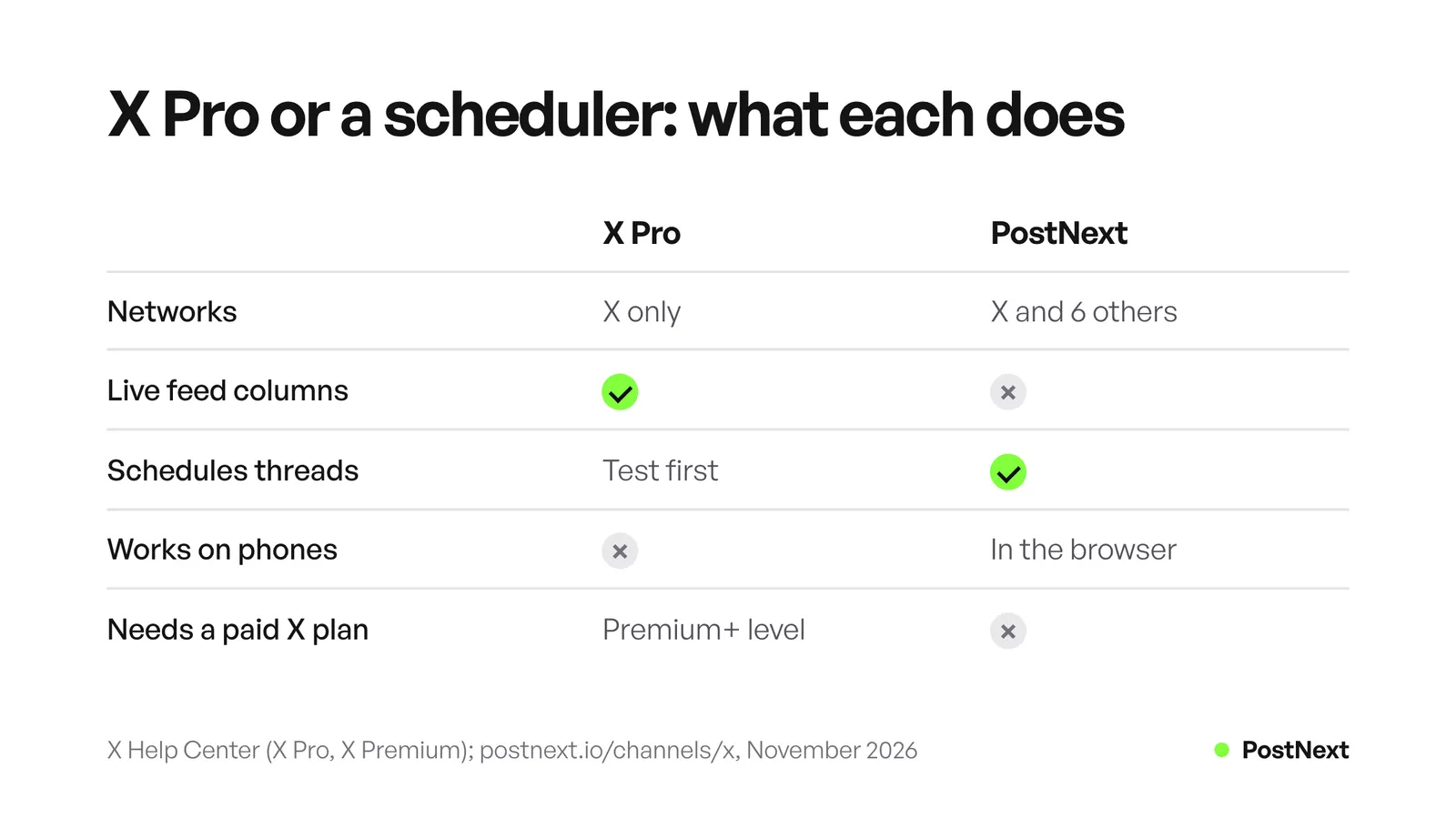
X Pro is the new name for TweetDeck, X’s dashboard that shows several timelines side by side in columns. It runs at pro.x.com in a desktop browser and needs a paid plan: X lists X Pro under Premium+, and on The X Subscription the Premium plan and above carry those benefits. X Pro schedules posts for every X account you add to it, but it works with X only.
Key Takeaways
- TweetDeck became X Pro in 2023. X renamed it and made it a feature for paying, verified users.
- It is not free. X’s Premium page lists access to X Pro only under Premium+. On The X Subscription, x.ai says the Premium, Super and Ultra plans keep full Premium+ benefits.
- Ten column types. X’s help page lists Home, Notifications, Search, Lists, Communities, Explore, Bookmarks, Profiles, Messages and Scheduled.
- It schedules single posts per account. You click Schedule post, pick a time and see the queue in a Scheduled column. It cannot schedule Direct Messages.
- Desktop only. X Pro needs a browser window larger than 500 by 500 pixels, so it does not work on phones.
- X only. For a calendar that also covers Instagram, LinkedIn, TikTok, YouTube, Threads and Bluesky, you need a separate scheduler.
What is X Pro?
X Pro is X’s web dashboard for power users. Instead of one timeline, you add columns, and each column shows one feed: your mentions, a search, a List or another account’s posts. You can group columns into Decks, add several X accounts, schedule posts and filter columns by keyword, engagement or date. X describes it as a way to “view multiple timelines in one easy interface”.
The table sums up what X’s help pages say X Pro does (read November 2026).
| Feature | What it does in X Pro |
|---|---|
| Columns | One feed per column, side by side. Add with the plus icon or the A key |
| Decks | Group columns into separate workspaces, such as one per client |
| Post composer | Threads, photos, videos, GIFs, polls and emoji |
| Scheduling | Schedule post for each connected account. A Scheduled column shows the queue |
| Several accounts | Add accounts with Account Switching, or share access with Delegate |
| Search and filters | Search operators, plus filters for keywords, media, dates, users and minimum engagement |
| Collections and mutes | Save posts into collections; mute words or accounts across columns |
| Devices | Desktop browser only. The window must be larger than 500 x 500 pixels |
X has rebuilt X Pro since the rename. Its help page says the new version “incorporates more of what you see on x.com”, with a full post composer, advanced search, new column types and Decks.
Is TweetDeck free?
No. TweetDeck used to be free, but X made it a paid feature in 2023 and renamed it X Pro. Today X’s Premium page lists “Access to X Pro” only under the Premium+ tier. On The X Subscription, which replaced Premium for new subscribers, x.ai says the Premium, Super and Ultra plans include full Premium+ benefits. No free X plan includes X Pro.
The change happened in steps. In July 2023, X said that only verified users would keep access to TweetDeck after 30 days. On 1 August 2023, TechCrunch reported that X had renamed the tool XPro and moved its account from @TweetDeck to @Pro. X Pro now lives at pro.x.com.
X Pro is not sold on its own. You get it with a plan, so compare what else the plan includes before you pay for it. Our guide to X Premium plans lists the current plans and prices.
Which X plan includes X Pro?
Premium+ on the older X Premium tiers, and Premium, Super or Ultra on The X Subscription. X’s Premium page puts X Pro in its “Only for Premium+ Tier” list. x.ai’s guide for people moving to The X Subscription says Premium, Super and Ultra carry “full X Premium+ benefits”. It describes Plus as “a checkmark, creator tools, and fewer ads on X”, without X Pro.
If you pay for Premium+ today, x.ai says to “choose Premium or higher” if you switch to The X Subscription and want to keep your Premium+ benefits. A switch cannot be undone, so check that X Pro still opens with the new plan before you cancel anything else.
Team plans on The X Subscription start at the Premium seat, because Plus is not sold to teams. x.ai says each member gets X benefits when they connect their own X account.
How do you use X Pro columns?
Sign in at pro.x.com with your X account. Click Add column in the navigation bar, pick a column type, and it appears next to the others. Drag the six-dot icon at the top of a column to move it. To delete one, click the filter icon in the column header and choose Delete column. Group related columns into a Deck.
X’s help page lists ten column types:
- Home: the Home timeline of one account.
- Notifications: reposts, likes, mentions and new followers for one account.
- Search: posts that match a search term, updating as new ones arrive.
- Lists: posts from the accounts in a List you made or follow.
- Communities: the Communities you belong to. X set 30 May 2026 as the end date for X Communities, so this column has little left to show.
- Explore: what is trending.
- Bookmarks: posts you saved.
- Profiles: one account’s posts.
- Messages: Direct Messages for one account.
- Scheduled: your scheduled posts.
Each column has its own filters. Click the filter icon to narrow it by keywords, media type, dates, language, location, users or a minimum number of reposts, likes or replies. You can also turn on a sound or desktop alert for new posts in a column.
How do you schedule a post in X Pro?
Click the post button, check which account is selected, and write the post. Click Schedule post, pick the date and time, then click “Schedule post at” that time. The post publishes on its own. Add a Scheduled column to see, edit or delete what is waiting. If you manage several accounts in X Pro, you can schedule posts for each of them.
X’s help pages add three limits:
- No scheduled Direct Messages. X says X Pro “does not support scheduled Direct Messages”.
- Shared visibility. In a team setup, every scheduled post for the connected accounts is visible to anyone with access to that X Pro.
- Longer posts. X’s page on post types says you “cannot save a draft or schedule a longer post on web”. X Pro runs on the web, so plan posts over 280 characters as single posts you publish by hand.
On threads, X’s help page says the new composer “lets you create threads and add photos, videos, GIFs, polls, or emojis to your posts, including scheduled posts”. The scheduling steps themselves describe a single post. Test a short thread before you rely on it. Our guide to scheduling X threads covers the other ways to do it.
Can you use X Pro with multiple accounts?
Yes. Click your profile photo, choose Manage accounts, then Add an existing account, and sign in to the second account. You can switch between accounts as you do on x.com, add columns for each one and schedule posts from each. For a team, X Pro’s Delegate feature shares access to an account without sharing its password.
X notes that Account Switching and team access are different things. Account Switching lets one person move between accounts they can sign in to. Delegate lets an account owner give teammates access. X’s help page said in 2026 that it was still redesigning the Teams experience in the new X Pro, so check the current options in your own X Pro before you set up a team.
X’s help pages do not say whether a teammate with delegated access needs a plan of their own. Check with one teammate before you set up a whole team.
What search operators work in X Pro?
X Pro search columns accept X’s advanced search operators. Type a word or hashtag, then add operators to narrow the results: who posted, what kind of post, which dates and how much engagement. A search column updates as new posts arrive, which makes X Pro useful for tracking a brand name, a launch or a topic.
These operators come from X’s help page on X Pro features:
| Operator | Finds posts |
|---|---|
from:nasa | Sent by that account |
"love hate" | With the exact phrase |
filter:verified | From verified accounts |
-filter:nativereposts | Leaves out reposts |
min_faves:10 | With at least 10 likes |
since:2026-11-01 until:2026-11-15 | Posted between two dates |
filter:news | With a link to a news story |
Combine them in one column. X’s own example, #space filter:verified -filter:nativereposts, shows posts about #space from verified accounts and hides reposts.
What are X Pro’s limits?
X Pro works with X only. It does not post to Instagram, LinkedIn, TikTok or any other network. It needs a top-tier paid plan, it does not run on phones, and it cannot schedule Direct Messages or longer posts on the web. If you post to several networks, a separate scheduler is the usual answer.
These limits matter most for three kinds of users:
- People who post to several networks. X Pro covers one network, so you plan the others somewhere else.
- People who work from a phone. X says X Pro shows a “not available on a mobile device” notice when the browser window is smaller than 500 x 500 pixels.
- Teams. X was still rebuilding the Teams feature in 2026, and its help pages do not say which plan a delegate needs.
For a person who reads X all day and replies in real time, the columns are the reason to pay. For a person who mainly publishes, scheduling is the job, and a scheduler does it without a top-tier X plan.
What is the best TweetDeck alternative?
It depends on the job you used TweetDeck for. For reading many feeds at once, X Pro is still the closest match. For scheduling, X’s own composer schedules single posts on the web, according to guides and news reports. For posting to X plus other networks from one calendar, a social media scheduler is the alternative.
| Job | Option | Catch |
|---|---|---|
| Read many X feeds at once | X Pro | Needs a Premium+ level plan |
| Schedule a few X posts | X’s composer on x.com | Single posts. Not in X’s help center, so check your account |
| Schedule threads and polls on X | A scheduler that uses X’s API | A separate tool to sign up for |
| Post to X and other networks | A scheduler with a shared calendar | Plans and channel limits differ |
Several schedulers cover X. PostNext keeps side-by-side scheduler comparisons if you want to see how the options differ. Our guide to scheduling tweets on X shows each built-in route step by step.
How do you schedule X posts without X Pro?
Use a scheduler that publishes through X’s official API. In PostNext you connect your X account, write a post, thread or poll, pick a time, and it publishes on its own. You do not need X Premium or X Pro for this. The same calendar holds posts for 6 other networks: Instagram, LinkedIn, TikTok, YouTube, Threads and Bluesky.
- Connect X. You sign in on X’s own page, so PostNext never sees your password.
- Write the post. Write a single post, a thread with images or a video on any post, or a poll with 2 to 4 choices. Accounts with an X subscription can schedule posts up to 25,000 characters.
- Pick a time. Choose a date and time, or send it to the next free slot. On paid plans, PostNext suggests three times from your own posts.
- Check the calendar. Every post and thread sits on the scheduling calendar by day, week or month. Drag one to move it.
The X scheduler also shows impressions, likes, replies and engagement rate for each post, and your follower growth. If you run several X accounts, PostNext publishes one post per account, so write a different version for each. The guide on managing multiple social media accounts shows a weekly routine. The free plan covers 1 channel and 10 posts a month, and new accounts start a 7-day trial of a paid plan that asks for a card.
PostNext does not replace X Pro’s live columns. If you want to watch searches and mentions in real time, keep X Pro for reading and use a scheduler for publishing.
Frequently Asked Questions
Is TweetDeck still available?
Yes, under a new name. TweetDeck became X Pro in 2023 and lives at pro.x.com. The old free version is gone. X Pro needs a paid X plan: Premium+ on the older tiers, or Premium, Super or Ultra on The X Subscription.
Is X Pro free?
No. X lists access to X Pro only under the Premium+ tier, and x.ai says Premium, Super and Ultra on The X Subscription carry full Premium+ benefits. X does not sell X Pro on its own, and no free X plan includes it.
Does X Pro work on mobile?
No. X says X Pro is not available on mobile. Your browser window must be larger than 500 by 500 pixels, or you see a notice that X Pro is not available on a mobile device. To schedule from a phone, open a scheduler’s website in your phone browser.
Can X Pro schedule threads?
X’s help page says the new composer can create threads and polls, “including scheduled posts”. Its scheduling steps describe a single post, and longer posts cannot be scheduled on the web. Test a short thread in your own X Pro before you rely on it.
Can you schedule Direct Messages in X Pro?
No. X’s X Pro help pages say that X Pro does not support scheduled Direct Messages. You can read and send messages for one account in a Messages column, but not schedule them.
Can X Pro post to Instagram or LinkedIn?
No. X Pro works only with X accounts. To post to X and other networks from one place, use a social media scheduler.
What happened to my old TweetDeck columns?
When X launched the new X Pro, it offered a one-time option to copy your search, List and profile columns into it. X says changes made in one version do not carry over to the other. If a column is missing, add it again with Add column.
Sources
- X Help Center, About X Pro: the new version, Decks, composer, mobile limit, Account Switching and Teams (archived copy of 20 May 2026, read November 2026)
- X Help Center, How to use X Pro: sign-in, adding accounts, the ten column types (archived copy of 26 May 2026, read November 2026)
- X Help Center, About advanced X Pro features: scheduling, column filters, search operators, mutes (archived copy of 12 November 2026, read November 2026)
- X Help Center, X Pro FAQs: Delegate, no scheduled Direct Messages (archived copy of 16 September 2025, read November 2026)
- X Help Center, X Premium: “Access to X Pro” under Premium+ (archived copy of 17 November 2026, read November 2026)
- X Help Center, About different types of Posts: longer posts cannot be scheduled on the web (archived copy of 13 October 2026, read November 2026)
- x.ai, X Premium customers moving to The X Subscription: Plus versus Premium, Super and Ultra, and The X Subscription plans: team seats (read 21 November 2026)
- TechCrunch, Elon Musk-owned X renames TweetDeck to XPro (1 August 2023)
- PostNext, postnext.io/channels/x and postnext.io/features/scheduling (read 21 November 2026)