
X Communities were topic groups inside X, each with its own feed, rules and moderators. On 22 April 2026, X’s head of product announced that X would retire them, and admins had until 30 May 2026 to move their members. X now points people to group chat links, Custom Timelines and Lists. For reaching a niche audience, your own timeline does the work.
Key Takeaways
- Communities are ending. Nikita Bier, X’s head of product, announced the change on 22 April 2026 and set 30 May 2026 as the last day to move members.
- X gave two reasons. Bier wrote “Due to declining usage”. TechCrunch quoted him saying Communities were used by less than 0.4% of users but drew 80% of spam reports, financial scams and malware.
- Group chat links replace the shared space. An XChat group can have a public invite link, and you approve each person who asks to join.
- Custom Timelines replace topic discovery. You pin a topic feed to your Home tab. At launch X offered over 75 topics, with early access for Premium subscribers on iOS.
- X’s help page is out of date. The Communities page was still online in November 2026 and still explains how to join, post and moderate.
- Your own profile is the audience you keep. Posts, replies and threads on your timeline reach your followers, and the For You feed can show them to people outside your network.
What are X Communities?
Communities were dedicated spaces on X where people shared posts around one topic. Each Community had an admin, moderators, its own rules and its own timeline. People joined to post into it. X’s help page says anyone on X could see Community posts, but only members could take part in the discussion. In April 2026, X announced that Communities would end.
X launched Communities in 2021, when it was still Twitter. The table shows how they worked, from X’s help page (archived copy of 15 November 2026).
| Part | How it worked |
|---|---|
| Who could join | Public accounts only. Protected accounts could not join |
| Membership | Open, Ask to join with member invites, or Ask to join only |
| Posting | Pick the Community as the audience instead of Everyone |
| Who saw posts | Members, your followers and other X users, in search and on your profile |
| Rules | At least one rule and up to ten per Community |
| Moderators | No limit on the number. X did not pay admins or moderators |
| Finding one | Search worked only on web and iOS, inside the Communities tab |
The Communities tab appeared only after you joined your first Community. Before that, the usual way in was an invite or a shared link.
Are X Communities shutting down?
Yes. On 22 April 2026, Nikita Bier, X’s head of product, posted that X was “deprecating X Communities on May 6” because of declining usage. Hours later he moved the date: “You’ll have until May 30th to transition to XChat.” X told admins to pin a group chat link in their Community so members could follow it.
The same announcement added joinable links for group chats in XChat, X’s messaging service. One day earlier, X had launched Custom Timelines. Bier wrote that X was “investing heavily in niche communities with the launch of Custom Timelines”. In the extension post, he said group chats would grow to 500 members the next day, with a goal of 1,000.
X has not said what happened to old Community posts. Its help page says your posts to a Community “will not be deleted if the Community is deleted”. X has not said whether that rule covered the shutdown. If you need your old posts, download your X archive from your account settings.
X’s Communities help page was still online in November 2026, with every step for joining and moderating. X did not update it after the announcement, so read it as a record of how the feature worked.
Why did X shut down Communities?
X gave low use and spam as the reasons. Bier’s announcement said “Due to declining usage”. TechCrunch quoted him saying Communities “were used by less than 0.4% of users” but “contributed to 80% of spam reports, financial scams, and malware on X”. He also said many of the successful ones were user-acquisition channels for other platforms.
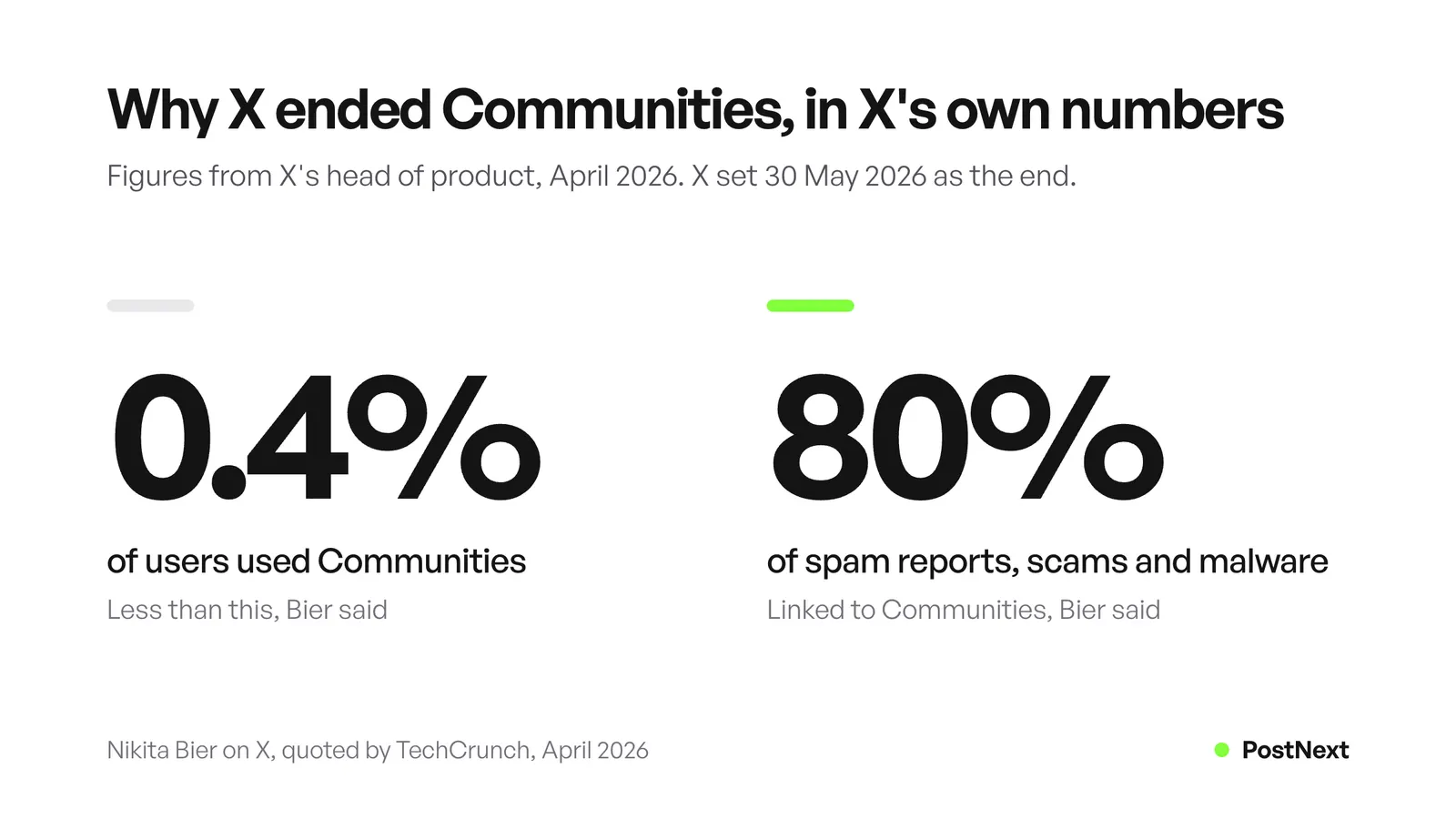
Those are X’s numbers, and nobody outside X can check them. They explain the decision from X’s side. A feature that few people used and that drew most of the spam reports took time away from the rest of the app.
Our view: Communities were never an audience you owned. The members belonged to the Community, an admin could remove you, and X could switch the feature off. The followers on your own profile stay when a product changes, which is where to put the work now.
How did you join and post in an X Community?
You needed a public account. On an open Community, you tapped Join, read the rules and selected Agree and join. A restricted Community showed Ask to join instead, and a moderator approved or denied your request. To post, you opened the composer, tapped the audience setting and picked the Community instead of Everyone.
To leave, you opened the Community, tapped Joined and chose Leave. Posts and replies you made while you were a member stayed in the Community. If a moderator blocked you, or you blocked a moderator, X removed you from the Community.
These steps come from X’s help page. With the end date of 30 May 2026, the buttons may no longer appear in your app.
Did X Community posts show to your followers?
Yes, by X’s own rules. The help page says Community posts were shared with Community members, your followers and other X users. They appeared on the Community page, in search results, on your profile and in other timelines, like regular posts. Non-members could reply, but moderators could limit their replies or hide them. Members also saw the posts in their Home timeline.
That reach is why some creators used Communities to grow: one post went to members who did not follow you and to your own followers. A normal post on your timeline also reaches your followers, and the For You feed can show it to people who do not follow you yet. Our guide to how the X algorithm works explains what that feed ranks.
Who could create an X Community?
X Premium subscribers. X’s Premium page lists “Create a Community” as a feature of every Premium tier, and it still did in November 2026. To be an admin, an account had to be public, at least six months old, have a verified email address or phone number, and have no history of breaking X’s Terms of Service. Roboin reported in April 2026 that the create button had already disappeared.
Admins chose open or restricted membership, wrote the rules and added moderators from the member list. Moderators reviewed reported posts and chose Hide post or Keep. They could also remove members and hide posts that broke the Community rules. X’s help page says it did not pay anyone for creating, running or moderating a Community. See our guide to X Premium plans for what each subscription includes today.
What replaced X Communities?
X points to three features. Group chat links in XChat give a group a place to talk, and you approve who joins. Custom Timelines pin a topic feed, sorted by Grok, to your Home tab. Lists show posts from the accounts you pick, and you can pin them too. None of the three recreates a public group feed with moderators.
| What Communities did | Use now | How it works | Catch |
|---|---|---|---|
| A space to talk with regulars | XChat group chat link | Share a public link. You approve each request, and admins can turn the link off | A live chat. Bier said groups would reach 500 members, with a goal of 1,000 |
| A feed about one topic | Custom Timelines | Pin a topic to your Home tab. Over 75 topics at launch | Early access for Premium subscribers on iOS at launch. Grok picks the posts |
| A feed of chosen people | Lists | Add accounts, then pin the List. Names up to 25 characters | Shows those accounts’ posts, with no shared conversation |
| A place to be found | Your own timeline | Posts, replies and threads | You build the audience yourself |
X’s chat help page adds one detail for group admins: the group name and avatar are public and not encrypted, even when the messages are.
A group chat asks more of people than a feed did. A Community could sit quiet for a week, and members still read posts later. A chat moves in real time, so use it for your most active readers and keep public posts on your timeline.
How do you grow a niche audience on X without Communities?
Post about one topic on your own timeline, on a schedule you can keep. Reply to larger accounts in that topic, because replies put your name in front of their readers. Turn your best ideas into threads. Gather the people you talk to into a List, and open a group chat for the readers who want more.
- Name your topic in your bio. People who find you through a reply check your bio before they follow.
- Post on a steady rhythm. Pick a number of posts a day you can keep for months. Check when your followers are online with the main site’s best time to post on X.
- Reply where your topic is discussed. A useful reply under a busy post is seen by that account’s readers.
- Write threads for your best ideas. The free Twitter thread maker splits a long text into numbered posts. Our guide to scheduling X threads covers how to plan one.
- Build a List of the people you talk to. Pin it, and read it before you post each day.
- Open a group chat for regulars. Post the invite link, pin that post to your profile, and approve people who ask to join.
For more ways to earn followers, read our guide on how to grow on X.
Can you schedule posts to Communities on X?
PostNext’s X page lists posts, threads and polls, published to your X timeline through X’s official API. It does not list Communities or group chats, so those stay in the X app. With Communities ending, the posts that reach a niche audience are the ones on your own profile, and those are the ones you can schedule.
The X scheduler puts every post, thread and poll on one calendar, and you can drag a post to another day. It shows impressions, likes, replies and engagement rate for each post, plus follower growth, so you can see which topics bring new followers. On paid plans, it suggests three posting times from your own posts.
If you run several X accounts, PostNext publishes one post per account. X bans the same or almost the same post across accounts you run, so write a different version for each. The free plan covers 1 channel and 10 posts a month, and new accounts start a 7-day trial of a paid plan that asks for a card.
Frequently Asked Questions
Are X Communities still available?
X set 30 May 2026 as the last day for Communities, after first naming 6 May. X’s help page on Communities was still online in November 2026, but X did not update it after the announcement. Plan as if Communities are gone, and use group chat links, Custom Timelines or Lists instead.
Can protected accounts join a Community on X?
No. X’s help page says you needed a public account to join a Community. It added that X was working on access for protected accounts, but gave no date, and the feature is now ending. Group chat links work another way: you approve each person who asks to join.
What happened to posts in Communities on X?
X has not said. Its help page says posts to a Community are not deleted if the Community is deleted, but X has not confirmed that this covered the shutdown. To keep a copy of everything you posted, download your X archive from your account settings.
Can I still create a Community on X?
No, not in practice. X’s Premium page still lists creating a Community as a Premium feature. Roboin reported in April 2026 that the create button had gone from the web and Android apps, and X then announced the end of Communities.
What is the difference between Communities and Lists on X?
A Community was a shared space where members posted to one feed under rules set by moderators. A List is a feed you build from accounts you choose. Their posts appear there, but they do not post to the List or talk to each other in it. Lists still work, and you can pin one to your Home timeline.
How many people can join an XChat group chat link?
Bier wrote on 22 April 2026 that group chats held 350 members. He then said the limit would rise to 500, with a goal of 1,000 in the following weeks. X’s chat help page gives no current number, so check your own group settings before you move a large audience.
Do I need X Premium for Custom Timelines?
At launch, yes. Bier wrote on 21 April 2026 that X was giving early access to Premium subscribers on iOS, with Android to follow. X may open the feature to more people over time, so check your Home tab for the option to pin a topic.
Sources
- X Help Center, Join a Community on X: joining, posting, visibility, admin rules, moderators and deleted Communities (archived copy of 15 November 2026, read November 2026)
- X Help Center, X Premium: “Create a Community” as a Premium feature (archived copy of 17 November 2026, read November 2026)
- X Help Center, About Chat: Group Chat Invites, approval and the public group name and avatar (archived copy of 20 November 2026, read November 2026)
- X Help Center, How to use X Lists: creating and pinning Lists, 25-character names (archived copy of 17 November 2026, read November 2026)
- Nikita Bier on X, deprecating X Communities (22 April 2026), the move to 30 May (23 April 2026, UTC) and Custom Timelines (21 April 2026), read November 2026
- TechCrunch, X is shutting down Communities because of low usage and lots of spam (23 April 2026): the 0.4% and 80% quotes
- Roboin, X scales back Communities feature (April 2026): the create button removed
- PostNext, postnext.io/channels/x: posts, threads, polls, analytics and plans (read 21 November 2026)