
Twitter advanced search is a form on X that filters posts by words, accounts, places and dates. You open it from any search results page on desktop, and you must be logged in. The same filters work as operators you type into the search box, such as from:, since: and min_faves:, which finds posts with at least a set number of likes.
Key Takeaways
- It needs a login. X’s help page says advanced search “is available when logged in”.
- Two ways to use it. The form at x.com/search-advanced, or operators typed straight into the search box.
- Four groups of filters on the form. Words, People, Places and Dates, per X’s help page.
- Engagement filters are operators.
min_faves:,min_retweets:andmin_replies:find posts above a number of likes, reposts or replies. X’s API docs confirm the first two names work in X web search. - The best use for creators. Find posts in your niche that already earned attention, then write your own take on the idea. Never copy the post.
- The web and the API use different names.
min_faves:works in the search box. The X API rejects it and usesmin_likes:.
How do you open Twitter advanced search?
Search for anything on x.com in a desktop browser. On the results page, click Advanced search under Search filters on the upper right, or click More options and then Advanced search. You can also go straight to x.com/search-advanced. You must be logged in: X’s help page says advanced search is “available when logged in”.
X’s help page describes only the web form. In the X app, type the operators from the table below into the search box instead; the community reference on GitHub says the operators work on the web and in the mobile app.
What can you filter in X advanced search?
X’s help page lists four groups of filters. Words: all of these words, an exact phrase, any of these words, none of these words, a hashtag and a language. People: posts from an account, in reply to an account, or mentioning an account. Places: posts sent from a location. Dates: posts before a date, after a date or in a range.
X’s own example on the help page is a search for posts with the words “New Years” that do not include “Resolution”, sent between 30 December 2013 and 2 January 2014. In operators, that is:
"New Years" -Resolution since:2013-12-30 until:2014-01-02Which X search operators still work?
These operators work in the search box on x.com. X’s help page documents the form fields; the operator syntax comes from a community reference on GitHub that lists the web operators, and X’s API documentation confirms the engagement names. Operators combine freely. A space between two terms means AND.
| Operator | What it finds | Example |
|---|---|---|
word word | Posts with both words, in any order | content calendar |
"exact phrase" | Posts with the exact phrase | "content calendar" |
OR | Posts with either term (OR in capitals) | calendar OR planner |
-word | Posts without the word | calendar -template |
#hashtag | Posts with the hashtag | #buildinpublic |
from:account | Posts sent by one account | from:postnextio |
to:account | Replies to one account | to:postnextio |
@account | Posts that mention the account | @postnextio |
since:YYYY-MM-DD | Posts on or after a date | since:2026-11-01 |
until:YYYY-MM-DD | Posts before a date (not included) | until:2026-11-15 |
lang:xx | Posts in one language | lang:en |
min_faves:N | Posts with at least N likes | min_faves:500 |
min_retweets:N | Posts with at least N reposts | min_retweets:50 |
min_replies:N | Posts with at least N replies | min_replies:20 |
filter:media | Posts with images or video | filter:media |
filter:images | Posts with images | filter:images |
filter:videos | Posts with video | filter:videos |
filter:links | Posts with a link | filter:links |
filter:replies | Only replies | filter:replies |
-filter:replies | No replies, original posts only | -filter:replies |
filter:quote | Quote posts | filter:quote |
url:domain | Posts that link to a site | url:postnext.io |
list:ID | Posts from members of a public List | list:123456 |
Put a minus sign before any operator to reverse it. -min_faves:500 finds posts with fewer than 500 likes, and -filter:links hides posts with links. The community reference notes that engagement counts “seem to be approximate” above about 1,000, so treat large numbers as a rough floor.
Location operators (near: and within:) exist in the community reference too, but few posts carry a location, so they return little.
How do you find posts that already performed on X?
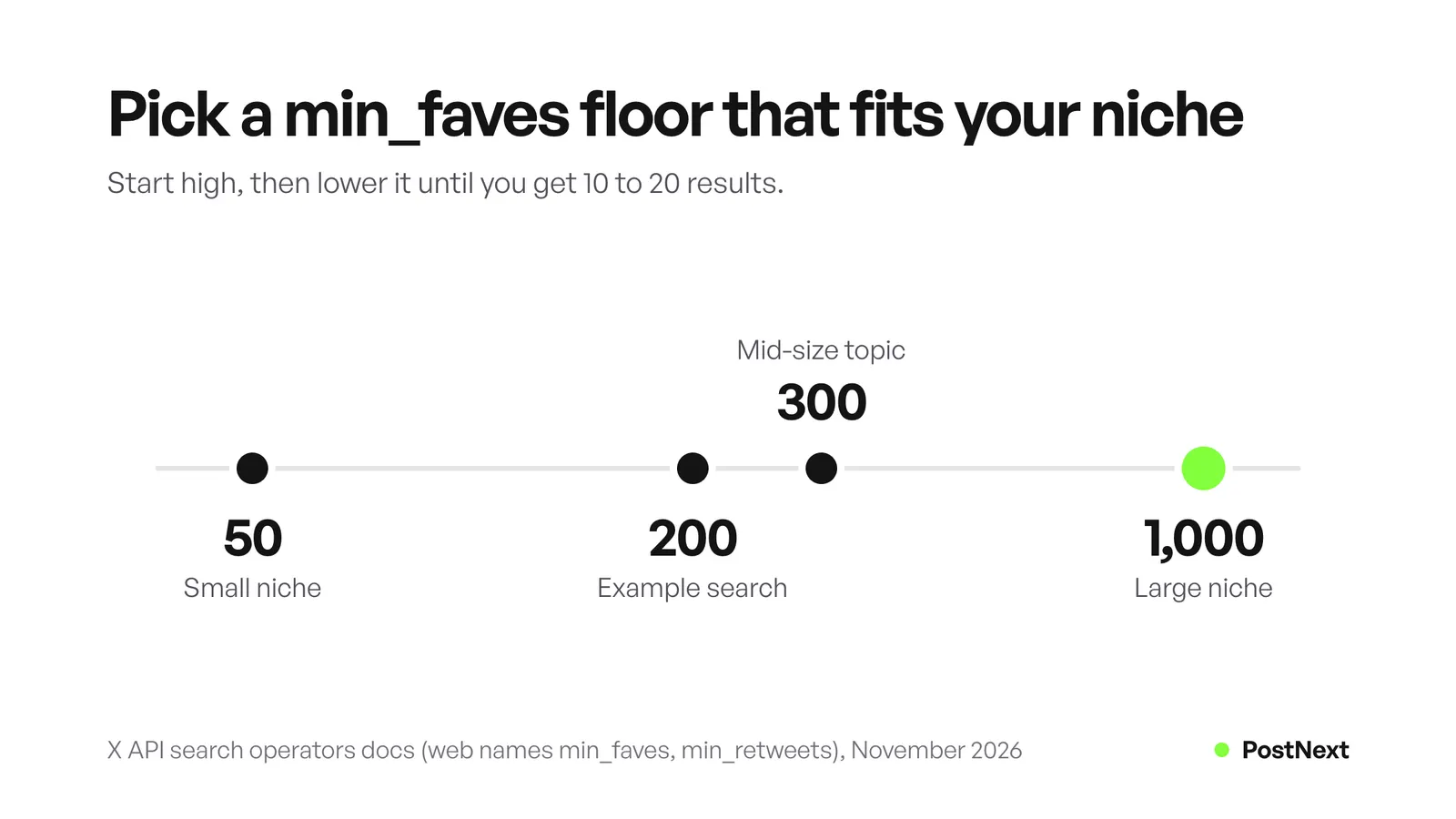
Combine a topic with an engagement floor and a date range. "content calendar" min_faves:200 since:2026-10-01 -filter:replies lang:en returns original posts about content calendars from the last few weeks that earned at least 200 likes. Start with a high floor and lower it until you get 10 to 20 results. Those posts show which angles your audience already rewards.
A method that turns search results into your own posts:
- Pick a narrow topic. “Pricing a design service”, not “design”. Narrow topics give results you can use.
- Set the engagement floor for your niche. In a small niche,
min_faves:50may already be a strong post. In a mid-size topic, trymin_faves:300. In a large one, start atmin_faves:1000. - Limit the dates.
since:set to the last 30 to 60 days keeps the results current. Older winners often depend on news that has passed. - Read the replies, not only the post. Replies show what people agreed with, argued about or asked next. An unanswered question in the replies is a post idea.
- Write your own take. Keep the idea and the question it answers. Change the example, the proof and the words to your own. Copying a viral post word for word is plagiarism. X’s rules also say it may remove accounts that repeatedly post duplicate content from search.
Search recipes for common jobs:
| Job | Search |
|---|---|
| Ideas that earned likes in your topic | "cold email" min_faves:300 -filter:replies lang:en |
| Questions people ask | "how do I" "cold email" min_replies:5 |
| What one account’s best posts look like | from:account min_faves:1000 |
| Threads that worked | "🧵" "pricing" min_retweets:50 |
| Posts with video in your niche | "meal prep" filter:videos min_faves:500 |
| Complaints about a tool you compete with | "tool name" (slow OR broken OR expensive) -from:toolname |
For how X decides which posts to show in the first place, our guide to the X algorithm covers the ranking signals. A search that keeps finding the same few large accounts is also a list of people to reply to, which is one of the faster ways to grow an X following.
What is the difference between X search and the X API search?
They use different operator names for the same filters. In the search box on x.com you type min_faves: and min_retweets:. The X API uses min_likes: and min_reposts:, and X’s developer docs say the web names “are not valid in the X API and will be rejected with a 400 error”. The API also has its own operators, such as has:media and is:reply.
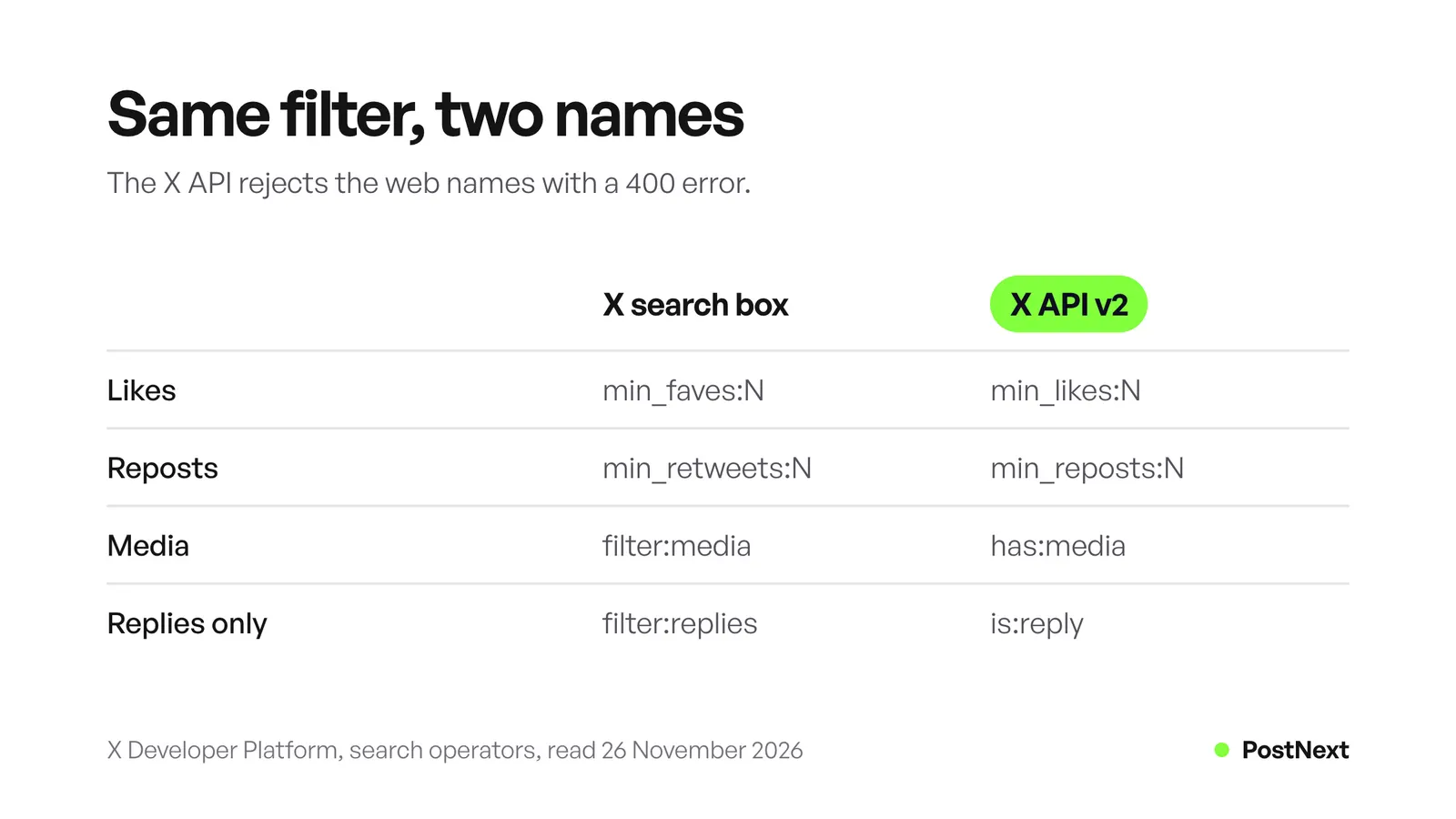
| Filter | X search box (web) | X API v2 |
|---|---|---|
| At least N likes | min_faves:N | min_likes:N |
| At least N reposts | min_retweets:N | min_reposts:N |
| At least N replies | min_replies:N | min_replies:N |
| Has media | filter:media | has:media |
| Only replies | filter:replies | is:reply |
| Has a link | filter:links | has:links |
This matters when you hand a search to a tool or an AI agent. A search copied from the web into an API-based tool can fail, so check which names the tool expects.
Can you save an advanced search on X?
The simplest way to keep a search is to bookmark the results page in your browser. The full query sits in the page address, so the bookmark reopens the same search with fresh results. For a search you check every day, a search column in X Pro shows new matching posts as they arrive.
X Pro, the dashboard that used to be TweetDeck, accepts the same search operators in its search columns. It needs a paid plan: X lists X Pro only under Premium+, and on The X Subscription the Premium, Super and Ultra plans carry those benefits. Our X Pro guide covers the columns and plans.
Why does X advanced search show no results?
Most empty results come from one of four causes: you are not logged in, an operator has a typo or a space after the colon, the engagement floor is too high for the topic, or the date range is too narrow. Remove one operator at a time until results appear. Then add the filters back, one by one.
Other things to check:
- Spaces.
from: postnextiowith a space does not work. Writefrom:postnextio. - OR in lower case.
calendar or plannersearches for the word “or”. WriteORin capitals. - Dates in the wrong format. Use
YYYY-MM-DD, for examplesince:2026-11-01. - Old posts with no likes. One report from August 2026 says X search leaves out posts that are at least seven days old and have zero likes. X has not documented this, but it is a reason not to rely on search to find every post an account ever sent.
- Protected accounts. Posts from protected accounts appear only to approved followers.
How does PostNext fit into this?
PostNext does the search step for you across five networks and turns a result into a draft. Its viral content discovery searches recent high-engagement public posts on X, Instagram, LinkedIn, TikTok and YouTube for a topic you type, in a 7, 14 or 30 day window. You open a result in the composer, and the AI writes new words in your brand voice.
Two limits, from PostNext’s own FAQ: results show an estimated engagement level, not exact like counts, and there is no engagement threshold filter. For an exact floor such as min_faves:500 on X, use X search. Then schedule your version with the X scheduler, which publishes posts, threads and polls at the time you set.
Our guides to scheduling tweets and how many tweets to post a day cover the next steps.
Frequently Asked Questions
Where is advanced search on X?
On desktop, search for anything on x.com, then click Advanced search under Search filters on the results page, or go to x.com/search-advanced. You must be logged in. In the X app, type the operators into the search box.
Can you use Twitter advanced search without an account?
No. X’s help page says advanced search is available when you are logged in. Create a free X account to use the form and the operators.
What does min_faves mean on Twitter?
min_faves: finds posts with at least a set number of likes. “Faves” is the old name for likes on Twitter. min_faves:100 returns posts with 100 or more likes. Put a minus sign in front, -min_faves:100, to find posts with fewer than 100 likes.
How do you search someone’s tweets on X?
Type from: and the username with no space, then a word or phrase. from:postnextio scheduling finds that account’s posts about scheduling. Add since: and until: with dates in YYYY-MM-DD format to search a period.
How do you search tweets by date?
Use since: and until: with dates in YYYY-MM-DD format. since:2026-11-01 until:2026-11-08 finds posts from 1 to 7 November 2026, because the until: date is not included. The Dates fields on the advanced search form write the same operators for you.
Does Twitter advanced search work in the app?
X’s help page describes the form on the web. In the X app, type operators such as from:, since: and min_faves: into the search box. The community operator reference says they work on mobile too.
Sources
- X Help Center, How to use advanced search (read 26 November 2026): the form, its four groups of filters, the login requirement, the example search.
- X Developer Platform, Search operators (read 26 November 2026): API operator names and the note that
min_faves:andmin_retweets:are the web names. - X Help Center, Search policies (archived 8 October 2026): accounts that repeatedly post duplicate content may be removed from search.
- PostNext, Find viral content on 5 platforms (read 26 November 2026).
- Igor Brigadir, twitter-advanced-search on GitHub (github.com/igorbrigadir/twitter-advanced-search, read 26 November 2026): community reference for web search operators.
- Roboin, “Why X search is not showing older posts” (roboin.io, 9 August 2026): the report on old posts with zero likes.
- X Help Center and x.ai documentation on X Pro and The X Subscription, as cited in our X Pro guide (November 2026).