Skip to content

Social media for architects

Share site visits, finished houses and the reason behind each choice. Plan once a week, and PostNext publishes on LinkedIn, Instagram and Threads.

How architects win house projects in their town

A client may work with you for years before they hold the keys. So they want reasons to trust you before the first meeting. Homeowners study built houses like the one they plan, ideally near their own plot. A finished house in their town tells them you know the local rules. Builders and developers check your LinkedIn for finished buildings and the teams that built them.

Architecture is slow, so let the stages of each project set your rhythm. Planning approval, the first wall and the handover each deserve a post. Between stages, post from the archive or explain one choice. When a site pauses for winter, show models and sketches instead. Two LinkedIn posts a week remind builders and clients of your name. This guide to scheduling LinkedIn posts shows a simple weekly routine.

On LinkedIn, name the engineer and the builder in every project post. Builders often share a finished house, and their contacts include future clients. On Instagram, a strong photo of a finished house needs only a short caption. Label every render as a render, so nobody thinks it is built.

Social media post ideas for architects

Example posts for a sample business, made with PostNext.

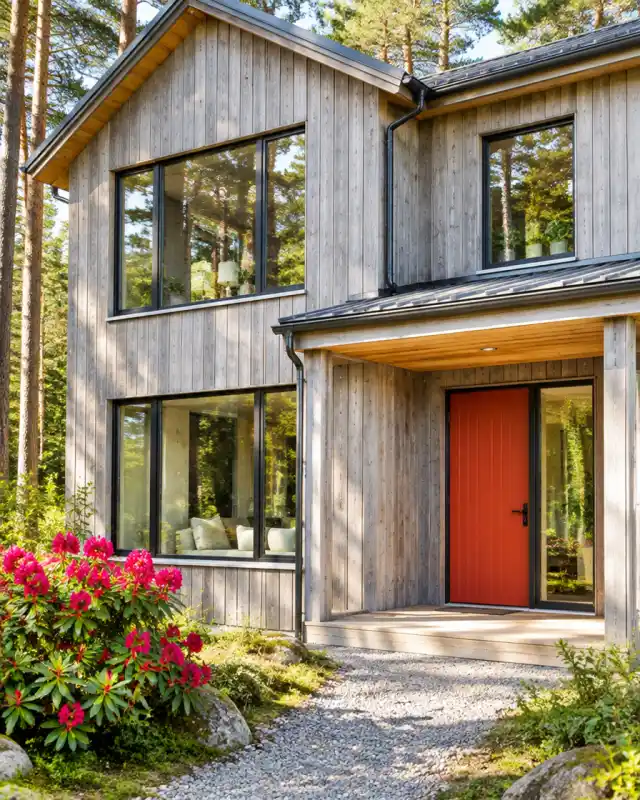
  1. Site visits, with your face

    A house takes years, and clients hire the person who checks it. A site photo of you shows that care every week.

  2. A finished house, years later

    Show a house after years of weather. People who plan to build see how your choices age.

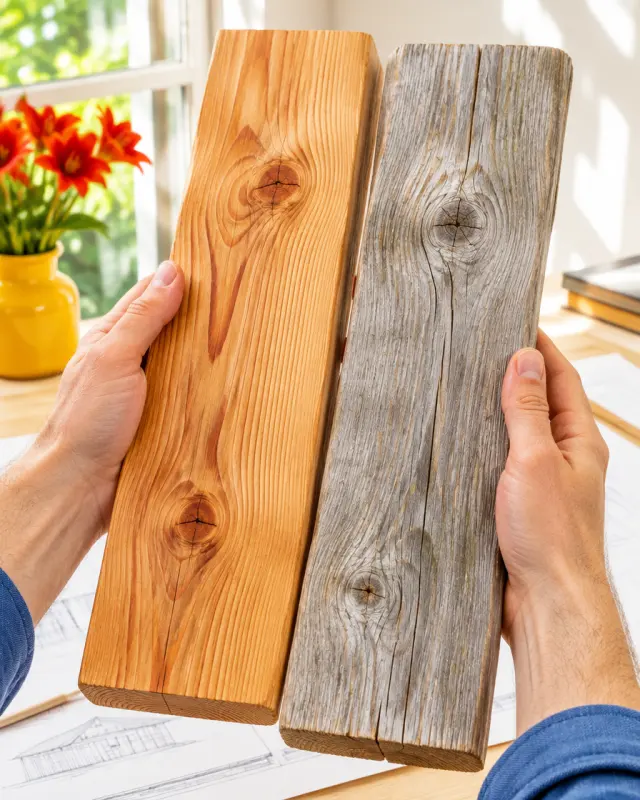
  3. One material, explained

    Two boards, five years apart. A short post about one choice shows how you think, before a client ever calls.

More post ideas

  1. The empty plot, first visitShow the plot before anything is built. Point to the slope, the old trees and where the sun rises.
  2. The sketch beside the built roomPut the first sketch next to a photo of the finished room. People see the idea survive from paper to timber.
  3. Why the kitchen faces eastExplain one orientation choice, like morning sun at breakfast. One plan and one photo are enough.
  4. Three things for the first meetingTell clients what helps: the plot map, photos of the site and a rough budget. They make the first meeting more useful.
  5. A building in town you admirePost one older building near you and what you learned from it. People who love the area notice.
  6. The person who draws the stairsIntroduce the colleague who draws the details. Clients like to know who works on their house.
  7. An open house on a SaturdayWhen owners agree, invite people to visit a finished house. Share the date two weeks ahead and the address only to people who book.
  8. Why the owners chose timberTell one family's reason for building in wood, in their words and with their consent.
  9. The house in its first winterShow a new house in snow or heavy rain. Future clients see how it handles the weather.

Where architects should post

  • LinkedInClients, builders and other architects read LinkedIn. A post on your own profile puts your name beside the project.
  • InstagramPeople planning a house save photos of finished homes. A steady grid shows the style they would get from you.
  • ThreadsA short thought on one choice, like a roof angle, fits here. It starts a talk with people who care about design.

PostNext publishes from your personal LinkedIn profile, never the practice's company page. Post there yourself.

A weekly posting plan for architects

Five posts a week, with LinkedIn on Monday and Thursday. Write them after Monday's site visit, while the notes are fresh.

  1. MonSite visit notesA site photo and three things you checked, from the slab to the window frames.
  2. TueA house from the archiveOne finished house in good light, with the year it was built and one detail.
  3. WedTwo samples, one questionShow two cladding samples and ask which one people would choose. Then say which you chose.
  4. ThuOne decision, explainedA text post of 200 to 300 words on one roof shape or window size.
  5. FriThe studio at workModels, sketches or the team at the big table, posted before the weekend.

A building project, post by post

Plan around site visits

Put the week's site visit and project posts on the calendar on Monday. When a visit moves, drag its post to the new day.

Paste a project page

Paste the larch article from your website. AI Repurpose drafts posts for LinkedIn, Instagram and Threads, and you edit each one.

Preview for the client

Send the Birch Hill owners a read-only link to the post. They open it without an account and tell you if it is fine.

Find your best hours

PostNext checks your posts from the last 90 days. It suggests three LinkedIn times for the cladding post. Paid plans only.

Caption templates for architects

Fill in the words in brackets, then paste the caption into PostNext.

  • Site visit update

    Site visit at [project], week [number]. Today we checked [what you checked]. Next comes [the next stage], planned for [month].

  • One choice explained

    Why [material or shape] at [project]: [the reason]. The owners wanted [their wish], and the site has [one condition].

  • A house years later

    [Project] was finished in [year]. Today the [material] looks [how it looks]. What we would keep: [one detail]. What we would change: [one thing].

Social media mistakes architects make

  1. Writing like a planning documentLong technical words lose clients. Explain one choice in plain words, as you would at their kitchen table.
  2. Renders with no built workRenders alone look like promises. For every render you post, show one house that stands today.
  3. Silence while a house is builtMonths pass between drawings and keys. Post the site visits, so people see the work in between.

Four reasons practices choose PostNext

  • Your website, made into postsPaste the link to a project page. AI Repurpose drafts up to 5 posts per network, at 1 credit per post.
  • LinkedIn as yourselfPosts publish to your personal LinkedIn profile, so your name stands next to every project.
  • A project in 20 imagesOne LinkedIn post holds up to 20 images. Show the plan, the sketch and the finished rooms.
  • Room for the whole ideaLinkedIn takes 3,000 characters, enough for the reasons behind a roof shape. A counter shows each limit as you write.

What stays in your hands

  • Your own accountsYou connect your own accounts. You can disconnect any of them at any time.
  • Your wordsEvery AI draft stays editable. You decide what each caption says.
  • Your calendarMove, change or delete any post before it is published.
  • Your planYou can start on the Free plan, or try a paid plan free for 7 days.

Questions from architects

Can PostNext post to our practice's LinkedIn page?

No. PostNext publishes to personal LinkedIn profiles only. It cannot post to the practice's company page or a showcase page. Your own profile puts your name beside each building.

Can my client see the post about their house first?

Yes, send the owners a read-only preview link. They open it without an account, and there is no approve button. If owners appear in it, ask for written consent before you post a client's photo.

Can the whole studio share one calendar?

It can on the Teams plan, which starts at 5 users. The studio shares a calendar and brand profiles. Each person is an owner, admin or member.

What does PostNext not do for an architect?

PostNext does not post to Facebook, Google Business Profile or LinkedIn company pages. It does not make renders either. It plans your LinkedIn, Instagram and Threads posts and publishes them at their times.

Can I post plans and drawings?

Yes, save each sheet as a PNG or JPG first. The media library takes files up to 500 MB, so large drawings fit.

Does the 7-day free trial ask for a card?

The trial asks for a card. If you cancel before it ends, you pay nothing and keep the Free plan with 1 channel and 10 posts a month. If you do not cancel, the paid plan starts when the trial ends.

Every project, posted while it grows

Make three posts from this week's site visit, and PostNext publishes them while you draw.