
Instagram trial reels are Reels that Instagram shows to people who do not follow you first. Your followers do not see them in Feed or Reels, and they stay off your profile unless you share them to everyone. You need a public account with at least 200 followers on a professional account, or 1,000 on a personal one. Insights arrive within 24 hours.
Key Takeaways
- A test with strangers first. A trial reel goes to non-followers. Your followers do not see it in Feed or Reels.
- The follower rule. Professional accounts need 200 followers and personal accounts need 1,000. The account must be public (Instagram Help Center, November 2026).
- One switch before you share. Create a Reel as usual and tap Trial before you share it.
- Results in 24 hours. You see views, likes, comments and shares within 24 hours.
- Manual or automatic sharing. Share a winning trial to everyone yourself, or turn on Share to everyone automatically.
- Use new content. Instagram may limit the reach of a trial reel that repeats something you already shared.
- Schedule your regular Reels. PostNext publishes Reels on a schedule. Trial reels are made in the Instagram app.
What are trial reels on Instagram?
A trial reel is a Reel that Instagram shows to accounts that do not follow you. Your followers do not see it in Feed or the Reels tab, and it does not appear on your profile. You read its numbers, then decide whether to share it with everyone. Instagram ranks trial reels on their own, so a weak trial does not hurt your regular Reels.
| Trial reel | Regular Reel | |
|---|---|---|
| Who sees it first | People who do not follow you | Your followers and new viewers |
| On your profile grid | No, unless you share it to everyone | Yes |
| In followers’ Feed and Reels | No | Yes |
| Insights | Views, likes, comments, shares within 24 hours | The Reel’s own insights |
| Effect on other Reels | Ranked on its own | Part of your normal Reels |
Instagram launched trial reels on 10 December 2024 (about.fb.com, November 2026). The idea has not changed: test a Reel with strangers before you show it to your audience. Some followers can still see a trial reel. Instagram’s help page says this can happen when someone sends it to them in a message, on a page that shows Reels with the same audio, or in search engine results.
Who can use trial reels?
You need a public Instagram account and a minimum number of followers. A professional account, which means Business or Creator, needs at least 200 followers. A personal account needs at least 1,000. Your account must also be eligible to appear in recommendations. If it is not, you lose access to trial reels until it is eligible again.
Instagram’s help page gives 200 followers for professional accounts and 1,000 for personal accounts (November 2026), so switching to a professional account is the faster route for a small account. The switch is free in the Instagram app. If you are still under 200, our guide to your first 1,000 followers covers the early growth steps.
To check whether your account can appear in recommendations, open Account Status in your Instagram settings. It shows removed content and any limits on your reach.
How do you post a trial reel?
Create a new Reel the normal way, then turn on Trial before you share it. Instagram’s help page gives three steps: record the Reel, tap Trial, then tap Next and Share. Use a new video. Instagram says a trial reel may get limited reach if it detects that you shared the same content before.
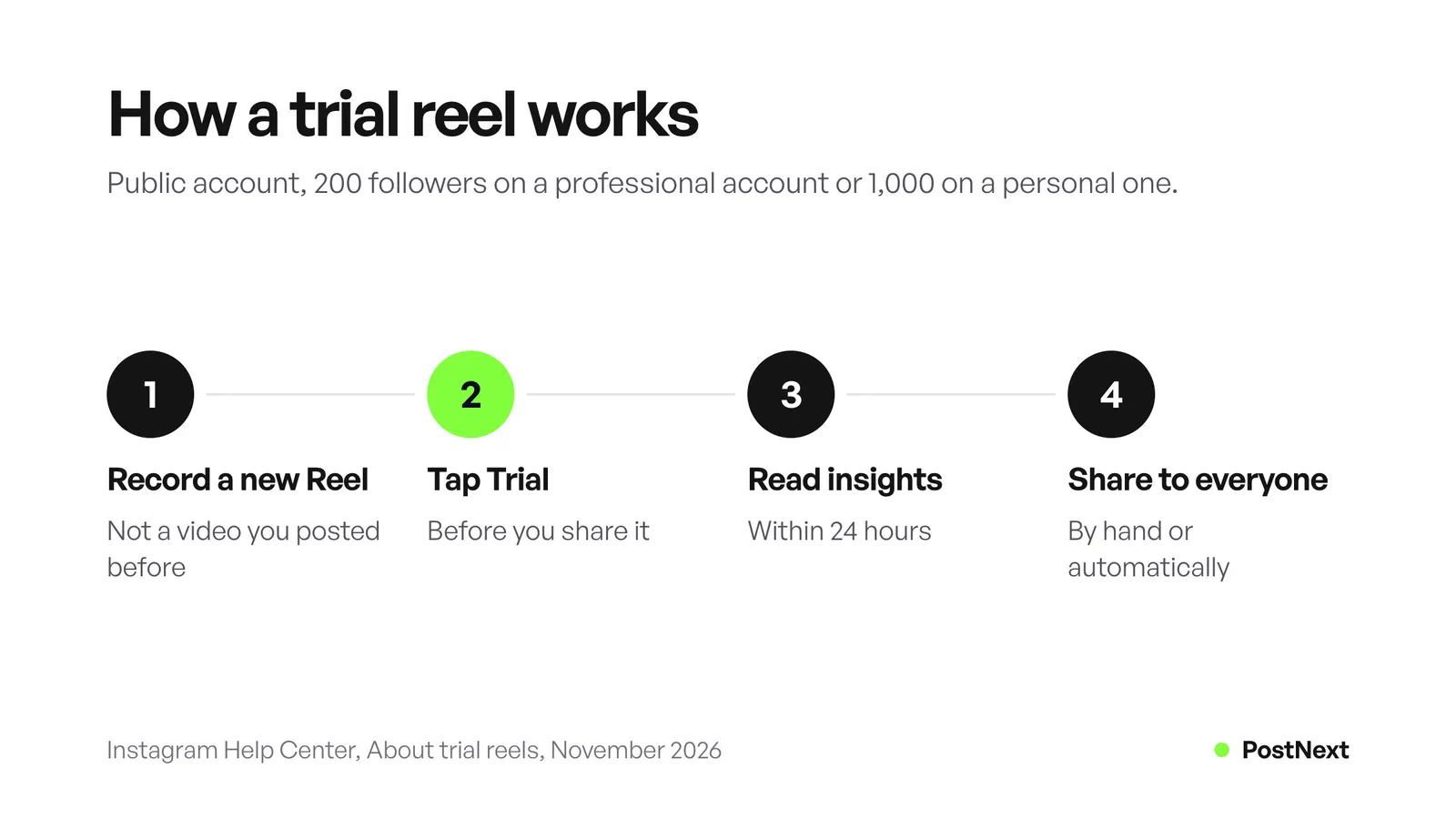
- Record or upload a new Reel. Edit it, add the cover and write the caption as you would for any Reel.
- Tap Trial. It sits on the screen before you share.
- Choose the sharing rule. Below Trial, tap Trial settings if you want Instagram to share it to everyone automatically.
- Tap Next, then Share. The Reel goes to people who do not follow you.
Trial reels do not appear on your profile. To find one later, go to your profile and open your Reels. Instagram’s December 2024 announcement said trial reels sit on your profile next to your drafts, visible only to you.
Make the Reel as carefully as a regular one. A trial is still a public video, and strangers decide in the first seconds whether to keep watching. Our Instagram Reel ideas give 30 formats with hooks, and the Reel size guide keeps text clear of the buttons.
Should you share trial reels automatically or manually?
Share manually when each Reel needs a decision, and automatically when you post many trials and want the good ones to reach followers fast. With Share to everyone automatically on, Instagram shares the trial if it performs well soon after you publish it, based on signals like views and engagement. The setting applies to all your future trials until you change it.
To share a trial reel by hand:
- Go to your profile and open your Reels.
- Tap the trial reel.
- Tap View insights.
- Tap Share to everyone.
The Reel then appears on your profile grid and Reels tab, and your followers may see it in Feed and Reels. Share the trial itself instead of posting the same video again as a new Reel. A second copy is the repeat content Instagram warns about.
Automatic sharing removes a step, but you give up the choice. Instagram decides what “performing well” means. Manual sharing lets you check the comments first, which matters for a brand account. When Instagram launched the feature, it described the automatic rule as based on views in the first 72 hours (about.fb.com, December 2024). The help page now says “soon after you publish it”, so do not plan around a fixed number of hours.
How do you read trial reel results?
Open the trial reel and tap View insights. Instagram shows views, likes, comments and shares within 24 hours of sharing. Give the trial more time than a regular Reel, because Instagram says trial reels may take longer to get views when they go to people who do not follow you. Compare trials with each other, not with your regular Reels.
A simple way to read them:
- Views tell you whether strangers stopped for the first seconds. A trial with far fewer views than your other trials probably has a weak opening.
- Shares tell you whether viewers sent the Reel to someone, which shows the topic reaches beyond your audience.
- Comments and likes tell you whether viewers agreed with or reacted to the idea.
When Instagram launched trial reels, it also said it would show how a trial performs compared with your previous trials (about.fb.com, December 2024). Use that comparison. Change one thing per trial, such as the hook, the cover or the length, so you know what caused the difference. If the opening line is the thing you test, our guide to hook ideas for social media gives openings to try.
For your regular Reels, Instagram Insights covers any period within the past 90 days (help.instagram.com, November 2026), so you can compare a shared trial with older posts later.
Why are trial reels not showing?
The Trial option is missing when your account does not meet one of Instagram’s rules. Check three things: the account is public, it has at least 200 followers as a professional account or 1,000 as a personal one, and it is eligible for recommendations. Fix the first one that fails.
- Private account. Trial reels need a public account. Switch the account to public in your privacy settings.
- Too few followers. Switch a personal account to a professional one to use the lower 200-follower rule.
- Not eligible for recommendations. Open Account Status in settings. Content that goes against Instagram’s rules can limit your reach and remove access to trial reels until the account is eligible again.
- Looking in the wrong place. Instagram’s steps say to tap Trial before you share the Reel, so look for it on the screen where you tap Next and Share.
- Trial reel gets few views. Instagram says trials can take longer to get views. Also check that the video is new. Repeated content may get limited reach.
If none of these apply, update the Instagram app and check again later.
Can you schedule trial reels?
Instagram’s publishing API now has a setting for trial reels, so some tools can publish them. PostNext schedules regular Reels and does not list trial reels as a feature, so make trial reels in the Instagram app. Then schedule your regular Reels in PostNext, using what the trials taught you about hooks, topics and length.
PostNext publishes Reels to Instagram through the official API at the time you set. It waits for Instagram to finish processing, lets you pick the cover frame per Reel and tells you if Instagram rejects a clip for length, format or aspect ratio (postnext.io, November 2026). You need an Instagram Business or Creator account. Trending audio cannot be added through the API by any tool, so add a sound in the Instagram app if a track matters.
The PostNext Reels planner shows the weekly Reels workflow, and the Instagram scheduler page lists every Instagram format PostNext publishes. Before you plan longer Reels, check how long Instagram Reels can be.
One habit keeps the two apart. Use trials for ideas you are unsure about. Use scheduled Reels for formats that already work. A trial that wins goes to everyone with the Share to everyone button, never as a second upload.
Frequently Asked Questions
What are trial reels on Instagram?
Trial reels are Reels that Instagram shows to people who do not follow you first. Your followers do not see them in Feed or Reels, and they stay off your profile. You read the results and then choose whether to share the Reel with everyone.
Who can use Instagram trial reels?
Public accounts that meet a follower minimum. A professional account needs at least 200 followers and a personal account needs at least 1,000. The account must also be eligible to appear in recommendations.
Do trial reels hurt your account?
Instagram says trial reels are evaluated on their own in its ranking and do not affect the performance or ranking of your regular Reels. A trial that does badly stays a trial and does not reach your followers.
How long does a trial reel test take?
Instagram shows insights within 24 hours of sharing. Trial reels can take longer to get views than regular Reels, because they go to people who do not follow you. Give a trial more time than a regular Reel before you judge it.
Can followers see my trial reel?
Not in Feed or the Reels tab. Some followers may still see it if someone sends it to them in a message, on a page of Reels with the same audio, or in search engine results.
Can I turn an old Reel into a trial reel?
Instagram’s steps start with a new Reel: you tap Trial before you share it. Instagram also says a trial reel may get limited reach if it repeats content you already shared, so use a new video.
Sources
- About trial reels on Instagram, help.instagram.com (November 2026): eligibility (public account, 200 or 1,000 followers, recommendations), steps, Trial settings, Share to everyone automatically, insights within 24 hours, independent ranking.
- Trial reels: try content with non-followers first, about.fb.com (10 December 2024, read November 2026): launch, 72-hour automatic rule at launch, drafts location, comparison with previous trials.
- Trial reels on the Instagram for Creators blog, creators.instagram.com (10 December 2024, read November 2026): same launch details.
- Check your Account Status on Instagram, help.instagram.com (November 2026): restrictions and limits on reach.
- Instagram API, IG User Media, developers.facebook.com (November 2026): the trial_params setting for publishing trial reels.
- Instagram Insights, help.instagram.com (November 2026): insights for any period within the past 90 days.
- PostNext Reels planner page, postnext.io/planners/reels (November 2026): Reels publishing, cover frame, rejection notices, professional account, no trending audio through the API.