
The best hashtags for TikTok are the ones that describe your video: its topic, its niche and who it is for. TikTok says relevant hashtags help the right viewers find a video, that more hashtags won’t guarantee a broader reach, and that #FYP works like any other tag. Three to five specific tags in the caption cover most videos.
Key Takeaways
- Hashtags describe, they do not promote: TikTok reads hashtags as part of a video’s information, next to captions and sounds. They tell TikTok and searchers what the video is about.
- No number is required: TikTok’s creator tips set no hashtag count and say more hashtags won’t guarantee a broader reach. Three to five is a practical default, not a TikTok rule.
- #FYP is a normal tag: TikTok says #FYP, #ForYou and #ForYouPage work like all other hashtags and won’t necessarily improve your chances of reaching the For You feed.
- Search is the second way in: TikTok says search results weigh how well a video matches the term someone typed, and hashtags are part of that match.
- Find tags in two places: TikTok’s search suggestions and the Trends page in TikTok Creative Center, which ranks hashtags by industry and time frame.
- Copied lists fail: a list of the most popular tags cannot know what your video is about. Generic tags put you next to every other video using them.
TikTok hashtag rules at a glance
Every row below comes from TikTok’s newsroom, Help Center, developer documentation or Creative Center help page, read in November 2026. Where TikTok gives no rule, the row says so, because many guides fill that gap with numbers TikTok never published.
| Question | Answer | Where TikTok says it |
|---|---|---|
| How many hashtags per video? | No number given; more won’t guarantee a broader reach | Creator tips, newsroom |
| Do hashtags affect recommendations? | Yes, as part of video information, next to captions and sounds | Help Center; newsroom |
| Do hashtags affect search? | Yes; search weighs how well a video matches the term typed | Help Center |
| Does #FYP help? | It works like all other hashtags | Creator tips, newsroom |
| Where do they go? | In the caption (“Add hashtags” when you post) | Help Center; creator tips |
| Caption length through an app | Up to 2,200 characters for a video | Developer documentation |
| Where to see trending tags | Trends in TikTok Creative Center, by industry and time frame | Creative Center help |
Do hashtags work on TikTok?
Yes, as labels. TikTok’s Help Center lists hashtags among the content information it uses to recommend videos in the For You feed, the Following feed and search, next to sounds and other video details. TikTok’s creator tips say relevant hashtags make a video more likely to be found by the right audiences. They describe a video. They do not push it to more people by themselves.
What decides reach is how viewers respond. TikTok says that for most users, interactions such as watching in full, liking, sharing and commenting are generally weighted more heavily than other signals (support.tiktok.com, November 2026). A hashtag helps TikTok pick the first viewers to test a video with. If those viewers skip, no tag will save the video. If they stay, the right tags help TikTok find more people like them. That is why the opening seconds deserve more effort than the tags, and our TikTok content ideas start each format with a hook.
Search is where hashtags matter most. For search results, TikTok says content information, which may include how well the content matches the specific term entered, is generally weighted more heavily than other factors. A tag such as #sourdoughstarter matches what a searcher types. A tag such as #viral matches nothing anyone is looking for.
How many hashtags should you use on TikTok?
Use three to five hashtags that each describe the video. TikTok sets no number. Its creator tips say more hashtags won’t guarantee a broader reach and that caption space is limited, so only add the hashtags that best represent what the video is about. Three to five usually covers the topic, the niche and the audience without crowding the caption.
That range is a working default, so treat it as one. Here is why it holds up:
- Each tag should add new information. After the topic, the niche and the audience, extra tags tend to repeat one of them in other words.
- The caption has other jobs. It should also say what the video is about in plain words, which helps search as much as a tag does.
- Unrelated tags blur the signal. Ten tags about ten loosely related topics tell TikTok less about the video than three precise ones.
The caption limit is rarely the problem. Through TikTok’s Content Posting API, which scheduling apps use, a video caption can hold up to 2,200 characters, as TikTok’s developer documentation counts them (developers.tiktok.com, November 2026). Five hashtags take a small part of that.
What are the best hashtags for TikTok?
The best hashtags for TikTok are specific to the video: one that names the topic, one that names the niche inside it, and one that names who it is for or what kind of video it is. A baker’s video on fixing a flat sourdough loaf might use #sourdough, #sourdoughtips and #homebaking. Add a trending tag only when the video truly fits it.
Build each set from three layers:
- Topic tag. The subject in one or two words: #sourdough, #skincare, #budgeting.
- Niche tag. A narrower version that a searcher with a real question would type: #sourdoughtips, #oilyskinroutine, #budgetingforbeginners.
- Audience or format tag. Who the video serves or what it is: #homebaking, #smallbusiness, #tutorial.
- Optional trend or community tag. Only if the video takes part, for example a challenge it joins. TikTok’s tips suggest joining trending hashtags that highlight trending topics or video challenges, or tagging a creator whose video inspired yours.
The same layers work for a business. A coffee shop posting a latte-art clip might use #latteart (topic), #latteartpractice (niche) and #coffeeshop (audience). Each tag is a word someone could type into search and expect this exact video.
Does #FYP help you get on the For You page?
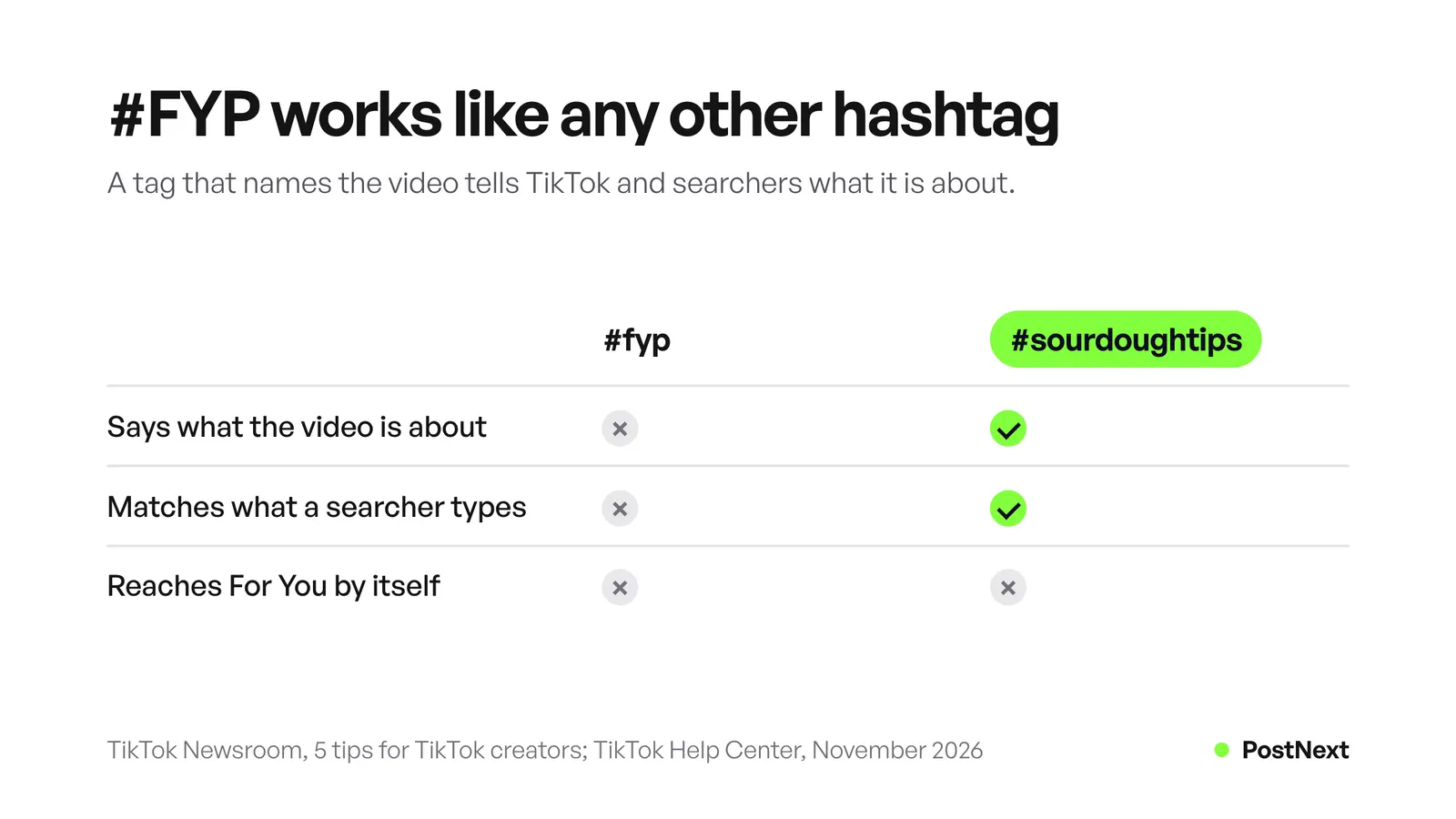
No. TikTok answered this directly in its 2020 creator tips: hashtags like #FYP, #ForYou and #ForYouPage “work just like all other hashtags on TikTok”, so adding them won’t necessarily improve your chances of reaching someone’s For You feed. TikTok recommends using the caption space for context and hashtags that are relevant to the content.
#FYP also says nothing about your video. Videos on every subject use it, so it gives TikTok no clue about who your viewers are. In search, nobody looking for help with a flat loaf types “fyp”. If you want reach, the space is better spent on a tag that names the topic. Our guide on how to get more views on TikTok covers what does decide who sees a video.
How do you find trending hashtags on TikTok?
Use two free sources from TikTok. TikTok search recommends search terms, so type your topic and read what it suggests. The Trends page in TikTok Creative Center lists trending hashtags by industry. You can search or filter it by industry or time frame, and open See Analytics on any hashtag for more detail.
The Creative Center steps, from TikTok’s business help page (ads.tiktok.com, November 2026):
- Log in to TikTok Creative Center.
- Click Trends.
- Search or filter by industry or time frame.
- Click See Analytics on a hashtag to see its trendline, related videos, audience insights, regional popularity and related hashtags.
The related hashtags in that view are useful for the niche layer. Trending tags change often, so check a tag on the day you post instead of keeping a saved list for months. Then look at the videos already using a trending tag. If they have nothing to do with your video, skip the tag, however popular it is.
Should you copy a list of popular TikTok hashtags?
No. Lists of the best TikTok hashtags rank tags by how many videos use them, which says nothing about whether they fit your video. TikTok’s own advice is to add only the hashtags that best represent what the video is about. A long list of popular tags, sorted by niche, is a place to find topic words. It cannot pick your set.
Popular tags fail in two ways. Broad tags such as #viral, #trending or #foryou describe nothing, so they add no signal. And the biggest tags in a niche put your video next to every other video on the same subject, where a searcher scrolling the results has thousands of choices. A narrow tag that matches a real question puts your video in front of fewer, better matched people.
Use lists for ideas and the three layers for the decision. Other networks follow their own rules, so write each network’s tags on their own: see our guides to hashtags on Threads and whether hashtags work on LinkedIn.
Where do you put hashtags on TikTok?
Put hashtags in the caption. When you post in the TikTok app, tap Next after editing the video, then add a description and hashtags on the post screen, along with people tags, a location and a link. TikTok’s creator tips also say to add hashtags to your captions. Put the plain-language description first and the tags after it.
Two habits help. Say the topic in words before the tags, because the words help search too. And keep tags in the language your viewers search in. A video for Spanish-speaking bakers needs Spanish tags, even if your other videos use English ones.
How to write TikTok hashtags with PostNext
PostNext has two tools for this job. The free TikTok hashtag generator suggests 3, 5 or 10 hashtags that describe your video, with an option to include niche tags. Generating needs a PostNext account. The hashtag checker on the same page is free, runs in your browser and needs no account. The AI has no live trend data, so check any trending tag in TikTok first.
Inside the app, the TikTok composer drafts an opening line, a caption and hashtags from your topic and tone, and you edit them before you schedule. You can save hashtag sets as groups and add them from the composer. PostNext checks a TikTok caption against the 2,200-character limit before it schedules the post. The TikTok scheduler then publishes the video at its time with Post directly on, or sends it to your TikTok inbox to finish in the app. A video sent to the inbox arrives without its caption, so add the caption and hashtags there. For captions without hashtags, the free TikTok caption generator drafts the words.
Frequently Asked Questions
What hashtags get you on the For You page?
No hashtag does that by itself. TikTok says #FYP, #ForYou and #ForYouPage work like all other hashtags. A hashtag helps TikTok understand the video, and then viewers decide its reach by watching, liking, sharing and commenting. Use tags that describe the video.
How many hashtags should I use on TikTok?
Three to five that each describe the video is a practical default. TikTok sets no number and says more hashtags won’t guarantee a broader reach. Cover the topic, the niche and the audience or format, and add a trending tag only when the video fits it.
Do hashtags still work on TikTok?
Yes, as labels for recommendations and search. TikTok’s Help Center lists hashtags among the content information used for the For You feed, the Following feed and search. They help the right viewers find a video, while how viewers respond decides how far it goes.
Should I use the same hashtags on every TikTok?
Only the tags that fit each video. A topic tag can repeat across a series, but the niche tag should change with what each video covers. Repeating one fixed set on every video tells TikTok and searchers less about each one.
Are niche hashtags better than popular ones on TikTok?
For most videos, yes. A niche tag matches what a searcher with a specific question types, and it describes the video precisely. A broad popular tag puts the video among many unrelated ones. Use one broad topic tag and one or two niche tags together.
Where do I find trending TikTok hashtags?
Open Trends in TikTok Creative Center and filter by industry or time frame, or type your topic into TikTok search and read the search terms it recommends. Check the videos already using a trending tag before you add it, and skip it if they are about something else.
Sources
- TikTok Newsroom, 5 tips for TikTok creators, July 30, 2020 (read November 2026)
- TikTok Newsroom, How TikTok recommends videos #ForYou, June 2020 (read November 2026)
- TikTok Help Center, How TikTok recommends content (read November 2026)
- TikTok Help Center, Making a post (read November 2026)
- TikTok Business Help Center, How to use Trends, updated July 2026 (read November 2026)
- TikTok for Developers, Direct Post reference (read November 2026)
- PostNext, postnext.io/tools/tiktok-hashtag-generator and postnext.io/channels/tiktok (read November 2026)