Un Tableau de Bord. Chaque Plateforme.Zéro Chaos.
Gérez tous vos comptes, planifiez des semaines à l'avance et publiez partout, sans jongler entre les onglets.
Pourquoi utiliser le planificateur de feed Instagram ?
Plan your perfect Instagram grid layout before posting
Grille prête ? Planifiez-la ici, sans changer d'outil.
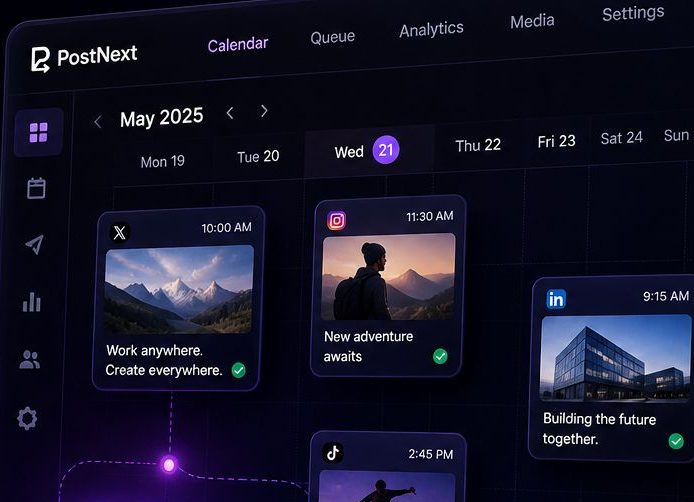
PostNext est le planificateur derrière cet outil. Reprenez les neuf publications que vous venez d'ordonner, rédigez les légendes avec l'assistant IA et placez-les dans un calendrier Instagram, aux côtés de X, LinkedIn, TikTok, Threads, YouTube et Bluesky.
- Un calendrier, pas une intuitionGlissez les publications sur des dates et des heures. L'ordre de la grille devient l'ordre de publication.
- Légendes et hashtags en une passeL'assistant IA rédige les légendes dans votre ton et propose des hashtags pour chaque publication.
- Gratuit pour commencerLe plan gratuit programme 10 publications par mois, sans carte bancaire. Passez au niveau supérieur quand la grille dépasse.
What is an Instagram Feed Planner?
An Instagram Feed Planner is a visual tool that helps you preview and organize your Instagram grid before posting. By uploading images and arranging them in a 3×3 grid (or larger), you can see how your feed will look to visitors, ensuring a cohesive and aesthetically pleasing profile. Whether you're a content creator, brand, or influencer, planning your Instagram feed helps maintain visual consistency and tells a compelling story through your posts.
Why Plan Your Instagram Feed?
Your Instagram profile is often the first impression people get of your brand or personal account. A well-planned feed shows professionalism and attention to detail. Here's why feed planning matters:
- Visual Cohesion: Ensure colors, themes, and styles work together harmoniously
- Brand Consistency: Maintain a consistent aesthetic that represents your brand identity
- Strategic Posting: Plan content in advance and avoid posting decisions made on the fly
- Grid Aesthetics: Create patterns, checkerboards, or color schemes across multiple posts
- Storytelling: Arrange posts to tell a visual narrative when viewed as a grid
- Increased Engagement: Cohesive feeds are more likely to convert profile visitors into followers
Instagram Feed Aesthetics & Themes
Popular Instagram feed aesthetic styles include:
- Minimalist: Clean, white backgrounds with simple compositions and lots of negative space
- Monochromatic: Stick to one color palette or filter for all posts
- Bright & Colorful: Bold, vibrant colors that pop and grab attention
- Dark & Moody: Low-key lighting with rich, deep tones and dramatic shadows
- Checkerboard: Alternate between two types of content (photos/quotes, products/lifestyle)
- Row by Row: Each row of 3 posts follows a specific theme or tells a story
- Puzzle Feed: Images that connect together to form one large picture
How to Create a Cohesive Instagram Feed
Follow these best practices to create a visually stunning Instagram feed:
- Choose Your Color Palette: Select 3-5 main colors and stick to them across posts
- Use Consistent Filters: Apply the same editing style or preset to all images
- Plan Content Mix: Balance different content types (products, lifestyle, quotes, behind-the-scenes)
- Mind the Spacing: Consider how each post looks both individually and in the grid
- Test Different Layouts: Use our planner to try 2×2, 3×3, or 4×4 grid previews
- Preview Before Posting: Always check how new posts will fit into your existing grid
- Think in Threes: Instagram shows 3 posts per row, so plan in sets of three
Instagram Grid Strategies
Advanced strategies for Instagram feed planning:
- The Rule of Thirds: Use the first 3, 6, or 9 posts to make a strong first impression on new visitors
- Color Blocking: Group posts by color to create visual sections in your feed
- Diagonal Patterns: Create diagonal lines of similar content across your grid
- Border Strategy: Add consistent borders to all photos for a framed, gallery look
- White Space Strategy: Use blank or minimal posts strategically to break up content
- Content Pillars: Rotate through 3-5 content themes in a predictable pattern
Best Times to Plan Your Feed
Feed planning is especially useful when:
- Launching a new product or campaign that requires visual coordination
- Rebranding or changing your Instagram aesthetic
- Planning content for events, holidays, or special occasions
- Batch-creating content to maintain consistency during busy periods
- Growing your following and wanting to make a strong first impression
- Preparing for a scheduled content calendar
Vous aimez cet outil? Planifiez partout avec PostNext
Contenu AI, planification pour X, Instagram, LinkedIn, TikTok, Threads, YouTube et Bluesky, plus un site link-in-bio gratuit.
Commencez gratuitement, sans carteRecevez des conseils hebdomadaires pour développer vos réseaux sociaux
Des conseils gratuits pour développer vos réseaux sociaux, directement dans votre boîte mail
Questions fréquemment posées
Qu'est-ce que la planification de flux Instagram ?
C'est l'idée d'organiser et de prévisualiser vos posts avant de les publier, pour qu'une fois en ligne, votre grille reste cohérente — niveau couleurs, ambiance, équilibre visuel.
Cet outil est-il gratuit ?
Oui, 100 % gratuit. Aucun compte requis. Le traitement se fait localement dans votre navigateur, ce qui protège vos visuels.
Combien d'images puis-je télécharger ?
Jusqu'à 9 visuels à la fois — la disposition 3×3 que vos visiteurs voient en haut de votre profil.
Vos serveurs stockent-ils mes images ?
Non. Rien ne sort de votre navigateur. Nous n'envoyons aucune image sur nos serveurs, nous n'en stockons aucune.
Puis-je réorganiser les images après le téléchargement ?
Oui. Glissez-déposez pour repositionner, la grille se met à jour en temps réel. Essayez plusieurs combinaisons sans perdre de temps.
Fonctionne-t-il sur les appareils mobiles ?
Oui, mais l'expérience est plus confortable sur ordinateur — le glisser-déposer y est plus précis qu'au doigt.
Quels formats d'image sont pris en charge ?
JPG, PNG, GIF, WebP. Les formats classiques qu'Instagram accepte de toute façon.
L'aperçu correspondra-t-il à mon vrai flux Instagram ?
Oui. La grille 3 colonnes affichée reproduit fidèlement l'apparence d'un profil Instagram — mêmes proportions, mêmes espaces.
Puis-je enregistrer la disposition que j'ai planifiée ?
Pour l'instant, l'outil fonctionne par session. Faites une capture d'écran pour garder une trace, ou notez l'ordre avant d'aller publier sur Instagram.
Pourquoi la planification de flux est-elle importante ?
Parce qu'une grille pensée à l'avance retient l'œil. Couleurs cohérentes, thèmes alignés, rythme visuel — c'est ce qui transforme un visiteur en abonné.