Одна Панель управления. На каждой платформе.Ноль хаоса.
Управляйте всеми своими аккаунтами, планируйте на недели вперед и публикуйте везде, не переключая вкладки.
Зачем нужен планировщик ленты Instagram?
Plan your perfect Instagram grid layout before posting
Сетка готова? Запланируйте публикации прямо здесь.
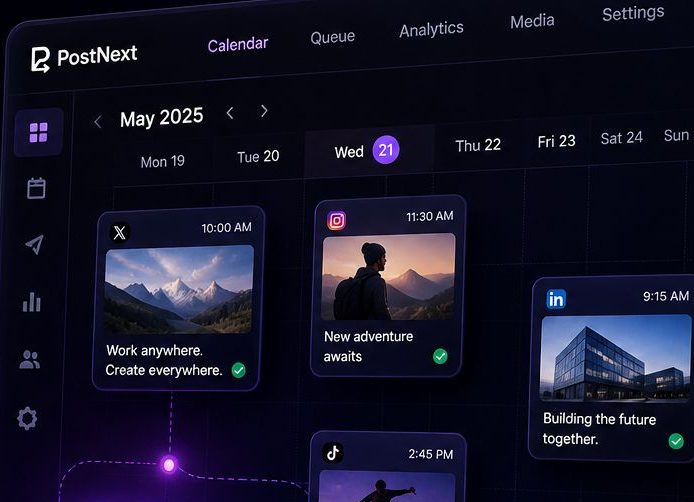
PostNext — планировщик, на котором работает этот инструмент. Возьмите девять постов, которые вы только что расставили, напишите подписи с ИИ-ассистентом и поставьте их в календарь Instagram рядом с X, LinkedIn, TikTok, Threads, YouTube и Bluesky.
- Календарь вместо догадокПеретащите посты на даты и время. Порядок в сетке становится порядком публикации.
- Подписи и хэштеги за один проходИИ-ассистент пишет подписи в вашем тоне и подбирает хэштеги для каждого поста.
- Бесплатный стартБесплатный план планирует 10 постов в месяц без карты. Переходите на платный, когда сетке станет тесно.
What is an Instagram Feed Planner?
An Instagram Feed Planner is a visual tool that helps you preview and organize your Instagram grid before posting. By uploading images and arranging them in a 3×3 grid (or larger), you can see how your feed will look to visitors, ensuring a cohesive and aesthetically pleasing profile. Whether you're a content creator, brand, or influencer, planning your Instagram feed helps maintain visual consistency and tells a compelling story through your posts.
Why Plan Your Instagram Feed?
Your Instagram profile is often the first impression people get of your brand or personal account. A well-planned feed shows professionalism and attention to detail. Here's why feed planning matters:
- Visual Cohesion: Ensure colors, themes, and styles work together harmoniously
- Brand Consistency: Maintain a consistent aesthetic that represents your brand identity
- Strategic Posting: Plan content in advance and avoid posting decisions made on the fly
- Grid Aesthetics: Create patterns, checkerboards, or color schemes across multiple posts
- Storytelling: Arrange posts to tell a visual narrative when viewed as a grid
- Increased Engagement: Cohesive feeds are more likely to convert profile visitors into followers
Instagram Feed Aesthetics & Themes
Popular Instagram feed aesthetic styles include:
- Minimalist: Clean, white backgrounds with simple compositions and lots of negative space
- Monochromatic: Stick to one color palette or filter for all posts
- Bright & Colorful: Bold, vibrant colors that pop and grab attention
- Dark & Moody: Low-key lighting with rich, deep tones and dramatic shadows
- Checkerboard: Alternate between two types of content (photos/quotes, products/lifestyle)
- Row by Row: Each row of 3 posts follows a specific theme or tells a story
- Puzzle Feed: Images that connect together to form one large picture
How to Create a Cohesive Instagram Feed
Follow these best practices to create a visually stunning Instagram feed:
- Choose Your Color Palette: Select 3-5 main colors and stick to them across posts
- Use Consistent Filters: Apply the same editing style or preset to all images
- Plan Content Mix: Balance different content types (products, lifestyle, quotes, behind-the-scenes)
- Mind the Spacing: Consider how each post looks both individually and in the grid
- Test Different Layouts: Use our planner to try 2×2, 3×3, or 4×4 grid previews
- Preview Before Posting: Always check how new posts will fit into your existing grid
- Think in Threes: Instagram shows 3 posts per row, so plan in sets of three
Instagram Grid Strategies
Advanced strategies for Instagram feed planning:
- The Rule of Thirds: Use the first 3, 6, or 9 posts to make a strong first impression on new visitors
- Color Blocking: Group posts by color to create visual sections in your feed
- Diagonal Patterns: Create diagonal lines of similar content across your grid
- Border Strategy: Add consistent borders to all photos for a framed, gallery look
- White Space Strategy: Use blank or minimal posts strategically to break up content
- Content Pillars: Rotate through 3-5 content themes in a predictable pattern
Best Times to Plan Your Feed
Feed planning is especially useful when:
- Launching a new product or campaign that requires visual coordination
- Rebranding or changing your Instagram aesthetic
- Planning content for events, holidays, or special occasions
- Batch-creating content to maintain consistency during busy periods
- Growing your following and wanting to make a strong first impression
- Preparing for a scheduled content calendar
Понравился этот инструмент? Планируйте публикации везде с PostNext
AI-контент и планирование публикаций для X, Instagram, LinkedIn, TikTok, Threads, YouTube и Bluesky, плюс бесплатный сайт link-in-bio.
Начать бесплатно, карта не нужнаПолучайте еженедельные советы по развитию соцсетей
Бесплатные советы по росту в соцсетях, прямо на вашу почту
Часто задаваемые вопросы
Что такое планирование ленты Instagram?
Планирование ленты Instagram - это процесс организации и предварительного просмотра ваших публикаций перед их публикацией, чтобы обеспечить цельный, эстетический макет сетки на вашем профиле.
Это инструмент бесплатный?
Да, наш Instagram Feed Planner полностью бесплатен и не требует регистрации. Вся обработка происходит в вашем браузере для максимальной конфиденциальности.
Сколько изображений я могу загрузить?
Вы можете загрузить до 9 изображений сразу, чтобы предварительно просмотреть свою ленту Instagram. Это показывает макет 3x3, который посетители увидят первым на вашем профиле.
Хранятся ли мои изображения на ваших серверах?
Нет, все изображения обрабатываются локально в вашем браузере. Мы никогда не загружаем или не храним ваши изображения на наших серверах, обеспечивая полную конфиденциальность.
Могу ли я переставить изображения после загрузки?
Да, просто перетаскивайте изображения, чтобы переставить их. Сетка обновляется в реальном времени, так что вы можете экспериментировать с разными макетами.
Работает ли это на мобильных устройствах?
Да, планировщик ленты работает на всех устройствах, включая смартфоны и планшеты, хотя настольный компьютер обеспечивает лучший опыт работы с функцией перетаскивания и перестановки.
Какие форматы изображений поддерживаются?
Инструмент поддерживает все распространенные форматы изображений, включая JPG, PNG, GIF и WebP. Сам Instagram также поддерживает эти форматы.
Будет ли предпросмотр соответствовать моей реальной ленте Instagram?
Да, предпросмотр показывает макет сетки из трех столбцов точно так, как он отображается на профилях Instagram. Пропорции и расстояния между изображениями соответствуют отображению Instagram.
Могу ли я сохранить свой запланированный макет?
В данный момент, инструмент работает на основе сессий. Вы можете сделать скриншот своей запланированной сетки для ссылки. Мы рекомендуем отметить ваш предпочитаемый порядок перед публикацией на Instagram.
Зачем важно планировать свою ленту?
Хорошо спланированная лента создает единый визуальный стиль, который привлекает подписчиков и демонстрирует ваш бренд или личный стиль. Это помогает обеспечить гармоничное сочетание цветов, тем и контента.