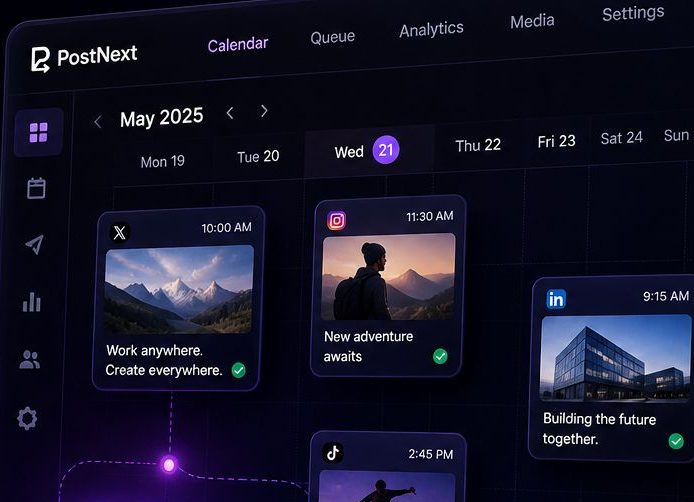
Ein Dashboard. Jede Plattform.Null Chaos.
Verwalten Sie alle Ihre Konten, planen Sie Wochen im Voraus und posten Sie überall, ohne zwischen Tabs zu wechseln.
Warum den Instagram Feed Planner nutzen?
Plan your perfect Instagram grid layout before posting
Raster geplant? Dann gleich hier einplanen.
PostNext ist der Scheduler hinter diesem Planer. Nehmen Sie die neun Beiträge, die Sie gerade angeordnet haben, schreiben Sie die Bildunterschriften mit dem KI-Assistenten und legen Sie sie in einen Instagram-Kalender neben X, LinkedIn, TikTok, Threads, YouTube und Bluesky.
- Ein Kalender statt BauchgefühlZiehen Sie Beiträge auf Datum und Uhrzeit. Die Reihenfolge im Raster wird zur Veröffentlichungsreihenfolge.
- Texte und Hashtags in einem DurchgangDer KI-Assistent entwirft Bildunterschriften in Ihrem Ton und schlägt Hashtags für jeden Beitrag vor.
- Kostenlos startenDer kostenlose Plan plant 10 Beiträge pro Monat, ohne Kreditkarte. Upgrade, wenn das Raster mehr braucht.
What is an Instagram Feed Planner?
An Instagram Feed Planner is a visual tool that helps you preview and organize your Instagram grid before posting. By uploading images and arranging them in a 3×3 grid (or larger), you can see how your feed will look to visitors, ensuring a cohesive and aesthetically pleasing profile. Whether you're a content creator, brand, or influencer, planning your Instagram feed helps maintain visual consistency and tells a compelling story through your posts.
Why Plan Your Instagram Feed?
Your Instagram profile is often the first impression people get of your brand or personal account. A well-planned feed shows professionalism and attention to detail. Here's why feed planning matters:
- Visual Cohesion: Ensure colors, themes, and styles work together harmoniously
- Brand Consistency: Maintain a consistent aesthetic that represents your brand identity
- Strategic Posting: Plan content in advance and avoid posting decisions made on the fly
- Grid Aesthetics: Create patterns, checkerboards, or color schemes across multiple posts
- Storytelling: Arrange posts to tell a visual narrative when viewed as a grid
- Increased Engagement: Cohesive feeds are more likely to convert profile visitors into followers
Instagram Feed Aesthetics & Themes
Popular Instagram feed aesthetic styles include:
- Minimalist: Clean, white backgrounds with simple compositions and lots of negative space
- Monochromatic: Stick to one color palette or filter for all posts
- Bright & Colorful: Bold, vibrant colors that pop and grab attention
- Dark & Moody: Low-key lighting with rich, deep tones and dramatic shadows
- Checkerboard: Alternate between two types of content (photos/quotes, products/lifestyle)
- Row by Row: Each row of 3 posts follows a specific theme or tells a story
- Puzzle Feed: Images that connect together to form one large picture
How to Create a Cohesive Instagram Feed
Follow these best practices to create a visually stunning Instagram feed:
- Choose Your Color Palette: Select 3-5 main colors and stick to them across posts
- Use Consistent Filters: Apply the same editing style or preset to all images
- Plan Content Mix: Balance different content types (products, lifestyle, quotes, behind-the-scenes)
- Mind the Spacing: Consider how each post looks both individually and in the grid
- Test Different Layouts: Use our planner to try 2×2, 3×3, or 4×4 grid previews
- Preview Before Posting: Always check how new posts will fit into your existing grid
- Think in Threes: Instagram shows 3 posts per row, so plan in sets of three
Instagram Grid Strategies
Advanced strategies for Instagram feed planning:
- The Rule of Thirds: Use the first 3, 6, or 9 posts to make a strong first impression on new visitors
- Color Blocking: Group posts by color to create visual sections in your feed
- Diagonal Patterns: Create diagonal lines of similar content across your grid
- Border Strategy: Add consistent borders to all photos for a framed, gallery look
- White Space Strategy: Use blank or minimal posts strategically to break up content
- Content Pillars: Rotate through 3-5 content themes in a predictable pattern
Best Times to Plan Your Feed
Feed planning is especially useful when:
- Launching a new product or campaign that requires visual coordination
- Rebranding or changing your Instagram aesthetic
- Planning content for events, holidays, or special occasions
- Batch-creating content to maintain consistency during busy periods
- Growing your following and wanting to make a strong first impression
- Preparing for a scheduled content calendar
Gefällt Ihnen dieses Tool? Planen Sie überall mit PostNext
AI-Content, Planung für X, Instagram, LinkedIn, TikTok, Threads und YouTube, plus eine kostenlose Link-in-Bio-Seite.
Kostenlos starten, keine Karte nötigErhalte wöchentliche Tipps zum Wachstum deiner Social Media
Kostenlose Tipps zum Social-Media-Wachstum, direkt in Ihr Postfach
Häufig gestellte Fragen
Was ist Instagram-Feed-Planung?
Instagram-Feed-Planung ist der Prozess der Organisation und Vorschau Ihrer Beiträge vor der Veröffentlichung, um ein zusammenhängendes, ästhetisches Raster-Layout auf Ihrem Profil zu gewährleisten.
Ist dieses Tool kostenlos zu verwenden?
Ja, unser Instagram Feed Planner ist völlig kostenlos ohne Registrierung. Alle Verarbeitung erfolgt in Ihrem Browser für maximalen Datenschutz.
Wie viele Bilder kann ich hochladen?
Sie können bis zu 9 Bilder gleichzeitig hochladen, um eine Vorschau Ihres Instagram-Rasters anzuzeigen. Dies zeigt ein 3x3-Layout, das Besucher zuerst auf Ihrem Profil sehen.
Werden meine Bilder auf Ihren Servern gespeichert?
Nein, alle Bilder werden lokal in Ihrem Browser verarbeitet. Wir laden Ihre Bilder nie auf unsere Server hoch oder speichern sie, um vollständigen Datenschutz zu gewährleisten.
Kann ich die Bilder nach dem Hochladen neu anordnen?
Ja, ziehen Sie einfach Bilder per Drag & Drop, um sie neu anzuordnen. Das Raster wird in Echtzeit aktualisiert, damit Sie mit verschiedenen Layouts experimentieren können.
Funktioniert es auf Mobilgeräten?
Ja, der Feed-Planner funktioniert auf allen Geräten, einschließlich Smartphones und Tablets, obwohl Desktop die beste Erfahrung für die Drag & Drop-Funktionalität bietet.
Welche Bildformate werden unterstützt?
Das Tool unterstützt alle gängigen Bildformate, einschließlich JPG, PNG, GIF und WebP. Instagram selbst unterstützt diese Formate.
Entspricht die Vorschau meinem tatsächlichen Instagram-Feed?
Ja, die Vorschau zeigt ein 3-Spalten-Raster-Layout genau so, wie es auf Instagram-Profilen angezeigt wird. Das Seitenverhältnis und der Abstand entsprechen Instagrams Anzeige.
Kann ich mein geplantes Layout speichern?
Derzeit ist das Tool sitzungsbasiert. Sie können einen Screenshot Ihres geplanten Rasters als Referenz machen. Wir empfehlen, Ihre bevorzugte Reihenfolge zu notieren, bevor Sie auf Instagram veröffentlichen.
Warum ist die Feed-Planung wichtig?
Ein gut geplanter Feed schafft eine zusammenhängende visuelle Ästhetik, die Follower anzieht und Ihre Marke oder Ihren persönlichen Stil präsentiert. Es hilft sicherzustellen, dass Farben, Themen und Inhalte harmonisch zusammenfließen.